How to Fine Tune LLM for Next-Level Customer Support
Learn how to fine tune LLM to transform your customer support. This practical guide covers data prep, LoRA, evaluation, and deployment for exceptional results.
Fine-tuning a large language model (LLM) is how you turn a jack-of-all-trades into a master of one: your business. You're essentially training it on your own private data, teaching it the specific language, product details, and conversational style that define your company. This moves the AI beyond generic, one-size-fits-all answers and toward providing support that’s genuinely helpful and accurate.
Why Generic AI Is Failing Your Customer Support
Out-of-the-box LLMs are impressive generalists, but they hit a wall when faced with real-world customer problems. They’re trained on the public internet, which means they know nothing about your product's latest feature, your company's specific return policy, or the unique voice your brand has cultivated. This is where generic AI falls flat, leaving you with frustrated customers and a support team picking up the pieces.

When an LLM hasn't been fine-tuned, it's really just making educated guesses. The responses might sound plausible, but they’re often practically useless. A generic model can’t troubleshoot an error with your new software update because it has never seen your internal engineering notes or help docs.
The High Cost of Vague Answers
Let's be clear: an imprecise answer from a bot creates more work, not less. When customers get a generic, unhelpful response, they don't just go away. They open another ticket, demand to speak to a human, or get even more frustrated. This flood of escalations lands squarely on your human agents, who now have to solve the original problem and calm down an annoyed customer.
We see this happen all the time. Here are a few classic failure points for generic models:
- Lacking Product-Specific Knowledge: A customer asks how to connect your SaaS tool with a niche platform. The generic model gives them a boilerplate guide to API integrations. A fine-tuned model, however, would pull the exact step-by-step instructions from your knowledge base.
- Ignoring Company Policies: Someone asks about your 30-day return window. The generic model, having scraped thousands of e-commerce sites, might confidently give incorrect information. Your fine-tuned model knows your exact policy, right down to the exceptions for certain product categories.
- Failing to Match Brand Voice: Your brand might be fun, informal, and a bit quirky. A generic model’s default corporate tone will feel completely off-brand and jarring. Fine-tuning teaches the AI to communicate with the same personality as your best support agents.
The core issue is a total lack of context. A generic LLM is like a new hire on their first day without any onboarding. It has all the raw intelligence but none of the specialized company knowledge to actually do the job well.
Bridging the Knowledge Gap
This is exactly the problem that learning how to fine tune llm solves. The process isn't just about dumping more data into a model; it's about methodically teaching it the context, nuances, and DNA of your business. By training the model on your past support tickets, chat logs, internal wikis, and help documentation, you're not just improving it—you're transforming it into a specialist.
This specialized agent can then handle a huge chunk of customer queries with instant, accurate answers. The impact is immediate: a dramatic drop in the number of tickets that need a human to step in. The end goal is a support experience that resolves issues faster, cuts down on escalations, and ultimately helps you build real customer loyalty.
Crafting the Perfect Dataset for Your Support Model
The performance of your fine-tuned model boils down to one thing: the quality of your training data. It’s the old "garbage in, garbage out" principle, but on steroids. You can have the most advanced model architecture in the world, but if you feed it messy, irrelevant, or low-quality examples, you’ll get a confused and unhelpful bot.
Your success in fine-tuning a model for support is almost entirely dictated by the dataset you build.

There’s a common misconception that more data is always better. I’ve seen teams dump thousands of raw, unedited chat logs into the training process, only to be baffled when the model can't handle basic queries. The reality? A smaller, meticulously curated set of high-quality examples is infinitely more powerful. You’re not trying to reteach the model the entire internet; you’re teaching it a very specific skill: how to be your best support agent.
And this isn't just a hunch; the research backs it up. One comprehensive study found that performance gains start to plateau pretty quickly. Models like GPT-2, for instance, saw diminishing returns after just 527 high-quality, human-annotated sentences. This proves you don't need a petabyte-scale dataset—you just need the right one. You can dive deeper into these fine-tuning thresholds in the full study.
Sourcing Your Raw Data
So where do you find this gold-standard data? Look no further than your existing customer conversations. These interactions are a treasure trove, containing the exact language, pain points, and successful resolutions you want your model to learn.
Your primary sources will likely be:
- Support Tickets: Platforms like Zendesk or Intercom are goldmines. They give you structured conversations with a clear problem-and-solution format.
- Live Chat Logs: These are fantastic for capturing the informal, conversational tone that makes a support experience feel human.
- Emails: Your support inbox is filled with detailed inquiries and the thoughtful, comprehensive answers your best agents have crafted.
Once you’ve gathered this raw material, the real work begins. You have to be ruthless in your curation. Filter out the noise—the spam, the irrelevant side-chatter, and especially the tickets that were resolved poorly or without a clear answer. Your goal is to isolate the "golden conversations," those perfect examples where an agent nailed the tone, provided a perfect solution, and embodied your brand's voice.
Structuring Data for Instruction Tuning
A raw chat log is meaningless to a model. To teach it anything, you need to reformat your "golden conversations" into a structured format, usually called an instruction-response pair. This is how you teach the model, "When you get a question like this, you should respond like that."
The most common and effective format breaks down into three parts:
- Instruction: The user's intent, phrased as a clear command or question.
- Input (Optional): Any extra context the model needs to get the answer right, like a customer's order history or a snippet from a knowledge base article.
- Output: The perfect, ideal response you want the model to generate. This is your chance to codify excellence.
Let's walk through how to structure a typical support query using this format.
Sample Instruction-Tuning Data Format
This table shows how to transform a real conversation about a return policy into a clean training example.
| Instruction | Input (Optional Context) | Output |
|---|---|---|
| A customer is asking about our return policy for a product they bought on sale. | Customer Purchase Date: 25 days ago.Product Category: Final Sale. | Hi there! I can help with that. Items marked as "Final Sale" aren't eligible for returns or exchanges. We make sure to highlight this on the product page before purchase. Is there anything else I can assist you with today? |
This clean, structured format is the bedrock of effective fine-tuning. By creating a few hundred, or maybe a few thousand, of these high-quality examples, you’re giving the model an unambiguous blueprint for what "great" looks like.
Avoiding Common Data Pitfalls
As you build your dataset, you have to be vigilant about a couple of major risks that can derail your entire project: data leakage and bias.
Data leakage is when you accidentally include sensitive personally identifiable information (PII) in your training data. This isn't just a mistake; it's a massive security and privacy risk. You must scrub all names, email addresses, phone numbers, and other PII from your dataset before a single line of code is run.
Bias, on the other hand, is a more subtle poison. If your training data is 90% questions about your top-selling product, the model will become a one-trick pony. It will be an expert on that single topic but utterly useless for everything else. Make sure your dataset reflects the true diversity of customer queries you actually receive. A balanced dataset is what creates a versatile and genuinely helpful AI agent.
Picking the Right Fine-Tuning Strategy
Once you've got your hands on a clean, high-quality dataset, the big question is how you're actually going to teach the model. This isn't a one-size-fits-all situation. The method you choose will have a direct impact on your budget, your timeline, and, most importantly, how well your AI support agent performs.
Think of it like training a new support hire. You could give them a detailed company manual to study, or you could enroll them in an advanced workshop on conversational etiquette. Both are valuable, but they solve completely different problems. The goal is to pick the right training approach for the job at hand, whether that's drilling product specs into the model or just polishing its conversational tone.
Supervised Fine-Tuning: The Foundation for Knowledge
For embedding core knowledge into an LLM, your go-to method is Supervised Fine-Tuning (SFT). This is the workhorse of fine-tuning, and it's the most direct way to teach your model new skills.
Using those instruction-and-response pairs you worked so hard on, SFT directly updates the model's internal weights. It learns to master specific tasks, like explaining your return policy or walking a user through a common troubleshooting step. You show it a question and the perfect answer, and over time, it learns to replicate that quality and knowledge. This is how you embed your company's brain directly into the AI.
Don't just take my word for it. Recent clinical research put SFT head-to-head with another popular method, Direct Preference Optimization (DPO). The study found that SFT took a Llama 3 model’s F1-score (a key accuracy metric) from 0.63 all the way up to 0.98. DPO, on the other hand, only hit 0.95 and demanded 2-3x more computing power to get there.
The takeaway is clear: for pure knowledge transfer, which is the bread and butter of a support bot, SFT is king. You can dig into the full research on SFT vs. DPO performance here.
Advanced Methods for Shaping Behavior
While SFT is a champ at teaching facts, other methods are better suited for shaping the model's behavior. Techniques like Reinforcement Learning from Human Feedback (RLHF) and the aforementioned Direct Preference Optimization (DPO) aren't really for injecting new information. They're for refining style, tone, and safety.
- RLHF/DPO: These methods work by showing the model a few different responses to a prompt and having a human pick the best one. This feedback loop helps the model learn nuanced preferences, like sounding more empathetic, being less wordy, or steering clear of sensitive topics.
Honestly, for most support use cases, you won't need to touch these more complex techniques, at least not at first. They're typically what model developers like OpenAI or Anthropic use to create their base models.
Key Takeaway: Stick with Supervised Fine-Tuning (SFT) to build the core knowledge base for your model. Save advanced methods like RLHF for later, if you find you need to make very specific tweaks to its conversational style.
The Game-Changer: Parameter-Efficient Fine-Tuning
Let's be real: a major roadblock with traditional SFT has always been the insane cost. Updating all billions of parameters in an LLM required a farm of high-end GPUs, putting it out of reach for most companies.
This is where Parameter-Efficient Fine-Tuning (PEFT) comes in and changes everything.
PEFT methods are designed from the ground up to be resource-friendly. Instead of retraining the entire model from scratch, you freeze the original LLM's weights and only train a small set of new, add-on parameters.
The most popular and, frankly, most effective PEFT technique out there right now is Low-Rank Adaptation, or LoRA.
LoRA is clever. It injects tiny, trainable "adapter" layers into the model. During fine-tuning, only these little adapters get updated. We're talking about a minuscule fraction of the model's total size—sometimes reducing the number of trainable parameters by a factor of 10,000.
The practical benefits are massive:
- Dramatically Lower Costs: You can fine-tune huge models on a single, commercially available GPU.
- Faster Training: With far fewer parameters to update, the whole process is much, much quicker.
- Simple Model Management: Instead of saving a whole new multi-billion parameter model, you just store the small LoRA adapter, which is usually just a few megabytes.
This efficiency is what makes fine-tuning a practical reality for almost any team, not just a handful of tech giants.
Of course, sometimes you can get the results you need without any fine-tuning at all. Our guide on what is prompt engineering is a great place to start if you want to explore that path.
For nearly any customer support project, though, the winning combination is SFT paired with a PEFT method like LoRA. It gives you all the power of custom knowledge without needing a supercomputer.
Fine-Tuning Methods Compared
Choosing your method often comes down to a trade-off between performance, cost, and complexity. This table breaks down the main approaches to help you decide which path makes the most sense for your project.
| Method | Best For | Compute Cost | Data Needs |
|---|---|---|---|
| SFT (Full) | Maximum performance for embedding deep domain knowledge. | Very High | High-quality, curated instruction-response pairs. |
| RLHF / DPO | Refining model behavior, style, and safety alignment. | High | Preference data (ranking multiple model outputs). |
| PEFT (LoRA) | Balancing performance with efficiency; ideal for most use cases. | Low | Same as SFT, but manageable on a smaller scale. |
As you can see, PEFT with LoRA really hits the sweet spot for most teams building a support agent. It delivers the knowledge transfer benefits of SFT without the crushing compute costs, making it the most practical and accessible choice.
Alright, let's get our hands dirty.
Theory is one thing, but actually seeing the fine-tuning process in action is what makes it all click. This is where we'll walk through a hands-on example to show you just how manageable fine-tuning an LLM can be. We'll stick with popular, open-source libraries and focus on a setup most of us have access to: a single GPU.
Sure, you could use a fully managed platform that automates all this. But understanding what's happening under the hood is invaluable. It’s what helps you troubleshoot weird results, squeeze out more performance, and ultimately build a better model. Think of this as the mini-tutorial that proves you’re ready to get started.
This diagram lays out the common paths you can take, from the direct knowledge transfer of Supervised Fine-Tuning (SFT) to the efficiency gains of PEFT.
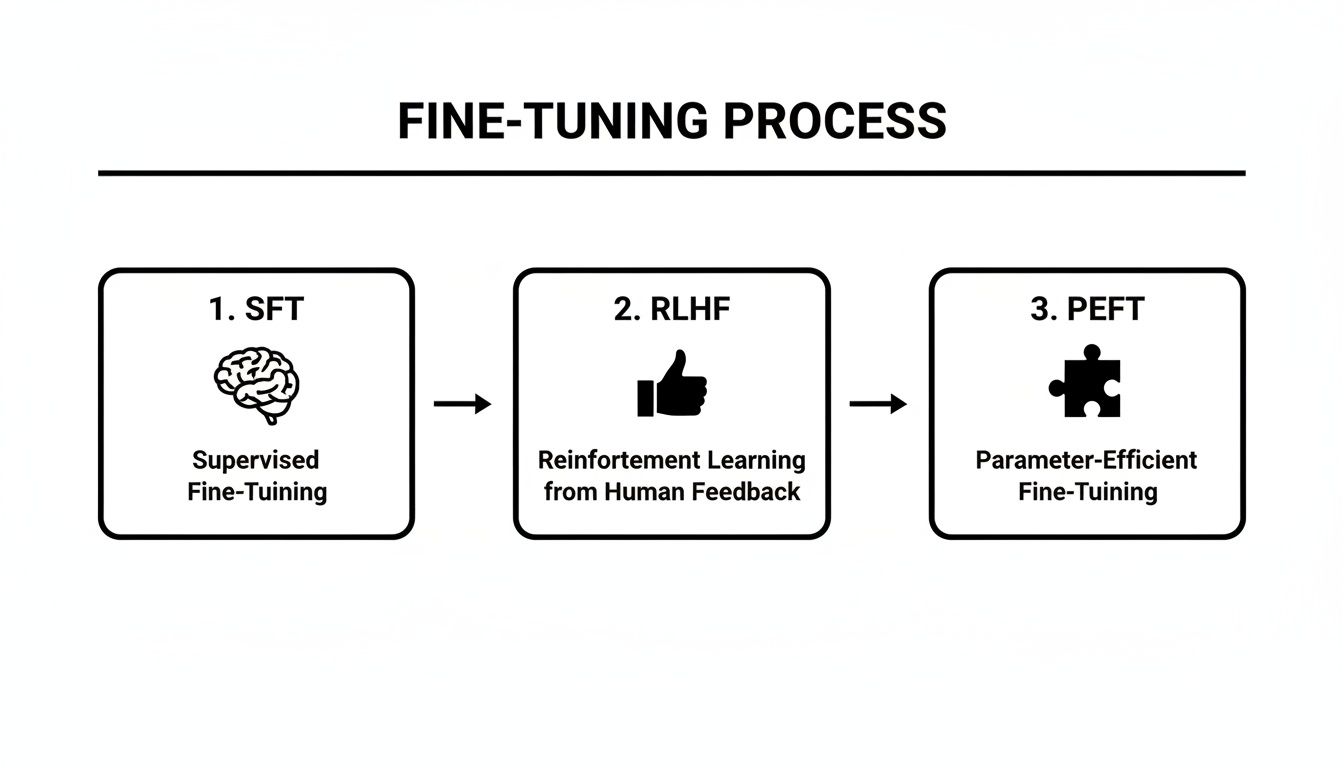
You can see how different methods solve different problems, with PEFT acting as a practical layer that makes the whole process more accessible.
Getting Your Environment Ready
First things first, you need the right tools. The Hugging Face ecosystem is the gold standard here, and for good reason. We'll be leaning on a few of their key libraries:
- Transformers: This is for loading up the base model we want to work with, like Llama 3 or Mistral.
- Datasets: Essential for loading and prepping our instruction-tuned dataset.
- TRL (Transformer Reinforcement Learning): This library gives us the
SFTTrainer, a brilliantly simple class that handles the heavy lifting of the fine-tuning process. - PEFT: This is our ticket to efficiency, making it a breeze to set up a LoRA adapter.
You can get all of them with a single pip command. Just make sure you have PyTorch installed with CUDA support so you can actually use your GPU.
pip install transformers datasets trl peft torch
That one line pulls in everything you need. It’s a testament to how much the open-source community has streamlined working with these massive models.
Loading the Model and Tokenizer
With your environment good to go, it's time to load your chosen base model. For this example, let's pretend we're using a smaller, 8-billion-parameter version of Llama 3. It's a fantastic starting point for anyone working on a single-GPU setup.
from transformers import AutoModelForCausalLM, AutoTokenizer
model_id = "meta-llama/Meta-Llama-3-8B" model = AutoModelForCausalLM.from_pretrained(model_id, device_map="auto") tokenizer = AutoTokenizer.from_pretrained(model_id)
That device_map="auto" argument is a neat trick; it intelligently loads the model onto whatever hardware you have available—in our case, that single GPU. The tokenizer is equally crucial. It’s the component that translates your human-readable text into the numbers the model actually understands.
Pro Tip: I've seen training jobs fail for the silliest reasons. A common one is the tokenizer missing a padding token. Always check, and if it's not there, set it manually like this:
tokenizer.pad_token = tokenizer.eos_token. This little fix saves a lot of headaches when you're batching texts of different lengths.
Configuring the LoRA Adapter
Now for the real magic of efficiency: setting up a LoRA adapter with the PEFT library. Instead of training all 8 billion parameters of the Llama 3 model, we're going to train a tiny, tiny fraction of them.
from peft import LoraConfig, get_peft_model
lora_config = LoraConfig( r=16, # The rank, or complexity, of the adapter matrices lora_alpha=32, # A scaling factor for the updates target_modules=["q_proj", "k_proj", "v_proj", "o_proj"], # The specific layers we're adapting lora_dropout=0.05, bias="none", task_type="CAUSAL_LM" )
model = get_peft_model(model, lora_config)
These few lines of code are doing something incredibly powerful. You're essentially freezing the massive base model and telling the system to only train these small, lightweight adapter layers. This is the core concept that makes fine-tuning on a sensible budget a reality. Knowing how to do this is fundamental if you're trying to build a Custom ChatGPT that's actually tailored to your business.
This isn't just a theoretical trick, either. It’s been battle-tested. In the NeurIPS 2023 LLM Efficiency Fine-tuning Competition, teams were able to fine-tune powerful models in under 24 hours on just a single GPU. It was a huge moment that proved you don’t need a server farm to get state-of-the-art results.
Kicking Off the Training Job
Finally, let's bring it all home with the SFTTrainer. This class is a lifesaver, automating the entire training loop—from batching data to calculating gradients and updating the weights. For a deeper dive into what happens during this phase, you might find our guide on how to train an AI chatbot helpful.
First, you need to define your training arguments. These are the crucial knobs and dials that control the learning process.
- Learning Rate: How big of a "step" the model takes during each update. If it's too high, you risk overshooting the best solution. Too low, and training will take forever.
- Batch Size: How many training examples to process in one go. A bigger batch can lead to more stable training but eats up more GPU memory.
- Epochs: How many times the model gets to see the full dataset.
import transformers from trl import SFTTrainer
trainer = SFTTrainer( model=model, train_dataset=your_dataset, # This is the dataset you prepared earlier args=transformers.TrainingArguments( per_device_train_batch_size=4, gradient_accumulation_steps=2, max_steps=100, # Or you can use num_train_epochs learning_rate=2e-4, output_dir="outputs", ), data_collator=transformers.DataCollatorForLanguageModeling(tokenizer, mlm=False), )
trainer.train()
And that’s it. Hitting trainer.train() kicks everything off. You'll see logs of the training progress, and when it’s all done, you’ll have a brand new, fine-tuned LoRA adapter sitting in your "outputs" directory, ready to go.
From Trained Model to Deployed Support Agent
Training your model is a huge accomplishment, but it's really just the beginning. The real work starts now: putting your freshly tuned LLM to the test and figuring out how to get it in front of customers safely and effectively. This final stretch is all about sharp evaluation, smart deployment, and setting yourself up for continuous improvement.
An LLM can look great on a validation dataset, but that's a controlled environment. The wild, unpredictable world of real customer questions is a completely different beast. Academic metrics like loss and perplexity are useful for the data scientists, but they don't tell you if the model is actually helpful, on-brand, or even correct. To get a true sense of its abilities, you have to shift your focus to real-world validation.
Building Your "Golden Dataset" for Evaluation
The single best way to test your support bot is with what we call a "golden dataset." This isn't just a random sample of questions; it's a hand-picked collection of your toughest, most nuanced, and most common support tickets. Think about the queries that trip up even your junior support agents—those are your prime candidates.
This dataset becomes your internal benchmark, your North Star for quality. Make sure it includes:
- Tricky edge cases: Questions about complex billing situations or obscure product bugs.
- Multi-part queries: Inquiries that force the model to pull together information from a few different places.
- Questions needing a specific tone: Scenarios where an empathetic touch or a more direct, firm response is critical.
By running your model against this gauntlet, you get a much clearer picture of its actual performance. You're not just looking for right or wrong answers; you’re judging its reasoning, tone, and problem-solving skills where it counts the most.
Human Review and A/B Testing
Let's be clear: automated metrics will only take you so far. The ultimate judges of quality are your own expert support agents and, of course, your customers.
Human-in-the-loop review is non-negotiable. Get your senior agents to score the model's responses to your golden dataset. Are the answers accurate? Are they complete? Do they sound like they came from your company? This kind of qualitative feedback is gold because it catches subtle mistakes that automated tests would fly right past.
Once you feel good about the model's performance internally, it's time for a controlled rollout with A/B testing. Start by exposing the AI agent to a small slice of your users—maybe 5% of your website traffic—and measure its performance against your current support setup. You'll want to keep a close eye on a few key metrics:
- First-contact resolution rate: Is the AI actually solving problems on the first try?
- Customer satisfaction (CSAT) scores: Are people happy with the answers they're getting?
- Ticket escalation rate: Is the AI successfully deflecting tickets that would otherwise go to your human team?
This phased approach is all about minimizing risk. It lets you collect real-world data and iron out the kinks before you go all-in, making the transition much smoother for your customers and your team.
Implementing Essential Guardrails
Deploying an LLM without guardrails is like giving a new hire the keys to your brand without a single day of training. You absolutely need strong systems in place to control for tone, safety, and factual accuracy. This is what turns a powerful technology into a reliable brand asset, not a liability. If you want to dive deeper, our guide on how to build an AI chatbot gets into the practical details.
Enterprise-grade guardrails are critical for a few key reasons:
- Topic Control: You need to keep the model on-topic. It should politely refuse to chat about politics, the weather, or anything else that isn't related to your business.
- Tone and Brand Voice: You can set rules that force the model's responses to always align with your brand's personality, whether that's buttoned-up and professional or friendly and informal.
- Preventing Misinformation: Guardrails can cross-check the model's answers against your official knowledge base. This dramatically cuts down on the risk of "hallucinations" and ensures the information it gives out is consistently accurate.
Think of these controls as your safety net. They're what make it possible to take this incredible technology and turn it into a trustworthy support tool you can confidently deploy at scale.
Fine-Tuning FAQs: Your Questions Answered
Diving into the world of fine-tuning can feel a bit overwhelming at first. It's natural to have questions. Here are some straightforward answers to the things we get asked most often by teams building their first custom LLM.
How Much Data Do I Really Need?
Probably a lot less than you'd guess. For the vast majority of customer support tasks, a high-quality, hand-picked dataset of just 500 to 2,000 examples is enough to see a huge jump in performance.
The secret isn't volume; it's quality. A smaller set of clean, diverse, and well-structured examples will always beat a giant, messy data dump.
Which Base Model Is Best for a Support Agent?
You've got great options right out of the gate with open-source models like Llama 3, Mistral, and Gemma. They're all fantastic starting points.
Honestly, the "best" one really depends on your specific needs. Think about the complexity of your support issues, the context window you require, and of course, your budget for compute power. My advice? Start with a smaller, proven model. You can always scale up to a larger one if your testing shows you need more firepower.
The biggest mistake we see teams make is feeding their model low-quality or poorly formatted data. It's the classic "garbage in, garbage out" problem. Spending that extra time up front to clean, curate, and structure your support conversations into clear instruction-response pairs will have the single biggest impact on your model's final performance.
Can I Fine-Tune a Model to Refuse Off-Topic Questions?
Yes, and you absolutely should. This is a critical step for building a support bot that stays on-brand and doesn't get distracted.
When you're preparing your data, make sure to mix in examples where the user's question is totally irrelevant (like, "What's the weather like?"). The correct response should be a polite refusal ("I'm sorry, I can only help with questions about our products and services."). This teaches the model its boundaries and is a fundamental part of building effective guardrails.
What’s the Difference Between Full Fine-Tuning and PEFT?
Getting this right is key to managing your project's costs and resources.
- Full Fine-Tuning: This is the heavyweight approach. It updates every single one of the model's billions of parameters. It’s incredibly powerful but also incredibly expensive, demanding a ton of GPU power and memory.
- Parameter-Efficient Fine-Tuning (PEFT): This is the smarter, more modern method. You freeze the massive original model and just train a small number of new, lightweight parameters on top. Techniques like LoRA can cut the number of trainable parameters by up to 99%, making it possible to fine-tune on a single GPU.
For nearly every support automation project out there, PEFT is the way to go. It gives you all the custom performance you need without the eye-watering cost. If you're interested in the underlying tech that makes this possible, getting a good grasp of Large Language Models (LLMs) is a great place to start. It helps put these different training strategies into perspective.
Ready to deploy a specialized support agent without the steep learning curve? With SupportGPT, you can build, train, and manage a custom AI assistant that knows your business inside and out. Our platform simplifies the entire process, from data preparation to deployment, with enterprise-grade guardrails included. Start your free trial and launch a smarter support agent in minutes.