How to Build AI Chatbot: A Practical Guide on how to build ai chatbot
A practical guide on how to build ai chatbot: plan your strategy, train your model, design conversations, and deploy a bot users love.
Building an AI chatbot isn't some far-off, futuristic idea anymore. It's a very real, very achievable way for businesses to give customers instant, 24/7 support and seriously bump up engagement. The whole process boils down to a few key stages: figuring out what you want the bot to do, picking the right tech stack, feeding it the right information, and designing conversations that are actually helpful. This guide will walk you through the practical steps to build a chatbot that delivers real, measurable results.
Why Building an AI Chatbot Is a Game Changer
Knowing how to build an AI chatbot has quickly shifted from a "cool experiment" to a must-have for a lot of businesses. The reason is pretty straightforward: customers today expect instant, correct answers, no matter the time of day. Trying to meet that demand with only human agents is not just expensive, it's often impossible. You end up with long wait times and unhappy customers.
An AI chatbot tackles this problem head-on. Think of it as your tireless, front-line support that never sleeps. It can instantly field a massive volume of common questions—everything from "Where's my package?" to "How do I reset my password?" This frees up your human agents to handle the tricky, high-stakes issues that genuinely need a human touch. The payoff here is huge and immediate.
The Immediate Business Impact
When you decide to build an AI chatbot, the benefits start showing up all over the business. It’s not just about saving money; it’s about building a smarter, faster, and more scalable customer service operation.
Here are the core advantages you'll see:
- 24/7 Availability: Your digital doors never close. A chatbot offers constant support, helping customers and catching leads long after your team has gone home.
- Instantaneous Responses: Let's be honest, nobody likes to wait. Making customers sit in a queue is a surefire way to lose them. AI chatbots kill the queue and deliver answers in seconds.
- Scalability on Demand: Whether you’re dealing with a dozen customer questions or thousands during a holiday rush, a chatbot handles the load without breaking a sweat.
- Improved Agent Productivity: By automating the boring, repetitive stuff, you let your support team focus on being expert problem-solvers. This boosts their job satisfaction and makes your whole team more effective. For a deeper dive, check out our guide on the many benefits of AI in customer service.
The global AI chatbot market has absolutely exploded, hitting $7.76 billion in 2024. This isn't just a trend; it’s a fundamental shift. Projections show the market rocketing to $27.30 billion by 2030 as more companies realize they can't afford to be left behind.
If you want to see what this looks like in the real world, just look at Klarna's AI Chatbot implementation. Their bot now handles two-thirds of all their customer service chats and is on track to add a staggering $40 million to their bottom line. This guide will give you the blueprint to start building your own version of that success.
Laying the Groundwork: Your Chatbot's Strategy and Foundation
Before you even think about code or platforms, let’s talk strategy. Building an AI chatbot without a clear plan is like trying to build a house without a blueprint—you’ll end up with something, but it probably won’t be what you or your customers need.
The first, and most critical, step is to nail down your chatbot's primary job. What’s its core reason for being? Without a laser-focused goal, your bot will be a jack of all trades and master of none, and you'll have no real way to measure its success. Give it one main job to do, and make sure it does it exceptionally well.
What Is Your Chatbot’s Core Purpose?
Are you aiming to automate answers to the same repetitive questions and cut down your support ticket volume? Or is your goal to qualify leads by asking a few smart questions before booking a demo for your sales team? Maybe you're in e-commerce and need a friendly assistant to help customers track orders and handle returns.
Each of these goals demands a completely different approach. A support bot needs to be empathetic, accurate, and reliable. A sales bot, on the other hand, should be a bit more persuasive and proactive.
- Support Automation: Instantly resolve common issues like password resets or "how-to" questions, freeing up your human agents for more complex problems.
- Lead Generation: Engage website visitors, capture their details, and seamlessly schedule meetings or demos.
- E-commerce Assistance: Help shoppers with order status, return policies, and even product recommendations, making their experience smoother.
This whole process follows a logical path: from the initial idea, through the build, and all the way to a successful launch.
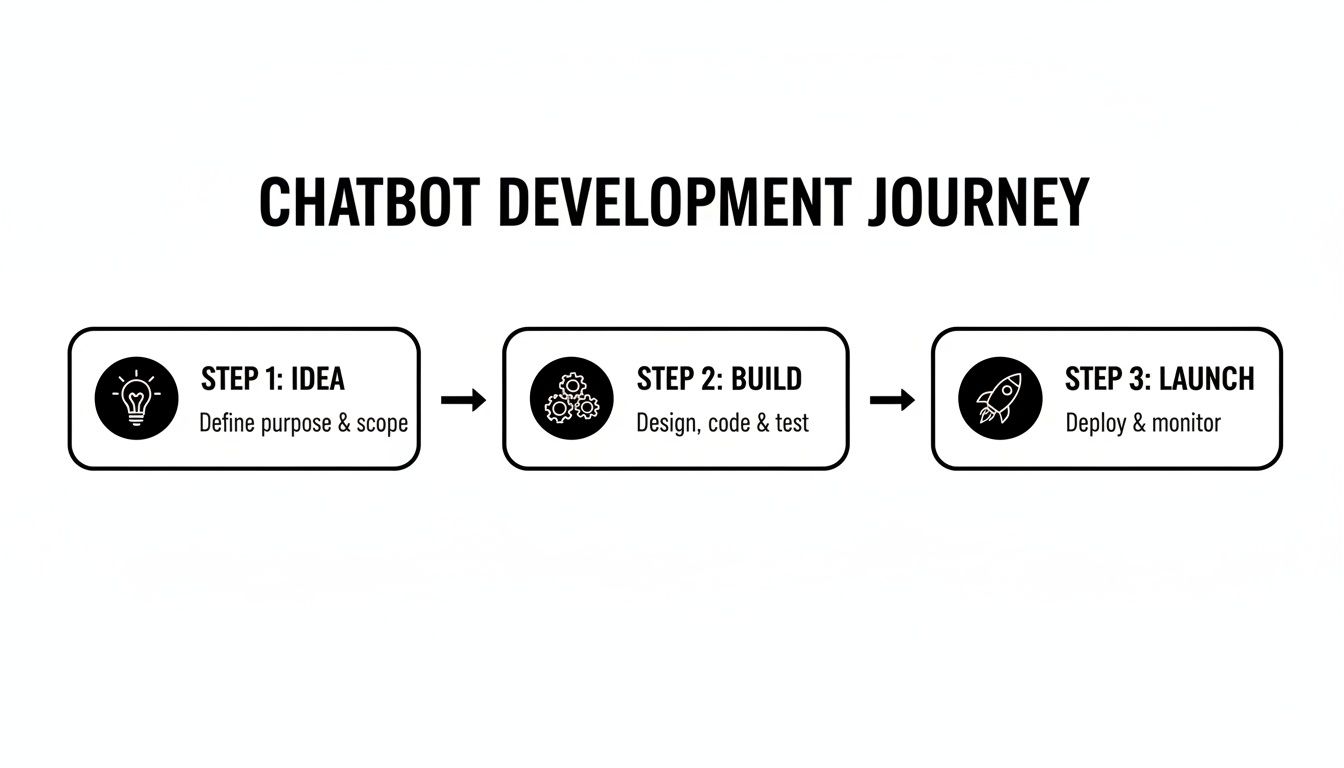
As you can see, the 'Idea' phase isn't just a formality. It's just as vital as the technical 'Build' and 'Launch' stages that follow. Getting this right sets you up for success.
Choosing Your Foundational Language Model
Once your strategy is locked in, the next big decision is picking the right Large Language Model (LLM). This is the engine that powers your chatbot's brain—its ability to understand what people are asking and generate helpful responses. The big three you'll likely be considering are OpenAI's GPT series, Google's Gemini, and Anthropic's Claude.
Each model brings something different to the table. GPT-4 is often the go-to for its impressive reasoning and creativity, which is great for bots that need to handle complex, nuanced conversations. Gemini really shines when it comes to integrating with the Google ecosystem and handling different types of input, like images and text. Claude, meanwhile, has built a reputation for its strong focus on safety and its incredible ability to process huge amounts of text at once.
Your choice of LLM isn't just a technical detail; it's a strategic decision that impacts cost, performance, and future scalability. The right model aligns with your chatbot's specific job.
The AI landscape is also changing fast. We're seeing a major competitive shift, where ChatGPT's early dominance is giving way to strong alternatives. As of early 2024, ChatGPT's market share has adjusted to between 60.7% and 80.49%, a noticeable dip from 87.2% just a year prior. At the same time, Google Gemini has quickly become a serious contender, capturing 18.2% of the market. This competition is great for builders like us, but it also means you need to choose your tech stack wisely.
To help you sort through the options, here's a quick rundown of the leading models.
Choosing Your Foundational LLM: A Quick Comparison
This table compares the leading LLMs to help you decide which model is the best fit for your AI chatbot's specific needs.
| LLM (Model Family) | Best For | Key Strength | Potential Consideration |
|---|---|---|---|
| OpenAI GPT-4 | Complex reasoning, creative tasks, and nuanced conversation | Top-tier performance in general problem-solving and generating human-like text. | Can be more expensive than other models for certain use cases. |
| Google Gemini | Multimodal tasks (text, images, code) and Google ecosystem integration | Excellent at processing and understanding varied data inputs. | Performance can vary, and its conversational tone may need more tuning. |
| Anthropic Claude 3 | Handling large documents, enterprise safety, and detailed analysis | Massive context window (up to 200K tokens) and a strong focus on "constitutional AI" for safety. | May be less "creative" than GPT-4 for certain imaginative tasks. |
Ultimately, the best model is the one that fits your specific needs. If you're using a chatbot-building platform, much of this complexity is handled for you. For a deeper dive, you might find it helpful to check out our breakdown of the leading AI agent platforms and see how they integrate these different models.
The goal is to find the sweet spot between three key factors: performance (how well it does its job), speed (how fast it responds), and cost (what you pay per conversation). Starting with a clear strategy makes this decision much easier, ensuring you build on a foundation that truly supports your business from day one.
Training Your Bot and Designing Conversations
An AI chatbot is only as good as the information it has access to. Once you've got your strategy locked in and your LLM picked out, it's time for the real work to begin: feeding your bot its knowledge and scripting its personality. This is where you build its "brain."
The whole process kicks off with gathering the raw materials—all the documents and data that hold the answers to your customers' questions. Think of it like curating a library for your new digital employee. You’ll want to pull from a few different places to make sure it's well-rounded.

Gathering Your Knowledge Sources
The name of the game is feeding your AI structured, accurate, and current information. If your knowledge base is a mess, your chatbot's answers will be too. Start by pinpointing your most reliable sources of truth.
Most teams find their best content comes from:
- Help Center Articles: These are usually the perfect starting point since they're already written to solve specific customer problems.
- Product Documentation: For deep, factual information on how your product works, nothing beats technical manuals and guides.
- FAQs: A good FAQ page is a goldmine of common questions and pre-approved answers.
- Past Support Tickets: Digging into resolved conversations shows you what customers actually ask and the words they use to ask it.
As you pull all this together, remember that quality beats quantity every time. A dozen clear, concise documents will serve you far better than thousands of pages of conflicting or outdated info. Your bot is a direct reflection of the data you give it.
Crafting the Base Prompt and Persona
With a solid knowledge base in hand, the next move is to give your chatbot its core instructions. This is done through a base prompt, which is basically a set of directives that defines its personality, its rules, and what it can and can't do. This is one of the most critical steps in building an AI chatbot because it steers every single response.
Your base prompt should clearly outline:
- Persona and Tone: Is it a buttoned-up professional or a friendly, casual helper? A SaaS bot might be "a knowledgeable product expert," while an e-commerce bot could be "an upbeat shopping assistant."
- Core Objective: Tell it its primary goal. Something like, "Your main job is to answer questions about our return policy using only the documents provided."
- Key Rules: Set firm boundaries. A non-negotiable rule is to instruct the bot not to answer if the information isn't in its knowledge base. This stops it from making things up (a problem known as "hallucination").
A well-crafted base prompt is like the chatbot's constitution. It's the ultimate source of truth that guides its behavior, ensuring it stays on-brand, on-topic, and most importantly, accurate.
Designing Intuitive Conversation Flows
Finally, you need to think about the conversations themselves. While a great AI chatbot can handle open-ended questions, it's smart to map out the most common user journeys to guarantee a smooth experience. What are the top 3-5 things people will try to do? Design a logical path for each.
Let's look at a couple of real-world scenarios.
Scenario 1: An E-commerce Returns Bot
- User Goal: Start a return.
- Ideal Flow:
- The bot immediately asks for the order number and email to verify the customer.
- It pulls up recent orders and asks which item needs to be returned.
- It then shows a few common return reasons (e.g., "wrong size," "damaged item") for the user to select.
- Finally, it confirms the return and generates a shipping label and clear instructions.
Scenario 2: A SaaS Onboarding Assistant
- User Goal: Set up a key feature.
- Ideal Flow:
- The bot greets the new user and asks what they're trying to accomplish.
- When the user says, "How do I set up integrations?" the bot provides a direct link to the guide.
- It follows up with a quick, step-by-step summary right in the chat window.
- It finishes by asking, "Did that help you get started?" to make sure the problem is solved.
By anticipating these common paths, you build interactions that feel efficient and natural. For a deeper dive into this part of the process, you might find our guide on how to train an AI chatbot for peak performance helpful. The secret is blending a rich knowledge base with thoughtful conversation design to build a truly useful assistant.
Implementing Guardrails and Human Handoffs
Building a powerful chatbot is one thing, but making it safe and reliable is what separates a great tool from a frustrating gimmick. Without clear boundaries, even the most sophisticated AI can go off the rails. It might offer bizarre advice, adopt a weird tone, or get stuck in a frustrating loop with a customer. This is where guardrails and a smart human handoff process become your most important safety net.
An unconstrained bot is a liability. Your first and most important rule is to lock its knowledge down to the documents you've provided. This is how you stop it from "hallucinating" or just plain making up answers when it can't find one in its source material. This isn’t a suggestion; it’s a non-negotiable instruction you need to bake into its core programming.
Think of it like training a new support agent. You’d never want them guessing about product features; you'd insist they stick to the official training manual. The exact same principle applies here.
Defining Your Chatbot's Boundaries
To get consistent, high-quality performance, you have to be explicit about what your chatbot should and should not do. This means setting up firm rules that control its behavior, ensuring every single interaction aligns with your brand and business goals. A good set of guardrails will manage its tone, the topics it discusses, and, most importantly, its accuracy.
Here are the foundational rules I always start with:
- Topic Restriction: The bot needs to know its lane. Instruct it to politely decline any questions that fall outside its designated purpose. If it's a support bot for your SaaS product, it has no business giving out medical advice or discussing politics. A simple, "I can only help with questions about [Your Product], how can I assist with that?" works wonders.
- Tone Policing: Define its personality right in the base prompt and stick to it. For example, "Always maintain a friendly, professional, and helpful tone. Never use slang or overly casual language." This keeps your brand voice consistent.
- Knowledge Grounding: This is the big one. Your prompt must include a firm directive like, "Only answer questions using the information found in the provided documents. If the answer is not in the documents, state that you do not have the information and offer to connect the user with a human agent."
A chatbot that confidently says, "I don't know, but I can find someone who does," is infinitely more trustworthy than one that confidently gives the wrong answer. This single feature is the bedrock of a positive user experience.
By implementing these simple but powerful constraints, you create a safety net that protects both your customers and your brand. It ensures the chatbot remains a helpful assistant rather than a source of frustration or bad information.
Engineering a Seamless Human Handoff
No matter how smart your AI is, it will eventually hit a wall. This isn't a failure; it's an opportunity to provide excellent service by seamlessly escalating the conversation to a human expert. A well-designed handoff is absolutely crucial for building customer trust.
The key is to define clear triggers for when this escalation should happen. You don't want users screaming "AGENT!" into the chat window out of sheer frustration. The bot should proactively recognize when it's time to pass the baton.
Consider these common escalation triggers:
- Knowledge Gaps: The bot gets asked the same question multiple times in different ways and still comes up empty.
- User Frustration: You can train the AI to detect negative sentiment. Phrases like "this isn't working," "I'm getting angry," or "useless" should be an immediate trigger for a handoff.
- Complex Issues: For anything involving billing, account security, or sensitive personal data, you should always route the user directly to a human. Don't let the bot touch it.
- High-Intent Keywords: If a user mentions terms like "pricing," "demo," "quote," or "competitor," this is a high-value sales lead. Route them directly to your sales team to capitalize on the opportunity.
The handoff itself must feel effortless. The bot should tell the user what’s happening ("It looks like I can't solve this. I'm connecting you with a support specialist now.") and, critically, provide the human agent with the full chat transcript. This way, the customer doesn't have to repeat themselves—turning a moment of potential friction into a surprisingly positive experience.
Deployment Analytics and Continuous Improvement
Getting your AI chatbot live isn’t the finish line—it’s the starting gun. The real work, and the real value, begins the moment it starts talking to actual users. This is where you shift from building to learning, turning a decent bot into an essential part of your team.

The initial launch can be surprisingly simple. Most modern platforms, like SupportGPT, give you a small snippet of code. Just paste it into your website’s HTML, and you're up and running. For a more custom feel, you can use an API to weave the bot directly into your mobile app or internal dashboards.
However you deploy it, your job immediately changes. You’re no longer the builder; you're the listener. The data your chatbot collects is a goldmine, packed with raw, unfiltered insights into what your customers actually want.
Identifying the Metrics That Matter
If you can't measure it, you can't improve it. But you don't want to get lost in a sea of vanity metrics that look impressive but tell you nothing. Your goal is to focus on a handful of key performance indicators (KPIs) that tie directly back to your business goals.
Here’s where I recommend you start:
- Resolution Rate: What percentage of chats does the bot handle successfully without a human stepping in? This is your north star metric for bot effectiveness.
- Escalation Rate: On the flip side, how often does the bot have to tap out and pass the conversation to a human? A high rate here is a smoke signal for knowledge gaps or clunky conversation flows.
- User Satisfaction (CSAT) Score: A simple "Did this help?" at the end of a chat is incredibly powerful. Low scores are your most urgent alerts that something is broken.
- Most Frequent Topics: What are people constantly asking about? This tells you exactly where to focus your efforts, whether it’s improving a help doc or creating a new one.
Focusing on these core metrics strips the guesswork out of managing your chatbot. It gives you a clear, data-backed picture of what's working, what's failing, and where a little effort will make the biggest difference.
Imagine your resolution rate suddenly plummets right after a new product launch. That’s not a mystery; it’s a clear signal that your bot is starved for information about the new features. Time to update the knowledge base.
The Feedback Loop for Continuous Improvement
Your chatbot's conversation logs are the most valuable resource you have for making it better. Seriously. Carve out time to regularly review these chats, especially the ones that got escalated or earned a thumbs-down. This is where the real learning happens.
This continuous improvement loop breaks down into a few simple, repeatable actions:
- Analyze Failed Conversations: Dig into the chats where the bot stumbled. Did it completely misunderstand the user's intent? Was the information just not in its knowledge base? Or did it get stuck repeating itself?
- Identify Knowledge Gaps: Start categorizing the questions the bot couldn’t answer. If you see ten different people asking about a specific billing issue the bot knows nothing about, you’ve just found your highest-priority content gap.
- Refine Prompts and Guardrails: The logs might show you patterns you didn't expect. Maybe the bot is way too wordy. You can jump into the base prompt and add a simple instruction like, "Keep your answers concise and under 100 words."
- Update Source Data: The most reliable way to fix a bad answer is to go to the source. Correct the help article or FAQ the bot is pulling from. This ensures the fix is permanent and consistent for every future query.
Make this review a ritual—something you do every week or two. By building this rhythm, you create a powerful engine for improvement. With each cycle, your bot gets a little smarter, a bit more accurate, and a lot more helpful, driving up that resolution rate and proving its value to both your customers and your bottom line.
Got Questions About Building an AI Chatbot? We've Got Answers.
Jumping into an AI chatbot project always brings up a bunch of practical questions. As you shift from a cool idea to actually building the thing, you're going to wonder about the real-world costs, performance, and what these bots can actually do. Let's tackle some of the most common questions teams have right before they get started.
How Much Does It Cost to Build an AI Chatbot?
This is the big one, and the honest answer is: it depends. The price tag for a chatbot can swing wildly based on how you decide to build it. There’s no single cost, but more of a spectrum.
For most businesses, especially if you're a small or medium-sized company, jumping on a no-code platform is the smartest, most budget-friendly move. You can often get started with a free plan or a subscription that runs somewhere between $20 and $100 a month. The real value here is that everything is bundled—the user interface, hosting, analytics, and access to top-tier LLMs are all included.
Need something a bit more custom? The next level up is hiring a freelance developer or a specialized agency. A bespoke chatbot built this way could run you anywhere from $3,000 to over $20,000. The final price depends on how complex the features are, how many other systems it needs to talk to, and the level of design work involved.
Then there’s the all-in approach: building a chatbot from scratch with your own dev team. This is a serious investment. You’re looking at initial development costs that often start at $50,000 and can easily sail past $100,000. And that’s just to get it built. Don't forget the ongoing costs for servers, API fees to LLM providers like OpenAI, and the salaries for the team keeping it all running.
How Do I Make Sure My AI Chatbot Gives Accurate Answers?
This is probably the most important part of the whole project. Getting this wrong doesn't just make for a bad user experience; it actively destroys the trust you've built with your customers. A truly accurate bot relies on a few key layers of control.
It all starts with your knowledge base. Think of it this way: your chatbot is only as smart as the information you give it. If you feed it garbage, it will give garbage answers. You absolutely have to provide clean, current, and factual information. A well-organized, curated set of documents is the bedrock of an accurate bot.
Next, you need to lay down the law in the bot's core prompt. This is where you give it "grounding" instructions. You have to be explicit, telling the AI to only answer questions based on the documents you've provided. The most crucial instruction? Tell it to say, "I don't know," or something similar if it can't find the answer in its knowledge base. This is your best defense against "hallucinations," where the AI just makes stuff up.
A well-designed chatbot knows when to be honest. It's far better for it to admit it doesn't have an answer and offer a human handoff than to confidently spit out wrong information.
Finally, you can't just set it and forget it. You need a process for ongoing review. Regularly check the conversation logs to see where the bot is getting things wrong or struggling. Every mistake is a learning opportunity. You can either update your source documents with the right info or tweak the bot's instructions to handle that kind of question better next time.
Can an AI Chatbot Handle Multiple Languages?
Absolutely. In fact, this is one of the biggest strengths of modern AI chatbots. The powerful Large Language Models (LLMs) behind them—think GPT-4, Gemini, and Claude—are incredible at handling different languages right out of the box.
Often, these models can automatically figure out what language a user is typing in and just respond in kind, no special setup required. So, if a customer asks a question in French, the bot can answer in French, even if all your help articles are in English.
For the most consistent and polished experience, though, you can define its language skills directly in the base prompt. You could add an instruction like, "You are a friendly assistant who is fluent in English, Spanish, and German." This gives the AI clear marching orders. While the bot is great at translating on the fly, the gold standard is to provide key knowledge base documents in the languages you want to support. This ensures the highest accuracy, especially for complex or technical topics.
What’s the Difference Between a Rule-Based Chatbot and an AI Chatbot?
Knowing the difference here is key, as it determines what kind of experience you're actually building for your customers.
A rule-based chatbot is like a phone tree (IVR) for a website. It works off a very rigid, pre-programmed script. It follows a strict decision tree with if/then logic and can only understand specific keywords or commands. If a user phrases a question in a way it hasn't been programmed for, it's stuck. It has no real understanding of context.
An AI chatbot, on the other hand, is powered by a Large Language Model. This gives it the ability to understand natural, human language—including context, intent, and even when a user goes off on a tangent. You don't have to program it for every single question imaginable. It can generate relevant, human-like answers based on the knowledge it's been given, making it infinitely more flexible and useful for real-world customer support.
Ready to build a smart, reliable AI assistant for your business without the complexity? SupportGPT provides a complete platform to create and deploy powerful AI chatbots in minutes. With enterprise-grade guardrails, seamless human handoffs, and support for the best LLMs, you can deliver instant, accurate support 24/7. Start for free on supportgpt.app.