How to Train AI Chatbot: how to train ai chatbot for flawless customer support
Discover how to train ai chatbot to deliver reliable customer support. Learn data prep, training tactics, prompt design, and ongoing improvement.
Before you touch a single line of code or upload a single document, the most important part of training an AI chatbot happens on a whiteboard. A truly effective bot isn’t a technical marvel—it’s a business tool, precision-engineered to solve a specific, measurable problem. If you skip this strategic planning, even the most sophisticated AI will fall flat.
Learning how to train an AI chatbot really starts with one fundamental question: What is its mission?
A fuzzy goal like "improve customer support" is a surefire way to get a mediocre result. You have to get specific. A laser-focused mission statement brings clarity to the entire project and keeps you from getting bogged down by scope creep later.

Defining a Clear and Measurable Mission
Your chatbot's purpose should be so obvious that anyone on your team can explain it in a sentence. Think about tangible outcomes. Are you trying to deflect 30% of repetitive "Where is my order?" tickets? Or maybe the goal is to qualify new leads by asking three key questions before handing them off to a sales rep.
Here are a few examples of strong, focused missions:
- For an e-commerce store: "Our chatbot will instantly answer the top five most common shipping and return policy questions, aiming to reduce ticket volume in these categories by 40% within three months."
- For a SaaS product: "The bot will guide new users through the initial setup process, targeting a 15% increase in successful onboarding completions during the first week of trial."
A chatbot without a clear mission is like a ship without a rudder. It might be moving, but it's not heading toward any valuable destination. This foundational step ensures every decision you make—from data collection to prompt design—serves a distinct business goal.
Mapping the Customer Journey for Maximum Impact
With a mission in hand, the next step is to figure out exactly where the bot can make the biggest difference. Sketch out your typical customer journey, from the moment they discover your brand to when they need support after a purchase. Look for the hang-ups, the friction points, and the common questions that pop up at each stage.
This simple exercise is all about prioritization. Instead of building a bot that tries to do everything (and likely does it all poorly), you can zero in on the areas with the highest potential return. You might discover that most customer frustration happens during checkout when questions about payment options pop up. Boom—that’s your chatbot's first priority.
Thinking through these questions upfront will save you countless hours and resources. The table below breaks down the key strategic decisions to make before you dive into the technical side of training.
Key Decisions Before You Begin Training Your Chatbot
| Strategic Area | Key Question to Answer | Example for an E-commerce Store | Example for a SaaS Product |
|---|---|---|---|
| Primary Goal | What single, measurable business problem will the bot solve? | Reduce return policy ticket volume by 40%. | Increase user onboarding completion rate by 15%. |
| Target Audience | Who is the primary user of this chatbot? | First-time buyers and existing customers with order questions. | New trial users in their first 7 days of using the product. |
| Scope of Work | What will the bot do? And just as importantly, what will it not do? | It will handle shipping, returns, and order status. It will not handle complex technical support or complaints. | It will guide users through setup wizards. It will not troubleshoot advanced integration issues. |
| Success Metrics | How will we know if the chatbot is successful? | Ticket deflection rate, customer satisfaction (CSAT) score on bot interactions. | Onboarding completion percentage, time-to-first-value for new users. |
Finalizing these points ensures your entire team is aligned and that the chatbot you build is a strategic asset, not just a technical experiment.
The demand for genuinely helpful AI is exploding. The global chatbot market is projected to grow from $7.76 billion in 2024 to $15.5 billion by 2028. Much of this growth comes from customer support, where well-trained bots can drive a 20% productivity boost by slashing response times and minimizing errors.
This strategic groundwork is non-negotiable. If you need help bringing your vision to life, exploring professional chatbot development services can provide the deep expertise required for a successful launch. Taking the time to properly define your bot's purpose and scope is the single most important factor in its success.
Sourcing and Preparing High-Quality Training Data
An AI chatbot is only as smart as the data it’s trained on. It’s that simple. Think of it like this: you're creating the bot's entire library of knowledge from scratch. The old adage "garbage in, garbage out" has never been more true. The good news is, your company is probably sitting on a goldmine of this stuff already—it just needs a little refining.
The best places to look are where your team is already talking to customers. Dig into your historical support tickets, pull up those live chat transcripts, and scour your help center articles. These aren't just files; they're direct records of real people asking real questions in their own words, with solutions provided by your best agents.
Identifying Your Golden Datasets
Before you start cleaning anything, you have to know what you’re looking for. Don't make the rookie mistake of just dumping every document you can find into a single folder. Be selective. Go back to the goals you defined for your bot and pick sources that directly support that mission.
You’ll want to zero in on materials that are:
- Accurate and Up-to-Date: This is non-negotiable. The information has to reflect your current products, policies, and pricing.
- Customer-Focused: Look for conversations that use the language your customers actually use, not internal jargon.
- Comprehensive: Gather enough examples to cover your most common questions from a few different angles.
- Structured: Content with a clear question-and-answer format, like FAQs or neatly resolved support tickets, is pure gold.
From my own experience building bots, I can tell you that a small, pristine dataset of 50-100 high-quality interactions is far more powerful than thousands of messy, outdated, or irrelevant records. Quality beats quantity, every single time.
The Art of Data Cleaning and Structuring
Once you’ve gathered the raw materials, the real work begins. Data cleaning isn't glamorous, but it's the most critical step. It’s a hands-on process of filtering out all the noise to create a clean, reliable source of truth. This is what stops your chatbot from giving confusing or just plain wrong answers.
Imagine you're sifting through support tickets from last year and find a conversation about your "Holiday 2023 Return Policy." That information isn't just irrelevant now; it's actively harmful if the bot learns it. Your job is to be the bouncer—spotting that outdated info and kicking it out.
Here’s a practical checklist to guide your cleaning process:
- Remove Outdated Information: Purge any mention of old pricing, discontinued products, or expired promotions. Be ruthless.
- Standardize Terminology: Does your team call it the "Pro Plan" in one ticket and the "Professional Tier" in another? Pick one and make it consistent across all your documents.
- Eliminate Personal Data: Scour everything for personally identifiable information (PII)—names, emails, phone numbers, you name it. Anonymize it all to protect your customers' privacy.
- Filter Irrelevant Conversations: Get rid of the chit-chat, internal team notes, and conversations that went way off-topic. You want to isolate the core problem and its solution.
The entire point of data preparation is to build a "golden dataset." This becomes the single, pristine source of truth that forms the core of your chatbot’s knowledge.
Transforming Raw Data into Usable Formats
After all that cleaning, the last step is to structure your data into a format the AI can actually digest. For this, two formats work exceptionally well: simple question-and-answer pairs and broader thematic documents.
For instance, you might find a chat transcript that’s a bit messy:
User: "Hey, my login isn't working." Agent: "Hi there! Let me help. Have you tried clearing your cache?" User: "Yeah I did that, still nothing." Agent: "Okay, can you try the 'Forgot Password' link on the sign-in page?" User: "Oh, that worked! Thanks!"
You'd distill that down into a clean, direct Q&A pair:
- Question: "What should I do if my login isn't working after clearing my cache?"
- Answer: "If clearing your cache doesn't resolve the login issue, please use the 'Forgot Password' link on the sign-in page to reset your password. This should restore your access."
This kind of structured data makes the learning process incredibly efficient. By putting in the effort to source, clean, and prepare your data upfront, you’re laying the foundation for a chatbot that customers will actually trust and find useful.
2. Decide on Your Training Strategy: Fine-Tuning vs. RAG
Alright, you've got your clean, high-quality data ready to go. Now comes the big decision: how are you actually going to teach your AI chatbot? This is a critical fork in the road, as your choice will dictate the bot's behavior, how you'll maintain it, and what it's going to cost.
The two main players on the field are fine-tuning and Retrieval-Augmented Generation (RAG).
Think of it this way. Fine-tuning is like apprenticing a new hire. You invest a ton of time teaching them your company's specific way of talking, thinking, and problem-solving until it becomes second nature. RAG, on the other hand, is like giving that same new hire a perfectly indexed, searchable intranet and teaching them how to find any answer in seconds. Both are effective, but for very different reasons.
What Is Fine-Tuning?
Fine-tuning takes a powerful, pre-trained Large Language Model (LLM) and retrains it using your company-specific data. This process actually changes the model's internal wiring, baking your knowledge, tone, and conversational patterns directly into its core. Specialized LLM training is a deep field, but the outcome is a model that intrinsically understands your world.
So, when would you do this? It's perfect when you need the bot to embody a very distinct persona or adhere to strict communication guidelines. Imagine a wealth management firm. They might fine-tune a model on thousands of compliance documents and approved client emails. The goal isn't just to get the facts right—it's to communicate those facts with the precise, cautious, and legally-sound language the firm requires, every single time.
The bottom line on fine-tuning: It's incredibly powerful for embedding a unique voice and deep, nuanced knowledge. But be warned: it's computationally expensive, demands a massive amount of well-structured training data, and is a real headache to update.
What Is Retrieval-Augmented Generation (RAG)?
RAG takes a completely different approach. Instead of changing the core AI model, you simply connect it to your external knowledge base—that "golden dataset" of help docs, product manuals, and FAQs you just prepared.
Here’s how it works:
- A user asks a question.
- The RAG system first retrieves the most relevant snippets of information from your knowledge base.
- It then feeds that context to the LLM along with the original question, asking it to generate an answer based only on the information provided.
This "just-in-time" learning is a game-changer for businesses with information that evolves. Think of an e-commerce brand dealing with ever-changing stock levels, seasonal promotions, or new return policies. It’s far, far easier to update a help article than it is to retrain an entire LLM from scratch.
This initial data-wrangling phase is the foundation for either strategy.
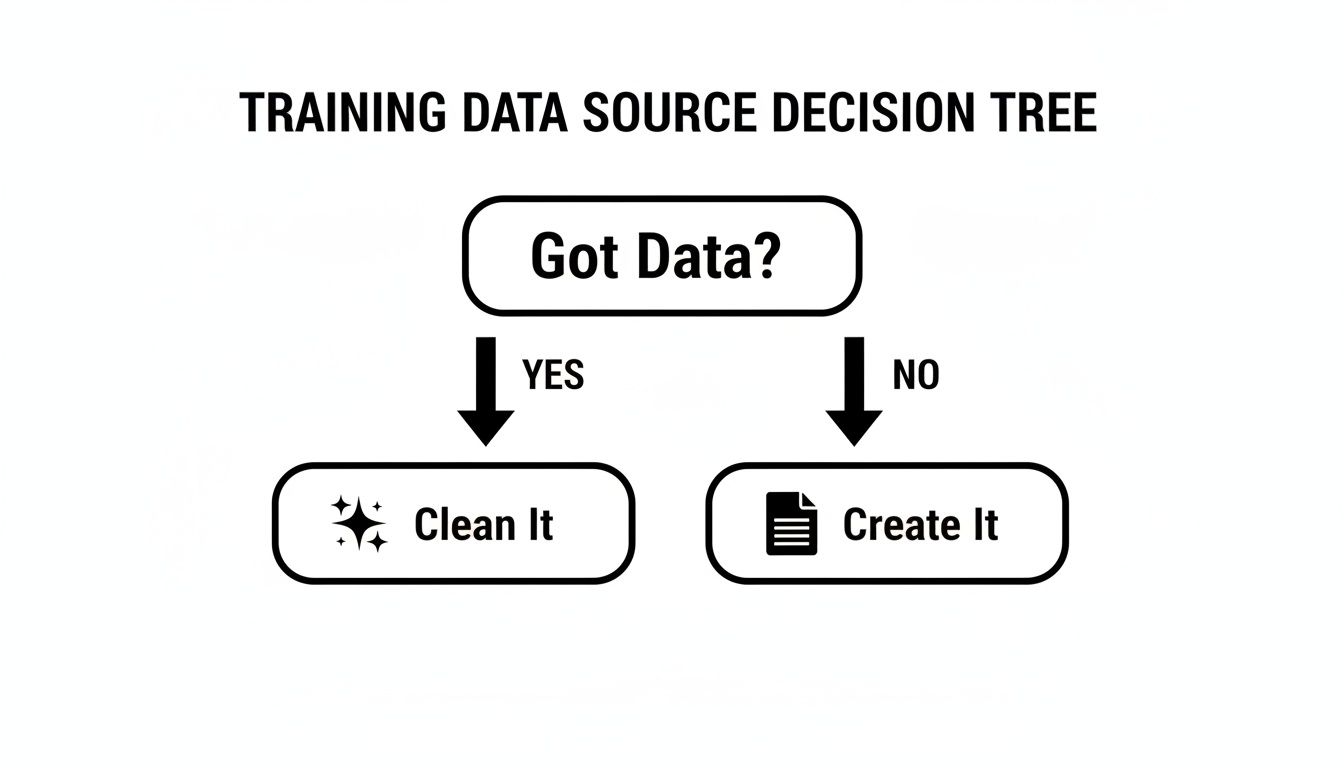
As the chart shows, whether you start with existing data or have to create it from scratch, the universal next step is cleaning and structuring it to fuel the training method you choose.
Fine-Tuning vs RAG Which Training Method Is Right for You
So, which path should you take? The best choice really hinges on your goals, budget, and the technical muscle you have on your team.
For most product and support teams, RAG is the clear winner. It’s more practical, affordable, and far easier to scale. Modern platforms like https://supportgpt.app are built around the RAG model, letting non-technical users connect their existing knowledge sources and launch a smart, accurate chatbot without needing a data science degree.
This table breaks down the key differences to help you decide.
| Factor | Fine-Tuning | Retrieval-Augmented Generation (RAG) |
|---|---|---|
| Primary Use Case | Teaching a specific personality, style, or complex behavior that isn't just about facts. | Answering questions using a specific, up-to-date knowledge base. |
| Data Requirements | Huge, meticulously labeled datasets of conversational pairs (e.g., thousands of question/answer examples). | Well-organized documents like FAQs, articles, and product manuals. |
| Keeping it Fresh | A major undertaking. You have to completely retrain the model to update its knowledge. | Super easy. Just edit the source document, and the bot is instantly updated. |
| Cost & Complexity | Very high. It requires significant computing power and deep AI expertise. | Much more cost-effective and simpler to implement, manage, and maintain. |
Ultimately, the most sophisticated systems often blend both. They might use a fine-tuned model to handle the conversational flow and personality, while a RAG system provides the real-time, factual data to ensure every answer is accurate and current.
Engineering Reliable Prompts and Guardrails
Once you’ve settled on a training strategy, it's time for the fun part: giving your chatbot its personality, rulebook, and boundaries. This is where prompt engineering comes into play. It's less of a science and more of an art—the art of crafting a master set of instructions that steers the AI’s every move.
Think of this master prompt as your chatbot’s core programming. It's the job description and code of conduct all rolled into one. This is what turns a generic, all-purpose language model into an on-brand, genuinely helpful member of your team.

Crafting the Master Prompt
Your master prompt is the foundational text the AI consults for every single conversation. It needs to be incredibly clear, direct, and should nail three critical areas: persona, tone, and boundaries.
- Persona: Give your bot a name and a role. Is it "Alex, a friendly support specialist," or "the official company assistant"? This small detail is surprisingly effective at making interactions feel more human.
- Tone: Define the communication style you're after. Is it "professional yet approachable"? "Enthusiastic and helpful"? Or "concise and direct"? Don't just state it; provide a few examples to make it stick.
- Boundaries: Be explicit about what the bot should never do. This is your chance to forbid it from making up answers, giving financial advice, or weighing in on controversial topics.
Here’s a simple but effective example I’ve seen work well for e-commerce brands:
You are Alex, a helpful and patient support specialist for 'CozyThreads'. Your goal is to assist customers with questions about their orders, our products, and our return policy. Always maintain a friendly and professional tone. Do not guess answers; if you don't know something, say you're not sure and offer to connect the user with a human agent.
This kind of instruction acts as your first line of defense against off-brand or just plain unhelpful responses.
Implementing Essential Guardrails
Think of guardrails as the hard-coded rules that keep your chatbot from driving off a cliff. While the master prompt sets the general direction, guardrails are the safety net. They are absolutely crucial for building user trust and ensuring the bot remains a reliable tool, not a liability.
One of the biggest headaches with LLMs is their tendency to hallucinate—when an AI confidently states made-up information as fact. Your number one guardrail should be a non-negotiable instruction to only use the knowledge you've provided. A simple but powerful rule is: "If the answer is not in the knowledge base, do not answer the question."
Another critical guardrail is topic restriction. You have to draw clear lines in the sand about what's off-limits.
- Prohibited Topics: Legal advice, medical diagnoses, personal opinions, competitor comparisons.
- Response Strategy: The bot needs a polite script for when a user asks about a banned topic. Something like, "I can't provide legal advice, but I can help you with questions about our terms of service," works perfectly to redirect the conversation.
Putting these rules in place used to require a data scientist. A recent report found that only 34% of companies are actively training employees on AI, highlighting a major skills gap. Thankfully, modern platforms like SupportGPT are changing that. They offer no-code prompt editors and built-in guardrails, so any support team can keep responses accurate without needing a PhD. If you're curious, this 2026 report on AI learning plans has some great insights on the skills gap.
Designing Smart Escalation Paths
Let's be realistic: no AI chatbot can handle every single query. A well-trained system knows its limits, and a seamless handoff to a human agent is non-negotiable. This is how you stop customer frustration from boiling over when a conversation gets too complex or emotional.
Your bot needs to learn the magic phrase: "I'm not sure I can help with that, but let me connect you with a team member who can."
The logic for when to trigger this escalation should be crystal clear. Here are the most common triggers:
- Direct Request: The user types "talk to a human," "agent," or something similar.
- Repeated Failure: The bot misses the mark on the same question two or three times in a row.
- Sentiment Detection: The conversation takes a nosedive, and the user expresses clear frustration or anger.
- Complex Queries: The question involves multiple moving parts or requires access to sensitive account data the bot shouldn't have.
When the handoff happens, it has to be smooth. The bot should package up a summary of the conversation for the human agent. This simple step prevents the customer's biggest pet peeve: having to repeat themselves.
It’s this combination—a well-defined persona, strong guardrails, and a smart escalation plan—that creates an AI chatbot people actually find helpful.
Measuring Performance and Driving Continuous Improvement
Launching your chatbot isn’t the end of the project. It's the beginning. The real work of training an AI chatbot starts the moment it has its first conversation with a real customer. From here on out, your success hinges on creating a constant feedback loop, where every interaction is a chance to get smarter.
Think of it less as a launch and more as establishing a baseline. Your job now is to iterate: analyze what’s working, pinpoint what isn't, and continuously refine your training data, prompts, and knowledge base to improve the bot’s performance.

Focusing on Meaningful KPIs
To know if your chatbot is actually helping, you have to look past vanity metrics like "total conversations." You need to track Key Performance Indicators (KPIs) that connect directly to the goals you set in the beginning. These numbers will tell you if the bot is truly solving the problem you built it to address.
For most support bots, there are three metrics that matter more than any others:
- Deflection Rate: What percentage of queries does the bot handle successfully without a human getting involved? A high deflection rate is a great sign that your knowledge base is hitting the mark on common questions.
- First-Contact Resolution (FCR): How often does the chatbot solve a user's entire problem in one session? A strong FCR shows your bot isn't just spitting out answers but providing complete, genuinely helpful solutions.
- Customer Satisfaction (CSAT): Are users happy with the help they get? A quick post-chat survey is the most direct way to find out. A rising CSAT score is the ultimate proof that your training efforts are paying off.
It's not enough to just track these numbers. You need to set clear, time-bound goals. For example, a great objective would be: "Increase the deflection rate for shipping questions from 40% to 60% within the next quarter." This gives your team a specific target to aim for.
Implementing a Human-in-the-Loop Review Process
Metrics tell you what is happening. A human-in-the-loop (HITL) review process tells you why. This is just a structured way for your support team to regularly dive into conversation transcripts, spot patterns, and find ways to make the bot better. Think of it as a weekly film review for your AI.
Set aside time every week for your team to analyze a sample of chatbot conversations. To keep it focused and productive, concentrate on a few key areas.
Here's a simple framework for your HITL sessions:
- Analyze Failed Conversations: Pull the transcripts for every single conversation that was escalated to a human. What went wrong? Was the answer missing from the knowledge base, or did the bot completely misunderstand the question?
- Identify New Question Patterns: Look for new topics people are asking about. These emerging themes are gold—they show you exactly where the gaps are in your knowledge base and training data.
- Spot User Frustration Points: Where do users get stuck or repeat themselves? These friction points often signal that the bot’s responses are confusing or its conversational logic is flawed.
- Review Successful Interactions: Don't forget to look at what's going right! Understanding why a conversation went perfectly helps you replicate that success across other topics.
Turning Insights into Action
Every failed conversation is a lesson, not a mistake. The crucial final step is to turn the insights from your reviews into a concrete to-do list that makes your chatbot smarter. This is the engine that will drive your AI's value over the long term.
Your team should walk away from each review session with clear, actionable tasks.
- For knowledge gaps: "Let's write a new help article on international shipping fees and add three related Q&A pairs to the training set."
- For prompt issues: "We need to tweak the master prompt so it knows not to speculate about future product release dates."
- For escalation logic: "Let's change the escalation trigger. Hand off to an agent after two failed attempts, not three."
By establishing this simple rhythm—measure, review, refine—you stop just having a chatbot. You start cultivating an intelligent assistant that truly learns, adapts, and delivers more and more value to your customers and your team. This iterative cycle is the most important part of training an AI chatbot that lasts.
Common Questions (and Expert Answers) About Training Your Chatbot
Even with a solid plan, building your first AI chatbot can feel a bit like navigating uncharted territory. Let's walk through some of the most common questions that pop up for product and support teams when they’re just getting started.
How Much Data Do I Really Need to Start?
This is the big one, and the answer almost always surprises people: it's about quality over quantity. You don't need a mountain of data to get going. In fact, you can see incredible results with a small, well-curated set of information.
A fantastic starting point is what I call a "golden dataset." Pull together 50 to 100 perfect question-and-answer pairs that cover your most frequent customer questions. What are the top 10 things your support team answers day in and day out? Start right there.
If you're using a Retrieval-Augmented Generation (RAG) model, your focus shifts to the knowledge base itself. You can spin up a genuinely helpful bot with as few as 20 to 30 detailed and accurate help articles. The non-negotiable part is that this information must be clean, up-to-date, and laser-focused on what you need the bot to do. You'll add more over time as you see where the knowledge gaps are.
What Are the Most Common Training Mistakes to Avoid?
I've seen teams run into the same handful of issues time and again. Steering clear of these common mistakes will save you a ton of headaches and prevent you from frustrating your users right out of the gate.
Here are the big three to watch out for:
- Using Dirty or Outdated Data: This is the cardinal sin of chatbot training. Feeding your bot old pricing info, details about discontinued features, or just messy, unedited support tickets is a surefire way to make it confidently give wrong answers. This erodes trust instantly. Always, always clean and verify your data sources first.
- Setting an Overly Broad Scope: Resist the temptation to build a bot that can "do everything." A bot designed to answer "all customer questions" will almost certainly fail at most of them. Start small and focused. Nail one specific task—like order tracking or password resets—and make it flawless before you even think about expanding.
- Forgetting About Guardrails and Escalation: A bot that doesn't know how to say "I don't know" is a liability. If you don't build in clear rules to prevent it from guessing and a seamless handoff to a human agent, you're just creating a frustration machine. This is a critical step, not an afterthought.
How Do I Keep My Chatbot on Brand?
Making sure your chatbot sounds like your company comes down to thoughtful prompt engineering. This is where you get to be the director, defining the bot's personality and tone right in its core instructions.
You can actually craft a persona directly in the master prompt. For example: "You are a friendly and helpful support assistant for CozyThreads. Your tone is professional yet approachable. You never use slang or overly technical jargon."
It also helps tremendously to provide a few concrete examples of good and bad responses right in your training materials. And once it's live, make a habit of regularly reviewing conversation logs. This is the best way to spot where the bot might be drifting from your brand voice so you can jump back in and tweak the prompts.
A well-defined persona isn't just fluff; it's a critical component of the user experience. A consistent and appropriate tone makes the interaction feel more natural and trustworthy, directly impacting customer satisfaction.
Can a Chatbot Support Multiple Languages?
Yes, and modern Large Language Models (LLMs) are incredibly good at it right out of the box. The core training process doesn't really change, but you will need to supply high-quality training data for each and every language you want to support.
For a RAG system, this means having properly translated versions of your knowledge base articles. And I don't mean just running them through a machine translator. For the best results, you need truly localized content that understands cultural nuances and regional dialects.
Here’s a pro tip: perfect the bot's performance in your primary language first. Get all the kinks worked out, and once you're thrilled with its accuracy and tone, you can clone that successful framework for other languages using your localized content. This staged rollout ensures a fantastic experience for all your users, no matter where they are.
Ready to build an AI assistant that customers love? With SupportGPT, non-technical teams can launch a powerful, secure, and on-brand chatbot in minutes. Train it on your own help docs, set up smart guardrails, and start deflecting tickets today. Get started for free with SupportGPT.