Build Your Own AI Assistant A Practical Guide
Discover how to build your own AI assistant without complex code. This guide covers LLM selection, custom data training, and deployment for exceptional support.
Building your own AI assistant is one of the most impactful things you can do for your support team. It gives your customers instant, personalized answers pulled directly from your own business knowledge. And thanks to modern platforms, you no longer need a team of developers to get it done. You can design, train, and deploy a genuinely helpful AI in just a few hours—no code required.
Why Building Your Own AI Assistant Is a Game-Changer
Let's be honest: customer expectations are at an all-time high. People want instant, accurate answers. Generic, off-the-shelf chatbots that just get in the way create more frustration than they solve. This is precisely why building a custom AI assistant has moved from a "nice-to-have" to a competitive necessity. It's about taking full control of your customer experience.
If the thought of building an AI conjures images of complex coding and data science teams, it's time to update that mental picture. Today's tools, like SupportGPT, are built for business users, not just engineers. You can create a powerful support agent that actually understands the nuances of your products and services.
This guide will walk you through the entire process, step by step. We'll cover how to:
- Define your AI's personality and tone of voice.
- Train it on your existing help center articles, FAQs, and product docs.
- Set up essential safety guardrails to keep it on-brand and accurate.
- Get the assistant live on your website and helping customers.
The Advantage of a Custom-Built Brain
A big part of this process is understanding what an AI does best versus where a human expert is still needed. When you look at AI vs human workflows, you see a clear pattern: AI excels at speed and pattern recognition, while humans are masters of nuance and empathy. A custom AI lets you strike the perfect balance, automating all the routine questions so your team can focus on the complex, high-value conversations.
This isn't just a technical project; it’s a strategic decision to scale your support intelligently and deliver a world-class experience. The market is exploding for a reason. According to MarketsandMarkets, the global AI assistant market is expected to grow from USD 3.35 billion in 2025 to a staggering USD 21.11 billion by 2030. That's a compound annual growth rate of 44.5%. The secret is out—custom AI is the future of support.
This simple, four-step process is all it takes to bring your own AI assistant to life.
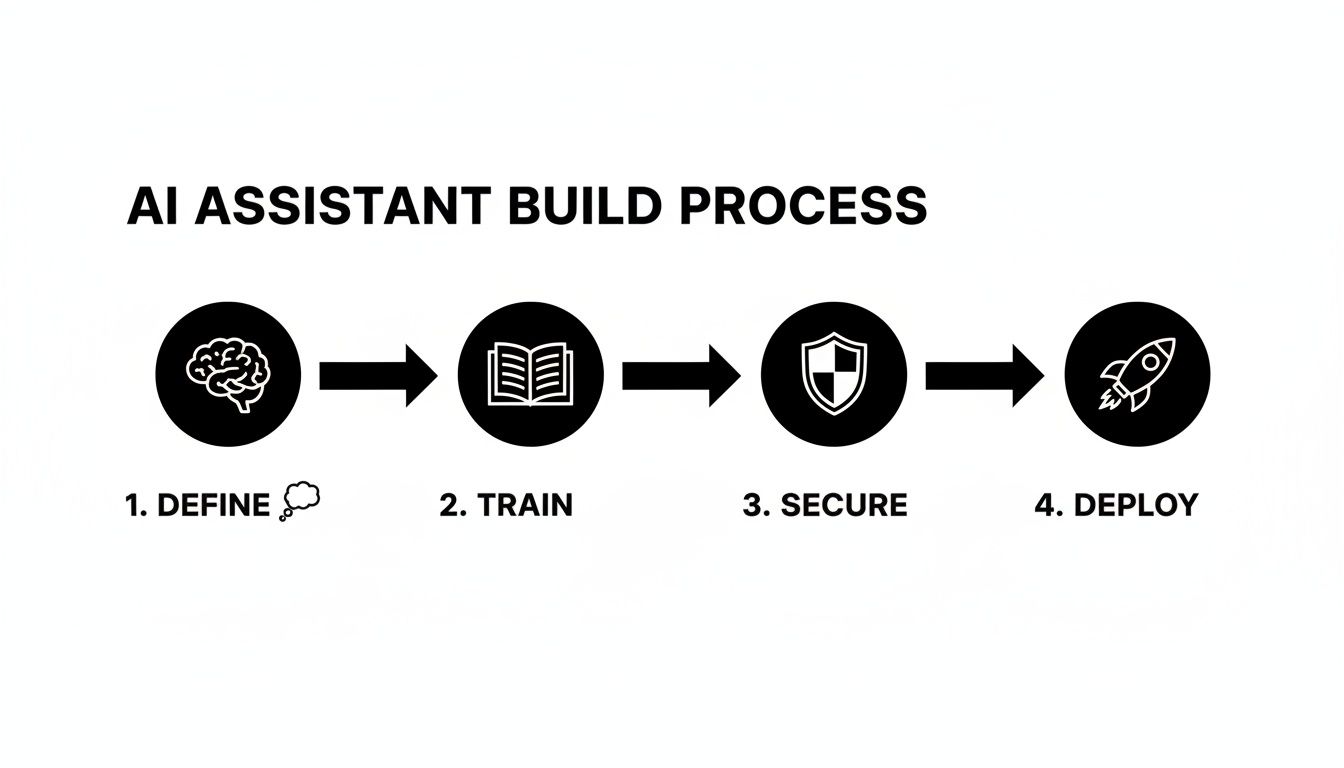
From defining its purpose to hitting the "deploy" button, this framework gives you a clear path forward that any business can follow.
Core Components of a Modern AI Assistant
When you decide to build, it's helpful to know what the essential building blocks are. These are the key pieces that turn a simple chatbot into a powerful, production-ready support agent.
| Component | Description | Why It Matters for Your Business |
|---|---|---|
| Knowledge Base Integration | The ability to ingest and learn from your existing documentation (help docs, PDFs, etc.). | This is the AI's "brain." It ensures answers are accurate, specific to your business, and not just generic LLM responses. |
| Prompt Engineering & Tone | Tools to define the AI's personality, conversation style, and operational instructions. | Controls the entire user experience, making the AI feel like a natural extension of your brand, not a cold robot. |
| Safety Guardrails | Mechanisms to prevent the AI from answering off-topic questions or giving harmful advice. | Protects your brand reputation and ensures the assistant stays focused on its core purpose: helping your customers. |
| Human Escalation Path | A clear, seamless way for the AI to hand off a conversation to a human agent when needed. | Builds trust with users. They know a human is available if the AI gets stuck, preventing frustration. |
| Deployment & Embedding | Simple options to add the AI assistant to your website or app, often via a code snippet. | Makes the final step easy. You can go live in minutes without needing a developer to integrate it. |
| Analytics & Reporting | Dashboards that track conversation volume, user satisfaction, and unanswered questions. | Provides the data you need to see what's working and identify gaps in your knowledge base, creating a cycle of improvement. |
Understanding these components helps you see the bigger picture. A great AI assistant isn't just one thing; it's a system of interconnected parts working together to deliver a better customer experience.
Choosing Your Foundation: Your LLM and Architecture

The first decisions you make are easily the most important. They set the stage for everything that comes after. Before you upload a single document or tweak any settings, you need to lock in your assistant's core purpose and personality.
Think about it: is this a friendly, casual guide for your e-commerce shop, helping people find the perfect gift? Or is it a highly precise, technical expert for your SaaS product, walking users through complex configurations? The answer changes everything about how the bot will interact with your customers.
This core directive is defined in what we call a system prompt. You can think of it as the AI's permanent set of instructions—its constitution. It’s a simple, plain-text directive that tells the AI how to behave, what tone to use, and what its ultimate goal is in every single conversation.
Crafting Your AI's Personality
A great system prompt is the difference between a generic, robotic bot and an AI that feels like a genuine extension of your brand. You're not just telling it to answer questions; you're giving it a character.
Here are a couple of real-world examples to get you started:
- For an E-commerce Brand: "You are a cheerful and helpful shopping assistant for 'Glow Skincare.' Your tone is upbeat and encouraging. Always guide users toward products that suit their needs, but never be pushy. Keep answers short and easy to read on a mobile device."
- For a SaaS Company: "You are a professional and knowledgeable support specialist for 'Data-Sync Pro.' Your tone is formal, clear, and precise. Prioritize accuracy above all else. When a user asks for help, provide step-by-step instructions and reference specific feature names."
A strong system prompt acts as a North Star for every response the AI generates. It’s the single most important piece of configuration you will write, ensuring consistency and brand alignment in thousands of future interactions.
The secret is to be specific. Vague instructions like "be friendly" just won't cut it. Define what kind of friendly you mean and give it context about the brand it represents. This level of clarity is non-negotiable when you build your own AI assistant from the ground up.
Selecting the Right Language Model
Once you've nailed down the personality, it's time to choose the engine that will power your assistant: the Large Language Model (LLM). This is the brain that processes information and generates every response. Luckily, we now have access to several world-class options, each with its own quirks and strengths.
The race to build custom AI solutions is on, especially in innovation hubs like the United States. The investment in this space is staggering, which is great news for businesses of all sizes. According to Precedence Research, the U.S. AI market is expected to rocket from USD 173.56 billion in 2025 to USD 976.23 billion by 2035. This boom is fueled by AI assistants becoming a cornerstone of modern customer service. You can read more on the growth of the U.S. artificial intelligence market.
This growth means top-tier LLMs are more accessible than ever. Many platforms, including SupportGPT, integrate with the leading models, letting you swap them out to find the perfect match. If you want to dive deeper, we break this down in our article on leading AI agent platforms.
So, which one is right for you? Let's compare the heavy hitters.
Comparing Top LLMs for Your Support Assistant
Choosing an LLM isn't just about picking the "smartest" one; it's about finding the model whose strengths align with your support goals. Here’s a quick rundown to help you decide.
| LLM (Provider) | Best For | Key Strengths | Considerations |
|---|---|---|---|
| GPT-4o (OpenAI) | Complex reasoning and creative, human-like conversation. | Highly versatile, excels at understanding nuance, great for conversational marketing and support. | Can sometimes be too creative or verbose if not constrained by a tight system prompt. |
| Gemini 1.5 Pro (Google) | Multimodal understanding and processing large amounts of data. | Exceptional at analyzing long documents, videos, and images to provide accurate, fact-based answers. | Its formal tone might require more prompt engineering to sound casual or friendly. |
| Claude 3 Opus (Anthropic) | Reliability, safety, and following complex instructions. | The best choice for scenarios requiring precision and adherence to strict rules. Ideal for technical support or regulated industries. | May be less "charismatic" out-of-the-box compared to GPT models, focusing more on directness. |
The good news is that your initial choice of an LLM isn't set in stone. A solid strategy is to start with a versatile model like GPT-4o, test it with your actual knowledge base and prompts, and then experiment.
You might find that Claude 3 Opus gives more consistently accurate answers for your technical docs, while Gemini 1.5 Pro is better at summarizing user feedback from long transcripts. The beauty of modern AI platforms is the flexibility to use the right tool for the job.
Giving Your Assistant Your Company's Brain
An AI assistant that doesn't know your business is just a glorified search engine. The real magic happens when it understands the nitty-gritty details of your products, policies, and pricing. This is how you transform a general-purpose model into a specialized expert that speaks for your brand.
Thankfully, the days of needing a data science team to manually train a model are long gone. Modern platforms are built to make this process intuitive. You can give your AI a PhD in your business by simply connecting it to the knowledge you already have.
The whole idea is to create a secure, curated "brain" for your AI. This forces it to pull answers only from your approved documents, preventing it from making things up or grabbing unvetted information from the web.
Connecting Your Knowledge Sources
First things first, you need to feed your assistant the right information. Often, this is as simple as dropping in a few links. Platforms like SupportGPT are designed to ingest data directly from various sources without you needing to write a single line of code.
Think about where your company's most important information lives. Good places to start are:
- Your Website: Point the AI to key pages like pricing, features, and your "About Us" section.
- Help Center or Knowledge Base: This is the jackpot. Your existing help articles, FAQs, and tutorials are the perfect training ground.
- Product Documentation: If you're a SaaS company, letting the AI learn from your technical docs means it can handle highly specific user questions.
- PDFs and Documents: Don't forget about internal documents. You can upload things like return policies, marketing one-pagers, or spec sheets.
This process, technically known as Retrieval-Augmented Generation (RAG), lets the AI search your private knowledge base in real-time. It finds the most relevant tidbit of information before generating an answer, which keeps every response grounded in your company’s reality.
The interface for this is usually dead simple—just a dashboard where you can add and manage your knowledge sources with a few clicks.

As you can see, training your AI is much less about complex engineering and much more about being a good curator of your existing content.
The Art of Crafting Quick Prompts
Once your AI has access to the raw knowledge, you need to guide its behavior for common questions. We do this with "quick prompts"—short, specific instructions written in plain English to handle those repetitive queries.
Think of them as conversational shortcuts or pre-programmed playbooks. They're essential for ensuring your bot gives consistent, accurate answers to the questions you know are coming.
A great quick prompt doesn't just give an answer; it tells the AI how to answer. The difference between a bland, unhelpful response and a great one often comes down to a few carefully chosen words in your prompt.
Example Scenario: An E-commerce Store
Let's imagine customers are constantly asking about your return policy.
- A lazy first attempt (Mediocre Prompt): "Tell the user about our return policy."
- What the AI might say: "We have a return policy. You can return items." (Thanks, that's not helpful at all).
Now, let's give the AI better direction.
- A much better version (Great Prompt): "When a user asks about returns, explain our 30-day return policy for unused items in their original packaging. Mention they can start a return on our website. End with a friendly offer to help them begin the process."
- The much better AI answer: "We offer a 30-day return policy for any items that are unused and in their original packaging! You can easily start a return by visiting the 'My Orders' section of our website. Would you like me to guide you there now?"
See the difference? The second response is infinitely more useful because the prompt was specific, action-oriented, and infused with a helpful brand tone. For a deeper dive into this, check out our guide on how to fine-tune an LLM for your specific business.
Test and Iterate in a Safe Playground
Here’s a secret from the field: you will not get this right on the first try. And that's perfectly fine. The key to building a high-performing AI assistant is relentless iteration in a safe environment where you can test, tweak, and polish its responses without any real customers seeing your work-in-progress.
This is what a real-time testing playground is for. It’s a sandbox where you can throw any question at your AI and instantly see how it responds based on the knowledge and prompts you’ve given it.
Your testing playground is the single most important tool for quality control. It’s where you simulate real customer conversations, find the blind spots in your knowledge base, and fine-tune your prompts until the answers are perfect—all before it goes live.
Here’s a practical workflow I've seen work time and again:
- Ask the Obvious Questions: Start with the top 10-20 questions your human support team gets hammered with every day. Does the AI nail the answer and the tone?
- Try to Break It: Now, test the edge cases. Ask confusing questions, use slang, or inquire about topics you've told it to avoid. This is how you discover holes in your safety guardrails.
- Refine and Retest Immediately: If you get a bad answer, don't just fix it and move on. Dig into why it was wrong. Does a help article need an update? Was a quick prompt too vague? Make the change, then immediately go back to the playground and ask the exact same question.
This constant feedback loop—test, refine, re-test—is how you build an AI assistant that's genuinely helpful and reliable. It transforms the setup from a one-and-done task into a continuous cycle of improvement.
Implementing Guardrails and Smart Human Escalation
Once you've fed your AI the knowledge it needs, the next critical step is giving it a rulebook. In customer support, trust is everything. One weird or unhelpful answer can erase the goodwill from a hundred positive interactions. This is where guardrails come in—they are the non-negotiable boundaries that keep your assistant safe, on-brand, and genuinely helpful.
Think of guardrails as the AI's internal compass. It's not just about stopping bad behavior; it’s about proactively steering conversations toward a good outcome. You're teaching the assistant what it shouldn't say just as much as what it should. This is a make-or-break step when you build your own AI assistant, because it's directly tied to protecting your brand's reputation.
Defining Your AI's Boundaries
The first layer of defense is keeping the assistant focused. You wouldn't want a support bot for your clothing store suddenly doling out financial advice or opining on your competitor's new arrivals. Setting up these boundaries is usually a straightforward, plain-language affair.
You can create simple rules to stop the AI from engaging with specific topics. For example:
- Competitor Mentions: Tell the AI to politely sidestep any questions about competitors and bring the conversation back to your own products.
- Sensitive Subjects: Block discussions on politics, religion, or other off-brand topics to maintain a professional and focused tone.
- Brand Voice Consistency: Make sure the tone stays locked in, whether that’s upbeat and friendly, strictly professional, or warm and empathetic. For a deeper dive on shaping your AI’s personality, check out our guide on the essentials of prompt engineering.
These rules act like an automated quality control check, ensuring that even when faced with a curveball question, your AI defaults to a safe, helpful, and brand-aligned response.
Guardrails aren't about limiting your AI's intelligence; they're about focusing it. A well-guarded assistant is a trustworthy assistant—one that customers feel confident interacting with because it operates within predictable, helpful parameters.
This proactive approach turns your AI from a simple Q&A machine into a reliable brand ambassador that works safely around the clock.
Knowing When a Human Is Needed
The smartest AI knows what it doesn't know. No matter how much data you feed it, some situations will always need a human touch. A truly intelligent system is designed to spot these moments and seamlessly hand the conversation over to a person. We call this smart human escalation.
This is what separates a frustrating chatbot from a genuinely useful support tool. Instead of trapping a user in a loop of unhelpful answers, the AI acts as an intelligent filter. It resolves the common stuff on its own and flags the complex problems for your team. Building your own AI assistant is becoming a core business strategy, especially with the rise of agentic AI—autonomous systems that can act independently. The global market for these tools hit USD 7.29 billion in 2023 and is projected to skyrocket to USD 139.19 billion by 2032. You can get more details on this trend by reading the full report on the agentic AI market.
Setting up escalation paths is all about creating simple triggers based on keywords, user intent, or even sentiment.
Common Escalation Triggers
Here are a few practical scenarios where you'd want your AI to immediately call for a human agent:
- High-Level User Frustration: If the AI picks up on words like "frustrated," "angry," or "useless," it should automatically offer to connect the user with a person. This stops a bad experience from getting worse.
- Specific Sensitive Keywords: Any query with words like "refund," "billing issue," "cancel," or "legal" should probably be handled by a human who can access account details and make decisions.
- Complex Technical Problems: When a user describes a bug or an issue that goes beyond the documented fixes in your knowledge base, the AI should recognize it’s out of its depth and create a support ticket.
- Sales or Lead Inquiries: If a customer expresses strong buying intent or asks for a custom quote, you don’t want to leave that to a bot. The AI should capture their info and route them straight to your sales team.
By setting up these pathways, you create a support safety net. Your AI handles the high volume of routine questions, freeing up your human experts to focus on the high-stakes conversations where they’re needed most.
Getting Your AI Live and Making It Smarter

After all the design, training, and testing, we’ve arrived at the most rewarding part—getting your AI assistant in front of real users. The deployment phase is where theory meets reality, and thankfully, it’s far simpler than it sounds. You don’t need to be a deployment specialist or kick off a huge integration project.
Modern platforms like SupportGPT are built for this kind of speed. Often, the final step is just copying and pasting a single line of code into your website's header. It's a task anyone on your team can knock out in a few minutes, instantly embedding a powerful support widget on every page.
This is one of the biggest wins when you build your own AI assistant. You can move from an idea to a live, customer-facing tool incredibly fast, without getting tangled up in technical red tape.
Your Pre-Launch Checklist
Before you flip the switch, a quick final review is crucial for a smooth rollout. A good launch isn’t just about hitting a button; it’s about being prepared. Running through a checklist helps you spot any last-minute issues that could sour a user's first impression.
Here’s a simple checklist I use before any deployment:
- Final Prompt Review: Is the system prompt clear, on-brand, and concise? Does it set the right personality for the AI?
- Knowledge Source Check: Are all the help articles, documents, and web pages up to date? Get rid of any outdated sources to stop the AI from giving bad answers.
- Escalation Path Test: Send a test query with a trigger word (like "refund") and make sure it lands in your human support team's inbox. No black holes allowed.
- Welcome Message Polish: Does the initial message in the chat widget feel welcoming? It needs to clearly set expectations for what the user can ask.
This isn’t about chasing perfection—your AI will constantly evolve. It's about making sure your starting point is solid enough to deliver a great first experience.
Tracking Analytics That Actually Matter
Once your assistant is live, the real learning begins. Data will start flowing in, giving you a direct line into what your customers are thinking and where they’re getting stuck. It's easy to get lost in a sea of metrics, so the key is to focus on the numbers that tell you about genuine performance and user value.
Forget vanity metrics like "total messages sent." You need to concentrate on analytics that tell a story about the quality of the interactions.
Don't just measure activity; measure effectiveness. A successful AI assistant is one that solves problems, not one that just has a lot of conversations. Your analytics should reflect resolution and satisfaction above all else.
These are the core metrics you should be watching like a hawk:
- Resolution Rate: This is your North Star. What percentage of conversations get fully resolved by the AI without a human ever stepping in? A high resolution rate means your assistant is actually doing the job you built it for.
- User Satisfaction Scores (CSAT): After a chat, ask for a simple thumbs-up or thumbs-down. This gives you instant, gut-check feedback on how helpful that specific interaction was.
- Failed Queries/Unanswered Questions: This is a goldmine. A running list of questions your AI couldn't answer is your roadmap for what to fix. It’s a literal to-do list for new help content.
- Escalation Rate: What percentage of chats get handed off to a human? Tracking this helps you figure out if your escalation triggers are too aggressive or not sensitive enough, so you can fine-tune that critical balance.
These metrics give you a clear, data-backed picture of how your AI is performing and show you exactly where to focus your improvement efforts.
Using Conversation Logs for Continuous Improvement
Your AI's conversation logs are more than just a historical record—they're your most valuable asset for making it better. I make it a habit to regularly review these transcripts because they provide insights you just can't get from a high-level dashboard. You see the exact words users type, pinpoint moments of confusion, and spot new issues before they become widespread problems.
Think of it as having a continuous, automated focus group. Every single conversation is a chance to learn something new about your customers' needs and your product's clarity.
This is the feedback loop that makes a custom-built AI so powerful. You can draw a straight line from user friction to an action item. For instance, if you see five different people asking the same question about a feature, that’s your cue to either create a new quick prompt for it or rewrite your documentation to be clearer.
This cycle of reviewing, learning, and refining is what turns a good AI support system into a great one. It ensures your assistant doesn't just sit there, but actually evolves with your business and your customers, getting smarter and more helpful with every single interaction.
Common Questions We Get About Building an AI Assistant
Diving into AI for the first time usually brings up a bunch of practical questions. How much work is this really going to be? What can't it do? Let’s tackle some of the most common things people ask when they're thinking about building their own AI assistant.
Just How Technical Do I Need to Be?
Honestly, not very. Modern platforms like SupportGPT are built specifically for non-technical teams. You absolutely do not need to be a developer or understand the nuts and bolts of machine learning to get a powerful assistant up and running.
The platform handles all the heavy lifting in the background. Your role is to focus on what you're already an expert in: your business and your customers. You'll work through a simple, visual interface to:
- Describe your AI’s personality in plain English.
- Add knowledge simply by pasting links to your help docs.
- Write rules and instructions without a single line of code.
- Get it live on your site by copying and pasting a small snippet of code.
If you can write a clear help center article, you've got all the technical skills you need.
Can This Thing Handle Different Languages?
Yes, and this is a huge win. Assistants built on sophisticated Large Language Models (LLMs) are multilingual right out of the box. They automatically detect the user's language and just start talking to them in it—no extra setup required on your end.
For any company with an international user base, this is a massive advantage. You can suddenly offer instant, 24/7 support across the globe without the massive expense of hiring a dedicated multilingual team. It’s a fantastic way to scale your customer experience.
How Do I Keep the AI From Making Stuff Up?
Stopping the AI from going rogue and giving wrong answers is all about control. You aren't just launching it and hoping for the best; you're building a walled garden for it to operate in. It really comes down to a three-part strategy.
First, and most critically, you lock down its knowledge base. By feeding the AI only your own trusted content—your help center, your product documentation, your internal guides—you prevent it from grabbing random, unvetted information from the wider internet.
Next, you put up enterprise-grade guardrails. Think of these as firm rules. You can define the AI's tone of voice and explicitly tell it what not to talk about, like competitors, pricing speculation, or sensitive company data.
The final, crucial step is the real-time testing playground. This is your sandbox. Before any customer sees it, you can throw tricky questions at the AI and see exactly how it responds, tweaking its behavior until you're confident it's ready.
This combination of curated knowledge, strict rules, and rigorous testing is how you ensure the assistant is a reliable, accurate extension of your brand.
What Happens When the AI Can't Answer a Question?
A well-built AI knows its own limits. When it gets stuck or senses a customer is becoming frustrated, the last thing you want is for it to just keep trying and failing. This is where you build in smart escalation paths.
You can set up simple rules that trigger a handoff to a human. For example, if a user's message contains words like "frustrated," "cancel," or "refund," you can have the AI automatically route the conversation to your support team’s inbox. This ensures sensitive or complex issues always get a human touch, which goes a long way in building customer trust.
Ready to build an AI assistant that actually understands your business? With SupportGPT, you can design, train, and deploy a custom support agent in minutes—no coding required. Start for free and see how easy it is.