Your Guide to Building an Automated Service Desk
Discover how an automated service desk streamlines support and boosts efficiency. Learn to implement, choose, and scale your IT and customer support automation.
At its core, an automated service desk is a support system that uses technology—mostly AI and automation—to handle common, everyday tasks without needing a human to step in. It's like having an intelligent assistant on duty 24/7, ready to solve routine problems, route trickier issues, and give people instant answers.
From Human-Powered to Always-On Support
Think about a traditional service desk. It’s a lot like a talented chef in a busy kitchen trying to do everything at once: take orders, cook the food, and even wash the dishes. They might be great at their job, but they're a huge bottleneck. That's the old, manual model where every single request, no matter how small, has to wait for an agent's attention.
Now, imagine that kitchen gets an upgrade. An automated service desk turns it into a modern, hyper-efficient operation. Simple things like taking reservations or processing a payment are handled instantly by a system. This frees up your top chefs—your support agents—to focus on the gourmet dishes that actually require their unique skills. It’s a complete shift from a reactive, firefighting model to a proactive, intelligent system.
The Core Purpose of Automation
The real goal here isn't to replace your team but to make them more powerful. Automation tackles the biggest headaches for both your support staff and the people they help.
- For Users: No more waiting around for simple stuff like a password reset or an order status update. Instead of logging a ticket and checking back hours later, they get an immediate answer, which makes a world of difference to their experience.
- For Support Teams: This is about getting rid of the soul-crushing, repetitive tickets. Research has shown that service automation can slash service desk calls by more than 40%, giving agents the breathing room to focus on strategic problem-solving.
- For the Business: The service desk stops being just a cost center and starts acting like an efficiency engine. You can offer 24/7 support without having to hire more people for every shift, boosting productivity across the board.
Shifting Focus to High-Impact Work
With automation handling the basics, your team can finally get out of the weeds. Instead of being buried under a mountain of low-level tickets, agents can start digging into root cause analysis, improving broken processes, and creating proactive guides that stop problems before they even start.
An automated service desk acts as the first line of defense, intelligently filtering and resolving the majority of inbound requests so human experts can apply their critical thinking where it matters most.
Getting this system in place is a massive step toward building a modern support operation. For anyone managing a team in SaaS, e-commerce, or IT, understanding this technology is the key to scaling support without burning out your team or frustrating your users. This approach also ties directly into solid knowledge management best practices by making sure information gets where it needs to go. To see how these ideas fit into the bigger picture, check out our guide on AI-powered customer service.
The Engine Behind Your Automated Service Desk
To really get what makes an automated service desk tick, you have to look under the hood. It’s not just one piece of software; it’s a whole ecosystem of technologies working together. Think of it less like a single tool and more like a highly coordinated pit crew, where every member has a specific, automated job that adds up to a lightning-fast result.
Let’s break down the essential parts that power this modern support engine. We'll use some real-world scenarios to see how they combine to create a seamless experience for everyone.
This diagram shows the journey from a manual, human-heavy model to the streamlined, automated systems we see today.
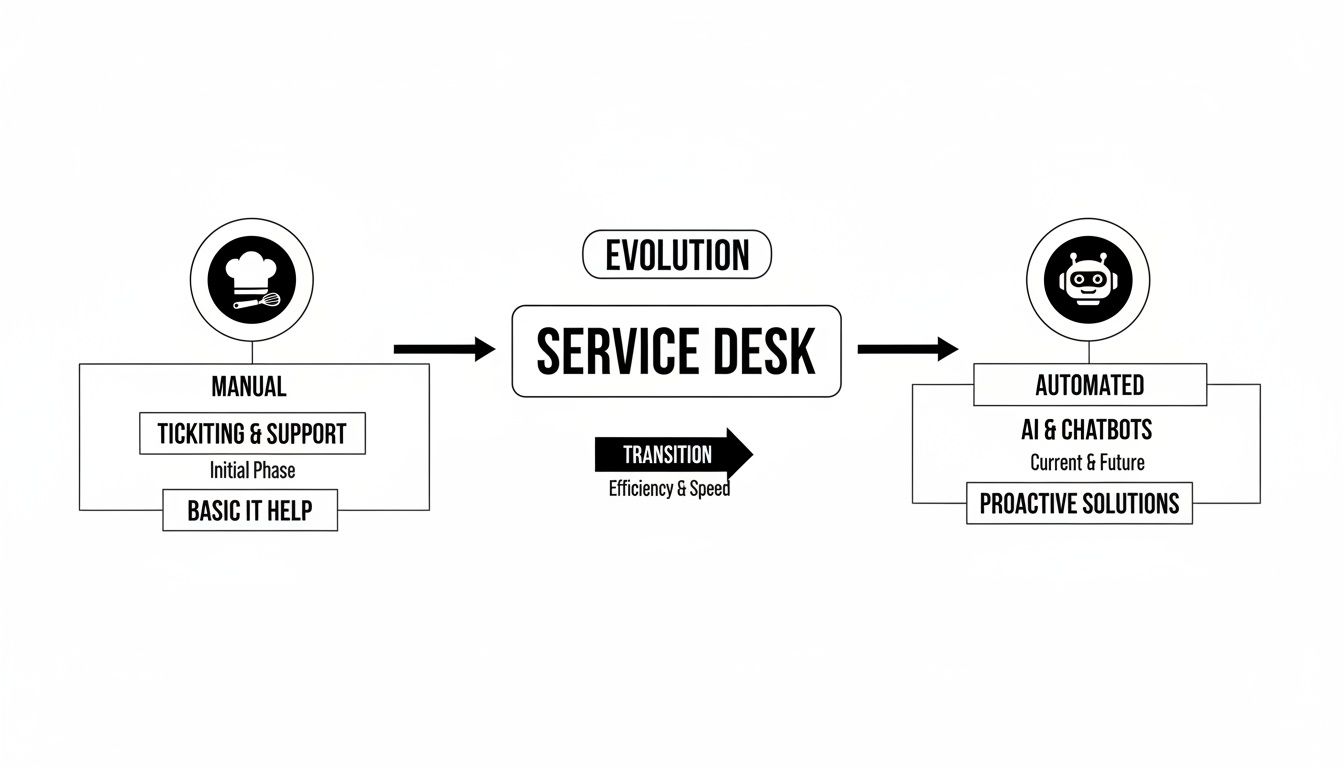
The shift from a hands-on chef to an efficient robot perfectly captures how automation takes over routine tasks. This move frees up your human experts to tackle the more complex, high-value work.
AI-Powered Ticket Routing and Triage
The first and arguably most important piece is AI-powered ticket routing. Imagine your support inbox is a chaotic mailroom. Without automation, a person has to manually read every single message, guess what it’s about, and then walk it over to the right department. It’s slow, full of potential for mistakes, and a huge drain on time.
An automated system, on the other hand, acts like an incredibly smart sorter. Using natural language processing (NLP), it instantly scans incoming tickets, picks out keywords, figures out what the user actually wants, and categorizes the issue.
- A request mentioning "invoice" and "payment"? It’s automatically tagged as a billing query and zapped over to the finance team.
- A ticket containing "can't log in" and "password error"? That’s clearly an access issue, so it’s routed straight to the IT support queue.
- An urgent message with phrases like "system down" or "critical failure" gets flagged with high priority and immediately escalated.
This all happens in seconds, making sure every request lands in the right hands without anyone lifting a finger. It’s the foundation of an efficient automated service desk because it eliminates bottlenecks before they can even form.
The Intelligent Knowledge Base
If AI routing is the system's circulatory system, then the intelligent knowledge base is its brain. This isn't just a dusty, static library of old help articles. It's a living, breathing repository of information that the entire automated system draws on to provide instant, accurate answers.
When a user asks a question, the AI doesn't just do a simple keyword search. It understands the context of the question and pulls the most relevant solution from your help docs, FAQs, and even past ticket resolutions. For example, a user might ask, "How do I connect my account to the new integration?" The system can pull up the exact step-by-step guide—complete with screenshots—and deliver it right inside the chat window.
An intelligent knowledge base turns your company’s collective knowledge from a passive resource into an active, 24/7 problem-solver for both your users and your support agents.
This component is the fuel for self-service portals and AI agents, giving them the information they need to resolve issues on their own. You can dive deeper into how to build and manage these systems in our guide on AI agent platforms.
Workflow Automation for Repetitive Tasks
A lot of support requests aren't just simple questions—they require a series of actions. This is where workflow automation shines. It acts as the system's hands, executing predictable and repetitive multi-step processes.
Here are a couple of common examples:
- Password Resets: Instead of an agent manually verifying a user and sending a reset link, an automated workflow handles the whole thing. It can verify the user's identity through security questions or two-factor authentication, trigger the password reset, and close the ticket automatically.
- New User Onboarding: When a new hire joins, a single trigger from HR can kick off a workflow that provisions their software access, sends out welcome emails with training materials, and even schedules follow-up check-ins.
These automated workflows take the human touch out of countless high-volume, low-complexity tasks, freeing up hundreds of hours for your team to focus on what matters.
Comparing Manual vs Automated Support Workflows
To really see the difference automation makes, let's put the old way and the new way side-by-side. The contrast in efficiency and agent workload is stark.
| Support Task | Manual Service Desk Process | Automated Service Desk Process | Key Benefit |
|---|---|---|---|
| Ticket Triage | Agent reads each ticket, categorizes it, and assigns it to a team or person. | AI analyzes ticket content, automatically categorizes, prioritizes, and routes it to the correct queue. | Instant routing, reduced human error, and faster first-response times. |
| Password Reset | Agent verifies user identity, manually generates a reset link, and emails it. | User interacts with a bot, completes automated identity verification, and receives a reset link instantly. | 24/7 self-service, zero agent involvement, and immediate resolution for users. |
| Information Request | Agent searches the knowledge base or asks colleagues to find an answer, then replies. | User asks a chatbot, which instantly retrieves the relevant article or data from the knowledge base. | Instant answers for users and a dramatic reduction in simple, repetitive tickets. |
| New Hire Onboarding | A manager or agent manually creates multiple tickets to provision access for IT, HR, etc. | A single trigger creates a workflow that automatically provisions accounts and sends welcome info. | Consistency and speed, ensuring new hires are ready to go on day one without manual effort. |
This table makes it clear: automation doesn't just speed things up; it completely redesigns how support gets done, shifting the focus from tedious manual labor to strategic problem-solving.
Self-Service Portals and AI Agents
Finally, we get to the most visible part of an automated service desk: the user-facing self-service portals and AI agents. These are the friendly concierges of your support system, giving users the power to find their own answers and solve problems on the spot. An advanced AI Chatbot is often the sophisticated brain behind these interfaces, enabling intelligent conversations and task automation.
The demand for these solutions is booming. Ticket management, workflow orchestration, and virtual agents currently hold over 68% of the market share. This growth shows a clear trend: companies are prioritizing quick, AI-driven solutions to meet user expectations for immediate support. In fact, the digital service desk market is projected to skyrocket to USD 6.1 billion by 2035.
How Automation Delivers Measurable Business Wins
Knowing the tech is one thing, but seeing what it actually does for a business is what really matters. An automated service desk isn't just a fancy upgrade for the IT department; it’s a strategic move that pays off in real, measurable ways. Let's move past the theory and look at how smart companies are using automation to get a serious leg up on the competition.
The magic happens when you take all those high-volume, low-effort tasks and turn them into instant, automated interactions. This isn't just about saving a few minutes here and there. It's about fundamentally improving customer satisfaction, slashing operational costs, and boosting your team's productivity.

Driving SaaS Growth with Faster Onboarding
For any SaaS company trying to scale, that first impression is everything. If a new user gets stuck during onboarding, they’re likely to churn before they ever discover the real value of your product. This is where an automated service desk isn't just helpful—it's a growth engine.
Picture a startup getting swamped with the same questions over and over: "How do I connect my data source?" or "Where do I find my API key?" Answering each one manually creates a huge bottleneck, killing that initial excitement for new customers.
By setting up an automated assistant, the company can deliver immediate, guided help for these common roadblocks. The AI can walk users through setup, point them to the right help articles, and even handle basic account configurations on the spot. The results are clear business wins:
- First-response times drop dramatically, going from hours to mere seconds.
- User activation rates climb because customers get set up without hitting a wall.
- Support becomes scalable, allowing the company to onboard thousands of new users without having to hire an army of support agents.
Enhancing E-commerce Customer Loyalty
In the cutthroat world of e-commerce, the customer experience can make or break a brand, especially during the holidays. A smooth return process builds trust and keeps people coming back. A difficult one sends them straight to your competitors.
Think about an online store during the Black Friday rush. The support team is buried under requests like, "I need to return this," or "How do I get a different size?" An automated service desk can handle that entire workflow from start to finish.
A customer can initiate a return through a chatbot, which instantly verifies their order, asks why they're returning the item, and emails them a shipping label. It all happens 24/7, with zero human input. The impact is immediate.
This level of self-service automation directly translates into higher customer satisfaction (CSAT) scores and a significant reduction in support ticket volume during the busiest times of the year, leading to a 15-point lift in CSAT during peak shopping seasons.
This also frees up your human agents to tackle the truly complex problems, like a damaged shipment or a nuanced product question, which makes for a better experience all around.
Reclaiming Productivity in Corporate IT
Support isn't just for external customers. When your own employees are stuck waiting on IT for a simple password reset or software license, productivity grinds to a halt across the entire organization.
A mid-sized company can put an automated service desk to work handling these common internal IT tickets. An employee who needs access to a new app can just submit a request through a self-service portal.
From there, an automated workflow kicks in. It gets manager approval, provisions the software license, and sends the employee a confirmation with their login details. A process that used to take days is now done in minutes. We're seeing real-world results where automation can resolve up to 70% of routine tickets on its own, boosting CSAT scores by 20-30%. The rapid growth of the growing digital service desk market shows just how critical these platforms have become for scalable support.
By automating hundreds of these requests every month, the company gets thousands of productive hours back and lets the IT team focus on high-value projects like network security or system upgrades. That’s the real ROI—turning the IT helpdesk from a cost center into a true business enabler.
Your Roadmap to an Automated Service Desk
Bringing an automated service desk to life can feel like a massive project, but it doesn't have to be overwhelming. The trick is to break it down into manageable steps. Think of it less like building a new system from the ground up and more like following a proven recipe. Each step builds on the last, guiding you toward a successful launch.
This roadmap will walk you through the entire process, from initial planning to making sure your system keeps getting better over time.
Phase 1: Figure Out What to Automate First
Before you even start looking at software, you need a clear picture of where automation will actually make a difference. The best place to find this is in your own support ticket history. It’s time to do some digging.
Your goal here is to spot the "low-hanging fruit"—those repetitive, high-volume tasks that tie up your team but don't require deep, creative problem-solving. These are your best starting points for automation.
Look for these patterns in your data:
- The Most Common Tickets: Are you drowning in password resets? Constantly answering questions about order status or walking people through the same basic setup steps? That's your sweet spot.
- Anything with a Scripted Answer: If a question almost always gets the exact same response or follows a standard procedure, it's begging to be automated.
- The Tickets Clogging the Queue: Find the simple, quick-fix issues that are creating a bottleneck and stopping your agents from tackling the really tough problems.
Focusing on these areas first will give you some quick wins. It proves the value of the project early, builds momentum, and gets everyone on board with the change.
Phase 2: Pick the Right Automation Platform
Once you know your priorities, you can start looking for the right tool. The market is full of options, but they are definitely not all created equal. You need a solution that fits your team's skills, plays nicely with your existing tech stack, and has the right safety features to protect your customer experience.
Choosing a platform isn't just about ticking off a feature list. It's about finding a partner that lets your non-technical team members confidently build, manage, and improve your automation workflows.
Use this checklist as you evaluate different platforms:
- Integration Power: Can it connect seamlessly with your CRM, knowledge base, and other business-critical systems?
- Ease of Use: Is the interface intuitive? Can your support managers create and tweak automation rules without calling in a developer every time?
- Built-in Guardrails: Does it have features to prevent inaccurate answers, keep the AI on-brand, and stop it from going off-topic?
- Smart Escalation: When a human needs to step in, how smoothly does it hand off the conversation? The agent should get the full context without missing a beat.
Phase 3: Train Your AI and Run a Pilot
You've picked your platform. Now it's time to give your new AI assistant its brain. That "brain" is your company’s knowledge—your help articles, FAQs, internal wikis, and product guides. The better the information you feed it, the more accurate and helpful its responses will be.
But hold off on a full company-wide launch. The smart move is to start with a pilot program. Pick a small, controlled group to test the system in a real-world setting. This could be a specific customer segment or even an internal department.
This pilot phase is absolutely critical for gathering feedback. It helps you find confusing responses, broken workflows, or gaps in your knowledge base before you roll it out to everyone. Use what you learn to fine-tune the system and build confidence in its performance.
Phase 4: Measure Everything and Keep Improving
Implementation isn’t a one-and-done task. A truly great automated service desk is one that evolves. To make that happen, you need to define your key performance indicators (KPIs) right from the start and track them obsessively.
Here are the core metrics you should be watching:
- Ticket Deflection Rate: What percentage of issues are being fully resolved by the AI without a human ever getting involved? This is a direct measure of your ROI.
- First-Contact Resolution (FCR): How often does the automation solve a user's problem on the very first interaction?
- Average Resolution Time: How much faster are problems getting solved now that automation handles the frontline work?
- Customer Satisfaction (CSAT): Are people happy with the automated support? Don't guess—use surveys to get direct feedback.
Reviewing these KPIs regularly will show you what’s working and what isn’t. This data-driven approach is the only way to ensure your automated service desk grows with your business and continues to deliver fantastic results.
Choosing the Right Automated Service Desk Platform
Picking the right platform for your automated service desk is a huge decision, one that's going to define how your support team operates for years. It's easy to get lost in a sea of vendors all promising the moon. The trick is to tune out the marketing hype and zero in on the core capabilities that will actually help your team and your customers.
A great platform is more than just a cool AI. It’s a complete ecosystem that gives your team the confidence to build, manage, and grow your support automation. It should feel less like a complicated engineering project and more like an intuitive command center for your entire support operation. That means finding that sweet spot between powerful features and genuine, day-to-day usability.
And the need for these tools is exploding. The help desk software market is on a trajectory to hit $21.8 billion by 2027. On top of that, the ticketing systems market is projected to rocket from $15 billion to $40 billion by 2033, all because businesses are finally embracing AI for self-service. You can read the full research on this market expansion to get the bigger picture.
Focus on Fast Deployment and Ease of Use
Nobody knows your customers' problems better than your support team. So, the right tool should let them build and launch an AI agent without needing a developer on speed dial. Look for a no-code or low-code setup that lets your non-technical folks define workflows, train the AI, and push out updates in minutes, not weeks.
This agility is everything. If every small change requires a ticket to the engineering team, your automation efforts will grind to a halt. The whole point is to put your support managers in the driver's seat, letting them adapt and fine-tune the system as they learn.
Evaluate AI Flexibility and Guardrails
Let's be clear: not all AI is created equal. A top-tier platform won't lock you into a single, proprietary model. It should give you the flexibility to use leading Large Language Models (LLMs) from providers like OpenAI, Google, or Anthropic. This future-proofs your investment, ensuring you can always tap into the latest and greatest AI advancements.
But all that power needs control. This is where enterprise-grade guardrails become non-negotiable. Think of these as the safety features that stop your AI from giving bad advice, going off-script, or saying something that could tarnish your brand's reputation.
An ideal platform gives you the best of both worlds: access to powerful, cutting-edge AI models combined with robust safety nets that ensure every user interaction is accurate, on-brand, and genuinely helpful.
Scrutinize Escalation Paths and Integrations
No AI can solve 100% of issues, nor should it. One of the most critical things to look at is the intelligent escalation path. When a problem gets too thorny for the AI, how smoothly does it hand things off to a human agent?
The user shouldn't even notice the transition. The human agent needs to get the full conversation history and context in a snap, allowing them to pick up exactly where the AI left off. No more "Can you please explain your issue again?" This is what creates a truly unified support experience, not a frustrating, disjointed one.
Just as important is how well the platform plugs into your existing sources of truth. It has to be able to learn from:
- Your public website and help docs
- Internal knowledge bases like Confluence or Notion
- Core business systems like your CRM or e-commerce platform
This ability to connect to and learn from your own data is what turns a generic chatbot into a genuine expert on your business. For a deeper look at what to compare, our helpdesk systems comparison breaks it down.
Prioritize Security and Compliance
Last but certainly not least: never, ever skimp on security. An automated service desk will be handling sensitive customer information, so rock-solid security and compliance are table stakes. The platform you choose must have a demonstrable, serious commitment to protecting that data.
Keep an eye out for key certifications. At a bare minimum, the platform should be SOC 2 compliant and follow GDPR principles. This is your assurance that your data—and your customers' data—is being handled with the highest level of care, building the trust you need for any automation project to succeed.
Common Questions About Automated Service Desks
Jumping into service desk automation can feel like a big leap. It’s natural to have questions and maybe a few reservations. After all, this is a fundamental change to how you deliver support, and it’s smart to get the full picture before you dive in.
Let's walk through the most common concerns we hear from teams just like yours. We'll tackle them head-on so you can move forward with clarity and confidence.
Will Automation Replace My Human Support Team?
This is always the first question, and for good reason. The answer is a firm no. An automated service desk isn't about replacing people; it's about making them more effective. Think of it as a powerful new teammate for your existing crew.
Automation is brilliant at handling the high-volume, repetitive stuff that burns out your best agents—think password resets, "where is my order?" updates, and basic FAQs. By offloading that grind, you free up your human experts to do what they do best: solve the tricky, high-stakes problems that require real creativity, empathy, and critical thinking. Your team gets to shift from putting out fires all day to being proactive problem-solvers.
How Much Technical Skill Do I Need to Manage It?
Many people worry they'll need a developer on speed dial just to keep an automated service desk running. Thankfully, that’s not the case anymore. Modern platforms are designed specifically for the people who actually run support, not for coders. The best tools have intuitive, no-code interfaces that let you build and train your AI with simple drag-and-drop editors and plain English.
If you understand your customers' pain points and your internal support processes, you have all the technical skill you need. The platform does the heavy lifting in the background, putting you—the support expert—in complete control of the automation.
How Do I Calculate the ROI of an Automated Service Desk?
Measuring the return on your investment (ROI) is essential, and it’s more straightforward than you might imagine. You can pin it down by looking at a few key numbers that have a direct impact on your budget and efficiency.
The real ROI of an automated service desk isn't just about cost savings; it's about reclaiming valuable time, boosting team capacity, and improving the overall customer experience in measurable ways.
To get started, focus on tracking these core metrics:
- Ticket Deflection Rate: What percentage of incoming tickets does the AI resolve completely on its own? Every single deflected ticket is a direct saving in agent time and operational cost.
- Increased Agent Capacity: With automation handling the simple requests, how many more complex issues can each agent now handle? This is how you scale your support capabilities without scaling your headcount.
- Reduced Resolution Time: Watch how quickly common problems get solved. That huge drop in resolution time isn't just a number—it translates directly to happier, more productive users and customers.
Can Automation Handle Truly Complex Problems?
While today's AI is incredibly capable, it has its lane. Its sweet spot is managing predictable, process-driven tasks and pulling answers from your existing knowledge base. It isn't built to solve brand-new, multi-layered problems that need a deep, creative investigation. That's precisely where your human team excels.
A smart automated service desk knows its own limits. Its primary job is to handle the knowns so your team can dedicate their brainpower to the unknowns. When a truly complex issue comes in, the system's role is to gather the initial details and then execute a seamless handoff to the right human expert, armed with all the context they need to jump right in. It’s the best of both worlds: instant help for the simple things and expert help for the hard ones.
Ready to see how an automated service desk can transform your support operations? With SupportGPT, you can build and deploy a powerful AI agent in minutes, no coding required.