A Practical Guide to AI Powered Customer Service in India
Discover how AI powered customer service is reshaping Indian businesses. Learn how to implement AI, measure its success, and drive real growth.
When we talk about AI-powered customer service, we're really talking about using smart technology to give customers support that feels fast, efficient, and tailored just for them. It’s a lot more than just chatbots. Think of it as a whole ecosystem of tools working together to automate the simple stuff, give your human agents superpowers, and provide help around the clock. The end goal? Making customer support feel effortless.
Meeting the New Standard of Customer Expectations in India

The modern Indian customer simply doesn't have the patience for waiting. We've all been there—stuck in a frustrating phone queue for twenty minutes just to sort out a simple banking issue. Now, imagine getting that same problem solved instantly through a chat window on your phone. That's the new baseline for customer service today.
Speed, 24/7 availability, and support that feels personal are no longer nice-to-haves; they're what customers demand. In a market where immediacy is everything, businesses that can't provide instant answers risk being left behind.
The Shift from Reactive to Proactive Support
For years, customer service was all about reacting. A customer has a problem, they call or email, and an agent eventually gets back to them. But that old model is quickly becoming obsolete. People now expect companies to anticipate their needs and solve problems before they even have to ask.
This is where AI-powered customer service stops being a buzzword and becomes a business necessity. It marks a fundamental shift in how companies engage with their customers, moving away from managing frustration towards creating genuinely helpful and instant experiences.
The goal is no longer just to solve problems. It's to create a seamless, friction-free experience where the customer feels heard and valued at every step, any time of day.
This new standard is driven by a generation of digitally-savvy consumers who are used to getting everything on demand. They expect the same instant response from their bank or online store as they do from their favourite streaming app.
An Ecosystem of Empowerment
It's important to see AI not as a single tool, but as a complete system designed to empower everyone. For customers, it means instant answers through self-service. For your support agents, it means AI handles all the repetitive questions, freeing them up to tackle the more complex issues where a human touch really matters.
Bringing an AI-driven approach into your support strategy gives you some serious advantages:
- 24/7 Availability: AI never sleeps. It ensures your customers can get help whenever they need it, whether it's late at night or on a public holiday.
- Instantaneous Responses: For common questions, AI eliminates queue times entirely. This drastically cuts down on customer frustration and boosts satisfaction.
- Scalable Operations: Your business can handle huge spikes in customer queries—like during a sale or a festival—without having to hire a massive team just to keep up.
Ultimately, integrating AI into your support is about meeting the demands of the modern Indian market head-on. It delivers the speed, personalisation, and efficiency you need to not just meet customer expectations, but to actually exceed them.
What Is AI-Powered Customer Service, Really?

Let's cut through the buzzwords and get to what AI-powered customer service actually is. At its heart, it’s about using smart technology to give customers fast and accurate answers to their problems. Think of it like having an army of super-efficient agents who can work 24/7, speak dozens of languages, and instantly recall every single past interaction with a customer.
This isn't about setting up a simple auto-reply. We're talking about a sophisticated system that's built to understand what customers actually mean, not just the specific words they use. This ability to grasp context allows it to provide genuinely helpful, relevant, and personalised support on a massive scale.
The whole point is to let technology handle the common, repetitive queries that bog down your team. This frees up your human agents to focus their energy on the trickier, more sensitive issues where a real human touch makes all the difference. It’s a powerful partnership: AI handles the speed and volume, while your people provide the empathy and critical thinking.
The Brains Behind the Operation
So, how does it all work? The magic really comes down to two key technologies: Natural Language Processing (NLP) and Machine Learning (ML). You can think of them as the AI's ability to listen and its ability to learn.
Natural Language Processing (NLP) is the technology that lets an AI system understand human language as we naturally speak and write it. Instead of just hunting for keywords, NLP allows the system to figure out the context, the customer's intention, and even the sentiment behind the message.
For example, when a customer in Delhi types, "My order hasn't arrived, where is it?", NLP helps the AI realise this isn't just a random question. It understands the intent is to track a package, senses the urgency, and knows exactly what information is needed to help.
Simply put, NLP gives AI the 'ears' to listen and comprehend. It’s the bridge that translates messy, human language into structured, actionable data that a computer can work with.
This is what makes the conversation feel natural and helpful, not robotic and frustrating. It’s a giant leap from the rigid, menu-driven systems we’ve all dealt with in the past.
Learning and Improving with Every Chat
While NLP gives the AI its ears, Machine Learning (ML) provides the brain and the memory. Machine learning is what allows the system to learn from data over time, getting better at its job without needing a developer to manually code every possible scenario.
Every single customer interaction becomes a tiny lesson. The AI constantly analyses which answers solved a problem and which ones missed the mark. This continuous feedback loop helps it refine its responses, making it smarter and more accurate with each passing day. It means your AI-powered customer service gets better and better on its own.
This Isn’t Your Average Chatbot
It's really important to draw a line between a basic, rule-based chatbot and a true AI-powered assistant. Most of us have run into those simple bots that can only follow a very strict, pre-written script.
- Rule-Based Chatbots: These are like an automated phone menu. They give you a few options ("Press 1 for tracking, Press 2 for returns") and completely fall apart if you ask anything they weren't programmed for.
- AI-Powered Assistants: These are far more dynamic. They use NLP and ML to understand the real context of a conversation, gauge customer sentiment (are they happy or frustrated?), and provide solutions that actually help. They can even hand off a complex chat to a human agent, bringing them up to speed instantly.
A truly modern AI assistant, like the kind powered by platforms such as SupportGPT, doesn't just parrot back answers. It actively solves problems, anticipates what a customer might need next, and creates a support experience that feels genuinely intelligent. It’s setting a whole new standard for what great customer care can be.
What Can AI Actually Do for Your Indian Business?
Let's move past the hype and look at what AI-powered customer service is doing on the ground. For businesses across India, this isn't some futuristic concept; it's a practical tool delivering real, measurable results every day. The technology's true strength is found in its specific capabilities, which solve some of the biggest headaches in the Indian market.
At its heart, AI brings a new kind of intelligence to your operations. Think about all the routine, repetitive questions your team answers daily. AI can automate these with incredible accuracy, handling a huge volume of customer chats and emails without breaking a sweat. This completely flips the old model of customer support on its head.
Instead of hiring more people every time your customer base grows, you can manage a massive increase in queries with a smaller, more specialised team. This isn't just about saving money—it’s about building a smarter, more scalable way to grow your business.
Turn Your Support Centre into a Sales Engine
One of the most exciting shifts we're seeing is AI turning customer support from a cost centre into a profit driver. By looking at a customer's past purchases and their current question, an AI assistant can spot a perfect moment to suggest something new.
Imagine a customer asking about the warranty on their new phone. The AI can instantly offer an extended protection plan. Or someone asking about a feature on a laptop could be shown a compatible mouse or keyboard that would make their life easier. Suddenly, a simple support chat becomes a natural, personalised sales conversation, directly adding to your revenue.
The proof is in the numbers. In 2024, Indian businesses using these AI tools saw their sales jump by an average of 25%. This shows that AI isn't just about efficiency; it's a powerful tool for growth. And with platforms like CoRover's BharatGPT offering support in over 14 Indian languages, you can connect with customers in Hindi, Tamil, or Bengali, ensuring no one is left out. You can discover more about AI's impact on Indian businesses and what's next for 2025.
Supercharge Your Performance Metrics
The impact of AI-powered customer service shows up clearly on the scoreboard. By giving customers instant answers around the clock, it drastically boosts first-contact resolution (FCR) rates. When a customer's problem is solved on the very first try, their satisfaction skyrockets.
This immediate resolution has a ripple effect, leading to higher Customer Satisfaction (CSAT) scores and a better Net Promoter Score (NPS). It’s a simple formula: faster, better answers lead to happier, more loyal customers.
AI isn't just giving faster answers; it's giving the right answers, consistently. It pulls from a single source of truth, so every customer gets accurate information, which is fundamental for building trust.
With AI handling the routine stuff, your human agents are free to tackle the tricky, sensitive problems that truly need a human touch. This not only makes them more productive but also more satisfied with their work, which helps reduce costly employee churn.
Impact of AI on Key Customer Service Metrics in India
Here’s a snapshot of how AI is quantifiably improving the most important customer service metrics for businesses operating in India.
| Metric | Improvement With AI | Business Impact |
|---|---|---|
| First-Contact Resolution | Up to 30% increase | Higher customer satisfaction, reduced repeat queries, lower support costs. |
| Average Handling Time | Reduced by 40% | Agents can handle more complex issues, improving overall team productivity. |
| Customer Satisfaction (CSAT) | Boosted by 20-25% | Increased customer loyalty, positive word-of-mouth, and higher retention rates. |
| Agent Productivity | Up by 35% | More focus on high-value tasks, better job satisfaction, and lower agent turnover. |
As the table shows, the improvements aren't minor tweaks. They represent a fundamental shift in operational efficiency and customer relationship management, leading to a stronger bottom line.
Break Down the Language Barrier
India's incredible linguistic diversity is one of its greatest strengths, but for customer service, it can be a huge operational hurdle. Supporting customers across dozens of languages and dialects has always been expensive and complicated.
AI changes all of that. Modern AI platforms are built with powerful multilingual capabilities, letting you talk to customers in their own language, whether it's Marathi, Telugu, Punjabi, or Gujarati.
This is more than just a nice feature—it's a game-changer. It opens up your business to entire new segments of the market and creates a much deeper bond with customers who feel truly heard and respected. When you speak your customer's language, you're not just providing support; you're building loyalty that lasts.
Common AI Use Cases Across Indian Industries
You really see the power of AI-powered customer service when you look at how it solves real-world problems for Indian businesses. The technology is surprisingly flexible, adapting to the unique challenges and opportunities in different sectors. From the whirlwind of e-commerce to the highly regulated world of banking, AI isn't just a shiny new toy—it's becoming a crucial part of how companies operate and keep their customers happy.
To bring this to life, let's look at some tangible examples of how this tech is being used right now. We'll explore specific business problems, the AI solutions that were brought in, and the real results they delivered. This should help you picture how these same ideas could work for you.
Revolutionising E-commerce and Retail
India's e-commerce market is a beast. It's defined by huge scale, cut-throat competition, and customers who speak a multitude of languages. For any online retailer, just keeping up with the flood of questions about order status, returns, and product details is a massive job. This is exactly where AI comes in, helping to create a smooth shopping experience for everyone, no matter what language they speak.
Picture a customer from Chennai who needs to return a shirt. Instead of fumbling through a confusing website or waiting days for an email response, they can just open WhatsApp and start a chat with an AI assistant in perfect Tamil.
- Order Tracking: The AI can pull up real-time shipping updates in a heartbeat.
- Returns and Exchanges: It can start the return process, schedule a pickup, and answer questions about the returns policy, all without a human needing to get involved.
- Product Recommendations: By looking at what the customer has browsed or bought before, the AI can suggest other products they might like, turning a simple support chat into a new sale.
This kind of instant, personalised help used to be the stuff of science fiction. Now, it's quickly becoming the standard for any e-commerce company trying to serve millions of customers well.
Transforming Banking and Financial Services
When it comes to money, security, accuracy, and trust are everything. Banking customers need fast answers to everyday questions, but they also—quite rightly—demand that their financial information is locked down tight. AI voicebots and chatbots are perfectly built for this balancing act, freeing up human agents to handle the more complex, advisory side of banking.
Think about a customer who needs to check their account balance late at night or report a lost card on a Sunday. An AI voicebot can securely confirm their identity using voice biometrics and give them the information they need, 24/7. This completely sidesteps the long hold times we've all come to dread when calling a bank.
AI in banking isn't just about saving money. It's about building a financial system that's more accessible and responsive for everyone. It lets banks provide round-the-clock help for simple things, which means their human experts are fresh and ready for the big stuff.
This automation takes care of the high-volume, repetitive queries, so the human teams can focus on building relationships and helping with high-stakes services like loan applications or investment advice.
Powering the BPO and Outsourcing Sector
India's Business Process Outsourcing (BPO) industry is the engine room for global customer support, and it’s going through a massive change. The old model of giant call centres is being reshaped by conversational AI, which now often serves as the first point of contact for customers. The results have been dramatic improvements in both speed and customer happiness.
In fact, chatbots and conversational AI now handle around 70% of customer interactions in India's BPO sector. This shift has crushed response times—for example, Hotstar cut its first response time from three hours down to just 30 seconds. This kind of efficiency also boosts Customer Satisfaction (CSAT) scores by 15-20% and can slash operational costs by as much as 30%. You can read more about how AI is redefining customer service jobs in India.
Bringing AI-powered customer service into the mix allows BPOs to manage a staggering number of queries with incredible speed. For the human agents, it means they're handed conversations that have already been sorted. The customer's basic problem has been identified, and they can step in with all the context needed to solve the trickier issues that call for a human touch. This hybrid human-AI model is proving to be the winning strategy for the modern BPO.
How to Implement AI in Your Customer Service Strategy
Bringing AI into your customer service operations isn’t like flipping a switch. Think of it more like cultivating a garden—it needs a thoughtful plan, the right tools, and ongoing attention to truly flourish. A successful rollout is built on a clear strategy that connects the technology to your most important business goals, ensuring the AI serves both your customers and your team from day one.
The whole process starts not with technology, but with a simple question: what problem are we actually trying to solve? Defining your goals is the most critical first step. Without a clear destination, you could easily end up investing in powerful tools that don't fix your real business needs, leading to nothing but wasted resources and frustration.
Define Your Core Objectives
Before you even start looking at vendors, you need to get crystal clear on what success looks like for your business. Are you trying to slash customer wait times, or is the main prize to increase sales through more personalised support? Maybe you just need a way to manage the flood of queries during peak seasons without hiring an army of temporary staff.
Your primary goals will steer every single decision you make from here on out.
- Reduce Response Times: If speed is the name of the game, you’ll want to focus on an AI chatbot that can handle common, repetitive questions in an instant.
- Increase Customer Satisfaction: This goal might lead you to an AI that feeds agents real-time information, helping them provide accurate and empathetic support.
- Boost Sales and Revenue: Here, the focus would be on an AI that can spot upselling or cross-selling opportunities during support chats.
- Lower Operational Costs: You might prioritise an AI that automates routine tasks, letting you scale your support without your headcount costs spiralling.
Having these goals clearly defined gives you a North Star for your entire strategy.
Choosing the Right Technology and Partner
Once your objectives are set, it’s time to select the right platform. The market is crowded with options, but the best choice is always one that fits your specific needs, integrates cleanly with your existing systems, and can grow with your business. It's smart to look for a partner that understands the nuances of the Indian market, especially when it comes to multilingual support.
A modern platform has to connect seamlessly with your Customer Relationship Management (CRM) and helpdesk software. This integration is completely non-negotiable; it’s what allows the AI to access customer history and provide context-aware, personalised help. Solutions like SupportGPT are designed for exactly this kind of smooth integration, letting you deploy a powerful AI assistant without a massive IT overhaul.
The right AI partner doesn't just sell you software; they provide a solution that feels like an extension of your own team. They should offer robust support, clear documentation, and a platform that even non-technical users can easily manage and refine.
This diagram shows how AI is typically adopted across major Indian industries, starting with the high-volume demands of e-commerce.
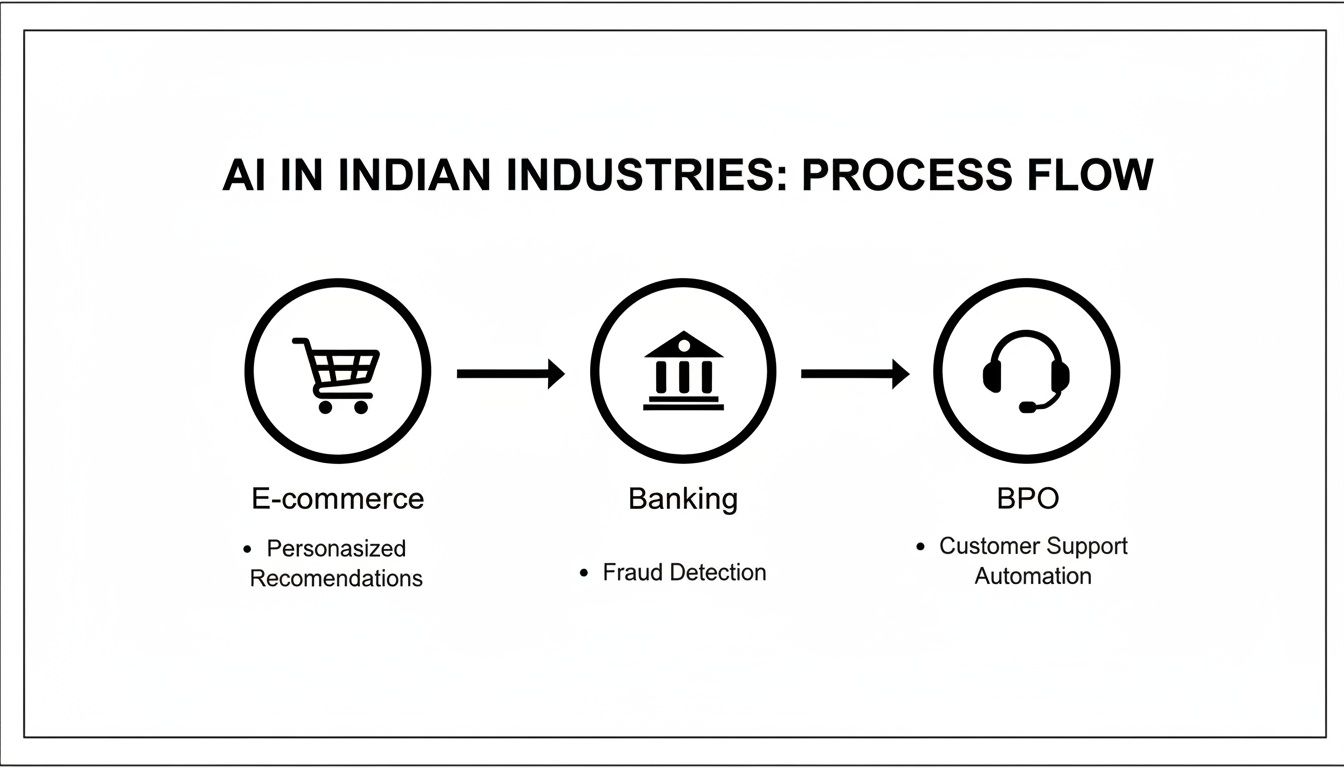
You can see a clear progression here. AI proves its value in transactional sectors first, before moving into more complex, service-heavy industries like banking and BPO.
Train Your AI and Prepare Your Team
An AI is only as smart as the data it learns from. A big part of the implementation process is training your AI model on your company’s specific information—think knowledge base articles, past support tickets, and product manuals. High-quality, organised data is the secret sauce for an AI that gives accurate and genuinely helpful responses.
But a successful AI-powered customer service strategy is as much about people as it is about technology. It's absolutely vital to prepare your human support team for this shift. Frame the AI not as a replacement, but as a powerful assistant that will handle all the repetitive work, freeing them up to focus on more complex, high-value problem-solving.
- Communicate the Vision: Clearly explain why this change is happening and how the AI will make their jobs better, not harder.
- Provide Training: Get your agents trained up on how the new system works and, more importantly, how to collaborate with their new AI teammate.
- Redefine Roles: Start transitioning agents into roles that lean into their uniquely human skills—empathy, strategic thinking, and managing escalated issues that need a personal touch.
Ultimately, the goal is a seamless collaboration. The AI brings speed and efficiency, while your human team delivers the expertise and warmth that builds lasting customer loyalty.
Measuring the True Success of Your AI Investment
So, you’ve brought in an AI-powered customer service platform. How do you know if it's actually working? It’s easy to point to faster response times or lower operational costs, but those numbers only paint part of the picture. The real return on your investment shows up in a better experience—not just for your customers, but for your support agents, too.
Moving beyond simple cost savings means we need to focus on what really matters: the human side of things. The goal isn't just about closing tickets faster; it's about building stronger relationships and creating genuine loyalty. That means looking at metrics that capture the quality of an interaction, not just its speed.
Key Metrics That Reflect Customer Happiness
To get a real sense of your AI's impact, you need to track the key performance indicators (KPIs) that tell you how your customers feel. This is the ultimate test of success.
- Customer Satisfaction (CSAT): The classic "how did we do?" metric. It directly asks customers to rate a specific interaction, and a rising CSAT score is a great sign your AI is hitting the mark with helpful, accurate answers.
- Net Promoter Score (NPS): This one looks at long-term loyalty by asking customers if they'd recommend you to others. Excellent AI-driven support can be the very thing that turns a passive customer into a vocal advocate for your brand.
- Customer Effort Score (CES): This KPI measures how easy it was for a customer to get help. A low effort score is fantastic news—it means your AI is smoothing out the bumps and creating a frustration-free journey.
Don't Forget Your Agents
A successful AI setup should empower your team, not get in their way. Agent satisfaction is a critical piece of the puzzle that often gets missed. Think of your AI as a helpful assistant, the one that handles the repetitive stuff and gives your agents the context they need to tackle the truly tricky problems.
When your agents feel supported by the tech, they're more engaged, more effective, and far less likely to burn out. That translates directly into better service for your customers, lower staff turnover, and a much healthier support culture all around.
The ultimate ROI is found in the powerful collaboration between efficient, intelligent AI and empathetic, empowered human agents. This partnership drives the kind of loyalty that keeps customers coming back.
The proof is already clear in the Indian market. A recent report found that a massive 88% of Indian CX leaders saw a positive ROI from their AI tools. This points to a powerful trend: AI isn’t replacing people; it's amplifying their abilities to deliver incredible experiences. You can discover more about how Indian businesses are leading in human-centric AI.
Frequently Asked Questions About AI in Customer Service
Bringing AI into your support operations is a big step, and it's completely normal to have questions. Here in India, business leaders often ask us about the real-world impact—from what it means for their teams to whether it’s even affordable. Let's tackle some of the most common queries head-on.
One of the biggest worries we hear is about people. What happens to the existing team when AI comes into the picture? It's a fair question, and the answer is usually much more positive than you might expect.
Will AI Replace Our Human Customer Service Agents?
Honestly, this is the biggest myth out there. What we see happening almost everywhere is AI augmenting human agents, not replacing them. Think of it this way: AI is brilliant at handling the flood of simple, repetitive questions that come in every day, and it can do it instantly.
This frees up your experienced team members to focus on what they do best: solving complex problems, handling sensitive situations, and building real relationships with customers. Their roles become more strategic and, frankly, more satisfying. It’s a win-win.
Is AI-Powered Customer Service Only for Large Companies?
It used to be, but not anymore. While the big corporations were the first to jump in, today's cloud-based AI tools have made top-tier customer service accessible for small and medium-sized businesses (SMBs) too. Many providers now offer pricing that scales with your usage.
This means you can start small. Maybe you just need a simple chatbot to answer questions after business hours. As your company grows, you can scale up your AI powered customer service capabilities. It really has levelled the playing field.
The key is finding a platform that scales with you. Modern AI solutions are designed to be cost-effective at any stage, from a solo founder to a growing enterprise team, making advanced support achievable for everyone.
How Difficult Is It to Integrate AI with Our Existing Tools?
The difficulty really depends on two things: the AI platform you choose and the tools you're already using. The good news is that most modern AI solutions are built with integration in mind. They come with ready-made connections (APIs) for popular platforms like Salesforce, Shopify, and Zendesk.
A good vendor will walk you through the process and provide solid documentation. The most important thing is to have this conversation upfront—make sure any potential partner understands your current setup and can confirm compatibility. The goal is for the AI to feel like a seamless part of your existing workflow, not another complicated piece of software your team has to wrestle with.
Ready to see how easily AI can integrate with your workflow? SupportGPT offers a complete platform for building and deploying AI agents that deliver fast, accurate help across your website and products. Get started for free today.