AI Based Customer Support: How It Works in 2026
Learn how AI based customer support works, what it resolves, how to launch it safely, and which metrics prove it works in 2026.
A shopper asks where their delayed parcel is at 11 p.m. Your team has gone home, the tracking page hasn't helped, and the next reply won't arrive until morning. A well-built support agent can check the order and explain the next step in seconds, without putting the shopper in a queue.
The harder question is what happens when tracking says “delivered” but the parcel isn't there. That's where AI-based customer support needs more than a convincing answer. It needs permission boundaries, a useful handoff, and a way to confirm that someone solved the problem.
What AI-Based Customer Support Really Covers
A customer asks whether a return is still eligible. An answer bot can find the policy and explain it. If the customer needs an exception or a refund, an action agent may be able to complete the task within its permissions, or pass the case to a person. The distinction matters: a clear answer does not necessarily resolve the customer's issue.
AI-based customer support covers systems that retrieve information, take permitted actions, or assist human agents. Those capabilities have different boundaries and should be measured separately.

The layers have different jobs
The comparison below separates common system capabilities. The automation figures come from a published benchmark synthesis of AI customer-service performance. The agent-assist result is a separate type of measure.
Three layers of AI-based customer support
| Layer | What It Does | Typical Example | Reported Outcome |
|---|---|---|---|
| Answer bot (retrieval) | Answers from help articles and product docs | What is your return window? | Cross-implementation benchmark aggregates for information-only retrieval report a median near 41% and a top quartile around 59%. These are not expected results for any specific retrieval bot. |
| Action agent | Runs authenticated tasks such as refunds, account changes, and rescheduling | Refund my last order | The synthesis estimates roughly 20–30 percentage points more resolution from action capability than information-only retrieval |
| Agent assist | Drafts replies and surfaces answers for human agents | Suggests a billing reply to a newer agent | Measured through human-agent productivity, not autonomous containment |
The 41% median and 59% top-quartile results summarize outcomes across implementations of information-only retrieval. They are benchmark aggregates, not a forecast for a particular answer bot. Vendor claims of 67–90%, often drawn from highly structured case studies, measure different conditions and cannot be compared directly with those aggregates.
An answer isn't always a resolution
A retrieval bot can explain how to update a billing address. An action agent can make the change after checking identity and permissions. Agent assist can help a person investigate why the update failed.
The measure that matters is whether the customer's issue was actually resolved. An accurate explanation may still leave an account change incomplete. A successful handoff can be a better outcome than an automated response that closes the conversation without fixing the problem.
Buying rule: Ask what the system can complete, and how it verifies resolution.
Compare platforms by what their systems can do and what counts as success. Track helpful replies, completed transactions, and human-assisted fixes as distinct outcomes, so a high automation rate does not hide unresolved issues.
What Teams Gain and Where the Gains Stop
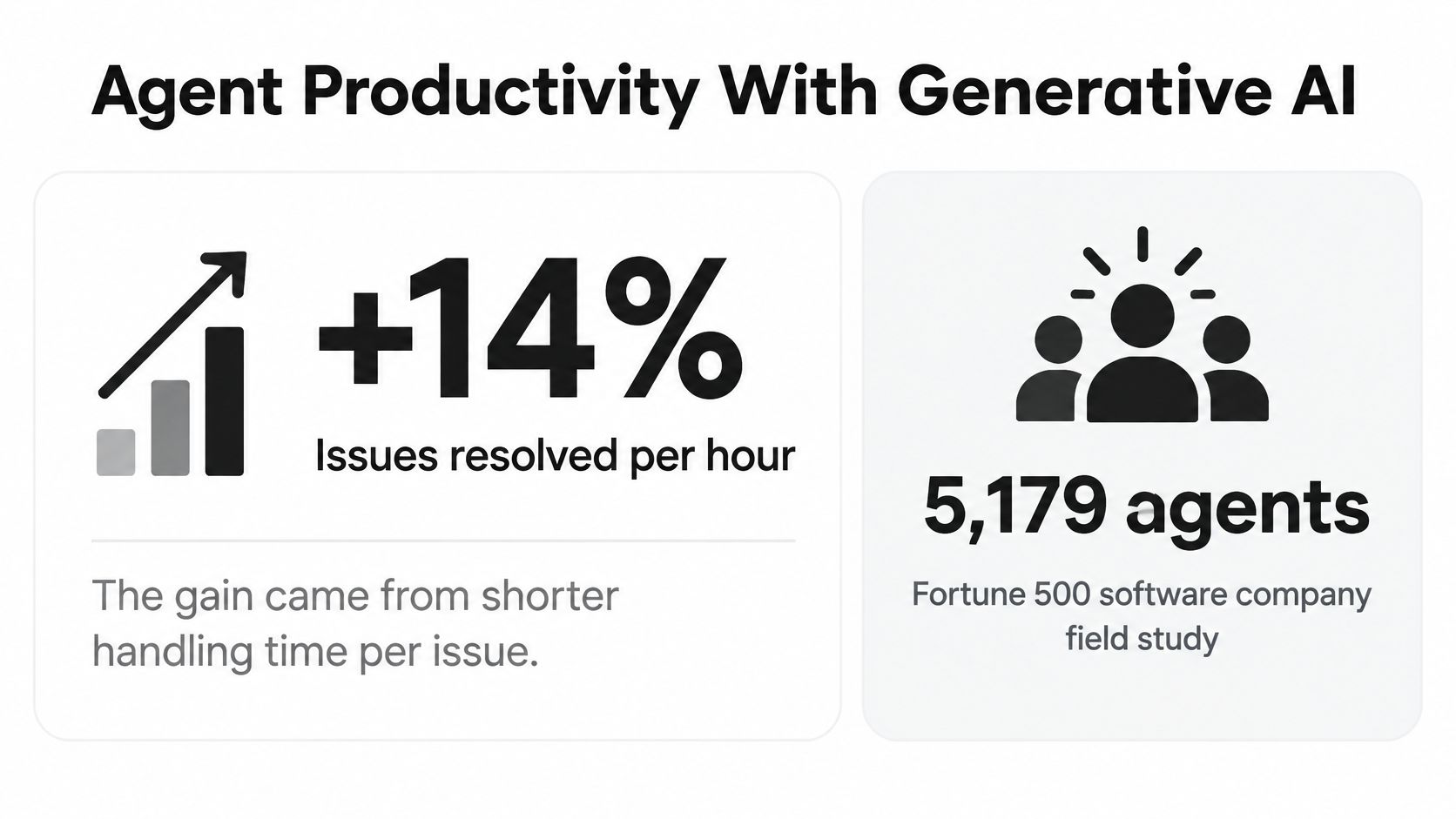
A field study of 5,179 customer-support agents found that access to a generative-AI assistant increased issues resolved per hour by 14%. Novice and lower-skilled agents improved by as much as 34–35%, while experienced, highly skilled agents saw minimal gains or small negative effects on some measures, according to Stanford's account of the customer-support field study.
Agents spent approximately 9% less time per chat and handled about 14% more chats per hour. Overall resolution increased by roughly 1.3 percentage points. Those results came from people using AI within their workflow, not from automated ticket deflection.
The graphic summarizes the productivity finding.
Separate potential benefits from measured results
Teams may use AI to provide coverage outside staffed hours, answer routine questions sooner, and offer more consistent multilingual guidance. Language-specific review still matters. Automation can also reduce repetitive work, leaving staff more time for investigations and sensitive conversations.
These gains depend on correct outcomes and working handoff. A fast answer that leaves the customer's issue unresolved is not a successful resolution. In practice, a lower automation rate can be the better result if complex or sensitive cases reach a person with the right context.
Budget against savings verified after launch. Compare customer-service costs with the cost of running the system and reviewing its outcomes, rather than assuming a widget will reduce expenses.
Salesforce's survey of 6,500 service professionals across 40 countries projected that AI would resolve 30% of service cases in 2025, rising to 50% by 2027, according to its State of Service report. These are survey-based expectations, not targets every support operation should adopt.
Find the work that consumes time
Identify where agents lose time between reading a question and choosing the next step. Searching documentation, finding the applicable policy, and reconstructing account history each point to different workflow problems than composing a reply.
Keep accountable people involved in complex decisions and emotionally sensitive cases. Requiring experts to approve obvious suggestions can add work without improving support. Measure whether the customer's issue was resolved, including cases where an agent completed the fix after AI handed it off.
For a related walkthrough, watch the video below.
Where in your queue does time disappear? Start there, then check whether the time saved leads to verified resolutions.
Architecture and Tooling Behind a Working Agent
A support agent resembles a kitchen: knowledge is the pantry, retrieval finds the recipe, the language model prepares the response, guardrails set food-safety rules, and the action layer carries requests to operational systems. If the pantry contains an expired policy, fluent preparation won't make the result safe.
Start with approved information and follow the customer's request through to a recorded outcome. A well-maintained knowledge base is part of the operating system, not just material uploaded during setup.
Follow the data flow
Core components of an AI support system
| Component | Job It Does | What to Check Before Launch |
|---|---|---|
| Knowledge sources | Holds help articles, policies, product data, and links | Named owners, review dates, and coverage of frequent intents |
| Retrieval index | Finds passages relevant to each question | Whether the correct passage ranks first on real questions |
| Language model | Writes answers using retrieved material | Accuracy, appropriate uncertainty, and tone on your test set |
| Guardrails | Blocks off-topic, unsupported, or risky replies | Behavior on unsupported requests and policy exceptions |
| Action layer | Calls order, billing, or booking APIs | Authentication, transaction limits, and required confirmations |
| Handoff routing | Sends complex cases to people | Working triggers and a usable context package |
| Channels | Connects web chat, email, and in-app messaging | Shared history wherever those channels are offered |
| Analytics and logs | Records conversations, tool calls, and outcomes | Traceable resolution status for each conversation |
Built-in AI-powered guardrails are intended to prevent misinformation and off-topic responses. Treat them as controls to test, not proof that every answer is safe.
Use edge cases that expose ambiguity. Ask about a pricing exception, a discontinued plan, and conflicting policy documents. A safe response may be a clarification or escalation rather than an answer.
Keep authority outside the model
Don't give the model write access to every API because integrations are available. Separate read permissions from write permissions, and enforce transaction limits in the application or backend rather than relying only on instructions.
Require confirmation before irreversible actions. Record the requested operation, authorization decision, tool result, and customer-facing response so reviewers can reconstruct what happened.
Also test failed and delayed tool calls. If a refund request times out, the agent shouldn't announce success or retry blindly before checking whether the transaction completed.
Cross-channel history deserves the same attention. A customer moving from web chat to email shouldn't lose their place just because the interface changed.
The analytics layer connects these components to operational accountability. Without it, you can inspect individual messages but can't reliably tell whether a failed answer, tool error, or routing problem caused the unresolved case.
How to Launch an AI Support Agent in Six Stages
Consider a SaaS team whose ticket review identifies routine billing questions as a promising pilot. The team starts with invoice explanations and billing-date lookups, while keeping disputed charges and contractual exceptions with people.
That's a proposed rollout pattern, not a customer case study. The important distinction is structured billing information versus judgment-heavy billing disputes.
Prepare the work before enabling traffic
-
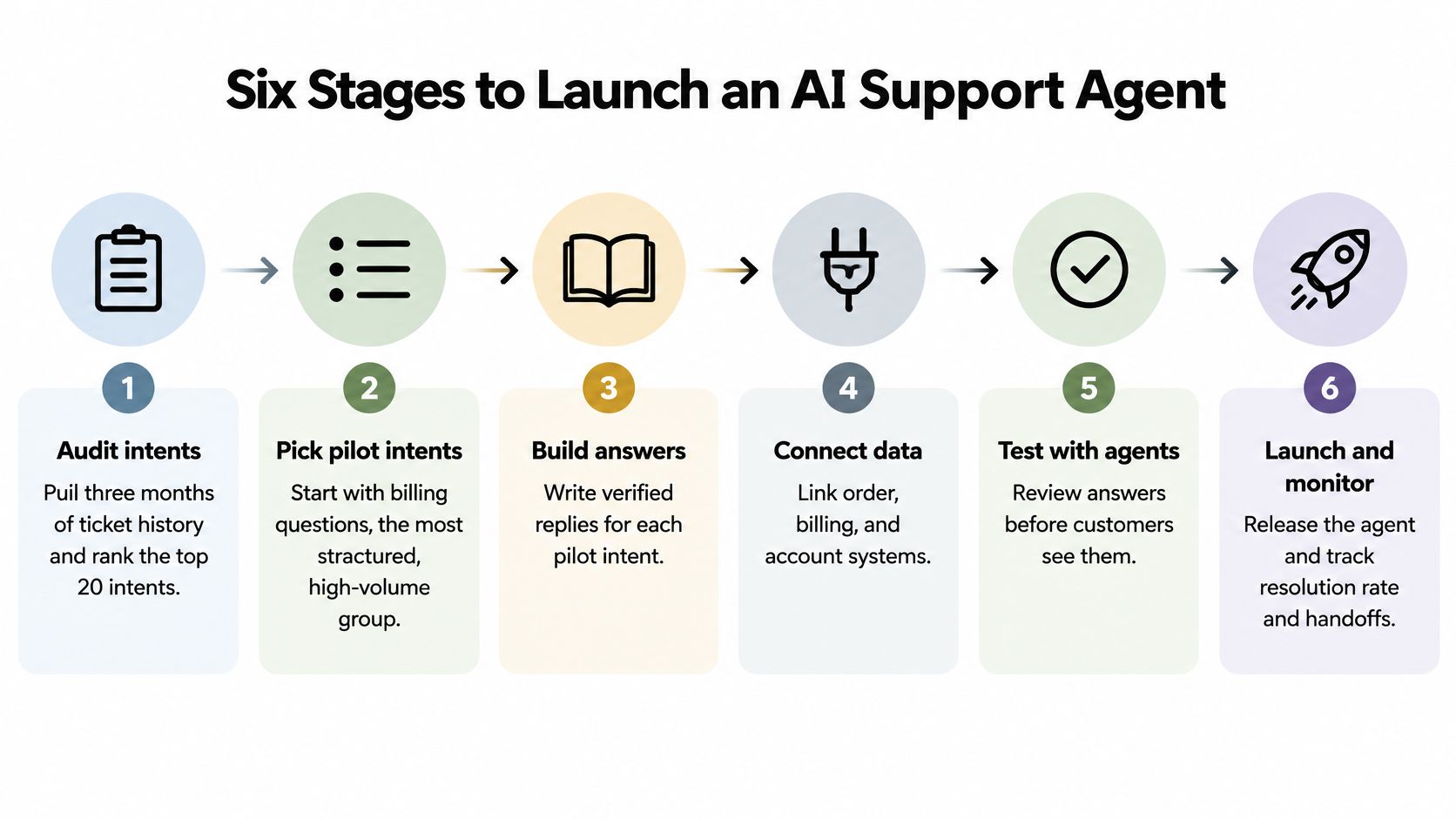
Audit intents and establish the baseline. Review a representative period of ticket history, rank common requests, and distinguish knowledge questions from account lookups and account changes. Record human-only outcomes before launch so the billing pilot has a meaningful comparison, including resolution, recontact, handling effort, and cost.
-
Clean the knowledge base. Fix or retire outdated billing articles and assign an accountable owner to each active source. Resolve conflicts between public help content and internal instructions before asking the agent to choose between them.
-
Set scope, tone, and escalation rules. Write plain-language instructions that explain what the agent may answer, when it should clarify, and which billing situations require a person. For example, keep refund exceptions outside autonomous scope rather than asking the model to improvise what seems fair.
The rollout should move from understanding requests to testing behavior, then to controlled deployment.
Prove behavior before widening access
-
Connect actions progressively. Start with authenticated, read-only access, such as retrieving an invoice or checking payment status. Add write operations only after their authorization, confirmation, and failure behavior have passed testing.
-
Test with real customer questions. Build a historical test set covering routine billing requests, missing information, contradictory documents, hostile instructions, and requests outside scope. Score replies against approved outcomes, including whether the agent correctly refuses or escalates, rather than rewarding plausible wording.
-
Pilot and widen deliberately. Release the agent to a limited traffic slice and compare it with a human-only control using a comparable ticket mix. Expand by intent only after reviewing completed outcomes and confirming that human teammates can handle the resulting escalations.
Keep a launch record with the approved knowledge version, instructions, enabled actions, test results, and rollback owner. When someone changes a billing policy, rerun the affected tests before expanding access.
Separate setup speed from launch readiness
Once content is ready, adding knowledge, shaping tone, testing questions, and deploying can take minutes. Copying a provided widget embed code onto a website can also take only a few minutes.
That doesn't mean a production rollout has been validated in the same time. Setup time depends on content readiness, integration complexity, and the risk of the work you authorize.
AI-generated responses can be inaccurate or unsuitable, and customers remain responsible for testing agent behavior and reviewing important output. Reserve time for that review even when the interface makes deployment easy.
A successful setup produces a live agent. A successful launch produces evidence that the agent behaves safely on the work you assigned.
Designing Human Handoff That Keeps Context
A customer who has repeated a password reset needs a different next step, not another copy of the same instructions. Human handoff should preserve what has happened and make it possible for the next agent to resolve the issue.
Human support is a safety and trust layer, not evidence that automation failed. In a 2025 survey of 1,006 consumers in the United States, United Kingdom, and Canada, 72% were open to AI interactions only when they could reach a human.

Trigger escalation before the customer gets trapped
Write natural-language instructions that escalate queries based on complexity. Set clear triggers for unsupported requests, repeated unsuccessful remedies, account-risk signals, legal threats, and explicit requests to speak with a person.
Confidence alone is a poor escalation rule. Missing evidence, conflicting account data, or a failed action are observable reasons to stop, even when the AI response sounds certain.
A human handoff workflow that preserves context should also route the case to someone equipped to handle it. A billing dispute belongs with a billing-capable teammate, not just the next available inbox.
Transfer a usable context package
The receiving agent needs enough information to continue without asking the customer to start over:
- Conversation history: The exchange so far, with a concise summary linked to the original messages.
- Authentication state: Which identity checks passed and which permissions remain unverified.
- Customer goal: The outcome the customer wants, kept separate from the bot's interpretation.
- Attempted remedies: Instructions given, actions tried, and their actual results.
- Risk and sentiment signals: Relevant urgency or frustration, distinguished from established facts.
- Open questions: What information is missing and why the case was escalated.
Share only details the receiving team is authorized to access. A useful summary is not a reason to distribute unnecessary account information.
For the customer who has tried resetting a password repeatedly, the human should see that history and investigate the next likely cause. If no person is immediately available, explain the queue or follow-up process plainly and preserve the case.
A lower automation rate can be the better result when it prevents failed self-service and gets the customer to someone who can finish the job.
Metrics That Separate Real Resolution From Deflection
Only 28% of surveyed customer-service leaders worldwide had achieved measurable business value from generative AI, according to BCG findings summarized in a customer-experience research review. The same review reports Capgemini's finding that 33% of organizations exploring or using generative AI were already seeing improved first-contact resolution, while another 52% expected that benefit.
The distinction matters: an expected benefit isn't a measured result. Before launch, define what counts as solved and record a comparable human-only baseline.
Make the outcome definitions explicit
Metrics for judging AI support outcomes
| Metric | What It Measures | How to Calculate | How to Read It |
|---|---|---|---|
| Containment rate | Conversations that never reached a human | Bot-only conversations divided by total conversations | Meaningful only alongside resolution and recontact |
| Verified resolution rate | Issues actually fixed, confirmed by outcome | Confirmed resolved issues without recontact in a defined window, divided by total eligible issues | Primary outcome measure |
| Intent-level resolution | Success across structured and ambiguous requests | Resolved conversations divided by eligible conversations within each intent | Use separate targets for different work |
| Escalation quality | Whether the human received usable context | Context-complete transfers without repeated information requests divided by reviewed transfers | Pair with transfer abandonment |
| Recontact rate | Customers returning about the same issue | Same-issue repeat contacts within the window divided by issues marked resolved | Investigate increases before expanding |
| First-contact resolution | Issues solved during the initial interaction | Issues resolved on first contact divided by total eligible issues | Compare with the human baseline |
| Segment resolution | Outcomes by tenure and issue complexity | Apply the same metrics within each segment | Inspect groups hidden by averages |
| Cost per resolved issue | Total handling cost for each solved case | Platform, staff, escalation, and attributable rework costs divided by verified resolved issues | Compare with equivalent human-only work |
A conversation ending doesn't prove resolution. Use transaction completion, customer confirmation, or reviewed evidence where available, and treat silence as uncertain rather than automatically successful.
Choose a recontact window appropriate to the issue. A shipping question and a recurring subscription problem may need different observation periods.
Read the metrics together
High containment with rising recontact is a warning, not a win. Customers may be abandoning the conversation, switching channels, or returning after following ineffective advice.
Tag the same issue across channels where your systems allow it. Otherwise, a customer who leaves chat and opens an email ticket may appear as a successful bot conversation plus an unrelated human case.
Segment by intent, complexity, channel, language, and agent tenure. The earlier productivity findings show why a blended average can conceal materially different outcomes for newer and experienced staff.
Use a consistent review process for both AI and human work. A stricter test for one group makes comparisons misleading, while a weak test for both makes the dashboard reassuring but unhelpful.
A useful chatbot performance metrics framework should connect operational measures to downstream costs. Count repeat contacts, avoidable refunds, unnecessary escalations, and other attributable consequences of incorrect answers.
Don't claim retained revenue or prevented churn unless you can establish the connection. Start with outcomes you can verify, then broaden the business case as the evidence improves.
Common Pitfalls and How to Avoid Them
Fast deployment isn't the dangerous assumption. Assuming that deployment proves readiness is.
The checks below address different failure causes, so don't replace them with a single overall quality score.
Challenge the shortcuts
- Stale knowledge: An outdated refund policy can produce a confident but incorrect answer. Use the ownership and review process described in the launch stages, and make policy changes trigger retesting.
- Headline benchmark shopping: A published automation claim may describe a narrower workload than yours. Use the opening comparison to ask what was included, excluded, and independently checked.
- Ambiguous work first: Contract exceptions and disputed charges require interpretation that routine lookups don't. Keep them outside the initial pilot until the structured workflow has demonstrated reliable outcomes.
- Actions without boundaries: Broad write permissions turn a bad interpretation into an account change. Enforce the architecture controls before enabling consequential tools.
- Blended averages: An overall improvement can hide a struggling intent or an expert-agent workflow that has become slower. Inspect the segments defined in the measurement framework.
- A single failure path: When the bot can't answer and can't transfer, customers loop. Maintain a working human route and review important responses on an ongoing schedule.
Plan for unavailable service too
A handoff process also needs to survive outages and unavailable integrations. Keep an alternative contact route visible, and make sure staff know how to recover conversations that stopped mid-action.
Our service is provided “as is” and “as available”; we don't promise uninterrupted or error-free operation. Treat continuity arrangements and output review as operating responsibilities rather than assumptions about the software.
Release check: Current sources, relevant benchmarks, bounded scope, restricted actions, segmented results, and a reachable human.
If any of those checks fails, narrow the rollout. You don't need to abandon automation, but you do need to remove the unsupported promise.
Choosing a Platform and Pilot Budget
Compare platforms on the work they can complete and the evidence they retain. An answer bot may suit policy questions; an action agent needs stronger authorization controls; agent assist may be the better fit where people must remain responsible for decisions.
Use the same historical questions and expected outcomes when evaluating AI-powered customer-service platforms. A polished demonstration with prepared prompts won't show how a tool behaves on your unresolved cases.
Ask operational questions
- Operating layer: Does the platform retrieve answers, execute actions, assist people, or combine those functions?
- Action authority: Which tasks can it complete, and where are authorization and transaction limits enforced?
- Handoff completeness: Does the receiving person get the context package, or only a transcript?
- Outcome reporting: Can you distinguish verified resolution and recontact from containment?
- Data access: Can you export conversation records and inspect action logs for review?
Match credits to the pilot
Estimate usage from your historical test set, expected pilot traffic, retesting, and ongoing quality review. Confirm how credits are consumed before converting a conversation forecast into a plan choice; don't assume a credit equals a resolved issue.
Our SupportGPT platform lets non-technical teams add knowledge, configure an agent, and embed the Ask AI widget on a website, with human handoff available. The plans provide these starting points:
| Plan | Monthly Price | Included Capacity | Relevant Features |
|---|---|---|---|
| Standard | $150 | 12,000 credits, 3 team seats, 2 AI agents | Advanced AI models, integrations, and analytics; labeled most popular |
| Pro | $500 | 40,000 credits, 5 team seats, 3 AI agents | Advanced analytics and priority capabilities |
| Enterprise | Custom | Limits shaped around the organization | Requirements and support options agreed after discussion |
If your measured usage fits Standard and its seats and analytics meet the pilot's needs, start there. Upgrade when a demonstrated requirement, rather than an optimistic traffic forecast, justifies it.
Include staff review and integration maintenance in the budget. The subscription is only part of the cost of operating support that customers can trust.
SupportGPT offers knowledge-based agents, an embedded website widget, and human handoff so you can build around completed outcomes rather than unanswered queues. Visit SupportGPT to configure a focused pilot, test real customer questions, and define when a person should take over before opening it to customers.