What Is a Knowledge Base? Definition, Types and Examples
What is a knowledge base? Learn its components, types, how AI uses it, and how to keep it accurate for support and self-service.
A knowledge base is an organized, searchable collection of information that people or software use to find answers. It works like a hotel concierge's binder: staff can find the current policy without sorting through outdated copies. A shared drive full of files lacks that structure.
The idea grew from expert systems, which emerged in the 1970s and spread in the 1980s. These systems stored facts and rules in a knowledge base, then used a separate inference engine to apply rules and draw conclusions. The history of expert systems describes information organized for retrieval, reasoning, or decision support.
MYCIN, developed at Stanford, used medical knowledge to help diagnose bacterial infections and recommend treatments. Digital Equipment Corporation's R1 applied configuration rules to select compatible computer parts for customer orders. Both made specialist knowledge explicit and machine-readable, rather than keeping it only in an expert's head.
Pulling that expertise out of people's heads made it easier to apply consistently, but only while the stored rules stayed accurate.
What a Knowledge Base Is and Where the Idea Came From
Think of a hotel concierge's binder. Every staff member reads the same pages. Answers are sorted, dated, and replaced when the policy changes. A shared drive full of PDFs is only a folder. Nobody can tell which file is the current refund rule, and a search returns the draft next to the signed version.

The modern idea comes from expert systems, which emerged in the 1970s and spread quickly in the 1980s. In that design, the knowledge base stored facts and rules, while a separate inference engine applied those rules to known facts and produced new conclusions. As the history of expert systems describes it, this is organized information built for retrieval, reasoning, or decision support, not a pile of webpages.
MYCIN, built at Stanford in the 1970s, used medical knowledge to help diagnose bacterial infections and recommend treatments. Digital Equipment Corporation's R1 used configuration rules to pick compatible computer parts and build customer orders. Both systems captured specialist knowledge as explicit, machine-readable rules instead of leaving it in one expert's head.
Pulling that expertise out of people was already the hard part. Teams named it the knowledge-elicitation bottleneck, and support teams still hit it when the only person who knows the exception is on leave.
Three-part test: Is the collection structured, findable, and maintained by a named person? Fail any one, and you still have a folder.
The Parts That Make Up a Knowledge Base
The knowledge base is the whole. Six parts make it usable, and each one has a plain job.
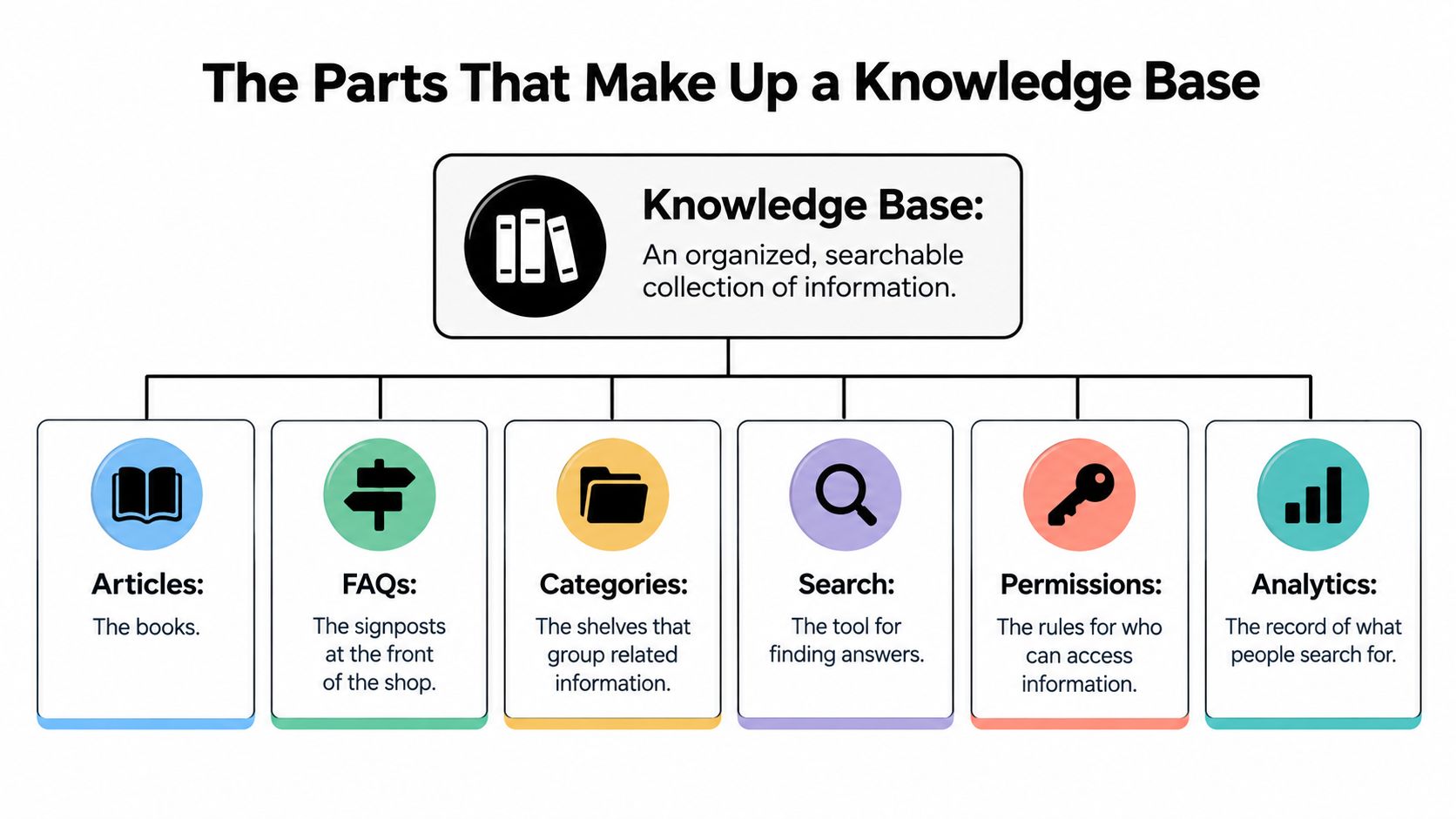
Articles are the books. FAQs are the signposts at the front of the shop. Structured documents are the spec sheet on the shelf. Metadata is the label on each spine. Taxonomy is the set of shelf sections. The search index is the catalogue that makes any of it findable.
| Component | What It Holds | Example | Typical Owner |
|---|---|---|---|
| Articles | Step-by-step explanations of one task | How to reset a password | Support or product team |
| FAQs | Short question and answer pairs | Can I change my plan mid-cycle? | Support team |
| Structured documents | Facts stored in fixed fields | Plan limits, prices, eligibility rules | Product or policy owner |
| Metadata | Version, language, region, review date | v2, English, EU, next review 1 June | Knowledge manager |
| Taxonomy | Categories and hierarchy | Billing > Refunds > Annual plans | Knowledge manager |
| Search index | Content findable by keyword and meaning | Keyword and vector index | Platform or engineering team |
What a beginner needs first
Articles and FAQs cover most customer questions. Metadata and taxonomy start to pay off once you have a few hundred items, because that is when two articles with the same title stop being obvious.
A SaaS plan comparison shows why fields beat paragraphs. Store plan name, seat limit, monthly price, renewal rule, and refund window as separate fields. A customer and a bot then read the same fact. Three paragraphs force both of them to guess which sentence is the rule.
List the six parts you already have. The missing one is your next build task, not a redesign of the whole library.
How a Knowledge Base Answers a Question
A customer asks, “Can I cancel after renewal?” The answer depends on more than matching those words. The system needs the right policy for that customer, then it must show whether the evidence supports a reply.
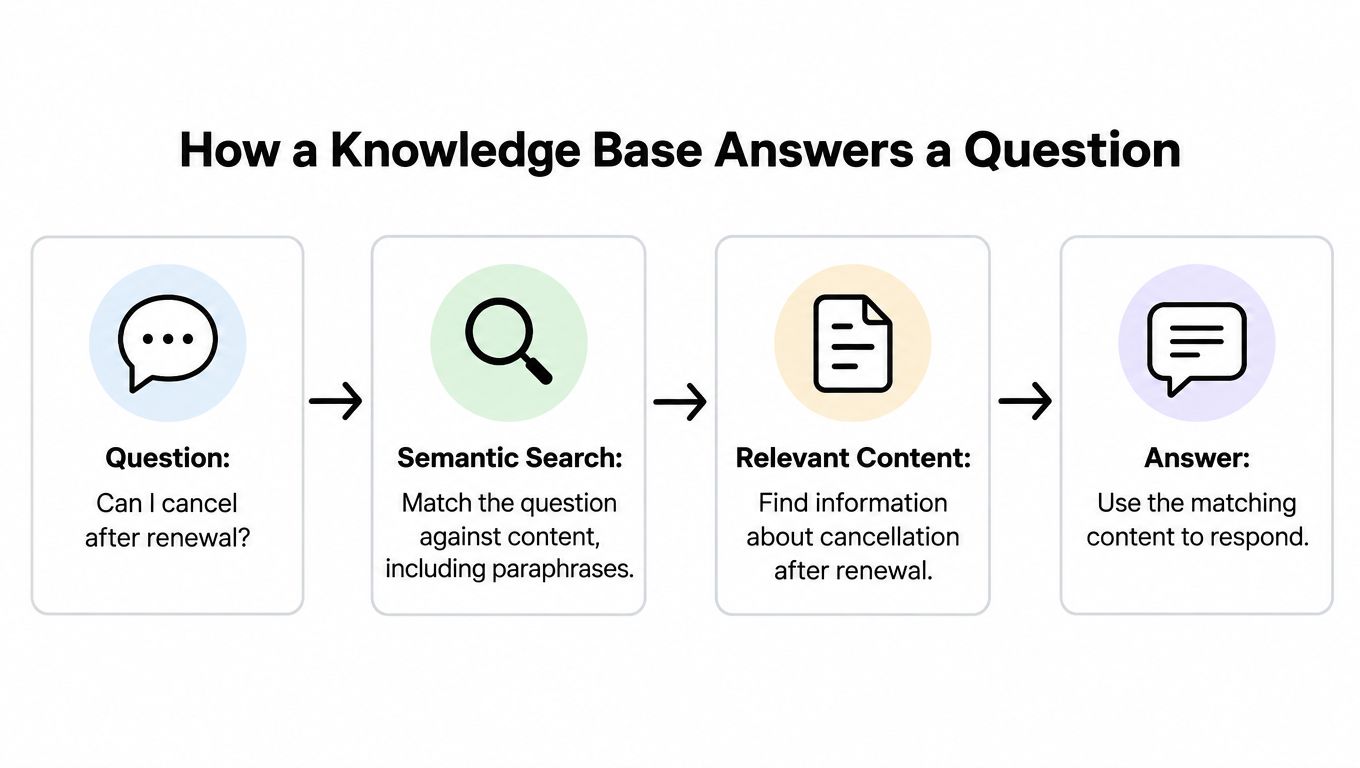
- Match the wording. Semantic search finds similar meanings, even when a customer paraphrases. Lexical search matches exact terms, which helps with SKUs and error codes. A study comparing semantic and lexical retrieval in Elasticsearch tested fact questions, reasoning, and summarization, and reported different strengths across those task types (RAG evaluation using Elasticsearch). Using both methods can cover more kinds of questions.
- Filter with metadata. Apply the product version, language, region, and plan. Without those filters, a US annual policy could be returned for an EU monthly customer.
- Retrieve and rerank. The system gathers likely passages, then can reorder them by relevance. If the policy is missing or out of date, the right evidence may never appear.
- Answer or hand off. A language model can draft a reply from the retrieved passages. If they do not support an answer, route the case to a person. A confident tone cannot make a retrieval miss correct.
In retrieval-augmented generation, the model searches for evidence at question time instead of relying only on information learned during training. That lets a team update its source content without retraining the model. A research paper describes knowledge bases as supporting question answering by combining information from sources such as text and structured data (knowledge-base research note).
The way facts are represented also matters. A knowledge graph connects items such as a product, plan, eligibility rule, exception, and escalation path. Those relationships can make related facts easier to retrieve than placing every rule in one long article.
A smooth reply can still be wrong. Track hit rate separately from answer faithfulness, response time, and escalation rate. Test with a small, versioned set of factual, procedural, multilingual, and adversarial questions, rather than relying on a single satisfaction score. Assign an owner and review date to each source, and keep private or unapproved information out. For help-desk setup, this guide to knowledge base integration explains how to connect sources while keeping the chat layer from becoming the source of truth.
This short walkthrough shows the retrieve-then-answer process in motion.
Types of Knowledge Bases With Real Examples
Four types differ by who reads them and what they store.
| Type | Main Reader | What It Holds | Example |
|---|---|---|---|
| Internal knowledge base | Support agents and staff | Runbooks, policies, escalation paths | Agent checks refund exceptions before replying |
| External help center | Customers | Public articles, FAQs, tutorials | Setup guide linked from a product site |
| AI-assisted knowledge base | Customers and agents | Indexed articles answered in natural language | Chat widget answering from help articles |
| Structured data knowledge base | Software and analysts | Entities, properties, relationships | Wikidata, a public structured data store |
Most small teams need the first three. Agents need the internal base for exceptions. Customers need the public help center. An AI-assisted layer answers from those same articles instead of a second, drifting copy. The structured store serves software and analysts once plans and prices change often.
Wikidata, launched in 2012 as structured data for Wikipedia and other projects, shows why structure beats raw volume. By March 2015 it held more than 17.4 million items and 58 million statements. A February 2020 snapshot described about 100 million items and roughly 1 billion facts, with about 10,000 properties. Later Wikimedia figures report more than 120 million entities, as the Wikidata overview records. Items, typed properties, and upkeep mattered as much as the count.
If the question is how to help someone do a task, write an article. If the question is what is true about the product, store fields. Teams comparing those choices can use this guide to AI knowledge management when the assistant and the help center start to diverge.
Why Knowledge Bases Pay Off for Support Teams
Suppose a four-person team handles about 400 tickets a week, and roughly half repeat the same fifteen questions. Once those answers are written, linked from the help center, and searchable, the repeat pile shrinks. Agents spend the saved hours on the odd cases that need judgment.
- Fewer repeat tickets: Customers can find the answer at 2 a.m. without waiting for the queue.
- One approved wording: Every agent cites the same text, so refund advice doesn't change with the shift.
- Faster onboarding: New hires learn from the pages customers already use.
- Reuse across teams: Sales and success pull the same product facts instead of keeping a private doc.
On the customer side, someone searches, reads a short article, and either finishes the task or escalates with the article already open. That is the core of customer self-service. The handoff is cleaner because the agent sees what the customer already tried.
Watch three signals. Track ticket volume by topic, the share of article readers who don't open a ticket afterward, and searches that return nothing. A library that doesn't move those numbers is a publishing project, not a support tool.
A knowledge base earns its place by reducing tickets, not by existing.
Where Knowledge Bases Fail and What People Get Wrong
A support bot can find a page and still give a poor answer. Searchability shows that information is retrievable, not that it is current, accurate, or suitable for the question. A SINTEF study on customer-service hallucinations surveyed 274 potential end-users and examined how hallucinations in conversational customer service affect trust. Its findings point to a risk: inaccurate answers can undermine trust, particularly when the consequences are harmful.

Adding pages can raise the risk
More pages do not guarantee better answers. If outdated and current instructions sit side by side, retrieval may surface the wrong one. Treat the knowledge base like a shared handbook: every page needs a responsible owner, a review date, an authoritative source, and a clear way to retire old versions.
These controls are operating choices, not features that come automatically with a definition of “knowledge base.” A support lead can set them up by recording who maintains each page, when it was last checked, and what source supports its guidance. Writing clearly matters too. The partner resource on examples of clear writing offers writing examples, while knowledge management best practices discusses ways to manage shared information.
More tools aren't a fix
A 2023 KMWorld survey of more than 300 knowledge-management professionals across over 20 industries found that 36% of organizations used three or more knowledge-management tools, while 31% did not know how many they had. The KMWorld survey illustrates why adding another app alone may not create a reliable source of truth. Teams still need clear ownership and rules for deciding which information takes precedence.
Searchable does not mean appropriate to publish. Personal data, secrets, and account-specific decisions need boundaries; the next section covers what to keep out. As a support lead, I would treat a confident answer as a reason to check its source and review date, not as proof that the page is right.
What Must Stay Out of a Knowledge Base
A knowledge base should work like a public help desk, not a filing cabinet for private cases. Keep personal data, secrets, account decisions, and fast-changing status out of the shared index.
- Personal data: Names linked to accounts, addresses, and payment details.
- Passwords and secrets: Credentials, tokens, and internal access steps.
- Account-specific decisions: Whether a particular invoice qualifies for a refund.
- Legal or financial guidance: Advice that could cost a customer money if it is wrong.
- Fast-changing status: Live outage notes that may be stale before anyone reviews them.
A general article can explain the refund policy, but it cannot safely decide what should happen to a named customer's invoice. If an indexed answer gets that decision wrong, the customer could lose money or access. Keep case details with the authorized people and systems that can verify them. Customers also need clear limits on what an automated answer can provide, as reflected in this study of trust in agentic AI.
Three ways to handle a risky question
Send the question to a person, keep its answer out of the index, or show a clear message explaining the limit. A confident answer can sound convincing even when it crosses a boundary, so confidence is not a substitute for review.
Use this screen before writing an article:
- Could a wrong answer cost the customer money, data, or account access?
- Does the answer depend on this specific account?
- Could it change before the next review?
If any answer is yes, send the question to a human or keep it outside the shared index. The refund policy itself can be searchable. A decision approving a refund on a named invoice belongs with an agent who can check the account and apply the policy. This distinction keeps reusable guidance available while protecting customers from general content being mistaken for a verified case decision.
Build Your First Knowledge Base in Six Steps
- Pull the top questions. Take the 20 questions customers ask most often from tickets, chat logs, or site search. Start there, not with a full taxonomy.
- Screen each one. Run the stay-out test. Anything personal, account-specific, legal, or financial goes to a human, not an article.
- Write one piece per remaining question. Use an article or a FAQ. Give each a named owner and a review date. If two articles could answer the same question, merge them before you publish.
- Turn volatile facts into fields. Plans, prices, and eligibility rules belong in structured fields so customers and software read one number, not three paragraphs that drifted apart.
- Set the review cadence, then put it on a calendar. Copy the table below. A date that isn't scheduled doesn't get done.
| Content type | Review every | Owner | Example |
|---|---|---|---|
| Pricing and plans | Each quarter | Product or finance lead | Monthly prices and seat limits |
| Refund and policy text | Twice a year | Legal or operations lead | Refund windows and exceptions |
| Product how-to articles | After each release | Product or support lead | Setup and integration guides |
| Security and compliance | Yearly | Security lead | Data handling statements |
| Contact and hours | Monthly | Support manager | Support hours and channels |
- Add where silence clusters. Each month, check which unanswered questions gather around one topic and write that article next. Silence is a better backlog than a brainstorm. A knowledge base training walkthrough covers how to turn those approved pages into answers an assistant can use.
Index your first twenty approved answers in SupportGPT, with guardrails that keep replies on topic and route complex queries to your team.
SupportGPT lets non-technical teams train an assistant on help articles, Q&A pairs, files, and site pages, then embed it as a widget with escalation back to people. If you're ready to turn a governed knowledge base into 24/7 answers that stay on your sources, visit SupportGPT and start with the questions you already trust.