AI Agent vs AI Assistant for Support Teams
AI Agent vs AI Assistant for support teams: autonomy, reliability, cost, and when a human should take over.
The most popular advice on this topic is wrong. Teams are told to retire the assistant and "upgrade" to an agent, as if autonomy were a higher software tier. It isn't. An assistant and an agent solve different control problems, and the wrong control model on a refund, an identity change, or a policy answer will cost you more than the ticket it was meant to close.
The decision is which control model fits the risk of each support task. Keep answers, drafts, and retrieval on an assistant. Give an agent only the actions whose end state you can observe, reverse, or gate. Tag every live ticket type before you buy another tool.
AI Agent vs AI Assistant Side by Side
Same-day verdict: an AI assistant responds to a request by answering, drafting, or retrieving. An AI agent pursues a goal across steps, chooses actions, uses connected systems, and finishes with limited supervision. If you cannot name the end state of the ticket, you do not have an agent job. You have an answer job.
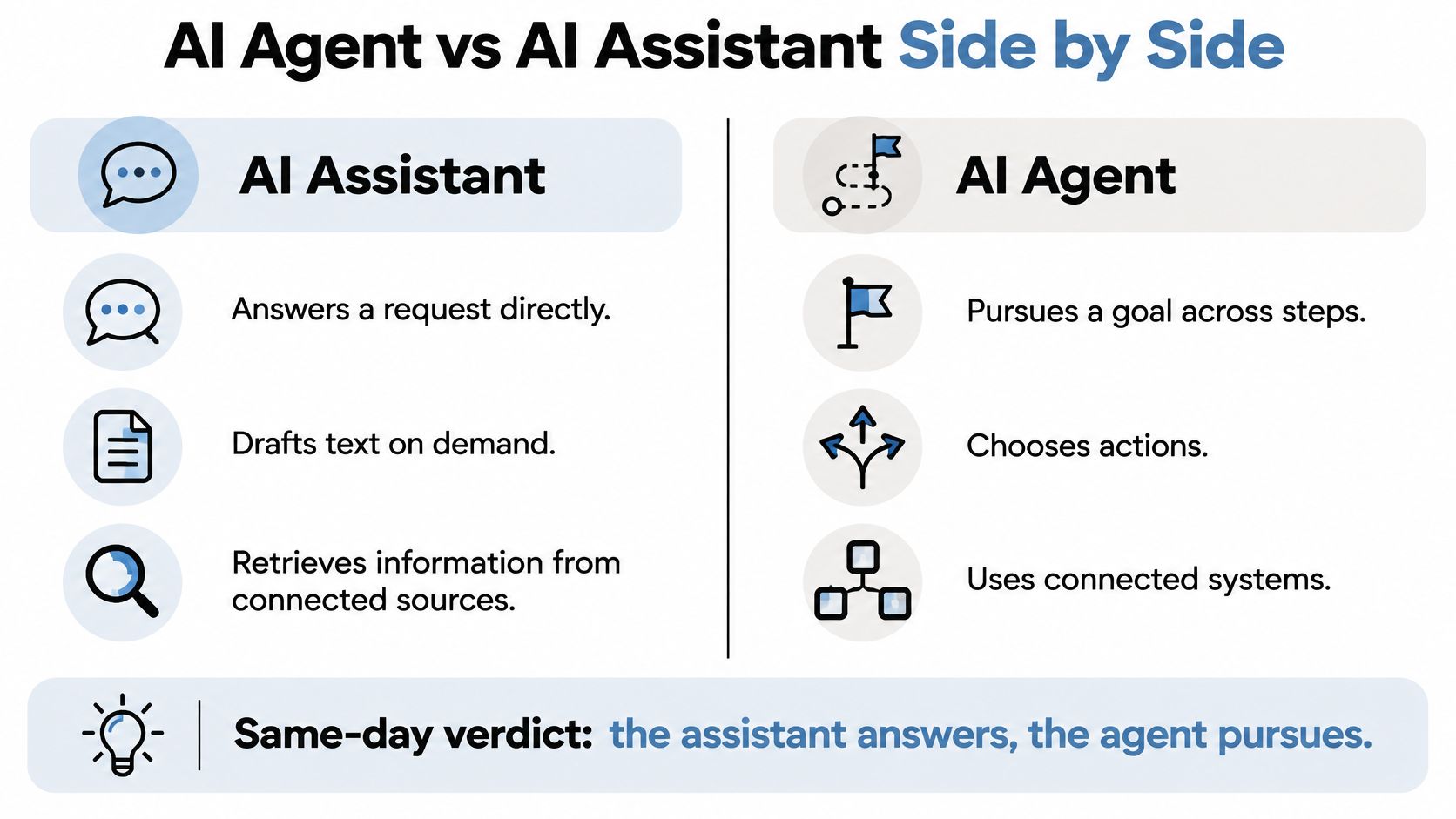
| Criterion | AI assistant | AI agent |
|---|---|---|
| Trigger | User request in the moment | A goal pursued with limited supervision |
| Time horizon | One turn or a short exchange | Multi-step plan and execution |
| Tools | Optional single or limited function call | Tool choice, parameters, retries, and verification |
| State | Little memory beyond the thread | Tracks workflow state across steps |
| Supervision | A person drives each step | Acts, then escalates exceptions |
| Best support fit | Policy answers, drafts, retrieval, navigation | Bounded actions such as a capped refund or ticket update |
| Main failure | Wrong, ungrounded, or off-topic answer | Errors compound across later steps |
| Release metric | Answer quality, latency, groundedness | End-state success, authorization, and safe escalation |
Three mix-ups that wreck a rollout
A single function call is not an agent. Plenty of assistants can fetch one order status and stop. The customer asked a question, the tool returned a field, and the model wrote a sentence. Nobody planned a next step, retried a failure, or wrote an outcome back to the help desk. That is still an assistant with a lookup.
A successful tool call is not a completed task. The API can return 200 while the arguments were wrong, the returned payload was misread, or the account never changed. Release judgment belongs on the final account state, not on the HTTP status.
More autonomy is not the upgrade for every queue. Policy explanations, how-to answers, and reply drafts stay with an assistant judged on groundedness, latency, and tone. Refunds, subscription changes, and ticket updates move to an agent only when the end state is observable and the action is reversible or approval-gated.
Open yesterday's queue and tag each live ticket type as answer, supervised action, or do-not-automate. That tag is the product decision. The model name is not.
Autonomy and What Teams Actually Run
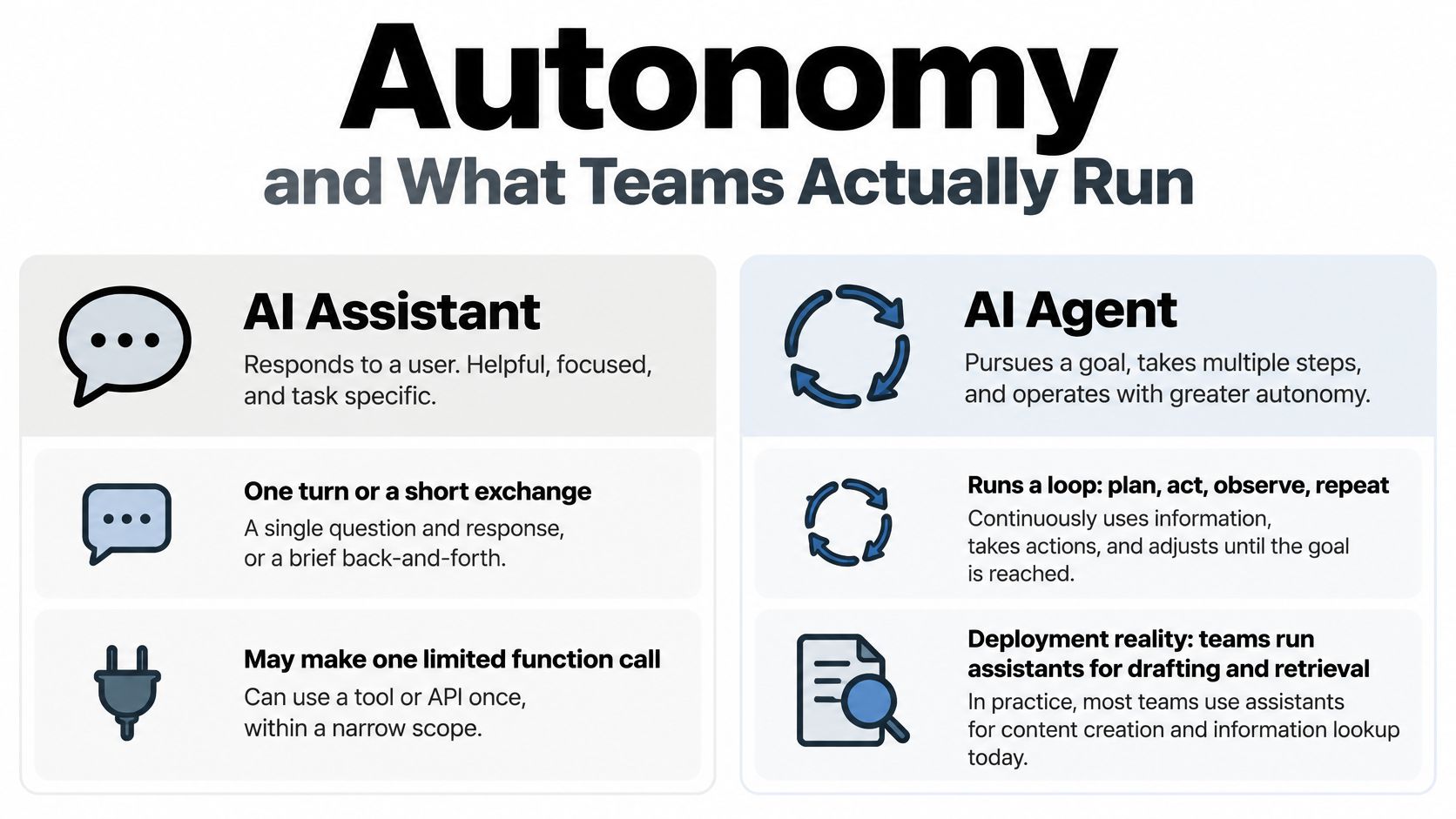
Autonomy is the only definitional line that still holds. An assistant handles one turn or a short exchange and may make one limited function call. An agent runs a loop: plan, select a tool, generate parameters, track state, retry, and verify. Memory, retrieval, and a chat window show up on both sides, so they do not settle the AI agent vs AI assistant argument.
What the adoption numbers actually say
McKinsey's 2025 State of AI found that 88% of organizations regularly used AI in at least one business function, while only 23% said they were scaling an agentic-AI system somewhere in the enterprise and another 39% were still experimenting. That puts 62% at least at the experimentation stage for agents, yet no individual business function had more than 10% of respondents reporting scaled agent deployment. The same research defines agentic systems as foundation-model-based systems capable of acting autonomously, planning, and executing multiple workflow steps, which is past a conversational assistant's usual answer-generation role.
Read those percentages as different claims, not as one market number:
- Regular AI use (88%): at least one function already runs generative AI, mostly assistant-style.
- Scaled agentic system (23%): somewhere in the enterprise, not across every queue.
- Still experimenting (39%): a pilot, not a default operating model.
- No function above 10% scaled: interest outruns operational scale.
A PwC survey of 300 senior executives in May 2025 found 79% said AI agents were already being adopted, 35% of adopters reported broad adoption, and 17% reported adoption across almost all workflows and functions. Treat that as executive-reported breadth of pilots, not as scaled completion in every function. The assistant-era baseline is older and wider: Slack's January 2024 survey of 10,281 desk workers in the United States, Australia, France, Germany, Japan, and the United Kingdom found 1 in 4 had tried AI tools for work.
Where support actually sits
The 2023–2024 wave was copilots and chat. The 2026 pattern is still narrow agent deployments, not a general worker on the whole queue. A live assistant can already give 24/7 grounded answers and summaries. An agent that checks policy, calls an API, and escalates is a scoped pilot.
Intent to expand is not proof the loop finishes.
Ship the assistant where the job ends in a sentence. Pilot the agent only where you can count completed outcomes, failed runs, and clean handoffs. If you cannot measure completion, you are still running a chatbot with extra permissions.
Reliability Beyond a Successful Tool Call
A green tool call is a weak victory. A multi-step agent can pick the right refund endpoint, submit an invalid amount, misread the returned balance, lose conversation state, and trigger a second action on the wrong order. Every step can look fine in isolation. The ticket still ends unresolved, and the customer now has a mess to clean up.
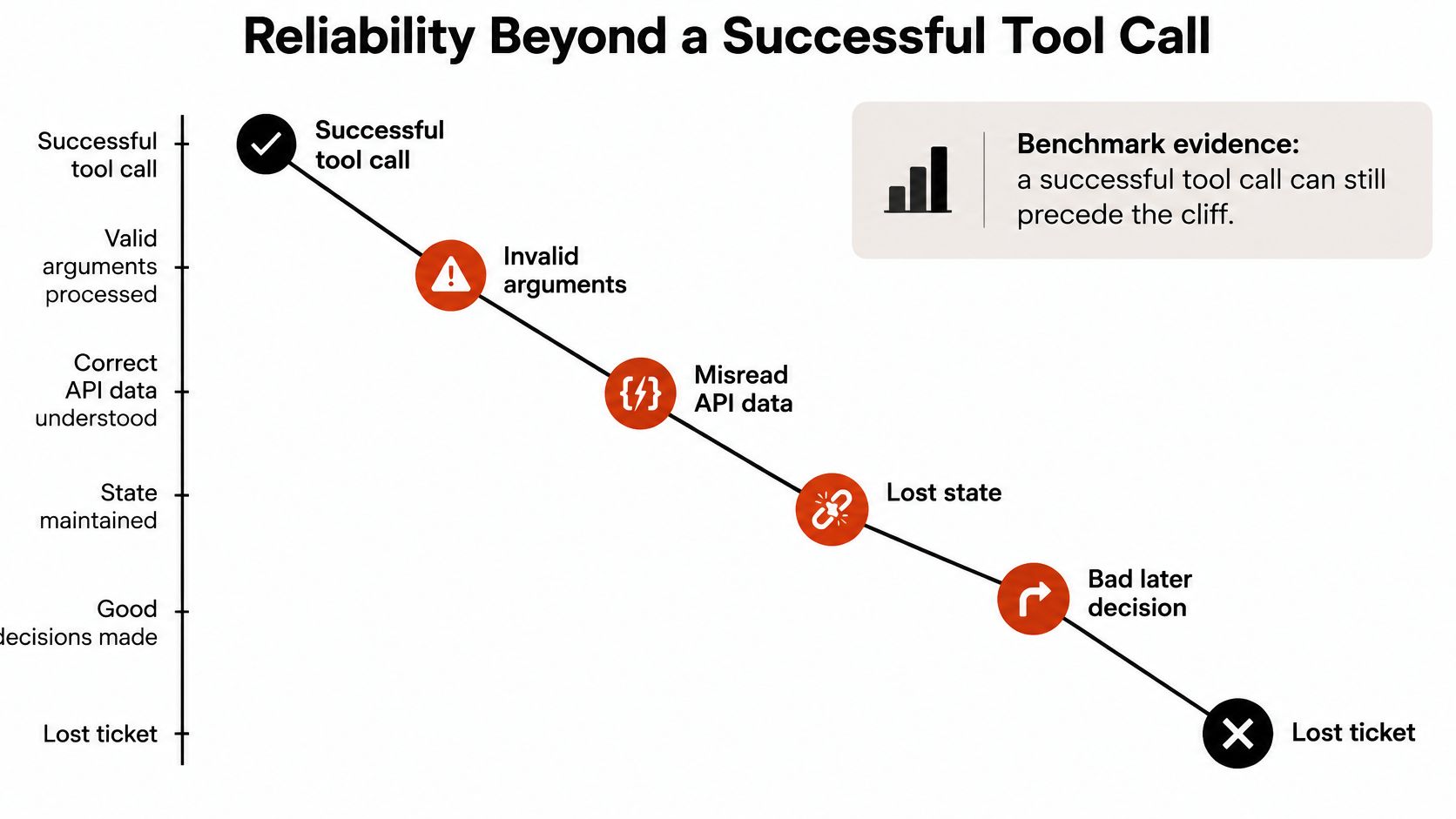
The failure chain is predictable:
- Invalid arguments. The tool name was right and the payload was wrong. A missing order ID or a refund above the cap is a failed task, even if the model reached the tool.
- Misread API data. The response said the shipment had left the warehouse. The agent treated it as still editable.
- Lost state. A retry forgets that the first call already issued a credit, so the customer is refunded twice.
- Bad later decision. An early misread becomes the premise for the escalation note, the macro, and the follow-up email.
That is why tool access changes the reliability question. An assistant mostly risks giving a bad answer. An agent risks taking a bad action, then carrying that bad assumption into the next step.
The cliff in published benchmarks
These figures show a capability cliff, not a model ranking. In the τ-bench evaluation, GPT-4o achieved approximately 61% single-attempt success in retail tasks and approximately 35% in airline tasks, despite function-calling capability, with substantial inconsistency across repeated trials. A scientific tool-use benchmark showed GPT-5 at 58.8% on the easiest level, 34.6% on the hardest, and 41.3% overall, while Claude Sonnet 4 fell from 57.4% to 20.3% as difficulty increased. The workflow benchmark found Gemini 2.5 Pro at a 91.20% tool-success rate and only 14.39% end-to-end root success.
| Evidence | Easier or tool result | Harder or completed result |
|---|---|---|
| τ-bench retail, GPT-4o | Function calling available | About 61% single-attempt task success |
| τ-bench airline, GPT-4o | Function calling available | About 35% single-attempt task success |
| Scientific tool-use, GPT-5 | 58.8% on the easiest level | 34.6% on the hardest level; 41.3% overall |
| Scientific tool-use, Claude Sonnet 4 | 57.4% on the easiest level | 20.3% on the hardest level |
| Workflow benchmark, Gemini 2.5 Pro | 91.20% tool-success rate | 14.39% end-to-end root success |
A successful API call is a poor proxy for a resolved customer.
Read the last row carefully. A system can succeed at the mechanical part and still fail the actual job. That gap is where support teams lose money, trust, and agent time. If your dashboard only counts tool calls, it will reward the wrong behavior.
Split the scorecard before you release
Assistants are judged on answer quality, latency, and groundedness. Agents need a different sheet: task-success rate, tool-call precision, argument accuracy, steps per successful task, cost per successful task, and variance across reruns. If the spread across ten identical runs is wide, you do not have a workflow. You have a coin flip with write access.
How to evaluate AI agents before they touch production accounts comes down to constraints, not a bigger prompt. Keep high-risk actions on deterministic workflows. Constrain tool permissions to the fields the job needs. Require confirmation for irreversible operations. Log the full trajectory, including arguments and returned payloads, so audit and debugging do not depend on the final chat bubble. Optimize for safe completed resolutions rather than maximum autonomy.
A practical release bar should separate three outcomes: answered, acted, and resolved. Answered means the customer got a usable response. Acted means the system made a valid change. Resolved means the customer's problem stayed fixed without a follow-up correction. Only the third one belongs in your business case.
The video below walks through why a green tool call still leaves the ticket open.
Risk Gates Before an Agent Acts
Score the task before you pick the model. Four gates decide the control level: reversibility, financial or reputational impact, data sensitivity, and customer consent. An assistant drafts and retrieves. A supervised agent handles refunds, account edits, and routing. Tight automation is only for low-risk reversible steps, such as sending a tracking link the customer already asked for.
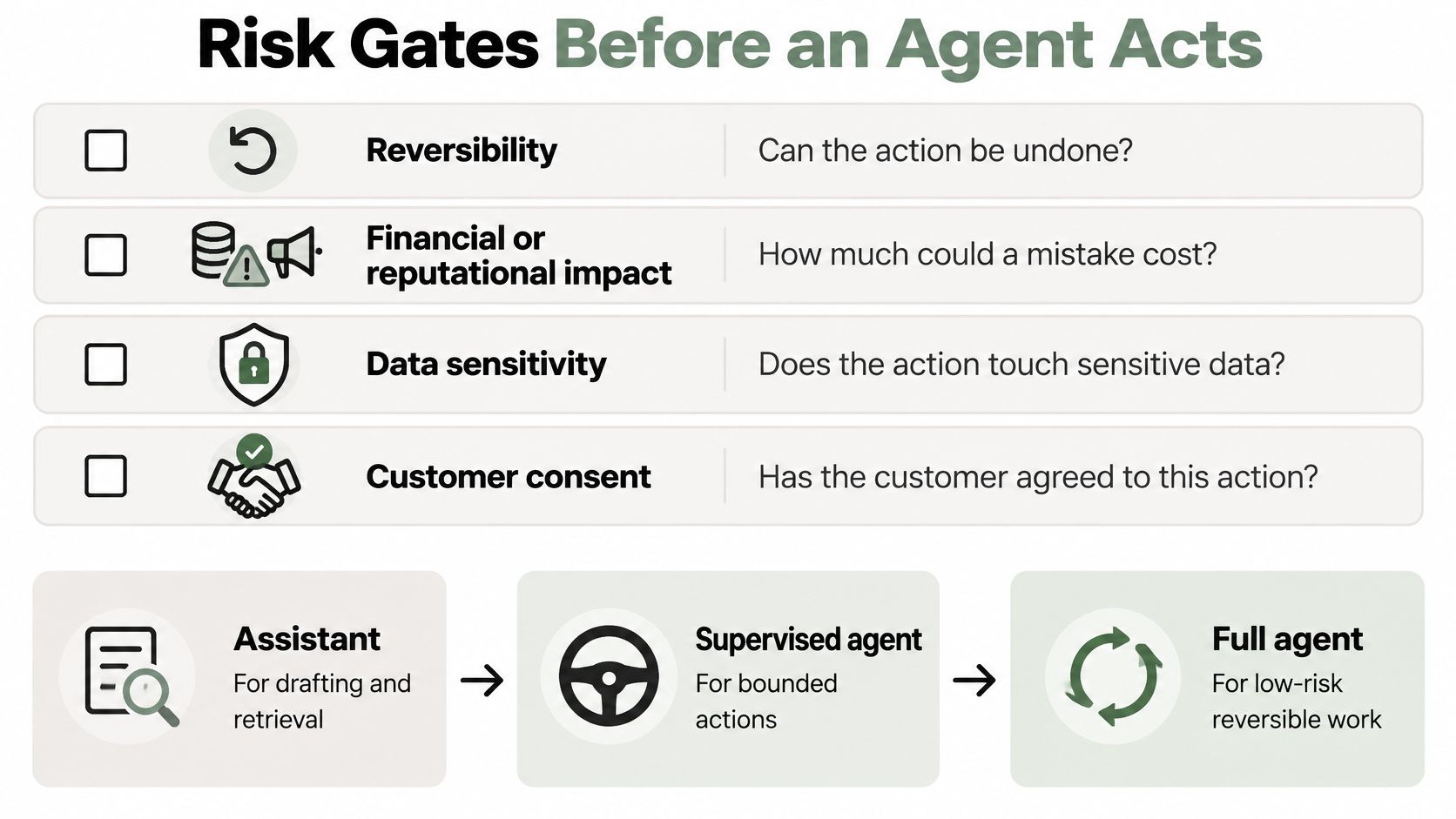
Glean's comparison of assistants and agents notes that 77% of organizations using customer-facing AI allow users to request a human at any point in a voice or chatbot interaction. Treat that human path as a floor, not a nice-to-have. Autonomous systems propagate a bad argument across every similar ticket, and security controls built for a human clicking "confirm" will not catch a loop.
What has to exist before the first write
- Approval gates. Money movement, identity changes, and anything you cannot undo wait for a person, even when confidence looks high.
- Confidence thresholds. Below the line, the system stops and asks. It does not "try the closest action."
- Permission scope per tool. A refund tool that can also close the account is two jobs glued together. Split them.
- Rollback. Idempotency keys and a documented undo for every write you allow without a person.
- Trajectory log. Trigger, sources, tool calls, arguments, approvals, and the final state.
You can write natural-language rules that escalate on query complexity, so a billing dispute or an angry multi-issue thread leaves the bot before a tool fires. Guardrails should block off-topic and misleading replies, and answers should stay inside approved sources with an explicit allow-list of topics. Generated replies can still be inaccurate or unsuitable. The workspace owner tests behavior and reviews important output, and also decides what visitor data is collected and which notices or consent that use requires.
The packet a human should receive
Escalation quality is a handoff, not a transfer button. The person should see the customer's question, the sources used, the actions already taken, and what is still unverified. A transcript with no action list forces the agent (the human one) to reconstruct the case and often to redo a lookup the system already ran.
Measure autonomous-resolution accuracy, escalation precision, and the severity of errors that slipped through. Raw containment flatters a bot that closed the chat and left the order wrong. A clean escalation of a $400 dispute beats a confident wrong refund.
More autonomy is not inherently better.
Design the stop conditions the same week you design the happy path. If you need a template for the human side of that stop, start from a written escalation process and wire the bot's rules to it, not the other way around.
Support Workflows That Fit Each Model
Support is where most companies want agents first, and it is also where integration hurts. A February 2025 survey of 1,484 IT leaders across 14 countries found that 57% of organizations had begun implementing AI agents within the previous two years, including 21% within the previous year, and 96% planned to expand agent use during the following 12 months. 78% named customer support as a leading concrete application, ahead of process automation at 71% and predictive analytics at 57%. The same study found 37% said integrating agents into existing systems and workflows was very or extremely challenging.
That last figure is the operating constraint. An assistant improves the reply. An agent has to sit inside billing, shipping, and the help desk, or it is a demo.
What stays an answer
Leave these on an assistant, judged on groundedness and tone:
- Return-policy answers drawn only from approved articles.
- Multilingual how-to replies that do not change an account.
- Order-status explanations after one lookup, with the human or the customer deciding the next move.
- Drafts a person still sends, including apology macros and internal notes.
What can be a supervised action
Route with natural-language rules. Issue a refund inside a published cap only after confirmation. Change a shipping address before the parcel leaves, then write the outcome back to the help desk. Each of those has an observable end state and a stop if the tool disagrees with policy.
What stays human
Billing disputes above your threshold, account closure, cases that need fresh consent, and knowledge that changes daily with no review owner. If the article might be wrong by tomorrow morning, do not let an agent treat it as a rule for writes.
Two queues, labeled step by step
Say a SaaS workspace gets "Can I add two seats on the Growth plan?" The assistant explains plan limits from the pricing article. That step is an answer. If the requester is an admin and the seat change is inside a preapproved band, a supervised agent applies it and posts the new quantity to the ticket. That step is a supervised action. If the ask is a custom contract or a downgrade that drops data retention, it is human-only, and the handoff includes the plan article used and the fact that no seat write occurred.
Say a store gets "My jacket arrived damaged." The assistant explains the return window and what photos are required. Answer. After the customer confirms, the agent creates a reversible return label and stores the label id on the ticket. Supervised action. A dispute over a chargeback, or a return outside the window with a goodwill request, is human-only. The person gets the order id, the policy snippet, and a clear "no label issued" line.
For more patterns in the same shape, see this AI customer service example and map your own macros the same way: answer, supervised action, or human-only. Do not promote a step because the model can describe it. Promote it because you can see the record change and undo it.
When an Agent Pays for Itself
Agent adoption is still uneven. The useful signal is not curiosity. It is whether a workflow repeats often enough, has stable rules, and produces a record you can audit. A support lead should buy autonomy only where supervised actions remove repeat contacts and reduce human cleanup.
An agent is not automatically cheaper than a well-built assistant. Autonomy adds model calls, tool execution, human review, escalations, incident response, and upkeep every time a help-center article changes. Price the whole run. A failed multi-step action plus the person who repairs it costs more than a clean answer that prevents the ticket.
A narrower assistant wins when most requests are informational, source material changes often, or every action needs approval. In those queues you pay for a loop a person was going to drive anyway. At SupportGPT pricing, that distinction matters: the Standard plan costs $150 per month and includes 12,000 credits per month, 3 team seats, 2 AI agents, advanced AI models, and integrations and analytics. The Pro plan costs $500 per month and includes 40,000 credits per month, 5 team seats, 3 AI agents, advanced analytics, and priority capabilities. Use credits as a capacity constraint, not as proof that an action should be automated.
Four inputs you can collect this week
- Monthly ticket volume. Without a denominator, cost per resolution is a story.
- Share of tickets that need more than one system step. Policy questions are one step. “Cancel, refund the prorated amount, and confirm the email” is several.
- Current escalation rate. A high rate means the agent will spend its budget on handoffs, not on closed work.
- Fully loaded cost per successfully resolved issue. Include reviewer time and incident time, not only model spend.
Also track time to resolution, containment without a repeat contact, transfer quality, error severity, and satisfaction by workflow. First-response time alone crowns the system that replies instantly and fixes nothing. Put those numbers beside your existing customer service costs, not in a separate AI dashboard nobody reconciles.
One grounded assistant answer may be a single model call: retrieve the article, answer, stop. A six-step agent can spend six calls plus a review, and a retry can double that before anyone notices a loop. Autonomy pays only when supervised actions cut repeat contacts enough to cover monitoring, failed runs, and incident time.
The break-even shows up when three things are true at once: a high share of tickets are multi-step, the policy behind those steps is stable, and a measured pilot shows fewer repeat contacts than the assistant-plus-human path. If any one is missing, keep the assistant and spend the quarter on article quality. SupportGPT's guardrails, approved-source grounding, human handoff, and Playground make that answer-first approach practical while you decide which actions deserve more control.
Pilot One Control Level on the Live Queue
Do not pick a winner between the two technologies. Pick the control level that matches the labels you already put on the queue.
A queue that is mostly questions, a knowledge base that turns over weekly, or actions you cannot yet audit starts as an assistant. A few repetitive workflows with a clear end state, a permission boundary, and a human path can become one supervised-agent pilot. Do not roll one general agent across billing, identity, and policy in the same release. That is how a bad argument in one domain writes into the other two.
Run it in this order:
- List the top ten ticket types by volume. Ignore the long tail until the head of the queue is labeled.
- Mark each type with the risk scores you already use. Reversibility, money or reputation, data sensitivity, consent.
- Pilot one reversible action with confirmation and a full trajectory log. One action, one tool, one owner.
- Promote it only after task success and escalation quality beat the human baseline on that same ticket type. A prettier transcript is not a promotion criterion.
A non-technical team can stand up the answer layer without engineering setup. Add the knowledge, shape the tone, test real questions, and go live in minutes, then paste an embed so an Ask AI widget handles most visitor questions and hands the hard conversation to a person. SupportGPT fits website and product support when you want guardrailed answers first and bounded actions second, on models such as OpenAI, Gemini, or Anthropic. Important output still needs a human review before any irreversible action goes live.
The immediate next step is the ticket-type list, not a platform migration. If you want the human side of that pilot written down, use this guide to AI and human collaboration and assign one owner for the single action you are willing to let run.
SupportGPT lets you deploy a guardrailed support assistant on your site first, then add bounded actions and natural-language handoff only where the ticket has a clear end state. You can ground answers in your own sources, test them before they go live, and keep a person on irreversible steps. Start with your top ten ticket types, then build the control level each one needs at SupportGPT.