How to Evaluate AI Agents: Metrics, Tests and Checklist
Learn how to evaluate AI agents with a step-by-step framework covering accuracy, hallucinations, latency, escalation, guardrails and cost. Includes a checklist.

The most popular advice on how to evaluate AI agents is still to paste a few prompts into a chat box and ask whether the reply "looks right." That vibe check will pass an agent that quotes a return window correctly, then invents a free-return exception, reads another customer's order, or retries a dead billing tool until the bill spikes. Fluency is not readiness.
A support agent is a system made of a model, instructions, knowledge sources, tools, and handoff rules. One accuracy score cannot grade that system. A reply can be factually tidy and still break policy, leak data, or fail the same refund the second time a customer asks. I would not ship on a leaderboard number or a single happy-path demo. I would lock a scorecard, test whole conversations, inject bad tool data, slice results by language and customer type, and rerun the important cases until the outcome is stable. AI-generated responses can be inaccurate or unsuitable, and you are responsible for testing agent behavior and reviewing important output before a customer does.
Set Success Criteria and a Scorecard First
Task success is not one number. The NIST AI Risk Management Framework, released in January 2023, defines trustworthy evaluation across validity, reliability, resilience, safety, security, privacy, explainability, and fairness. For a support agent, that means you measure whether it reaches the right outcome, follows the intended process, resists misleading inputs, protects private data, and behaves the same way on a later run. NIST pairs accuracy with clearly defined test sets and a documented method, and the useful statistics include false-positive and false-negative rates. Reliability means performing as required, without failure, over a stated interval and under stated conditions. One clean demo does not meet that bar.
Get the task owner to sign the definition of done before anyone runs a test. For refunds, account access, and order changes, "done" is a completed workflow, not a polite paragraph. Say the approved policy is a 30-day return window with no free-return exception. The agent quotes the 30 days correctly, then adds a free-return waiver that nobody approved. The wording is fluent. Policy accuracy still fails. The same reply fails again if it skips the identity check, exposes an order total that belongs to someone else, or ignores the rule to hand off a legal complaint.
What belongs on the sheet
Copy the metrics below into a sheet with an owner and a numeric pass threshold on every row. Write those thresholds before the first run, or the team will move the bar after it sees the score. Pair the automated checks with a blinded read of sampled answers against the source document. Track false positives and false negatives on escalation and on unsafe replies, not only "percent correct."
| Metric | What It Measures | How to Measure It |
|---|---|---|
| Task completion rate | Whether the customer's goal is fully resolved | Share of scenario tests fully resolved, not partially helpful |
| Factual and policy accuracy | Whether answers match approved sources and rules | Blinded review of sampled answers against the source document |
| Unsafe-response rate | Replies that expose data, invent policy, or take unauthorized actions | Automated assertions plus human review of flagged conversations |
| Escalation precision and recall | Whether handoffs happen when needed and only when needed | Compare handoffs with the expected-handoff label on each test case |
| Latency | How long the customer waits for a reply | Median and 95th percentile response time per conversation |
| Tool-call failure rate | How often calls to order, billing, or CRM tools fail or return bad data | Failed tool calls divided by total tool calls in test runs |
| Coverage | Whether the test set reflects real intents, languages, and customer types | Test case count per slice compared with the target mix |
Practical rule: If a metric has no owner and no pass line, it is a decoration, not a gate.
Coverage is the row teams skip, then regret. A set that is 80% "where is my order" will flatter the agent and hide refund exceptions. Compare each slice with the mix in your queue. Validity for a live system is also judged later, through audits and monitoring that confirm it still does what the scorecard required. Incomplete resolutions show up in repeat contacts, which is why these gates belong next to your customer satisfaction metrics, not in a separate science project.
Build a Test Set From Real and Synthetic Queries
The unit of measurement is a finished conversation, not a plausible sentence, a retrieved paragraph, or a tool call that returned 200. Benchmark design changes the headline. On SWE-bench, which asks agents to resolve real GitHub issues, OpenAI's introduction of SWE-bench Verified records that by August 5, 2024, leading agents scored about 20% on the full benchmark and 43% on the Lite version. The smaller, cleaner subset looked more than twice as kind. A support suite built only from easy tickets will do the same trick.
Start from real traffic, then deliberately break the skew. Export a few hundred past tickets. Real logs lean toward short, already-solved questions, so a raw dump will overstate how often the agent finishes the hard work. Paraphrase each kept ticket into synthetic variants: a terse tone, an angry tone, a typo-heavy first message, and a version that buries the order number in the third sentence.
Build the case mix like this, and keep every bucket, even if some are thin at first:
- Routine: order status, opening hours, shipping cutoffs.
- Vague openers: "this is wrong" with no order id, so the correct move is a clarifying question.
- Adversarial pushes: a customer demanding a policy exception, a refund above the cap, or a promise the knowledge base does not make.
- Multilingual inputs: the same intent in each language you serve.
- Account and money: refunds, address changes, login recovery.
- Tool faults and handoffs: timeouts, empty records, and cases that must leave the bot.
Ground those variants in the same approved articles you use for knowledge base training. If the article and the test disagree, you are grading the agent for following a document you would not publish.
Keep a holdout set you never tune prompts against. If every failure becomes a prompt patch and then a retest of the same lines, the score measures memorization. Score each conversation as fully resolved, partially helpful, or failed, and report those three labels by scenario type. A refund chat that quotes the right amount but skips the confirmation step is partially helpful. It is not a pass. Partially helpful replies are how "high accuracy" agents create second contacts.
The desk where this work happens looks less like a leaderboard and more like a pile of real tickets beside the run log.
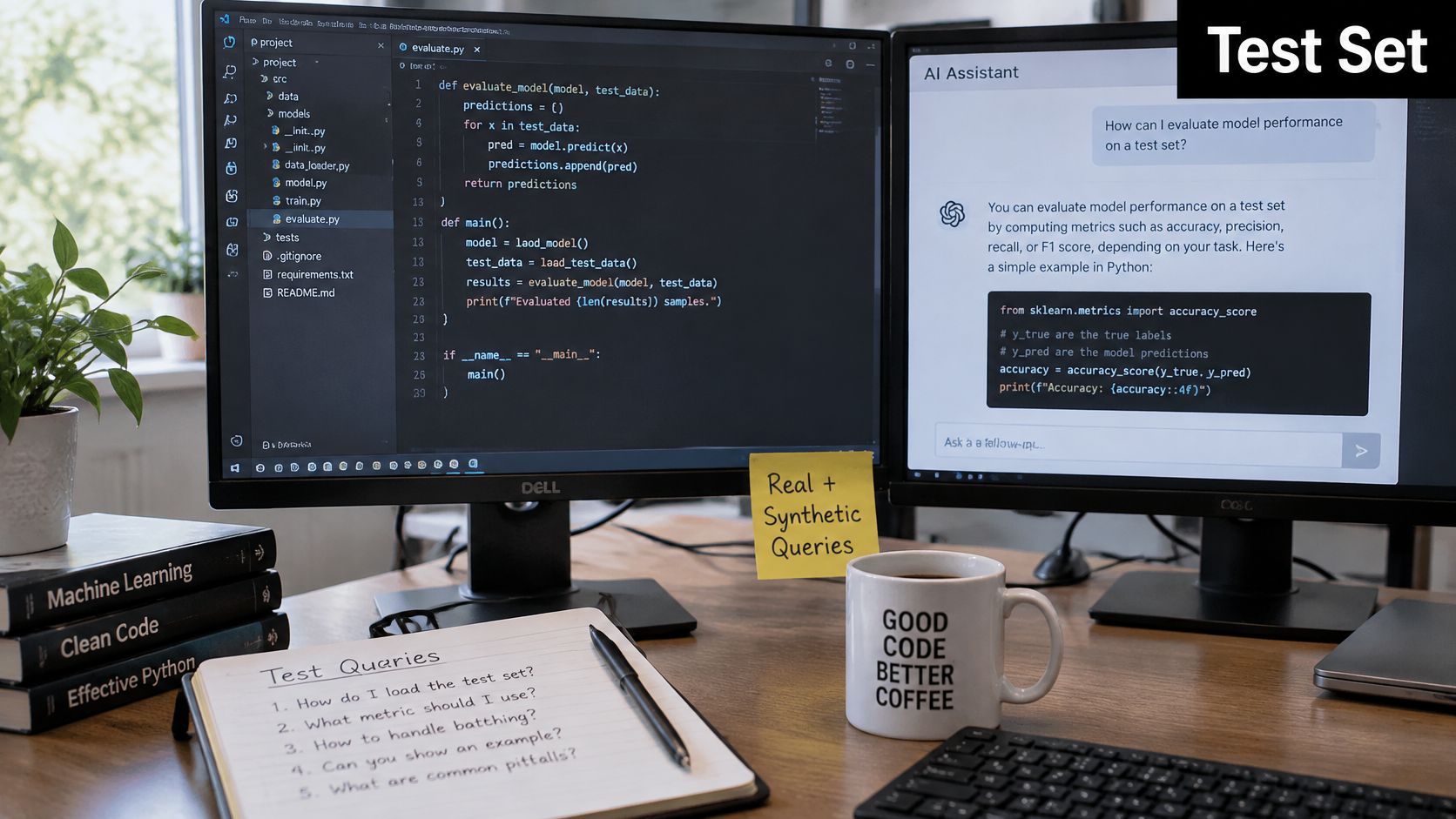
Tag fifty real tickets by category this week and count how many land in each bucket. If adversarial, multilingual, and escalation cases are almost empty, the suite is not ready, no matter how high the routine score sits.
Test Failures, Guardrails and Escalation
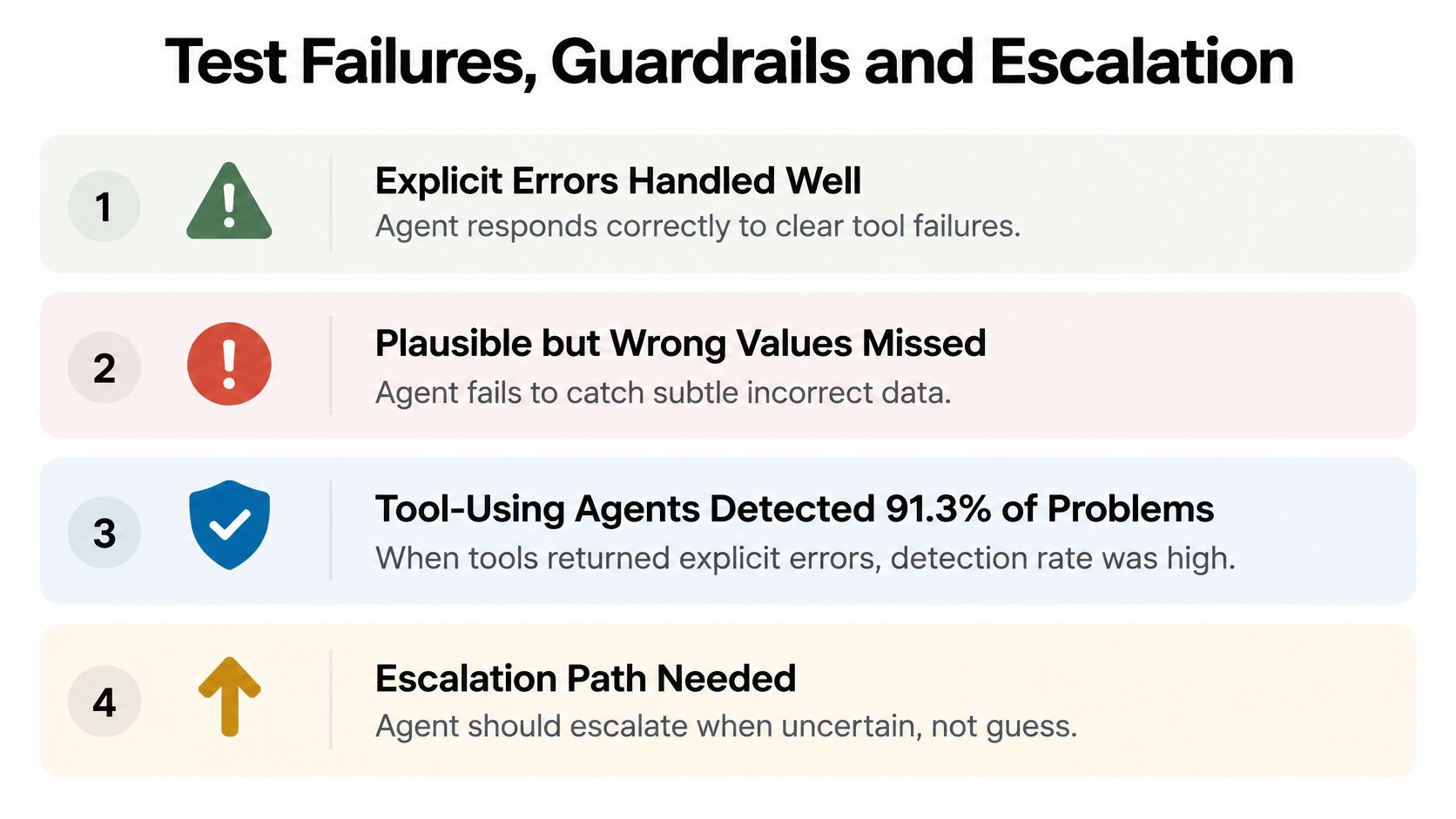
A tool can fail loudly and still be easier to handle than one that returns a plausible lie. In trials of tool-using agents, problems were recognized in 91.3% of trials when tools returned explicit errors, compared with 58.8% when tools returned plausible but wrong values. The agent also reported a problem in 26.8% of cases where nothing was wrong, according to research on agent failure detection. A stale “delivered” status may look valid and be repeated to a customer as fact. Test for false confidence as carefully as visible tool failure.
| Test Condition | Detection Result | What It Means |
|---|---|---|
| Tool returns an explicit error | 91.3% detected | Most failures are caught, but some still pass unnoticed |
| Tool returns a plausible wrong value | 58.8% detected | A major blind spot. Include these cases in release tests |
| Nothing is wrong | 26.8% false alarms | Unnecessary flags create handoff work and may lead customers to ignore warnings |
Faults to inject
Keep fault injections separate from happy-path tests. For each fault, check whether the agent stops, explains what is uncertain, avoids claiming an incomplete action succeeded, retries only when it cannot cause a duplicate charge or shipment, and hands off when it cannot recover with confidence.
- Timeouts and permission denials. A CRM or payment tool might fail to respond or return an authorization error. A sound response says it cannot check the order and offers a handoff, rather than guessing its status.
- Stale records. Return an old address or balance that appears internally consistent. The agent should not assume a record is current just because it looks complete.
- Wrong but plausible outputs. Try a slightly incorrect refund amount, a tracking number in a valid format, or a policy excerpt that nearly matches. These cases expose the gap reflected in the 58.8% detection result. Include several in each release test.
- Explicit errors. Retain some obvious failures to confirm the agent handles them, but do not let them dominate the test set.
Use a confusion matrix to score fault reporting: true detection, missed failure, false alarm, and correct continuation. False alarms are operational failures too. The 26.8% false-alarm result shows how often an agent can flag healthy calls, increasing handoff load and risking warning fatigue.
Guardrails and who must take the chat
Test requests that do not depend on a tool. Include off-topic questions, fabricated policy claims, requests for another customer's information, and attempts to make the agent issue a refund it is not authorized to provide. Abuse cases to test include unsafe tool selection, excessive agency, unauthorized action attempts, and harmful task execution. For an agent that changes orders, captures leads, or triggers a workflow, an unauthorized-action attempt is a release gate. The passing count is zero. Pair automated checks with a human review of flagged transcripts, with reviewers unaware of the automated result.
Write escalation instructions in natural language and set them to route queries based on complexity. Then test whether the rules distinguish a legal complaint or a frustrated repeat contact from a straightforward question about opening hours. Compare the expected handoff labels with the agent's decisions, and calculate escalation precision and recall. Clear handoff rules help limit both missed escalations and unnecessary transfers. See what an escalation process is for guidance on structuring those rules.
If the agent confirms a refund the tool never committed, the conversation is a failure even when the customer sounds satisfied.
Review the full trace, not just the final reply. A polite closing message can conceal a retry loop or an action that never completed.
Check Languages, Locales and Customer Segments
An overall pass rate can be a cover story. Say English returns questions resolve most of the time, while Portuguese questions about customs duties collapse, and the blended average still looks fine in the weekly deck. The failing market never appears unless you refuse to publish only the blend.
Automated judges are not a free substitute for that slice work. A validity audit found that automated evaluators disagreed with expert human judgment on 18.5% of 496 tasks, because of brittle state matching, trajectory lock-in, incorrect ground truth, rubric drift, and hallucinated completion judgments. Public rankings are a weak shortcut too. A 2026 audit of agent benchmarks reported a mean Spearman correlation of only 0.67 across rankings, 22% of model pairs reversed order between benchmarks, and two widely used evaluations correlated as low as 0.10, as documented in this audit of construct validity failures.pdf). I would treat a vendor score as context, and I would not make a release decision from it.
Slices worth their own row
Calibrate any automated judge on a human-labeled sample before you trust it. Then report these slices separately, each with a minimum sample you can review:
- Language, with native-speaker review of tone and policy accuracy, not only machine-translated prompts.
- Policy region, where the rule itself changes, not just the wording.
- Locale details, including currency, date formats, and tax.
- Customer type, such as new versus returning, or enterprise versus self-serve.
- Channel, because a widget chat and an email thread do not fail the same way.
For each slice, compare task completion, escalation quality, and policy accuracy with the overall average. If a slice cannot reach its sample minimum, say so on the scorecard instead of borrowing confidence from the big number. Two reviewers should score the same thirty conversations and agree closely before those labels become the gold set. Disagreement is a rubric problem, not a reason to average the noise away.
A judge that rewards any confident completion will hide an agent that should have asked, refused, or handed off. Build those "do nothing" cases into every slice. For a global queue, separate language and locale reporting is the difference between a bot you can defend and a blended score that multilingual customer support will later embarrass. List the slices you need this week, and write the sample size you can afford beside each one. That list is the plan. A single corpus-wide percentage is not.
Measure Repeatability, Cost and Speed
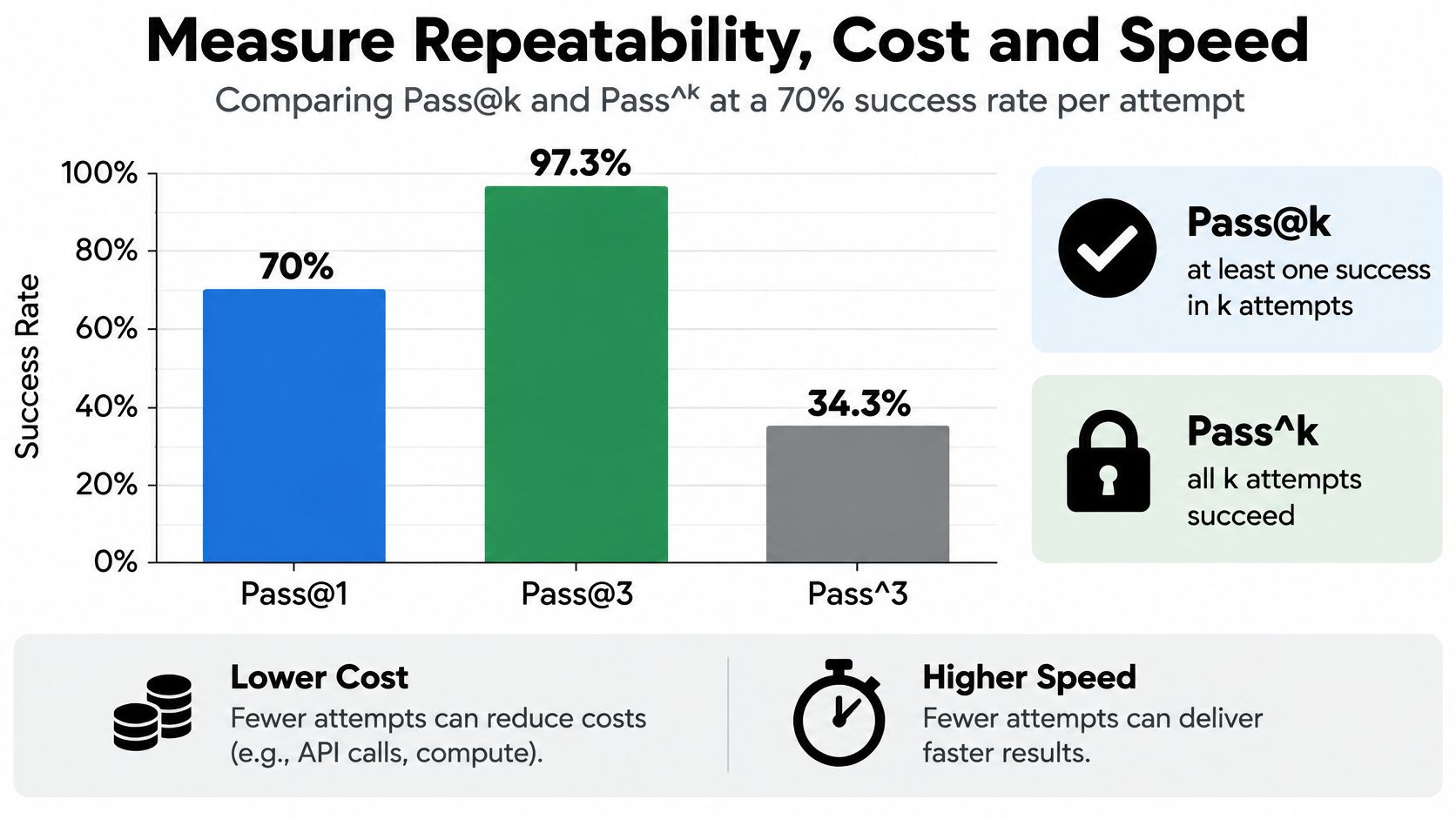
A 70% single-attempt success rate sounds close to usable. It is not the number a repeat customer experiences. Pass@k asks whether at least one of k attempts succeeds. Pass^k asks whether every attempt succeeds. At that 70% rate, Pass@3 is approximately 97%, while Pass^3 is only 34.3%, which is the gap a review of agent benchmarks uses to separate capability from reliability. Raise the same rate to five independent runs and Pass^5 is 0.70 to the fifth, about 16.8%. The agent that "usually works" if you let it try again is an agent that usually does not work for the person who asks once.
| Attempts (k) | Pass^k (all succeed) |
|---|---|
| 1 | 70% |
| 3 | 34.3% |
| 5 | 16.8% |
The same pattern shows up on retail tasks, not only on a coin-flip example. A 2024 τ-bench evaluation cited by Rillor's agent reliability report found that the leading model solved approximately 61% of retail tasks on a single attempt, but fewer than 25% when it had to succeed across all eight repeated attempts. A customer who sends the same refund request twice should get the same correct outcome. Run each important case several times on a fixed model and environment, and report a confidence interval rather than one lucky transcript.
What the bill and the wait actually are
Cost belongs on the scorecard as cost per resolved conversation: model tokens, tool calls, and retries, not cost per cheerful message. An unresolved chat that burned twelve tool calls is not cheap because the last bubble was short. Latency belongs as a median and a 95th percentile. The median hides the slow tail, and the slow tail is what people abandon.
Most benchmarks never score that bill. In a review of 892 deployment attempts, cost explosions accounted for 31% of critical failures, a class conventional task scores leave out, according to a review of agent deployment failures. That same literature of benchmarks also found weak ties between leaderboard success and whether a deployment was viable. I would rather run a slightly weaker model that calls fewer tools and hands off cleanly than a stronger one with expensive, unsafe trajectories.
Put these numbers next to the rest of your chatbot performance metrics, or the quality score and the invoice will tell two different stories. Run a five-attempt test on your thirty most important cases and calculate both Pass@5 and Pass^5. If Pass^5 is far below the single-try rate, the agent is not ready for a workflow people repeat.
Iterate on Analytics and Confirm Your Next Step
A pre-launch suite goes stale the week real questions arrive. Many teams already lean on live signals. A 2025 production-evaluation study reported that 75% of examined deployments evaluated agents without formal benchmark sets, relying instead on A/B testing, user feedback, or production monitoring, as described in this study of production agent evaluation. Those signals are necessary. They are not a substitute for a frozen holdout. Monitoring tells you what broke. The holdout tells you whether the fix broke something else.
Run this loop every week:
- Read the unresolved pile. Pull conversations that did not finish, handoffs the customer rejected, repeat contacts within 24 hours, and negative feedback. Tag the failure mode, not just the topic.
- Blind-review about twenty transcripts against the scorecard. Check policy, unsafe actions, escalation, and whether the goal was finished.
- Promote each new failure into the permanent test set, including a paraphrased twin so a one-line prompt patch cannot memorize it.
- Rerun before you publish. After any prompt, model, or knowledge change, rerun the previously failing cases and the untouched holdout. One variable at a time, or you will not know which edit moved the number.
The release rule
Release only when every scorecard metric meets its threshold on the holdout set and on each language, locale, and customer slice, and when the fault gates pass with zero unauthorized actions. A green routine bucket does not offset a failing refund slice or a single invented refund. If a threshold misses, the change stays in test.
Schedule the first full run this week and save that sheet as the baseline. Later edits are compared with those same numbers, not with a new suite assembled to flatter the latest prompt. Basic analytics on a live agent are enough to start the loop. The Free plan costs $0 forever and includes 50 message credits, 1 AI agent, 400 KB of source storage, and basic analytics. The Playground lets you test chatbot responses instantly and monitor prompts in real time, and you can go from idea to a live agent in minutes by adding your knowledge, shaping the tone, testing real questions, and deploying. Keep the saved scorecard beside that playground so a fast edit still has to beat the baseline.
SupportGPT gives support teams a place to train an agent on their own sources, test real questions before customers see them, and watch resolution, handoff, and conversation quality after launch. If you want that test loop on a bot you can deploy, visit SupportGPT and run your first scorecard against a live agent this week.