What Is an Escalation Process and How to Build One
What is an escalation process? Learn the levels, routing rules and SLAs that move issues to the right people, with examples for AI support.
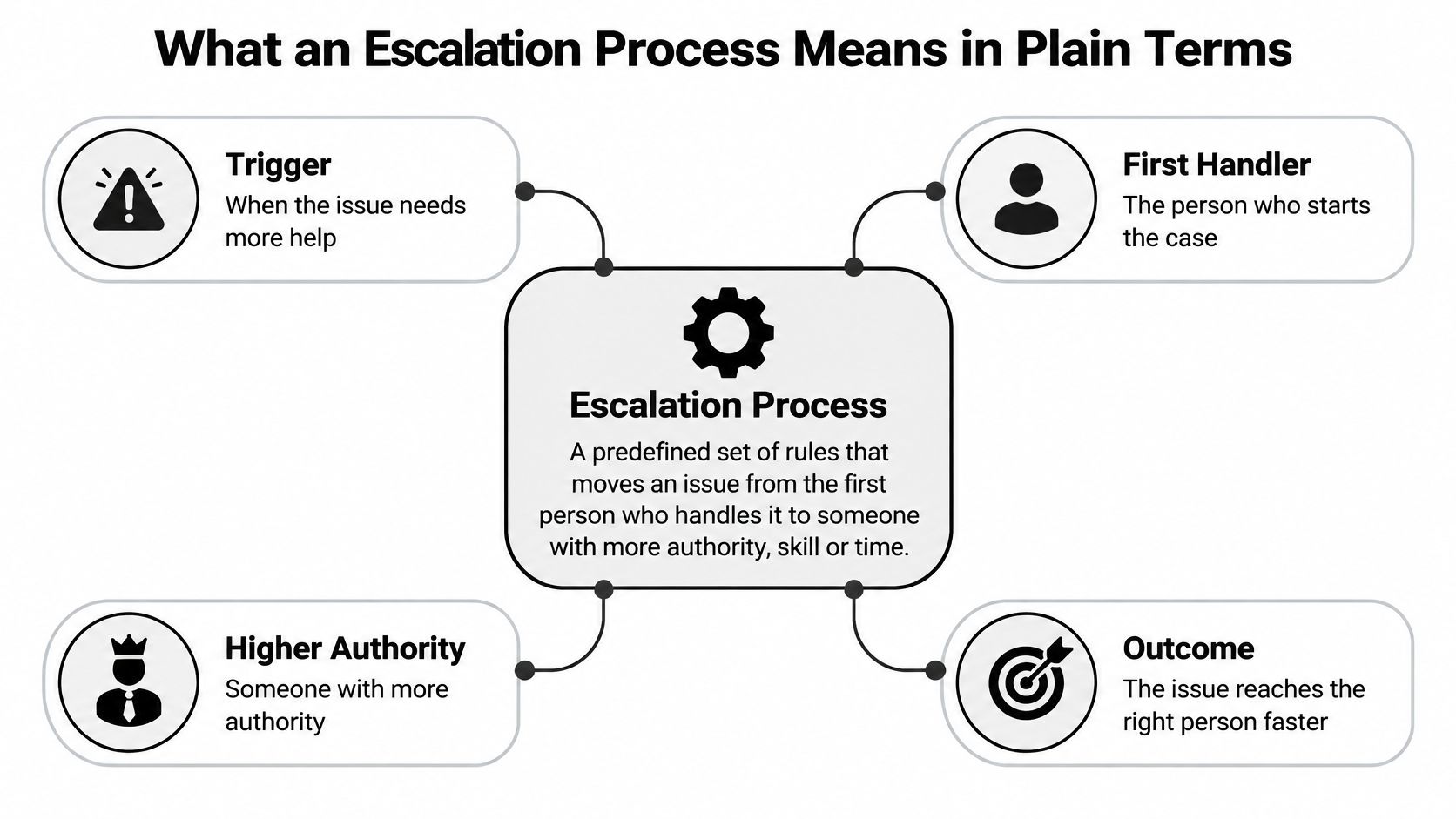
An escalation process is a predefined set of rules that moves an issue to a more senior or specialized person when it cannot be resolved within agreed limits.
A customer can't access their account, your AI assistant has suggested a password reset, and the customer says they've already tried it. Your team needs to decide what happens next, who takes responsibility, and what that person needs to know before replying.
The useful outcome isn't another transfer. It's a customer getting help without having to start the conversation again.
What an Escalation Process Means in Plain Terms
Think of hospital triage. A nurse assesses who needs urgent attention, who can wait, and who needs a specialist. The staff don't invent those decisions from scratch during an emergency.
Support teams need the same kind of preparation. The first responder handles what they're equipped to resolve and recognizes when someone else needs to take responsibility. That move might involve specialist knowledge, permission to make an exception, or coordination across teams.
What makes an issue ready to move
An escalation decision usually starts with these considerations:
- Impact: What could happen to the customer or business if the issue remains unresolved? A suspected account takeover needs different treatment from a question about changing a profile photo.
- Urgency: Is there a deadline or an active problem that makes waiting costly? A customer locked out during a critical workflow may need attention before a routine configuration request.
- Uncertainty: Does the responder lack reliable evidence or permission to act? An AI assistant shouldn't improvise an account-recovery procedure because the documented answer is missing.
The basic relationship between the trigger, the first handler, and the next owner looks like this.
Escalation isn't always a management issue
A billing specialist might be the right destination even when no manager needs to get involved. That's functional escalation, moving work to someone with the right expertise. Hierarchical escalation means involving someone with greater decision-making authority.
Don't make customers climb an organizational ladder when you already know the destination. A suspected security incident can go directly to the designated incident owner rather than waiting for successive approvals.
Without a defined path, agents can mistake forwarding a ticket for making progress. Customers repeat their explanation, and high-risk requests remain mixed with ordinary questions. AI adds another decision: the assistant must recognize when it should stop answering.
Escalation is about who owns the problem next, not about passing a complaint along.
When someone asks, “What is an escalation process?”, the practical answer should identify the next responsible person, the information they inherit, and the condition that makes the issue complete.
The Four Parts Every Escalation Process Needs
Start with classification and severity, not a list of managers. Your team needs to know what kind of issue it's handling and how serious the actual or potential impact is before choosing a destination.
The NIST incident-handling guide connects incident prioritization with response and notification decisions and illustrates escalating an unanswered initial contact after roughly 15 minutes, then escalating again if the next management level doesn't respond. That's an incident-response example, not a universal customer-support deadline.
Build the ownership structure
Levels describe tiers of responsibility. A frontline responder handles documented questions, specialists handle work requiring deeper knowledge or access, and managers or incident owners handle exceptions and broader coordination. These are roles, not necessarily separate departments.
Service-level agreements, or SLAs, define response and resolution commitments. Separate acknowledgement from resolution: accepting responsibility isn't the same as fixing the issue. A support service-level agreement should make that distinction clear and explain when the relevant clocks run.
Routing rules connect a condition to a destination. Account-ownership questions belong with identity verification; a request beyond an agent's refund authority belongs with someone authorized to decide.
An escalation matrix puts those decisions into a usable reference. Include the owner, trigger, and response target so a responder doesn't have to search through policy documents while a customer waits.
Example escalation matrix by level
The targets below are hypothetical operating targets, not industry benchmarks or promises. Set your own against staffing, coverage, risk, and contractual commitments.
| Level | Owner | Typical trigger | Example response target |
|---|---|---|---|
| Level 1 | Frontline agent or AI assistant | Routine question with a sourced answer | Answer in the same session |
| Level 2 | Specialist team such as billing or technical support | Needs account access or specialist knowledge | Acknowledge within 1 hour, resolve within 1 business day |
| Level 3 | Team lead or support manager | Customer asks for a manager, SLA at risk, or repeat contact | Respond within 2 hours |
| Level 4 | Executive or incident owner | Security, legal, or an outage affecting many customers | Immediate page, status update every 30 minutes |
Attach an ownership field, an acknowledgement timer, and an audit trail to the workflow. Record who assigned the case, why it moved, when someone accepted it, and what changed afterward.
Also define a fallback for an unavailable specialist or an unanswered notification. Until the receiving person accepts, the sending owner should remain responsible for monitoring the handoff.
Keep notification thresholds selective. Page people when they need to act, not whenever a ticket changes state, or routine alerts can obscure urgent work.
Routing Rules for Human and AI Handoffs
A routing rule is a condition plus a destination. Write it so a new hire can apply it without guessing: if the customer asks to change the email address on a paid account, send the request to identity verification before making changes.
The goal is collaboration between the initial responder and the person equipped to act.

For an AI agent, write instructions in plain language. Specify what it should recognize, what it must stop doing, and which queue should receive the conversation. Complexity alone isn't enough: even a short question can require identity checks or authority the assistant doesn't have.
Example routing rules for AI handoffs
These are illustrative internal targets, not legal deadlines or provider commitments. Validate coverage before adopting them.
| Issue type | Route to | Urgency |
|---|---|---|
| Authentication or account ownership | Identity verification queue | Within 15 minutes |
| Payment dispute or refund above your threshold | Billing specialist | Same business day |
| Safety, self-harm or medical concern | Trained human responder | Immediate |
| Privacy or data deletion request | Privacy or compliance queue | Within 1 business day |
| Model has no supporting source | Knowledge update queue for support specialists | Within 1 business day |
| Customer explicitly asks for a person | Next available agent | Within the same session |
Account ownership goes to verification because access changes require more than a plausible explanation. Payment disputes go to billing so the person responding has the necessary transaction context and approval authority.
Safety-related conversations need the designated trained responder immediately, rather than ordinary troubleshooting. Privacy requests need a team that can verify identity, assess the request, and apply the organization's obligations.
A missing source needs both a customer-facing owner and a knowledge-update task. Don't leave the customer waiting in a documentation backlog while someone repairs the underlying content.
An explicit request for a person should take the human route without forcing another automated troubleshooting cycle. Match the destination to the required expertise through skill-based routing, rather than assigning every case to whoever happens to be available.
Use this walkthrough alongside your written rules when discussing the workflow with teammates.
Use the same urgency labels in routing instructions and the escalation matrix. Review conversation logs monthly, and settle overlapping rules by naming a primary owner for each issue type.
How to Run a Closed-Loop Handoff
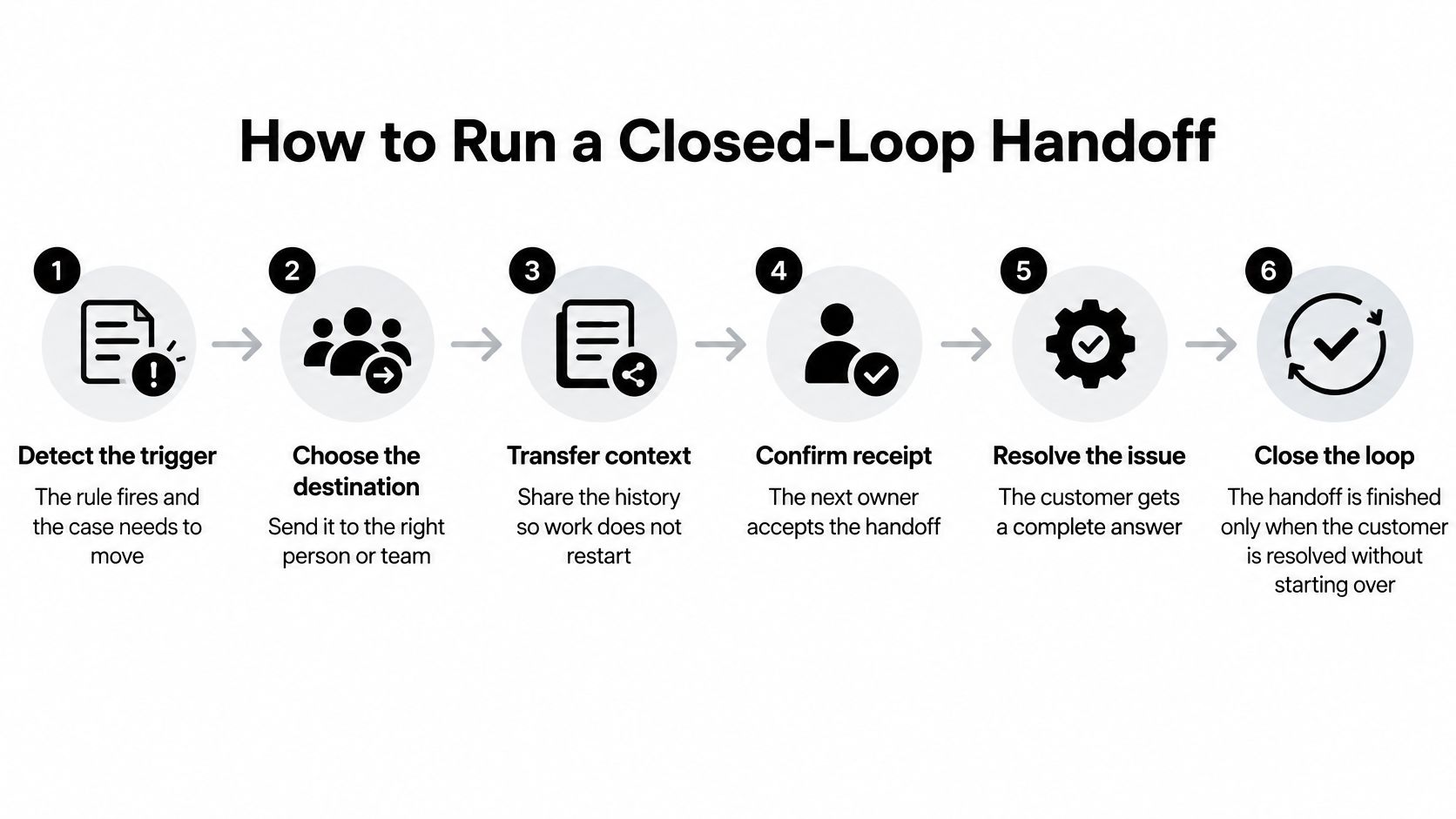
A transfer is complete when the receiving person accepts responsibility. A resolved escalation goes further: the customer gets a complete outcome without reconstructing the conversation.
A 2026 consumer survey reported by CMSWire, covering more than 3,000 consumers in the United States, United Kingdom, and Germany, found that 35% often or always repeat themselves after moving from AI to a human. A visible human option doesn't solve that continuity problem by itself.
Follow the case through to resolution
-
Detect the trigger. Record the reason the case needs to move, such as an unsupported answer or an account-ownership concern. A generic escalation tag leaves the receiver guessing about urgency.
-
Summarize the case. Capture the customer's intent, relevant account context, and attempted remedies with their outcomes. Omitting a failed password reset invites the next agent to suggest it again.
-
Transfer evidence and ownership. Include relevant messages, error details, and source references, then assign the receiving queue and accountable person. Sending a transcript to a shared inbox without an owner doesn't establish responsibility.
-
Confirm receipt. Start the acknowledgement timer when the handoff is requested and record acceptance when the receiver takes ownership. Starting the timer only after acceptance would hide the waiting period you need to monitor.
-
Tell the customer what happens next. Explain which team is taking over, why, and when the customer can expect contact. Avoid promising an immediate reply when you've only created a ticket.
-
Check the outcome. Verify that the customer received a resolution or a clearly owned next action. Closing the original chat while the underlying issue remains unattended breaks the loop.
The workflow below makes acceptance and continuity explicit.
Use a fixed handoff template
Build these fields into your case form:
- Customer intent: The outcome the customer wants.
- Steps already tried and their outcome: Successful, failed, or incomplete actions.
- Account context: Relevant identifiers and verified details, limited to what the receiver needs.
- Risk flags: Suspected fraud, safety concerns, privacy issues, or time-sensitive impact.
- Named owner and response deadline: Who must act and by when.
- Message sent to the customer: The expectations already communicated.
Don't complete a routine transfer with unexplained blanks. Mark unavailable information explicitly, and don't delay an urgent safety route just to finish documentation.
Sensitive conversations should retain relevant context while respecting access controls. Effective AI-human collaboration means the receiving agent reads that context before asking questions.
The simplest quality check is direct: Did the customer have to repeat their question?
Common Escalation Mistakes and the Trade-Offs
Escalating early can protect customers from an unsuitable automated answer. Escalating indiscriminately can leave specialists sorting routine work while urgent cases wait.
The distinction is whether the transfer improves the customer's path to resolution.
Beliefs that create avoidable transfers
- Every difficult-looking question needs a human. A long question may still have a clear, documented answer. Keep sourced, authorized work with the initial responder and escalate when a defined boundary is reached.
- Every issue can use the same urgency threshold. A frustrated comment and suspected account theft don't call for identical action. Separate emotional distress, safety, financial risk, technical ambiguity, and ordinary complexity.
- A human button is enough. Giving customers an exit from automation doesn't prepare the receiving agent. Require a usable summary and acceptance rather than treating the button click as a successful outcome.
Test these beliefs through edge-case testing. Use conversations that combine categories, such as an angry customer disputing a charge while reporting unauthorized access, and check which rule wins.
More escalation doesn't automatically mean better service
A Stealth Agents summary of a randomized field experiment on Alibaba's Taobao platform, which examined 11,069 AI-eligible chats, reports that technical escalations took 19.1% longer than comparable human-handled chats, while emotional escalations took 40.8% longer. The same experiment associated worker-initiated escalations with fewer repeat contacts, although that estimate was only marginally significant.
Those findings don't justify blocking access to people. They challenge the belief that every transfer has the same operational value.
A technical specialist may need to reconstruct failed automated troubleshooting before beginning useful work. An emotionally charged conversation may require acknowledgement and reassurance before the agent can investigate the original problem.
Practical rule: Never make the customer absorb the cost of a poor automation decision by explaining everything again.
Give receiving agents permission to change the approach rather than continue the script. If the customer is distressed, acknowledge that first; if identity is uncertain, verify it before discussing sensitive details.
The correction isn't fewer transfers at any cost. It's a different response for each escalation reason, with enough context and authority for the receiving person to help.
Measure Escalation Quality With Metrics and Error Budgets
Escalation count and containment rate are weak success measures on their own. A team can transfer every difficult case without resolving it, or keep conversations automated by making human help hard to reach.
Use operational measures that show what happened after the routing decision.
Escalation metrics to track
The warning signs below are diagnostic prompts, not universal performance standards.
| Metric | What it reveals | Warning sign |
|---|---|---|
| Time to acknowledgement | Whether the owner accepted the case | Acknowledgements slipping past the level target |
| Time to human takeover | The real wait the customer experiences | Takeover times rising while volume is steady |
| Reassignment count | Routing accuracy | For example, more than two reassignments on the same case |
| Unresolved age | Cases stalling after handoff | Old cases accumulating in one queue |
| Repeat-contact rate | Whether the customer may have had to start over | Repeat contacts rising week on week |
Separate acknowledgement from the first meaningful human response. An agent can accept a case and still leave the customer waiting without an update.
Break results down by escalation reason and destination. Your billing route may work well while identity-verification cases stall, and an overall average can hide that difference. Include these measures alongside your other chatbot performance metrics.
Turn warning signs into decisions
An error budget defines how much failure a service can tolerate before the team must change its operating priorities. Google's SRE guidance describes a 99.99% availability objective with a 0.01% unavailability budget and recommends freezing ordinary changes once the budget is exhausted, except urgent security or corrective work, until reliability recovers.
For AI support, apply that logic to clearly defined failures: unsupported claims, unsafe responses, or conversations incorrectly marked resolved. Define how reviewers identify each failure and which conversations form the measurement population.
If failures rise sharply, page the accountable owner and investigate retrieval, tool execution, or guardrail behavior. Pause risky prompt or model changes when the agreed budget is exhausted rather than adding more variables during remediation.
A threshold is useful only when someone knows what action it requires.
Write every threshold with its evidence, owner, response deadline, and exit condition. Returning to normal operation should require restored performance and a documented corrective action, not just a quieter inbox.
Launch the Escalation Path in Six Steps
Start with the ownership matrix and the safety route. Missing documentation is inconvenient; missing responsibility during a high-risk conversation is a more serious operational gap.
You don't need a complicated organizational chart. You need a path that works when the usual specialist is unavailable and the customer's request doesn't fit neatly into a category.
Put the workflow into operation
-
Write the matrix. Assign a named accountable owner to each level and identify a backup. Confirm that everyone listed understands the responsibility.
-
Define issue-specific triggers. Begin with safety, payment, and account ownership. Write observable conditions rather than asking agents to recognize when a case feels serious.
-
Set acknowledgement and resolution targets. Match them to actual coverage and commitments. Include what happens outside staffed hours and when a target is missed.
-
Test plain-language routing rules. Use representative questions from your inbox. Include ambiguous requests and overlapping categories, not just obvious examples.
-
Verify the complete handoff. Check the summary, accepting owner, evidence, and customer message. Simulate an unavailable receiver to confirm that the fallback works.
-
Review outcomes monthly. Inspect the metrics alongside individual conversations. Adjust rules that create non-actionable alerts, repeated reassignment, or unnecessary customer effort.
With SupportGPT, you can write natural-language escalation instructions based on query complexity, hand complex or sensitive conversations to human teammates with context intact, and test questions in the Playground while reviewing conversations and analytics.
Before deployment, run sample conversations through the full path, including human acceptance and the final customer reply. Don't stop testing when the assistant correctly recognizes that it needs help.
The launch decision should be concrete: the right person receives the case, understands what happened, and knows what to do next.
SupportGPT offers embedded chat agents that answer visitor questions and can hand conversations off to a human. Visit SupportGPT to build an agent with your knowledge, define its escalation instructions, and test the handoff before putting it in front of customers.