The Ultimate Guide to an Online Chat Widget for Website
Discover how a modern online chat widget for website can transform your customer support, capture high-quality leads, and drive sales growth. Get started today.
You've seen them before—those little pop-up windows, usually tucked away in the corner of a website, ready to spring to life. That's an online chat widget. Think of it as a direct line to your business, giving website visitors a way to have a real-time text conversation without ever leaving the page. It’s like having a friendly, expert staff member available on every single page of your site, ready to answer questions, offer help, and guide people.
What Is an Online Chat Widget and Why Your Website Needs One
Imagine your website as a physical storefront. Someone walks in, looks around, but has a quick question about a product. If there’s no one there to help, they're likely to just turn around and leave. An online chat widget is that ever-present employee, instantly engaging customers right when they need a hand. It fundamentally changes your website from a one-way brochure into a two-way, interactive conversation.

This simple tool isn't just a "nice-to-have" anymore; it's a core part of the modern customer journey. The proof is in the numbers. Over 5,300,000 websites are already using some form of online chat. This isn't just a trend; it's a direct response to a massive shift in what customers expect. People want instant answers, and data shows that about 15% of all website visitors will start a chat if one is available.
The Core Benefits of a Chat Widget
At its heart, a chat widget is all about shortening the distance between a customer’s question and your answer. The faster you can close that gap, the better it is for everyone. This simple concept delivers some incredibly powerful business advantages that directly hit your bottom line.
To give you a clearer picture, here’s a quick breakdown of how a chat widget can impact different parts of your business.
Core Benefits of a Website Chat Widget at a Glance
| Key Benefit | Business Impact | Example Scenario |
|---|---|---|
| Boost Sales & Conversions | Increases revenue and reduces cart abandonment | A customer is stuck on the checkout page. The chat widget pops up to help them complete their purchase. |
| Elevate Customer Support | Improves customer satisfaction and loyalty | A user gets an instant answer to a technical question instead of waiting hours for an email reply. |
| Capture High-Intent Leads | Generates more qualified leads for the sales team | A visitor asking detailed pricing questions is flagged as a hot lead and their contact info is captured. |
These benefits show that a chat widget isn't just a support tool—it’s a powerful engine for growth across the entire customer lifecycle.
Of course, the technology itself is getting more sophisticated. The rise of AI chatbots and conversational tools is changing the game entirely, adding a layer of intelligence that makes these interactions even more effective.
Modern platforms like SupportGPT take this to the next level. They use AI to handle all the common, repetitive questions 24/7. This frees up your human team to tackle the more complex, high-value conversations that really need a personal touch. The goal isn't just to be available; it's to be intelligently available.
What a Modern Chat Widget Should Really Do
A modern chat widget isn't just a pop-up text box. It's a powerhouse for your entire customer experience, and thinking of it as just a simple messaging tool is a huge missed opportunity. While the basic function is, of course, talking to visitors, the best ones are loaded with features that automate tedious work, deliver smarter answers on the spot, and give you incredible insight into what your customers actually want.
These features aren't just shiny add-ons; they're the engine that transforms a simple, reactive support channel into a proactive tool for growth. Picking a widget without understanding these core capabilities is like buying a car without checking under the hood. Sure, it might get you down the road, but you'll be missing all the power and efficiency that makes for a smooth ride.
AI-Powered Automated Responses
Let's start with the biggest game-changer: artificial intelligence. AI-driven responses are your front line, instantly fielding the flood of common, repetitive questions that can bury a support team.
Think about it. Instead of your skilled agents typing out answers about your return policy or password resets for the hundredth time, the AI handles it. In fact, studies show that AI can successfully resolve up to 80% of routine customer inquiries all on its own. This frees up your team to tackle the complex, high-value problems where a human touch truly matters. Platforms like SupportGPT take this a step further by letting you train the AI on your own knowledge base, ensuring its answers are not just instant, but consistently accurate and perfectly on-brand.
Intelligent Escalation and Routing
Of course, AI can't—and shouldn't—handle everything. The smartest chat systems know their limits, which is where intelligent escalation and routing come into play. This is like having a brilliant receptionist who knows exactly who needs to handle which conversation.
When the AI detects a complex technical issue, a frustrated customer, or a hot sales lead, it seamlessly passes the conversation to the right person or department.
- Sales Inquiry: A question about enterprise pricing gets routed straight to your sales team’s queue.
- Technical Bug: A user reporting a glitch is connected with a technical support specialist.
- Billing Question: An inquiry about a recent invoice is sent directly to the finance or billing department.
This process ensures customers get to the right expert fast, cutting out the frustrating experience of being bounced from person to person.
The goal is a fluid, cohesive experience. The customer shouldn't feel a jarring handoff from a robot to a human. Instead, it should feel like a guided journey to the best possible solution, with technology and people working in perfect sync.
Multilingual Support and Global Reach
In today's market, your next customer could be anywhere in the world. A modern chat widget needs to speak their language, literally. Multilingual support automatically detects a visitor’s browser language and translates the entire conversation in real-time, for both the customer and your agent.
This powerful feature breaks down communication barriers, making your business instantly accessible to a global audience. It’s a clear signal to international customers that you value them, helping you build trust and expand your market reach without having to build a massive multinational support team.
Robust Analytics and Reporting
You can't fix what you can't see. A top-tier chat widget must come with a powerful analytics dashboard that gives you a crystal-clear view of your entire support operation. This isn't about vanity metrics; it's about getting the data you need to make smart, informed decisions.
Look for these key performance indicators (KPIs):
- First Response Time: How long do customers wait for an initial reply?
- Resolution Rate: What percentage of issues are you solving in the first interaction?
- Customer Satisfaction (CSAT) Scores: Are customers actually happy with the support they get?
- Most Common Queries: What are people asking about most often?
These insights point you directly to areas for improvement, whether it's updating your help docs to proactively address common questions or identifying training opportunities for your team.
Deep CRM and Helpdesk Integrations
Finally, your chat widget can't be a data silo. It absolutely has to connect with the other tools you rely on every day, especially your CRM (like Salesforce or HubSpot) and your helpdesk software.
When your tools are integrated, the chat widget can pull in customer history, giving your agents instant context the moment a conversation begins. It also means every chat transcript and every new lead captured can be automatically logged in your main system. This creates a single, 360-degree view of your customer, breaking down departmental walls and paving the way for a truly personalized and efficient experience.
How to Choose the Right Chat Widget for Your Business
Picking the right online chat widget for your website isn't a one-size-fits-all deal. What works for a scrappy SaaS startup will be totally different from what a massive enterprise needs. To make the right call, you need to look past flashy feature lists and figure out what actually aligns with your specific business goals.
Start by asking yourself: what's my main objective here? Are you trying to boost free trial sign-ups? Stop shoppers from abandoning their carts? Or do you need to lock down customer data with iron-clad security?
Answering that simple question will instantly clarify which features matter most, helping you find a tool that solves your real-world problems.
SaaS Companies: Nailing User Onboarding and Integration
For a SaaS business, your product is your storefront. That means your chat widget has to feel like a natural part of the user experience. Its job is to help users find that "aha!" moment quickly, get past any snags, and ultimately become happy, paying customers.
Your focus should be on features that encourage deep product engagement and offer smart, proactive support.
- Proactive Onboarding Messages: Don't wait for users to get stuck. Trigger helpful messages based on their behavior. For instance, if someone is lingering on your integrations page for five minutes without connecting anything, the widget can pop up with a friendly offer of help.
- Knowledge Base Integration: Your chat widget should be smart enough to pull answers directly from your technical docs. This gives users instant self-service help without ever leaving the app.
- User Data Sync: Connect the widget to your customer database. When a user starts a chat, your support agents should instantly see who they are, their subscription plan, and what they were just doing in the app.
This kind of integrated approach transforms your chat widget from a simple support tool into a powerful engine for onboarding and retention. For a deeper look, check out our guide comparing different live chat software solutions for SaaS.
E-commerce Stores: Driving Sales and Recovering Carts
In e-commerce, every click is a step toward a sale—or a step away from one. Your chat widget needs to act like the best salesperson on your team, guiding shoppers, answering last-minute questions, and saving sales that might otherwise be lost.
The impact an online chat widget for website conversions can have is huge. It’s not uncommon for businesses to see their conversion rates jump by 20% to 40%. Even more telling, simply having a chat widget on the checkout page can increase the average order value by as much as 43%. That’s the power of having someone there to help right at the moment of decision. For more details, check out this in-depth analysis of live chat statistics.
Key features that make a real difference for e-commerce sites include:
- Abandoned Cart Recovery: If a shopper has items in their cart and heads for the exit, the widget can trigger a message with a discount or offer to help them complete the order.
- Product Recommendations: Based on what a customer is looking at, a smart AI can suggest related products they might love, boosting the total order value.
- Order Status Lookups: Let customers check on their orders by simply typing their order number into the chat. This frees up your support team from answering the same question over and over.
Enterprise Clients: Prioritizing Security and Compliance
For large organizations, the game changes completely. Functionality is still important, but the absolute, non-negotiable priorities are security, compliance, and the ability to integrate into a complex IT ecosystem. A data breach isn't just an oops—it's a catastrophe.
An enterprise-grade chat widget must be built on a foundation of trust. It needs to give administrators total control over data, access, and even how the AI behaves, ensuring everything stays aligned with strict internal policies and government regulations.
This flowchart gives you a simple way to think about your main priority—whether that's getting instant AI-powered answers, connecting to your core systems, or scaling across the globe.
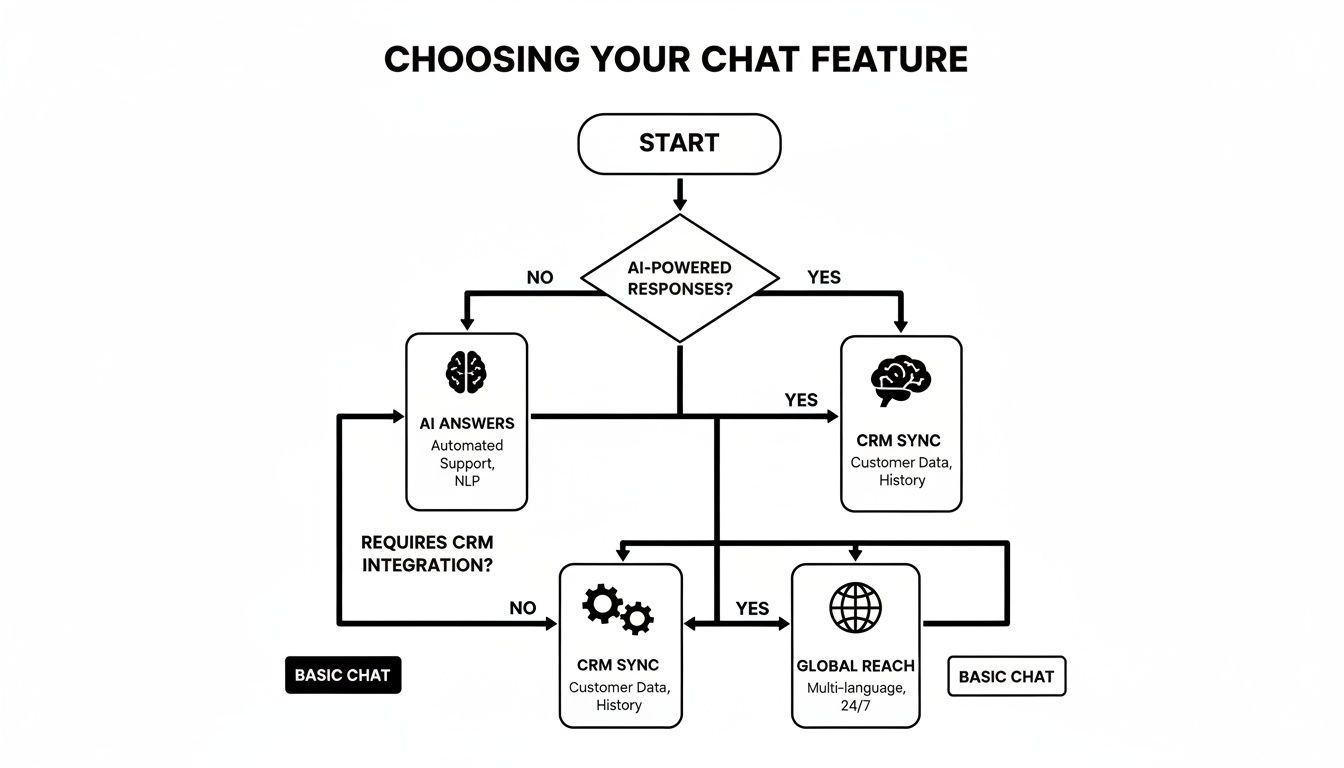
As the chart shows, your unique needs will point you toward a specific set of features. When you’re evaluating different platforms, enterprises must put these capabilities at the top of the list:
- Robust Security Protocols: Look for non-negotiables like end-to-end encryption, regular security audits, and certifications like SOC 2 Type II.
- Data Compliance: The platform must meet data residency rules and be fully compliant with regulations like GDPR and CCPA.
- Single Sign-On (SSO): This is a must-have. It needs to integrate smoothly with identity providers like Okta or Azure AD to keep agent access secure and simple.
- AI Guardrails: You need advanced controls to stop the AI from giving wrong answers, going off-script, or adopting the wrong tone. This level of control is a core part of platforms like SupportGPT.
Chat Widget Selection Criteria by Business Type
To make this even clearer, here's a quick table showing how different types of businesses should prioritize their feature wish list.
| Feature | SaaS Priority | E-commerce Priority | Enterprise Priority |
|---|---|---|---|
| Knowledge Base Sync | High (Essential for in-app self-service) | Medium (Good for product FAQs) | High (Needed for complex internal/external docs) |
| CRM/User Data Integration | High (Personalizes the user experience) | High (Crucial for order history/support) | High (Connects chat to the entire customer view) |
| Proactive Messaging | High (Key for onboarding and engagement) | High (Drives sales and cart recovery) | Medium (Useful for targeted internal support) |
| AI-Powered Recommendations | Medium (Can suggest features/upgrades) | High (A direct revenue driver) | Low (Less relevant for most use cases) |
| Security & Compliance | Medium (Important, but scales with size) | Medium (PCI compliance is key) | Critical (Non-negotiable foundation) |
| Single Sign-On (SSO) | Low (A nice-to-have for smaller teams) | Low (Not a primary concern) | Critical (Essential for access management) |
| AI Guardrails & Controls | Medium (Helps maintain brand voice) | Medium (Prevents off-brand offers) | Critical (Ensures accuracy and compliance) |
This table isn't a rigid set of rules, but it's a solid starting point. Your own specific needs might shift these priorities around a bit, but it helps frame the conversation.
Ultimately, choosing the right chat widget is about understanding your unique context. Whether you're a SaaS company trying to reduce churn, an e-commerce store looking to boost sales, or an enterprise protecting sensitive data, there’s a solution out there that's built for you. The key is to know what you're looking for before you start shopping.
Installing and Deploying Your First Chat Widget
Getting a chat widget live on your website is surprisingly simple these days. Thankfully, the era of needing a developer for every tiny site update is long gone. Modern chat platforms have made the whole process incredibly straightforward, often boiling it down to a simple copy-and-paste.
The goal is to get from sign-up to a fully functioning, on-brand chat assistant in minutes, not weeks. Platforms like SupportGPT are designed for this exact purpose, making sure even non-technical users can launch a powerful AI agent without writing a single line of code.
Common Deployment Methods Explained
You've got a few ways to get a chat widget onto your site, each tailored for different platforms and technical comfort levels. The best part? The most common method is also the easiest.
1. The Embed Code Snippet This is the classic, go-to method for a reason—it's universal. After you sign up for a chat service, you'll get a small piece of JavaScript code. You can think of this code as a simple instruction that tells a visitor's browser, "Hey, load our awesome chat widget right here."
All you have to do is copy this code and paste it into your website's HTML, usually just before the closing </body> tag. This one-time setup ensures the widget appears on every page and typically takes less than five minutes.
2. One-Click Plugins and Integrations If your website is built on a popular platform like WordPress, Shopify, or Webflow, it gets even easier. Most chat providers offer dedicated plugins or apps specifically for these content management systems.
Instead of touching any code, you just install the plugin from your platform’s marketplace, connect it to your account, and voilà—the widget is automatically added. This is the perfect solution for anyone who prefers to manage everything from their website’s dashboard.
3. Software Development Kits (SDKs) For teams looking for a much deeper, more customized integration, an SDK is the answer. This is definitely the developer's route. It provides a full library of tools to build the chat experience directly into a web or mobile application from the ground up. An SDK gives you total control over how the widget looks and acts, but it does require engineering resources to implement.
Your Pre-Launch Checklist
Before you flip the switch, taking a few minutes to run through a quick checklist can make all the difference. A little bit of prep work here will dramatically improve the user experience right out of the gate.
Key Insight: A successful launch isn't just about making the widget show up. It's about making sure that the very first interaction a visitor has is helpful, on-brand, and sets the right tone.
Use this checklist to make sure you've got your bases covered:
-
Customize the Appearance: Your chat widget shouldn't look like a third-party add-on. Adjust the colors to match your brand palette, upload your company logo, and pick a design that feels like a natural part of your site. Cohesion builds trust.
-
Set an Automated Welcome Greeting: A good welcome message is your proactive first move. Instead of a generic "How can I help?", try something more contextual. If a user is on your pricing page, a message like, "Have questions about our plans? I can help with that," is far more engaging.
-
Define Basic Routing Rules: Even with a smart AI, you need a plan for when a human touch is required. Set up simple escalation rules. For example, if a conversation includes the word "refund" or "complaint," you can have it automatically flagged for a human agent.
-
Train Your AI on Core Knowledge: If you're using an AI-powered widget, the initial training is vital. Upload your key help documents, FAQs, and product info. This ensures the AI can deliver accurate, genuinely helpful answers from day one.
By following these straightforward deployment steps and ticking off this checklist, you can launch your new chat widget with confidence. The entire process is built to be accessible, giving you a powerful new way to connect with customers with minimal fuss. For more ideas on perfecting your setup, explore our tips on creating an effective https://supportgpt.app/blog/chat-widget-on-website.
Best Practices for Driving Engagement and Conversions
Dropping a chat widget onto your website is the easy part. The real work—and the real payoff—comes from turning it into a powerful tool that actively helps visitors, builds trust, and nudges them toward becoming customers. A well-tuned chat experience is about much more than just answering questions; it's about starting the right conversations at the right time.

This means we need to think beyond the initial setup. It’s about designing smart, helpful conversation flows, knowing exactly when to bring in a human expert, and relentlessly measuring what works so you can do more of it. Let’s walk through the strategies that separate a 'meh' chat widget from one that truly drives growth.
Craft an Exceptional User Experience
First impressions are everything, and your chat widget is often a visitor’s first direct interaction with your brand. A slow, generic, or clunky interface can be a major turn-off. But a thoughtful, personal touch can build instant rapport and get the conversation started on the right foot.
Your top priority here is the welcome message. Ditch the bland "How can I help?" and greet people with a message that shows you understand what they might be looking for.
- On a Pricing Page: "Exploring our plans? I can help you find the perfect fit for your team."
- On a Product Page: "Have a specific question about this feature? Just ask me here!"
- On the Homepage: "Welcome! Are you looking for product info, support, or something else?"
This simple tweak makes a world of difference. For more ideas, we've put together some proven templates in our guide on creating the perfect welcome message example.
You should also use proactive chat triggers based on what visitors are doing. If someone is lingering on a high-value page—like your checkout or demo request form—for more than 30 seconds, have the widget pop up with a helpful offer. That little nudge is often all it takes to close the deal.
Design Intelligent Conversation Flows
A great chat experience doesn't just wait for questions; it guides users toward answers. This means designing conversation flows that are logical and intuitive, empowering people to find what they need on their own while always offering a clear path to a human when things get tricky.
Start by feeding your AI with your company's documents, help articles, and website content. This allows it to give accurate, instant answers to the most common questions, which takes a huge load off your support team. Modern platforms like SupportGPT make this a breeze by letting you sync your existing knowledge base to build a smart AI assistant.
A well-trained AI is your first line of defense against support overload. It handles the repetitive queries 24/7, ensuring your team's expertise is reserved for the complex, high-value conversations that truly require a human touch.
It's also crucial to set up clear rules for when a person should take over. This is what we call intelligent escalation. For instance, you can create a rule that automatically hands off a chat to a live agent if a user types keywords like "refund" or "billing error," or if they're clearly getting frustrated.
Measure and Refine Your Strategy
You can't improve what you don't measure. A data-driven approach is the only way to know if your chat strategy is actually working and how to make it better. Focus on tracking a few key metrics that tell you about both user happiness and your business goals.
Here are the Key Performance Indicators (KPIs) you should be watching:
- First Response Time: How fast are people getting a reply, from both the AI and your team?
- Resolution Rate: What percentage of issues get solved in the first conversation?
- Customer Satisfaction (CSAT) Score: Are people leaving the chat feeling happy and helped?
- Ticket Deflection Rate: How many simple questions is your AI handling on its own?
- Leads Captured: How many qualified leads are you generating directly from chat conversations?
Digging into these numbers will give you incredible insights. You might find that a specific proactive message is a lead-generation machine or that your AI needs more training on a certain product. This cycle of measuring, learning, and tweaking is how you build a chat implementation that delivers real results.
Of course, the chat widget is just one piece of the puzzle. To see how it fits into a broader strategy, it's worth exploring other conversion rate optimization tools as well.
Common Pitfalls to Avoid with Your Chat Widget
Adding a chat widget to your website can be a game-changer, but it’s not a magic bullet. If you're not careful, that helpful little pop-up can quickly become a major source of frustration for your visitors and a headache for your team. Knowing the common tripwires ahead of time is the best way to make sure your chat strategy actually helps, not hinders.
One of the biggest mistakes we see is unleashing an undertrained AI on unsuspecting customers. Think about it: when a bot spits out wrong or nonsensical answers, it doesn't just fail to help—it actively damages your credibility. This almost always happens when the AI is working with an incomplete or outdated knowledge base, leaving it to guess or fall back on useless, canned responses.
Another classic blunder is a clumsy handoff from the bot to a real person. By the time a customer asks for a human, they've already tried to solve the problem themselves and their patience is likely wearing thin. If getting to an agent is slow, difficult, or—worst of all—makes them repeat everything they just told the bot, you might lose that customer for good. With 73% of customers saying experience is a major factor in their buying decisions, a smooth transition isn't just nice to have; it's essential.
Solving Common Chat Widget Problems
Getting this right isn't about flipping a switch and walking away. It requires a thoughtful approach that puts the user experience front and center. You need to actively manage, tune, and improve your chat setup to make every interaction feel effortless.
The first step is setting up solid AI guardrails. This is all about defining the rules of engagement for your bot. You need to control what it can and can't talk about, preventing it from going off-script or trying to answer questions it's not equipped for. For example, a platform like SupportGPT lets you create boundaries so the bot stays on-brand, on-topic, and consistently accurate.
Key Insight: Your chat widget should never be a dead end. Every conversation, whether with an AI or a person, must have a clear and efficient path to resolution. If the AI doesn't know the answer, its primary job is to connect the user to someone who does—quickly.
Establishing Clear Escalation Protocols
To fix those painful bot-to-human handoffs, you have to map out a clear escalation path. This means setting up smart rules that automatically get the conversation to the right person based on what the customer is saying or how they're feeling.
Here are a few practical ways to improve your escalation process:
- Keyword Triggers: Set up rules to instantly transfer a chat to a live agent if it contains words like "complaint," "billing issue," or "cancel."
- Sentiment Analysis: Use a system that can pick up on signs of frustration in the user's language and proactively offer a human connection.
- Seamless Context Transfer: Make sure the full conversation history—everything the user already told the bot—is passed directly to the human agent. Nobody wants to repeat themselves.
Finally, resist the urge to be too aggressive with proactive messages. Sure, reaching out can be effective, but hitting every single visitor with a chat pop-up the moment they arrive is a great way to annoy them. A much better approach is to use behavior-based triggers. For instance, only engage a user after they’ve spent 30 seconds on your pricing page. That way, your outreach feels helpful, not intrusive.
Frequently Asked Questions
If you're exploring chat widgets, you've probably got a few questions. That's a good thing. Getting the right answers upfront helps you build a solid strategy and know what to expect. Let's dig into some of the most common ones we hear.
How Much Technical Knowledge Do I Need?
Honestly, for most modern platforms, you need almost none. The days of needing to call in a developer for every little website tweak are long gone.
The standard way to get a chat widget running is to simply copy a single line of JavaScript code and paste it into your site's header or footer. If you're on a platform like WordPress or Shopify, it's often even simpler—there's usually a dedicated plugin that makes installation a one-click affair. If you can copy and paste, you're good to go.
Can an AI Chat Widget Completely Replace Humans?
Not really, and that’s not the point anyway. Think of an AI chat widget as a powerful force multiplier for your human team, not a replacement.
Where it really shines is in handling the flood of simple, repetitive questions—instantly, 24/7. This is a huge time-saver. By letting the AI handle the basics, your skilled human agents are freed up to tackle the complex, high-stakes conversations where empathy and critical thinking make all the difference. The best setups seamlessly hand off a chat from AI to a person the moment a human touch is needed.
How Do I Measure the ROI of a Chat Widget?
Measuring the return on your investment comes down to tracking metrics that actually matter to your bottom line.
The trick is to directly link chat interactions to business outcomes. If you're focused on sales, you'll want to watch the number of leads captured and, more importantly, the conversion rate of visitors who chatted versus those who didn't. For support, focus on things like ticket deflection rate, how quickly customers get an answer, and their overall satisfaction (CSAT) scores.
Most chat platforms have built-in dashboards that serve up these numbers, so you can get a clear, data-backed picture of the value it’s adding.
Ready to see how an AI-powered chat widget can change the game for your website? Discover SupportGPT and deploy a smart, 24/7 assistant in minutes. https://supportgpt.app