How to Add a Chat Widget on Website for Better Engagement
Discover how to add a chat widget on website to boost conversions and customer loyalty. This guide provides actionable steps and expert tips for success.
A chat widget on a website is your direct line to visitors, turning a one-way browsing experience into a two-way conversation. Think of it as having a helpful expert ready in the corner of every page, available the exact moment a question pops into a customer's head. It’s the fastest way to offer help, capture leads, and make people feel confident about doing business with you.
Why a Chat Widget Is a Must-Have for Modern Websites
In the past, a chat widget might have been considered a "nice-to-have" feature. Not anymore. It's now a fundamental part of a smart business strategy. It closes the all-too-common gap between a visitor having a question and you providing the answer, preventing them from bouncing off your site out of frustration or uncertainty. This kind of immediate, on-the-spot support isn't just about being helpful—it directly impacts your bottom line.

From Passive Browsing to Active Engagement
Let’s look at a classic example. A potential customer lands on your pricing page. They're weighing their options but can't quite figure out which plan is right for them. Without a chat widget, what do they do? They might hunt for a contact form, send an email into the void, or, more likely, just give up and leave.
Now, picture that same scenario with a chat widget. They can type a quick question and get an instant recommendation, guiding them straight to checkout. That's the power of turning passive browsing into an active conversation.
This simple change opens up so many opportunities:
- Resolve doubts instantly: Clear up questions about features, shipping, or pricing right when they surface.
- Proactively offer help: Set up automated messages on key pages to nudge users who seem stuck or hesitant.
- Gather valuable feedback: Get unfiltered insights from your users about what they need and where they're struggling.
Integrating a chat widget brings a host of benefits that directly translate into better business performance. Here's a quick breakdown of the value it delivers.
Key Benefits of Implementing a Chat Widget
| Benefit | Impact on Business | Example Scenario |
|---|---|---|
| Increased Conversions | Removes friction from the buying process, guiding users toward a purchase. | A visitor on a product page asks about compatibility and gets an instant 'yes,' leading to a sale. |
| Improved Customer Satisfaction | Provides immediate answers, making customers feel heard and valued. | A frustrated user gets a quick solution to a login problem instead of waiting 24 hours for an email reply. |
| Lead Generation | Captures contact information from interested prospects, even outside of business hours. | A visitor interested in a demo leaves their email in the chatbox, creating a new lead for the sales team. |
| Valuable User Insights | Collects real-time feedback and common questions to improve products and content. | The support team notices many questions about a specific feature and informs the product team to clarify it. |
Ultimately, the goal is to be there for your customers at the moment of need, which builds trust and drives growth.
The Bottom-Line Impact of Instant Support
The link between real-time support and revenue is crystal clear. Did you know that 63% of customers are more likely to buy from a site that offers live chat? The results can be staggering. When Intuit implemented live chat, they saw their conversion rates jump by a massive 190%.
A chat widget is more than a support tool; it's a conversion engine. By being available the second a customer needs you, you build trust and remove the friction that kills sales.
Beyond a simple pop-up, you can even explore building a secure and engaging mix chat room for a more dynamic community feel. With modern AI tools like SupportGPT, providing this level of sophisticated, 24/7 support is entirely achievable without overloading your team.
How to Choose the Right Chat Widget for Your Business
Picking the right chat widget for your website isn't just about aesthetics. It’s a strategic move that needs to line up with your business goals, your team's bandwidth, and the kind of experience you want to give your customers. Trust me, not all chat tools are built the same, and what works for one company could be a complete mismatch for another.
A small e-commerce shop, for example, might just need a simple way to field product questions and maybe capture a few leads. A basic live chat tool could do the trick. But if you're a growing B2B SaaS company, your needs are worlds apart. You're likely dealing with complex technical issues, supporting customers across different time zones, and needing to get tricky problems to the right engineers—fast.
Assess Your Core Needs and Goals
Before you even start looking at fancy features, take a step back and figure out what you're actually trying to achieve. Is the main goal to slash your support ticket volume? Boost sales conversions? Or just give people a way to get answers around the clock? Your answer here will point you in the right direction.
Start by asking yourself a few honest questions:
- Who is going to run this thing? Do you have a support team ready to jump on live chats, or are you looking for an AI chatbot like SupportGPT to handle the bulk of the work automatically?
- How technical is your team? If you don't have a developer on call, you'll want a no-code option where installation is as simple as pasting a snippet of code into your site's header.
- What will people actually ask? If you anticipate detailed, multi-part questions, you need a platform that can be trained on your internal knowledge base and documentation to give accurate answers.
Comparing AI Platforms vs Live Chat Only
The real dividing line in the chat widget world today is AI. Your traditional widget is basically a direct line to a human agent. Modern platforms, on the other hand, use powerful AI to deliver instant, automated help without any human intervention.
A purely live-chat tool is like hiring a receptionist who can only answer the phone during office hours. An AI-driven widget is like having an expert on every single page of your website, ready to help 24/7, in any language.
AI platforms like SupportGPT, which tap into large language models from OpenAI or Google's Gemini, can figure out what a user actually wants, pull detailed answers from your own content, and even take action. A simple live chat tool just can’t do that. To get a better sense of the landscape, you can dig into this detailed live chat software comparison to see how different tools stack up.
Must-Have Features for Scalability and Security
Even if you're small now, you want to choose a tool that can grow with you. It's far better to have enterprise-grade features you don't use yet than to realize you've outgrown your widget in six months.
Here are a few key features I always recommend looking for:
- Security Guardrails: You absolutely need the ability to keep the AI on-topic. Preventing it from answering weird questions or making things up is critical for protecting your brand.
- SSO (Single Sign-On): For any team with more than a few people, SSO is a lifesaver. It makes user management a breeze and keeps your accounts secure by connecting with your company's existing login system.
- Smart Escalation: The widget has to be smart enough to know when it's out of its depth. It should seamlessly route complex conversations to the right human expert without making the customer repeat themselves.
- Multilingual Support: If you have an international audience, this is a non-negotiable. The ability to automatically chat with users in their native language makes for a much better, more inclusive experience.
Your Guide to Embedding and Configuring the Widget
Alright, let's get down to the fun part—turning that chat widget from a line item in your software subscription into a living, breathing part of your website. Putting a chat widget on your website is surprisingly straightforward these days. You don’t need to have a developer on speed dial; if you can copy and paste, you can have a basic widget up and running in minutes.
We’ll walk through this using SupportGPT as our example, but the core steps are pretty similar across most modern platforms. The first thing you'll do is grab a unique code snippet. Think of this little block of JavaScript as the magic key that connects your website to the chat service, allowing the widget to pop up and work its magic.
Once you have that snippet, the only "technical" bit is pasting it into your website’s HTML, usually right before the closing </head> tag. Placing it there helps the widget load quickly without slowing down the rest of your site content. If you're using a platform like WordPress, Shopify, or Squarespace, you're in luck. They almost always have a dedicated spot in the settings for "custom code" or "header scripts." Just paste it in, save, and you’re done with the hard part.
Getting the Code Snippet
You'll start inside your chat platform's dashboard. Just look for a section labeled "Installation," "Channels," or "Widget Setup."
From there, it’s a simple three-step dance:
- Generate the Code: You'll see a button to create your unique embed code.
- Copy the Snippet: A single click usually copies the entire block of code to your clipboard.
- Paste into Your Site: Hop over to your website's admin panel, find that header section we talked about, and paste the code.
Hit save, refresh your website, and you should see the default chat icon pop up. It’s live!
Initial Configuration and Branding
Now that the widget is on your site, it’s time to make it feel like yours. A generic, out-of-the-box chat bubble can feel clunky and untrustworthy. Customization is what creates a smooth, integrated experience that feels like a natural extension of your brand.
First up, the visuals. The goal here is to make the widget look like it belongs. Most platforms, SupportGPT included, give you easy-to-use controls for this:
- Widget Color: Tweak the primary color to perfectly match your brand’s palette.
- Header and Icon: Upload your logo and pick an icon that fits your vibe.
- Positioning: Decide if you want it on the bottom-right or bottom-left of the screen.
Next, think about your welcome message. This is your first impression, so don’t squander it with a robotic "How can I help?" Tailor it to your audience and brand voice. If you run a SaaS product, something like, "Welcome! Got questions about features or pricing?" works great.
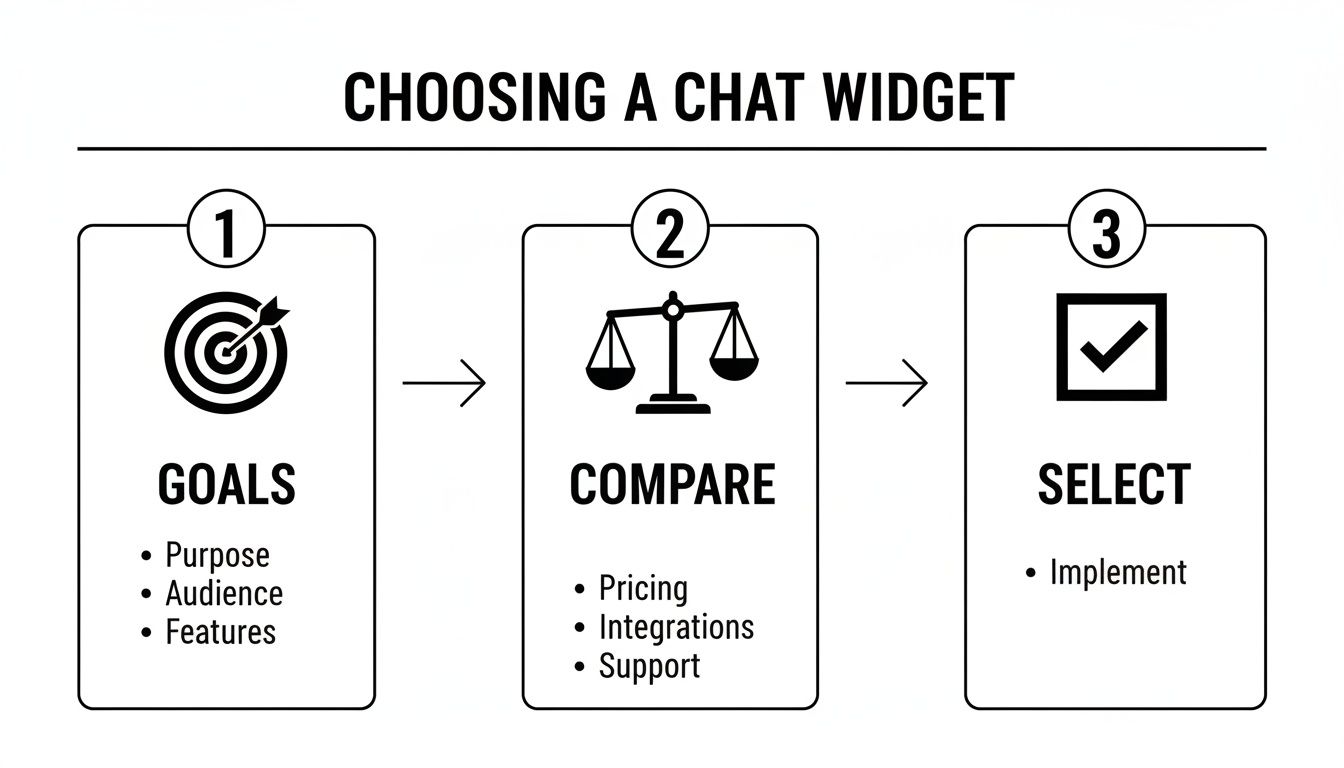
This whole process really starts long before you touch a line of code. As you can see, a successful rollout begins with defining clear goals for what you want the widget to achieve.
These initial tweaks are more than just cosmetic—they build immediate trust. And the data backs this up. Customer expectations are high; globally, 74% of people actually prefer bots for simple questions. On top of that, 44% of shoppers are open to making a purchase directly through chat. A polished, accessible widget isn't just for support anymore; it's a powerful sales tool.
Finally, set up a few automated prompts or "quick replies." These are the little buttons that guide the user, like "See a demo," "View pricing," or "Talk to an agent." They remove friction and give your support team—whether human or AI—instant context on what the user needs. To dive deeper, you can learn more about optimizing your customer support chat process to make every interaction count.
Fine-Tuning Your Chat Widget for a Truly Personal Touch
Let's be honest, a generic, out-of-the-box chat widget is just a starting point. The real magic happens when you personalize it. This is where you transform a simple Q&A box into a smart, context-aware assistant that feels like a genuine extension of your brand. Your goal is to make every single interaction feel relevant, helpful, and almost uncannily intuitive.

This isn’t just a nice-to-have feature anymore; customers expect it. And the data backs this up. A huge 87.2% of consumers view their bot interactions as neutral or positive. Even more telling, 62% would rather use a chatbot than wait for a human agent, especially for those quick, simple questions. With platforms like SupportGPT, meeting—and even exceeding—these expectations is well within reach.
Train Your AI on What You Actually Know
The quickest way to make your chat widget infinitely more useful is to teach it about your business. A generic AI can tell a user what a "subscription" is, but it can't explain the nuances of your Gold vs. Platinum pricing tiers or troubleshoot a feature unique to your product.
Think of it like training a new team member. You wouldn't just sit them at a desk with no information. You’d give them access to your core knowledge:
- Your Entire Help Center: Every last support article and FAQ is a goldmine of information for your AI.
- Product & Service Pages: Let the bot crawl these pages to understand what you sell, its features, and why it's great.
- Technical Docs & PDFs: For more complex products, feeding the AI your technical manuals ensures it can handle those deep-in-the-weeds questions with confidence.
With a tool like SupportGPT, this process is surprisingly simple. You just point it to the right URLs or upload the files, and the AI gets to work absorbing that information. This means every answer it gives is accurate, on-brand, and grounded in your own approved content.
Turn Conversation into Action
True personalization isn’t just about providing better answers; it’s about getting things done. Modern AI chat widgets can be configured to perform tasks directly within the chat window, creating a smooth, efficient experience that users love. We call these "AI Actions."
A truly personalized chat widget doesn't just answer questions—it solves problems. It bridges the gap between conversation and action, turning a simple query into a completed task.
Imagine a potential customer asks about your enterprise plan. Instead of just getting a paragraph of text, the AI can trigger an action to book a demo with your sales team right there in the chat. Or, if a user describes a bug, the AI can automatically create a support ticket in your helpdesk. Suddenly, your chat widget isn't just a passive knowledge base; it's an active part of your business operations.
Get Smart with Routing and Escalation
Look, not every conversation can be—or should be—handled entirely by AI. A huge part of a great chat experience is knowing when to seamlessly hand off a conversation to a human. Forget clunky old keyword triggers; modern systems use natural language to build intelligent routing rules.
For instance, you can set up rules that feel completely intuitive:
- If a user mentions words like "refund" or "cancel my account," the chat can be flagged and instantly sent to your customer success team.
- When a message includes phrases like "enterprise pricing" or "security compliance," route it directly to a sales specialist's queue.
- If the AI gets stumped on the same question twice, automatically escalate the conversation to a live agent.
This proactive approach makes sure your most important conversations get to the right people without a single moment of friction. The more you dig into artificial intelligence personalization, the more you'll see how these small automations add up to a massive improvement in customer experience. And for more tips on making a great first impression, check out our guide on crafting the perfect welcome message.
Using Analytics to Fine-Tune Your Chat Widget's Performance
Getting your chat widget live on your website is a huge milestone, but it's really just the starting line. The real magic happens with continuous improvement, and that whole process is fueled by data. If you aren't looking at the numbers, you're just flying blind. By diving into the analytics, you can turn guesswork into a solid, actionable strategy for making your widget better and better.
Think of your widget’s analytics dashboard as its report card. It tells you exactly where the AI is acing the test and where it might need a little extra tutoring. This data-first approach is what separates an okay chatbot from one that becomes an absolutely essential part of your customer experience.
What Numbers Actually Matter?
To get the full story, you need to look beyond just the total number of chats. A robust analytics dashboard, like the one built into SupportGPT, will give you a complete, 360-degree view of how things are going.
You'll want to keep a close eye on these core metrics:
- Conversation Volume: This is your basic engagement metric. How many people are actually talking to your widget? Keep an eye out for spikes—they often line up with marketing campaigns, product launches, or other changes in website traffic.
- Resolution Rate: What percentage of conversations does the AI handle successfully from start to finish, without a human ever getting involved? This is one of the biggest indicators of your widget's overall effectiveness.
- Escalation Frequency: How often is the AI passing a conversation over to a live agent? A consistently high escalation rate is a red flag that your AI might need more training or better documentation on certain topics.
- User Satisfaction (CSAT) Scores: At the end of the day, are people happy with the support they're getting? This direct feedback is pure gold for pinpointing exactly what needs improvement.
Keeping these numbers on your radar gives you a quick, high-level pulse check on your widget’s health and business impact.
Turning Raw Data into Smart Moves
Data is only valuable if you act on it. The real goal here is to spot patterns in these metrics and uncover opportunities to refine the experience. For instance, after digging into your conversation logs, you might discover that a whopping 25% of all escalations stem from confusion about a single feature on your pricing page.
Your analytics dashboard isn't just a report card; it's a treasure map. It shows you exactly where to dig to uncover friction points in the customer journey and find opportunities for improvement.
An insight like that is invaluable. It immediately tells you two things: first, your support articles about that feature are probably not clear enough. Second, you can create a brand new automated response or even a dedicated AI Action to address that exact question, which could instantly slash your support team's workload.
Here’s a simple, repeatable process for continuous improvement:
- Check the Vitals: Set aside some time each week to review your key metrics. Look for trends, odd spikes, or anything that seems out of place in the escalation reasons.
- Read the Transcripts: Don't just look at the numbers. Dive into a handful of unresolved or low-rated conversations. What were the specific questions that tripped up the AI?
- Experiment and Tweak: Use a real-time testing tool, like the playground feature in SupportGPT, to workshop better prompts and answers for those tricky edge cases.
- Push It Live: Once you're confident in the fix, update your AI's knowledge base or adjust your routing rules.
By making this a regular cycle, you build a powerful feedback loop. Your chat widget doesn't just stay static; it gets smarter, more helpful, and more valuable over time.
Common Questions About Website Chat Widgets
It’s completely normal to have a few questions before you add a new tool to your website, and a chat widget is no exception. Let's walk through some of the most common concerns I hear from people. Most of these worries come from experiences with older, clunky chat tools, and you’ll be happy to know that modern solutions have solved these problems right from the start.
The first question is always about performance. "Will this slow down my website?" It's a great question—site speed is everything for user experience and SEO, so the last thing you want is a new feature that drags everything down.
The good news is that today's chat widgets are built to be incredibly lightweight. They load asynchronously, which is a fancy way of saying they don't get in the way of your main content. Your visitors can start browsing your pages or reading your articles while the widget loads quietly in the background, having almost no impact on your site's performance.
This means you get to offer fantastic, instant support without making the painful tradeoff of a slower website.
What Skills Do I Need to Get Started?
Another hesitation I see a lot is the fear of a complex technical setup. Do you need to hire a developer just to get a chat widget on a website? With platforms like SupportGPT, the answer is a definite no. The entire experience is designed for people who aren't coders.
Getting the widget on your site really just comes down to a simple copy-and-paste job.
- First, you’ll generate a code snippet in your dashboard.
- Next, you just copy that snippet.
- Finally, you paste it into the header section of your website. Most website builders like WordPress or Shopify have a dedicated spot for this, making it incredibly straightforward.
Once that’s done, everything else—from changing the widget's colors and training the AI to setting up rules for when to bring in a human—is handled in a simple, visual dashboard. No code needed, ever.
Can It Support a Global Audience?
"What about customers who don't speak English?" This is a big one. If you have an international audience, you need a solution that works for everyone. Modern AI chat platforms are built for this.
Tools like SupportGPT have strong multilingual capabilities built right in. The widget can automatically detect a visitor's language and respond in the same one. This lets you offer consistent, top-notch support to people all over the world without needing to hire a massive, multilingual support team.
And what happens when the AI can't answer a question? This is where having smart escalation rules makes all the difference. Instead of hitting a dead end, a well-designed AI widget will follow the rules you've set to smoothly hand the conversation over to the right person on your team. It's a seamless transition from AI to human help, so your customers always get the answers they need.
Ready to transform your customer support? SupportGPT makes it easy to build and deploy a smart AI assistant on your website in minutes. Start for free and see the difference. Get started with SupportGPT.