Helpdesk Chatbot Explained: A Practical 2026 Guide
Learn how a helpdesk chatbot works, where it actually helps, and how to deploy one your customers will trust. A practical 2026 guide
A two-person SaaS company can spend its morning answering password-reset emails instead of improving the product. A Shopify owner can watch “Where is my order?” messages flood the inbox during a peak sales period. An IT manager can explain the same VPN setup process repeatedly while more urgent incidents wait.
A helpdesk chatbot can absorb much of that repetitive demand, but only when it's built as more than an FAQ widget. The useful product is a layered automation system that understands intent, retrieves reliable knowledge, completes carefully bounded actions, measures real resolution, and knows when a person should take over.
That distinction matters because chatbot adoption has moved into mainstream support operations. A 2026 industry roundup reports that 91% of businesses with 50 or more employees use AI chatbots somewhere in the customer journey, compared with roughly 58% in 2023, while adoption across businesses grew 4.7 times between 2020 and 2025. The same roundup estimates that roughly 987 million people worldwide use chatbots. (Ringly.io's 2026 chatbot statistics roundup)
What a Helpdesk Chatbot Actually Does
A helpdesk chatbot is software that sits at the front of a support operation and decides what should happen next. It interprets a customer's message, identifies the likely intent, retrieves an answer from an approved source, performs an allowed task when connected to business systems, and escalates when the request falls outside its boundaries.
That's different from legacy live chat. A traditional live-chat widget mainly opens a queue for human agents. The customer waits for someone to accept the conversation, and the agent gathers context manually. A chatbot actively handles the first interaction, asks clarifying questions, and can resolve a routine issue before a human ever sees it. A practical overview of FAQ-oriented chatbot design is available in this guide to chatbots for frequently asked questions.
The four jobs inside the conversation
A capable bot usually performs four related jobs:
- Recognize intent: It distinguishes “I forgot my password” from “my account has been locked,” even though both concern access.
- Retrieve knowledge: It searches approved help-center content, product documentation, policies, or structured records instead of relying on a vague internal memory.
- Take bounded action: It might look up an order, check a subscription status, open a ticket, or begin an authenticated password-reset flow.
- Escalate with context: It sends the transcript, collected details, attempted steps, and routing information to the right human queue when confidence is low or judgment is required.
The last job is where many deployments fail. A bot that stops a customer from reaching an agent may appear efficient, but the customer can still reopen the case, contact support through another channel, or arrive at escalation frustrated. Independent guidance recommends evaluating true resolution, not deflection alone. A useful approach is to check whether the customer recontacts support about the same issue within a 48-hour or seven-day window, then count the interaction as successful only when the issue stays closed. (Digital Applied's 2026 support resolution playbook)
The right mental model isn't “bot versus agent.” It's first layer versus exception layer. The bot handles high-frequency, low-judgment work, while people handle ambiguity, emotion, policy exceptions, account risk, and cases where the customer explicitly asks for a human.
Anatomy of a Modern Helpdesk Chatbot
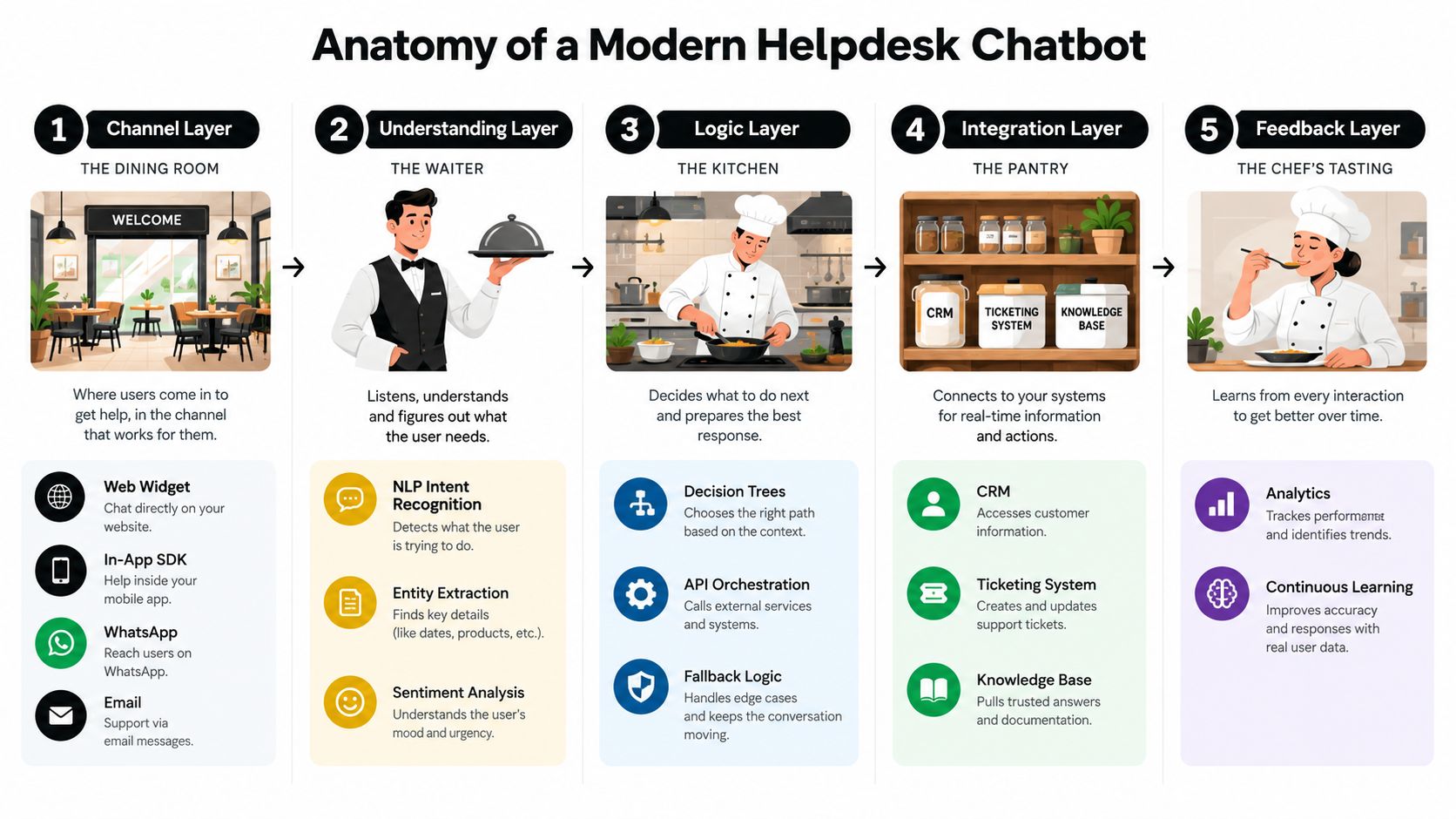
Think of the chatbot as a restaurant. The customer sees the dining room, but a useful meal depends on the host, pantry, kitchen, and delivery systems working together. Separating these layers helps product managers locate failures instead of blaming the language model for every poor answer.
The five functional layers
The channel layer is the dining room. Customers speak to the system through a web widget, an in-app SDK, WhatsApp, Apple Messages for Business, Slack, Microsoft Teams, or email. Channel choice affects adoption because customers tend to use the place where the problem already appears.
The understanding layer is the host. Older systems use natural-language understanding trained around intents and entities. Newer systems often use a large language model to interpret free-form questions, identify missing details, and ask a clarifying question. For example, “I can't get in” needs account context before the bot can safely decide whether the customer means a password, a locked account, or a service outage.
The knowledge layer is the pantry. It can contain help-center articles, internal runbooks, PDFs, past tickets, product catalogs, and structured records. Retrieval-augmented generation, keyword search, and API calls give the model material to work from. Retrieval quality depends heavily on content freshness, article structure, permissions, and metadata.
The orchestration layer is the kitchen manager. It decides whether the next step is to answer, ask, perform an action, or escalate. It tracks conversation state, confidence, identity, policy restrictions, and failed attempts. A bot shouldn't issue a refund because a sentence resembles a refund request.
The integration layer is the delivery hatch. It connects the assistant to ticketing, CRM, identity, billing, order, and product systems. Without it, the chatbot can explain how to change a plan but can't change the plan.
These layers increasingly overlap as language models take on intent recognition and parts of orchestration. Teams should still keep the mental separation. If answers are wrong, inspect retrieval. If actions are unsafe, inspect orchestration and permissions. If agents receive incomplete cases, inspect the integration and handoff payload. A deeper visual explanation appears in this chatbot architecture diagram.
Core Features That Matter in 2026
Buyers should separate table stakes from features that determine whether a chatbot can resolve real work. A legacy FAQ widget may return a canned article when it detects a keyword. A modern helpdesk chatbot should explain an answer, show where it came from, complete authorized tasks, and expose uncertainty.
What every serious platform should cover
Table-stakes capabilities include omnichannel deployment, intent recognition, knowledge-base connections, ticket creation and routing, human handoff with conversation context, analytics for resolution and customer satisfaction, SSO, and role-based access. These features make the bot usable as part of an operating model rather than as a separate experiment.
The stronger 2026 differentiators include:
- Grounded retrieval: The assistant answers from approved content and can display the source that supported its response.
- Authenticated actions: It uses controlled API calls to reset a password, look up an order, issue a refund, or change a subscription.
- Confidence and policy thresholds: It declines, asks for clarification, or escalates instead of guessing.
- Multi-step workflows: It can chain tools across systems while preserving the user's goal and state.
- Multilingual support: Teams can serve customers in additional languages without maintaining a separate intent model for each one.
- Governance controls: Audit logs, redaction, access policies, and response review help teams investigate what the bot said.
- Resolution analytics: Dashboards distinguish genuine closure from a conversation that merely ended.
The buyer's most revealing question is simple: Can the platform show the customer which source answered them, and can your team audit every response the bot gave last week? If the vendor can't answer both questions clearly, the system may be optimized for impressive conversations rather than dependable support.
| Capability | Legacy FAQ widget | Modern helpdesk chatbot |
|---|---|---|
| Understanding | Matches keywords or fixed intents | Interprets natural language, entities, context, and ambiguity |
| Knowledge | Returns canned links | Retrieves relevant approved content and can expose sources |
| Actions | Usually sends instructions | Uses authenticated integrations to complete bounded tasks |
| Escalation | Transfers with limited context | Applies rules and passes the transcript, details, and attempted steps |
| Analytics | Counts chats or clicks | Tracks containment, true resolution, recontact, escalation reasons, and feedback |
| Governance | Basic configuration | Policies, audit logs, permissions, redaction, and review controls |
For a more detailed evaluation framework, compare the AI chatbot features support teams should assess. The key principle is to buy for the workflows you need to close, not for the number of model options in a product demo.
Architecture and Integrations for Real Teams
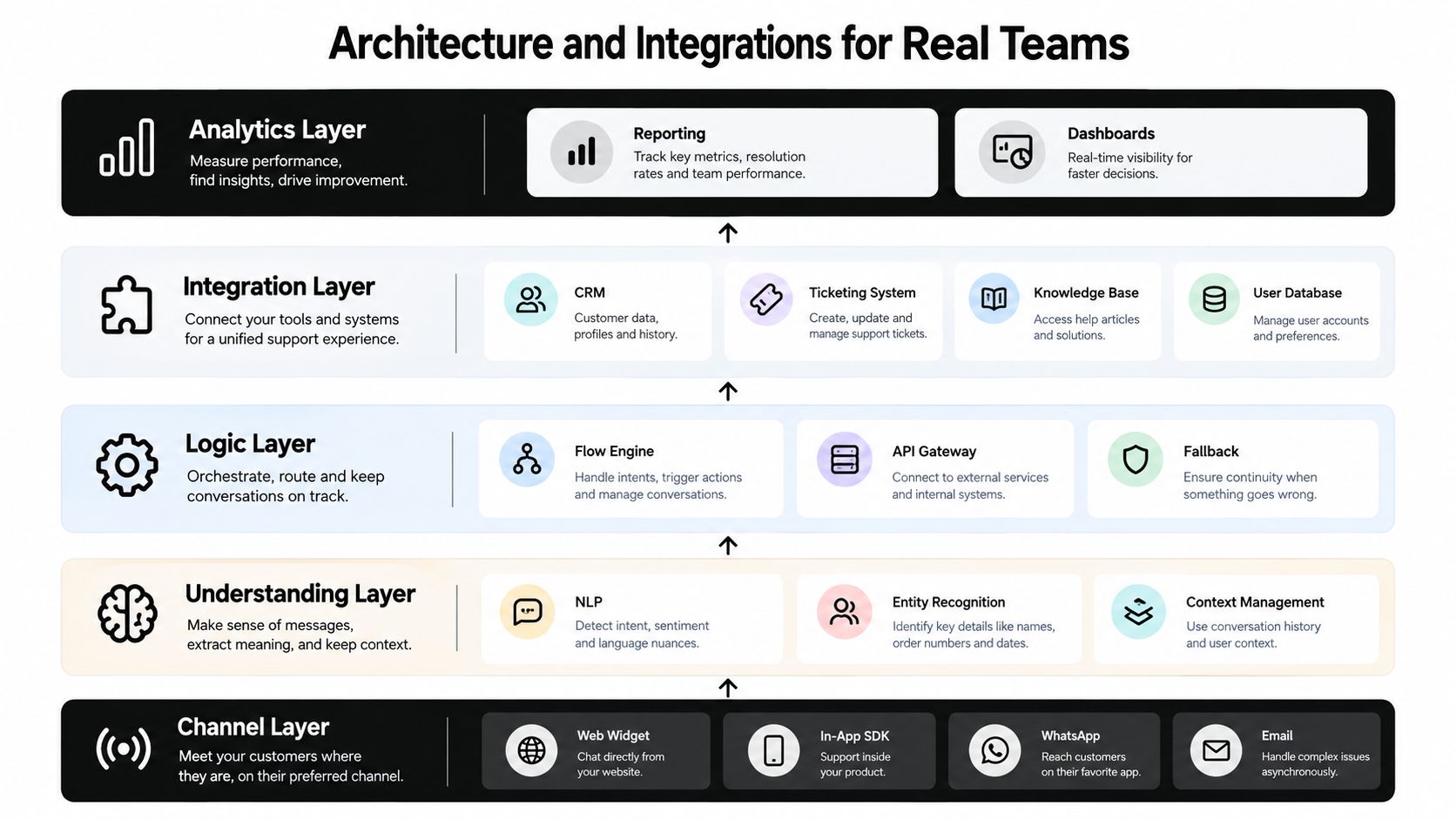
Consider a mid-sized SaaS support team with a web widget, an in-app help panel, WhatsApp, and an email intake. The channel layer collects conversations, but it shouldn't decide whether a customer gets an answer, an action, or a human. That responsibility belongs in the layers behind it.
A practical reference design
The understanding layer can combine an LLM with retrieval over a curated knowledge base and structured intents for transactional requests. The LLM handles varied phrasing, while structured intents make sensitive actions predictable. A customer asking “Can I get back into the account?” may receive conversational troubleshooting, but a password reset should follow a defined identity and authorization path.
The orchestration layer should behave like a state machine. It tracks the customer's goal, identity status, information already collected, actions attempted, and escalation triggers. Triggers might include repeated failure, low retrieval confidence, a sensitive topic, an explicit human request, or a policy exception.
The action layer exposes read and write APIs into systems such as Zendesk, Intercom, Salesforce, Jira Service Management, billing tools, and identity providers. A ticket handoff should include the conversation transcript, customer identity, relevant account fields, retrieved sources, diagnostic results, and the reason for escalation. Agents shouldn't have to ask the customer to repeat the story.
Production requirements teams often miss
The language model matters, but it usually matters less than knowledge freshness and integration quality. A stronger model can phrase an outdated policy more fluently, which doesn't make the answer safer. A vector store also isn't a complete knowledge strategy. Structured data, permissions, article ownership, API responses, and explicit business rules must work alongside semantic retrieval.
Identity resolution deserves early attention. The bot needs to know when it can provide general information and when it must verify the account before exposing data or taking action. Production systems also need audit logging, rate limiting, permission boundaries, failure handling, and a clear record of model and prompt changes. Teams evaluating model connectivity can use this overview of LLM integration for support assistants.
Sample Workflows Across SaaS, E-commerce, and IT
A useful way to test a helpdesk chatbot is to follow the request from the first sentence to the final state. The bot shouldn't merely produce a polished reply. It should either solve the job, create a properly prepared case, or explain why it can't proceed.
B2B SaaS access issue
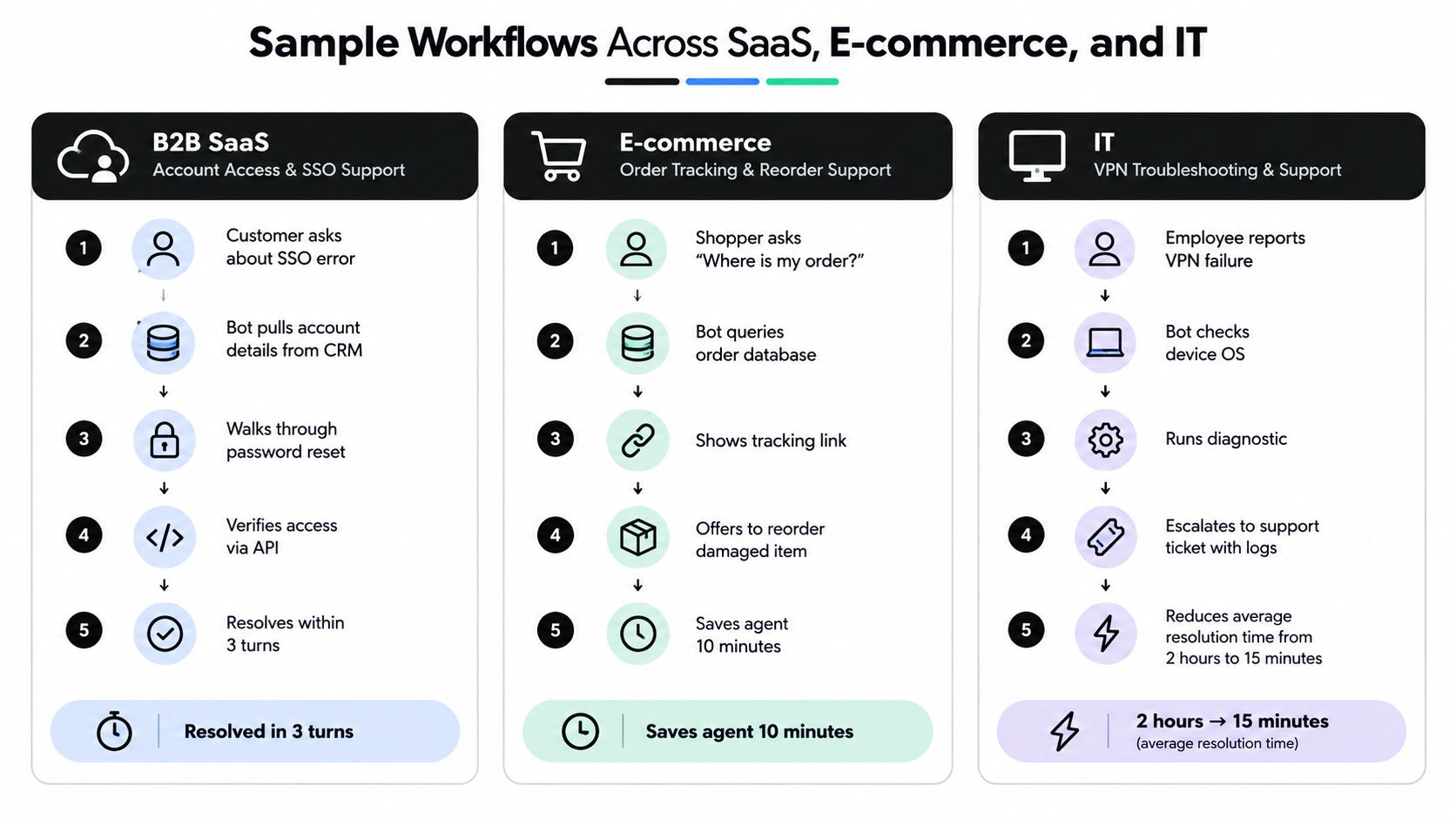
A customer reports an SSO error. The bot verifies the account context, checks the CRM for the customer's plan and relevant configuration, and walks through a diagnostic sequence. If an authenticated check confirms that access remains blocked, it creates a prioritized ticket in the support platform with the transcript and diagnostic results attached.
If the system recognizes a known product defect, it can route the case to the bug queue and offer a callback or human follow-up. The escalation seam is clear: the bot can guide standard troubleshooting, but it shouldn't speculate about an outage or promise a fix that the product team hasn't confirmed.
E-commerce order and return
A shopper asks where an order is. The bot queries the order system, returns the current tracking information, and explains the next available step. If the customer wants a return, the assistant can verify eligibility, create the return authorization, and provide the shipping label through the store's approved workflow.
A damaged-in-transit claim is different. The bot should collect the order details and preserve uploaded photos, then route the case to a human because the decision may require evidence, discretion, or carrier review. Returns and exchanges are already a strong automation category, with chatbots reported to handle 58% of those queries in a 2026 customer-support statistics roundup. (GreetNow's customer-support chatbot statistics)
Internal IT request
An employee reports a VPN failure. The bot identifies the device context, checks the employee's identity through the organization's authentication system, and runs approved diagnostics. If the diagnostic output indicates a configuration problem, it can trigger the permitted remediation workflow. If the issue requires endpoint investigation, it opens a ticket with logs and routes it to the right IT queue.
Organizations comparing an internal build with managed capacity may also review customer support outsourcing companies when they need human coverage for escalations, overflow, or after-hours operations.
Implementation Considerations and Governance
Launch readiness is less about choosing a fashionable model and more about proving that the operating system around it is sound. Use six decision blocks before opening the chatbot to customers.
Goals and data
Define what success means for the business. Track containment, actual resolution, customer satisfaction, time to resolution, escalation reasons, and any revenue or cost relationship that matters. Since a deflection can become a reopened case, use a recontact window rather than treating every conversation that ends as a win.
Audit the help center, internal runbooks, past tickets, and structured records before model selection. Remove contradictions, identify missing procedures, assign content owners, and mark articles that require authentication. The bot can't retrieve a trustworthy answer from content your team hasn't maintained.
Escalation and governance
Write explicit rules for uncertainty, sentiment, repeated failure, sensitive requests, and direct human requests. Decide which queue receives each escalation and what information the agent must see. A customer who has already completed three troubleshooting steps shouldn't be sent back to the first step by a human agent.
Governance should cover data residency, PII handling, prompt and response logging, access control, vendor lock-in, model updates, and review ownership. People interacting with chatbots must be informed that they're talking to AI unless that's obvious under the EU AI Act, as described in recent customer-support coverage. (Gleap's 2026 customer-support chatbot analysis)
Language, accessibility, and measurement
Test the experience across supported languages, accents, accessibility needs, and channels. Translation alone doesn't guarantee that policies, product terms, or escalation instructions remain accurate.
Build a day-one dashboard around:
- Resolution: Whether the customer's issue stayed closed after the selected recontact window.
- Escalation: Which intents, policies, and integrations send work to people.
- Trust: Thumbs-down feedback, source clicks, repeated questions, and requests for a human.
- Content quality: Topics that produce uncertainty, corrections, or repeated searches.
For broader governance planning, use this guide to enterprise AI governance. Treat the first launch as a controlled support process, not a one-time model deployment.
Why Customers Bypass Your Bot and What to Do About It
Some customers don't use a company's chatbot at all. They open ChatGPT, Perplexity, or Gemini in another tab because they expect those tools to interpret messy questions more naturally than a scripted support widget. Gartner coverage says customers are roughly three times more likely to use external GenAI tools than a company chatbot for service issues. (CMSWire's coverage of Gartner's GenAI findings)
The trust gap is understandable. A generic bot may pretend to understand, return several irrelevant articles, hide its sources, block access to a human, or force the customer through identity checks before explaining what information it needs. Customers also have a strong preference for human support in many situations. A 2026 survey cited in the same coverage reports that 79% of Americans strongly prefer a human for customer service, while 62% prefer chatbots for simple routine requests.
Seven design choices that earn a second chance
- Answer the question early. Put the direct answer in the first sentence, then provide context or steps.
- Show the evidence. Display the internal article, policy, order record, or status source used to answer.
- Admit uncertainty. Say that the available information isn't sufficient instead of filling gaps with a plausible invention.
- Offer one-tap escalation. Don't make a customer argue with the bot to reach an agent.
- Preserve the handoff. Send the transcript, identity status, attempted actions, and unresolved question to the human.
- Recognize returning customers. Use permitted context so the customer doesn't repeatedly explain the account or issue.
- Collect feedback per turn. A thumbs-down attached to a specific response is more useful than a general satisfaction prompt at the end.
Run a short diagnostic today. Ask the bot a routine question, a paraphrased version of that question, an ambiguous question, and a request for a human. Check whether it answers directly, cites a source, asks a sensible clarification, and transfers context without making you start over. Then repeat the test with a sensitive request that the bot should decline or escalate.
Your Helpdesk Chatbot Launch Checklist
Use this checklist to turn the strategy into work your team can assign this week.
- Discover: Map the highest-volume ticket intents, audit knowledge freshness, and define containment, resolution, and CSAT goals. Owner: support operations. Timing: this week.
- Build: Choose the first channel, select an LLM or NLU approach, connect approved knowledge, wire ticketing and CRM integrations, and write escalation rules. Owner: product and support engineering. Timing: during the initial build.
- Govern: Set content guardrails, PII rules, permissions, human review cadence, language coverage, and source-display requirements. Owner: security, legal, and support leadership. Timing: before launch.
- Measure: Track true resolution, recontact, escalation reasons, customer feedback, and unanswered topics. Owner: support analytics. Timing: from the first conversation.
For the first week, launch against a narrow set of routine intents and review conversations daily. During the first month, expand only after the team has corrected weak content, tuned escalation rules, verified integrations, and confirmed that closed conversations stay resolved.
SupportGPT lets teams create AI support agents, train them on their own sources, deploy them through a website or product widget, and route complex requests to human teammates with context. Visit SupportGPT to test a helpdesk chatbot workflow built around grounded answers, guarded actions, escalation, and ongoing conversation analytics.