Your Guide to Chatbot Architecture Diagram Design
Explore our complete guide to the chatbot architecture diagram. Learn core components, design patterns, and best practices for building scalable AI bots.
A chatbot architecture diagram is really the master blueprint for your entire conversational AI system. It’s a visual map that lays out every single piece of the puzzle—from what the user sees on their screen all the way to the backend databases—and shows how they all talk to each other to create a smooth, natural conversation.
The Blueprint for Conversational AI
Trying to build a chatbot without an architecture diagram is a bit like trying to build a house without a blueprint. Sure, you might get something standing in the end, but it’s probably going to be inefficient, a nightmare to change later, and full of unexpected problems. A proper diagram gives everyone involved, from the developers coding it to the stakeholders funding it, a clear, shared vision of the final product.
This visual plan isn't just a technical box-ticking exercise; it's a powerful strategic tool. It clearly charts the entire journey of a user's question: how it’s received, understood, processed, and ultimately answered. By mapping out this flow, teams can spot potential bottlenecks ahead of time, design for future growth, and make sure all the moving parts work together seamlessly.
Why This Diagram Is So Important
A well-thought-out chatbot architecture diagram is fundamental to the success of any AI project. It becomes the foundational document that guides the whole development process, providing clarity and keeping everyone on the same page from day one.
Here’s why it’s so critical:
- Clarity and Communication: It establishes a common language for both technical and non-technical team members. Everyone can look at it and understand the system’s structure and what it’s meant to achieve.
- Better Planning: It helps you figure out what resources you'll need, where the chatbot needs to connect with other systems, and get a much more accurate estimate of your project timeline.
- Scalability and Maintenance: With a clear diagram, adding new features, swapping out components, or fixing bugs becomes much easier because you can see how changes will affect the rest of the system.
- Spotting Risks Early: By visualising how data moves through the system, you can identify potential security gaps or performance issues long before they become real problems.
A chatbot architecture diagram turns an abstract idea into a concrete, actionable plan. It’s the single source of truth that aligns development, clarifies how different parts of the system depend on each other, and sets the stage for a robust, scalable conversational AI.
This kind of structured approach is a huge reason why chatbot technology has been adopted so quickly. Take India's booming tech scene, for example. The chatbot market there has seen explosive growth, largely thanks to architectures that make complex AI integrations manageable. The market is projected to jump from USD 243.3 million to an incredible USD 1,465.2 million by 2033, and this kind of strategic planning is what's fuelling it. You can read more on this in the IMARC Group’s report on the India chatbot market.
To get a clearer picture, let's break down the core layers you'll find in almost any chatbot architecture.
Key Components of a Chatbot Architecture
| Component Layer | Primary Function | Real-World Analogy |
|---|---|---|
| Presentation Layer | The user interface (UI) where the conversation happens. This is the chat widget, app screen, or voice interface the user interacts with directly. | The front counter of a shop, where you speak directly with a salesperson. |
| NLP Layer | The "brain" of the chatbot. It uses Natural Language Processing (NLP) to understand the user's intent, extract key information, and manage the conversation's flow. | The shopkeeper who listens to your request, understands what you need, and knows what to do next. |
| Business Logic Layer | Executes the tasks needed to fulfil the user's request. This layer connects to other systems, performs calculations, and retrieves information. | The back office or stockroom, where the actual work of finding your item or processing your payment happens. |
| Integration Layer | The set of APIs and connectors that allow the chatbot to communicate with external systems like CRM, databases, payment gateways, and other third-party services. | The delivery network and phone lines that connect the shop to its suppliers, banks, and delivery services. |
These layers work in harmony, passing information back and forth to create the illusion of a single, intelligent entity. Understanding how they fit together is the first step to designing a truly effective chatbot.
The Core Components of Modern Chatbot Design
To really get what's going on in a chatbot architecture diagram, you need to look past the boxes and arrows and pop the bonnet. Inside, you'll find the core components working together to power intelligent conversations. Each piece has a specific job, and how well they cooperate is the difference between a bot that's genuinely helpful and one that makes you want to throw your computer out the window.
Think of it like a well-drilled pit crew in a race. Every member has a highly specialised role, but they have to communicate flawlessly to get the car back on the track. Let's break down the four key players you'll find in any modern chatbot.
The User Interface or Frontend
This is the part everyone sees. It’s the chat widget sitting in the corner of a website, the messaging screen in your favourite app, or even the voice interface on a smart speaker. For the user, this is where the conversation starts and ends.
Its main job is to make the conversation look and feel natural. A great UI makes chatting with a bot feel effortless, not like you're filling out a form. But it's more than just window dressing; the UI is the conduit that takes what a user types or says and sends it off to the chatbot's brain, and then displays the answer that comes back.
The Natural Language Processing Engine
If the UI is the face of the operation, the Natural Language Processing (NLP) Engine is the brain. This is where the real magic happens. The NLP engine takes the user's message—often a messy jumble of typos, slang, and vague phrasing—and figures out what they actually mean.
It's like having an expert translator who doesn't just swap words, but understands context, emotion, and subtle hints. The NLP engine is responsible for a few critical tasks:
- Intent Recognition: This is all about figuring out what the user wants to do. The engine knows that "book a flight," "I need a ticket," and "fly to Mumbai" are all pointing to the same goal.
- Entity Extraction: It plucks out the key details from the user's message, like dates, locations, names, or product numbers. In "book a flight to Mumbai tomorrow," the entities are "Mumbai" and "tomorrow."
- Sentiment Analysis: It gets a read on the user's emotional state—are they happy, frustrated, or just neutral? This helps the bot tailor its response and avoid sounding tone-deaf.
A strong NLP engine is what allows a chatbot to feel fluid and human-like, moving beyond clunky keyword-matching.
The quality of your NLP puts a ceiling on your chatbot's intelligence. A great one makes the conversation feel intuitive; a poor one traps users in frustrating, repetitive loops.
The Dialogue Manager
So, the NLP engine understands what the user says. The Dialogue Manager is the part that decides what to do about it. It's the conversation's conductor, keeping track of the context and steering the interaction toward a helpful outcome.
This component is basically the chatbot's short-term memory. It remembers what was said earlier and uses that information to decide the next logical step. For example, if a user asks, "What's the weather like?", the Dialogue Manager knows to ask for a location if one wasn't mentioned. It manages the conversational flow, making sure the bot's replies are coherent and actually make sense in the context of the discussion.
Backend Integrations and Business Logic
Last but not least, we have the Backend Integrations. This is the critical link that connects the chatbot to the rest of the world—your company's databases, APIs, CRM systems, and other tools. Without these connections, a chatbot is all talk and no action.
This is where the bot gets its real-world powers. When a user asks for their order status, the Dialogue Manager tells the backend to look it up in the order management system. The backend fetches the data, gets it ready, and sends it back up the chain to be shown to the user. These integrations are what enable a chatbot to do useful things, like:
- Checking an account balance
- Updating customer details in a CRM
- Processing a refund
- Booking an appointment
These four components are the foundation of any chatbot worth its salt. Together, they turn simple text into a powerful, automated service that can actually get things done.
Taking a Look at Different Chatbot Architectures
Knowing the core components of a chatbot is a great start, but the real magic happens when you see how they all connect in a working system. There’s no single, universal blueprint for a chatbot. The right design really depends on what you need it to do—whether that’s answering simple questions on your website or acting as a sophisticated AI assistant for your entire company.
To make this tangible, let’s walk through three common chatbot architectures. Each one represents a different level of complexity and is built for a different kind of job. We'll start simple, move to a more scalable design, and finish with the powerful, modern architecture that uses Large Language Models (LLMs).
This diagram gives you a quick overview of the foundational pieces you'll find in almost every chatbot, from the part your users see to the brains behind the operation.
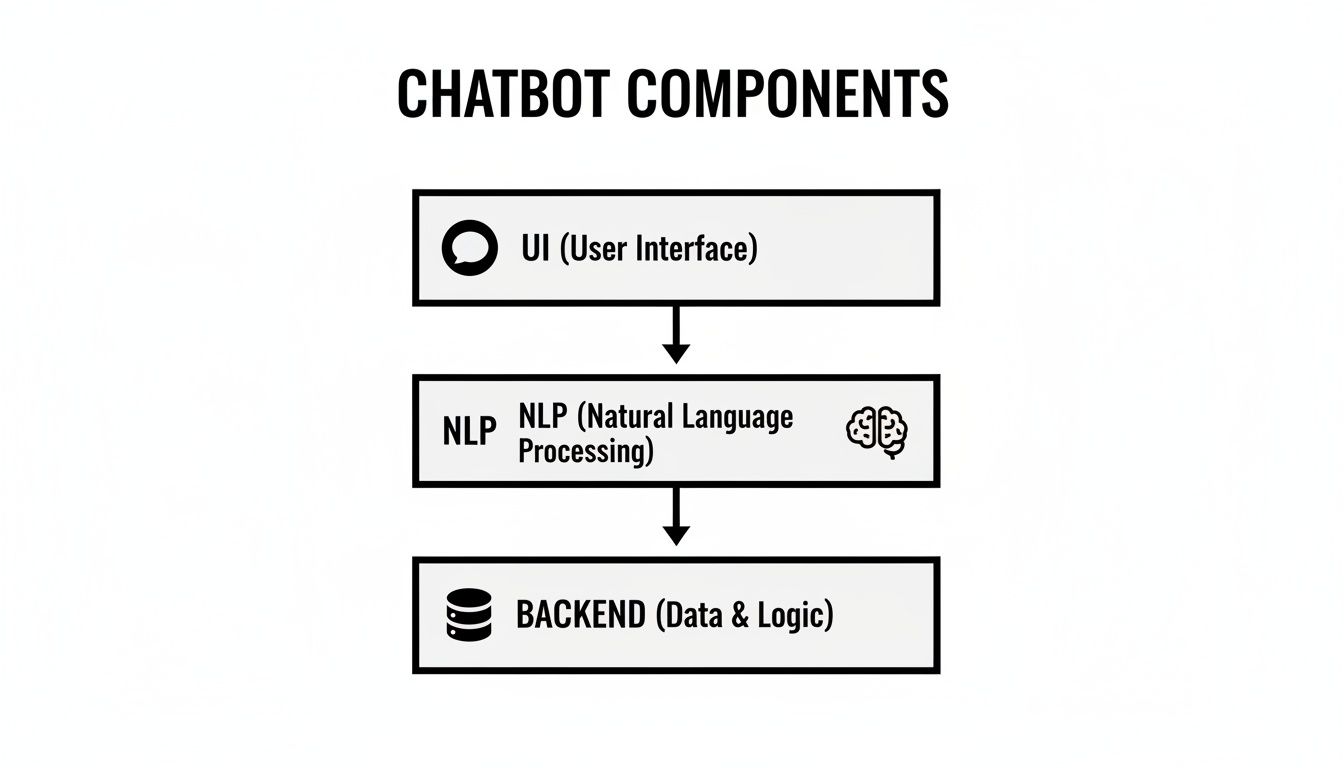
As you can see, it's a layered setup. The User Interface is the entry point, the NLP engine figures out what the user means, and the Backend does the heavy lifting to find the right answer.
The Basic Widget Bot
Think about a small business that just needs a simple FAQ bot for their website. The goal is clear: answer repetitive questions like "What are your opening hours?" or "Where are you located?" without pulling a human agent away from more complex tasks. For this kind of job, a Basic Widget Bot architecture is the perfect fit.
This model is usually rule-based, meaning it follows a very specific script or decision tree. It's built for speed and simplicity, not for deep, flowing conversations.
Here’s what makes it tick:
- A Simple Frontend: Usually just a lightweight chat widget that sits on a webpage.
- Direct Logic: User input gets matched against a list of keywords or pre-programmed patterns.
- No Fancy NLP: The "brain" is a straightforward dialogue manager following a script. If it finds a match, it gives a canned response.
- Minimal Backend: It might pull from a simple knowledge base, but often, the answers are just coded directly into the bot itself.
This architecture is quick to get up and running and easy to maintain, which is why it's a favourite for startups and small businesses needing a fast support solution. The trade-off, of course, is its inflexibility. It can't handle any question it hasn't been explicitly taught to answer.
The Scalable Microservices Bot
Now let’s picture a growing e-commerce business. Their bot has to do a lot more than just answer FAQs. It needs to handle order tracking, manage returns, and even give personalised product suggestions. This calls for a much more flexible and sturdy design—which brings us to the Scalable Microservices architecture.
Instead of being one big, clunky application, this model breaks the chatbot into a collection of smaller, independent services. Each service has one specific job, like processing payments, authenticating a user, or checking inventory.
Think of a microservices architecture as a team of specialists instead of one generalist. Each service is an expert at its own task, and they all communicate to solve bigger, more complex problems together.
This modular approach has some serious perks:
- Flexibility: You can update or swap out one service without breaking the entire system.
- Scalability: If the order tracking service is getting hammered with requests, you can scale up just that one part.
- Resilience: If one service goes down, the rest of the chatbot can often keep running without a hitch.
In this design, the core components—UI, NLP, and the Dialogue Manager—are still there. The big difference is the backend. It isn't a single unit anymore; it's a network of microservices talking to each other through APIs. It’s more complex to set up initially, but it provides the agility a growing business needs.
The Enterprise LLM-Powered Bot
Finally, let's consider a large enterprise building a sophisticated AI assistant to work across all its different applications. This bot needs to understand subtle, complex requests, securely access huge amounts of company data, and perform complicated tasks. This is exactly where an Enterprise LLM-Powered Bot architecture shines.
This advanced model taps into the power of Large Language Models (LLMs) from providers like OpenAI or Google. It frequently uses a clever technique called Retrieval-Augmented Generation (RAG) to deliver answers that are not only accurate but also deeply context-aware.
Here are the key new pieces in this architecture:
- LLM Integration: A powerful LLM handles the core reasoning and language generation.
- Vector Database: Company documents, knowledge articles, and other data are converted into numerical representations (called embeddings) and stored in a vector database. This allows the bot to search for relevant information at lightning speed.
- Robust Integrations: It needs secure connections to enterprise systems like CRMs, ERPs, and internal databases.
- Guardrails and Security: This is critical. Strong security layers are built in to control the LLM's output, prevent data leaks, and maintain compliance.
For example, when a user asks a question, the system first queries the vector database to pull up the most relevant documents. That context is then fed to the LLM along with the user's original query. This gives the model everything it needs to generate a precise, factual answer grounded in the company's own private data. This is the core approach behind platforms that let businesses build their own secure AI assistants, and you can see it in action with modern tools like SupportGPT, which simplifies the process of creating these powerful agents.
Integrating LLMs, Vector Databases, and Human Handoff

The real magic happens when a chatbot stops being a simple script-follower and becomes an intelligent conversational partner. This leap forward is all about integrations—connecting your bot to powerful external brains, vast knowledge libraries, and, crucially, a human safety net.
A modern chatbot architecture diagram isn't complete without these connections. They're what gives a bot its depth, allowing it to reason, learn, and most importantly, recognise when it needs to ask for help.
Powering Conversations with Large Language Models
At the very core of today's AI assistants sits a Large Language Model (LLM). You can think of an LLM, from providers like OpenAI, Google, or Anthropic, as the chatbot's advanced language and reasoning centre. It moves way beyond basic keyword matching, giving the bot a genuine ability to understand nuanced, complex, and even poorly worded questions.
This integration is what transforms a rigid, robotic tool into a flexible problem-solver. Instead of just picking out keywords, the LLM grasps the user's intent and the conversation's context, letting it generate surprisingly natural, human-like responses. Your architecture diagram needs to show a clear, two-way data flow to this LLM; it’s the central processing unit for any truly sophisticated dialogue.
Unlocking Knowledge with Vector Databases
An LLM is a master of language, but it knows nothing about your company's specific product details, internal policies, or the latest help articles you just published. That’s where a vector database steps in. It acts as a super-efficient, specialised library built just for your chatbot.
This powerful combination works through a technique known as Retrieval-Augmented Generation (RAG). Here’s a quick breakdown of how it works:
- Knowledge Indexing: First, your company's entire knowledge base—help documents, PDFs, website content—is processed and converted into numerical representations called vector embeddings.
- Instant Retrieval: When a user asks a question, the system instantly scans the vector database to find the most relevant pieces of information. It’s incredibly fast.
- Informed Generation: This retrieved information is then bundled with the user's original question and sent to the LLM. This gives the model the exact context it needs to formulate a precise, factual answer based on your own data.
This whole process grounds the chatbot's responses in reality, making sure they are specific to your business and dramatically cutting down the risk of the AI making things up or giving vague, unhelpful advice.
Integrating a vector database is like giving your chatbot a perfect, photographic memory of your entire knowledge base, letting it recall the exact piece of information it needs in milliseconds.
The Essential Human Handoff
Let's be realistic: no matter how intelligent an AI gets, there will always be situations it can't handle. A customer might have a highly sensitive issue, an emotionally charged complaint, or a problem so unique it falls completely outside the bot's training data. This is precisely why a seamless human handoff is a non-negotiable part of any robust chatbot architecture.
A well-designed escalation path isn't a sign of failure; it's a critical feature that builds trust with your users. The system has to be smart enough to recognise when it's out of its depth and then gracefully transfer the entire conversation, context and all, to a human agent.
This ensures a few key outcomes:
- No Lost Context: The human agent gets the full chat history, so the customer never has to suffer the frustration of repeating themselves.
- Positive User Experience: Customers feel looked after, knowing a human expert is ready to step in when things get complicated.
- Efficient Support: Your human agents can focus their valuable time on the complex issues where their skills are needed most.
These three integrations—LLMs for reasoning, vector databases for knowledge, and human handoff for support—are the pillars of any modern, effective chatbot. They work in concert to create an experience that feels intelligent, accurate, and consistently helpful.
Best Practices for Secure and Scalable Deployment
Having a brilliant chatbot architecture diagram is one thing; bringing it to life in a way that’s secure, reliable, and ready for growth is a whole other challenge. A successful deployment isn’t about just flipping a switch. It’s a thoughtful process of building in security, scalability, and maintenance right from the start.
This is where your theoretical blueprint crashes into the real world. You have to make sure your chatbot isn’t just intelligent but also a responsible, robust representative of your brand. If you rush this part, you're opening the door to security holes, terrible user experiences, and a system that breaks the moment it gets popular.
Implementing Essential Security Guardrails
Before your chatbot ever says "hello" to a real customer, you need to lock down its security. This is non-negotiable, especially when you’re plugging in powerful LLMs that can sometimes go off-script or say something completely off-brand if left unchecked. These "guardrails" are the rules and filters that keep the conversation safe and aligned with your company’s voice.
Your architecture needs to have layers for:
- Input and Output Sanitisation: Think of this as a bouncer at the door. It checks what users type in for any malicious code and frisks the bot's responses on the way out to stop it from leaking sensitive data or generating inappropriate content.
- Access Control: Not everyone needs the keys to the kingdom. Implement strict, role-based access so only authorised people can tweak the chatbot’s settings, see conversation logs, or touch backend systems.
- API Hardening: Every connection to another service or database is a potential weak point. Secure them with authentication tokens, encrypt all data flying back and forth, and use rate limiting to stop bots from hammering your APIs.
A chatbot without guardrails is a liability waiting to happen. The goal is to give it enough freedom to be helpful, but within a securely fenced-off area that protects both your users and your business.
Thinking about security early is the only way to go. Just look at India's chatbot revolution—architectural diagrams have become absolutely central for developers there. They map out layered designs with security built in from the frontend UI all the way to the backend models, which is a huge reason for their massive adoption. The market's projected growth to USD 1,465.2 million by 2033 is partly down to businesses diagramming these secure, 24/7 support flows. You can find more insights about the global chatbot market on mordorintelligence.com.
Choosing the Right Deployment Strategy
How and where you host your chatbot has a massive impact on its performance, scalability, and cost. Your architecture diagram should point you in the right direction by showing what other systems it depends on. Really, there are two main paths to choose from.
Cloud-Native Deployment
For most businesses, deploying on a major cloud platform like Amazon Web Services (AWS) or Microsoft Azure is the no-brainer choice. You get incredible scalability, with the power to automatically add or remove resources as user traffic fluctuates. Services like serverless functions (think AWS Lambda) are perfect for running chatbot logic without ever having to worry about managing a server.
On-Premise Deployment
If you're in a heavily regulated industry like finance or healthcare, you might need to keep everything in-house with an on-premise deployment. This gives you total control over your data and infrastructure, but it comes with the heavy price tag of buying and managing all the hardware and software yourself.
Automating for Scalability and Maintenance
As more and more people start using your bot, trying to do manual updates becomes a recipe for disaster. Modern deployment relies on automation to make sure your chatbot can handle the load and be updated reliably without breaking things.
Two bits of tech are key here:
- Containerisation (Docker): This means packaging your chatbot application and everything it needs to run into a neat little standardised box called a "container." Using a tool like Docker, you guarantee it runs the exact same way everywhere, from your developer’s laptop to the live production environment.
- CI/CD Pipelines: A Continuous Integration/Continuous Deployment (CI/CD) pipeline is an automated production line for your code. When a developer makes a change, the pipeline automatically runs a battery of tests. If everything passes, it deploys the new version seamlessly, often with zero downtime.
By blending a secure-by-design architecture with a modern, automated deployment strategy, you end up with a chatbot that isn't just smart—it's also safe, scalable, and easy to look after for years to come.
Common Questions About Chatbot Architecture
When a team starts mapping out a new chatbot, the same questions pop up almost every time. Getting the answers right from the start is the difference between a smooth project and one that hits roadblocks before it even gets going.
Think of this section as your cheat sheet for those big conversations. We'll cut through the noise and give you straight answers on everything from fundamental design choices to the toughest challenges you'll face.
Rule-Based vs. AI-Based Architecture
The first fork in the road is deciding between a rule-based system and an AI-driven one.
A rule-based architecture is essentially a decision tree. It operates on a very strict, pre-defined script, which makes it great for straightforward tasks like answering a handful of FAQs. You can build one quickly, but it has zero flexibility—if a user asks something outside the script, it breaks.
On the other hand, an AI-based architecture uses NLP and LLMs to understand what users mean, not just what they type. It can handle nuance, context, and follow the natural flow of a conversation. It's a more involved build, but for anything more than basic Q&A, the user experience is in a completely different league. Your choice really boils down to what you need the bot to do.
How to Choose the Right Architecture
Picking the right architecture for your chatbot isn't just about the tech; it's about the business. The best choice is always the one that lines up with your real-world needs, not just the shiniest new technology.
Before you commit, think about these three things:
- Business Goals: What problem are you actually trying to solve? A simple bot to capture sales leads has completely different architectural needs than a company-wide AI assistant for employees.
- Scalability Needs: Do you expect this bot to handle more users and take on more tasks over time? A microservices approach is built for growth in a way a rigid, rule-based system just isn't.
- Budget and Resources: Let's be honest, AI bots need specialised skills and ongoing costs for things like LLM APIs and infrastructure. Be realistic about what your organisation can truly support.
Your architecture should be the simplest possible solution that gets the job done today but leaves the door open for tomorrow. Over-engineering from day one is a classic, expensive mistake.
Addressing Top Design Challenges
Even with the perfect diagram on a whiteboard, building a chatbot that people actually like using is tough. Most teams run into the same few hurdles along the way.
Here are the big ones to watch out for:
- Maintaining Data Security: This is non-negotiable. You have to ensure the bot protects user privacy and doesn't accidentally leak sensitive company information.
- Managing Integration Complexity: A chatbot is rarely a standalone tool. Getting it to talk to all your other systems—CRMs, databases, and third-party APIs—can turn into a real mess without a solid architectural plan.
- Ensuring Natural Conversation: The holy grail is a bot that doesn't feel like a bot. This isn't a one-and-done task; it requires constant fine-tuning of the language models and conversation flows to keep interactions feeling human.
Successfully getting past these challenges almost always comes back to the foundation you set with a clear, well-thought-out architecture from the very beginning.
Ready to build a secure, intelligent AI support agent without the architectural headaches? With SupportGPT, you can deploy a powerful assistant trained on your own data in minutes. Start your free trial today and see how easy it is.