Customer Service Messaging Guide: Channels, Tone and AI
Customer service messaging explained: pick the right channel, write replies customers trust, use AI safely, and track response time, resolution and CSAT.
A customer types a billing question into your website chat late in the evening. The next morning, they follow up on WhatsApp, but your agent can't see the original exchange. The customer has already explained the problem. Your team is about to ask them to explain it again.
That's the operating problem behind customer service messaging. Adding another inbox is easy compared with keeping the issue, identity and ownership connected until someone resolves the request.
What Customer Service Messaging Is and Why It Matters
Customer service messaging is support delivered through asynchronous or near-real-time text, including web chat, in-app messaging, SMS, email threads and third-party messaging apps. Customers can ask a question, leave, and return to the conversation without staying on a call.
Think of messaging as a shared notebook rather than a phone call. The answer matters, but so does the record of what the customer asked, what your team checked and what happens next. If that record disappears when someone changes channels, you haven't preserved the conversation.
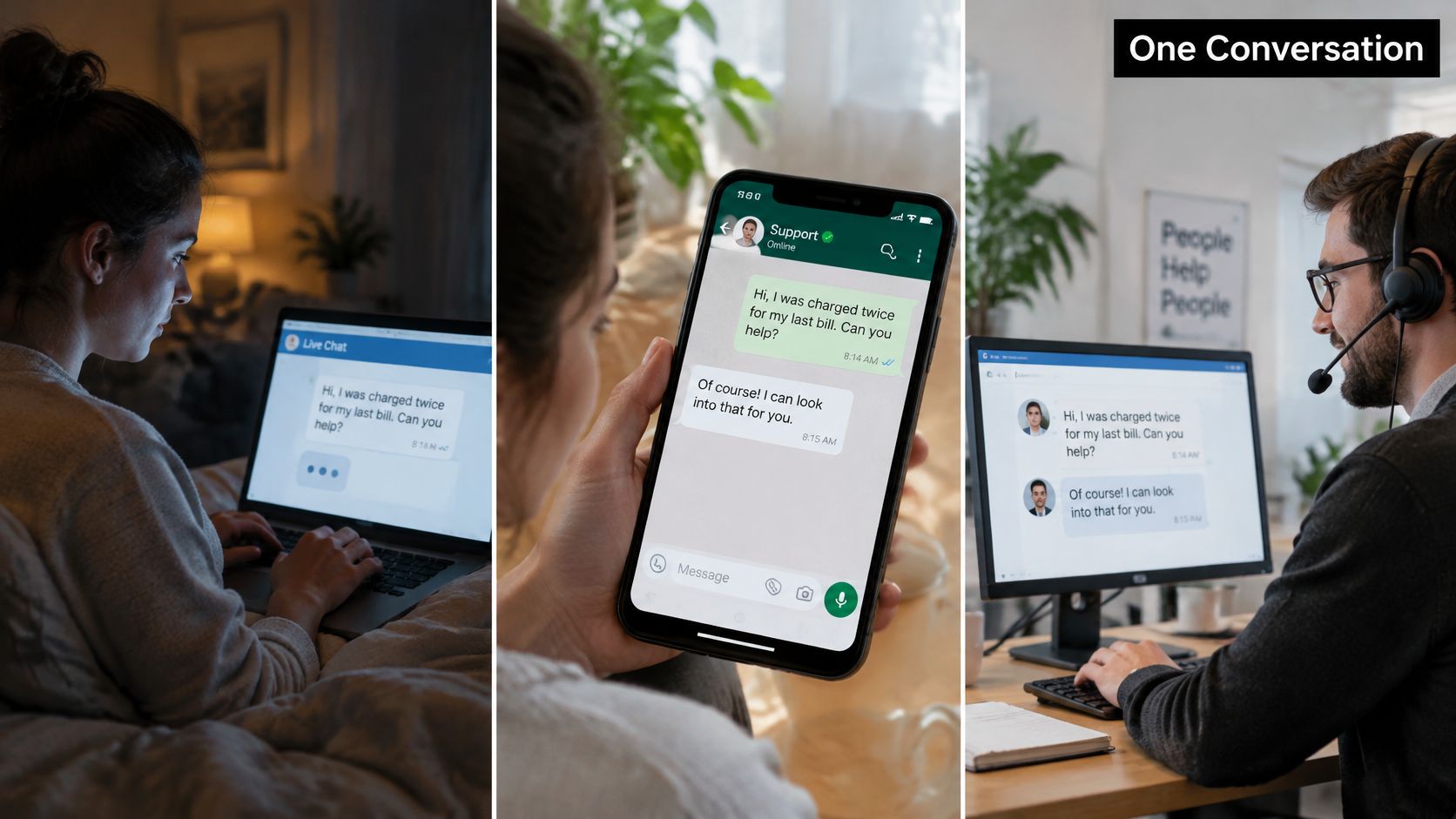
The expectation is continuity
During the pandemic-driven shift to digital support, WhatsApp support requests grew 101% year over year in 2020, and 74% of customers who first messaged a company that year intended to continue, according to Zendesk data summarized by FinanceOnline. Those findings document a shift toward messaging as an ongoing service channel, not just an emergency substitute for phone support.
The practical benefit is convenience. A customer can send a screenshot from inside your product or ask about delivery from the app they already use. Your team can investigate without keeping them waiting on hold.
The operational risks are equally clear:
- Easy entry creates more unfinished work. A customer can start another conversation when the original request appears stalled.
- Delays are visible. A chat interface suggests someone may answer immediately, even when the queue is asynchronous.
- Ownership can disappear. Separate inboxes make it easy for each team to assume another team is handling the issue.
SupportGPT provides embedded chat agents that answer visitor questions and can hand conversations off to a human. But the operating standard should remain the same with or without automation: choose a suitable channel, preserve the relevant context and judge success by resolution, not by the number of replies sent.
Matching Each Request to the Right Channel
Channel fit for customer service messaging
| Channel | Best for | Typical response expectation | Main watch-out |
|---|---|---|---|
| Web chat | Quick product or order questions while the visitor is on the site | Immediate automated acknowledgement; prompt replies while staffed | Bot loops on billing disputes; offer a human option early |
| In-app messaging | Account, feature and troubleshooting questions from logged-in users | Prompt replies with relevant account context | Confirm identity and authorization before showing account data |
| Long, documented or non-urgent requests, including refunds with attachments | An asynchronous reply within the published business-hours target | Threads get lost; don't force chat customers into email mid-issue | |
| SMS | Short status updates, appointment and delivery notices | A reply within the stated messaging window | Limited space; manage outbound permission and opt-outs |
| Customers who already use it for everyday communication | Prompt replies during published staffed hours | Configure the business account and avoid unrequested outreach | |
| Social direct messages | Requests customers initiate on a brand's social account | A reply within the account's stated support hours | Keep sensitive information out of public threads and verify identity privately |
These are operating expectations to publish and staff for, not universal service guarantees. A channel label doesn't tell the customer whether a person is currently available.
Route by risk, not just preference
Customer choice matters, but urgency, sensitivity and required account access should determine what your team can safely do in that channel. Verint's State of Customer Experience 2025 report reports that 85% of customers used at least two service channels during the year. That makes cross-channel continuity a practical requirement, not an edge case.
Consider these routes:
- Order status from a messaging app. Verify only what's necessary to locate the order, retrieve its current status and answer in the same conversation. Don't redirect the customer to email just because the fulfillment team uses a different tool.
- A billing dispute from web chat. Explain why account verification is necessary and send the customer into an authenticated portal. Carry the issue summary and case reference forward so the secure step doesn't become a fresh intake.
- A technical problem from in-app chat. Attach the transcript, error text, relevant product context and troubleshooting already attempted before assigning a specialist. The specialist should continue the investigation, not restart the interview.
Keep ownership across the move
Adding channels can worsen service when each inbox has separate history, identity records and owners. Assign a case owner who remains accountable even when another team performs the next action.
Practical rule: A necessary security transfer is acceptable. A transfer caused by your internal inbox structure is avoidable customer effort.
Use a customer service channel comparison to decide which channels deserve staffing before expanding coverage. For proactive messages, use only channels the customer has opted into, record that preference and make stopping those messages straightforward.
Writing Messages Customers Trust
An expectation gap becomes a trust problem when customers don't know whether anyone owns their request. A survey of more than 3,200 consumers in the United States, United Kingdom and Canada found that a reply within an hour met 88% of respondents' expectations, while SuperOffice's benchmark of 1,000 companies found that 62% didn't answer customer-service emails, as summarized by Keeping.
The lesson isn't to promise an immediate resolution. It's to make the next action explicit, then deliver it.
Write the messages your workflow actually needs
Build templates around the customer's state, not around generic politeness. Adapt these examples to your staffing and policies:
- Acknowledgement that names the issue. We've received your question about the duplicate charge. I'll check whether it's a pending authorization or a completed payment.
- A concrete next-response target. A billing specialist will update this conversation by the time shown in your support window, even if the investigation is still open.
- A handoff note with useful detail. I'm transferring this to our billing team. They'll have your charge reference, verification status and the checks already completed.
- A closing confirmation. The duplicate charge has been reversed. Does that resolve the billing issue, or is there another charge we need to check?
For a live queue, replace a vague target with an actual clock time and time zone. Only insert a deadline your team can meet; a precise but fictional promise is worse than an honest queue estimate.
Match the customer without imitating them
A frustrated customer needs a clear explanation, not exaggerated cheerfulness. Match their level of formality, keep sentences direct and avoid copying slang or escalating their emotional language.
State relevant limits early. If your team can investigate a refund but can't approve it until a review finishes, say so before asking for more information. Use a consistent support tone of voice, and don't pretend an automated agent is a person.
A handoff should not trigger repeated questions about details already collected. Carry verification status forward securely, while allowing a fresh check when the requested action requires stronger authorization.
Before approving templates, remove:
- Empty progress language. Replace vague investigation updates with an action, owner and next update.
- Unsupported promises. Don't guarantee refunds, delivery dates or fixes without authority.
- Blame disguised as instructions. Explain the next step without suggesting the customer caused the problem.
- Premature closure. Don't mark a request resolved merely because someone sent an answer.
Setting Up Chat, Email and In-App Messaging
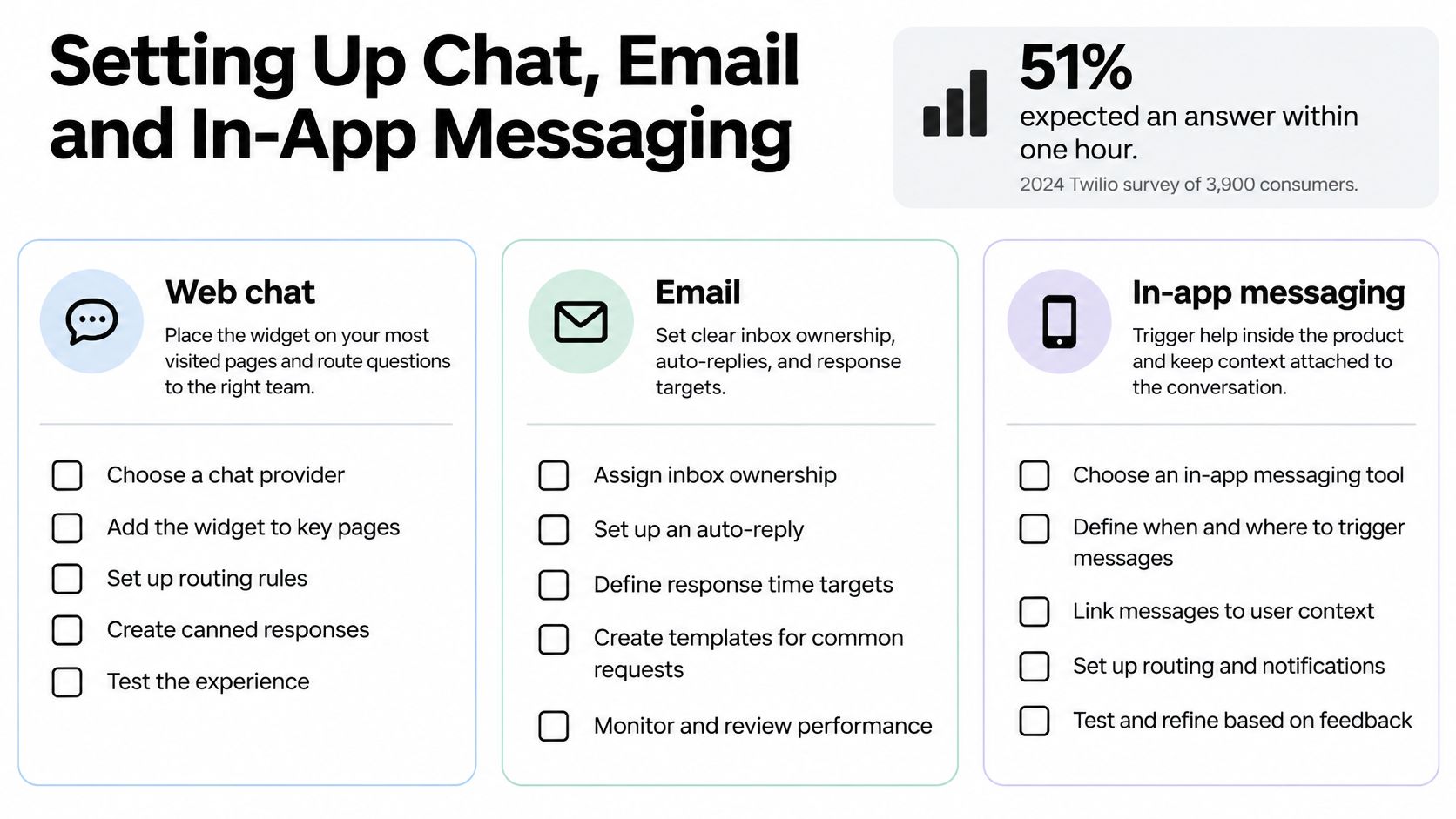
In a 2024 survey of 3,900 global consumers, 51% expected an answer within an hour, while 67% preferred email for support, according to Twilio's Consumer Preferences Report. Fast messaging should therefore complement email, not become a reason to remove it.
Build the queue and escalation process before switching on the interface. Otherwise, the widget gives customers a convenient entrance to an unowned backlog.
Configure the entry points
Web chat
- Start where questions block action. Put the widget on pricing, checkout and relevant help pages before placing it everywhere. Match the greeting to the page rather than interrupting every visitor.
- Identify who's answering. State whether the customer is speaking with automation and whether human support is currently staffed.
- Provide an escape route. Detect repeated unsuccessful answers and offer human help instead of returning the same article.
You can embed our Ask AI widget on your website to handle most support queries. Keep its initial scope aligned with the approved knowledge you've supplied, rather than assuming every visible page is safe for automated answers.
In-app messaging
Pass the user's plan, relevant recent actions and open case reference when those details are necessary and authorized. Avoid attaching an entire activity history by default.
Place contextual help beside a failed action or confusing feature. A useful live chat and in-app messaging setup lets the agent understand where the request started without making the customer describe the interface from memory.
Give each category a queue owner, not just a shared address. Route billing, account access and technical requests separately, with fallback ownership for messages the classifier can't place.
Send an acknowledgement that distinguishes receipt from investigation. When a thread turns into rapid troubleshooting, offer a live conversation with the email history attached, but let the customer remain in email if that works better.
Test discovery as well as delivery
Customers also need a clear way to find the right contact route outside your widget. For someone seeking that provider's support, the Watching IPTV Canada contact details provide a direct contact-page destination; your own site should make its support destination equally easy to identify without requiring customers to search social profiles.
Before launch, check:
- Hours and clocks. Confirm what happens after closing and when the next staffed response is due.
- Automatic replies. Test greetings, acknowledgements and absence messages together.
- Widget placement. Check mobile screens, checkout overlays and accessibility.
- Escalation delivery. Verify that a human receives the case and can reply through the intended channel.
Where AI Fits and When It Must Hand Off
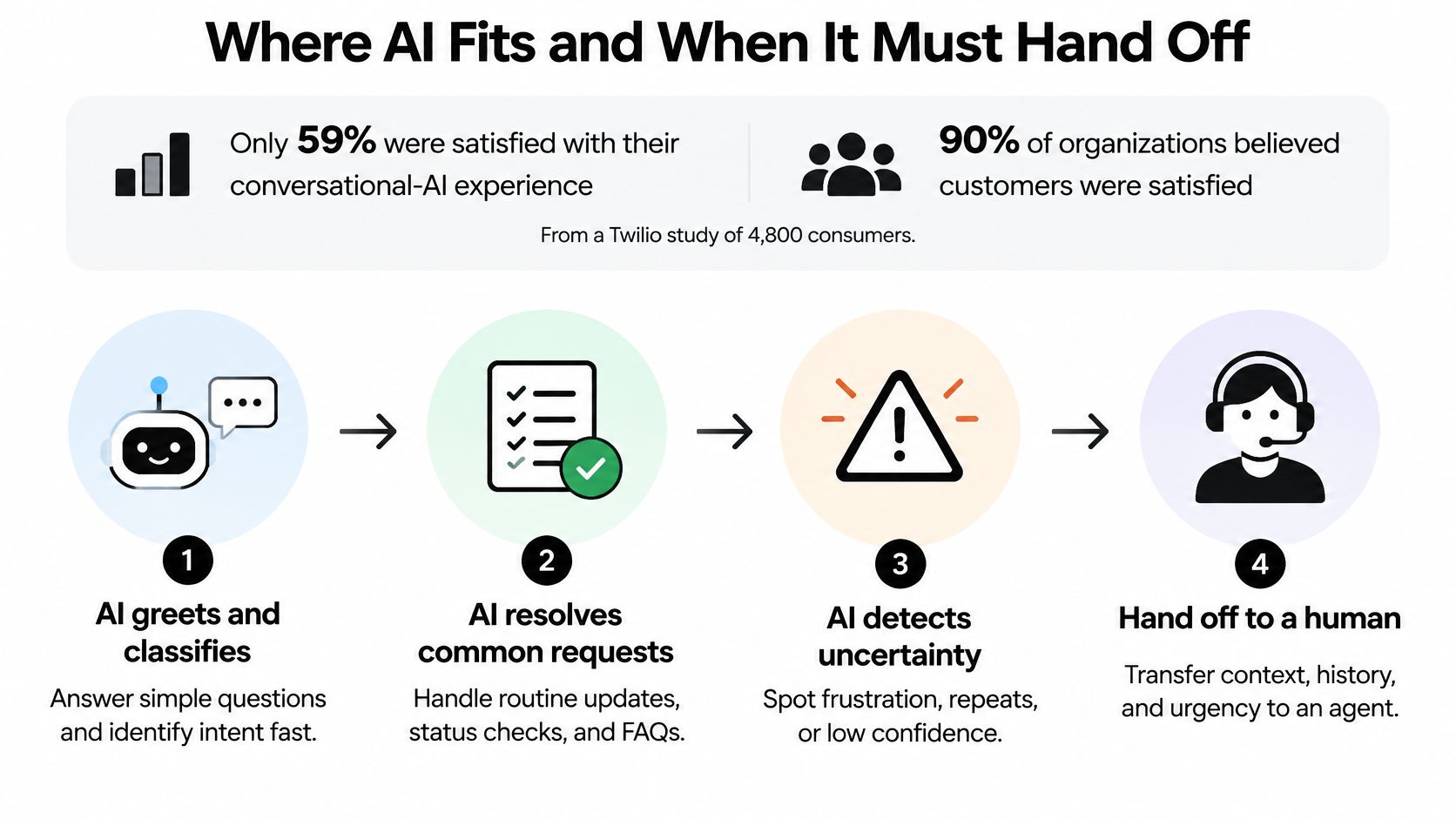
The trust gap is substantial. In a global study of 4,800 consumers and 457 business leaders, 59% of consumers agreed their conversational-AI experience was satisfactory, compared with 90% of organizations believing customers were satisfied, according to Twilio's conversational-AI study.
Treat automation as a bounded workflow, not an unrestricted substitute for an agent.
- Acknowledge promptly. Identify the assistant as automated and recognize the request. Don't imply that it has already investigated.
- Classify the intent. Separate information requests from account changes, disputes and sensitive situations. Don't request payment-card data to classify a billing question.
- Retrieve approved information. Use the applicable knowledge source and policy version. If retrieval returns nothing useful, don't guess.
- Resolve or prepare escalation. Complete only actions within the agent's permissions. Don't reveal account details before identity and authorization are confirmed.
- Transfer with context. Send the issue, relevant evidence, attempted actions and reason for escalation to the receiving person. Don't continue generating speculative answers while the customer waits.
Define the stop conditions
Route billing disputes, legal complaints and requests involving a vulnerable customer to a person. Also stop when the customer explicitly requests human help, the available sources conflict or the requested action exceeds the agent's authority.
A human handoff is a successful safety outcome when the alternative is an unsupported answer.
In our agent configuration, you write escalation instructions in natural language, with escalation based on query complexity. Make those instructions observable: name the triggering request and the destination, rather than telling the agent to escalate whenever appropriate.
For teams deciding who should maintain retrieval, permissions and queue integrations, Doczen's guide can help you compare service automation build versus buy. Evaluate ongoing maintenance ownership, not just the initial installation.
Answer the trust questions explicitly
When should the bot identify itself? At the start of the interaction, as an operating standard, and whenever asked. Don't rely on an ambiguous avatar.
What should it refuse to request? Passwords, full payment-card details and authentication secrets. Direct customers to approved secure flows instead.
How much context should it use? Only what the task needs. An agent answering a feature question doesn't need access to purchase history or unrelated complaints.
How can users review or delete data? Publish a request route and explain any retention limits. For our account-level privacy requests, customers should email support@supportgpt.app from the account's associated address; identity verification may be required.
What confidence threshold triggers escalation? Set it using tested outcomes for each intent, not a universal model score. Missing evidence or policy conflict should trigger escalation regardless of a confident-sounding answer.
What if an answer conflicts with policy? Stop the action, correct the answer and route the case for review. Build those checks into your AI customer support workflow.
Our agents can hand sensitive conversations to your team with context intact, but AI output can be inaccurate or unsuitable, so customers remain responsible for testing behavior and reviewing important output.
Metrics That Show Whether Messaging Works
A blended response-time average can hide both excellent routine support and a neglected specialist queue. Separate first-response time, time-to-resolution and answer quality before deciding whether messaging is working.
Freshworks' 2024 Customer Service Benchmark Report found that conversations averaged a 15-second first response, compared with 16 minutes for ticketing. Treat that comparison as a reference point, not a promise that every queue should achieve the same result.
An automatic acknowledgement and a useful answer are different events. Record both, or your dashboard may improve while customers continue waiting for help.
Messaging support metrics and how to read them
| Metric | What It Reveals | How to Read It |
|---|---|---|
| First-response time (FRT) | How long the first reply takes | Separate acknowledgement from substantive response; check the slow tail |
| p50, p95 and p99 latency | Whether slow waits hide behind a good average | A healthy median with a poor p95 means some customers wait far too long |
| First-contact resolution | Whether the issue closed in one conversation | Rising rates with falling CSAT warrant a closure-quality review |
| Escalation rate | How often conversations move to a human | Very low rates can indicate that the bot retains cases it should transfer |
| Reopen rate | Whether customers return after closure | Compare equivalent issue types handled by automation and humans |
| CSAT | How customers rate the conversation | Segment by channel and intent to locate weak spots |
| Unanswered conversations | Messages that never received a reply | Every occurrence on a staffed channel needs a named cause |
| Abandonment | Customers who leave before resolution | Examine exits immediately after prompts for unnecessary friction |
Read the distribution, not just the average
The median, or p50, describes the middle of the response-time distribution. p95 and p99 expose progressively slower parts of that distribution, where specialist routing failures and unattended handoffs can become visible.
Set channel-specific service objectives against the slow tail. Staffed web chat and an overnight email queue should not share a blended target or the same business-hours clock.
Track time-to-resolution separately, including time spent waiting on internal teams. If you pause the clock while waiting for the customer, preserve total elapsed time too. Otherwise, a case can look efficient internally while remaining open for the customer.
Connect outcomes to the underlying messages
Attach operational fields to each conversation so someone can investigate a weak result:
- Intent and channel. Record the request category and where it began.
- Retrieval status. Distinguish approved evidence found, evidence missing and conflicting sources.
- Confidence and permissions. Capture the escalation decision and whether account access was required.
- Handoff outcome. Record the receiving queue, acceptance and any lost context.
- Resolution and feedback. Connect closure, reopening and post-conversation CSAT to the same case.
Use a stable issue identifier across channels. Without it, a customer who abandons chat and emails support may appear to be unrelated contacts rather than an unresolved request.
Add resolution without avoidable channel switching to your review of customer satisfaction metrics. Keep necessary authenticated transfers visible, but distinguish them from transfers caused by missing staffing or disconnected tools.
Finally, read metrics together. Rising first-contact resolution alongside falling CSAT, or low escalation alongside frequent reopening, should trigger transcript review. Check whether the bot solved the request or merely closed the conversation, then correct the closure rule before optimizing response speed.
Confirm the Routing Rules Before You Scale
Scale messaging only after the routing rules work on a single channel with real traffic. A wider rollout won't fix unclear ownership or an agent that doesn't know when to stop.
Run a bounded pilot
Use this launch sequence:
- Choose a narrow request type. Start with a high-volume, low-risk question such as order status. Exclude disputed charges and account changes from the initial scope.
- Write the escalation rule plainly. Specify what the agent can answer, what requires verification and which conditions send the case to a person.
- Test real questions. Use representative customer wording, including incomplete requests, frustration, typos and questions the knowledge base can't answer.
- Set the response objective. Define the channel's p95 target and assign someone to investigate unanswered-conversation alerts.
- Review live handoffs. Check whether the receiving agent had enough information to act and whether the customer had to repeat anything.
Keep sensitive requests outside the routine automated path. Preserve each channel's staffed hours and response clock, and don't treat an inbound question as permission for unrelated outbound messaging.
Expand only after reviewing outcomes
Our setup lets a non-technical team add knowledge, shape tone, test real questions and deploy a live agent in minutes. Use that speed to shorten the setup process, not to skip testing.
The Free plan requires no credit card and includes an AI agent, message credits, source storage and basic analytics. A useful pilot is a working widget with a deliberately limited scope, a tested human route and a named person reviewing unresolved cases.
Before deleting a test workspace, export or retain the conversation information you need. Account or workspace deletion can be irreversible.
SupportGPT offers embedded AI support agents, natural-language escalation rules and human handoff so your team can keep messaging focused on resolution. Visit SupportGPT to build a narrowly scoped agent, test it against real customer questions and deploy a chat widget on the Free plan.