AI in Customer Support: Guide to Use Cases, Risks and ROI
Learn what AI in customer support is, where it fits, its benefits and risks, escalation rules, rollout steps, and the metrics that prove ROI.
A customer checks an order at 11 p.m. and gets an accurate status update in seconds, without joining a queue. The next customer has a billing dispute the system can't resolve safely, so it passes the conversation to a person with the details already collected. That's the standard worth aiming for: fast automation where the answer is clear, and a useful human handoff where it isn't.
The best measure of AI in customer support isn't how many conversations disappear from the queue. It's whether customers get their issue resolved, whether the answer holds up afterward, and whether people can step in smoothly when the AI reaches its limits.
What AI in Customer Support Actually Means
In the order-status example, the assistant understands the customer's question, checks approved order information, and reports the result. It doesn't need to improvise or ask an agent to look up a tracking number. If the order data is missing or the customer reports a lost package, the assistant should recognize that the routine flow has ended and route the issue to a person.
AI in customer support is software that interprets customer messages, retrieves relevant answers from approved knowledge, and may take limited actions through connected systems. Those actions might include checking an order or starting a return within written policy. A reliable system also has a clear point at which it stops trying and hands the conversation to a human.
Think of it as a new hire with a perfect binder who never sleeps. The new hire can find the right procedure quickly, but anything unusual still needs a supervisor. The analogy has a limit: an AI can sound certain when its answer isn't supported, so the binder needs controls and the supervisor needs to be reachable.
Three kinds of support AI
- Scripted chatbots match keywords and guide customers through fixed menus. They're predictable when customers follow the expected path, but brittle when a request doesn't match the script.
- Generative assistants create answers in natural language, ideally by retrieving approved source material and showing or linking that information.
- Agent-assist tools work beside human staff. They can suggest a reply or summarize a conversation, but an agent reviews and sends each message.
Modern support systems can combine retrieval with guardrails, analytics, and escalation paths. Retrieval helps keep answers tied to company information; guardrails define what the system may say or do; analytics show where it struggles; and escalation rules tell it when to involve a person.
The boundary matters: AI can help find information and follow a documented workflow. It doesn't take responsibility for judgment, empathy, exceptions, or the outcome a customer receives.
Where AI Fits in a Support Operation
| Use case | What the AI does | Human role | Risk level |
|---|---|---|---|
| Order status and shipping questions | Looks up order data and reports status with tracking details | Rarely involved | Low |
| Product and feature FAQs | Answers from approved help content and links to sources | Reviews content gaps | Low |
| Account and password resets | Guides the customer through reset steps and triggers reset flows | Verifies identity when flows fail | Medium |
| Known-issue troubleshooting | Asks diagnostic questions and follows a decision tree | Takes over when steps fail | Medium |
| Returns and refunds within policy | Checks eligibility against written policy rules | Approves exceptions | Medium |
| Billing disputes and chargebacks | Collects details and summarizes the case | Decides the outcome | High |
| Complaints, legal or medical topics | Acknowledges the issue and routes immediately | Handles the case fully | High |
| Agent assist: drafts and summaries | Suggests replies and summarizes conversation history for agents | Edits and sends every message | Low to medium |
A queue is a good automation candidate when it passes three tests: How much volume does it generate? Is there one authoritative document for the answer? What does a wrong answer cost in money or trust? Use those answers together. High volume alone doesn't make a request safe to automate.
Password resets show why. They're common and usually follow a documented flow, but mishandling identity can expose an account. Let AI guide a customer through the approved reset process, then require identity verification or a human handoff when the flow fails. For other tasks, a practical starting point is this collection of AI customer-service examples.
Keep decisions with the right owner
Billing disputes and chargebacks require a tighter boundary. A customer may be contesting a charge, disputing a cancellation, or reporting a transaction they don't recognize. AI can collect the relevant details, summarize the timeline, and attach the approved policy, but a human should decide the outcome. The system shouldn't infer fault or promise a refund just to finish the chat.
Complaints and regulated or safety-related topics need similar care. An assistant can acknowledge the concern and route it, but it shouldn't offer legal or medical judgment, minimize a serious complaint, or make a commitment the business hasn't authorized.
Agent assist is often the safest first deployment: a person reviews and sends every proposed message. That creates a useful test of whether the assistant finds the right knowledge and drafts helpful replies before it speaks directly to customers.
A conversation isn't a success just because the customer stopped chatting. Count a deflection as success only when the problem was resolved, not when the system ended the interaction.
Benefits Backed by Field Evidence
In an AI-assisted support operation, the relevant gain is whether agents resolve issues more effectively, not whether fewer conversations reach a person. A 2023 study published by the National Bureau of Economic Research found that access to a generative-AI conversational assistant increased customer-support agents' productivity by 14% on average, based on data from 5,179 agents. The measure was agent productivity, not the share of conversations handled by fully autonomous bots.
A later peer-reviewed version in the Quarterly Journal of Economics reported a 15% improvement in issues resolved per hour across 5,172 agents (the study's peer-reviewed version). The working-paper and peer-reviewed results come from different versions of the study, with different sample sizes. In both, AI offered agents recommendations and suggested responses based on successful support interactions. For a broader look at the operational trade-offs, see this guide to customer-service costs.
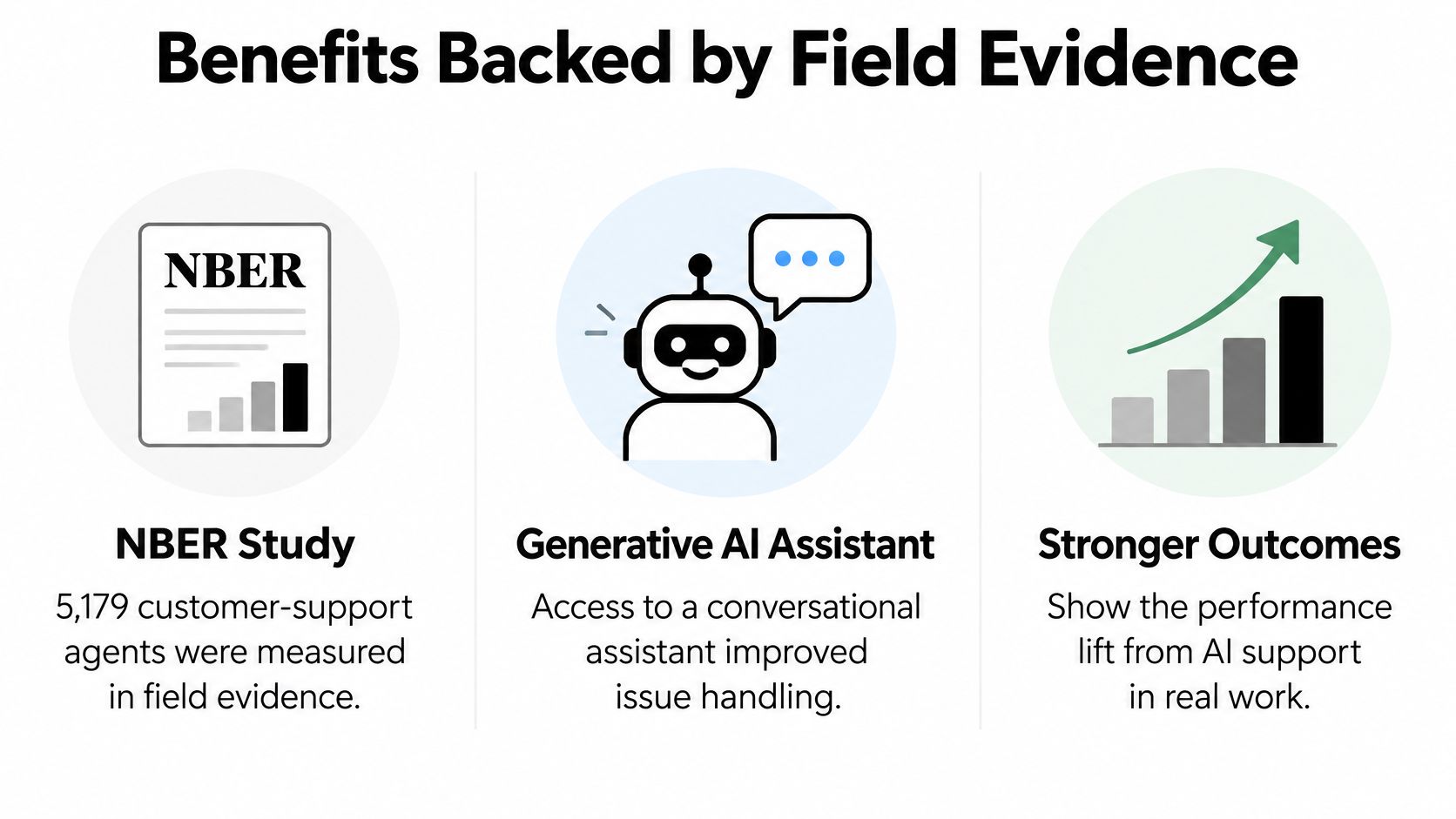
The gains varied by experience. Novice and lower-skilled agents benefited more, while highly skilled agents saw little improvement; one analysis also found slightly lower response quality for the most skilled group. That suggests a practical use for AI: helping less experienced agents apply documented procedures and effective response patterns, while leaving complex judgment with people.
| Group or measure | Reported effect |
|---|---|
| All agents, average issues resolved per hour | About 14% for 5,179 agents in the working paper; 15% for 5,172 agents in the peer-reviewed version |
| Novice and lower-skilled agents | Greater improvement than experienced agents |
| Highly skilled agents | Little improvement; one analysis reports slightly lower response quality |
| Timing of effect | Visible in month one, grew slightly in month two, and persisted through the observed period |
Practical benefits to test in your own operation include:
- Coverage for routine questions: An AI assistant can answer common requests outside staffed hours when it has current, approved information.
- Faster first response: Customers can receive an initial answer while agents are busy or unavailable.
- More consistent answers: A shared source of truth can reduce differences between shifts, teams, and supported languages.
- Lower cost per resolved contact: This depends on resolving eligible requests without adding more review and maintenance work than the system removes.
- Clearer knowledge gaps: Conversation patterns can reveal questions the help content does not answer well.
The field study measured AI-assisted agents, not unsupervised self-service. Treat its productivity results as evidence for testing agent assistance, not as a forecast for automated resolution. Track resolution quality and successful handoffs alongside deflection: a conversation that disappears from the queue without solving the customer's problem is not a gain.
Guardrails That Prevent Confident Mistakes
Speed without guardrails multiplies errors. A system that gives fast but unsupported answers can spread a bad policy interpretation across many conversations before anyone spots the pattern.
| Risk | What it looks like | Guardrail |
|---|---|---|
| Invented policy or price | Confident answer that isn't in the approved documents | Ground answers in approved sources and decline when no source matches |
| Off-topic or unprofessional replies | Bot discusses unrelated subjects or jokes about a complaint | Write topic boundaries and tone rules in plain language |
| Privacy overreach | Bot asks for card numbers or stores sensitive details | Collect only required fields, disclose collection, and set retention limits |
| Quality drop on hard cases | Fast answers miss exceptions | Use confidence thresholds and policy checks before the bot answers |
| Silent repeat failures | Customer repeats the same question three times | Set a repeat-failure counter that triggers a handoff |
| Unauthorized actions | Bot issues a refund outside the rules | Limit AI actions to scoped, reversible tasks and require approval for high-value ones |
The uneven productivity results reinforce why averages aren't enough. An analysis of the field evidence found roughly 30% to 34% gains for novice and lower-skilled agents, while highly skilled agents saw little improvement; one analysis reported a slight decline in response quality for that group. A system optimized only for speed can miss deterioration on complex cases. Grounded responses and tested rules are a better starting point than unconstrained generation; this explanation of why grounding matters covers the principle.
Assign responsibility before launch
A business remains responsible for checking how its assistant behaves. AI-generated responses can be inaccurate or unsuitable, so test the agent and review important output before launch. Don't treat a vendor's ability to generate fluent text as evidence that a specific answer is correct.
Workspace owners also decide what content they submit and how their agents collect visitor information. They're responsible for providing any additional notices and obtaining any consent their use case requires. Keep data collection limited to what the task needs, and decide who can access conversation records and how long they should be retained.
Build separate test sets for routine requests, technical edge cases, policy exceptions, and human-escalation scenarios. Set a distinct quality threshold for each group. A bot that performs well on straightforward product questions shouldn't automatically pass a test for billing disputes or account access.
Escalation Patterns Customers Will Accept
A 2025 Verizon survey of 5,000 consumers and 500 executives across seven countries found satisfaction was 88% for interactions handled mostly or completely by humans, compared with 60% for AI-driven interactions (Verizon's 2025 CX Annual Insights Report). Customers can appreciate quick answers and still want a person when the issue becomes difficult. Escalation design determines whether AI helps them reach resolution or traps them in another automated loop.

Write escalation triggers as rules an agent can follow, not as a vague instruction to “use judgment.” Consider triggers such as:
- The customer explicitly asks to speak with a person.
- The assistant has made two unsuccessful attempts on the same intent.
- The customer's sentiment is negative or escalating.
- The request involves a regulated, financial, or safety-related topic.
- The account is high-value and the issue needs careful handling.
- The assistant has low confidence on a policy question.
- The request falls outside the approved sources.
Treat a direct request for a person differently from model uncertainty. A customer who asks for a human should transfer immediately. When the assistant is uncertain, it can first ask a focused clarifying question or check the approved source. If that doesn't resolve the uncertainty, it should hand off rather than guess.
A warm transfer gives the human the transcript, detected intent, actions already attempted, and the customer's stated goal. That context lets the agent start with the problem instead of asking the customer to repeat the whole story. Rules written in natural language can direct the agent to escalate based on query complexity; more guidance on human-AI collaboration can help teams define the boundary.
A useful handoff also tells the customer why the transfer is happening and what wait to expect. Keep the message direct: explain what the assistant couldn't resolve, confirm the information being passed along, and don't imply that a person is available instantly if there's a queue.
This short video offers another perspective on AI and customer support.
Metrics and ROI Worth Tracking From Day One
A rising deflection rate can look good while satisfaction falls or customers return with the same unresolved issue. Track efficiency beside quality, and capture a baseline before launch so you can distinguish a real improvement from a change in reporting.
| Metric | What it reveals | Healthy direction | Watch-out |
|---|---|---|---|
| First-contact resolution | Whether the issue closed in one exchange | Rising | Can rise when agents close tickets early |
| Recontact within 7 days | Whether the answer actually held | Falling | Lags, so check weekly cohorts |
| Median handling time | Speed of human or assisted handling | Falling without quality loss | Speed alone can hide errors |
| Escalation rate | Share of conversations handed to humans | Stable or purposeful drop | A very low rate can mean failed handoffs |
| Post-handoff satisfaction | Customer experience after transfer | Rising | Survey response bias skews results |
| Issues resolved per hour | Agent productivity | Rising, segmented by tenure | Averages hide declines for skilled agents |
| Policy violations and unsupported claims | Harm-sensitive quality | Near zero | Needs sampled human review to detect |
| Cost per resolved contact | Financial return | Falling | Leaves out review and tooling cost unless added |
Review results at 30, 60, and 90 days. The workplace study found improvements became visible early, grew slightly in the following month, and persisted through the observed period; treat that as a reason to monitor change over time, not a guarantee that your rollout will follow the same pattern (the Quarterly Journal of Economics study). Segment each metric by agent tenure, customer intent, and channel. An overall average can hide a decline in quality for experienced staff or on a particular class of request.
For a balanced measurement plan, compare customer-service chatbot performance metrics with the outcomes customers care about. Include post-handoff satisfaction and repeat contacts, not just the number of chats that end without an agent.
Calculate value after counting the full cost
Use a simple formula: monthly value from contacts resolved without a human, plus agent hours saved valued at loaded hourly cost, minus platform, review, and maintenance costs. Divide that net value by those costs if you want a return ratio. Avoid counting the same benefit twice; if saved agent hours are already included in the value of resolved contacts, don't add them again.
For a hypothetical example, if 2,000 contacts a month are resolved at $5 each, that's $10,000 in avoided handling cost. If tooling and review cost $3,000, the net gain is $7,000 a month, before any other operating costs you haven't included. Those figures are illustrative, not a forecast.
Savings from closing tickets early or pushing customers away aren't ROI. Check whether customers stay resolved, return for help, or rate the human handoff poorly before treating lower contact volume as a win.
Common Questions About AI Customer Support
Will AI replace human agents?
Don't plan around full replacement. The strongest workplace evidence measured AI helping human agents, and customers still reported greater satisfaction with mostly or completely human-handled interactions. Use AI to take on bounded routine work and support agents, while people remain accountable for exceptions and outcomes.
Is AI safe for billing, legal, or medical topics?
Keep those decisions human-owned or human-approved. AI can acknowledge the issue, collect relevant details, and route the case, but it shouldn't decide a billing dispute or offer professional judgment on a high-stakes topic.
How long does setup take?
The agent may be quick to configure; preparation usually takes longer. You still need to clean up knowledge, define what the system may do, test real customer questions, and decide how handoffs work before release.
Does AI help every agent equally?
No. Gains have been stronger for novice and lower-skilled agents than for highly skilled staff. Give experienced agents tools that remove workflow friction rather than assuming generic drafting suggestions will improve every case.
Roll Out AI Support in Four Phases
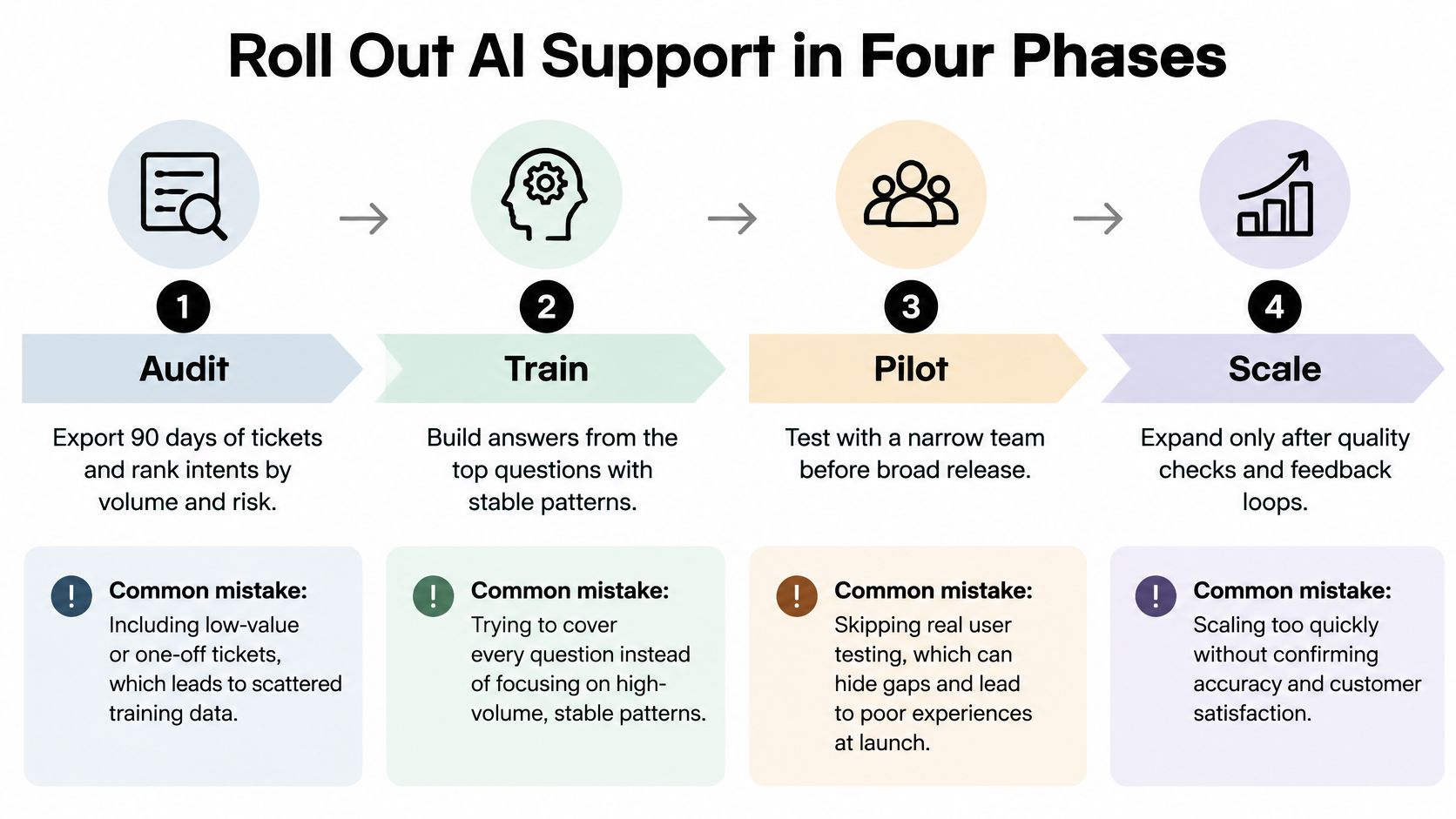
1. Audit the queue before choosing the bot
Export 90 days of tickets and group them by intent, volume, and risk. Shortlist the top 10 questions with stable answers, then check whether each answer comes from a source your team trusts and can maintain. A shipping-status query and a chargeback may both occur often, but they don't carry the same risk.
Why this matters: volume and risk together define what the assistant should touch. Common mistake: ranking intents by volume alone and automating a frequent request whose answer requires judgment.
2. Prepare knowledge that has one owner
Bring policies and procedures into an authoritative source. Remove contradictions, clarify outdated instructions, and assign an owner to each help article so someone is accountable for updates. If one page says returns are accepted under one condition and another page says something different, the AI can retrieve either answer without recognizing which one your team intended.
Why this matters: the assistant can only ground its answer in the information you give it. Common mistake: launching against a messy knowledge base and expecting the model to resolve conflicting company rules.
3. Configure and test the boundaries
Set the assistant's tone, supported topics, and forbidden topics. Write escalation rules, then connect order or account lookups only as narrowly as the task requires. Prefer actions that are scoped and reversible, and require human approval for actions that could create a significant customer or business consequence.
Test real questions and adversarial versions, such as incomplete requests, conflicting details, and attempts to get the assistant to invent a policy. Score each response against its source, and check whether the assistant escalates when it should. SupportGPT, for example, lets teams add knowledge, shape tone, test real questions, and deploy an agent; an embedded Ask AI widget can handle support queries, with human handoff available when a conversation needs a person.
Why this matters: a clean demonstration with easy questions won't expose failure modes in everyday use. Common mistake: testing only happy paths, such as a customer who follows every prompt and supplies complete information.
4. Pilot narrowly, then expand on evidence
Start with one high-volume, low-risk intent family, such as order status or product FAQs, and one channel. Run the pilot for two to four weeks with human review of a sample of conversations. Before launch, compare results against the baseline for first-contact resolution, recontact within seven days, and post-handoff satisfaction. Add more intents only after those quality measures hold up.
Assign one person to review samples each week and update the knowledge as new gaps appear. Schedule a 30-day review, and keep the records needed to understand what the assistant answered, what it changed, and when it transferred a conversation. Keep regulated and high-stakes topics under human ownership throughout the rollout.
Why this matters: a contained pilot gives the team a chance to fix weak answers before they reach more customers. Common mistake: expanding after a launch looks busy or fast, without checking whether customers stayed resolved or whether transfers worked.
SupportGPT provides embedded chat agents that answer visitor questions and can hand conversations to a human, with tools to ground responses in your own knowledge and review performance. If you're planning selective automation, visit SupportGPT to explore how an agent can fit your support workflow.