Chatbot for Support: What It Is and How to Deploy One
Learn what a chatbot for support does, which requests to automate, and how to set escalation, guardrails and metrics that keep customers satisfied.
The usual advice about deploying a chatbot for support starts with speed and automation. That's the wrong starting point. Design the route to a human first, then decide which requests the bot can safely finish without one.
A fast answer only saves time when it helps the customer move forward. If the bot guesses, blocks an agent request, or makes someone repeat their problem after a transfer, you haven't removed work. You've moved it onto the customer.
What a Support Chatbot Is and Where It Fits
A support chatbot is software that answers customer questions in a chat window using your help content and connected systems, then hands the conversation to a person when it can't answer safely. Think of a good receptionist: they provide directions and book appointments immediately, but send a legal complaint straight to the manager.
Say a customer asks where their order is. The bot retrieves the shipment record and explains its status. If the customer says the delivery contains someone else's medication, the same interface should stop routine troubleshooting and bring in a person.

In a 2020 survey of 404 customer-support leaders across B2B and B2C organizations, Intercom found that automation assisted with 33% of support conversations, while leaders believed more than half could ultimately be handled by automated chatbots. Those were reported assessments and expectations, not an audited deployment rate.
Match the bot to the job
Buyers will encounter several approaches:
- Rule-based decision trees guide customers through fixed choices. They suit predictable flows but struggle when the request falls outside the menu.
- Retrieval bots find relevant passages in approved documentation and use them to answer product or policy questions.
- LLM agents with actions can also call connected tools, such as checking an order record or creating a ticket.
Their useful jobs are straightforward: answer repetitive questions, remain available outside staffed hours, and leave agents time for sensitive or complex cases. For service teams that need structured tickets rather than chat alone, Vight's guide to AI-powered PSA ticket intake is a useful companion for planning what information should reach the queue.
These aren't merely theoretical use cases. During November and December 2024, approximately 47% of consumers worldwide used chatbots for help placing orders, while 46% used them to report an issue or start a return, according to Statista.
Practical rule: A chatbot isn't a replacement support department or just a clickable FAQ. Its value depends on which questions reach it and how cleanly it passes on the rest.
Chatbot Speed and Resolution Compared to Live Agents
Chatbot and live agent performance compared
| Measure | Chatbot | Live agent |
|---|---|---|
| Users waiting under one minute | 77–79% | 24–33% |
| Resolution success | 34–42% | 79–87% |
| Availability outside staffed hours | 24/7 when the service is operating | Only during shifts |
| Best role | First response and triage | Resolution and judgement calls |
The waiting-time and resolution ranges above come from a large-scale study of customer-service channel choice, which found that approximately 77–79% of chatbot users waited less than a minute, compared with 24–33% for live-agent interactions, while resolution success ranged from 34–42% for chatbots versus approximately 79–87% for agents. Availability and role describe operating arrangements, not measured study outcomes.
That's the central trade-off: customers can reach a bot quickly, but access doesn't guarantee a solution. A shipment question may require only a lookup. A shipment marked delivered to the wrong address may require an investigation, replacement authorization, or a judgement call.
Why a quick reply can create more work
Suppose a customer asks whether a replacement part fits an older product. The bot replies immediately but retrieves documentation for the current model. The customer buys the wrong part, returns it, and contacts support again.
The response looked successful if the dashboard recorded only speed and conversation closure. Operationally, it created another transaction and another support issue.
Don't treat a channel comparison as proof that either bots or people should handle everything. In a 2026 benchmark covering 22 million conversations, interactions combining bots and human agents achieved a 57% resolution rate, compared with 29% for bots alone, according to Tidio's chatbot statistics summary. That benchmark uses a different sample and methodology from the channel-choice study, so the figures shouldn't be combined into a single performance forecast.
Choose the service model, not just the interface
Use early intent classification to distinguish an information request from a request requiring discretion. Then check whether the available evidence and policy cover the question before generating an answer.
When comparing live chat and chatbot support, include the customer's entire journey: initial access, attempted troubleshooting, transfer, and final outcome. A short verification step can be worthwhile if it prevents an unsupported answer.
The sensible division is bots for accessible first response and triage, people for judgement-heavy resolution. Don't ask customers to absorb the difference between what your bot sounds confident about and what it can do.
Routing, Escalation and Handoff Design
Automate requests with a known answer, a low cost of error, and no need for discretion. Route money exceptions, account ownership changes, and distressed customers to people. Written policy should determine the route, not a confidence score alone.
In the 2025 Verizon CX Annual Insights Report, 47% of surveyed consumers identified lack of access to a human as a frustration, while satisfaction reached 88% when humans were involved, versus 60% for AI-driven interactions. Human access belongs in the service design, not behind a series of unsuccessful answers.
Set the routes before writing the greeting
Request types and where each should go
| Request | Route | Why |
|---|---|---|
| Order status and tracking | Automate | Answer sits in a connected system; no judgement needed |
| Password reset and login help | Automate after verification | Safe only when identity checks run first |
| Return policy and eligibility questions | Automate | Answer repeats often and comes from written policy |
| Product compatibility and specifications | Automate | Answer comes from product documentation |
| Refund disputes over the standard amount | Hand off | Needs discretion and policy exceptions |
| Account ownership or security changes | Hand off | Higher fraud and privacy risk |
| Complaints or upset customers | Hand off | Emotional context needs a person |
| Multi-step billing errors | Hand off after two failed bot attempts | Repeated loops waste customer effort |
Treat the retry limit in this table as a proposed operating rule, not an industry benchmark. Known disputes or security risks should bypass retries altogether.
An order-status request can finish with tracking information. A locked-out customer should complete an approved identity check or reach an agent with the verification result attached. For a double-charge dispute, collect only the permitted order reference and transaction date, then pass them along so the agent doesn't ask again.
Export your most frequent ticket categories and label them automate, verify then automate, or hand off. Start with the safest high-volume categories, not the ones that make the most impressive demo.
Build the handoff deliberately
- Define immediate escalation intents. Account security, policy exceptions, and legal or medical concerns need explicit routes. We use natural-language instructions to tell agents when query complexity requires human escalation.
- Cap unsuccessful retries. I'd start with a limit of two failed answers in succession. A customer correcting the same misunderstanding shouldn't receive another paraphrase.
- Respect distress and agent requests. Use negative sentiment as a warning signal, not a diagnosis. An explicit request for a person should carry more weight than an automated mood label.
- Attach useful context. Transfer the transcript, authentication status, relevant references, tool results, and steps already tried. Mark uncertain details as uncertain.
- Explain the next step. Display the receiving queue and a current wait estimate when available. Outside staffed hours, explain the callback or ticket route instead of implying someone is joining.
- Check customer effort. Review whether customers repeat information or restart troubleshooting after transfer. A completed transfer isn't necessarily a useful one.
Use skill-based routing to send the case to someone equipped to resolve it, rather than the next available inbox.
I can't confirm that from your account, so I'm passing you to a teammate with your order details.
Use fallback wording like this as authored interface copy. Before launch, run scripted failure conversations covering each route and confirm that both the transfer and its context arrive correctly.
Core Features That Make a Support Bot Reliable
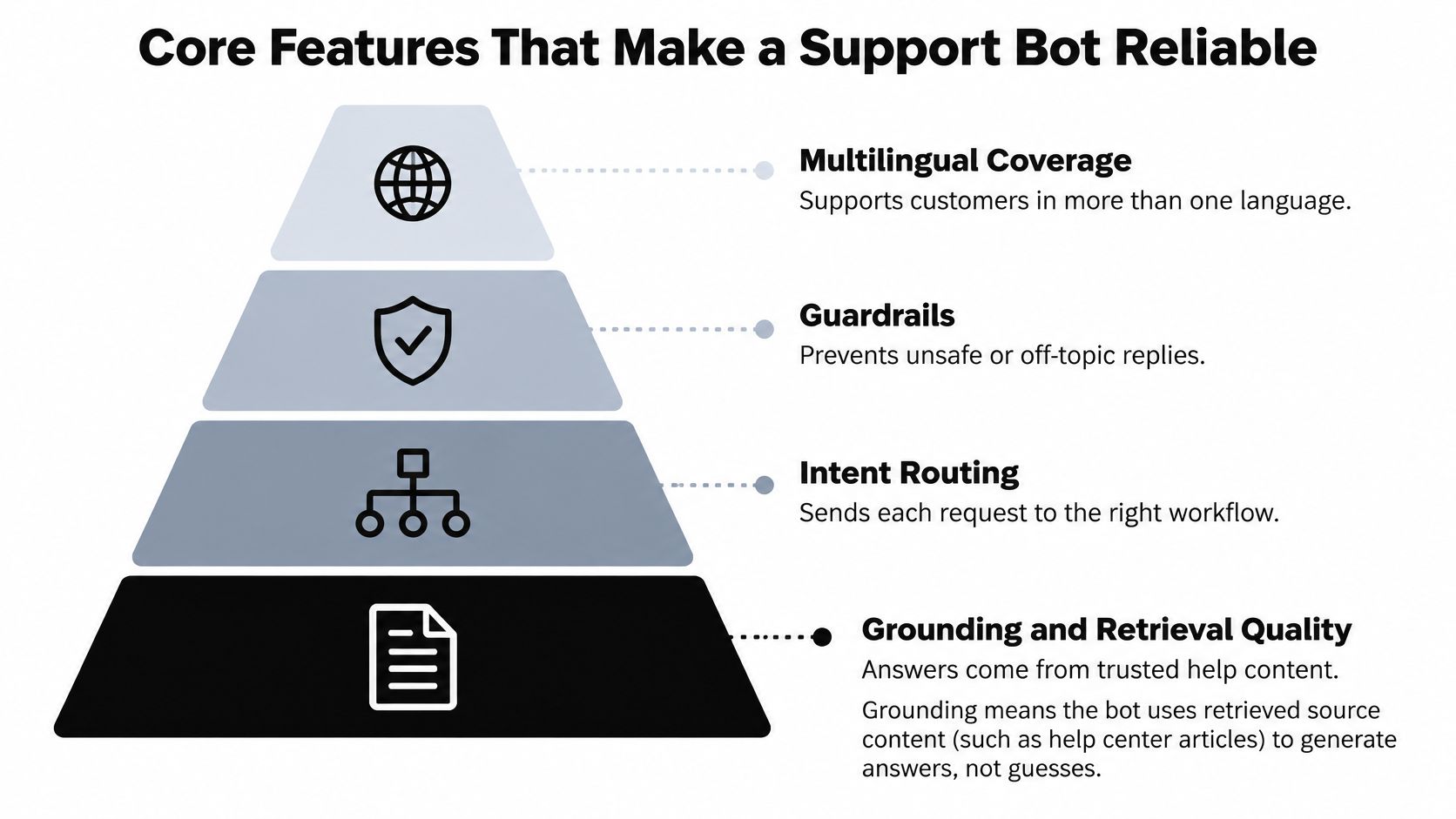
Start with grounding and retrieval quality, not personality. A bot that sounds reassuring while using the wrong policy is harder to trust than one that clearly explains its limits.
A 575-response online-shopping study published in Scientific Reports found that understanding customer requests and resolving problems mattered more to chatbot service quality than perceived humanness or synchronization alone. Spend your effort on finding the right information and completing the right task before polishing conversational flourishes.
Build from authoritative evidence
Grounding means the answer comes from retrieved source content, not a plausible guess. Give each document metadata such as product, version, region, customer plan, publication status, and policy owner.
Semantic similarity alone isn't enough. A passage can closely match a customer's wording while describing the wrong subscription tier. Filter by applicable metadata, rank the remaining passages, and refuse or escalate when the evidence doesn't cover the request.
Also separate source validity from retrieval confidence. The system may confidently retrieve an obsolete article. Someone must own retiring old policies and resolving contradictory help pages.
Add routing and guardrails above retrieval
Route billing, technical, and sales questions to their relevant knowledge sets and workflows. For example, cancel in a SaaS help bot might mean stopping subscription renewal, cancelling an export, or deleting an account. Ask a clarifying question rather than assigning the most destructive interpretation.
SupportGPT has built-in AI-powered guardrails to prevent misinformation and off-topic responses. Those controls still need adversarial testing: try requests to invent a refund policy, ignore source restrictions, or claim that an account action succeeded when the tool returned an error.
For multilingual coverage, test the customer's phrasing as well as the translated answer. Include idioms, misspellings, mixed-language messages, and local product terminology. Don't assume that a fluent response means the bot understood the intended task.
Make reliability inspectable
A useful support chatbot feature checklist should help an operator explain why an answer happened. Require:
- Source visibility for substantive documentation and policy answers, with traceable tool results for account-specific replies.
- Intent logs showing the selected workflow and relevant uncertainty.
- Fallback language that distinguishes missing information, unavailable tools, and prohibited actions.
- Language-specific tests with expected answers, allowed actions, and escalation outcomes.
- Issue-level evaluation that checks completion across the conversation, not just whether an individual reply reads well.
Keep separate timing measurements for retrieval, generation, tool execution, and transfer. Otherwise, an operator may shorten the wrong stage and remove a verification step that was protecting answer quality.
Implementation Options and Recommended Architecture
Choose an implementation around the work your team must perform and maintain. A documentation assistant and an account-action agent may share a chat window, but they require different permissions, testing, and operational ownership.
Implementation options for a support chatbot
| Option | Best for | Trade-off |
|---|---|---|
| Rule-based decision tree | Fixed menus such as order lookup or store hours | Breaks on phrasing outside its menu |
| Retrieval bot on documentation | Product and policy questions over a stable help center | Only as good as its source content |
| LLM agent with tool actions | Order status and account lookups across systems | Needs authentication, permissions and audit logs |
| Hosted platform | Teams without ML staff that want a fast launch | Less control over the data path and model choice |
| Built in-house | Teams with strict data control and engineering capacity | Higher build and maintenance cost |
The conversational approaches and delivery choices aren't mutually exclusive. You can buy a hosted retrieval bot or build an action-taking agent internally.
Match the stack to the team
SaaS teams should embed the widget inside the application where useful context is available. Keep product documentation, subscription policy, and troubleshooting workflows distinguishable so a sales answer doesn't become an unsupported billing promise.
E-commerce teams need reliable connections to order and returns systems. A chat interface that merely explains how to find an order page may add little value compared with a direct, authenticated lookup.
Enterprise teams should prioritize single sign-on, role-based knowledge access, auditability, and a ticketing handoff that preserves the conversation. Access restrictions must apply before retrieval, not merely instruct the model to avoid revealing restricted material.
Use a layered architecture
A practical chatbot architecture separates responsibilities:
- Retrieval layer searches authoritative, metadata-tagged content.
- Intent classifier selects the workflow and flags uncertain classification.
- Guardrail and citation layer checks support for the proposed answer.
- Tool layer executes permitted account actions after authentication.
- Escalation router sends the case and context to the appropriate queue.
Log intent, evidence, tool outcomes, and final disposition for operational review. Keep authorization checks in application code rather than relying on conversational instructions.
When comparing costs, include the agent workspace that receives transfers. DataLunix's breakdown of Freshdesk pricing plans can help structure that part of the comparison. Evaluate the combined workflow, including maintenance and queue ownership, rather than treating the chat widget as the entire system.
Metrics to Track and Targets to Set
Core metrics for a support chatbot
| Metric | What it tells you | How to calculate |
|---|---|---|
| First-response latency | How fast the first answer arrives | Median seconds from customer message to first reply |
| Answer acceptance | Whether the answer helped | Accepted answers divided by answers shown |
| Successful resolution | Whether the issue was solved without a person | Bot-resolved conversations divided by total bot conversations |
| Transfer rate | How often the bot hands off | Handoffs divided by total bot conversations |
| Repeat-contact rate | Whether the problem came back | Customers returning about the same issue within your defined window divided by total customers in the cohort |
| Time to human after failure | How long a stuck customer waits | Minutes from failed bot turn to first agent reply |
Define the observation window and eligibility rules before calculating these metrics. For an initial pilot, I'd use a seven-day repeat-contact window, then adjust it to the natural lifecycle of the request. That's a measurement choice, not a published benchmark.
Also track end-to-end resolution, including cases completed after human handoff. Otherwise, you'll penalize correct escalation while missing whether the overall service solved the problem.
Don't confuse containment with resolution
Containment means the conversation ended without a human. Resolution means the customer's problem was solved.
Suppose a customer gives up after several unhelpful replies and returns through email the following week. The first session was contained, but it wasn't resolved. If your system doesn't connect those contacts, it can report apparent success while agents handle the unfinished work elsewhere.
Require credible resolution evidence. That might be a completed tool action, explicit customer confirmation, or a reviewed outcome supported by the conversation. Silence alone isn't sufficient.
A falling transfer rate is useful only when customers still get their problems solved.
Set targets against your own baseline
Use chatbot performance metrics to compare like-for-like request categories. Don't compare routine tracking questions handled by a bot with complex billing disputes handled by agents.
Review failed conversations weekly and assign a concrete cause:
- Missing source content requires an approved answer or policy clarification.
- Weak retrieval ranking requires better filtering, metadata, or passage selection.
- Reasoning errors require focused tests and tighter answer constraints.
- Escalation gaps require a corrected route or earlier transfer.
AI-generated responses can be inaccurate or unsuitable. Customers remain responsible for testing agent behavior and reviewing important output; a favorable dashboard doesn't replace that work.
Before enabling the pilot, I'd measure a fortnight of human-only handling for the selected request. Record resolution evidence, repeat contacts, and handling effort so the bot has a meaningful baseline to improve on.
Privacy Controls and a Pre-Launch Checklist
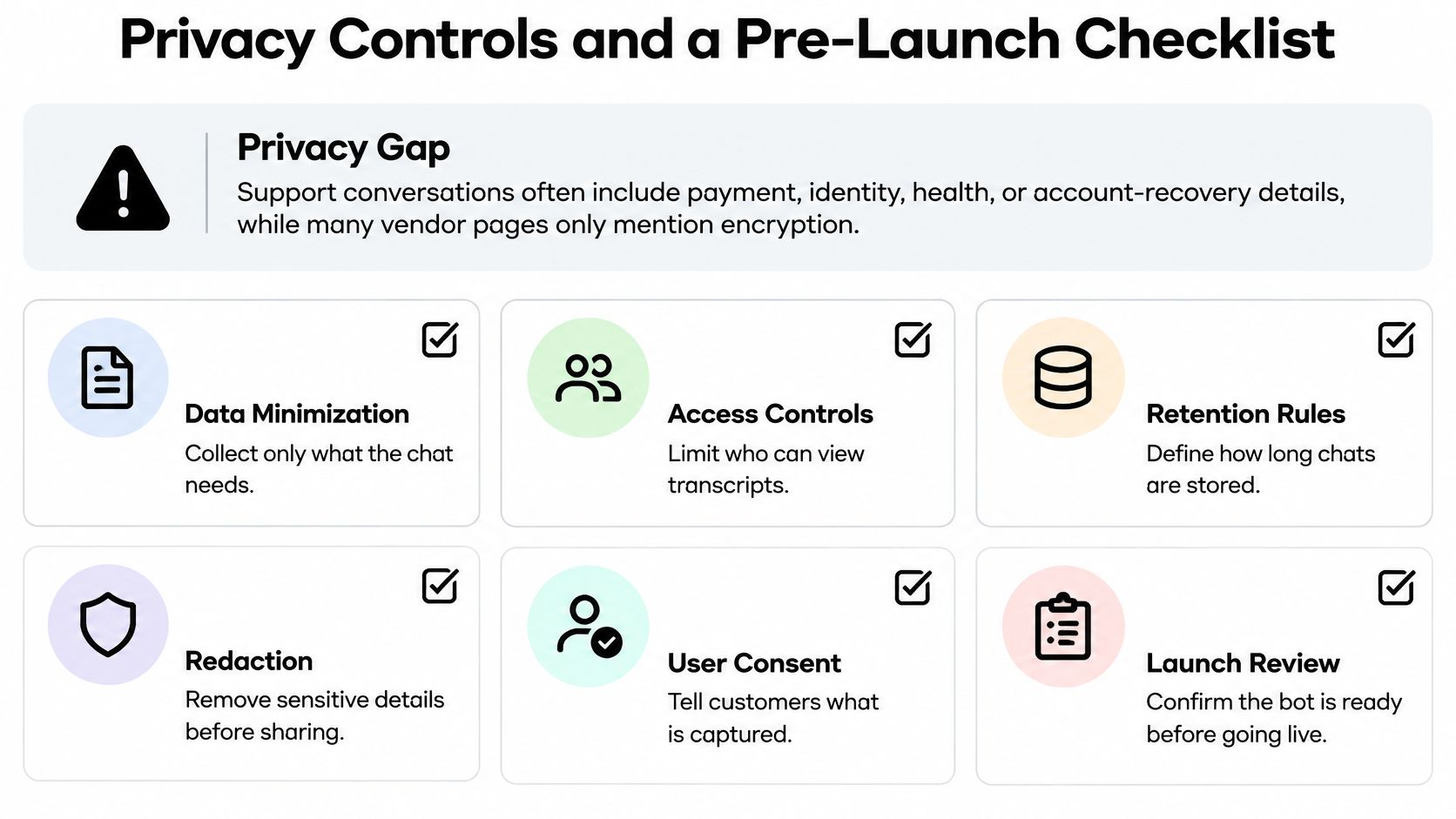
Support conversations can contain payment, identity, health, or account-recovery details. Encryption matters, but it doesn't answer whether the bot should collect that information, who can inspect it, or when it should disappear.
An AMCIS study on chatbot privacy found participants divided over whether chatbots could be trusted to follow privacy policies and identified transparency, clear consent mechanisms, and user control over data sharing as requirements for trust. Make those controls understandable before asking customers to disclose sensitive information.
Decide what enters the conversation
Classify the information the bot may receive before connecting sources or tools. Separate public help content, internal procedures, customer records, and highly sensitive information.
Don't request passwords or full payment-card details in open chat. Use authenticated, purpose-built flows for sensitive verification and expose only the minimum result the support workflow needs.
Disclose that the visitor is speaking with AI. Explain what conversation information is stored, its purpose, the retention period, and the available access or deletion route. Where consent is required, don't hide the choice inside a greeting that customers must accept to obtain help.
Trace the data path
When the selected model processes a prompt, the selected model provider processes that prompt. Review the applicable processing terms, retention settings, and data-use conditions before sending customer information.
Workspace customers decide what content they submit and how their agents collect visitor information. They're responsible for providing additional notices and obtaining any consent their use case requires. Treat this as an assigned operational responsibility, not a checkbox delegated to whoever installs the widget.
Restrict transcript access by role and log account actions. Redact unnecessary personal information before sharing conversations for debugging, evaluation, or training.
Prompt injection is an attempt to make the bot follow malicious instructions embedded in a visitor message or retrieved content. Test whether a visitor can coax it into revealing internal instructions, exposing restricted documents, or invoking an unauthorized tool. Keep secrets out of prompts and enforce permissions outside the model.
Copy this launch checklist
- Data classification complete with permitted and prohibited inputs documented.
- AI disclosure live before customers begin sharing details.
- Escalation tested without unnecessary sensitive information in the transfer.
- Retention period set with deletion behavior checked across connected systems.
- Access controls verified for sources, transcripts, and account actions.
- Review owner named for ongoing conversation and incident review.
- Privacy request channel published with a clear handling process.
Don't launch until someone can explain the complete path of a customer message, including logs, model processing, connected tools, and the receiving support queue.
Launch a Pilot on One High-Volume Request
Choose the highest-volume, lowest-risk request you can support with a current source and an unambiguous outcome. Order status or a straightforward return-policy question is a better starting point than a broad promise to answer anything.
The pilot should test an operational hypothesis: can this workflow solve the selected issue with less customer effort, without creating more follow-up work?
Build a bounded pilot
- Export relevant historical tickets. I'd start with the previous quarter's examples for the selected request. Remove unnecessary personal information and preserve the messy wording customers use.
- Prepare the answer source. Use the current approved policy or connected system. Resolve contradictions before the agent sees them, and name the person responsible for updates.
- Write operating instructions. Specify the permitted task, tone, prohibited actions, and escalation conditions. Include what the agent should do when the source or tool is unavailable.
- Test real questions. Use historical phrasing, incomplete messages, corrections, and requests outside scope. Keep some examples separate from configuration work so the final test isn't just rehearsal.
- Deploy where the request occurs. We provide an embed code you can copy and paste onto your website in a few minutes. Place the widget where customers need the selected help, rather than exposing an untested assistant everywhere.
- Review the pilot against the baseline. I'd schedule the initial decision after a fortnight, while inspecting failures from launch day. Check enough completed outcomes to distinguish improvement from an unusually easy batch of requests.
The setup process can move from idea to a live agent in minutes by adding knowledge, shaping tone, testing questions, and deploying. That describes configuration speed, not proof that the workflow is ready for unrestricted traffic.
Make expansion conditional
Expand only when resolution improves and repeat contacts don't rise for comparable requests. If customers reach agents faster but still repeat their details, fix the transfer. If answers fail because the policy is ambiguous, fix the policy before changing the prompt.
Compare any platform on those same outcomes. Start with one request, not the whole queue.
SupportGPT offers knowledge-trained support agents, a testing playground, and human handoff for conversations that need a teammate. Visit SupportGPT to build a focused pilot, test its failure routes, and deploy it on the page where customers need help.