Designing a Modern Customer Support Chat Process
Build a customer support chat process that drives loyalty and efficiency. Learn to map journeys, integrate AI, design workflows, and measure what truly matters.
A solid customer support chat process is more than just a set of scripts; it's your blueprint for turning reactive conversations into experiences that build genuine loyalty. It’s the framework that dictates how your team actually engages with customers, solves their problems, and delivers consistently great interactions, even when you're growing fast. Think of it as moving from improvised responses to a reliable system that works every single time.
Why Your Chat Process Needs a Modern Blueprint
In the not-so-distant past, customer support was often a chaotic free-for-all. Agents would just grab tickets from a shared inbox, leading to wild inconsistencies in how problems were handled. That just doesn’t cut it anymore.
Today's customers expect immediate, helpful answers. A clumsy or confusing process leads directly to frustrated customers, burnt-out agents, and, ultimately, churn. A well-defined workflow isn't just about being efficient; it's a massive competitive advantage.

There's no debating it: live chat is the undisputed king of support channels. A full 41% of consumers worldwide now call it their top choice. This isn't surprising when you see the results—chat drives an 87% CSAT score, crushing email's 61% and the phone's 44%.
The data is clear: 60% of customers are more likely to come back to a website that offers live chat. If you want to dig deeper, you can check out more of these customer support statistics and trends for 2025.
The True Cost of an Unplanned Process
When you don't have a formal chat process, the consequences are predictable and entirely preventable. The cracks start to show in ways that directly hurt your growth and reputation.
I’ve seen it happen. A fast-growing e-commerce brand starts getting public complaints because one agent says returns are free, while another says they aren't. Or a SaaS company botches the handoff of a tricky technical bug from a Tier 1 agent to an engineer, forcing a high-value customer to explain their problem all over again. Trust is immediately broken.
A great process ensures that the first agent who engages a customer has the tools and pathways to get them the right answer, whether it comes from a knowledge base, an AI, or a senior engineer. It’s about creating a seamless experience, not a series of dead ends.
From Cost Center to Loyalty Engine
This is where the magic happens. A modern blueprint flips the script, turning support from a reactive cost center into a powerful engine for customer loyalty. The benefits of a formal workflow are tangible and easy to measure.
- Improved Consistency: Every customer gets the same high standard of care. It doesn't matter who they talk to or how complex their problem is.
- Enhanced Scalability: As your company grows, you can onboard new agents quickly and maintain that high quality without a manager having to look over every shoulder.
- Reduced Agent Burnout: When you have clear escalation paths and AI handling the repetitive stuff, your agents can focus on meaningful problem-solving. This makes their job more satisfying and reduces turnover.
- Actionable Insights: A structured process gives you clean data. This makes it so much easier to spot recurring issues, track your team's performance, and make smarter decisions for the business.
Mapping the Customer Journey to Anticipate Needs
A truly great chat support experience doesn’t start when a customer opens the chat window. It starts with a deep understanding of their world—what they’re trying to achieve, where they get stuck, and the exact moments they’re most likely to need a helping hand. By mapping these journeys, you can build a workflow that feels less like a process and more like a conversation that already knows what the customer needs.
This means getting granular about customer intents. Forget broad categories. We're talking about the specific, real-world reasons someone is reaching out. You want the full picture, from a potential customer comparing features to a seasoned power user trying to debug a tricky API call. Each journey demands a different approach.
Think about it: a brand-new user struggling with their initial setup needs immediate, hands-on guidance to keep them from churning. On the other hand, an experienced user flagging a minor UI bug might just need quick confirmation that you've logged it for the engineering team.
Identifying and Prioritizing What Your Customers Actually Want
First things first, you need to figure out every possible reason a customer might start a chat. This isn't a solo exercise. Get your sales, success, and product folks in a room (or a Zoom) and brainstorm a master list. Your best source of truth? Dive into your existing support tickets and chat transcripts to see what patterns jump out.
Once you have that raw list, start grouping the intents into logical buckets. You'll likely see a few common themes emerge:
- Pre-Sales Inquiry: Questions about pricing, specific features, or how you stack up against the competition.
- Technical Troubleshooting: Anything from error messages and bugs to features that just aren't behaving as expected.
- Billing and Account Management: All the money talk—invoices, plan changes, user seats, and permissions.
- Onboarding Assistance: Helping new users get off the ground with setup, data imports, or walking through a core workflow for the first time.
Now, with your intents defined, it’s time to prioritize. Don't leave this to guesswork; let data be your guide. Pull reports to see which intents drive the most volume. But volume is only half the story. You also have to weigh the business impact. A pre-sales question from a major lead is almost always a higher priority than a simple "how-to" question, even if you get far more of the latter.
Building a great customer support chat process is like being a city planner. You need to know where the high-traffic intersections are, where new roads are needed, and how to create the smoothest possible routes for everyone, no matter their destination.
From Journey Map to Chat Workflow
This mapping work isn't just a theoretical exercise—it directly shapes your chat workflow. It dictates the triage questions you ask upfront, determines which problems an AI can solve on its own, and flags the exact moments a human expert needs to step in. For instance, a "billing issue" intent should have a direct-line route to an agent who can actually access payment systems, completely bypassing the general support queue.
To make this more concrete, let's look at how different customer intents can be triaged. This is where you start to see the foundation of a smart, efficient customer support chat process.
Common Customer Chat Intents and Initial Triage
Here’s a simple breakdown of how you might categorize and route common inquiries for both SaaS and E-commerce businesses.
| Customer Intent | Typical Questions | Suggested Triage | Priority Level |
|---|---|---|---|
| Pre-Sales Questions | "Does your Pro plan include SSO?" "How do you compare to Competitor X?" | Route directly to the Sales team or a sales-trained AI bot. | High |
| API Integration Error | "I'm getting a 403 error on the payments endpoint." | Escalate to Tier 2 technical support or a developer advocate. | High |
| Password Reset | "I forgot my password and can't log in." | Handle with a self-service link or an automated AI action. | Low |
| Bug Report | "The export button isn't working on the new dashboard." | Create a ticket for the engineering team and inform the user. | Medium |
By defining these paths ahead of time, you ensure that every customer, regardless of their issue, gets on the fastest and most effective track to a resolution.
Designing Smart Workflows and Escalation Paths
Once you've mapped out what your customers need, it's time to build the operational backbone of your customer support chat process. This is where we turn those journey maps and intent lists into a living, breathing system that guides a user from their first typed word to a fast, satisfying answer. And it all begins with that first interaction.
That opening message is more important than most people think. It's not just a simple "hello"; it's your first chance to build confidence. Forget the generic "How can I help you?". A much better approach is to use a smart, contextual opener. For example, if someone is lingering on your pricing page, greet them with something like, "Hi there! Have any questions about our plans or features?" It’s a small detail, but it instantly shows you’re paying attention.
From that first message, the workflow needs to quickly figure out what the user’s core problem is. This isn’t about creating a frustrating phone tree in a chat window. It’s about using one, maybe two, targeted questions to get them to the right place on the first try.
This diagram really breaks down how different stages—from someone just browsing to a long-time customer needing technical help—demand completely different paths.
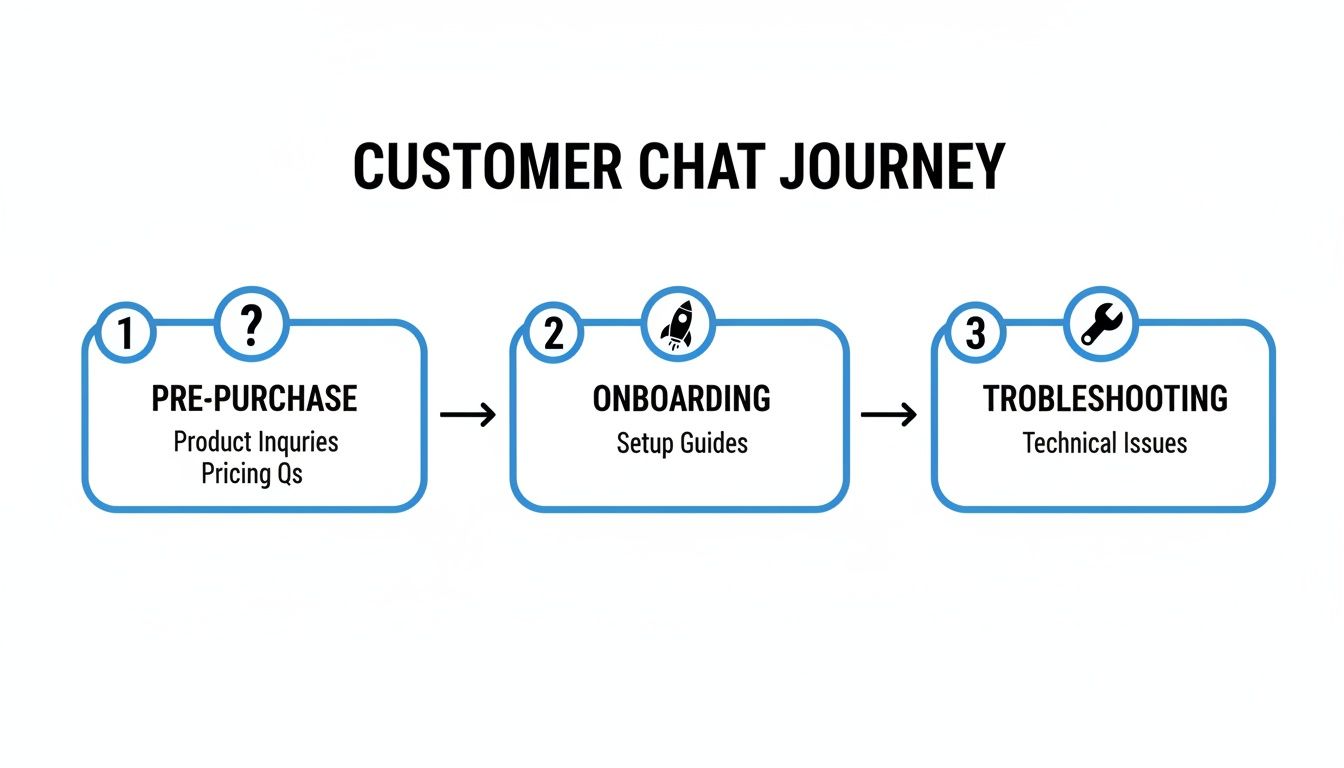
The big takeaway here? A one-size-fits-all chat process just doesn't work. The context of where the customer is in their lifecycle is everything.
Creating Seamless Handoffs and Escalations
Let's be honest, one of the most infuriating things for a customer is having to repeat themselves. It’s the cardinal sin of customer service. Whether the handoff is from an AI bot to a human agent or from a generalist to a specialist, it has to be smooth. A well-designed escalation path makes sure the entire conversation history—transcripts, customer details, everything—moves with the ticket.
Modern support platforms are great for this, letting you set up intelligent routing based on keywords or rules. For instance, if a chat contains words like "invoice," "billing error," or "refund," you can automatically send it straight to the finance team's queue. This stops your front-line agent from becoming a bottleneck and gets the customer to an expert who can actually solve their problem right away.
The goal of an escalation isn't just to transfer a problem; it's to transfer a fully understood problem. The receiving agent should have everything they need to pick up the conversation exactly where it left off, without missing a beat.
The Role of AI in Frontline Triage
This is where AI agents, like those powered by tools such as SupportGPT, really shine. They are perfect for handling that initial triage. Think about all the high-volume, repetitive questions your team gets every day: "How do I reset my password?" or "What are your shipping times?".
An AI can handle these instantly, 24/7. This frees up your human agents to focus their brainpower on the tricky, high-stakes issues that demand real empathy and complex problem-solving.
You can build a hybrid system by setting up smart rules and triggers. The AI acts as the first line of defense, providing immediate answers for common questions, while automatically routing more complex issues to the right human team. This way, your experts are deployed exactly when and where they’re needed most, making the whole operation more efficient and keeping customers happy.
Weaving AI into Your Human Support Fabric
Let's get real about AI in customer support. It's not about replacing your team with robots. It’s about giving them a powerful sidekick—an AI agent that acts as your tireless frontline specialist. This isn't just any chatbot; it's an agent trained exclusively on your company's knowledge, ready to provide instant, accurate answers 24/7.
Think about all the repetitive questions that tie up your team. "How do I reset my password?" "What's your return policy?" An AI can handle that high-volume, low-complexity work, freeing your human experts to tackle the truly tricky stuff.

This isn't some far-off future; it's happening right now. A staggering 90% of leading CX organizations expect automation to handle eight out of ten issues without a human ever stepping in. The results speak for themselves. Contact centers using AI are seeing 14% more issues resolved per hour, and agents are getting back over two hours every single day. You can dig deeper into the rise of AI in customer service trends to see just how big this shift is.
Getting Your AI Ready for Prime Time
An AI is only as smart as the information you give it. You can't just flip a switch and expect miracles. The real work is in the training, which means feeding it a steady diet of your company's own resources.
Here’s what you’ll need to get started:
- Knowledge Base Articles: This is your AI’s primary textbook—the official source for product info, policies, and step-by-step guides.
- Saved Replies & Macros: You've already got proven answers to common questions. Give them to the AI so it knows what good looks like.
- Product Documentation: For those nitty-gritty technical questions, this gives the AI the detailed specs it needs to be genuinely helpful.
- Past Chat Transcripts: This is where the magic happens. Analyzing real conversations helps the AI master your brand’s voice and get a feel for what customers really mean.
Remember, this isn't a one-and-done deal. The best AI setups create a feedback loop where the agent learns from every single conversation, getting smarter and more effective over time.
Setting Up Guardrails and AI Actions
You wouldn't let a new team member go solo without training, right? The same goes for your AI. You need to establish clear guardrails—rules that keep the AI on-brand, on-topic, and helpful. These constraints prevent it from going off script, making up answers, or sounding like a generic robot. With a platform like SupportGPT, you can build and deploy AI support agents that come with enterprise-grade guardrails baked right in.
An AI without guardrails is like a new hire without training—full of potential but prone to making costly mistakes. Setting clear boundaries is essential for building customer trust and maintaining brand integrity from day one.
Today's AI can do more than just talk; it can act. Using AI Actions, you can automate common tasks right inside the chat window, turning your AI into a doer, not just a talker.
Imagine an AI that can:
- Look up an order status the moment a customer provides their order number.
- Kick off a password reset after a quick identity verification.
- Pull up subscription details and explain the latest invoice.
These actions take a massive chunk of manual work off your team’s plate. This frees them up to focus on the high-stakes, high-emotion problems where human empathy and creative problem-solving truly shine. That’s what creates an unforgettable customer experience.
Measuring Performance with KPIs That Actually Matter
A perfectly designed chat process is a great start, but it's only half the story. If you're not measuring its effectiveness, you're flying blind. To get a real sense of how you're doing, you have to move past vanity metrics and dig into the Key Performance Indicators (KPIs) that tell you what’s truly happening. Without data, you’re just guessing.
The numbers don't lie. Customers have high expectations for speed—nearly half expect a response in under 4 hours. The shocking part? The average business takes more than 12 hours to get back to them. That huge gap is where frustration festers and where a data-driven approach can give you a massive competitive edge.
Core Metrics for Chat Success
To start, you don't need to track a hundred different things. Focus on a handful of essential metrics that form the bedrock of any solid performance strategy. Each of these gives you a unique window into your operational efficiency and, more importantly, your customers' happiness.
- First Response Time (FRT): This is your stopwatch for how long a customer has to wait for that initial "hello." A low FRT immediately shows you respect their time and are ready to help, which is absolutely critical for making a good first impression.
- Average Resolution Time (ART): This tracks the entire conversation, from the moment a customer reaches out until their issue is completely solved. If your ART is creeping up, it could be a red flag for issues with agent training, gaps in your knowledge base, or clunky internal processes.
- Customer Satisfaction (CSAT): This is the ultimate report card. It's usually captured with a simple post-chat survey asking something like, "How would you rate the support you received?" This metric gets right to the point and tells you exactly how customers feel about the experience they just had.
The single most important attribute of a good customer experience isn't empathy or helpfulness—it's a fast response time. Speed signals that you value your customer, building the trust needed for long-term loyalty.
Turning Data into Actionable Insights
Just tracking KPIs is pointless if you don't do anything with the information. This is where the real work—and the real value—begins. By analyzing your chat transcripts and performance data, you can uncover recurring pain points that would otherwise stay hidden.
A good analytics dashboard, for example, can bring metrics like resolution rates and customer sentiment to life.
This kind of visual data makes it easy to spot patterns. You might see a sudden spike in negative sentiment on a Tuesday and realize it lines up perfectly with a new product update or a brief website outage.
Are you noticing the same questions about a certain feature over and over again? That's your cue to improve your in-app guidance or build out a new knowledge base article. Is your ART getting longer? Maybe it’s time for some advanced training on complex issues or a review of your escalation process.
This continuous, data-driven feedback loop is what transforms your support team from a reactive cost center into a proactive, strategic asset that consistently makes the customer experience better.
Common Questions on Building a Chat Process
Even with the best-laid plans, building a solid customer support chat process always brings up real-world questions. Let's dig into some of the most common hurdles I see teams stumble over, from figuring out staffing without breaking the bank to keeping your automated and human support sharp.
These are the practical challenges that can trip you up. Getting them right is what separates a frustrating chat experience from a fantastic one.
How Do I Staff for Live Chat Without Overspending?
This is the big one, isn't it? You want to be there for your customers, but a 24/7 team of agents is a huge expense that most companies just can't justify. The secret isn’t just to hire more people; it’s about being smarter with who you have and the tools you use.
Start by staffing for your peaks. Dive into your analytics and find out when you get hit with the most chats. Is it between 10 AM and 2 PM on weekdays? Great. Concentrate your human agents there. For the off-hours and overnight, let a well-trained AI agent handle the frontline. This hybrid approach gives customers instant answers around the clock without the heavy cost of a full-time overnight crew.
Another trick is to cross-train people you already have. Your chat team doesn't have to be a silo. A product expert or someone from your customer success team can jump on chat for a few hours a week. They bring a ton of deep knowledge and get a direct line to what customers are actually thinking.
What Is the Best Way to Handle Multiple Chats at Once?
Juggling several chats at once is a real art. Getting an agent to handle three, four, or even five chats simultaneously sounds like a massive efficiency win, but it can quickly turn into a disaster if you're not careful. The goal is quality, not just quantity. Trying to manage too many conversations leads to slow responses and silly mistakes.
First, set a hard limit. A new agent should probably start with just two concurrent chats. Let them get comfortable. As they get more experience, maybe they can handle more, but this really depends on how complex your customer issues are.
The single most important part of a good customer experience is a fast response. When an agent is juggling too many chats, that speed disappears. It's always better to handle three chats exceptionally well than five chats poorly.
This is where canned responses and text shortcuts become an agent's best friend. They're perfect for knocking out quick, consistent answers to common questions, which buys the agent precious time to focus on the tougher problems in their other conversations. It's a simple way to keep customers from feeling like they're being ignored.
How Often Should I Update My Chat Workflows and AI?
Think of your chat process as a garden, not a statue. It's a living thing that needs constant tending to stay healthy and effective. You can't just set it up and walk away.
I recommend reviewing your chat workflows and agent scripts at least quarterly. This is your chance to actually read through chat transcripts, spot new trends in customer problems, and tweak your escalation paths based on what the data is telling you.
Your AI agent, however, needs more frequent attention. You should be feeding it new information whenever:
- You launch a new product or feature.
- A help center article or company policy gets an update.
- You spot the AI giving the wrong answer to a specific question.
Treat your AI like a new employee. It needs continuous training and feedback to get smarter and more helpful over time.
Ready to build a smarter chat process? With SupportGPT, you can create and deploy powerful AI agents trained on your own knowledge, complete with guardrails and seamless human handoffs. Get started for free.