AI Chatbot Support: A Practical Guide for 2026
Learn how AI chatbot support works in 2026, from architecture and routing to implementation, measurement, and the pitfalls teams actually hit in production.
At 2 a.m., your support queue is already filling up. Customers want to know where an order is, why a payment failed, or how to reset a password, while the team that can help is still hours away from opening Slack. By the time agents arrive, the backlog has become the first task of the day, and customers who expected an answer immediately are already frustrated.
That's the practical case for AI chatbot support. A well-designed bot can handle routine questions, retrieve approved information, complete selected actions, and send complicated cases to the right person without making the customer start over. A poorly designed one adds another obstacle between the customer and a resolution.
The difference comes from system design, not from choosing the most impressive model. You need a clear architecture, trustworthy knowledge, useful tools, deliberate escalation rules, and measurements that distinguish genuine resolution from silent deferral.
Why AI Chatbot Support Has Become the Default Expectation
A support team can recover from a busy afternoon. It struggles when every night produces the same backlog. Password resets, delivery updates, subscription questions, and account explanations don't become less important because they arrive outside business hours. Customers also don't experience your staffing schedule as a reason to wait. They compare your support experience with the fastest digital service they've used recently.
That shift has moved chatbots from an experimental cost-saving project into a normal customer interface. A summary of customer support trends helps explain the broader change, but the operational reality is straightforward: customers increasingly expect to ask a question in plain language and receive a useful next step without searching through an entire help center.
The adoption data reflects that change. Between 2020 and 2025, chatbot adoption across businesses grew about 4.7 times, with estimates suggesting that roughly 58% of B2B companies and 42% of B2C companies had integrated chatbot technology by 2025, according to Chatbot.com's industry statistics. The same source reports broad consumer exposure, including an estimate of more than 987 million people worldwide using AI chatbots and findings that about 88% had at least one chatbot conversation in the previous year.
Three pressures are changing support operations
First, ticket volume grows faster than a human team can scale. Hiring helps, but it takes time, and adding agents doesn't automatically create continuous coverage across regions, languages, and time zones.
Second, customer patience has changed. People have become accustomed to instant answers from consumer apps, marketplaces, and SaaS products. They may accept a human handoff for a sensitive or account-specific issue, but they don't want a person to manually answer a question the company has already documented.
Third, modern language models can handle messy, multi-turn requests more naturally than older menu-based bots. A customer can explain a billing problem in their own words, clarify the issue, and receive a response that accounts for the conversation. That capability is useful, but it also creates risk. A fluent answer can still be wrong, unauthorized, or disconnected from the required workflow.
Practical rule: Treat the bot as a support worker with limited authority, not as an all-knowing representative.
The question is no longer whether a company can place a chat bubble on its website. The question is whether the system can identify what it knows, use the right business data, stop when it lacks authority, and preserve context when a human needs to take over.
How an AI Chatbot Support System Actually Works
Think of the system as a hotel front desk. A guest arrives with a request, the front desk interprets it, checks the hotel's information, decides what can be handled locally, and calls a manager when the request falls outside its authority.
The lobby is the chat widget
The widget is the customer's entry point. It appears on a website, inside an application, or in another supported channel. The customer types, “My package says delivered, but I don't have it,” and the widget sends that message, along with relevant session information, into the support system.
The widget also controls expectations. It can explain what the assistant handles, ask the customer to sign in before accessing private information, and make the human-support option visible. A hidden escalation button tells customers that the company wants automation more than resolution.
The interpreter is the language model
The large language model reads the message and works out the likely intent. It identifies that the customer may need an order lookup, a delivery investigation, or a human agent. It also considers the conversation so far, the bot's instructions, and any policy constraints.
The model shouldn't invent the delivery status. It should decide which approved source or tool can provide that status.
The memory is the knowledge layer
The knowledge layer contains help articles, product documentation, policies, and structured answers. Retrieval selects relevant material for the model before it drafts a response. This is why a grounded question-answering approach matters. The system needs to answer from current, approved information rather than rely on general language patterns.
The response is the customer-facing action
The assistant returns an answer in plain language. It might explain how to report a missing package, ask for an order number, or confirm that an investigation has started. The wording should match the customer's situation rather than just repeat a generic article.
Escalation is the manager's office
If the customer needs an exception, account change, refund approval, or sensitive investigation, routing sends the conversation to a human. A good handoff includes the transcript, detected intent, account information the agent is allowed to see, actions already attempted, and a suggested next step.
The pipeline looks like this:
- Receive: The widget captures the message and permitted context.
- Interpret: The model identifies intent, urgency, and missing information.
- Retrieve or act: The system searches approved knowledge or calls a controlled tool.
- Respond: The bot gives an answer, completes an authorized action, or asks a focused question.
- Escalate: The system transfers unresolved or risky cases with context intact.
The full process is more important than the final sentence. The CM-ServiceBench explanation of customer-service model evaluation emphasizes reasoning, tool use, workflow execution, and guardrail adherence across complete conversations. A polished final reply can't compensate for retrieving the wrong account record or skipping a required verification step.
The Core Components You Need to Understand
A production chatbot is a stack of cooperating parts. Each part creates a different failure mode, so teams shouldn't treat the model as the entire product.
The component decisions
The widget determines where customers encounter the assistant and what identity information accompanies the request. A help-center widget may focus on article discovery, while an in-app widget can support account-specific tasks. Mobile placement, proactive prompts, sign-in requirements, and accessibility all affect adoption and trust.
The LLM determines how the system interprets language and composes replies. Teams balance response quality against latency, context limits, operating cost, and the risk of allowing a model too much freedom. Prompt instructions should specify tone, allowed claims, source requirements, and conditions for escalation.
The retrieval layer supplies current information. Retrieval-augmented generation usually fits changing policies and product documentation because the team can update the source without retraining the model. Fine-tuning can shape behavior or formatting, but it isn't a substitute for a maintained source of truth.
Routing and tools give the bot controlled ways to act. An order lookup, CRM search, subscription service, or internal API can provide information that documentation never can. The critical design choice is permission. The bot should know which actions are read-only, which require authentication, and which must be approved by a person.
Escalation logic decides when automation stops. Useful triggers include low confidence, a failed retrieval, repeated misunderstanding, an explicit human request, a sharp sentiment change, or a request involving account permissions. Agents should receive the conversation history and the actions already taken, not a blank ticket.
| Component | Responsibility | Key Design Choice |
|---|---|---|
| Widget | Captures messages and user context | Where it appears and when identity is required |
| LLM | Interprets requests and drafts replies | Quality, latency, context, and instruction boundaries |
| Knowledge layer | Supplies approved information | Retrieval freshness and source ownership |
| Tools | Reads data or performs actions | Permissions, authentication, and auditability |
| Router | Selects answer, tool, or human path | Intent coverage and confidence rules |
| Escalation | Transfers unresolved work | Trigger conditions and agent context |
Production ownership matters
Every row needs an owner. Product may own the widget, support may own intents and escalation, engineering may own tools and observability, and legal or security may review sensitive data flows. If nobody owns article freshness, the knowledge layer becomes unreliable even when the model behaves exactly as configured.
Teams extending human coverage can also evaluate operational resources such as Latin American virtual assistants for queues that still require judgment, language fluency, or follow-up. Human staffing and automation work best together when the router makes the boundary explicit.
A visual chatbot architecture diagram can help product and engineering teams agree on these boundaries before implementation begins.
Implementing AI Chatbot Support in Real Teams
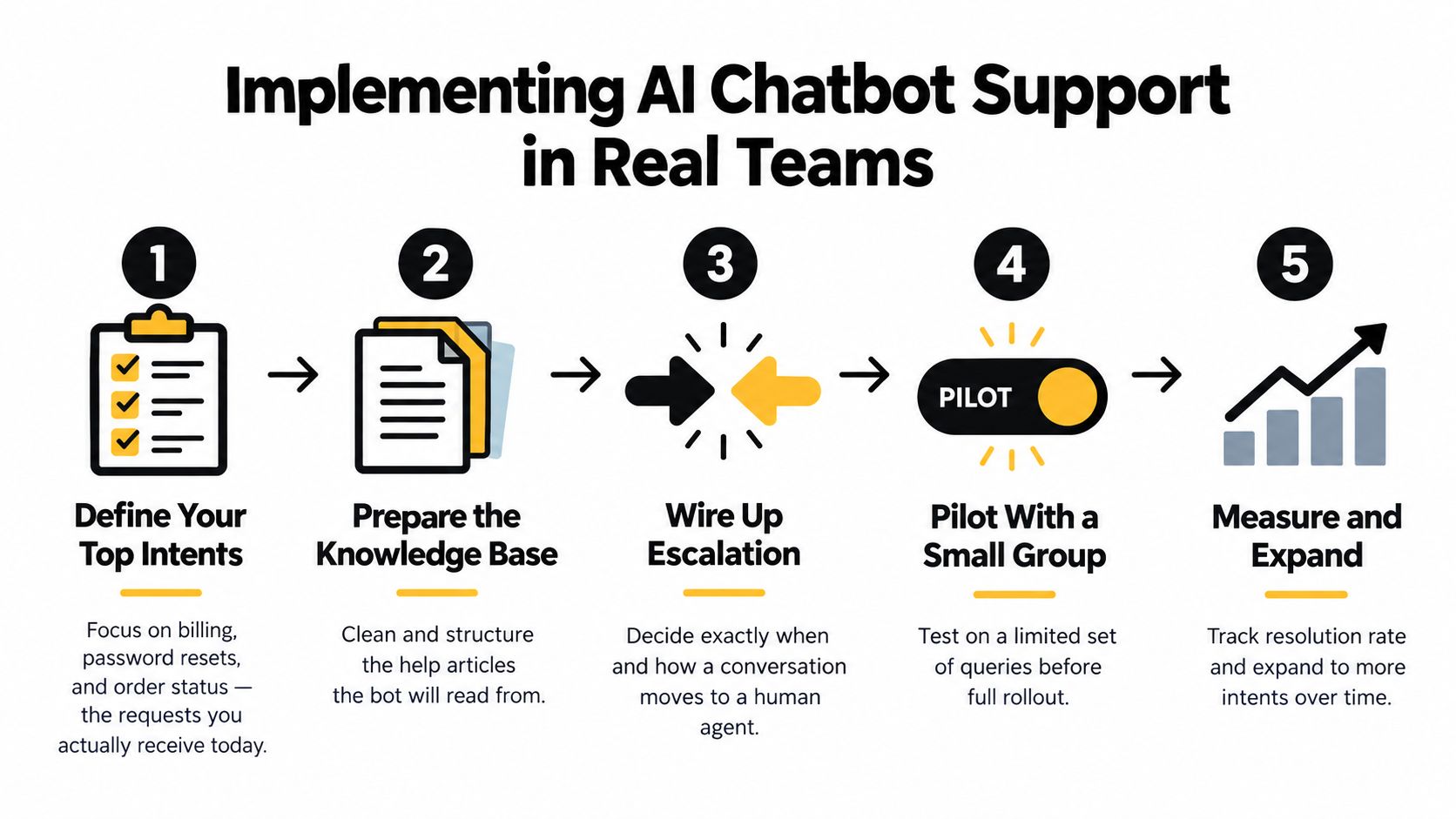
Start with the conversations you already receive. Don't begin by asking which model to buy. Export recent tickets, group them by customer intent, and identify requests that are frequent, well documented, and low risk.
Typical starting flows include billing explanations, password resets, order status, account navigation, and basic product questions. Avoid launching first on disputes, legal requests, safety issues, or cases where the assistant would need broad permission to change customer data.
Build the source before tuning the model
Connect the help center, internal documentation, approved ticket examples, and structured policy content. Then remove contradictions, archive outdated pages, label ownership, and test whether the retrieved passages answer customer questions.
A model can't repair a missing refund policy. It may produce a confident-sounding compromise instead, which is worse than saying it doesn't know.
Next, choose the first placement. A help-center widget is usually a controlled environment for article-based questions. An in-app assistant can provide more context, but it also raises privacy and permission requirements. Checkout flows may need very narrow prompts because an intrusive or uncertain assistant can interrupt a high-intent action.
Wire the handoff before inviting traffic
Define concrete triggers:
- Low confidence: The system can't find sufficient approved evidence.
- Repeated failure: The customer rephrases the same problem or rejects multiple answers.
- Human request: The customer asks for an agent directly.
- Sensitive permission: The request involves refunds, identity, account ownership, or security.
- Sentiment change: The customer signals urgency, anger, distress, or potential harm.
Route each trigger to the right queue and pass the transcript, detected intent, customer identifiers permitted by policy, and attempted actions. For teams handling sensitive conversations or remote service operations, reviewing guidance on video conference security can complement the broader access and privacy review.
Pilot behind a feature flag, keep a fallback path, and decide how non-English traffic will be handled before launch. Security and legal review should happen before the bot can access personal data or execute account changes, not after an incident.
Measuring Whether the Bot Is Actually Working
A bot can reduce visible ticket volume without resolving anything. The customer may leave the chat, return through email, contact an agent later, or abandon the task. That isn't resolution. It's deferred work.
Use separate definitions for deflection, containment, and resolution. Deflection means the customer didn't create or continue a human ticket. Containment means the conversation ended inside the automated flow. Resolution means the customer reached the intended outcome, ideally confirmed by a post-interaction signal or a later absence of repeat contact.
Published benchmarks show why implementation quality matters. One 2026 cross-source benchmark reported a median AI self-service deflection rate of 22%, with a range from 8% to 45%, while pre-LLM chatbots had an 11% median, according to Happy Support's deflection benchmarks. Another 2026 benchmark found that AI chatbots fully resolved 44.8% of customer-service conversations without human involvement, as reported by Comm100's resolution analysis.
These are reference points, not promises. Your traffic mix, documentation quality, permissions, languages, and escalation design determine what the numbers mean.
| Metric | Typical Range | What It Tells You |
|---|---|---|
| AI self-service deflection | 8% to 45% in a 2026 benchmark | How often customers avoid a human ticket, not whether they reached the right outcome |
| AI self-service deflection median | 22% in the same benchmark | A comparison point for implementation quality |
| Pre-LLM chatbot deflection median | 11% | A baseline showing that older systems often contained less work |
| Full AI resolution | 44.8% in a 2026 benchmark | How many conversations ended without human involvement |
| Customer satisfaction | 74% for the most recent AI interaction in a global study | A broad experience signal that varies with issue completion |
| Satisfaction after full resolution | Above 90% in the same research when AI fully resolved the issue without extra steps | Why task completion and handoff quality matter more than a pleasant reply |
The global consumer research behind the satisfaction figures found 74% satisfaction with the most recent AI interaction, while satisfaction exceeded 90% when the issue was fully resolved without extra steps. Those figures come from COPC's AI customer-experience research.
Track resolution time, repeat contact, transfer rate, CSAT, failed retrievals, tool errors, and handoff acceptance. Review an intent distribution or confusion matrix weekly. If “refund status” is repeatedly classified as “refund request,” the remedy may be better intent boundaries or routing, not a larger model.
A useful operating rhythm is to establish a pre-bot baseline, review early traffic by intent, and set targets only after the team understands its own failure patterns. Month three should answer which flows work. Month six should show whether content and routing improvements are increasing completed tasks. A year-long view should reveal whether the bot remains accurate as products, policies, and customer language change.
For a practical event taxonomy, use a guide to chatbot performance metrics and map each metric to a customer outcome rather than a vendor dashboard label.
Common Pitfalls and How to Avoid Them
The first mistake is treating the chatbot as the destination. Support systems are more reliable when the bot can answer routine questions, gather information, and route work. A customer who needs a specialist shouldn't have to defeat the automation before reaching one.
The second mistake is designing escalation as a button instead of a workflow. If the agent receives only “customer wants help,” the customer must repeat the problem, provide the same identifiers, and explain what the bot already tried. The agent then performs the bot's work and repairs the relationship at the same time.
Customers don't judge a handoff by whether a human appears. They judge it by whether they have to start again.
Deflection can also become a misleading target. A conversation that ends because the customer gives up may look successful in a dashboard. Pair deflection with repeat contact, resolution confirmation, transfer outcomes, and satisfaction. If those signals worsen, the bot is shifting work rather than removing it.
Quiet failure modes
Content rot is easy to miss. A pricing page changes, a refund policy is revised, or a product setting moves, but the retrieval index still surfaces old guidance. Assign owners, date sensitive documents, remove duplicates, and test high-risk answers after every policy change. Grounding guidance for support chatbots provides a useful framework for keeping responses tied to approved material.
Scope expansion creates another problem. Launching across every intent makes evaluation difficult and exposes customers to uncertain behavior. Begin with a small set of frequent, low-risk requests, then add one intent at a time after reviewing failures.
Agent neglect finishes the pattern. Agents need training on the new triage fields, context payload, escalation categories, and feedback process. They should be able to mark a bot response as wrong, incomplete, or incorrectly routed. Without that loop, the system can't improve and the support team may blame automation for problems caused by missing governance.
A Pre-Launch Checklist and Next Steps
Before switching on the widget, run a review that checks the whole customer journey rather than only sample answers.
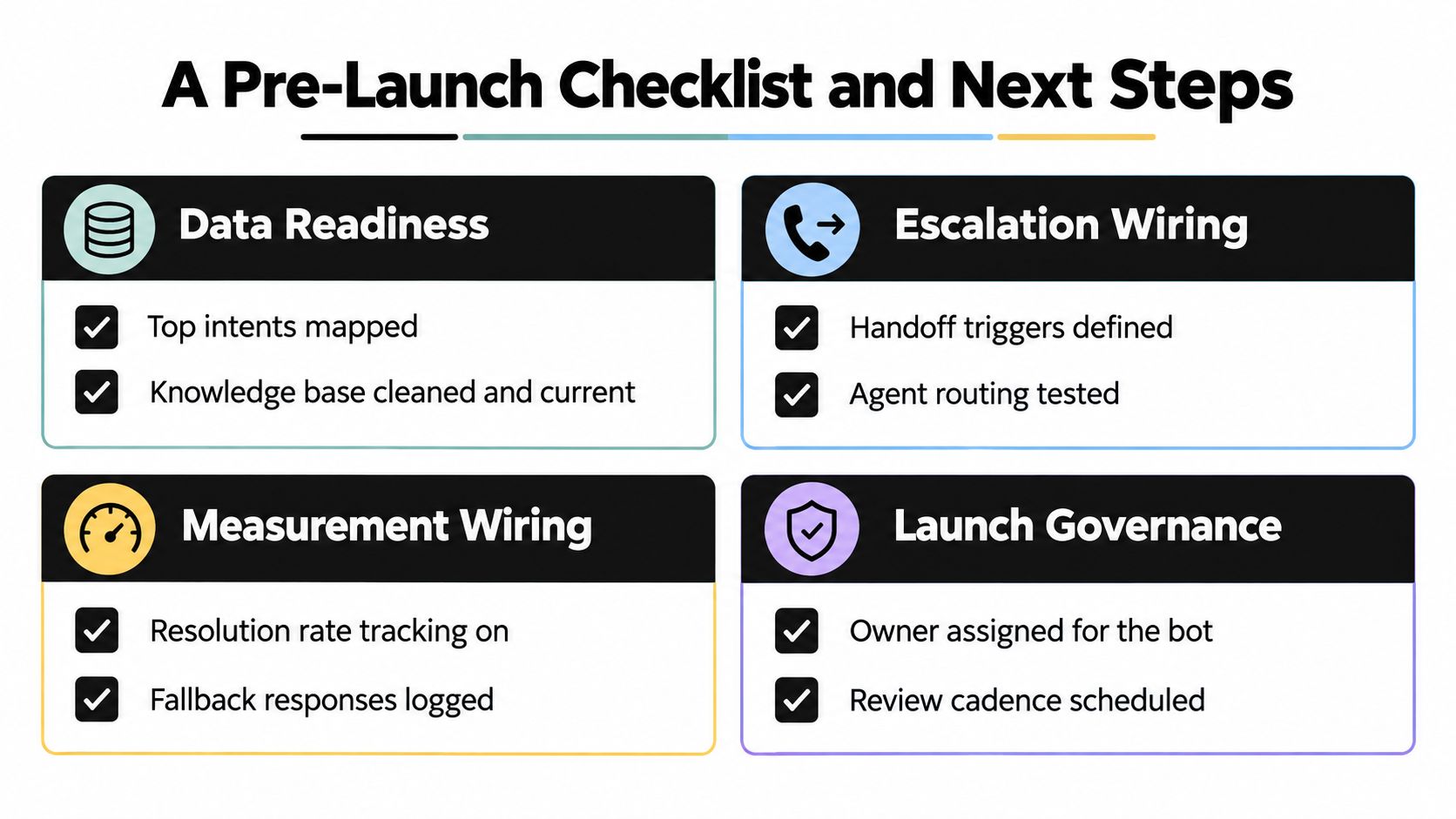
Data readiness
- Map top intents: Name the requests the team receives most often and define the intended outcome for each.
- Clean knowledge sources: Remove contradictions, assign owners, and confirm that sensitive policies are current.
- Test retrieval: Use real customer wording, including misspellings, short messages, and follow-up questions.
- Mark boundaries: Identify requests that require authentication, a tool, approval, or immediate human attention.
Escalation wiring
- Define triggers: Include low confidence, missing evidence, repeated loops, sentiment shifts, explicit human requests, and restricted actions.
- Test queues: Confirm that each route reaches the right team during working and non-working hours.
- Send context: Include the transcript, detected intent, relevant account context, attempted actions, and the reason for handoff.
- Preserve the conversation: Make sure the customer and agent can see what happened without repeating the exchange.
Measurement wiring
Record containment, confirmed resolution, repeat contact, CSAT, tool failures, retrieval failures, escalation reasons, and handoff quality. Capture a pre-bot baseline so the team can compare customer outcomes and agent workload rather than rely on an isolated chatbot score.
Launch governance
Assign a product owner, a support owner, and an engineering owner. Document the fallback response for model, retrieval, or tool outages. Get security, legal, and operations sign-off for the data and actions the assistant can access, then schedule a recurring review of intents, content, escalations, and customer feedback.
Run the first pilot on one channel and a narrow group of intents. Instrument the workflow before expanding it, so every failure produces useful evidence. After thirty days of real traffic, revisit routing rules, update weak sources, and decide which next intent deserves a controlled test.
SupportGPT lets teams build and deploy AI support agents through an embeddable widget, train them on approved sources such as files, text, Q&A, website content, and Notion, and test behavior in a playground before launch. Visit SupportGPT to evaluate whether its retrieval, guardrails, escalation, multilingual support, and built-in analytics fit your pilot plan.