Scaling Personalized Support Using AI Agents
Learn how to build and scale personalized support using AI agents. Discover practical steps for data training, guardrails, routing, and measuring ROI.
The most popular advice about personalized support is also the least useful: teach the AI agent to use the customer's name and sound warmer. That can make a message look customized, but it doesn't make the support experience personal. If the customer still has to explain their plan, recent activity, open ticket, and failed troubleshooting steps, the system has added decoration rather than reducing effort.
Personalized support earns its value through context. A capable agent recognizes the account, retrieves the relevant history, understands the customer's current product state, and either resolves the issue quickly or sends a complete brief to the right human. Conversational warmth matters, but it can't compensate for an incorrect answer or a slow recovery.
Redefining Personalization for Modern Support
Support teams often treat personalization as a writing exercise. They add a first name to the greeting, instruct the AI to use a friendly tone, and call the result individualized service. That approach creates a dangerous mismatch between the appearance of care and the actuality of the interaction.
The more useful definition is operational. Personalized support means using reliable customer context to remove unnecessary work. The agent should know which product or plan the customer uses, recognize recent actions that may have caused the issue, retrieve relevant ticket history, and understand what the customer has already tried. A customer feels known when they can continue the conversation without restarting it.
Research points in that direction. Zendesk's 2026 statistics report that 76% of customers expect personalization, while Avaya's 2026 data says 83% want agents to know their history and only 69% actively notice personalization (Zendesk's customer service statistics). The practical reading is clear: customers value remembered context, but they don't necessarily reward visible personalization when it doesn't make the interaction easier.
Replace conversational signals with useful context
A name belongs in the profile, but it shouldn't be the centerpiece of the strategy. The agent should use identity to retrieve the right records, not to manufacture familiarity.
Useful context includes:
- Account state: plan, region, permissions, renewal status, and relevant service limits.
- Interaction history: recent conversations, unresolved tickets, previous resolutions, and promises made by support.
- Product activity: failed actions, error messages, feature usage, and recent configuration changes.
- Customer intent: whether the person wants instructions, a status update, a correction, an exception, or a human decision.
- Communication preferences: language, channel, technical comfort, and any accessibility requirements the customer has provided.
That information changes the answer. “Try clearing your cache” is generic. “Your workspace is on the Pro plan, and the error began after the billing role changed. I've linked the relevant permission step and can route this to billing if the role update wasn't intentional” is contextual, actionable, and easier to verify.
Practical rule: If a personalization signal doesn't reduce effort, improve accuracy, or accelerate resolution, treat it as optional rather than as a core KPI.
The same principle applies outside support. Teams evaluating conversational products can learn from this guide to AI language apps, where personalization is useful when it adapts the experience to the learner's context rather than merely changing the tone. For support operations, the equivalent is an agent that remembers the customer's situation and acts on it.
A helpful example of personalisation should therefore show more than a customized greeting. It should demonstrate history-aware answers, accurate routing, and a handoff that preserves the conversation. Those are the signals that survive contact with a high-volume queue.
Structuring Data Sources for Contextual Recall
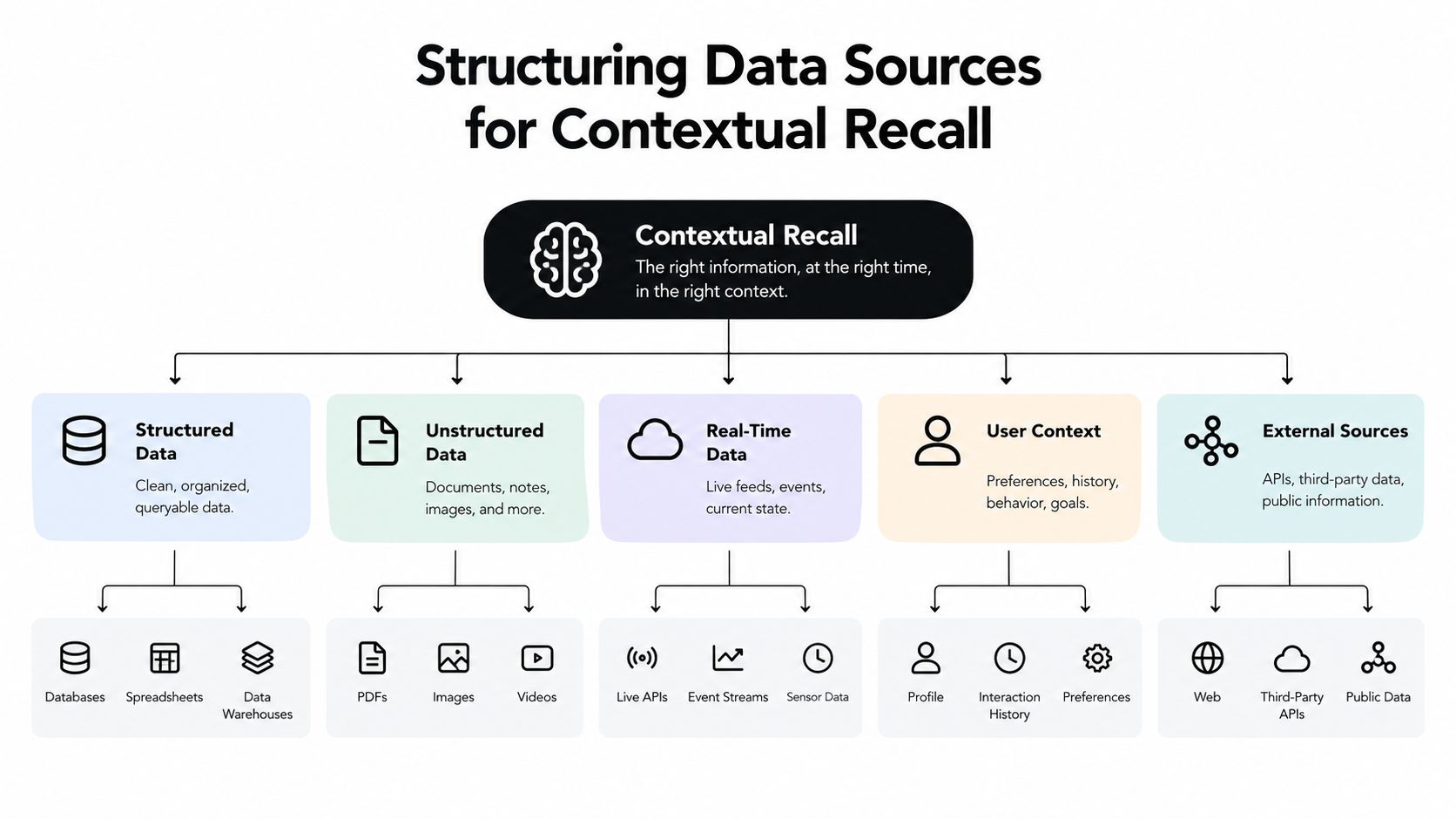
An AI agent can't personalize from information it can't retrieve. Connecting a CRM to a chatbot isn't enough if customer identities don't match, ticket histories lack structure, or product events arrive too late to influence the answer.
Start with an inventory of every source the support operation relies on. Include the CRM, help desk, billing platform, product database, status page, knowledge base, account permissions, and product telemetry. For each source, document the owner, update frequency, identifier used for matching, fields that may contain sensitive data, and whether the agent can read or write records.
Build an identity layer before adding retrieval
The first technical problem is identity resolution. An email address may identify a user in the help desk, while a workspace ID identifies the same person in the product and an account number identifies them in billing. Create a canonical customer or account ID, then map every system to it.
Keep user and account relationships explicit. A single customer may belong to multiple workspaces, and a support agent that confuses them can expose the wrong history or recommend the wrong action. Store the relationship between user, workspace, role, plan, and region as structured fields rather than relying on text buried inside old tickets.
Next, separate stable profile data from volatile event data:
- Stable data includes plan, role, language preference, consent status, and account ownership.
- Recent events include sign-ins, failed actions, configuration changes, payment events, and product errors.
- Conversation data includes the issue summary, confirmed facts, attempted steps, outcome, and unresolved questions.
This separation lets the agent prioritize recent evidence without treating every old sentence as equally relevant.
Prepare ticket history for retrieval
Historical tickets are valuable only after they're normalized. Remove signatures, duplicated quoted replies, irrelevant boilerplate, and unsupported assumptions. Add metadata such as product area, issue type, resolution status, channel, account ID, and date.
Then divide conversations into meaningful units. A complete issue summary and its resolution should remain retrievable together, while long transcripts can be split into smaller passages with enough surrounding context to preserve meaning. A vector index can help retrieve semantically similar cases, but it shouldn't replace exact filters for account identity, ticket status, permissions, or policy version.
The retrieval sequence should be deliberate:
- Identify the customer and account.
- Pull active tickets and recent high-confidence events.
- Filter knowledge by product, region, plan, and policy version.
- Search historical resolutions for similar symptoms.
- Present the agent with source labels and timestamps.
- Generate an answer only from permitted, relevant context.
Teams that want a deeper explanation of this retrieval layer can review what vector search is. The important operational point is that semantic similarity must sit behind identity and authorization checks.
Real-time data deserves special treatment. If a customer asks about an outage, order, payment, or failed action, the agent should query the live system rather than rely on an old indexed document. Every dynamic field should carry a timestamp or freshness indicator, and the agent should disclose uncertainty when the source is unavailable.
A short architecture review can reveal more than a prompt rewrite. Ask whether the agent can distinguish an open ticket from a closed one, whether it sees the latest product event, whether it knows which policy version applies, and whether a human can inspect the evidence used in the answer.
Use the video below as a practical visual reference for how structured support data can feed an AI workflow.
Designing Prompts and Enterprise Guardrails
Connected data creates capability, not judgment. The agent still needs explicit instructions about which sources to trust, what it may do, what it must refuse, and when it should stop.
Write the system prompt as an operating policy. Start with the agent's role and scope, then define the response process. A practical sequence is:
- Confirm the user and relevant account.
- Identify the request and its risk level.
- Retrieve approved context.
- Check whether the context is current and sufficient.
- Answer with verifiable steps or ask one necessary question.
- Escalate when the issue exceeds the agent's authority.
The prompt should distinguish facts from inferences. If the system knows that a payment failed, it may explain the recorded failure state. It shouldn't infer the customer's financial situation, promise a refund, or claim that a backend action succeeded without confirmation.
Put authority limits in writing
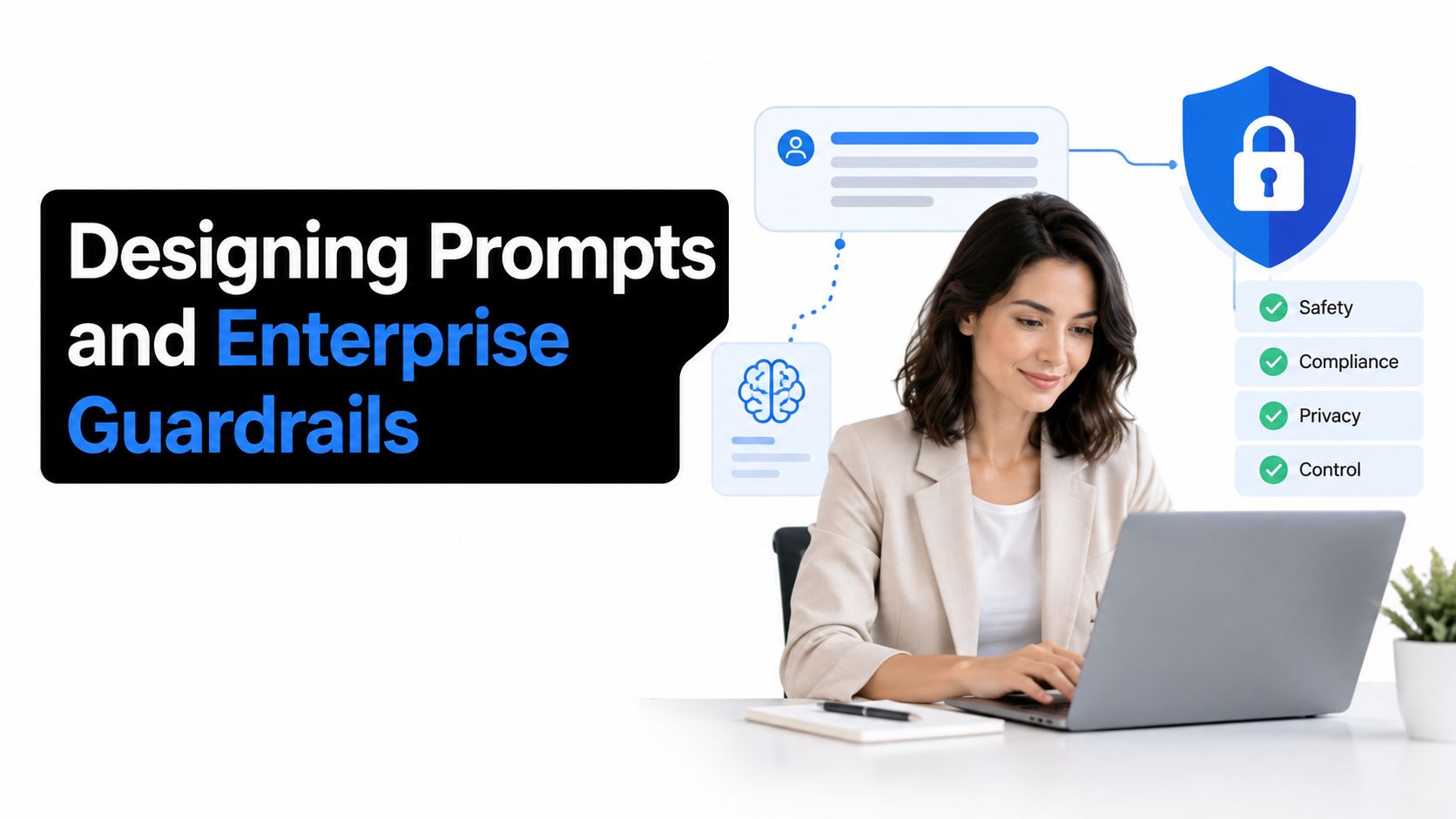
Guardrails work best when they are specific enough to test. Define prohibited actions and required approvals for refunds, cancellations, account ownership changes, security incidents, regulated requests, and access to sensitive records.
A support agent should never invent a policy to keep a conversation moving. If the knowledge base doesn't contain an applicable rule, the agent should say that it can't verify the policy and route the question appropriately. Confidence in the wording must not exceed confidence in the source.
Use layered controls:
- Retrieval filters restrict documents by product, region, account, permission, and policy status.
- Input filters detect credentials, payment details, authentication secrets, and other sensitive content.
- Output filters block unsupported promises, competitor comparisons outside approved guidance, and exposure of private records.
- Action controls require confirmation or human approval before consequential changes.
- Session isolation prevents one customer's context from appearing in another customer's conversation.
- Audit logs record the retrieved sources, actions requested, refusals, and escalation decisions.
Prompt design should also define how the agent handles ambiguity. It should ask a focused question when two accounts, products, or policies could apply. It shouldn't ask the customer to repeat information already present in the verified context.
A guide to writing a prompt can help teams structure these instructions, but production quality comes from testing, not from elegant wording alone. Build a test set containing incomplete requests, contradictory records, hostile language, prompt injection attempts, outdated policy references, and requests involving another user's account.
Test behavior, not just phrasing
Use a real-time playground to inspect the complete chain. Check the retrieved context, the final response, the decision to ask for clarification, and any action or handoff. Test the same issue across web chat, email, and in-app support to catch differences in available data.
Have reviewers score whether the agent used the right record, respected permissions, answered the actual question, and avoided unnecessary personalization. The strongest response may be brief. A customer with a simple status question doesn't need an elaborate empathy statement if the agent can provide the correct status immediately.
Guardrails should evolve from incidents and near misses. When the agent produces a misleading answer, fix the source, retrieval rule, instruction, or escalation condition that allowed it. Don't just add another sentence to an already overloaded prompt.
Implementing Smart Routing and Human Escalation
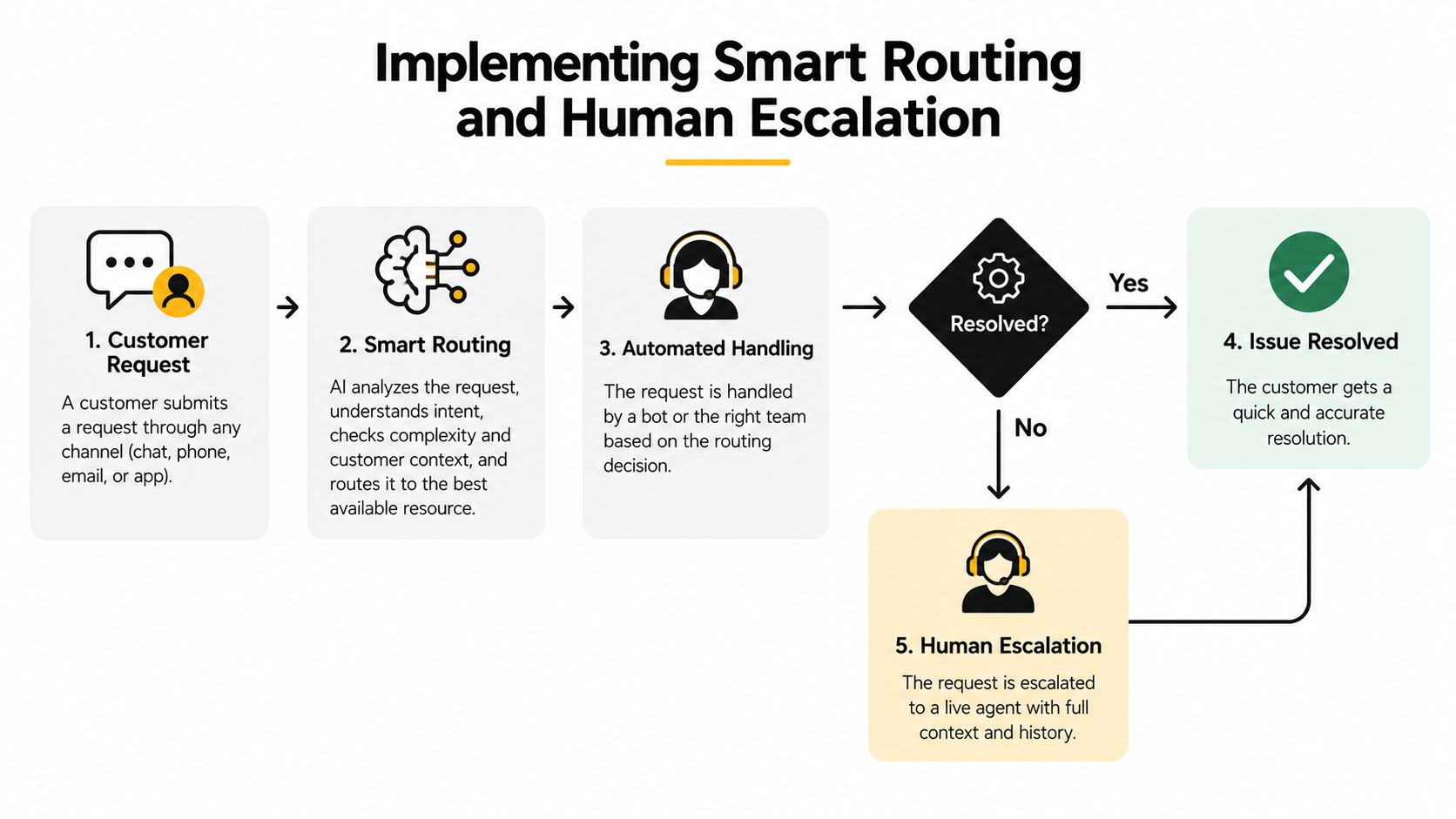
A high-volume AI agent should not try to solve every conversation. Its job is to resolve routine work safely and recognize the boundary where human judgment becomes more valuable.
Routing should evaluate several signals together. Complexity matters because a multi-system investigation is different from a known password question. Sentiment matters because repeated frustration can turn a technically correct answer into a retention risk. Account context matters because a security incident, contractual issue, or high-impact outage deserves a different path from a routine how-to request.
Define the boundary with explicit triggers
Use natural-language rules that a supervisor can read and challenge. Examples include:
- Route security, legal, safety, and account-ownership issues to a trained human queue.
- Escalate when the customer reports repeated failure after the approved troubleshooting path.
- Escalate when sentiment deteriorates across the interaction or the customer explicitly requests a person.
- Require approval for refunds, credits, cancellations, plan changes, and irreversible actions.
- Send technical cases to a specialist when the agent lacks a verified fix or needs access to internal diagnostics.
The agent should also escalate on uncertainty. A missing record, conflicting account state, stale event, or ambiguous entitlement is a routing condition, not an invitation to guess.
A 2025 study warns that excessive AI automation can reduce customer retention during loyalty and advocacy stages, which supports pairing automation with human escalation for complex or high-stakes cases (G2's AI customer support report). The operational lesson is not to remove automation. It's to make the transition to a person fast and informed.
Make the handoff feel continuous
A handoff fails when the human receives only “customer needs help.” Pass a structured brief containing:
- Customer and account identifiers, subject to access controls.
- The customer's stated goal and the issue classification.
- Relevant plan, entitlement, region, and product context.
- Timeline of important events.
- Troubleshooting steps already attempted and their results.
- Policies or sources consulted.
- The reason for escalation.
- Any promise the AI made, plus unresolved questions.
The human should be able to open the conversation and act, not conduct an interview to reconstruct it. Tell the customer what happens next without exposing internal routing logic, and avoid forcing them to restate sensitive information.
For teams refining queue design, skill-based routing offers a useful way to connect issue type, language, product expertise, and agent capacity. Review routing outcomes regularly. A case sent to the wrong queue creates delay that no amount of friendly language can repair.
Navigating Multilingual Scale and Privacy Tradeoffs
Global support introduces a problem that teams often separate incorrectly. Language quality and privacy quality are both context problems. An agent can translate a sentence fluently while still using the wrong regional policy, exposing an unauthorized detail, or misunderstanding a culturally specific expression of urgency.
Store language preference as customer-provided profile data, but detect the language of the current message as a secondary signal. Don't assume that a customer's preferred language is the language they'll use for every issue. Preserve product names, error codes, legal terms, and user-provided values exactly where translation could alter meaning.
Localize the decision, not only the words
Maintain regional variants of policies, workflows, escalation queues, and consent language. Retrieval should filter by the customer's region before generation, especially for billing, privacy, returns, eligibility, and regulated services.
Use multilingual evaluation sets that cover:
- Direct translations and natural phrasing.
- Formal and informal address.
- Mixed-language messages.
- Idioms, sarcasm, and indirect complaints.
- Product terminology that should remain untranslated.
- Requests involving personal or account data.
A translated response should preserve the same safety boundary as the source response. If the English agent would escalate a security concern, the multilingual agent should do the same, even when the customer describes it indirectly.
Privacy requires restraint. PwC's 2025 CX survey argues that personalization works when companies orchestrate trust, consent, and useful data, rather than treating increased data collection as the solution (PwC's 2025 CX survey). Collect only the fields that improve support, explain why they're used, and make retention and deletion practices understandable.
Minimize exposure at every processing step
Mask sensitive values before they enter retrieval or generation where the full value isn't necessary. Tokenize identifiers, redact payment details, restrict transcript access by role, and keep customer data separated by tenant and session. Don't use historical conversations as a general training source without reviewing consent, retention, and access controls.
Create a data decision register for each field:
| Data question | Operational decision |
|---|---|
| Why is this field needed? | Tie it to a support action or routing decision |
| Who may access it? | Limit access to the relevant agent, queue, or workflow |
| How current must it be? | Define freshness requirements and fallback behavior |
| When should it expire? | Set retention rules that match business and legal needs |
| What happens if consent changes? | Stop processing and remove or isolate the data as required |
Teams building their privacy process can also consult these data protection tips. Treat privacy review as part of agent design, not as a final approval step. A highly relevant answer that violates customer expectations will damage trust faster than a generic answer.
Measuring ROI and Support Performance Metrics
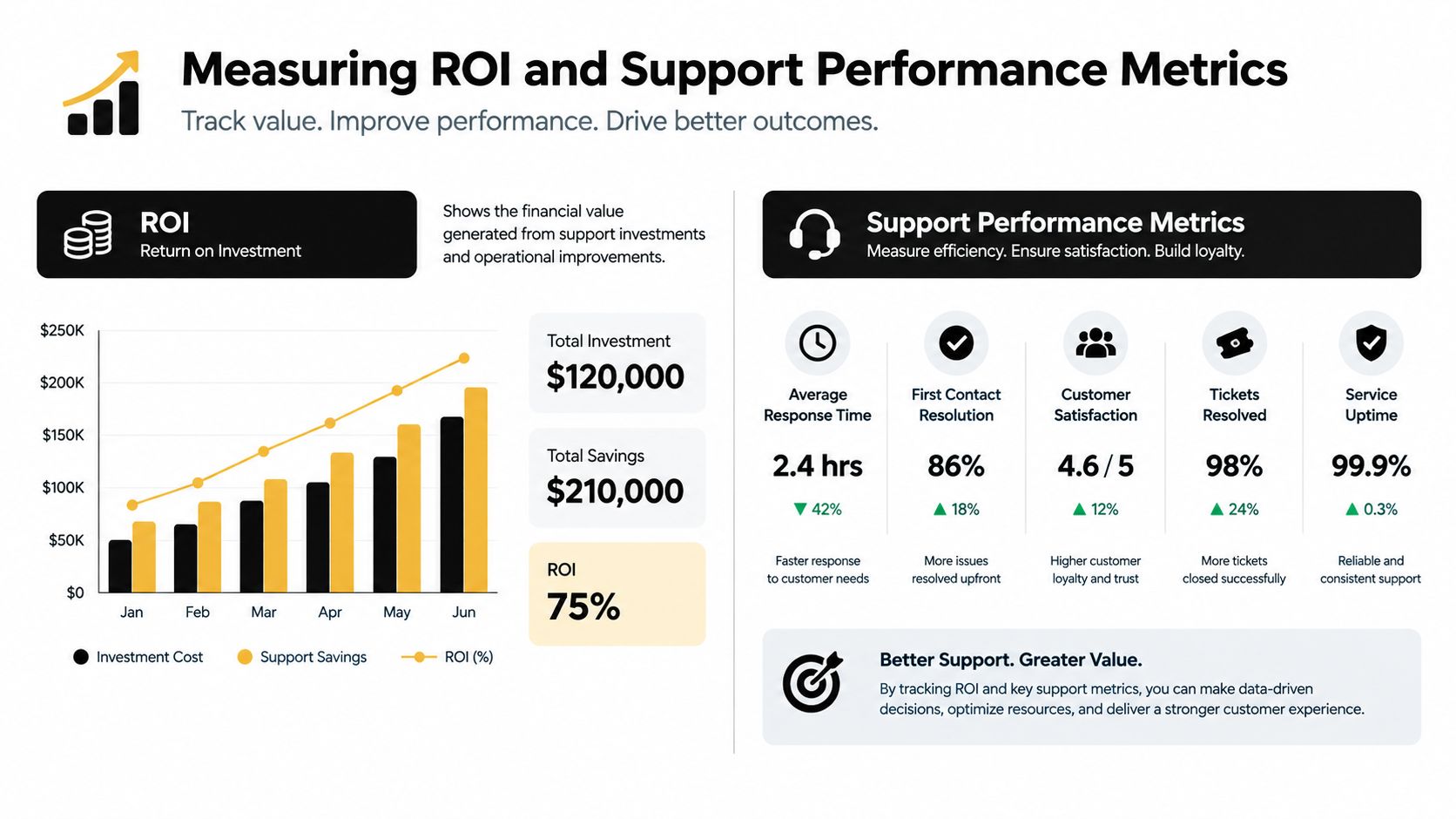
Ticket deflection is an incomplete success measure. An AI agent can reduce visible ticket volume by frustrating customers into abandoning contact, shifting work to another channel, or creating repeat contacts that appear later. Personalized support needs a measurement model that connects context use to actual recovery.
Start with four separate questions:
- Did the agent retrieve the right context?
- Did it communicate with appropriate empathy and clarity?
- Was the answer correct and supported?
- Did the customer reach resolution quickly?
A widely used support-quality benchmark assigns 10 points to personalization, 10 to empathy, 30 to answer quality, and 50 to resolution time in a 100-point Support Performance Index (the customer support benchmark framework). The weighting makes the central operational point explicit: a customer's name has limited value if the answer is wrong or the issue remains open.
Track the components separately
Measure context injection as a quality signal, not as a vanity metric. Review whether the agent used the correct account, recent events, open tickets, entitlement, language, and policy version. A response that mentions a customer's plan but ignores the active incident should score poorly even if the tone is polished.
Answer quality needs human and automated review. Check factual correctness, source alignment, completeness, and whether the agent avoided claiming an action it didn't perform. Resolution time should include the complete journey, including time spent waiting for escalation, rather than stopping when the bot sends its last message.
Pair operational measures with customer outcomes:
- Repeat-contact rate: Did the customer return for the same issue?
- Reopen rate: Did a supposedly resolved case become active again?
- Escalation quality: Did the human receive enough context to act immediately?
- Customer effort: How often did the customer repeat facts or move through unnecessary steps?
- Satisfaction by issue type: Which workflows create positive or negative experiences?
- Retention and expansion signals: Do customers with successful contextual resolutions remain active or deepen their relationship?
Run controlled comparisons
Create a baseline from human-only or pre-agent conversations, then compare similar issue categories after deployment. Keep the comparison fair by separating routine cases from complex cases and accounting for channel, language, product area, and customer segment.
Review performance at the workflow level. If billing status improves while cancellation requests deteriorate, don't average the results into a single success number. Each workflow needs its own authority limits, retrieval sources, escalation rule, and outcome target.
Analytics also need a human owner. Support operations leaders and customer success professionals should be able to interpret conversation quality, investigate outliers, and coach the system. A practical customer success manager career path illustrates why this work sits between service, product, data, and relationship management rather than belonging exclusively to engineering.
Use performance benchmarking to establish a recurring review cycle. Sample failed resolutions, inspect the context presented to the agent, identify whether the defect came from data, retrieval, prompting, routing, or policy, then change one control at a time and measure the result. Keep a rollback path for changes that increase automation but reduce answer quality or customer trust.
SupportGPT provides AI support agents that can train on company sources, apply custom instructions, support multilingual interactions, track conversations, and hand off cases through a shared inbox. Teams evaluating it alongside other platforms should test those capabilities against their own context, guardrail, routing, and measurement requirements.
SupportGPT can help you deploy AI support agents trained on your knowledge base, with guardrails, smart escalation, multilingual support, and conversation analytics for continuous improvement. Visit SupportGPT to test whether its agent workflows can reduce customer effort while preserving the human judgment your highest-risk cases require.