How to Write a Prompt That Actually Works
Learn how to write a prompt that gets reliable, accurate AI responses. Practical steps, templates, and debugging tips for support teams using tools like
A customer types, “Why isn't my export working?” Your AI support agent replies, “The issue is probably your browser. Clear your cache and try again.” The customer has already tried that. Now a support rep has to correct the answer, ask the questions the agent should have asked, and rebuild trust. A five-second request has become a fifteen-minute recovery job.
That failure usually starts before the conversation. The system prompt didn't tell the agent who it is, what information it can trust, how it should reason, or what to do when the answer isn't clear. Learning how to write a prompt that works means designing those decisions deliberately. You're not searching for a clever sentence. You're building instructions that help an AI answer, ask, or escalate safely.
When a Good Prompt Saves the Whole Conversation
The export example is common because support questions often arrive incomplete. “My export isn't working” doesn't identify the file type, error message, account state, browser, permissions, or recent changes. A vague prompt gives the model room to fill those gaps with a plausible guess. Plausible is not the same as accurate.
A stronger support instruction changes the agent's first move:
Before suggesting a fix, identify the missing details that could change the diagnosis. Ask one targeted question if the request is underspecified. Never present an unverified cause as fact.
That single rule prevents the agent from treating a hypothesis as a diagnosis. It might ask, “What happens when you start the export, and do you see an error message?” That response takes the conversation in the right direction without pretending to know more than it does.
What the prompt must establish
A reliable support prompt gives the agent five kinds of direction:
- Identity: It acts as a support assistant for a named product, not as a general-purpose guesser.
- Knowledge: It uses approved help content, account data, and conversation history available to it.
- Task: It identifies the customer's problem and gives the next appropriate step.
- Boundaries: It avoids inventing features, policies, causes, or account actions.
- Fallback behavior: It asks for missing information or sends the case to a person when the risk is too high.
The modern practice of prompt writing developed alongside large language models. Around 2020, GPT-3's 175-billion-parameter scale made in-context learning practical for non-researchers, and later model releases expanded prompts into structured context engineering with larger context windows and multimodal input, as described in this history of prompt engineering.
The lesson for a support lead is straightforward: a prompt isn't merely a question. It's the operating policy for a conversation. If the policy says “be helpful,” the agent may guess. If it says “use the available source, state uncertainty, ask for the missing detail, and escalate account-risk cases,” the agent has a safer path.
Why Most Prompts Fail Before You Even Start
Most weak prompts fail because the team has supplied too little structure, not because the wording sounds awkward. A prompt can use polished language and still omit the information the model needs to choose a safe response.
Prompt defects commonly fall into separate areas: intent and specification, input and content, structure and formatting, context and memory, and performance and efficiency. This taxonomy is useful because it turns “the AI gave a bad answer” into a diagnosis. Was the task unclear? Was the source missing? Was the conversation state unavailable? Did the requested output have no defined shape? The SupportGPT guide to prompt engineering provides a practical introduction to these underlying principles.
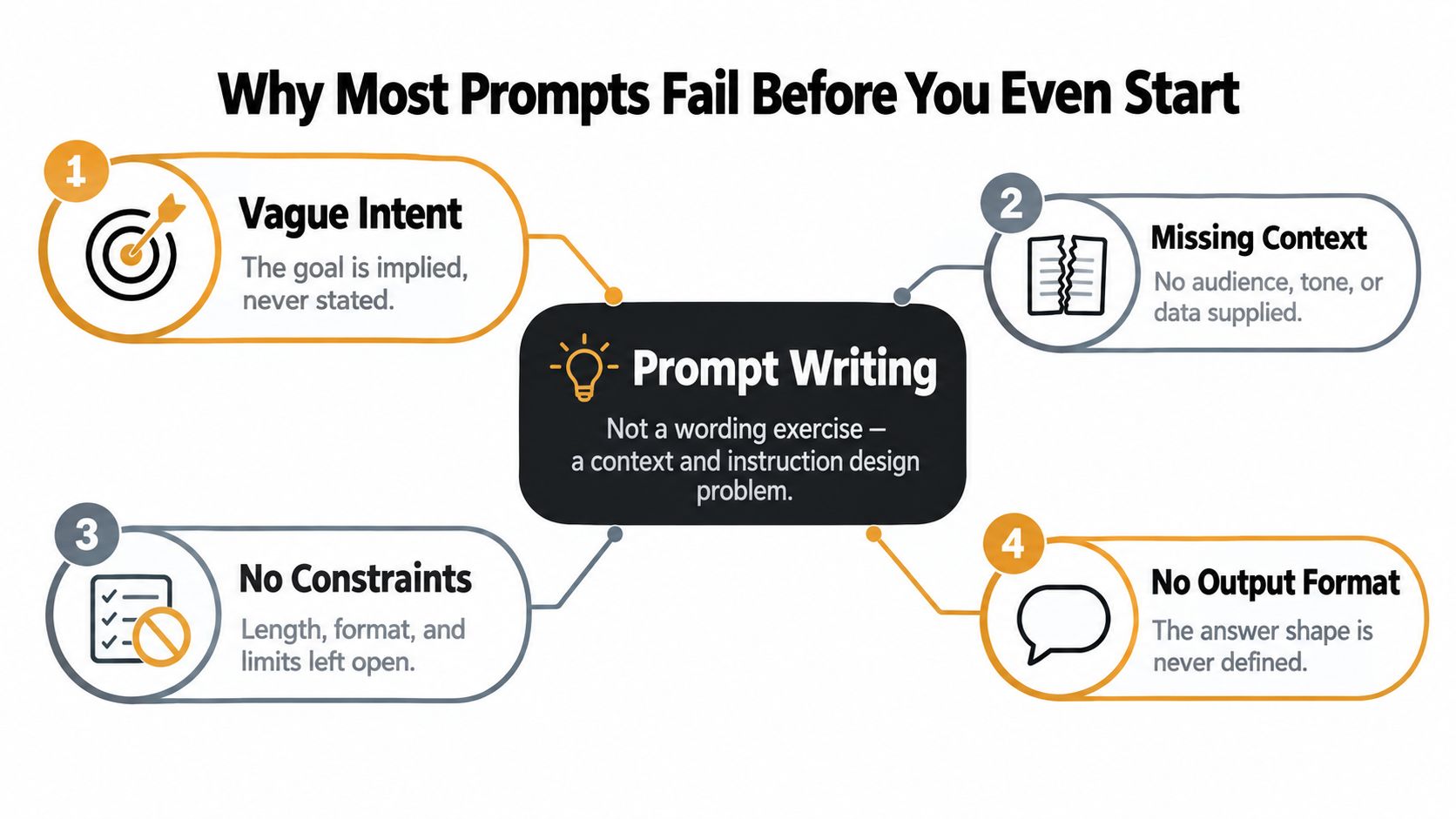
Four failures support teams recognize
- Hallucinated features: A customer asks how to enable a dashboard setting that the product doesn't offer. Without a source boundary, the agent invents menu names and steps.
- Confident wrong fixes: The agent blames a browser for an export problem even though it has no error message or diagnostic evidence.
- Lost conversation state: The customer already explained the issue, but the next answer ignores that detail because the prompt doesn't tell the system how to use prior messages.
- Unsafe account answers: A customer asks to change billing ownership or regain access. A generic “help the customer” instruction may encourage the agent to give account-specific guidance without verification.
The recurring problem is the vocabulary gap. Users often know what outcome they want but don't know how to express that intent in terms the model can reliably follow. Research on prompt defects and user behavior describes trial and error as a common strategy and identifies this difficulty as a “vocabulary problem” in prompt design, rather than a simple failure of grammar.
Practical rule: When an answer is wrong, don't immediately rewrite every sentence. First identify the missing decision, source, constraint, or context.
A better prompt usually adds a role, a defined task, relevant context, an output format, and constraints. Rewriting “Help the customer with this issue” as “Diagnose the request using the approved troubleshooting guide, ask one missing-detail question before proposing a fix, and escalate account-risk cases” changes the agent's job. It doesn't just make the original wording prettier.
The Five Building Blocks of a Strong Prompt
A support prompt becomes easier to debug when you can point to its parts. The five building blocks below work together, but each controls a different failure.
| Block | What It Controls | Example Clause |
|---|---|---|
| Role | The agent's perspective and responsibility | “You are a support agent for Acme Analytics.” |
| Task | The work the agent must perform | “Identify the customer's issue and recommend the next safe step.” |
| Context | The information the agent may use | “Use the conversation history and billing events from the last 24 hours.” |
| Format | The shape of the response | “Reply in plain text with diagnosis, next step, and one question.” |
| Constraints | Boundaries and fallback behavior | “Don't invent causes. Escalate account-access risks.” |
The best practices for prompt engineering expand on this structure, but you can learn the mechanics by adding one block at a time to the same weak request.
Start with the task
Bad prompt: “Help with this export issue.”
Add the task: “Determine why the customer's export may have failed and provide the safest next step.”
The agent now has an outcome, but it still lacks authority, evidence, and limits.
Add the role
“You are a first-line support agent for Acme Analytics. Determine why the customer's export may have failed and provide the safest next step.”
The role tells the model what kind of answer belongs in the conversation. It also discourages a general technical explanation that doesn't fit a customer-facing reply.
Supply context
“You are a first-line support agent for Acme Analytics. Review the customer's message, conversation history, export status, and billing context from the last 24 hours. Determine why the export may have failed and provide the safest next step.”
Now the agent knows what evidence matters. The phrase “may have failed” also avoids turning an unverified theory into a fact.
Define the format
“Reply in plain text using this order: what you know, what is missing, and the next step. End with one clarifying question.”
The format makes the response easier for a rep to scan and exposes missing information instead of hiding it inside a confident paragraph.
Add constraints
“Don't claim a cause unless the available evidence supports it. Don't ask the customer to repeat information already present in the conversation. Don't provide account-access or billing changes without verification. If the issue involves account risk or the evidence is insufficient after one question, prepare a human handoff.”
That final version has an operating boundary. It doesn't force the model to answer every request. It tells the agent how to behave when certainty runs out.
A finished prompt could look like this:
You are a first-line support agent for Acme Analytics. Review the customer's message, conversation history, export status, and billing context from the last 24 hours. Identify what is known, what is missing, and the safest next step. Reply in plain text, under 80 words, with no markdown, and end with one clarifying question. Don't invent causes or product features. Don't request information already provided. Escalate account-access, billing-risk, or unresolved cases after one clarifying question.
Instead of “Clear your cache,” the agent might respond: “I can help investigate. I don't yet have the export error or file type, so I can't confirm the cause. What file are you exporting, and what message appears when the export fails?” That answer is less flashy, but it moves the case forward without creating a second problem.
Five Support Prompt Templates You Can Steal Today
Templates reduce the blank-page problem. Use the one that matches the job, then adapt the sources, fields, tone, and escalation rules to your workflow. The AI scenarios for customer service guide can help you map these prompt patterns to broader support tasks, while a privacy-first AI blog offers useful context for thinking about data handling when prompts include customer information.
| Template | Use When | Example |
|---|---|---|
| Triage routing | You need to classify intent and send the ticket to the right queue. | “Classify this ticket as billing, technical, account access, or other. Return the label, confidence level, evidence, and required queue. If account risk appears, route to a human.” |
| Refund eligibility | A customer asks for money back and policy determines the response. | “Review the refund policy and order details. State whether the request is eligible, cite the relevant policy section, and explain the next step. If a required fact is missing, ask one question.” |
| Technical troubleshooting | The issue has a repeatable diagnostic sequence. | “Use the troubleshooting guide in order. Confirm symptoms, check prerequisites, suggest one reversible step, and wait for the result before continuing. Don't skip to an unsupported cause.” |
| Policy lookup | The answer must come from an approved source. | “Find the relevant section in the supplied policy. Quote only the necessary passage, summarize it in plain language, and say when the policy doesn't cover the request.” |
| Empathetic acknowledgement | The customer is frustrated, anxious, or distressed. | “Acknowledge the customer's specific concern without exaggerating or making promises. State what you can do next, then ask one focused question. Escalate signs of serious distress.” |
Template one, triage routing
Use this when the main decision is where the ticket belongs, not how to solve it. Include a fixed label set, the evidence behind the label, and a route for ambiguous cases. Without those fields, the agent may produce a paragraph that sounds helpful but cannot drive workflow automation.
Template two, refund eligibility
Use this when policy and transaction context must be considered together. Require the agent to consult the supplied policy before responding. “We usually refund these” is not a policy check. A source requirement forces the model to show which rule supports its answer.
Template three, technical troubleshooting
Use this when order matters. Tell the agent to test or ask about prerequisites before proposing a more disruptive action. A troubleshooting prompt should also distinguish between an observed symptom and a possible cause.
Template four, policy lookup
Use this when accuracy depends on a controlled document. Give the agent the policy, define how much it may quote, and require an explicit “not covered” response when no matching section exists.
Template five, empathetic acknowledgement
Use this when a fast factual reply could sound dismissive. The agent should recognize the customer's specific situation, avoid empty reassurance, and state the next action. Emotional tone doesn't replace escalation rules. It works alongside them.
Testing and Iterating Until the Answer Is Reliable
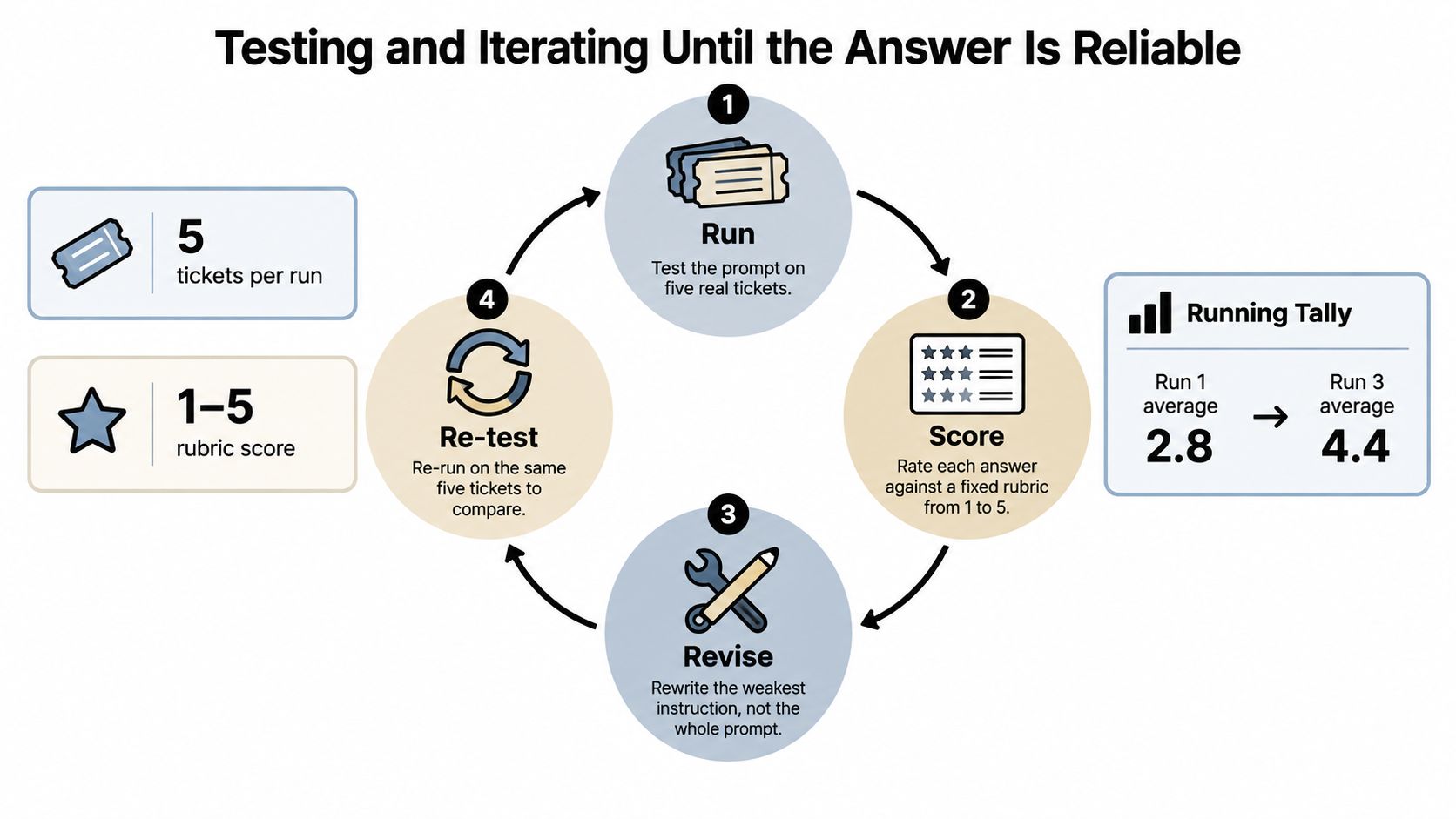
A prompt isn't finished because it produced one excellent answer. Test it against a small set of real tickets, score the behavior, change one instruction, and run the same tickets again. That process reveals whether the prompt is reliable or merely lucky.
Use a fixed loop:
- Run: Test the prompt on five real tickets, including an easy case, an incomplete request, a policy edge case, a technical problem, and a potentially risky request.
- Score: Rate each response from 1 to 5 for accuracy, tone, source use, and escalation appropriateness. The numerical rubric shown here is a testing convention for the exercise, not a measured performance claim.
- Revise: Change one instruction that addresses the weakest score.
- Re-test: Use the same tickets so you can compare the effect of that one change.
A refund example
Weak instruction:
Decide whether the customer should receive a refund and explain why.
A customer asks for a refund after a subscription renewal. The agent says the request is eligible, but it doesn't identify the policy rule or mention the missing renewal details. Its answer may sound reasonable, yet a rep can't audit the decision.
Targeted revision:
Review the supplied refund policy and the customer's transaction details. State the eligibility decision, cite the exact policy section used, list any missing fact, and ask one clarifying question before deciding when the evidence is incomplete.
The second instruction doesn't attempt to solve every possible failure. It adds a citation requirement, a missing-fact check, and a decision boundary. Score both versions against the same rubric, then inspect which category changed.
For high-stakes analytical work, the same discipline applies. Guidance for statistically oriented prompts recommends supplying the dataset and background, selecting the appropriate test, checking assumptions such as normality and homogeneity of variance, switching procedures when assumptions fail, and requesting outputs such as tables, p-values, confidence intervals, or effect sizes. The broader principle is unambiguous wording plus verification, not blind trust in a polished result.
For additional practical safeguards, compare your test checklist with these strategies for AI hallucination prevention and review AI prompt optimization. Judge quality across a distribution of tickets, not by the single best response you can find.
Knowing When to Ask, When to Answer, and When to Escalate
A customer writes, “My export failed. Can you fix it?” The agent has no error message, file type, or account context. A confident guess may waste time or send the customer toward the wrong fix. A good support prompt treats this as a decision point: ask, answer, or escalate.
Encode the three branches
Ask when one missing fact could change the response. Ask one focused question rather than presenting a questionnaire. For the export problem, request the error message or file type, choosing the detail that most affects diagnosis.
Answer when the context is sufficient, the approved source is clear, and the risk is low. State the action and relevant limitation. Do not fill gaps with explanations the source does not support. Clear boundaries also help teams learn how to prevent AI hallucinations before an unsupported answer reaches a customer.
Escalate when the request involves account-level risk, legal exposure, serious emotional distress, or a judgment reserved for a person. The handoff should carry the conversation forward, with the issue, relevant facts, missing information, risk signals, attempted actions, and decision required. Teams can use guidance on handling escalation of issues to define that operational path.
Use a rule like this:
If the request is ambiguous, ask one targeted clarifying question. If an approved source clearly answers it and the risk is low, answer directly. If it involves account access, sensitive billing action, legal risk, serious distress, or unresolved uncertainty, do not guess. Create a handoff containing the customer's issue, relevant conversation facts, missing information, risk signals, actions already attempted, and the human decision required.
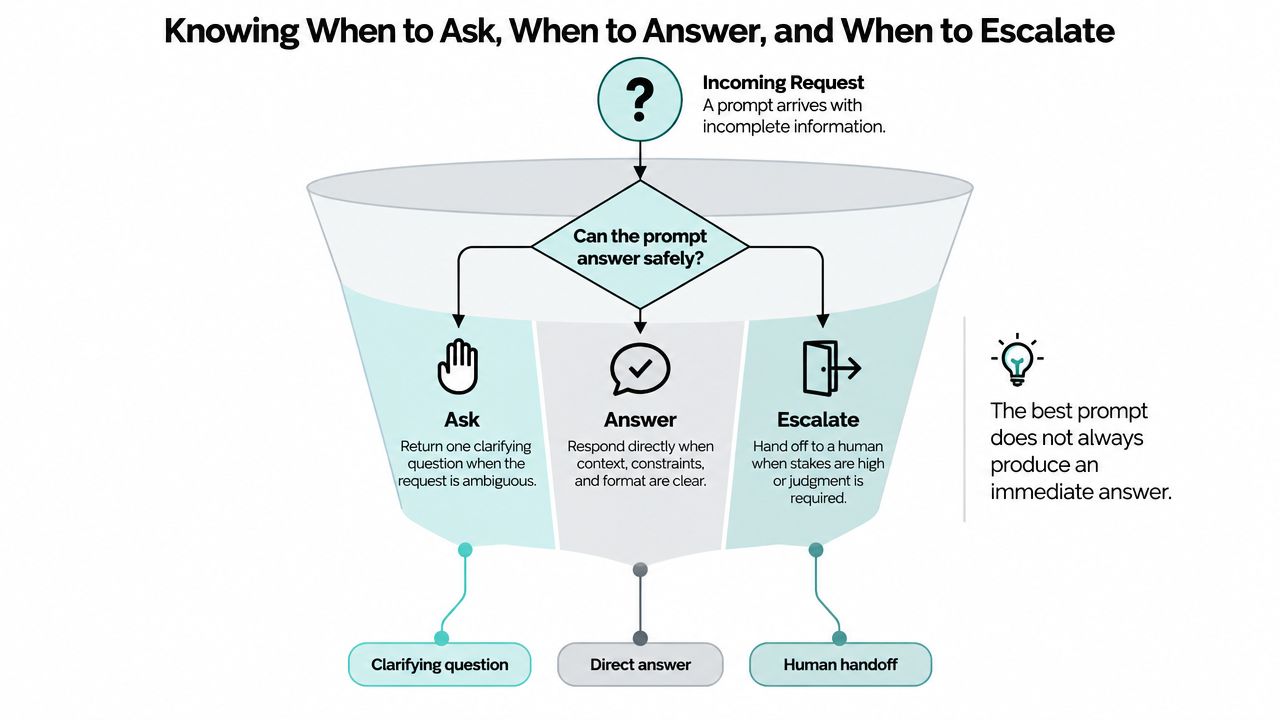
Prompt writing includes deciding when the agent must stop. The goal is a support system that knows its evidence, states its limits, and hands over risky cases with enough context for a person to act.
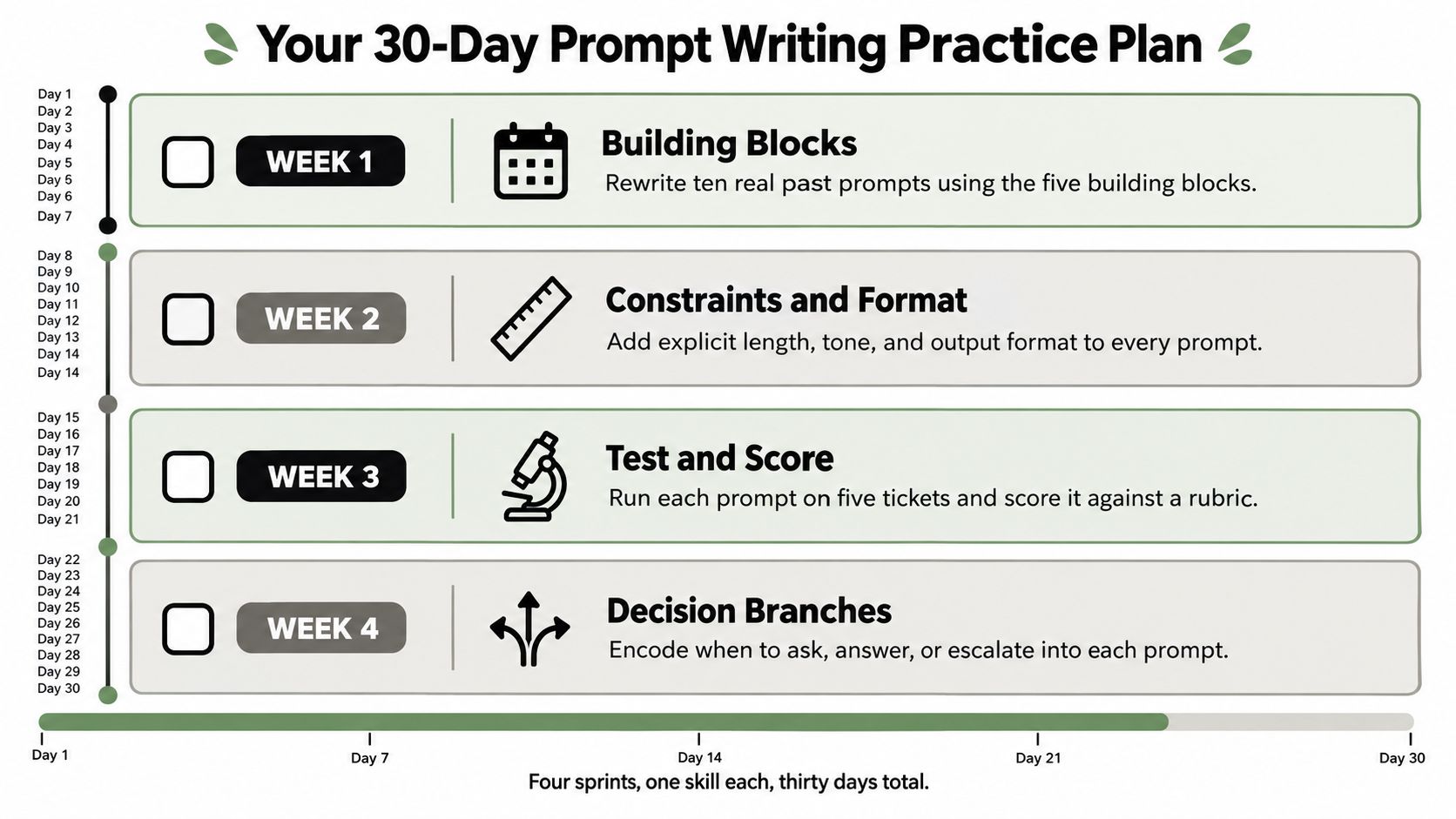
Your 30-Day Prompt Writing Practice Plan
Use real support tickets as your practice material. Keep each revision, test result, and observation so you can identify which instruction changes the answer.
- Week 1, building blocks: Rewrite ten past prompts with a role, task, context, format, and constraints. Compare each original output with the revised version, especially where the agent misunderstood the customer.
- Week 2, reusable templates: Convert five successful rewrites into prompt files. Add variables for the product, tone, channel, policy, and escalation route.
- Week 3, testing discipline: Create a five-question rubric for accuracy, tone, source use, completeness, and escalation. Run each prompt on the same test tickets twice during the workday, then compare the outputs.
- Week 4, decision branches: Add clarifying-question and human-handoff triggers to two existing prompts. Check whether the agent selects the correct branch before attempting an answer.
A printable diagnostic checklist
Answer yes or no:
- Does the prompt define the agent's role?
- Does it state the task in observable terms?
- Does it identify approved context and sources?
- Does it explain how to use conversation history?
- Does it define the response format?
- Does it set length and tone constraints?
- Does it include an example where useful?
- Does it prohibit invented facts, features, or policies?
- Does it say when to ask a clarifying question?
- Has it passed a test run on representative tickets?
Save every version with its date, test result, and notes about what changed. If you want to apply this workflow in a support environment, SupportGPT lets teams build and manage AI support agents, define quick prompts, use their own sources, and set natural-language escalation rules for human handoffs.
Start with five real tickets today. Rewrite one weak prompt using the five building blocks, then add one explicit escalation rule. Test the result in a support-agent workflow and turn the versions that hold up into reusable customer-service instructions.