Ecommerce Help Desk Software: A 2026 Buyer's Guide
Compare ecommerce help desk software for 2026. See features, integrations, automation, SLAs, and shortlist picks by store size.
At 11 p.m., a customer wants a refund on an order that already shipped. An Amazon buyer message is sitting unanswered because your team handled Shopify email first. Live chat keeps firing off “where is my order” questions while one messy ticket involves a partial shipment, a discount code, and a promised replacement your warehouse never logged.
That's the moment generic support software starts to show its limits.
Ecommerce help desk software isn't just a shared inbox with a chatbot bolted on. It has to help agents make order decisions fast, keep marketplace messages from going stale, route low-risk work automatically, and escalate the ugly edge cases before they turn into chargebacks or public complaints. Buyers who shop this category like they're buying standard ticketing software usually regret it six weeks later.
A lot of teams already know support tooling matters. The market itself tells you that. One industry summary puts the ecommerce help desk and ticketing software market at $8.22 billion in 2026, projected to reach $18.61 billion by 2035, while another estimate places the broader help desk ticketing system market at $11.4 billion in 2025 and $28.7 billion by 2034. The same summary reports a 9.5% projected CAGR from 2026 to 2035 for help desk software, which is what you'd expect from a category tied closely to digital commerce and automated service adoption, according to this industry roundup on ecommerce support ticket volume statistics.
What This Guide Solves for Ecommerce Operators
Most buyers don't need another feature checklist. They need to know whether a platform will hold up when support gets operationally messy.
The four jobs your help desk must handle
A real ecommerce help desk has to do four things well:
- Unify order context: Agents need order status, shipment state, payment details, and prior conversations in one place.
- Automate tier one work: Repetitive questions should move out of the live queue when they're safe to automate.
- Escalate edge cases cleanly: Refund disputes, address changes after fulfillment, fraud flags, and partial shipments need rules, not guesswork.
- Report against service commitments: You need to see whether your team is meeting response and resolution expectations by channel.
If a tool only does two of those jobs, it's a drag on ops, not an upgrade.
What actually changes CSAT
Teams love to obsess over macros, AI copy suggestions, and pretty dashboards. Those can help. They don't fix the bottleneck if agents still need five tabs open to answer one customer.
Practical rule: If your agent can't see the order and take the next action from the same screen, your workflow is still broken.
That's why this guide is framed around operational jobs instead of vendor slogans. The question isn't whether a platform has automation. The question is whether automation helps when the customer asks for a refund at 11 p.m., when a marketplace order fails to sync, or when AI should step aside and let a person take over.
Who should use which lens
Different store profiles should buy differently:
- Founder-led DTC stores: Prioritize setup speed, Shopify context, and simple automation.
- Scaling brands: Focus on routing, SLA control, and return-related workflows across channels.
- Marketplace-heavy sellers: Put channel consolidation and marketplace sync above generic ticketing polish.
- B2B storefronts: Push harder on permissions, ERP integration, and approval-based workflows.
You don't need the most feature-rich platform. You need the one that removes the friction your team feels every day.
Why Ecommerce Support Is Its Own Discipline
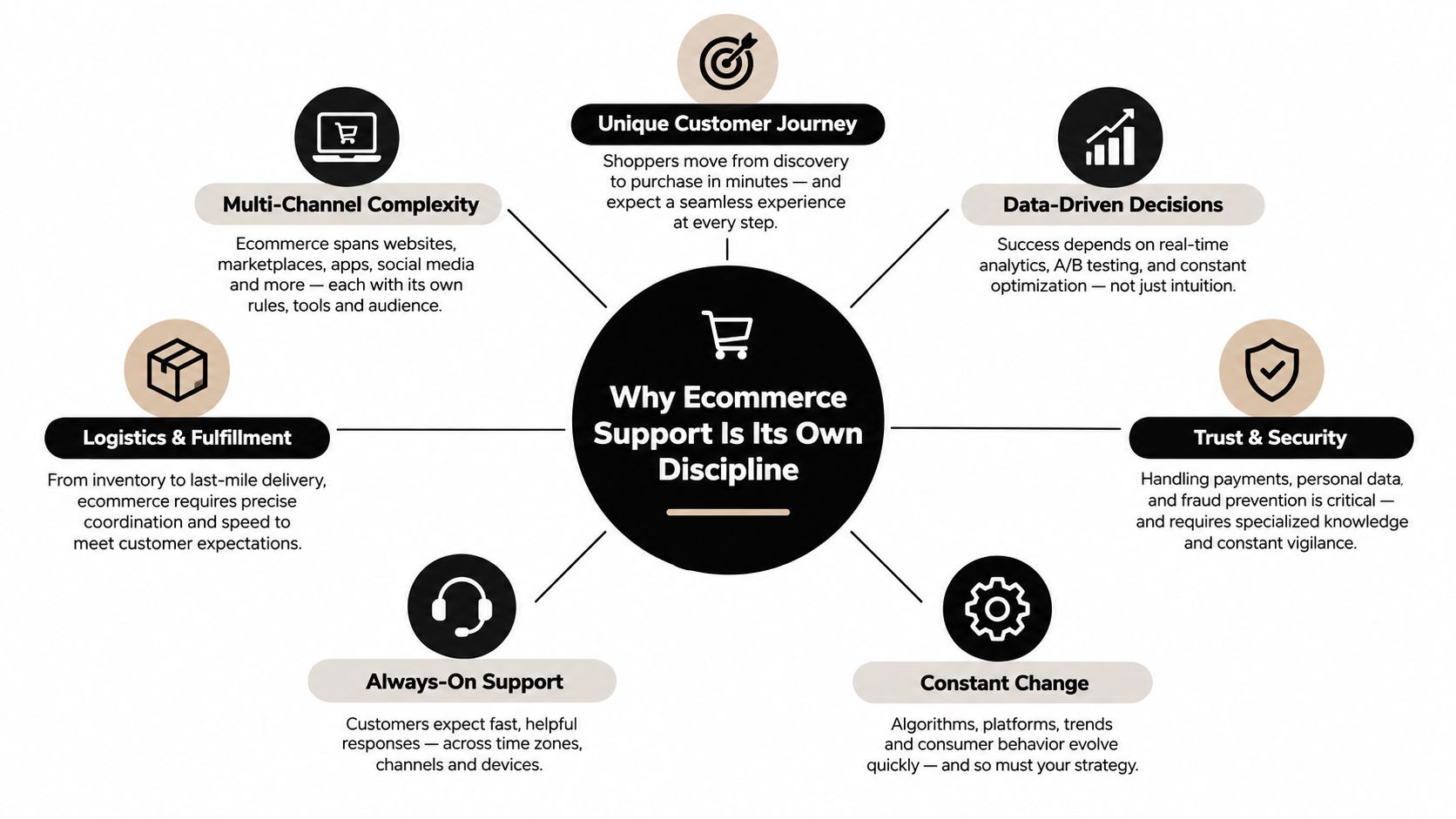
A B2B SaaS ticket can wait until morning. A post-purchase ecommerce issue often can't. That's the difference.
An ecommerce support team works inside moving operational conditions. Orders change status. Carriers miss scans. Inventory shifts. A customer asks for an address correction after the label prints. Another wants a partial refund because one item in a bundle arrived damaged. None of that behaves like a standard support queue.
Why generic ticketing logic breaks
Generic help desks were built around cases, not transactions. Ecommerce support is transaction-dense, time-sensitive, and tied directly to fulfillment and revenue protection.
Three conditions make it its own discipline:
- Order state changes constantly: “Where is my order?” is easy until the shipment is split, delayed, rerouted, or partially refunded.
- Channels multiply fast: Email, chat, social DMs, order notifications, and marketplace inboxes all create support work with different response expectations.
- Policy decisions carry money risk: A sloppy refund, duplicate replacement, or missed seller message isn't just a support miss. It can become margin loss.
The real unit of work is not the ticket
The unit of work in ecommerce support is the customer-plus-order relationship. The ticket is just the wrapper.
That's why agents need product details, fulfillment state, return eligibility, and previous messages inside the same workspace. If your team supports channels like SMS, consistency matters there too. Teams looking to tighten that flow can borrow useful patterns from these SMS templates for Shopify store owners with practical service scenarios from YipSMS Inc.
A delayed response in ecommerce doesn't just frustrate a user. It can trigger a cancellation, a chargeback, or a marketplace penalty.
The buying lens that matters
When you evaluate software, stop asking whether it's omnichannel in the abstract. Ask whether it was built for support teams dealing with live order volatility.
A platform that handles software bug reports beautifully can still be wrong for a brand handling returns, delivery exceptions, and policy disputes all day. Ecommerce support is operations with a customer conversation wrapped around it. Buy for that reality.
Core Capabilities That Actually Matter
Vendors love to pile on features. Most of them don't matter equally. In ecommerce, the stack rises or falls on whether agents can act on live order context without leaving the queue.
The table below is the evaluation grid I'd use first.
Core Capabilities and Their Operational Impact
| Capability | What It Does | Impact Priority | Common Failure Mode |
|---|---|---|---|
| Order lookup | Pulls order, payment, shipping, and customer history into the ticket view | Highest for nearly every ecommerce team | Agents tab-hop between store admin, shipping portal, and help desk |
| Returns workflows | Handles return requests, exchanges, exceptions, and refund coordination | High | Returns live in a separate app with no conversation context |
| Automation rules | Routes, tags, replies, and queues repetitive work | High | Rules fire too broadly and bury edge cases |
| SLA management | Tracks first response, follow-up, and resolution targets by channel | Medium to high | One global SLA ignores marketplace or chat urgency |
| Platform integrations | Connects Shopify, marketplaces, ERP, WMS, loyalty, and shipping tools | Highest for complex stores | “Integration” only means shallow data sync |
| AI assistance | Deflects simple requests and assists agents on repetitive work | Medium, rising fast | AI answers confidently without enough order context |
| Analytics | Shows queue health, agent performance, and contact drivers | Medium | Vanity dashboards with no operational action tied to them |
| Compliance | Controls permissions, retention, auditability, and data handling | Medium for small teams, high for larger orgs | Ops hacks around the tool because governance is too loose or too rigid |
What to prioritize by store stage
A smaller DTC brand doesn't need the same weighting as a multichannel operator.
- Small DTC teams: Order lookup, chat routing, returns basics, and simple macros matter first.
- Scaling brands: Add deeper automation, SLA segmentation, and analytics you can use in staffing decisions.
- Larger operators: Marketplace depth, ERP sync, permissions, and exception handling move to the top.
The one capability that unlocks the rest
If I had to strip this down to one principle, it's this: unified order context is the foundation.
Without it, automation gets sloppy, AI gets risky, and analytics get misleading. With it, you can design a support operation instead of babysitting disconnected tools.
Self-service matters too. Independent ecommerce support benchmarks say a strong knowledge base can deflect 25 to 35% of inbound tickets on average, while best-in-class self-service reaches 50 to 60%, according to Richpanel's ecommerce help desk software benchmark guide. If you're fixing self-service, this piece on knowledge base integration for support workflows is worth reading because the deflection win only sticks when the help center and the help desk are tightly connected.
Don't buy analytics first. Don't buy AI first. Buy the platform that gives agents the right order context at the moment they need to decide.
Comparing the Leading Platforms
Here's the blunt version. Most ecommerce teams don't fail because they picked a bad inbox. They fail because they picked a platform that looked flexible in a demo and turned awkward once real order complexity showed up.
Leading Ecommerce Help Desk Platforms Compared
| Platform | Deployment Speed | Channel Coverage | Marketplace Depth | AI Maturity | Best For |
|---|---|---|---|---|---|
| Gorgias | Fast | Strong for DTC channels | Moderate | Strong for ecommerce use cases | Shopify-first DTC brands |
| Zendesk | Slower | Broad | Depends heavily on integrations | Mature platform AI, less ecommerce-native | Large teams needing customization |
| eDesk | Fast for the right use case | Good across commerce channels | Deep | Practical, workflow-led | Marketplace-heavy sellers |
| Intercom | Moderate | Strong for site chat and conversational flows | Limited natively for marketplaces | Strong conversational AI | Brands blending support and conversion |
Where each one wins
Gorgias works best when the business is Shopify-centric and wants native ecommerce support actions close to the ticket. It's a good fit when your main pain is post-purchase DTC volume, not marketplace sprawl.
Zendesk wins when you have a large team, internal admins, and patience for configuration. It's powerful. It also tempts teams into building a lot of process around a system that wasn't originally shaped for ecommerce operations first.
eDesk deserves more attention than it gets because marketplace sellers have different pain. One independent comparison reports 300+ native marketplace links, full in-ticket order management, native cross-channel identity, and 1 to 2 day setup time for eDesk, while Zendesk typically requires plugins and manual configuration, with setup measured in weeks, according to this ecommerce help desk comparison from Ringly. If you sell heavily on Amazon, eBay, Walmart, or similar channels, that gap matters.
Intercom is strong when chat, proactive messaging, and on-site conversation design matter more than deep order operations. It can work for ecommerce, but it isn't the first tool I'd pick if your queue is dominated by shipping, refund, and return exceptions. If you're stuck between enterprise service tooling and conversational tooling, this breakdown of Intercom vs Zendesk for support teams helps clarify the tradeoff.
My shortlist logic
Use this rule set:
- Pick Gorgias if Shopify is home base and your team wants speed without a heavy rollout.
- Pick eDesk if marketplaces are a major revenue channel and seller inbox sprawl is the core problem.
- Pick Zendesk if you need broad enterprise customization and you can support a longer implementation.
- Pick Intercom if support and conversion chat are tightly linked on-site.
One more practical note. SupportGPT fits a different role than a full help desk. It can be used as an AI support layer for customer-facing assistance, with smart escalation and training on your own support content, which is useful when you want better automation without making the AI your system of record.
Matching Software to Your Store Profile
Buying by vendor category is lazy. Buy by store profile instead.
Profile A for the Shopify-led DTC brand
You run a DTC store, the support team is still relatively lean, and you need fast setup, clean order context, Instagram or chat routing, and sane automations. You do not need a six-month admin project.
Best fit: Gorgias or Re:amaze.
Pick Gorgias if order actions inside the help desk matter most. Pick Re:amaze if you want a lighter operational footprint and can live with less depth. Your decision criteria should be simple:
- Must-have integrations: Shopify, returns platform, shipping tracker, chat
- Must-have automations: WISMO routing, refund request tagging, VIP customer flags
- Deal breaker: Agents needing to leave the help desk for common order actions
Profile B for the multi-marketplace seller
This team lives inside Amazon, eBay, Walmart, and emerging channels. The biggest pain isn't ticketing. It's fractured customer identity and missed marketplace context.
Best fit: eDesk or Zendesk.
eDesk usually makes more sense if channel merging and marketplace sync are the main job. Zendesk only becomes worth the effort if your org also needs broader enterprise process control beyond commerce support.
If more than a meaningful share of your tickets touch an order, order-context depth should outrank generic workflow elegance.
Profile C for the B2B storefront
Now the queue includes negotiated pricing, NET terms, approvals, account hierarchies, and ERP dependencies. Standard DTC-first tooling can feel too shallow here.
Best fit: Zendesk or Kustomer.
What matters most:
- Required integrations: ERP, CRM, ecommerce platform, finance workflow
- Must-have automations: Approval routing, account-tier handling, exception tagging
- Permission needs: Role-based access for sales, finance, support, and ops
For B2B commerce, I'd tolerate slower implementation if it buys cleaner process control later. For DTC, I usually won't.
Implementation Roadmap From Selection to Launch
Most help desk rollouts fail because teams turn everything on at once. Don't do that. Launch in phases and keep the first version boring.
Phase one for data migration
Start with the minimum data agents need on day one. That usually means historical tickets, customer profiles, and order history.
For a smaller brand, this phase can move quickly. For enterprise teams, it takes longer because data ownership is fragmented and every business unit wants custom fields. If your support operation also touches vendor or partner workflows, the same discipline used to accelerate supplier onboarding with DPP Grid applies here too. Define source systems first, not just workflows.
Phase two for channel rollout
Turn on channels in sequence.
- Email first: It's the easiest place to validate queues, tags, macros, and permissions.
- Chat second: Real-time channels expose staffing gaps fast, so add them only after email is stable.
- Social and marketplaces last: Those channels carry unique routing logic and usually create the most edge cases.
They create avoidable chaos. They migrate the inbox and call it done. It isn't done until routing logic matches the actual business.
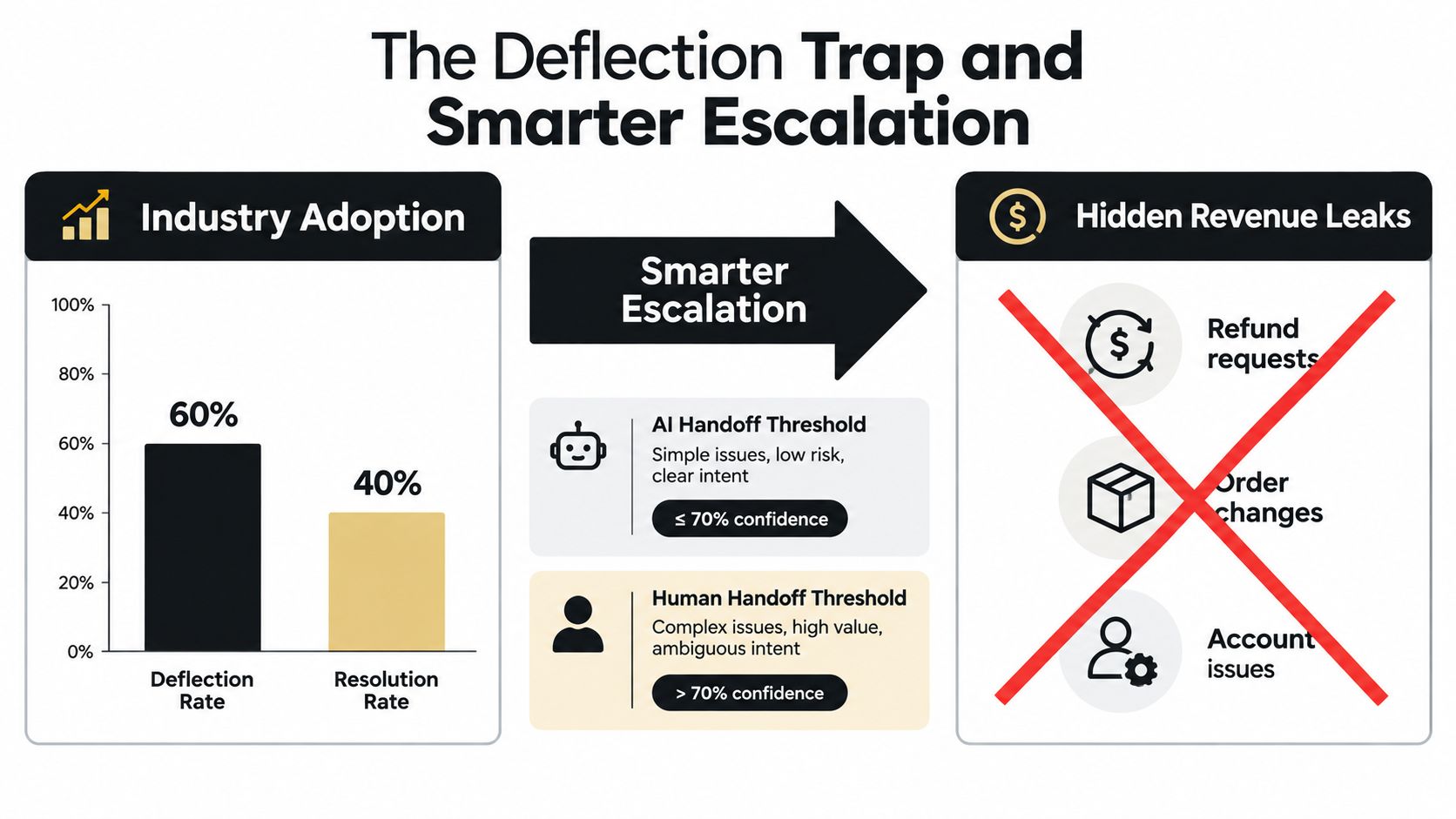
Phase three for automation tuning
Build rules around real queue patterns, not vendor defaults.
- Tagging rules: Create clear distinctions between WISMO, returns, refund requests, cancellations, and damaged-item claims.
- Macro library: Keep it tight. If agents have hundreds of macros, they stop trusting the library.
- SLA timers: Segment by channel and urgency. Chat, marketplace messages, and standard email shouldn't all run on the same timer.
If you're planning a switch, this guide to support migration without breaking customer experience is useful because the migration work itself is usually less painful than the workflow cleanup that follows.
Phase four for AI escalation
Don't let AI auto-handle refund exceptions, address changes after fulfillment, or policy disputes without defined human checkpoints.
Set a kill switch before launch. If resolution quality drops or agents flag recurring errors, pause automation first and diagnose second.
Keep a two-week tuning window after go-live. Review permissions, finance-related actions, billing reconciliation, and any workflow that can create accidental credits or duplicate replacements.
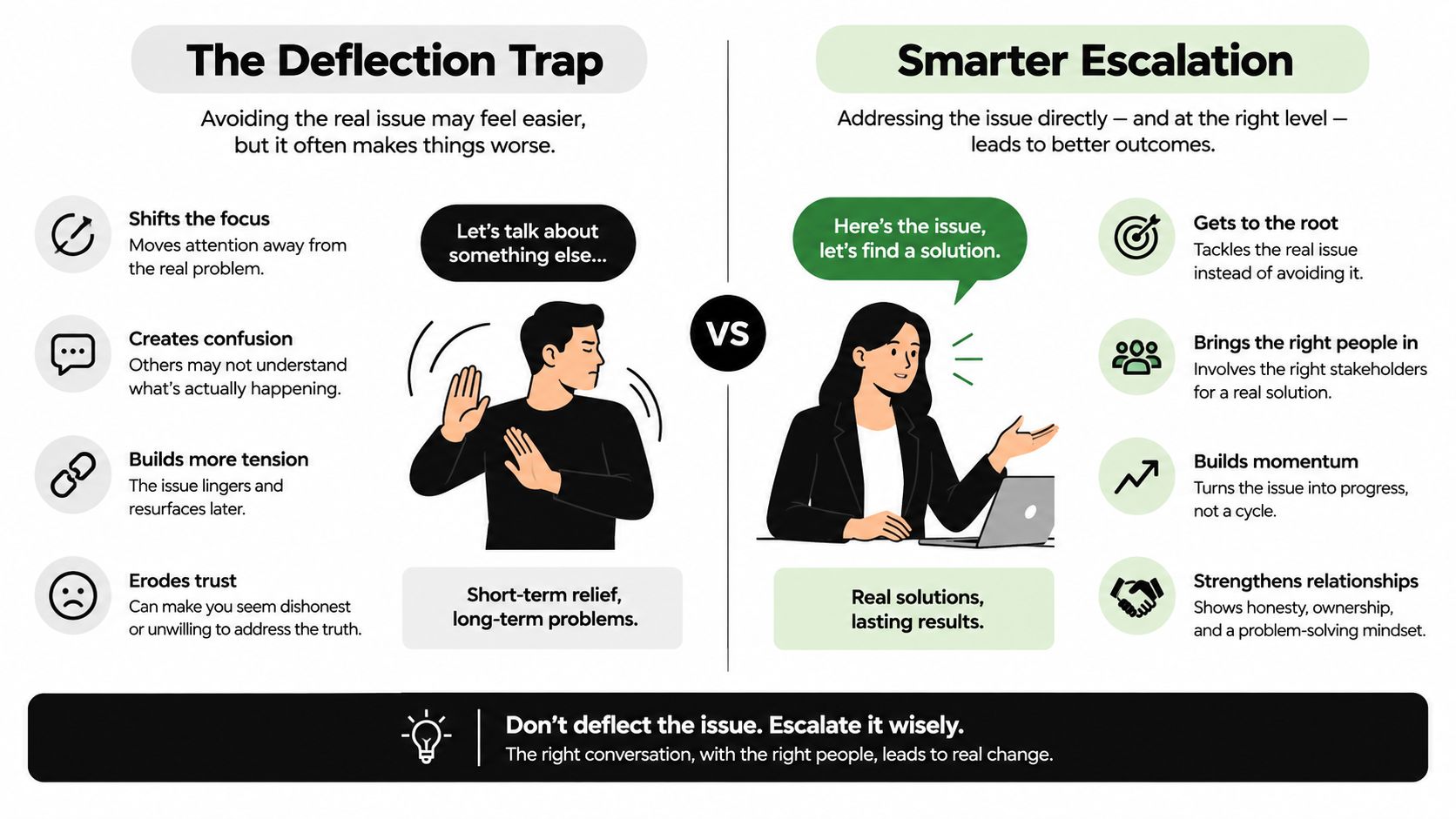
The Deflection Trap and Smarter Escalation
A lot of ecommerce teams chase deflection like it's the whole game. It isn't. Deflection is useful until it starts hiding the tickets that need judgment.
Independent benchmarks show a strong knowledge base can deflect 25 to 35% of inbound tickets on average, and best-in-class self-service can reach 50 to 60%, as noted earlier from the Richpanel benchmark. That's good. But it doesn't mean you should force more requests away from people at all costs.
What the market gets wrong about AI
AI adoption is broad, but scaled deployment is still uneven. Gartner-linked reporting says 80% of customer service and support organizations will apply generative AI in some form by 2025, while a separate 2026 industry summary notes organizational AI adoption reached 88% but scaled AI agent deployment remained in the single digits, according to Inbenta's roundup on AI in ecommerce for 2025. That gap tells you something important. Plenty of teams have AI. Far fewer have figured out where it should stop.
The escalation model I trust
Three models show up in practice:
- Pure deflection: Good for FAQs, dangerous for refund nuance and fulfillment exceptions.
- Rules-based routing: Better. It catches obvious intent categories but struggles with messy mixed requests.
- AI-assisted triage with human checkpoints: Best for most ecommerce teams because it combines intent detection, order-aware context, and handoff discipline.
If you're evaluating AI workflows, ask whether the vendor can hand off with the full conversation, intent label, and order context intact. If not, the bot is just creating extra work. Tools built for helpdesk chatbot workflows with human escalation are more useful than generic AI add-ons.
Final Buyer's Checklist and Decision Framework
Make the decision with a scorecard, not a demo high.
Ecommerce Help Desk Buyer's Checklist
| Criterion | Weight | Demo Red Flag |
|---|---|---|
| Unified order context | 25% | Agents need multiple tabs for order status or refunds |
| Native platform and marketplace integrations | 20% | “Native” turns out to mean connector plus manual field mapping |
| Returns and exchanges workflow depth | 15% | Returns sit in a separate tool with no in-ticket action |
| Automation and AI escalation maturity | 15% | Bot can answer, but handoff loses context |
| Channel coverage and SLA tooling | 10% | Same routing and timers for every channel |
| Reporting and SLA dashboards | 5% | Dashboard looks polished but can't isolate operational drivers |
| Compliance and security | 10% | Weak permission controls or unclear audit trail |
How to pick the winner fast
Run this process:
- Score two finalists only. If you keep five tools alive, the project drags.
- Use real ticket samples. Test refunds, delivery delays, address changes, and marketplace messages.
- Force agents to work inside the trial. Admins don't feel friction the same way agents do.
- Watch for first-contact resolution quality. This matters more than flashy automation. If you need a tighter lens on that metric, this guide on first contact resolution in support operations is a good reference.
- Choose based on operational fit, not list price. Cheap tools get expensive when they add manual work.
Don't buy the platform with the prettiest demo. Buy the one your agents can trust on a messy Tuesday.
If I were making the call today, I'd weight order context first, integration depth second, and escalation discipline third. Everything else is secondary.
If your team wants AI support automation without handing sensitive ecommerce decisions to a black box, SupportGPT is built for that middle ground. It lets you deploy AI support agents trained on your own content, add guardrails, and escalate complex cases to humans when the workflow gets risky. That's the right shape for ecommerce support, where speed matters but bad automation is expensive.