Best AI Chatbot for Customer Support: 10 Top Picks
Compare the best AI chatbot for customer support in 2026 across accuracy, integrations, escalation, compliance, languages, and pricing.
A customer asks why a refund hasn't arrived. The help center says refunds take one amount of time, an older policy page says another, and the bot can't see the order record. If it guesses, it risks giving a misleading answer. If it can't transfer the conversation cleanly, the customer has to repeat the problem to an agent.
That's why the best AI chatbot for customer support isn't necessarily the one with the longest feature list. It's the platform that balances accurate answers, safe escalation, useful integrations, compliance, multilingual performance, manageable training and data sources, and transparent total pricing. Gartner's 2024 survey of customer-service leaders found that knowledge-base upkeep was a significant operational constraint, reinforcing that a chatbot is only as dependable as the information and controls behind it (Gartner's customer-service GenAI survey).
The roundup below compares ten platforms by operational fit, not by a generic feature ranking. For each, consider whether its strengths match your channels and support stack, where implementation or pricing may introduce friction, and what you should verify in a controlled pilot. Pricing and packaging can change, so confirm current terms directly with vendors during 2026 purchasing.
If you're weighing a customer-facing bot against a specialized workflow such as AI chatbot for medical practice admin, pay particular attention to privacy, source control, and how the system handles cases that need a person.
1. SupportGPT
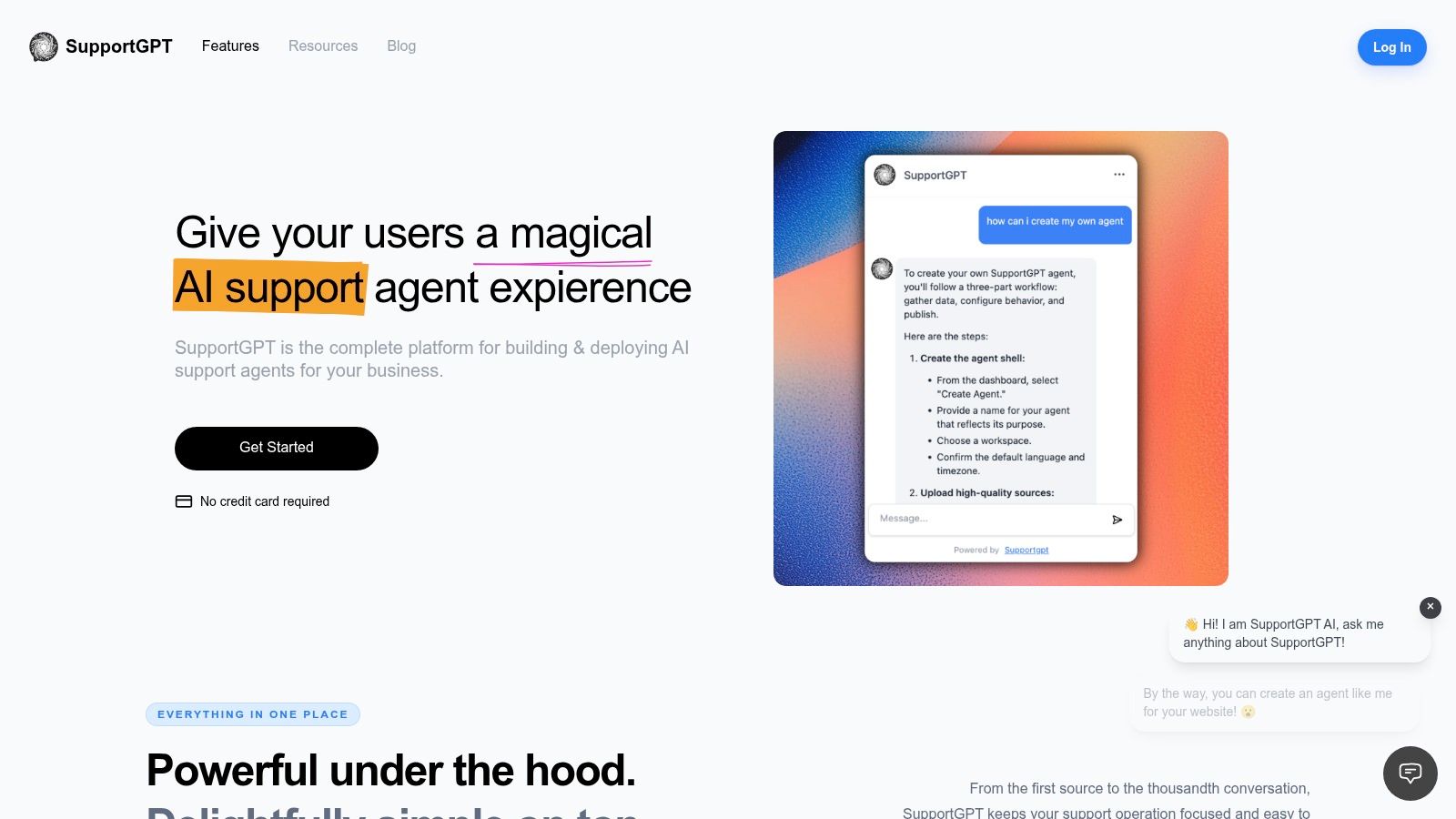
SupportGPT fits teams that want to launch a customer-support agent and let support staff adjust its content and tone without relying on developers for every change. Teams can add approved knowledge sources, set instructions, test responses in a live playground, and publish a website widget. The platform also supports multiple model providers, multilingual conversations, lead capture, and AI Actions for task automation.
A practical strength is how closely testing and deployment sit together. A support lead can check the agent's answer to a policy question, revise its instructions or sources, and test again before customers use it. Natural-language escalation rules let teams specify when a conversation should reach a person. That helps prevent automated containment from becoming the only measure of success.
Best for a fast, controlled launch
Source-grounded responses, topic and tone controls, conversation tracking, and analytics give teams tools to review and improve the bot after launch. Support for more than 90 languages may suit companies serving customers across markets. Validate response quality in the languages and support workflows your team handles.
Published pricing lists a Free plan with 50 message credits, Hobby at $40 per month, Standard at $150 per month, and Pro at $500 per month. Enterprise pricing is custom, so confirm capacity and contract terms before a larger rollout. The Free plan can help assess setup and initial conversations, though its message allowance is limited.
Pilot focus: Check that answers use approved sources and that sensitive or uncertain requests reach a human with customer context intact.
SupportGPT can suit SaaS startups, product-led companies, and ecommerce teams seeking a no-code starting point with room to add automation. It may be a weaker fit for buyers who require independently documented certifications or detailed public customer case studies before vendor evaluation. Compare its operational fit with other options in this guide to AI chatbot companies.
2. Intercom Fin AI Agent
Intercom's Fin is a strong match for support teams that want customer-facing automation alongside a mature messaging and help-desk experience. It can support self-service across website and in-product messaging, email, and other channels, then hand conversations to human representatives. Fin Voice adds an option for AI-powered phone support.
A notable operational advantage is deployment flexibility. Teams can use Fin with Intercom's help desk or alongside tools such as Zendesk, HubSpot, and Freshdesk. That can make it worth evaluating even if replacing the existing help desk isn't on the roadmap, though buyers should test how much of the intended workflow depends on the surrounding Intercom setup.
Where costs need a closer look
Fin uses outcome-based pricing, with $0.99 per outcome cited as a reference point. The final bill can also depend on seats and channel usage, and voice pricing and some AI details may require a conversation with sales. Don't evaluate the per-outcome figure in isolation. Estimate expected outcomes using your own traffic and decide how you'll verify that a conversation counts as successfully resolved.
Intercom is best suited to teams that value an integrated customer messaging experience and can accommodate usage-based costs. It may be a harder fit for a team seeking a simple, fixed monthly AI bill. During a pilot, inspect transcript transfer, agent context, and the difference between a completed automated interaction and one that should have been escalated.
Teams comparing broader platforms can also consult this overview of AI-powered customer service platforms.
See Intercom's Fin AI Agent for current availability and packaging.
3. Zendesk AI
Zendesk AI makes the most sense for teams already operating on Zendesk or organizations that want their chatbot tied directly to a ticketing workflow. Its customer-facing AI agents focus on automated resolutions, while Copilot supports human agents with tasks such as summaries and suggestions. Ticket history, handoffs, and reporting can sit within the same support environment.
That native connection can reduce setup friction: agents can receive the conversation as a ticket instead of switching to a disconnected tool. Zendesk also provides rollout guidance and documentation, which can help teams standardize configuration. But a familiar help desk doesn't automatically mean the bot is ready for production. The knowledge sources, routing rules, and escalation behavior still need to be tested against real support requests.
A practical fit for established Zendesk teams
The trade-off is cost and packaging. Per-agent plans, AI outcomes, and add-ons can all contribute to the total, and advanced capabilities may require a higher tier or separate purchase. Voice and SMS options can also bring additional usage considerations, so include your actual channel mix in a pricing review.
Zendesk AI is a sensible shortlist choice when agents already work in Zendesk and the team wants AI assistance and customer automation connected to its existing processes. It's less compelling if you'd be adopting the wider platform solely to get a chatbot, or if a lightweight standalone agent would satisfy the need.
During a pilot, compare bot answers with existing ticket resolutions, then verify that a transfer preserves the conversation and directs it to the right queue. Review Zendesk's AI customer-service capabilities alongside its wider AI customer-service options.
4. Freshdesk Freddy AI
Freshdesk's Freddy AI is a practical candidate for teams seeking AI features within a help desk that offers modular pricing. Freddy Copilot can assist agents with reply suggestions, summaries, and drafting, while AI agent session packs support customer-facing automation. Conversational Insights gives teams another way to examine support conversations, and Freshdesk offers omnichannel options across chat, email, and social.
That combination suits operators who want to improve agent workflows while introducing automation gradually. A team can first use AI to help agents handle repetitive work, then evaluate customer-facing answers on a defined set of intents. This staged approach can be more manageable than turning on broad autonomous handling before the knowledge base and escalation paths are ready.
Modular pricing requires configuration discipline
A cited pricing example lists Freddy Copilot at $29 per agent per month with annual billing, while AI agent sessions are sold in packs. Confirm current terms with Freshworks, and build a cost estimate that includes both human-agent seats and anticipated AI use. The entry point may look accessible, but advanced automation can require multiple add-ons and careful configuration.
Freshdesk is worth considering for value-conscious support teams that want AI assistance and analytics in a help-desk context. The trade-off is that teams looking for extensive autonomous behavior out of the box may find they need to assemble and configure more of the experience.
In a pilot, assess whether Freddy can retrieve the right policy, draft a response that an agent can use, and show useful patterns in conversation data. Test the customer-facing agent separately from Copilot rather than assuming success in one mode proves readiness in the other.
See Freshdesk's Freddy AI offering and this overview of customer-service AI tools.
5. Ada
Ada is geared toward businesses that want a dedicated enterprise AI support platform across channels. Its agent can support web, apps, voice, social, and SMS, with escalation to human support. APIs, SDKs, MCP tools, and headless deployment options give technical teams ways to connect the agent to business systems and actions.
That flexibility can be valuable when the bot must do more than answer questions from a help center. For example, an enterprise may need an agent to interact with internal systems, follow defined workflows, and pass a complex case to the right team. These capabilities can also make implementation more demanding: extracting value may require a dedicated platform owner and careful integration planning.
The best test isn't whether an agent can answer a demo question. It's whether it knows when to stop, what context to preserve, and where to send the customer next.
Best for enterprise ownership
Ada offers governance and safeguards, but pricing is quote-based. Conversation-based pricing is typical, and resolution-based pricing may also be available. Ask the vendor to define how billable activity is counted, how escalation is treated, and what support or implementation work is included. The platform's enterprise focus may not suit a small team seeking self-serve pricing and simple administration.
Ada may fit global or mid-market and enterprise support operations that need multiple deployment options and can support an involved rollout. In a controlled pilot, test customer-facing channels separately, check how business actions are authorized, and review the handoff from bot to agent for sensitive cases.
Visit Ada for current product and pricing details, and compare its operating model with these AI customer-service solutions.
6. Forethought
Forethought is designed for support operations that want to connect automation, agent assistance, and service analytics within a broader platform. Its Solve, Assist, and Discover offerings address different parts of the workflow, while integrations with help desks and data sources can help teams work with their existing systems. Solve API support also offers a flexible route for teams that don't want to rely only on a standard chat widget.
The emphasis on resolution outcomes makes Forethought worth examining when leadership wants to understand whether automation is solving customer problems. But an outcome-focused pitch doesn't remove the need to inspect the underlying evidence. Teams need clear definitions for success, a way to review failed or disputed resolutions, and visibility into when an interaction moved to a human.
Prepare the data before scaling
Forethought's pricing combines platform access with outcome-based costs and is quote-only. Because costs can vary with outcome targets, ask for a written explanation of the pricing model and test it against your expected traffic and escalation mix. A quote may be difficult to compare with a published monthly subscription unless both estimates cover the same channels, services, and workload.
The platform is a stronger fit for support organizations that can dedicate time to integrations and data preparation than for teams hoping to turn on automation with minimal configuration. Poorly organized help content or unclear operational definitions can complicate both performance reviews and budget forecasts.
In a pilot, connect one help desk and a defined knowledge set. Review the questions Solve handles, those it routes to a human, and the data available for investigating unsuccessful outcomes. Confirm that the API or connectors fit your architecture before making the tool central to a larger workflow.
Explore Forethought for current product and pricing details.
7. Tidio Lyro AI Agent
Tidio brings together a website chat widget, lightweight ticketing, automation Flows, and its customer-facing Lyro AI agent. The combination is appealing to small ecommerce teams that want to manage chat and simple automation from one interface without beginning with an enterprise implementation project.
Self-serve onboarding and accessible plan information can help a small team evaluate the basics on its own. Tidio also offers a free tier and a full-feature trial. Those options make it easier to explore the interface, but they don't answer the question that matters most for ongoing use: how Lyro's separate conversation packs align with the store's actual support volume.
A useful starting point for lean teams
Lyro is billed separately from Tidio's base plans, so include its allowance in the cost estimate rather than treating the chat subscription as the full price. Teams should also assess whether the platform's reporting and permissions will remain adequate as the support operation grows. What works for a small team with a focused set of FAQs may become limiting when several teams need distinct workflows and reporting access.
Tidio is best for teams that want quick setup, self-serve onboarding, and an approachable way to trial AI support. It may be less suitable for larger operations that need deep permissions, detailed analytics, or more complex governance.
Test Lyro with the questions customers ask most often, including a policy question with incomplete context and a case that should go to an agent. Confirm that it doesn't generate a plausible answer when the relevant information is missing.
See Tidio's Lyro AI Agent for the current plan structure and usage terms.
8. Gorgias
Gorgias is built around ecommerce support, making it a natural candidate for online stores using Shopify, BigCommerce, or Magento. Its help desk and AI Agent can handle common support work across email and chat, while commerce integrations bring storefront data and workflows for orders, shipping, and refunds into the support experience.
That commerce context is the key difference from a more general-purpose support bot. An agent answering an order-status question needs access to the right order information, and a workflow for a return can require more than retrieving a policy article. Gorgias's ecommerce orientation can help teams keep those interactions close to their storefront operations.
Watch both tickets and AI usage
Some plans bundle automated interactions and ticket quotas, but ticket limits and AI usage can lead to overages. That means a busy period can affect costs in more than one way. Before choosing a plan, ask how automated conversations count toward ticket usage and how the vendor handles volume above the included allowance.
Gorgias fits stores that want ecommerce support workflows and AI in one tool. It may be less suitable for complex B2B service operations that need broader case management and highly customized routing beyond the ecommerce context.
A pilot should use actual storefront scenarios, such as checking an order, asking about shipping, and requesting a refund. Confirm which tasks the AI can safely complete, which ones need approval, and how a human agent sees the customer's commerce context after escalation.
Review Gorgias's ecommerce help desk and AI Agent for current integrations, quotas, and billing details.
9. LivePerson Conversational Cloud
LivePerson's Conversational Cloud is designed for enterprises that manage customer conversations across several messaging channels. The platform supports web and app chat, SMS, WhatsApp, Apple Business Messages, and other channels, alongside bot capabilities and analytics. Tools for moving customers from IVR calls into messaging can also be relevant to companies trying to connect voice and digital service operations.
Its broad channel footprint makes LivePerson a candidate for organizations where a website widget is only one part of the support environment. Instead of evaluating a standalone bot, buyers can assess how conversations move across channels and where analytics give service leaders a view of customer interactions.
Plan for a specialist implementation
LivePerson's packaging can include channels, bots, analytics, and call-deflection capabilities, and pricing is quote-based. This gives enterprise buyers room to scope a solution around their operations, but it makes an apples-to-apples cost comparison harder. Request a detailed proposal that separates platform access, channel scope, implementation, and ongoing service costs.
LivePerson is best suited to high-volume, multichannel customer-service organizations with the technical and operational capacity to manage a broad deployment. A team looking for a simple self-service subscription may find the buying and implementation process more involved than necessary.
For a pilot, select one channel and a clearly bounded customer journey. Verify that the bot passes context to agents, that analytics cover the conversation path, and that any IVR-to-messaging transition fits your existing routing and customer-experience requirements.
Visit LivePerson Conversational Cloud to review its current enterprise offering.
10. Salesforce Service Cloud AI
Salesforce Service Cloud AI combines generative support features with Einstein and Agentforce bot options. It can assist with replies, summaries, answers, and knowledge creation, while CRM and Data Cloud integrations can supply customer context. For companies already standardized on Salesforce, that connection may reduce the need to move customer information between unrelated platforms.
The trade-off is that this is part of a larger service ecosystem, not a chatbot purchase. Whether it's a sensible option depends on the Salesforce edition, the company's existing configuration, the AI capabilities it needs, and any applicable usage-based billing or add-ons. Teams should evaluate the entire operational setup rather than comparing one AI feature with a standalone bot.
Most compelling inside a Salesforce estate
Salesforce can offer an integrated environment for teams that already use its CRM and service products. It may be harder to justify for companies without Salesforce experience or an existing service stack, particularly when pricing and packaging vary by edition and add-on.
During a pilot, verify what customer and case information the bot can access, which actions it's permitted to take, and what agents see when a case is transferred. Test the intended workflow using realistic customer records and the knowledge sources that agents rely on. Ask for a detailed breakdown of AI usage and any dependencies before comparing costs with other shortlisted platforms.
Salesforce Service Cloud AI is most relevant when your customer-support operations already depend on Salesforce and you want AI to work within that environment. For teams selecting a chatbot independently of their CRM, the platform's broader scope may add unnecessary complexity.
Review Salesforce Service Cloud AI against your current Salesforce setup and purchasing requirements.
Top 10 AI Chatbots for Customer Support: Feature Comparison
| Platform | Core capabilities | Best for | Standout value | Pricing |
|---|---|---|---|---|
| 🏆 SupportGPT | ★ No-code setup, 90+ languages, AI Actions, guardrails, human handoff, analytics | 👥 Teams wanting fast, flexible AI support | ✨ Train on your sources; choose from leading LLMs | 💰 Free (50 credits); $40–$500/month; Enterprise custom |
| Intercom (Fin AI Agent) | ★ Omnichannel self-service, human handoff, AI voice | 👥 Teams needing a mature messaging suite | ✨ Works with Intercom or select existing help desks | 💰 From $0.99 per outcome; seats and channel costs extra |
| Zendesk AI | ★ AI agents, Copilot, native ticketing and reporting | 👥 Zendesk users and unified support teams | ✨ Customer-facing automation plus agent assistance | 💰 Per-agent plans; AI usage and add-ons may cost extra |
| Freshdesk (Freddy AI) | ★ AI replies, session-based agents, analytics, omnichannel support | 👥 Value-conscious support teams | ✨ Modular AI features and conversational insights | 💰 Copilot cited at $29/agent/month annually; AI sessions extra |
| Ada | ★ Omnichannel autonomous AI, escalation, APIs and SDKs | 👥 Mid-market and enterprise teams | ✨ Flexible integrations and deployment options | 💰 Quote-based |
| Forethought | ★ Automated resolutions, agent assist, support analytics | 👥 Teams focused on deflection and measurable outcomes | ✨ Solve API and major help-desk integrations | 💰 Quote-based; outcome-based costs |
| Tidio (Lyro AI Agent) | ★ Website chat, AI agent, automation Flows | 👥 Ecommerce SMBs and smaller teams | ✨ Quick self-serve setup with a free tier | 💰 Free tier; Lyro conversation packs cost extra |
| Gorgias | ★ AI resolutions, help desk, commerce workflows | 👥 Online stores using Shopify, BigCommerce, or Magento | ✨ Order, refund, and shipping support workflows | 💰 Plan-based; ticket limits and AI usage may add costs |
| LivePerson (Conversational Cloud) | ★ Multichannel messaging, bots, analytics, IVR deflection | 👥 Large, high-volume support organizations | ✨ Broad messaging channels and voice capabilities | 💰 Quote-based |
| Salesforce Service Cloud AI | ★ AI replies, summaries, knowledge tools, CRM integration | 👥 Teams already using Salesforce | ✨ Customer context from CRM and Data Cloud | 💰 Varies by edition, AI usage, and add-ons |
Run a Controlled Pilot Before You Commit
Choose a chatbot by testing it against the work your support team handles. Broad vendor claims about automation won't tell you whether the bot can resolve your policies correctly, use customer context safely, or transfer a difficult request without making the customer start over.
Customer acceptance matters as much as internal adoption. In Gartner research published in July 2024, 64% of surveyed customers preferred companies not to use AI in customer service, and 53% said they would consider switching competitors if they discovered a company planned to use AI for customer service. Those figures come from a survey of 5,728 customers conducted in December 2023, and should be read as a directional signal, not a universal estimate for every market or industry (Gartner customer research summarized by GetMacha). Clear disclosure, reliable answers, privacy controls, and human escalation are therefore practical buying criteria, not afterthoughts.
Use this implementation sequence:
- Choose a narrow starting point: Pick the highest-volume, lowest-risk intents, such as a routine policy or status question.
- Audit the source material: Remove conflicting and outdated guidance before connecting the help center or files.
- Set operating boundaries: Define response expectations, escalation triggers, privacy requirements, and language needs.
- Connect one essential system: Start with the help desk, store data, or CRM needed to support the selected workflow.
- Test realistic conversations: Include incomplete questions, conflicting information, sensitive requests, and cases the bot should decline or escalate.
- Compare the outcome: Review automated resolution quality alongside human handling, including failed answers and the quality of the handoff.
- Calculate the actual cost: Compare cost per resolved contact, not just the advertised plan price.
An independent synthesis reports a sharp difference in customer satisfaction between chatbot conversations that reached a resolution and those that did not, underscoring why containment alone is a weak measure of success (AI chatbot support adoption and satisfaction synthesis). Track correct resolution, escalation quality, repeat contact, and customer feedback together. A bot that knows when it cannot help is often safer than one that keeps a conversation automated at any cost.
For a quick, no-code SupportGPT pilot, start on the Free plan and import a limited set of approved help-center pages. Configure the agent's tone and topic guardrails, define natural-language escalation rules, test responses in the playground, and embed the widget for a controlled audience. Review the resulting conversations and analytics before expanding sources or moving to a higher-volume plan.
The right choice depends on your existing support stack, risk requirements, and the team's capacity to maintain the system. Select the platform that fits those conditions, not merely the product with the longest feature list.
SupportGPT lets teams build and deploy AI support agents trained on their own sources, with guardrails, analytics, multilingual support, and human escalation. If you're planning a controlled chatbot pilot, visit SupportGPT to explore a no-code way to test customer answers before expanding automation.