AI Customer Service: A Practical Guide for 2026
Learn how AI customer service works, where it delivers real ROI, and how to deploy it safely across SMB, SaaS, and enterprise support teams in 2026.
A support leader opens Monday's dashboard and sees the same pattern again: demand is rising, response times are slipping, and the team is spending its best hours answering questions customers asked last week. Hiring will help eventually, but it won't solve the immediate operating problem. AI customer service can, but only when it's connected to the systems, policies, and people that resolve customer issues.
The market has moved beyond experimental FAQ bots. MarketsandMarkets estimates that the global AI for customer service market was valued at USD 12.06 billion in 2024 and will reach USD 47.82 billion by 2030, implying a 25.8% CAGR across that period, as summarized by AI customer service market statistics. Customers also expect faster service, with expectations for response speed rising 63% and expectations for resolution speed rising 57%, according to the same industry coverage.
The leadership question isn't whether AI belongs in support. It's whether your company will deploy a chatbot at the edge of the operation or build an integrated service system that resolves routine work, gives agents useful context, and escalates difficult cases before trust breaks.
The Moment a Support Team Hits Its Limit
At 9:05 on Monday morning, a mid-sized SaaS company's support queue is already uncomfortable. Fourteen agents are watching ticket volume that doubled in a single quarter, while the average wait time has climbed past 12 minutes and CSAT is sliding. The hiring plan exists, but candidates are scarce, onboarding takes time, and the next product release is due before the team is fully staffed.
By noon, the failure modes are familiar. One agent gives a precise billing explanation, another sends an outdated macro, and a third asks a customer to repeat information already provided in the previous message. Senior agents take the hardest escalations while newer agents clear repetitive tickets, and everyone starts preparing for the graveyard shift. The team isn't failing because it lacks commitment. It's failing because demand has outgrown a staffing model that scales linearly.
Operational reality: More headcount can add capacity, but it doesn't automatically create consistent answers, continuous coverage, or clean handoffs.
Early chatbot deployments made the situation worse. Rule-based systems forced customers through rigid menus, misunderstood ordinary language, and sent people back to the same help article when the actual issue required an account lookup or policy exception. Customers learned to type “agent” repeatedly because the automation had no useful next step.
Modern systems are different when they're designed properly. Retrieval grounds responses in approved knowledge, intent understanding interprets the customer's actual request, and action-taking agents can use connected systems rather than only generate text. A customer asking about a delayed shipment might receive an order lookup, an explanation based on current status, and a clear human handoff with the conversation history intact.
That shift makes AI a mainstream CX layer, not a decorative chat bubble. It also changes the support leader's job. The work now includes mapping complaints, defining escalation paths, and deciding which information agents need before they take over. A practical resource such as the agentcentral complaint resolution playbook can help teams formalize that human response layer, while this guide on scaling customer support provides useful context for the capacity problem.
What AI Customer Service Actually Means in 2026
AI customer service is software that interprets a customer's message, retrieves relevant information, follows policy rules, and chooses an appropriate next step. That step might be an answer, an action such as an order lookup or refund request, or an escalation to a human agent.
A legacy chatbot behaves like a phone-tree IVR. It recognizes a narrow set of phrases and moves the customer through predefined branches. A modern AI service system is closer to a skilled triage nurse. It listens for intent, checks the available context, asks a clarifying question when necessary, follows approved procedures, and knows when the case needs a specialist.
The distinction matters because a chatbot is only one interface. The operational system behind it should include:
- Natural-language understanding: Interprets intent, entities, urgency, and conversational context.
- Knowledge retrieval: Finds answers in approved help-center articles, policies, product documentation, and internal sources.
- Tool use: Connects to CRM, help desk, order, billing, or account systems to retrieve information and complete bounded actions.
- Escalation detection: Identifies low confidence, frustration, sensitive topics, or policy exceptions.
- Analytics: Separates AI-assisted, AI-resolved, and human-resolved work so leaders can see where value is created.
A free-floating large language model isn't customer service infrastructure. Without source restrictions, permissions, action limits, and escalation rules, it can produce fluent answers that don't reflect your policies or the customer's account. The model's ability to write isn't the same as its ability to resolve.
| Dimension | Legacy Chatbot | AI Customer Service (2026) |
|---|---|---|
| Interaction model | Fixed decision tree | Context-aware conversation |
| Knowledge | Scripted responses | Retrieval from approved sources |
| Actions | Usually limited to navigation | Can call connected tools within defined permissions |
| Failure handling | Repeats a flow or stops | Explains the limitation and escalates with context |
| Agent support | Transfers a transcript | Transfers intent, history, sources, and suggested next steps |
| Governance | Basic flow maintenance | Policies, access controls, audit logs, and review workflows |
In the support stack, AI sits alongside the help desk, CRM, knowledge base, workforce tools, and product systems. It should orchestrate information and workflows across them, not replace the systems of record. For a clear explanation of the conversational layer itself, see this guide to what conversational AI means.
The Benefits That Show Up on the P&L
AI customer service affects the P&L only when it completes work inside the support operation. The relevant benefits are lower cost to serve, faster resolution, broader coverage, and greater agent capacity. A chat window produces none of these outcomes by itself. Integration depth, escalation design, and operating guardrails determine whether the investment creates savings or another channel to maintain.
The strongest evidence in this section comes from two different uses of AI. A randomized field experiment in online chats found that agents using AI-generated suggestions responded faster, engaged customers more effectively, and produced stronger improvements in customer sentiment than agents without that assistance, according to the published field experiment. The result supports agent assistance as a financial lever. AI can improve the interaction while a trained employee retains responsibility for judgment and customer outcomes.
The benchmark that matters is completed work
A 2026 benchmark covering 131 e-commerce shops and 2.9 million resolved tickets found that AI resolved 4.9% of tickets end to end, touched 24.2% of all tickets, and helped automation reach 32.9% of resolved tickets overall. AI-resolved tickets closed in a median 1.9 days, compared with 3.0 days for manual handling, implying roughly 37% faster resolution when AI was used in the workflow, according to the e-commerce AI customer service benchmark.
These figures give leaders a better test than bot containment. A system that touches many tickets but resolves few may just add another interaction layer. A smaller system that completes routine work accurately can reduce queue pressure, shorten handling time, and give agents more capacity for exceptions.
| Benefit | Verified benchmark | Primary KPI impacted |
|---|---|---|
| AI-assisted interaction quality | Faster responses and stronger customer sentiment in a randomized chat experiment | Response quality, sentiment |
| End-to-end AI resolution | 4.9% of tickets in the benchmark | Resolution rate |
| AI workflow coverage | 24.2% of all tickets touched | Assisted volume |
| Overall automation support | 32.9% of resolved tickets | Automation coverage |
| Resolution speed | Median 1.9 days with AI versus 3.0 days manually | Time to resolution |
Coverage creates operational value when the system handles routine questions outside normal shifts and across time zones. Agents can then focus on technical investigation, complaints, exceptions, and situations requiring reassurance. Multilingual coverage can also expand, but only when approved knowledge, permissions, and escalation policies work reliably in each language.
The financial case depends on how much AI is integrated. Intercom reports that only 10% of teams have reached mature AI deployment, where AI is fully integrated into support operations and works at scale, according to its customer transformation report. Leadership should therefore measure completed work, transfer quality, resolution time, and agent capacity, not chatbot launches. If AI cannot retrieve accurate customer data, act within policy, or pass useful context to a human, projected savings remain theoretical.
Implementing AI Customer Service Without Breaking Operations
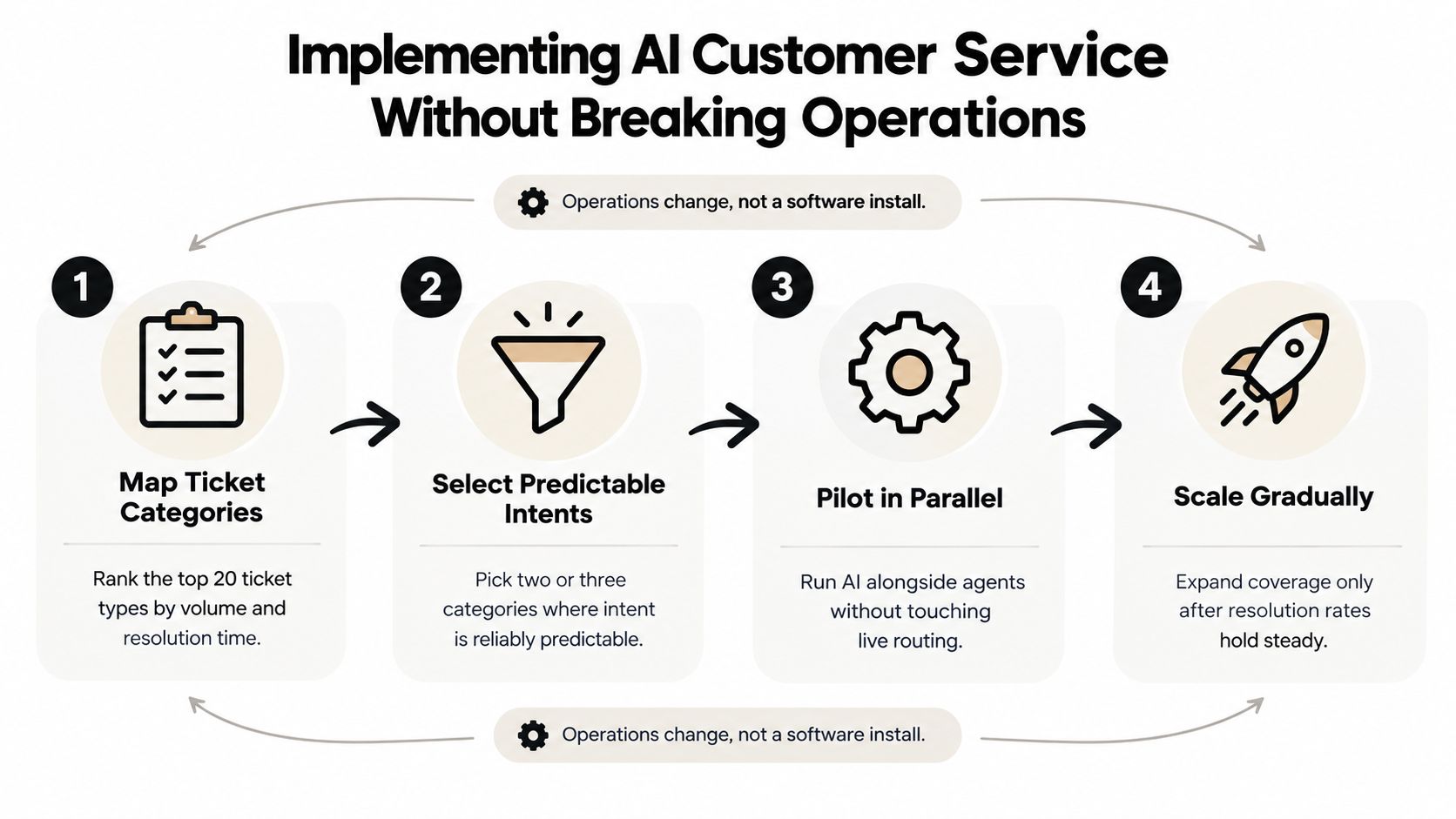
Treat implementation as an operating-model change, not a software installation. The first decision isn't which model to buy. It's which customer problems your team can automate safely and measure accurately.
Start with your support data. Rank the top 20 ticket categories by volume and resolution time, then compare the categories against four tests:
- Predictable intent: Customers describe the problem in language the system can recognize.
- Stable resolution: The correct answer or action doesn't change from case to case.
- Accessible context: The required account, order, or subscription information is available through a connected system.
- Safe escalation: A human can take over without making the customer start again.
Order status, password resets, and straightforward plan-billing questions often fit this profile. Complaints, disputed charges, account closures, security incidents, and regulated advice usually need stricter controls or human ownership.
Pilot the workflow, not the marketing promise
Run the first pilot in one channel for 30 days, with shadow mode enabled. In shadow mode, the AI drafts a response while agents continue handling the live interaction. Compare the draft with what the agent sends, then classify errors by cause: missing knowledge, wrong intent, unavailable system access, policy conflict, or poor escalation.
Before signing with a vendor, ask to see the integration in your environment. A platform that can only answer from a help center isn't equivalent to one that can check an order, verify an account, or create a structured escalation. Test the connection to your CRM, help desk, billing system, order platform, identity layer, and analytics environment.
Define escalation triggers before launch. Use a combination of topic, sentiment, confidence, customer value, and repeated failed attempts. Every handoff should include the customer's request, relevant history, retrieved sources, actions already attempted, and the reason for escalation.
Assign ownership explicitly. Someone must maintain source content, someone must tune intents and policies, someone must review escalations, and someone must report performance to leadership. Teams that need to change their existing support processes should review this support migration guide before routing live volume.
Decision rule: Don't expand coverage because the bot handled more conversations. Expand only when resolution quality, escalation quality, and customer sentiment remain acceptable together.
Roll out in phases. Begin with agent assist or shadow mode, move selected intents into limited customer-facing automation, and add new categories only after the previous workflow performs consistently. This approach gives agents and customers time to adapt without turning the first deployment into a risky switchover.
Guardrails, Compliance, and the Trust Equation
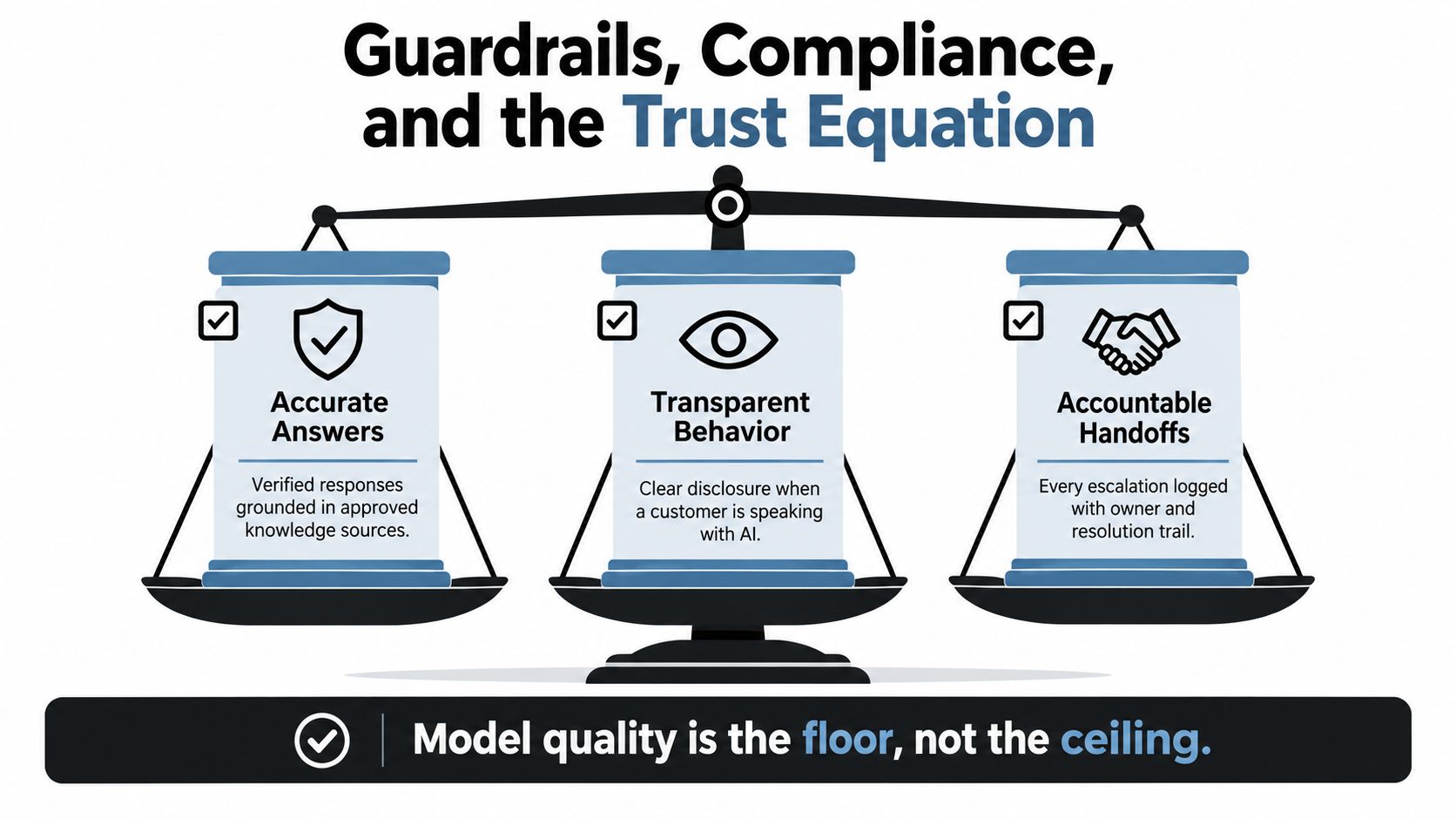
A better model won't rescue a badly governed support operation. Model quality is the floor, not the ceiling. Trust depends on three things: accurate answers, transparent behavior, and accountable handoffs.
Accurate answers require retrieval from approved sources, not unrestricted generation. Your system should distinguish between documented policy and a plausible response, refuse unsupported claims, and show agents the source material used during an escalation. If product documentation is outdated, the AI will expose that weakness at a higher speed.
Transparent behavior means customers know when they're interacting with AI and understand what it can do. Don't disguise automation as a person. Give customers a visible route to human help, especially after failed attempts or when the issue involves money, access, safety, privacy, or a complaint.
Accountable handoffs require an owner and an audit trail. An escalation that enters a queue isn't a control. The receiving agent should see why the system escalated, what confidence or topic rule triggered it, which actions occurred, and what remains unresolved.
Build controls before the first customer interaction
Compliance depends on your geography, industry, data, and use case. GDPR, CCPA, HIPAA, PCI DSS, and the EU AI Act can create different obligations around personal data, consent, payment information, health information, and automated decisions. Treat legal review as part of architecture, not a final checklist.
At minimum, define:
- PII handling: Redact or tokenize sensitive information where the workflow doesn't need the raw value.
- Access boundaries: Give the AI only the permissions required for its approved actions.
- Retention rules: Set how long conversations, prompts, retrieved documents, and action logs remain available.
- Sensitive-action approval: Require human review for refunds, cancellations, account changes, and regulated topics where risk warrants it.
- Monitoring: Sample responses, review failed escalations, and audit policy changes on a recurring schedule.
Customers trust automation they can override. Agents trust it when they can verify the answer and see the evidence. Build both conditions into the experience, and log enough information to investigate failures rather than treating them as isolated anecdotes. For a broader governance framework, see enterprise AI governance for support teams.
Matching the Stack to Your Company Size
Company size isn't the deciding factor by itself. The right stack follows ticket volume, integration surface area, and risk tolerance. A small team with complex billing and account workflows may need stronger governance than a larger company handling simple product questions.
Startups with fewer than 50 agents should prioritize speed and operational simplicity. A lightweight platform that connects to the help desk, knowledge base, and core product systems is usually more valuable than a broad enterprise suite that requires a long implementation. One console for chat, email, or voice can reduce administration, but only if the team can maintain the sources and escalation rules.
SMBs with 50 to 500 agents need more workflow depth. They should look for CRM and help-desk connectivity, custom routing, agent assistance, conversation analytics, and reporting that ties automation to resolution and CSAT. At this stage, ownership becomes important because an informal founder-led tuning process won't scale.
Enterprises need controls that support multiple regions, business units, and risk profiles. Private deployment options, granular role-based access, regional data residency, and recognized security certifications such as SOC 2 Type II and ISO 27001 should be evaluated alongside integration and service-level commitments. Healthcare and finance teams should assume that consumer-grade tools won't meet their requirements without additional controls.
| Tier | Team size | Stack priorities | Compliance bar |
|---|---|---|---|
| Startup | Under 50 agents | Fast deployment, core integrations, simple multi-channel management, clear escalation | Strong privacy basics and documented access controls |
| SMB | 50 to 500 agents | CRM and help-desk connectivity, workflow automation, analytics, agent assist | Formal governance, retention policies, vendor security review |
| Enterprise | Large or distributed teams | Private deployment options, regional controls, deep orchestration, granular permissions | Regional data residency, role-based access, SOC 2 Type II and ISO 27001 evaluation |
| Regulated operation | Any size | Restricted actions, auditability, human review, approved data flows | Industry-specific requirements for healthcare, finance, payments, and privacy |
SupportGPT is one platform option for teams that need to build and deploy AI support agents, train them on approved sources, define rules and AI Actions, embed an assistant, and route complex queries to human teammates. The important evaluation question isn't the brand. It's whether the platform fits your workflows and risk controls without creating shelfware.
Best Practices and a 90-Day Adoption Playbook
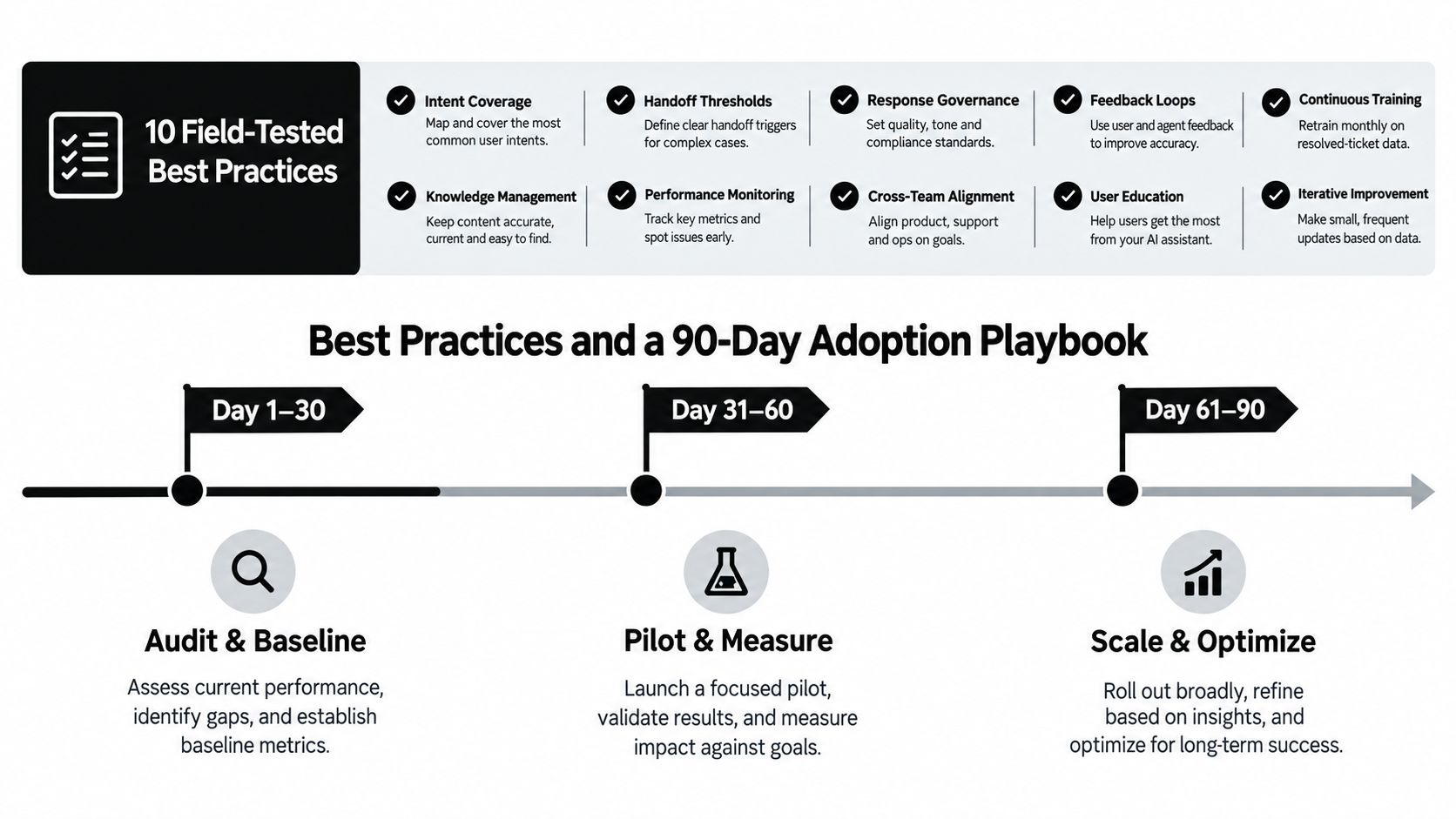
A sound adoption program keeps the scope narrow, the evidence visible, and the human path easy to use. Use these ten practices as operating rules:
- Start with intent coverage: Automate predictable, high-volume requests before complex cases.
- Set handoff thresholds: Escalate on low confidence, frustration, sensitive topics, and repeated failure.
- Ground every answer: Restrict responses to approved, maintained sources.
- Connect systems of record: Give the AI the context required to resolve, not merely describe.
- Limit permissions: Let actions follow the minimum access necessary.
- Preserve context: Transfer the request, history, sources, actions, and escalation reason.
- Separate metrics: Report AI-resolved, AI-assisted, and human-resolved outcomes independently.
- Review failures weekly: Turn bad answers and poor handoffs into content or workflow fixes.
- Enable agents: Train people to verify, override, and improve AI suggestions.
- Retrain operations continuously: Update intents, policies, and knowledge as products change.
Days 1 to 30
Audit the knowledge base, rank ticket categories, identify integration gaps, and establish a baseline for response time, resolution rate, escalation volume, CSAT, and agent effort. Select two or three predictable intents and document the exact conditions under which AI must stop.
Days 31 to 60
Run the pilot in parallel with agents. Review drafts, tune retrieval, fix missing content, test actions in a controlled environment, and adjust escalation triggers. Give agents a simple feedback mechanism so they can mark an answer as correct, incomplete, unsafe, or irrelevant.
Days 61 to 90
Expand only the workflows that met the agreed quality bar. Validate guardrails, compare outcomes against the pre-launch baseline, and calculate value from completed work rather than conversation volume. Keep high-risk topics human-led until the system has earned broader autonomy.
Leaders should review the program quarterly. Check whether the knowledge base is current, whether escalations reach the right owners, whether customers can reach humans without friction, whether permissions still match the use case, and whether automation is improving resolution rather than hiding demand. Teams looking to extend coverage outside business hours can also review this guide to 24/7 customer service.
The practical conclusion is straightforward. AI customer service creates value when it becomes part of the support operation, with connected data, bounded actions, deliberate escalation, and accountable human ownership. The chatbot is the visible surface. Integration depth is the product.
SupportGPT lets teams build and deploy AI support agents trained on their own sources, define guardrails and AI Actions, embed assistance in websites or products, and escalate complex requests to human teammates. If you're ready to replace a shallow chatbot pilot with a controlled service workflow, visit SupportGPT and evaluate how it fits your support operation.