10 AI Automation Examples for Smarter Workflows
Explore 10 ai automation examples across support, sales, e-commerce, and operations, with implementation tactics, trade-offs, and measurable outcomes.
Useful AI automation rarely starts with a chatbot. It starts with a bounded workflow that has a clear trigger, a known knowledge source, a narrow decision, and an obvious next action. That's why so many flashy demos collapse in production. The model sounds capable, but the workflow around it is vague, ungoverned, or impossible to audit.
That matters now because AI has already moved into day-to-day work. Microsoft reported that 75% of global knowledge workers were using generative AI at work in 2024, and 46% of those users had started within the previous six months, according to the Microsoft 2024 Work Trend Index. The implication isn't just adoption. It's that teams need better operating patterns, not more novelty.
The best way to evaluate ai automation examples is simple. Look at the workflow trigger, the data or knowledge source, the AI decision, the downstream action, the human safeguard, and the metric that tells you whether the automation is helping. That lens works for support, sales, commerce, and internal operations.
Support teams feel this first because customer conversations create repeatable, high-volume decisions. Tools like SupportGPT are relevant here because non-technical teams can deploy support agents, train them on their own sources, set guardrails, capture leads, and route complex conversations to human teammates without building a custom stack. That's a practical operating model, not just a chatbot widget.
Below are 10 AI automation examples that hold up better when you treat them as workflows instead of features.
1. AI-Powered Customer Support Chatbots
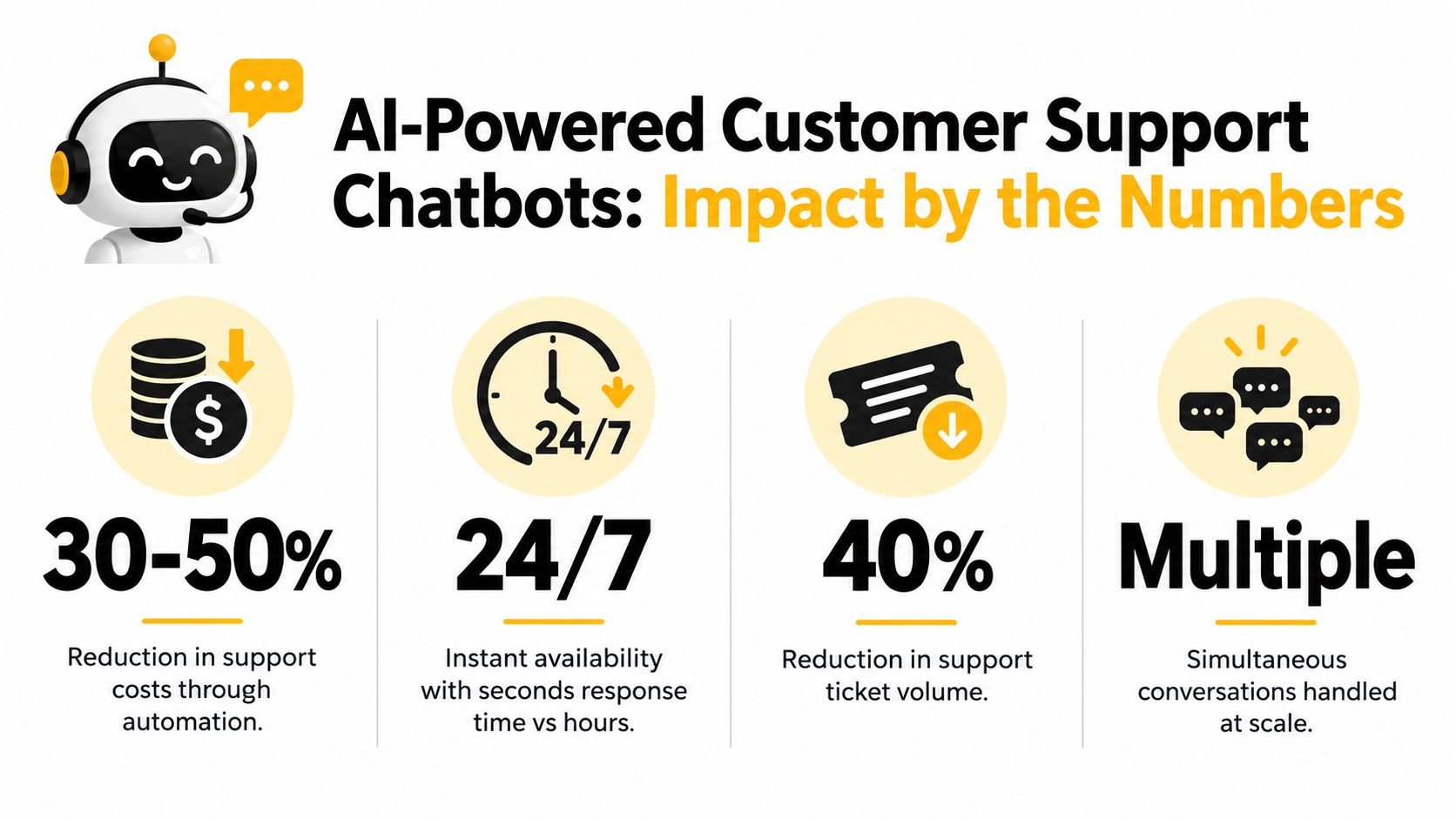
A support chatbot works best when the trigger is predictable. A customer lands on a pricing page, return policy page, or in-app help screen and asks a recurring question. The bot retrieves the answer from approved documentation, responds in plain language, and either resolves the issue or routes the conversation.
This is one of the most common ai automation examples because the operating logic is easy to define. Trigger: inbound question. AI decision: answer, ask a clarifying question, or escalate. Downstream action: send help content, collect details, or create a handoff. Human safeguard: route billing disputes, cancellation threats, or policy exceptions to a person.
What creates value
The value isn't “instant answers” by itself. The value is consistency at scale. SaaS companies use bots for onboarding questions, Shopify stores use them for returns and shipping, and beauty or retail brands use them for product guidance and order status.
For implementation patterns, it helps to study real customer service AI examples instead of generic chatbot promises. The strongest setups are trained on actual support conversations and internal policy docs, not marketing copy.
Practical rule: If the answer depends on a stable source of truth, automate it. If the answer depends on negotiation, edge-case judgment, or account history interpretation, escalate it.
What goes wrong
Most failures come from weak boundaries. Teams let the bot answer everything, even when the knowledge base is thin or contradictory. The result is polite misinformation.
Monitor containment quality, escalation reasons, unresolved repeat contacts, and the topics that generate the most fallback responses. Those signals tell you whether the workflow is mature or just busy.
2. Automated FAQ and Knowledge Base Search
Search is often a better automation target than full conversation. When someone asks, “How do I change my invoice email?” they don't always need a bot to simulate a human. They need the right article, step list, or policy excerpt without hunting through menus.
The workflow is straightforward. Trigger: a user types a natural-language question. Knowledge source: your help center, docs, release notes, or product guides. AI decision: retrieve and rank the most relevant passage. Downstream action: show the answer, highlight the source article, and offer escalation if confidence is low.

Where this workflow beats traditional search
Keyword search breaks when the user's language doesn't match your documentation language. Semantic retrieval closes that gap. GitHub-style docs, developer help centers, and product knowledge bases all benefit because users phrase the same problem in wildly different ways.
A purpose-built knowledge base chatbot can sit on top of existing documentation and turn static articles into an interactive answer layer. That's often the fastest path for teams that already have decent docs but poor discoverability.
Risks to watch
This workflow depends on documentation hygiene. If your content is outdated, duplicated, or written with internal jargon, AI retrieval will surface the wrong answer faster.
Use a short feedback loop:
- Track failed searches: Review the questions that lead to no useful answer.
- Remove stale content: Archive conflicting or outdated articles instead of leaving them searchable.
- Expose citations: Show users which document the answer came from so they can verify it.
Search automation works when the retrieval layer is honest about uncertainty and the content underneath is maintained.
3. AI-Powered Self-Service Troubleshooting and Guided Solutions
Troubleshooting is different from FAQ search because it's diagnostic. The user doesn't just want information. They want the system to narrow the problem and walk them through the next step.

A good troubleshooting workflow has a firm shape. Trigger: a user reports a known issue category such as password reset, failed sync, installation error, or device connectivity problem. AI decision: ask one diagnostic question at a time, map the response to a tested branch, and provide the next action. Human safeguard: escalate if the issue leaves the known decision tree or touches security, payments, or account ownership.
Apple-style troubleshooting wizards, ISP connection checkers, and software setup assistants all follow this pattern. The strongest versions don't pretend to reason about everything. They narrow the universe of possible causes and make progress through controlled steps.
Why this tends to work
Bounded task-level automation is still the most dependable model in production. McKinsey's workplace reporting framed current generative AI gains around localized boosts such as smarter search, contract generation, faster customer-information processing, and targeted sales actions, while a later automation report noted that only 21% of organizations run AI workflows at enterprise scale. McKinsey's analysis points to orchestration and governance, not raw model capability, as the key barrier in production-ready automation, as summarized in its workplace AI report.
That's exactly why guided troubleshooting works. The workflow is narrow, testable, and auditable.
Here's a walkthrough example teams can study before building their own flows:
Failure mode
The common mistake is trying to build one universal support agent instead of separate guided flows for top issues. Start with a small set of repeat problems and harden those paths first. Measure where users abandon the flow, where they ask for a human, and which branch creates repeat tickets.
4. Intelligent Lead Capture and Qualification
High-intent leads are usually lost in the first minute, not at the contract stage.
This workflow works best when it treats qualification as an operating decision, not a longer chat. The trigger is clear behavior: a visitor spends time on pricing, services, demo, or comparison pages, then opens chat or hesitates near a form. The AI decision is to classify intent, collect only the fields needed for the next step, and choose the downstream action. That action might be booking a meeting, routing the conversation to sales, or capturing contact details for follow-up.
The value comes from speed and structure. Sales gets cleaner handoffs. Prospects avoid long forms before they trust the company enough to share detail.
A consulting firm might ask about project scope, timeline, and budget range. A B2B SaaS company might collect team size, primary use case, and current stack. An ecommerce brand usually needs less. Email, product interest, and purchase timing are often enough.
Workflow design that holds up
Keep the flow short and operational. Every question should map to a decision in the CRM or routing logic. If the answer does not change owner, priority, or next action, cut it.
For teams building conversational funnels, lead capture automation works when it is tied directly to CRM fields, lead scoring rules, and calendar availability. Without that connection, the bot produces transcripts that a rep still has to read and clean up by hand.
Optimize for handoff accuracy, not conversation length.
Human review still matters. Set a safeguard for edge cases such as large accounts, vague enterprise inquiries, procurement questions, and visitors who ask for pricing exceptions. Those should go to a person fast, even if the model is reasonably confident.
What to monitor
This workflow fails in predictable ways. Too many questions increase drop-off. Vague prompts create weak qualification data. Aggressive filtering can push away buyers who would have converted with a quick human reply.
Track the metrics that show whether the workflow is helping operations.
- Conversation-to-contact capture rate
- Drop-off before email or phone capture
- Sales acceptance rate on routed leads
- Meeting show rate for AI-qualified bookings
- Reopen rate, where humans have to ask for missing basics
If those numbers stall, the fix is usually simple. Shorten the flow, tighten the qualification logic, or change which leads get an immediate human handoff.
5. Conversational Product Recommendations
Static recommendation engines are good at “people who bought this also bought that.” Conversational recommendation is better when the product choice depends on context the catalog doesn't know yet.
An eyewear retailer can ask about face shape, lens use, and budget. A laptop seller can ask whether the buyer needs portability, gaming power, or video editing performance. A SaaS company can ask team size, collaboration needs, and admin requirements before suggesting a plan.
The workflow anatomy
The trigger is usually hesitation or comparison behavior. A shopper opens chat on a collection page, pricing page, or product detail page. The AI decision is to ask clarifying questions, rank suitable options, and explain why those options fit. The downstream action can be adding products to cart, surfacing a comparison, or recommending a sales conversation.
This workflow creates value because it reduces choice overload. It also improves trust when the system explains trade-offs instead of pushing the highest-priced item.
What breaks it
Recommendation quality collapses when the AI lacks structured product data. If attributes are inconsistent, inventory is out of sync, or the recommendation logic doesn't reflect real buying constraints, the conversation feels polished but useless.
Use a practical guardrail set:
- Ask budget early: It narrows options and prevents irrelevant recommendations.
- Explain the reasoning: Tell the buyer why one option fits better than another.
- Sync inventory: Don't recommend products that aren't available.
- Flag exceptions: If the request is unusual or high-consideration, offer human advice.
This works best when merchandising, support, and product marketing agree on the actual buying logic before the AI goes live.
6. Automated Ticket Routing and Triage
Ticket triage is one of the cleanest automation opportunities because the decision is operational. You are not trying to solve the issue yet. You are deciding where it should go and how fast.
A typical workflow starts when a support request enters Zendesk, Intercom, email, or an in-app queue. The AI extracts issue type, urgency, account context, and possible sentiment. It then classifies the request and assigns it to the right team, queue, or SLA path. That can mean routing billing requests to finance, bug reports to technical support, or VIP accounts to a priority queue.
Why operations teams like this first
Unlike broad “agentic” support, routing can be validated against historical ticket data. You can compare AI classification with past human labels and tighten the rules before full rollout.
There's also real evidence that this category can produce measurable operational gains. One multinational bank's AI-driven IT service management automation increased automation coverage from 12% to 48% of inbound requests over 12 months, cut mean time to resolution from 6.5 hours to 2.1 hours, reduced cost per ticket by 43%, and lifted CSAT from 82% to 92%, according to this ITSM automation ROI analysis.
Common implementation mistake
Teams often train the model on messy historical categories that agents never used consistently. If your label taxonomy is weak, AI will automate the confusion.
Clean up categories first. Then monitor reassignment rate, time to first owner, first-contact resolution, and the queue types that still require manual triage.
7. AI-Driven Data Extraction and Form Automation
Data extraction is one of the most underrated ai automation examples because it doesn't look flashy. It just removes clerical work. But in operations, support, insurance, lending, and onboarding, that's often where the advantage is.
The trigger is a message or document arriving in a channel. An email includes claim details. A support conversation contains account identifiers and issue context. A loan application includes financial facts in mixed formats. The AI reads the unstructured input, extracts approved fields, and writes them into a ticketing system, CRM, or form.
Where this creates real leverage
This workflow reduces copy-paste work and standardizes records. It also shortens the gap between intake and action because the downstream team starts with structured data instead of a raw paragraph.
Independent 2026 benchmark reporting across 14 industries found median AI automation outcomes of a 47% reduction in manual processing time and a median ROI payback period of 4.2 months, according to this AI automation ROI benchmark. That's especially relevant for high-volume document and back-office workflows.
Guardrails that matter
Extraction should not be treated as “set and forget,” especially when fields affect compliance, money movement, or identity.
- Start with high-confidence fields: Names, IDs, order numbers, and dates are easier than nuanced eligibility judgments.
- Use human review on sensitive records: Confidence thresholds should decide when a person checks the output.
- Map directly into systems: If data still needs manual re-entry, you haven't automated much.
- Show extracted values: Let users or staff confirm what the system captured.
This workflow succeeds when teams distinguish extraction from interpretation. Let AI collect facts first. Leave ambiguous decisions to a review layer.
8. Proactive Customer Issue Detection and Resolution
Reactive support waits for the ticket. Proactive support looks for known failure patterns and acts before the customer complains.
The workflow starts with a monitored signal. A SaaS integration fails repeatedly. A user nears a usage threshold. A mobile app crashes after a recent release. An ecommerce checkout error spikes for a product line. The AI analyzes the event pattern, decides whether it matches a known issue, and triggers a response such as a warning, a suggested fix, a silent remediation, or a support alert.
Why this is harder than it looks
The workflow sounds elegant, but it only works when issue patterns are high-confidence. False alarms erode trust fast. Automatic “fixes” can also create bigger problems if they change settings or workflows without context.
The strongest versions start small. For example, a cloud platform can notify a customer before they hit a limit. A SaaS product can detect a failed sync and guide reconnection. A commerce brand can spot common order-status confusion and push a tracking update before the customer asks.
Reliable proactive automation starts with detection rules you could explain to an auditor or a support lead in one minute.
What to watch
Review false positives, customer responses to proactive outreach, issue recurrence after intervention, and the percentage of detections that still require human follow-up. If the alerting logic is noisy, refine the detection layer before adding more autonomy.
9. Multilingual Support and Global Customer Service
Multilingual support automation is often framed as translation, but that's too narrow. The workflow is language detection, answer retrieval, tone control, and escalation routing in the customer's preferred language.
The trigger is simple. A customer starts a conversation in Spanish, German, Japanese, or another language your team doesn't cover natively around the clock. The AI identifies the language, retrieves the answer from approved sources, responds in that language, and routes the case to a human if the topic is sensitive or unclear.
Where teams get value
This workflow is especially useful for ecommerce, SaaS, and marketplaces that already have global demand but don't have region-specific support staffing at all hours. It extends coverage without forcing every query through a manual translation chain.
For teams building this capability, multilingual customer support works best when the system is trained on product terminology, policy language, and common customer intents from each region. Generic translation alone isn't enough.
Distribution matters
The business case for multilingual automation can be strong, but the benefits aren't always shared evenly across workers and firms. The ILO's 2025 update found the mean automation score across occupations was 0.29, only slightly below 0.30 in 2023, and emphasized that gains are not distributed uniformly across roles, according to the ILO research brief on automation exposure.
That's worth remembering in global support design. AI can widen service coverage, but without thoughtful routing and workload design, it may shift harder conversations onto smaller human teams.
10. Sentiment Analysis and Customer Emotion Monitoring
Sentiment analysis is useful when you treat it as a prioritization layer, not a mind reader. The workflow begins when a message, review, email, or support conversation enters the system. The AI analyzes tone, frustration signals, urgency cues, and escalation risk. Then it adjusts routing, flags at-risk conversations, or alerts a manager.
Banks, ecommerce brands, and SaaS support teams all use some version of this. A refund request with rising frustration should not sit in the same queue behavior as a neutral product question. A cluster of angry conversations about the same feature should trigger product or incident review.
What sentiment should actually do
The downstream action matters more than the label. “Negative” by itself isn't operationally useful. “Negative plus high-value account plus unresolved issue” is useful because it changes who should respond and how fast.
Conversation-level analytics platforms can help teams turn emotion signals into workflow rules. If you want a practical model for that, conversation analytics software is relevant when it feeds escalation, QA review, or systemic issue detection instead of just producing dashboards.
What not to trust blindly
Sentiment models still miss nuance. Sarcasm, short replies, cultural tone differences, and issue-specific language can confuse classification. Don't let sentiment automation close tickets, issue compensation, or infer intent by itself.
Use it to rank attention. Then verify its accuracy against real outcomes like reopened cases, churn-risk flags, complaint categories, and manager reviews.
10 AI Automation Examples, Feature Comparison
| Solution | Implementation Complexity 🔄 | Resource Requirements ⚡ | Expected Outcomes 📊 | Ideal Use Cases ⭐ | Key Advantages 💡 |
|---|---|---|---|---|---|
| AI-Powered Customer Support Chatbots | Moderate 🔄 Days–weeks to set up; ongoing training | Moderate ⚡ Conversational models, hosting, analytics | High 📊 30–50% cost reduction; 24/7 instant responses; lower ticket volume | High-volume FAQs, e-commerce, SaaS onboarding ⭐ | Instant 24/7 support; scalable; frees agents 💡 |
| Automated FAQ and Knowledge Base Search | Low–Moderate 🔄 KB structuring and indexing required | Low ⚡ Content + semantic search/embeddings | Moderate 📊 25–40% ticket reduction; improved self-service | Documentation-heavy products, developer docs ⭐ | Better findability; cost-effective to scale 💡 |
| AI-Powered Self-Service Troubleshooting & Guided Solutions | High 🔄 Complex branching and frequent updates | High ⚡ Authoring flows, multimedia, diagnostic logic | High 📊 Resolves 70–80% common issues; 35–50% ticket reduction | Technical troubleshooting, ISPs, device support ⭐ | Empowers customers; reduces escalations; captures diagnostics 💡 |
| Intelligent Lead Capture and Qualification | Moderate 🔄 Conversation design + routing rules | Moderate ⚡ CRM integration, lead-scoring models | High 📊 25–40% lift in conversions; faster time-to-lead | B2B SaaS, enterprise sales, high-ticket services ⭐ | Higher-quality leads; reduced friction; instant context for sales 💡 |
| Conversational Product Recommendations | Moderate–High 🔄 Catalog syncing and personalization logic | Moderate ⚡ Product data, inventory sync, personalization models | High 📊 15–30% increase in AOV/conversion; better product discovery | E-commerce, retail, personalized sales ⭐ | Personalized suggestions; higher AOV; reduced returns 💡 |
| Automated Ticket Routing and Triage | Moderate 🔄 Model training on historical tickets; rules setup | Low–Moderate ⚡ Ticketing integration, monitoring, training data | High 📊 20–35% faster resolution; 80–90% fewer misroutes | Mid–large support teams with multi-team routing ⭐ | Automates triage; improves SLA compliance and workload balance 💡 |
| AI-Driven Data Extraction and Form Automation | Moderate 🔄 Extraction pipelines + validation workflows | Moderate ⚡ OCR/NLP, mapping to CRM, human review initially | High 📊 70–80% reduction in data entry time; quick ROI (1–2 months) | Document-heavy workflows (insurance, loans, healthcare) ⭐ | Speeds processing; improves data accuracy; reduces manual entry 💡 |
| Proactive Customer Issue Detection & Resolution | High 🔄 Complex anomaly detection and remediation logic | High ⚡ Continuous telemetry, ML ops, automated remediation scripts | High 📊 Prevents churn; 15–25% LTV uplift; 30–40% fewer escalations | SaaS, cloud services, telecom, subscription businesses ⭐ | Anticipates problems; improves retention and trust 💡 |
| Multilingual Support & Global Customer Service | Moderate 🔄 Language detection, translation QA, localization | Moderate ⚡ Multilingual models + native-speaker review for quality | High 📊 Faster market expansion (2–3x); improved non‑English CSAT | Global merchants, marketplaces, international SaaS ⭐ | Scales global support cost‑effectively; consistent brand voice 💡 |
| Sentiment Analysis & Customer Emotion Monitoring | Moderate 🔄 Model training on diverse language and context | Moderate ⚡ Labeled conversation data, real-time scoring, dashboards | Moderate 📊 10–15% NPS improvement; early churn detection | Customer success, retention, social and brand monitoring ⭐ | Flags at‑risk customers; informs tone and escalation strategies 💡 |
Turn Examples Into an Automation Roadmap
Teams shouldn't start with the most ambitious workflow. They should start with the cleanest one. In practice, that usually means retrieval and repetitive support questions first, then guided troubleshooting and ticket triage, then lead capture, recommendations, extraction, and finally proactive workflows that depend on stronger monitoring and orchestration.
That sequence matches how AI is being adopted in business. The Federal Reserve noted that surveys of firms found AI adoption rates ranging from 5% to about 40%, worker surveys showed 20% to 40% workplace usage, the Dallas Fed survey found 38.3% of firms using AI in April 2024, and the U.S. Census BTOS showed 78.4% annualized growth in AI adoption, according to the Federal Reserve note on workplace AI uptake. Adoption is broadening, but that doesn't mean every workflow is ready for full autonomy.
A practical rollout starts with one high-volume, low-risk process. Pick something that already has a stable trigger, a clear source of truth, and a measurable handoff. Support FAQs, order-status questions, password-reset guidance, and ticket routing are usually better starting points than cross-functional “AI agents” that are expected to improvise across systems.
Then define a baseline metric before you automate. That might be time to resolution, human touches per case, self-service resolution quality, or handoff completeness. If you skip the baseline, you'll end up measuring usage volume instead of business impact.
Add confidence thresholds and explicit human escalation. That means deciding in advance what the AI can answer, what it can suggest, what it can fill in, and what must pause for review. A lot of projects either become reliable or become expensive rework at this point.
The strongest automations don't replace process design. They force you to make it explicit.
Test the AI workflow against the current one. Compare outputs, not just speed. Did the customer get the right answer? Did the lead reach the right rep? Did the document field land correctly in the CRM? Did triage reduce queue friction or just move it around?
Before scaling, review conversation logs or operational traces every week. Look for repeated escalations, missing source content, brittle prompts, and edge cases that humans keep correcting. That's where most of the improvement happens.
If you're building support-first workflows, a platform like SupportGPT can fit naturally into this roadmap because it lets teams train agents on their own sources, apply guardrails, route complex cases, and extend into lead capture or AI actions without forcing a custom build from day one. What matters most is not the interface. It's whether each AI decision is tied to a clear business action.
Even small details in customer communication can become workflow assets when handled deliberately, whether that's triage logic, escalation phrasing, or something as simple as a polished chatGPT email signature. The same principle applies across this whole list. AI creates advantage when it is attached to repeatable operations, measurable outcomes, and human control points.
SupportGPT gives teams a practical way to build the kinds of support automations covered here, including knowledge-based answers, escalation rules, multilingual support, lead capture, and workflow actions. If you want to turn these ai automation examples into a live support system without stitching together multiple tools, visit SupportGPT.