10 Customer Service AI Examples That Work
Explore 10 customer service ai examples with dialogues, use cases, KPIs, training data, prompts, guardrails, and SupportGPT implementation tips.
Useful customer service AI isn't the bot that says the most. It's the system that stays inside a clearly bounded workflow, answers from approved material, hands off cleanly when confidence drops, and can be measured after launch. That sounds less exciting than “autonomous support,” but it's what works in production.
That matters even more now because AI has moved from pilot status into the service stack. One industry summary reported that 66% of service organizations were running AI agents in 2026, up from 39% in 2025, while 91% of CX leaders were under executive pressure to deploy AI (industry adoption summary). The practical lesson isn't that every team should automate everything. It's that buyers and operators now need better standards for what good deployment looks like.
The best customer service AI examples share the same bones. There is a specific customer problem. The AI has a narrow role. The team knows what content trains it, which actions it may take, when it must escalate, and which metrics prove it's helping instead of creating rework.
Use the examples below that way. For each one, look at five things: the workflow, the dialogue pattern, the data requirements, the guardrails, and the KPIs. Where this article mentions percentages or time-based outcomes from source material, treat them as benchmarks to validate in your own environment, not guaranteed results. Independent guidance recommends measuring end-to-end outcomes such as handle time, first-contact resolution, cost per contact, and CSAT by handler, with year-one targets often cited in the ranges of 45% to 60% resolved deflection, 20% to 30% lower assisted handle time, and 20% to 35% lower cost per contact when a program is working well (AI contact-center ROI guidance).
1. AI-Powered Chatbots for Instant Customer Support
The most reliable starting point is still the humble support chatbot. Not a wide-open general assistant. A bot that handles a defined set of intents such as order status, password reset steps, return policy questions, account access checks, and subscription changes.

Sephora-style product guidance, Shopify merchant setup help, and Bank of America's Erica all point to the same pattern. The AI succeeds when the question space is repetitive, the source material is stable, and the user can reach a human when the path gets messy.
What to configure
Start with a prompt that limits scope. Tell the bot which intents it owns, which sources it may cite, and which cases it must escalate. Then map dialogue guidance for each high-volume flow.
Sample support dialogue guidance:
- Opening move: “Ask one clarifying question if the request is ambiguous.”
- Knowledge use: “Answer only from approved help center articles and account-safe tool outputs.”
- Fallback: “If the answer isn't in the source material, say that clearly and offer human help.”
- Sensitive requests: “Never ask for full card details, passwords, or government IDs in chat.”
A lot of teams skip source discipline. That's where chatbot projects start sounding smart and becoming dangerous. If you're evaluating feature depth, this breakdown of AI chatbot features for support teams is the right lens.
What to measure and improve
Use chatbot logs to find the top failed intents, unclear handoffs, and repeated customer rephrasing. Good chatbots don't just deflect. They preserve trust.
Practical rule: If a chatbot can't explain a policy with the same wording your best agent would use, don't let it answer that policy yet.
A short deployment walkthrough helps teams see the shape of this setup in practice:
SupportGPT path: upload approved articles, define quick prompts for order tracking and account questions, embed the website widget, and set natural-language escalation rules for billing disputes or emotionally charged conversations.
2. Intelligent Ticket Routing and Triage
Bad routing poisons the whole queue. A refund request sent to technical support adds handle time, creates one more transfer, and teaches the customer that your system does not understand the problem.
This is one of the customer service AI examples where the workflow matters more than the model. Good triage starts with a real intake path. Channel, account tier, language, product line, order status, and intent all need to be available at classification time. If those fields are missing or unreliable, the model will guess, and agents will spend the day cleaning that up.
Routing logic that holds up
Start with one operational question: what decision is the model making? The right first version is narrower than "route every ticket." Route only to staffed queues that have clear ownership, such as billing, technical support, returns, onboarding, or account security.
A workable prompt looks like this:
Read the ticket and assign one primary queue. Use customer intent, product area, urgency language, account tier, channel, and permissions needed to resolve the case. If confidence is below threshold or ownership is unclear, send to general triage, include the top two candidate queues, and explain the uncertainty in one sentence.
The dialogue guidance should shape what the AI extracts, not just where it sends the case:
- If the request includes two issues: route by the issue blocking resolution first, and note the secondary issue for the agent.
- If urgency is implied but not explicit: flag for review instead of forcing a high-priority route.
- If the customer mentions cancellation, fraud, or legal risk: send to the protected queue and suppress automated replies until reviewed.
- If required account context is missing: request the minimum identifying detail allowed by policy before final assignment.
Training data decides whether routing will stay clean after launch. Use resolved historical tickets with reliable queue outcomes, agent-applied corrections, and a short reason code for reroutes. Skip old data if your queue design has changed. A model trained on outdated ownership rules will keep recreating them. For teams refining specialist coverage, this guide to skill-based routing for support operations is useful because it forces cleaner queue definitions before you automate.
The guardrails are simple and strict. Set a confidence threshold. Keep a general triage fallback. Log every reroute, and review whether the miss came from weak taxonomy, missing metadata, or ambiguous customer language.
What to measure in production
Misroute rate is the headline metric, but it is not enough on its own. Track time to first owner, reroute volume per queue, first-touch resolution after routing, and the percentage of low-confidence cases sent to manual triage. Those numbers tell you whether the model is reducing work or just shifting it downstream.
Channel design matters too. Recent CX reporting noted rising AI adoption, uneven operational rollout, and that the same reporting found only about one in five agents has generative-AI tools. It also showed voice AI growing from 6% of inbound contact-center volume in 2024 to 19% in 2026, while chat's share fell from 52% to 41% (CX deployment and channel-shift reporting). Routing rules should cover voice transcripts, email, forms, and chat intake, not just web messaging.
SupportGPT path: import historical tags and queue outcomes, map intents to live teams, add confidence-based fallback rules, write short routing prompts for each queue, then review low-confidence and rerouted tickets weekly to tighten labels, thresholds, and escalation rules.
3. Sentiment Analysis and Emotion Detection
Sentiment detection changes support outcomes only when it triggers a different next step. The practical use case is simple: catch rising frustration early, change the reply style, and hand off before the customer has to repeat themselves.
A common workflow is a delayed-order or refund conversation that starts neutral, then turns tense after two failed attempts at self-service. In that case, sentiment should not label the customer as "angry" and stop there. It should trigger specific guidance for the bot or agent: acknowledge the issue, stop asking redundant questions, surface the order history, and offer a human handoff if frustration continues.
Use short response rules the model can follow:
- Negative tone plus repeat contact: apologize once, summarize the issue, and offer escalation.
- Confusion without hostility: switch to step-by-step instructions and avoid policy-heavy wording.
- Mixed sentiment: continue troubleshooting, but monitor for another spike before changing the flow.
Training quality matters more than model complexity here. Feed the system resolved transcripts with tags for frustration, de-escalation, escalation outcome, and customer effort signals such as repeat contact or failed self-service. Include examples with sarcasm, terse replies, and multilingual phrasing, because those are common failure points. Prompting should also stay narrow: "Detect customer emotion shifts from the last 3 messages. Recommend reply style only. Do not infer refund eligibility or fault."
The guardrails are operational. Sentiment should adjust tone, queue priority, and handoff timing. It should not decide policy, agent performance, or case truth. Managers also get more value from pattern review than agent scoring, which is why a guide to choosing conversation analytics software is useful for teams that want to inspect recurring friction across conversations.
What to measure depends on the intervention. Track escalation acceptance rate after negative sentiment detection, resolution rate for sentiment-flagged cases, customer effort signals such as repeat contacts, and false-positive rates on short messages. Review transcripts where the model flagged strong frustration but the customer was brief, or where it missed a clear emotional turn.
SupportGPT path: start with a small set of sentiment states, map each state to approved dialogue guidance, add triggers for repeat-contact context, preserve transcript history in every handoff, and review flagged conversations weekly to tighten prompts, examples, and escalation thresholds.
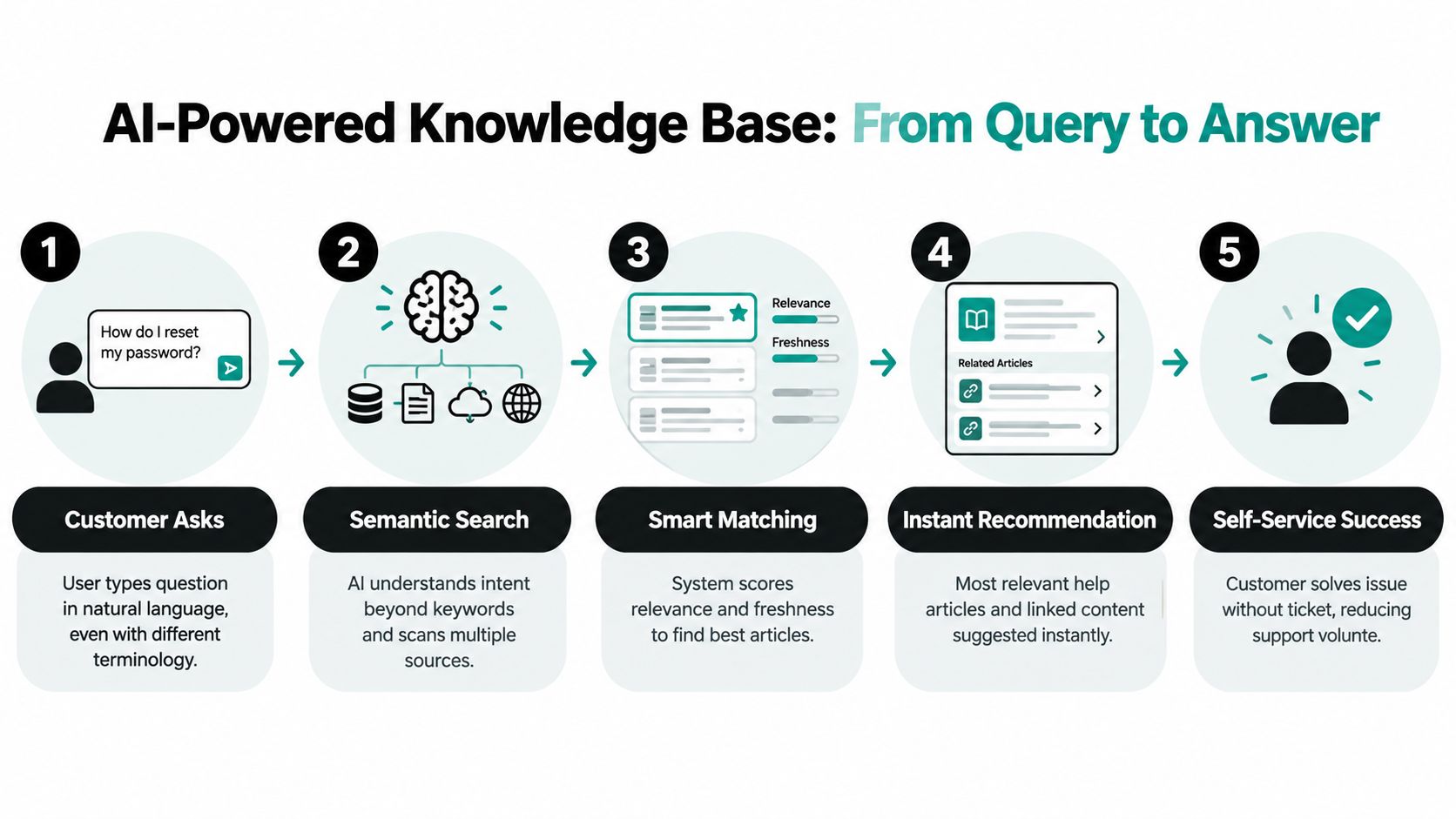
4. AI-Powered Knowledge Base and Content Recommendations
A lot of “AI support” is really retrieval quality. If the system can find the right article, section, or troubleshooting step at the right moment, customers and agents both move faster.
Slack-style help search, GitHub documentation recommendations, and Notion-like semantic lookup all show the same operating model. The AI doesn't need to invent great answers. It needs to retrieve the right approved answer and present it clearly.
Build the source layer first
Before rollout, clean the knowledge base. Merge duplicates, retire outdated docs, tag product names consistently, and make policy language explicit. Semantic search can tolerate different wording. It can't fix contradictory content.
Sample content prompt:
Answer using the approved help center only. Prefer the newest policy page when sources conflict. Cite article titles internally for traceability. If no matching source exists, offer escalation instead of generating a workaround.
The strongest versions of this workflow support both self-service and agent-assist. A customer types “my invoice looks wrong,” and the system can surface the billing FAQ, tax explanation, and refund policy in a single guided answer. For the operational side of that buildout, AI knowledge management is the core capability.
KPIs and improvement loop
Track search success, article usefulness feedback, repeat searches on the same topic, and assisted resolution after a recommendation appears. If users keep opening a document and still escalate, the article may be technically correct and operationally useless.
Historically, this category has sped up because deployment got easier. Industry reporting in 2026 said over 70% of customer service organizations had either deployed AI or were actively piloting it, up from roughly 45% in 2023. The same reporting said average AI chatbot deployment time had fallen from 3 to 6 months in 2022 to 1 to 7 days in 2026 on modern platforms, and included a projection that AI-powered customer service could handle 85% of interactions without human agents by 2028 (2026 customer service AI deployment trends).
SupportGPT path: train the agent on approved docs and URLs, test retrieval in the playground, then expose the same source set to both the public widget and internal agent prompts.
5. Predictive Analytics for Customer Issues
The practical use of predictive support is simple. Catch a support problem before the customer has to report it.
That usually means watching for patterns you already have in your systems: repeated payment failures, stalled onboarding steps, sudden drops in product usage, delivery exceptions, or a spike in login resets from the same account. The model is only one part of the workflow. The work is deciding which signals justify outreach, what message is safe to send, and when a human should review it first.
A concrete example helps. A SaaS team sees that customers who fail to complete two setup events in the first week often open a “how do I get started?” ticket a few days later. Instead of waiting, support can trigger a short outreach message with one setup step, one help article, and a clear handoff option.
Sample dialogue guidance for that outreach:
We noticed your workspace may still be in setup. The next step is connecting your data source in Settings. If you'd like, reply here and support can help you finish it.
The phrasing matters. Keep it specific to the service issue, not creepy about behavior tracking. “Your setup may still be incomplete” is easier to accept than “we noticed you clicked around but did not finish onboarding.”
Configuration determines whether this workflow helps or annoys people. Define the triggering event, minimum confidence threshold, suppression rules, channel, and response path. For example, do not send three nudges in three days. Do not send a billing warning if finance already has an open ticket. Do route any reply from a high-value account into the queue with the prediction reason attached.
Training inputs should include event logs, account attributes, ticket outcomes, historical incident tags, and examples of outreach that led to resolution versus escalation. If the underlying labels are weak, the predictions will be weak too. Teams often discover that they can model “who contacted us” faster than “who needed help,” and those are not the same thing.
Measure the intervention, not just the score. Useful KPIs here are prevented ticket volume, reply rate to proactive outreach, resolution rate after outreach, false-positive rate, time to resolution, churn or cancellation risk after intervention, and opt-out or complaint rate. A model that predicts well but causes unnecessary messages is still a bad support system.
Guardrails need to be tighter than they are for reactive chat. Outreach should use approved reasons, approved channels, and approved message types. Sensitive categories, account risk language, and anything that could sound like surveillance should be blocked or require human approval.
SupportGPT implementation path: connect product or billing events through AI Actions, define a small set of trigger conditions, draft proactive messages with approved prompt instructions, and send replies into support with the original event context included. Start with one use case, such as failed onboarding or recurring payment trouble, then tune thresholds based on false positives and saved tickets.
6. Automated Response Suggestions for Agents
If I had to pick one low-risk, high-utility AI use case for most support teams, it would be response suggestions. Agents stay in control. The model speeds up drafting, surfaces policy language, and reduces blank-page fatigue.
Gmail Smart Compose, Salesforce Einstein suggestions, and Intercom-style reply drafting all work because they assist rather than decide. That's a healthier place to start than full automation for many teams.
What makes suggestions usable
The best suggestions are short, source-grounded, and editable. Agents reject bloated drafts, fake confidence, and robotic empathy. They accept concise replies that already contain the right facts.
Sample agent-assist prompt:
Draft a reply in the company's support tone. Use approved sources only. Keep it under five sentences unless troubleshooting requires steps. If policy is unclear, ask the agent to verify before sending.

Metrics that matter
Look at suggestion acceptance, edit distance, send time, policy compliance, and CSAT by handler. If agents rewrite every draft, the AI isn't helping. If they send weak drafts unchanged, your guardrails are too loose.
A stronger evaluation stack goes beyond productivity. Production systems should also be watched for hallucination rate, escalation quality, multi-turn context retention, tool-use accuracy, judge-based quality scores with bias controls, and jailbreak resilience (customer support AI evaluation framework).
SupportGPT path: train on macros, policy docs, and prior high-quality tickets, then create quick prompts for refund explanations, bug follow-ups, and renewal questions inside the agent workflow.
7. Multi-Language Support and Automated Translation
Multilingual support is one of the clearest examples of AI removing operational bottlenecks. It lets a small team serve more markets without staffing every language pair from day one.
But translation alone isn't enough. Support teams need glossaries, tone rules, locale-specific policy handling, and a process for reviewing sensitive messages. That's especially true for refunds, legal notices, account security, and medical or financial contexts.
What to localize beyond words
Google Translate API-style workflows, Shopify-style global merchant support, and Airbnb-style multilingual messaging all depend on terminology control. Product names, shipping statuses, billing labels, and account actions must stay consistent across languages.
Sample translation guidance:
- Preserve meaning: translate intent, not just literal wording.
- Keep product terms fixed: don't translate branded feature names unless approved.
- Flag ambiguity: if a source sentence could mean two things, ask for human review.
- Escalate sensitive cases: compliance, legal, and security requests shouldn't rely on raw machine output.
A translated wrong answer is still a wrong answer. Localization scales only after source accuracy is under control.
KPIs and handoff design
Measure containment by language, human review rate, mistranslation reports, and satisfaction by locale. Also check whether translated self-service content reduces duplicate inbound questions or shifts confusion to human queues.
SupportGPT path: train one agent on approved multilingual sources, define language-specific prompts, use the widget to detect and respond in the user's language, and escalate sensitive threads to human reviewers with both original and translated text attached.
8. Smart Escalation and Handoff to Human Agents
The handoff is where teams reveal whether they built a support system or a demo. Customers don't mind automation nearly as much as they mind getting trapped in it.
Zendesk, Intercom, Dialogflow, and Drift all point to the same requirement. The AI must know when to stop. Not eventually. Early enough to preserve confidence.
Good escalation is specific
Don't use a vague rule like “escalate complex issues.” Define actual triggers. Refund exceptions. Threats of cancellation. Identity disputes. Security concerns. Repeated failed troubleshooting. Multiple turns without progress.
Sample handoff prompt:
Escalate when the user requests a person, when approved sources don't answer the issue, when the request involves account ownership or policy exceptions, or when the customer repeats the same unresolved problem. Summarize the issue, actions already taken, cited sources, and open questions.
Many teams underestimate transcript quality. A human shouldn't need to reread the entire conversation to understand what happened.
What to inspect every week
Review escalated conversations for timing, summary quality, and customer effort. Handoff quality matters as much as escalation rate. A low escalation rate can mean the bot is overreaching. A high escalation rate can mean scope is too broad or content is weak.
SupportGPT path: write natural-language escalation policies, pass transcript summaries into the human queue, and track which intents repeatedly require takeover so you can tighten boundaries or improve source content.
9. Conversational AI for Proactive Outreach and Lead Capture
A proactive chat widget should do more than collect emails. It should reduce friction at the exact moment a visitor is deciding whether to buy, book, or leave.
This workflow sits between support, sales, and success, so sloppy setup creates predictable problems. Sales gets low-intent conversations. Support gets plan and pricing questions it should never own. Visitors get trapped in a qualification script that asks for too much before giving any help.
A better pattern is simple. Start with a narrow job, such as routing plan-fit questions, booking demos, or identifying accounts that need a sales engineer. Then write dialogue rules that earn the next question.
For example, a B2B SaaS team might configure the assistant to greet returning pricing-page visitors with: “I can help compare plans, answer setup questions from approved docs, or book time with the right specialist.” If the visitor asks about SSO, data residency, or migration, the bot should collect company size, timeline, and use case only if those fields change routing or meeting ownership. If they do not, cut them.
The dialogue design matters as much as the widget itself:
- Offer three clear paths at the start: compare plans, ask a product question, or book a demo.
- Ask one question at a time, and explain why you need it when the reason is not obvious.
- Answer only from approved sales, product, and support content. If documentation does not cover the question, route it.
- Treat enterprise procurement, security reviews, and migration discussions as qualification plus handoff workflows, not self-serve chat sessions.
- Write fallback replies that preserve momentum: “I can route this to our team and include your requirements so you do not have to repeat them.”
Training data should come from real pricing-page chats, demo request forms, SDR qualification notes, common pre-sales questions, and a clean set of approved product claims. Exclude stale positioning docs and old launch copy. Those create confident but wrong answers faster than teams expect.
Prompts should reflect that boundary. A practical system prompt is: “You are a pre-sales assistant. Help visitors choose the next best step using approved pricing, product, and qualification content. Do not invent features, implementation timelines, or contract terms. Collect only details required for routing, scheduling, or CRM capture.” Guardrails should also block the bot from giving discount approvals, security commitments, or custom integration promises.
Measure this use case like an operations flow, not a chatbot vanity project. Watch qualified conversation rate, meeting-booked rate, CRM field completion, no-show rate from AI-booked meetings, and contamination rate, meaning how often support queues receive sales-only conversations. Review transcripts where visitors abandon after two or three turns. That usually points to weak opening options, unnecessary questions, or missing product content.
If this is a priority channel, lead capture automation for support and sales workflows deserves the same process design as routing and escalation.
SupportGPT path: set up separate intents for support, pre-sales questions, and demo booking. Connect approved pricing and product content as the answer source. Map captured fields into your CRM, calendar flow, or shared inbox with AI Actions. Then review lost conversations weekly to tighten prompts, remove unnecessary qualification steps, and add missing source content.
10. AI-Driven Quality Assurance and Agent Performance Coaching
Manual QA usually samples too little and arrives too late. AI changes that by reviewing more conversations, spotting patterns faster, and giving coaches a better starting point. It doesn't replace human judgment. It expands the review surface.
Talkdesk, NICE, Calabrio, and Amazon Connect-style QA systems are strongest when the rubric is clear. If your team can't define what a good support interaction looks like, AI scoring will only automate ambiguity.
Start with a real rubric
Use a scorecard that checks factual accuracy, policy adherence, empathy, resolution progress, clarity, and next-step quality. Then decide which failures are coachable and which are compliance-critical.
Sample QA prompt:
Evaluate the interaction against the support rubric. Score only observable behavior in the transcript. Distinguish factual error, tone issue, and process miss. Provide one coaching note tied to a specific line from the conversation.
This use case is especially valuable after you introduce bots, routing, and agent-assist. QA then becomes the place where you find recurring failure patterns across the whole system, not just individual agents.
What coaching should produce
Look for repeatable behavior change: fewer policy misses, cleaner summaries, better first responses after escalation, and more consistent use of approved content. Avoid ranking agents across different case types. That creates noise and resentment.
SupportGPT path: review transcripts in analytics, define quality prompts for different queues, identify where AI and human responses drift from policy, and feed those findings back into sources, prompts, and escalation rules.
Comparison of 10 Customer Service AI Capabilities
| Solution | 🔄 Implementation | ⚡ Resources & Speed | 📊 Expected Outcomes | 💡 Ideal Use Cases | ⭐ Key Advantages |
|---|---|---|---|---|---|
| AI-Powered Chatbots for Instant Customer Support | Low–Medium; initial setup and training required | Moderate: NLP models or APIs, knowledge base; delivers instant responses | Lower support costs (~30–40%), faster first-response, handle high volumes | FAQs, 24/7 front-line support, repetitive queries | Scales conversations, 24/7 availability, interaction data collection |
| Intelligent Ticket Routing and Triage | Medium; integration with ticketing systems and training | Moderate: structured ticket data, agent-skill mappings; speeds assignment | Reduced handling time (20–35%), improved SLA compliance and routing accuracy | Multi-team support, high ticket volume, skill-based workflows | Ensures right-agent matching, workload balancing, faster resolution |
| Sentiment Analysis and Emotion Detection | Medium–High; needs labeled data and model tuning | High: multilingual datasets, ML expertise; real-time scoring possible | Early flagging of dissatisfied customers, proactive intervention, churn reduction | CX monitoring, escalations, agent coaching | Provides emotional context, enables empathetic responses and proactive outreach |
| AI-Powered Knowledge Base and Content Recommendations | Low–Medium; requires KB structuring and tagging | Moderate: semantic search tools, content maintenance; fast self-service suggestions | Reduced ticket volume (15–25%), faster agent resolution, identifies doc gaps | Self-service portals, documentation-heavy products, help centers | Improves search relevancy, scales support, finds content gaps |
| Predictive Analytics for Customer Issues | High; advanced modeling and continuous retraining | High: large historical datasets, data science resources; batch/real-time forecasts | Prevents issues, enables proactive outreach, improves retention; longer ROI | Churn prediction, resource planning, anomaly detection | Forecasts risks, optimizes resource allocation, drives preventive action |
| Automated Response Suggestions for Agents | Low–Medium; integrates into agent UI and templates | Low: template library + suggestion model; greatly reduces response time | Lower average handle time (20–30%), improved consistency and onboarding | Agent-assisted workflows, high-volume inboxes, new-agent support | Accelerates agent replies, maintains brand voice, reduces cognitive load |
| Multi-Language Support and Automated Translation | Low; plug-in NMT services and glossaries | Low: translation APIs, glossaries; real-time translation with QA | Enables global support without many hires, improves accessibility | Global user base, multilingual chats, support localization | Breaks language barriers, scales support cost-effectively |
| Smart Escalation and Handoff to Human Agents | Medium; requires confidence scoring and workflow rules | Moderate: escalation triggers, context transfer integrations; preserves context | Fewer frustrated customers, faster complex-issue resolution, better handoffs | Hybrid AI-human workflows, sensitive or complex queries | Seamless context-rich handoffs, optimizes AI vs human involvement |
| Conversational AI for Proactive Outreach and Lead Capture | Medium; needs conversation design and CRM integration | Moderate: dialog flows, CRM syncing, scheduling APIs; runs 24/7 | Continuous lead qualification, higher engagement and conversions | Lead capture, appointment scheduling, sales qualification | Scales outreach, captures structured lead data, qualifies prospects |
| AI-Driven Quality Assurance and Agent Performance Coaching | Medium–High; define QA criteria and analytics pipelines | High: interaction recordings, scoring models, analytics infra; speeds QA review | Automated scoring (reduces QA time 60–80%), targeted coaching, compliance detection | QA programs, agent coaching, compliance monitoring | Consistent, scalable QA insights, actionable coaching recommendations |
Turn These Examples Into a Measurable Roadmap
The fastest way to waste money on customer service AI examples is to deploy them in the wrong order. Start where source quality matters more than model cleverness. That means a knowledge-grounded chatbot for narrow self-service flows or agent response suggestions that keep humans in control. Both reveal whether your documentation is usable, whether your prompts are clear, and whether your escalation logic is realistic.
Next, add workflow controls. Intelligent routing and smart escalation make the rest of the system safer because they decide who owns the issue and when automation must stop. Once those controls are working, multilingual support becomes easier to trust. Predictive workflows, proactive outreach, and QA coaching usually come later because they depend on stronger data hygiene, better instrumentation, and clearer ownership across support, success, and operations.
A practical validation pass should cover the same basics every time:
- Source quality: Are policies, help articles, and macros current, deduplicated, and approved?
- Prompt design: Does each workflow have a narrow role, explicit tone rules, and a refusal path?
- Guardrails: Are sensitive requests blocked, tool permissions scoped, and escalation triggers defined?
- Human ownership: Does one team own content, one team own workflow logic, and one team review failures?
- Privacy review: Are you limiting what data the AI sees, stores, translates, and surfaces?
- Baseline metrics: Do you know your current handle time, first-contact resolution, cost per contact, and CSAT?
- Post-launch monitoring: Are you reviewing failed conversations, hallucinations, low-confidence routing, and poor handoffs every week?
A deployment layer matters. SupportGPT can fit that layer by training agents on your own sources and links, giving teams quick prompts, a lightweight website widget, multilingual support, AI Actions, smart escalation, analytics, conversation tracking, and a real-time playground for testing before release. Those pieces don't replace support operations. They make it easier to ship a bounded workflow, inspect it, and improve it.
The most actionable next step is simple. Pick one high-volume workflow that already has approved source material. Define where the AI must stop, launch a pilot you can measure, and improve it from real conversations instead of assumptions.
SupportGPT gives teams a practical way to build and deploy the kinds of workflows covered here, including source-grounded chat, escalation rules, multilingual support, AI Actions, and post-launch analytics. If you want to turn one support use case into a measurable pilot without stitching together multiple tools, visit SupportGPT.