Virtual Legal Assistants: A Guide for 2026 Legal Teams
Discover how virtual legal assistants help modern firms cut costs, speed up casework and scale support without sacrificing accuracy or client care.

You start Monday with an intake inbox full of new matters, three contract redlines waiting for review, and a calendar that doesn't show every filing deadline. A founder wants an answer before lunch. A client has sent sensitive documents through an ordinary form. Someone suggests a virtual legal assistant, and the promise sounds attractive: sort the requests, draft the routine replies, find the relevant clauses, and keep work moving after hours.
The risk is just as practical. An assistant can misclassify a matter, invent support for a legal proposition, expose confidential information, or create a deadline problem while sounding completely confident. My position is clear: virtual legal assistants should be deployed as supervised decision-support systems, not autonomous lawyers. The value comes from combining bounded tasks with access controls, source-grounded outputs, human escalation, and a measurement plan that counts corrected work as carefully as completed work.
Table of Contents
- Virtual Legal Assistants in Daily Practice: Where They Help and Where They Stop
- What Virtual Legal Assistants Actually Are
- Comparing AI Human and Hybrid Models
- How LatHire Can Help
- Common Use Cases and Where Each One Breaks
- Compliance Security and Ethical Guardrails
- Measuring Real ROI Beyond Conversation Volume
- Implementation Best Practices and Your First 90 Days
Virtual Legal Assistants in Daily Practice: Where They Help and Where They Stop
A small firm can deploy an assistant to collect intake details, flag missing documents, and route inquiries to the right queue. A SaaS legal team can classify contract requests, identify whether a standard template fits, and prepare a first-pass summary for counsel. In both settings, the system should stop before matter acceptance, legal advice, negotiation approval, or client communication based on an unreviewed conclusion.
Fluent output can conceal uneven performance. An assistant may extract a renewal date from a standard agreement, then miss a notice condition buried in an unusual clause. It may summarize a case accurately while citing authority that does not support the sentence. The lawyer or legal operations owner must set permissions, require source checks, define escalation triggers, and review high-consequence outputs.
Use the assistant to prepare work. Keep legal judgment, accountability, and consequential communication with a qualified human.
The market is shifting from occasional testing to routine use. The American Bar Association's 2024 Legal Technology Survey coverage reported that AI-tool use among respondents rose from 11% in 2023 to 30% in 2024, while 54% used AI to draft correspondence. Those figures support deployment only alongside controls. Before implementation, define which information the system may access, which outputs require approval, how errors are recorded, and when a matter must escalate to counsel. Measure corrected drafts, missed issues, response time, and prevented errors, not conversation volume alone.
What Virtual Legal Assistants Actually Are
A virtual legal assistant is a remote person or software system that performs legal-adjacent work on behalf of a lawyer, firm, or legal department. The category is broader than an AI chatbot and narrower than a practicing attorney. It includes work such as intake, scheduling, document classification, template-based drafting, research support, matter updates, and status communication.
Three operating models appear in practice:
-
AI-driven assistants use language models, retrieval systems, workflow automation, or combinations of these tools. They work quickly across large queues and can remain available outside office hours. Their weakness is judgment. They can produce polished but unsupported text, miss unusual context, or apply the wrong jurisdiction unless the workflow constrains them.
-
Human virtual assistants are remote legal assistants, paralegals, intake specialists, or contracted professionals. They handle ambiguity, client tone, and practical follow-up better than software. They still require training, confidentiality controls, clear role boundaries, and supervision.
-
Hybrid assistants combine both. Software handles sorting, extraction, first drafts, and routine prompts. A human reviews the output, resolves exceptions, and manages communications that require context. For most legal teams, this is the strongest default because it assigns speed to the machine and judgment to the person.
The technology has developed in layers. In the early 2000s, AI supported e-discovery by helping lawyers identify concepts and relevant documents rather than relying only on keyword searches. Legal analytics expanded from approximately 2010 through 2018, and generative AI later added natural-language interaction, summarization, drafting, and research support. The historical progression is summarized in this guide to artificial intelligence and law, which also reports that 31% of legal professionals personally used generative AI at work in 2025, up from 27% the previous year, with 39% of respondents from firms with 51 or more lawyers reporting use.
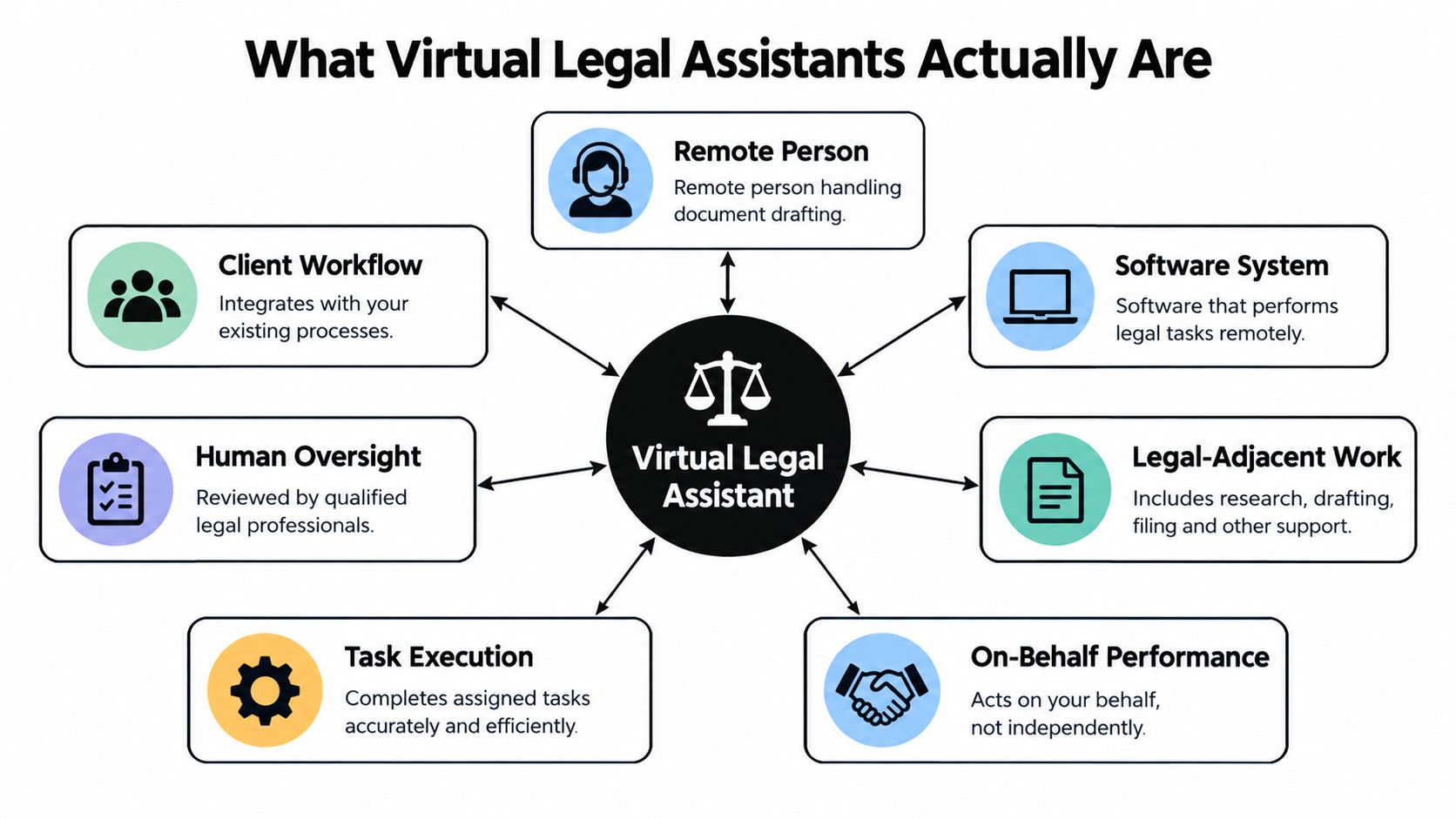
A drafting tool isn't a lawyer because drafting isn't the same as advising. The software doesn't hold professional judgment, understand a client relationship by itself, or assume responsibility for the consequences of an answer. Teams evaluating agent behavior can use this explanation of what an AI agent is, but legal deployment still requires a narrower scope, stronger evidence requirements, and human control.
Comparing AI Human and Hybrid Models
The right model depends on the bottleneck, not on which option sounds most modern. AI usually wins when the queue is repetitive and the inputs are structured. A human wins when the work depends on tone, negotiation, cultural context, or jurisdiction-specific judgment. A hybrid model wins when the team needs scale but can't afford to let unchecked output reach a client or court.
| Dimension | AI-Driven | Human | Hybrid |
|---|---|---|---|
| Cost per matter or hour | Usually efficient for repeatable volume, but review and governance add real cost | Direct labor cost is clearer, with onboarding and management overhead | Combines automation cost with human review time |
| Demand spikes | Scales rapidly across intake, classification, and routine drafting | Limited by availability and scheduling | Scales the first pass while preserving review capacity |
| Language-dependent accuracy | Strong on consistent patterns, weaker on ambiguity and unsupported inference | Stronger at nuance, tone, and incomplete facts | AI prepares work, human resolves uncertainty |
| Confidentiality exposure | Depends heavily on retention, training, access, and deployment architecture | Depends on contracts, device controls, and supervision | Requires controls for both software and people |
| Supervision burden | High for high-risk outputs, with testing and escalation rules | High for legal work, lower for tightly scripted administration | Distributed across system monitoring and human review |
AI can outperform a person at repetitive document comparison, field extraction, and always-on intake. It doesn't get tired halfway through a queue, and it can apply the same checklist consistently. That advantage disappears when the task asks, “What should we do?” rather than, “What does this document contain?”
Human assistants remain better at recognizing when a client is confused, when a request doesn't fit the standard workflow, or when a supposedly simple matter carries an unusual fact pattern. They can also ask follow-up questions naturally. Their work still needs review, especially where they draft filings, conduct research, or handle privileged information.
A hybrid arrangement should not mean “AI first, human approval in name only.” The reviewer needs enough time, context, and authority to reject the output. For after-hours intake, a carefully constrained assistant can collect facts and schedule a conversation. The escalation design should resemble a 24/7 customer service workflow, but the legal thresholds must be stricter: uncertainty, urgency, privilege, conflicts, and requests for advice should all route to a qualified person.
How LatHire Can Help
LatHire connects US and Canadian companies with pre-vetted Latin American professionals across technology, marketing, sales, and operations. Its model combines AI assessments, skills evaluations, human-led background checks, recruiting support, international payroll, benefits, and compliance administration. For a legal team, the relevant question isn't whether LatHire is a legal AI product. It isn't. The question is whether a managed human assistant can provide the review layer and operational coverage that an AI workflow lacks.
The platform states that its talent pool includes more than 800,000 candidates, and that companies can match with qualified candidates in as fast as 24 hours. Those figures come from LatHire's virtual legal assistants resource, so treat them as platform claims and validate the role, vetting process, confidentiality terms, and supervision arrangement before engagement.
LatHire is a reasonable option when your bottleneck is capacity rather than legal judgment. It can help staff intake queues, maintain matter data, prepare document drafts from approved templates, coordinate records, and provide a human checkpoint for AI-generated work. It makes less sense when you need a lawyer to decide privilege, give advice, sign a filing, or set litigation strategy.
Assess the five workflows separately:
- Intake: A remote professional can collect facts and check whether required fields are complete. The failure mode is treating intake information as legal analysis. A lawyer or designated intake lead should review conflicts, eligibility, urgency, and acceptance decisions.
- Document review: A human assistant can verify extracted fields and compare standard clauses against an approved playbook. The failure mode is overlooking a nonstandard provision because the template looks familiar. Counsel should review exceptions and any clause that changes liability, rights, or obligations.
- Research: A supervised professional can organize authorities and prepare a research memo for review. The failure mode is relying on an incomplete or jurisdictionally wrong source. Counsel must verify every authority and material proposition before use.
- Docketing: A trained assistant can enter dates, request missing information, and maintain a calendar. The failure mode is accepting an incomplete or ambiguous source date. The responsible lawyer or docketing owner needs a second check for consequential deadlines.
- Contract automation: An assistant can route standard agreements and populate approved fields. The failure mode is applying a standard form to a transaction that falls outside the playbook. Counsel must approve deviations and negotiation positions.
Common Use Cases and Where Each One Breaks
Start with administrative workflows that have clear inputs, reversible actions, and a defined escalation path. As a workflow affects legal rights, court deadlines, negotiation posture, or client expectations, require stronger review and tighter performance monitoring. Treat every assistant as supervised decision support, not an autonomous lawyer.
Client intake triage
An assistant can ask structured questions, identify missing information, detect urgency signals, and route an inquiry to the right queue. The practical gain is faster organization, not automated case evaluation. It may recognize a court date or contract deadline, but it must not decide whether the firm has a viable claim, whether a conflict exists, or whether the firm should accept the matter.
Escalate incomplete facts, requests for advice, possible privilege, immediate deadlines, and requests the system cannot classify confidently. Track missed urgency signals and incorrect routing, then adjust the questions and thresholds. A lawyer or designated intake lead remains accountable for conflicts, eligibility, urgency, and acceptance decisions.
Document review
Document review performs well when the team defines fields and risks in advance. The assistant can extract parties, dates, renewal terms, governing law, indemnity language, and deviations from an approved clause library. Require each finding to include the source passage, surrounding context, and confidence signal rather than a conclusion alone.
Context remains the common break point. A limitation-of-liability clause may appear acceptable by itself while conflicting with another section or the commercial deal. Human review is required for unusual clauses, conflicting provisions, and documents outside the tested document type. Measure missed exceptions and false alerts, not only the number of pages processed.
Legal research
A research assistant can gather candidate authorities and prepare a preliminary synthesis. Configure it to use approved sources, preserve citations, and separate retrieved text from generated explanation. It must not fill gaps with plausible language.
A benchmark covering 210 research questions and nine research types found approximately 80% accuracy for the tested AI systems compared with 71% for the lawyer control group, with results varying by task, according to the UC Davis legal AI research guide. Use that result to test specific tasks, not to approve research output wholesale. A lawyer must verify jurisdiction, procedural posture, citations, and the exact proposition before reliance.
Docketing and deadline management
A system can extract dates, create reminders, and flag missing docket information. Its value is reducing manual entry and making open tasks visible. The failure occurs when an assistant treats a date as reliable merely because it appears in a document. Incomplete, amended, or ambiguous sources require an immediate stop and escalation.
Require a second-person review for filing dates, responses, limitation periods, hearings, and deadlines affecting client rights. Record who confirmed the date, which source controlled, and whether later amendments changed it. Measure missed deadlines, duplicate reminders, and unverified dates.
Contract automation
Contract automation is strongest with approved templates, predictable data fields, and predefined fallback language. It breaks when a business user requests a quick exception or an agreement combines several transaction types. Route scope changes, nonstandard indemnity, privacy terms, liability changes, and governing-law issues to counsel.
Drafting is a sensible entry point, but separate drafting from sending. The assistant may prepare language from approved inputs. A responsible reviewer must approve the output, confirm the recipient and attachments, and own the decision to send.
Compliance Security and Ethical Guardrails
Confidentiality and supervision must become system requirements, not policy language that nobody checks. Professional-responsibility guidance warns that generative AI products may collect user inputs, including client confidences, for provider training or transmission to future users. The District of Columbia Bar's ethics opinion on generative AI makes the operational point: lawyers remain responsible for protecting confidential information and supervising delegated work.
Before production use, require these controls:
- Data boundaries: Define which matters may use automation and prohibit privileged or sensitive material from unapproved models.
- Provider terms: Confirm retention, training opt-outs, deletion, subprocessors, breach duties, and permitted uses of prompts and files.
- Technical protection: Use encryption in transit and at rest, tenant isolation, role-based access, redaction or pseudonymization, and configurable deletion.
- Accountability: Maintain audit logs showing who accessed matter data, what the assistant produced, what a reviewer changed, and when the output was approved.
- Escalation: Route ambiguity, conflicting authority, sensitive conversations, legal advice requests, and high-consequence actions to a qualified human.
A surveyed 79% of lawyers expressed concern about AI's imperfect understanding of legal ethics and standards, with confidentiality, security, and data privacy also ranking as major concerns, according to the survey coverage on attorney views of AI. That concern shouldn't produce a blanket ban. It should determine the design of the deployment.
Practical control: If you can't explain where a prompt, attachment, extracted field, and final answer went, the assistant isn't ready for confidential matters.
Measure guardrails alongside productivity. A fast system that creates correction work, weakens privilege controls, or produces uncited research isn't efficient. Teams building a broader enterprise AI governance program should include matter-level rules, review evidence, incident handling, and a process for retiring workflows that fail validation.
Measuring Real ROI Beyond Conversation Volume
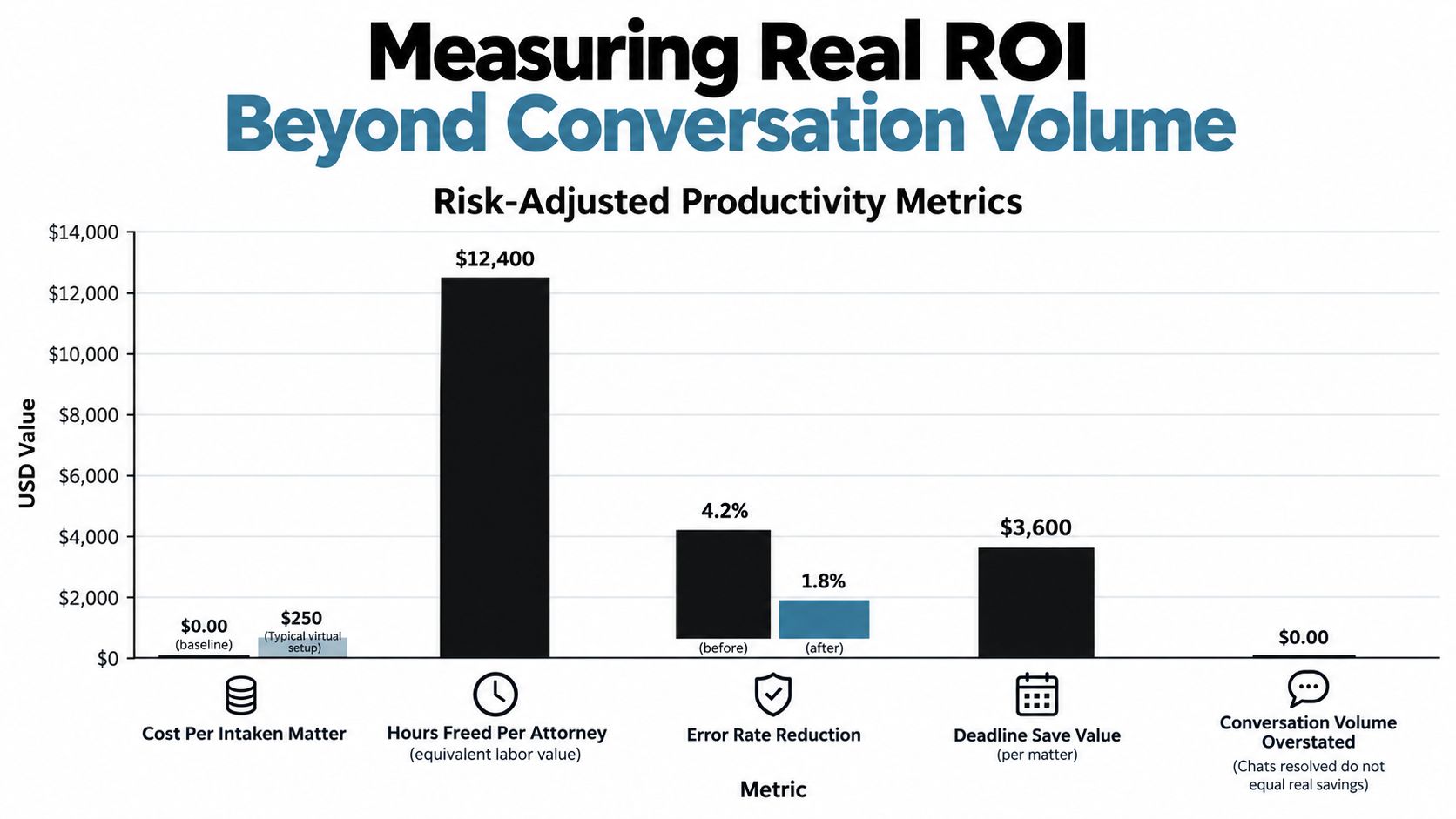
A dashboard that counts resolved chats can look healthy while lawyers spend their afternoons correcting the answers. Risk-adjusted productivity is the useful measure. It asks whether the system completed valuable work safely, how much review it required, and what failure costs it introduced.
Track these measures by workflow:
- Resolution quality: Did the output satisfy the defined task, use the correct jurisdiction, and preserve required facts?
- Escalation rate: How often did the assistant recognize uncertainty and route the matter correctly?
- Review burden: How much lawyer or staff time did each accepted output require?
- Error cost: Count rework, missed information, incorrect routing, deadline incidents, and client remediation.
- Client experience: Monitor satisfaction and complaints without treating speed as proof of quality.
- Independent completion: Track matters completed without lawyer intervention only where the task is explicitly approved for that level of autonomy.
Corporate legal teams show why readiness matters. A 2025 survey of North American legal departments found that 38% were already using AI and another 50% were exploring implementation. Yet 60% identified trust or output quality as the top implementation challenge, and only 24% reported a strong understanding of AI fundamentals and implications for legal work.
Use a staged program:
- First 30 days: Choose one low-risk workflow, record the current process, define acceptance criteria, approve data access, and create an escalation policy.
- By day 60: Test representative matters, measure precision, recall, citation correctness, review time, and abstention quality. Compare results with the baseline.
- By day 90: Expand only if error costs and review burdens remain acceptable. Document the controls, train users, and set a monthly review cadence.
Use performance benchmarking for AI workflows to keep the dashboard tied to outcomes rather than activity volume.
Implementation Best Practices and Your First 90 Days
Treat deployment as a controlled operating change. Buying a product doesn't create value until the team has chosen a task, defined the review standard, secured the data, and accepted responsibility for the result.
Days 1 through 30
Start with one workflow that has a narrow purpose and clear boundaries. Intake classification, document field extraction, or template-based correspondence is usually more manageable than open-ended legal research or contract negotiation.
Write the operating rule before configuring the assistant:
- What information may enter the system?
- What may the system produce?
- Which actions require approval?
- Which signals trigger escalation?
- Who owns the queue and who reviews exceptions?
- What evidence must accompany an answer?
Create a benchmark set from real, appropriately handled examples. Include ordinary matters, incomplete inputs, ambiguous requests, unusual clauses, multiple jurisdictions, conflicting documents, and cases where the assistant must abstain. A benchmark that contains only easy examples will reward confidence rather than reliability.
Days 31 through 60
Run the assistant in review mode. Let it produce classifications, drafts, extracted fields, or research summaries without allowing it to send, file, negotiate, or update consequential records automatically.
Measure task-specific performance. For research, check citation validity and jurisdiction. For intake, check routing and escalation. For contract work, check field extraction, clause detection, and exception handling. Record false positives and false negatives separately because each creates a different operational burden.
Tune the workflow, not only the prompt. Improve source selection, required fields, retrieval filters, access rules, and escalation thresholds. If the assistant cannot support an answer with an approved source, configure it to abstain rather than improvise.
Days 61 through 90
Expand only when the first workflow meets its acceptance standard. Add one adjacent task at a time, and preserve the review record so the team can identify which change introduced a failure.
Train lawyers, staff, and business users on the boundary between preparation and advice. Show them how to inspect sources, reject an output, report an incident, and handle a client who asks the assistant a question outside scope. Keep a named owner for permissions, evaluation, vendor review, and policy updates.
A production checklist should include:
- Approved use cases and prohibited actions
- Matter and jurisdiction restrictions
- Data-retention and deletion terms
- Access roles and audit logging
- Human reviewer assignments
- Benchmark questions and acceptance thresholds
- Citation and source-verification requirements
- Escalation rules for uncertainty and urgency
- Incident response and rollback procedures
- Monthly review of quality, cost, and user trust
Integrate the assistant only after these controls exist. A technical guide to AI agent integration can help teams think through connections, but legal operations must decide which systems the assistant may read from and write to. The safest integration is usually read-only first, followed by controlled updates with approval.
The best virtual legal assistants don't replace lawyers. They remove predictable friction, surface the next action, and prepare work that a qualified person can verify quickly. Start with one bounded queue, measure the full cost of review and failure, and expand only when the evidence supports it. If you want to deploy that model for intake or support, evaluate SupportGPT's guardrails, escalation controls, analytics, and enterprise options at supportgpt.app, then run a supervised pilot before connecting sensitive legal workflows.