How to Improve Agent Productivity with AI-Powered Support
Discover how to improve agent productivity using AI. Our guide covers AI-driven triage, response automation, and analytics to empower your support team.
To get a real boost in agent productivity, you have to bring in smart tools that can take over the repetitive, soul-crushing tasks and offer up assistance right when it's needed. When you get this right, your agents stop wasting time on manual work like sorting tickets and can finally focus on solving the tricky customer problems that actually require a human touch.
This shift directly moves the needle on crucial support metrics like First Contact Resolution (FCR) and dramatically cuts down the Average Handle Time (AHT).
The New Reality of Agent Productivity
Let's be honest, customer expectations are through the roof. The old playbook—just throwing more bodies at a growing ticket queue—is a recipe for burnout and bloated budgets. It's just not sustainable.
Support teams today are caught in a tough spot. Customers want expert answers, and they want them now. Meanwhile, your agents are stuck in a grind of repetitive, low-value tasks that drain their energy and prevent them from doing their best work. This is where the old model completely falls apart.
This guide is about a different way forward. Instead of thinking about AI as a tool to replace people, think of it as a way to supercharge them. By equipping your team with an intelligent platform like SupportGPT, you can turn every agent into a top-tier problem solver. The goal is to build a smarter, more resilient support operation where technology handles the grunt work, freeing up your team to focus on what they do best: connecting with customers and delivering fantastic service.
A Roadmap for AI-Powered Efficiency
We’re not going to talk in hypotheticals. This is a practical roadmap filled with actionable strategies you can start using right away. We'll break down exactly how to:
- Automate Triage and Routing: Instantly analyze and assign incoming tickets to the right agent or team, completely cutting out the manual sorting that slows everything down.
- Deliver AI-Assisted Responses: Give your agents instant, accurate answers pulled directly from your internal knowledge, turning even a brand-new hire into a seasoned pro overnight.
- Build a Self-Improving Knowledge Engine: Create a system where every single customer interaction is used to make your knowledge base—and your entire support operation—smarter and more efficient.
- Optimize Performance with Analytics: Go beyond basic metrics and dig into real, actionable insights that help you provide targeted coaching and fine-tune your workflows.
When you nail these core areas, you create a powerful flywheel effect. Productivity gains aren't just a one-off project; they become a continuous cycle of improvement that lets you scale your support team without sacrificing quality.
Here’s a quick look at how these AI strategies directly contribute to a more productive support team.
Core AI Strategies for Productivity Gains
| Strategy | Primary Benefit | Key Impact Area |
|---|---|---|
| Automated Triage & Routing | Reduced manual workload | Average Handle Time (AHT) & First Response Time (FRT) |
| AI-Assisted Responses | Faster, more accurate answers | First Contact Resolution (FCR) & Agent Confidence |
| Dynamic Knowledge Base | Consistent, high-quality support | Ticket Escalation Rate & CSAT Scores |
| Actionable Analytics | Data-driven coaching & optimization | Agent Performance & Team Efficiency |
By implementing these strategies, you’re not just chasing metrics; you’re fundamentally changing how your team operates for the better.
Automate Triage and Routing to Unclog Your Queue
The first few moments after a customer submits a ticket are a massive opportunity. But for many teams, this is where the biggest bottleneck forms. When a person has to read every single incoming request just to decide who should handle it, your entire support operation slows to a crawl. This manual triage is a huge drag on productivity and the number one reason for slow first response times.
Automating this process with an intelligent system unclogs that queue instantly. It’s not just about moving faster; it’s about being smarter. By using AI to understand the natural language in each ticket, you can build a system that gets the intent, urgency, and even customer sentiment without a human ever having to lay eyes on it. This is the first, most crucial step to improve agent productivity, because it gets every issue to the right person from the get-go.
Building Your Smart Routing Rules
Getting started is more straightforward than you might think. With a tool like SupportGPT, you can build powerful routing rules based on the actual words and context of a customer’s request.
For instance, a ticket with phrases like “can’t login” and “payment due” isn’t just a simple access problem—it's a major retention risk. You can create a rule that instantly flags this ticket, assigns it a “High Urgency” tag, and routes it straight to your account retention specialists. It completely bypasses the general queue, putting a critical issue in front of an expert in seconds, not hours.
This is where an AI-first strategy really shines, moving from sorting requests to actively assisting agents and ultimately automating the resolution itself.
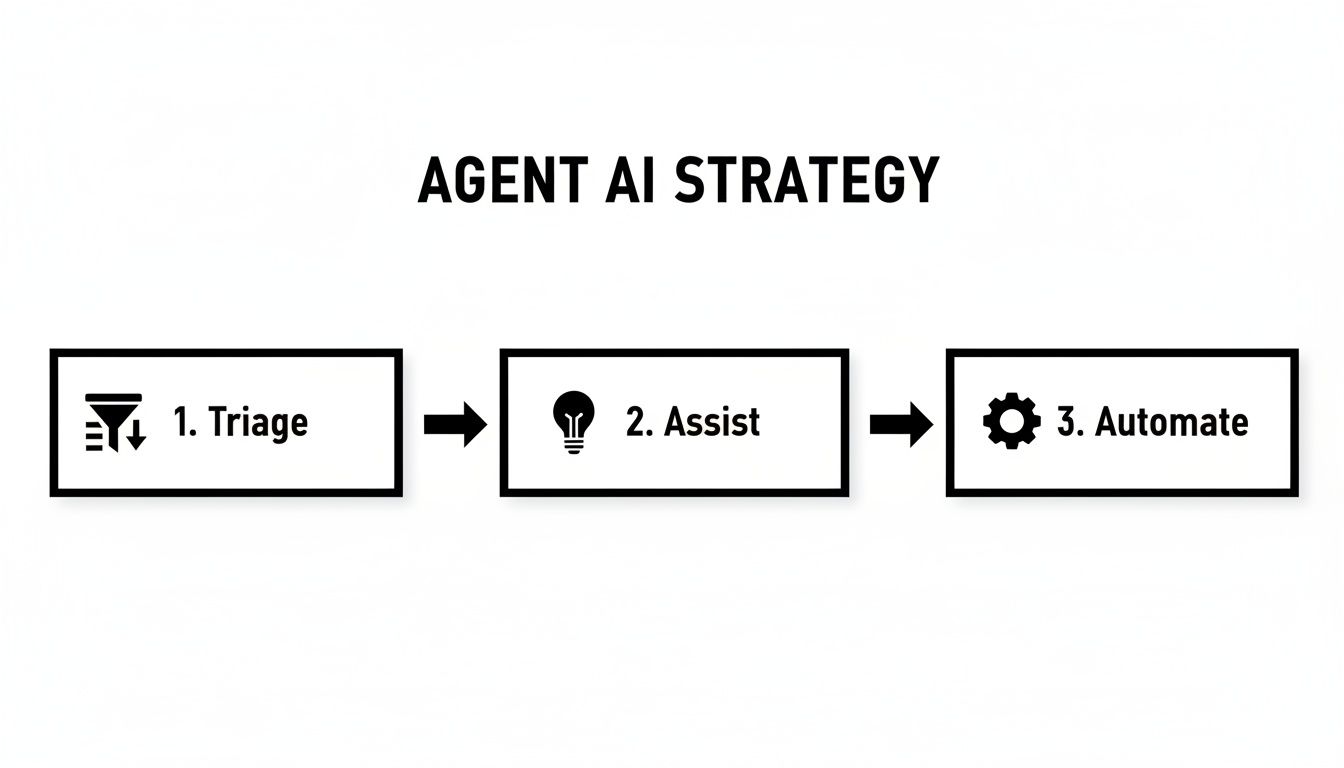
The key takeaway is that smart automation starts with smart triage. Once you nail that, you unlock the ability to implement even more powerful AI assistance and resolution features down the road.
Creating Smart Escalation Paths
Automation isn't just for that first touchpoint. It’s also the perfect way to handle escalations, ensuring tough problems don’t get stuck. You can set up rules that automatically bump a ticket to a senior agent or a different department based on clear triggers.
Think about these real-world scenarios:
- Multiple Negative Replies: A customer replies twice in a row with clearly frustrated language. The system can automatically escalate that conversation to a team lead before things get worse.
- Technical Keywords: A ticket mentions specific error codes or technical jargon like "API endpoint failure." Instead of sitting in the main queue, it can be routed directly to your engineering support team.
- VIP Customer Tags: Any ticket from a customer tagged as "Enterprise" or "VIP" can be flagged for immediate review by a dedicated account manager.
This completely changes your support queue from a simple first-in, first-out list into a dynamic, priority-driven workflow. Your agents stop cherry-picking easy tickets or getting bogged down by issues they can't solve. Instead, they get a curated feed of tasks that perfectly match their skills.
Give Your Team Instant AI-Assisted Responses
Picture this: every single one of your agents—from the seasoned pro to the rookie on day one—has a subject matter expert sitting right beside them, ready with the perfect answer. This isn't some far-off fantasy; it's what happens when you arm your team with AI-assisted responses. It's an absolute game-changer for agent productivity because it eliminates the two things that kill momentum: guesswork and the frantic search for information.
Instead of typing "one moment please..." and frantically digging through a clunky knowledge base, an agent gets an instant, accurate suggestion right in their workspace. Today's AI tools can read a customer's question in real time, scan your entire universe of knowledge—help articles, past tickets, internal docs—and pop out the right answer.

This obviously slashes average handle times. But more importantly, it frees up your agents to focus on the human side of support: building a connection, showing real empathy, and solving the actual problem, not just reciting a script. When your agents know they have the right information, their confidence soars, and they can deliver a much better, more personal experience.
Turn New Hires into Top Performers
The real beauty of AI assistance is how it completely levels the playing field. Getting new support agents up to speed is a huge time sink. There's always that long ramp-up period before they feel comfortable handling tricky issues alone. AI-powered tools just shred that learning curve.
Imagine a new agent gets a highly technical question about an API integration. In the old days, they had two bad options: escalate the ticket (making the customer wait) or burn half an hour navigating a confusing internal wiki.
With AI assistance, the agent sees the question and instantly gets a perfectly worded, technically accurate response suggested on their screen. They can quickly confirm it's correct and send it off, resolving a complex issue in minutes instead of hours.
This doesn't just make the agent faster; it builds their confidence and teaches them on the fly. Every AI-suggested response reinforces correct procedures and product knowledge, fast-tracking their journey to becoming a genuine expert.
The Real-World Impact on Productivity
This isn't just theory—the numbers back it up. AI assistance gives a huge boost to less experienced team members. One study showed that while overall issue resolution jumped by 14%, the fascinating part was who improved the most. Newer and lower-skilled agents saw their resolved issues per hour skyrocket by an incredible 34%. You can dive into the details of how AI affects agent performance in this productivity study.
That means you can improve agent productivity right where you need it most, lifting your entire team's performance to a higher, more consistent level. Platforms like SupportGPT are built for exactly this, slotting right into the tools your team already uses. You can see how to use an AI platform to boost your team. By giving them this intelligent layer of help, you're not just closing tickets faster—you're building a more capable and efficient team for the long haul.
Build a Self-Improving Knowledge Engine
Your AI is only as smart as the information you feed it. A stale, outdated knowledge base isn't just unhelpful; it's a genuine liability that can drag down your entire support operation. To really improve agent productivity, you need to stop thinking in terms of static FAQs and start building a dynamic knowledge ecosystem that's constantly learning and getting smarter.
This living repository becomes the single source of truth for both your AI and your human agents, making sure everyone is working with the most current and accurate information.
The best place to start is by training your AI on everything you've got. I'm talking about help center articles, dense product documentation, saved chat transcripts, and even the recordings from your most successful support calls. Each piece of content adds another layer of context, teaching the AI not just what the right answer is, but how to deliver it effectively. This initial data dump is a critical first step, but it’s just the beginning.

Create a Powerful Feedback Loop
The real breakthrough happens when you close the loop between your support interactions and your knowledge base. Every single customer conversation is a goldmine of insights, showing you exactly where your documentation is falling short. By analyzing these conversations, you can pinpoint the real questions your customers are asking—the ones your current content doesn't even address.
This is where a tool like SupportGPT comes in. It can automatically flag these knowledge gaps as they emerge. For instance, if three different customers ask about a new feature that isn’t documented yet, the system can create a task for your content team to write an article. This completely changes the game, turning your support team from a reactive cost center into a proactive source of business intelligence. You get a direct line into your customers' minds.
This approach turns every customer question into an opportunity. Instead of just closing one ticket, you’re plugging a hole in your knowledge base that could help hundreds of future customers find answers on their own.
Empower Agents to Become Contributors
Your agents are on the front lines every day, coming up with creative solutions to tricky, one-off problems. Don't let that institutional knowledge vanish the moment a ticket is closed. Give your team a dead-simple way to contribute their insights back into the knowledge engine.
When an agent figures out a brilliant fix for a complex issue, they should be able to suggest it as a new knowledge base article or an update to an existing one with just a click. This creates two massive benefits:
- It captures real-world expertise: You get detailed, nuanced solutions that a technical writer, working in a silo, might never uncover on their own.
- It boosts agent morale and engagement: Agents feel seen and valued for their expertise. It makes them feel like owners of the support process, not just cogs in a machine. In fact, research from Nectar shows that 77.9% of employees would be more productive if they felt more recognized.
This creates a virtuous cycle. More customer interactions lead to more identified knowledge gaps, which leads to better documentation, which makes your AI smarter, and ultimately, gives you highly productive agents who can resolve issues faster than ever.
6. Measure What Matters to Actually Move the Needle
You can’t improve what you don’t measure. And when it comes to agent productivity, gut feelings and assumptions just don't cut it. Real, sustainable improvements are built on a foundation of solid data, not guesswork. It's time to stop chasing vanity metrics and start focusing on the KPIs that truly tell you what's going on.
This means digging into the numbers that directly impact your team's efficiency and your customers' happiness. Simply tracking ticket volume is a surface-level metric; the real story is hidden in the details.
Pinpoint the KPIs That Drive Performance
To get a clear picture, you need to concentrate on a handful of metrics that reveal both efficiency and quality. This is the only way to make informed decisions that lead to real productivity gains.
We recommend keeping a close eye on these:
- First-Contact Resolution (FCR): This is the holy grail of support metrics. A high FCR means your agents are solving problems on the first try—a massive win for customer satisfaction and a huge time-saver for your team.
- Average Handle Time (AHT): You never want to rush agents, but tracking AHT is fantastic for spotting inefficiencies. A sudden spike could signal a new product bug or a hole in your knowledge base that needs patching.
- Customer Satisfaction (CSAT) Scores: This metric is your direct link between productivity and customer happiness. It’s the ultimate check to ensure you're not just closing tickets faster, but actually solving problems better.
When you consistently track these KPIs, patterns start to jump out. You’ll see which agents are crushing it, where your processes are hitting a snag, and how the team is trending over time. This is the kind of insight that leads to targeted coaching and smart strategic shifts.
Let AI Find the Friction for You
Modern analytics tools, especially those with AI at their core, let you go way beyond just looking at numbers on a dashboard. An AI platform like SupportGPT can sift through thousands of customer conversations to pinpoint trends and friction points you'd never catch manually.
For instance, SupportGPT can automatically tag conversations with "negative sentiment." Digging into those, you might discover dozens of customers are all complaining about the same confusing step in your checkout process. That’s not just a support problem; it's a critical piece of product feedback. Armed with that data, you can fix the root cause instead of forcing your team to handle an endless stream of tickets about the same preventable issue.
By turning messy, raw conversation data into structured, actionable insights, you empower your entire organization to make smarter decisions. You can refine workflows, tweak AI prompts, and give your agents specific, data-backed coaching that actually helps them grow.
This is where the real magic happens. In fact, research shows a clear link between AI assistance and agent output. One study found that giving agents access to generative AI tools boosted the number of issues they could resolve per hour by 15%—a significant jump from 1.7 to 2.5 chats. You can read the full study about AI's effect on support productivity here. This proves that data-driven optimization isn't just a nice idea; it delivers tangible, bottom-line results.
Drive Adoption and Manage Change Effectively
Bringing in a powerful new tool is one thing, but getting your team to actually use it is a whole different ballgame. The human side of implementing AI is often where these projects hit a wall. To get it right, you have to treat this as a change management initiative, not just another software rollout.
It all starts with answering the "why." Let's be honest, your agents' first thought might be fear: Is this bot going to replace me? You have to get out in front of that immediately. Frame the AI as a partner that's there to handle the repetitive, boring stuff, freeing them up to tackle the more complex and rewarding customer problems.
When you position an AI like SupportGPT as a co-pilot that makes them better at their jobs, the entire conversation shifts from threat to opportunity. That mental switch is crucial for getting the buy-in you need to make the transition work.
Design Training That Builds Confidence
Good training isn't about running through a long list of features. It's about building confidence. Your team needs to see, with their own eyes, how this new tool makes their daily grind easier.
Ditch the generic demos. Instead, build your training sessions around real, tricky tickets your team has dealt with in the past. Walk them through specific scenarios where the AI could have instantly surfaced the right answer from the knowledge base or automated a tedious, multi-step process. This hands-on approach helps them see the direct connection between the tech and their own success.
A SurveyMonkey study found that 59% of employees feel training improves their job performance, and that's exactly the mindset you want to foster.
The key is to constantly answer the agent's question: "What's in it for me?" When they see the tool as their personal productivity booster—something that helps them hit their goals and lowers their stress—they won't just adopt it, they'll embrace it.
Foster a Culture of Feedback and Improvement
Finally, turn your agents into co-developers of the AI. No system is perfect on day one, and the people on the front lines are your single best source of intelligence for making it better.
Set up a dead-simple way for them to flag when the AI gives a wonky suggestion or misses a chance to be helpful. This feedback loop is gold for fine-tuning the system's accuracy and usefulness.
More than that, it gives your team a real sense of ownership. When you celebrate their contributions and show them how their feedback is directly improving the tool, you build a culture where technology is a shared asset. This collaborative spirit is what truly helps improve agent productivity, because it ensures the AI is constantly evolving to meet the real-world needs of your team.
Frequently Asked Questions
It's natural to have questions when you're thinking about bringing new tools into your support workflow. We hear a lot of the same concerns from leaders, so let's tackle the big ones head-on.
Will AI Replace My Human Support Team?
That’s probably the number one question we get, and the short answer is no. The goal here is to make your human team better, not to replace them.
Think about it this way: AI is fantastic at handling the repetitive, high-volume stuff—the "Where's my order?" and "How do I reset my password?" questions. This frees up your skilled agents to dive into the complex, emotionally charged issues where a human touch is non-negotiable.
So, instead of replacing people, you're empowering them. You're taking the tedious tasks off their plate, which boosts their job satisfaction and lets them focus on the work that truly matters: building relationships with your customers.
How Hard Is It to Actually Implement a Support AI?
This isn't like enterprise software from a decade ago. Modern AI platforms are designed for people who aren't developers. Honestly, you can get a basic AI agent up and running in a few minutes just by pointing it at your existing knowledge base or website.
The heavy lifting happens behind the scenes. You get a straightforward interface to train and manage your AI without ever touching a line of code. This means you can start seeing a real impact on your team's productivity almost right away.
How Do We Make Sure the AI Gives Accurate Answers?
This is a critical point, and it comes down to two things: focused training and built-in guardrails.
You train the AI exclusively on your own trusted content—your help articles, your internal wikis, your product docs. It doesn't just go out and search the internet, so you don't have to worry about it pulling in some random, unverified information from a forum.
Good, enterprise-level platforms also have safety features baked in to prevent it from going off-topic, making things up, or adopting a weird tone. You set the rules to ensure every answer is professional and aligns with your brand.
It’s a system that works. In fact, AI agents now handle roughly 80% of all customer service queries, and companies using them are seeing customer satisfaction scores jump by an average of 32%. You can dig into more data on AI agent performance if you're curious.
Ready to see how an AI co-pilot could genuinely change the game for your support team? With SupportGPT, you can build, manage, and deploy a powerful AI assistant in just a few minutes. Start your free trial today.