How to Create Chatbot for Website in 2026
Learn how to create chatbot for website in 2026 with this practical, end-to-end guide covering planning, training, embedding, guardrails, and optimization.
A small SaaS team can recognize the pattern immediately. The same questions arrive every week: how to reset a password, which plan includes a feature, whether an integration has a limit, and where to find a billing document. While the team handles urgent issues, someone keeps rewriting answers that already exist in the help center.
That's why learning how to create a chatbot for a website shouldn't start with a widget script. The script is the easy part. The difficult work is deciding what the chatbot should handle, preparing trustworthy sources, defining when it must stop, protecting visitor data, and creating a process for improving answers after launch.
What Building a Website Chatbot Actually Looks Like in 2026
A useful website chatbot is an operational support system, not a pop-up with an AI label. The build begins with intent discovery. Review support conversations, site-search queries, sales objections, and product questions to identify the requests that repeat and can be answered safely.
Next, prepare the source layer. Select approved product documentation, help center articles, pricing explanations, policy pages, and troubleshooting guides. Remove duplicate or outdated material before connecting it to a retrieval system. If the source content contradicts itself, a stronger model won't solve the underlying problem.
The six phases behind a reliable deployment
-
Discover intents. Start with a focused set of common questions rather than trying to cover the entire business. Separate simple information requests from actions that require account access, payment authority, or human judgment.
-
Prepare sources. Assign a canonical answer to each supported topic. Record ownership, update responsibility, and the conditions under which the answer should no longer be used.
-
Choose the build path. A no-code platform can be sensible for a small team that needs a working assistant quickly. A custom stack gives engineers more control over data flows, retrieval, observability, and deployment boundaries.
-
Configure retrieval and behavior. Connect the approved sources, define how the assistant should answer, set confidence thresholds, and specify what it must do when it can't find a reliable passage.
-
Embed the widget with guardrails. Add the widget to the relevant pages, not necessarily every page. Set a clear greeting, a concise response style, topic limits, rate controls, and a visible path to a person.
-
Review the gaps after launch. Every fallback, failed answer, low rating, and human handoff is evidence. Feed that evidence into documentation updates, new intents, routing rules, or source removal.
A focused first release can be delivered relatively quickly, while a polished production deployment takes longer because it includes integrations, security review, analytics, accessibility checks, and internal ownership. Maintenance also isn't zero. Retrieval quality depends on document hygiene, and the assistant will still need to hand off conversations that involve ambiguity, sensitive data, or unsupported actions.
Practical rule: Launch a narrow assistant that knows when to escalate before you launch a broad assistant that sounds confident about everything.
The simplest way to compare affordable approaches is to review a choose an affordable chatbot resource alongside your technical requirements. Price matters, but so do source controls, escalation features, data handling, and the amount of engineering time your team can spare.
Mapping Intents Before You Touch Any Tool
The first design decision is scope. A practical process starts by defining the top 20–50 intents from support logs, then creating a knowledge source and fallback policy before embedding the widget. This narrow map gives the retrieval layer clear boundaries and gives the support team a manageable review queue. The benchmark described by Comm100's live chat report also shows that automation works best when self-service containment is paired with clean escalation and human handoff.
Don't begin by naming categories such as “all billing” or “all product questions.” Those labels are too broad to guide retrieval or routing. Instead, collect support conversations and group them by the customer's actual job.
A workable extraction method
- Start with evidence. Export recent tickets, chat transcripts, contact-form submissions, and internal support tags. Preserve the original wording because customers rarely phrase questions like your documentation team does.
- Cluster recurring requests. Group phrases such as “I forgot my password,” “reset link expired,” and “can't log in” under a single access intent if they share the same answer and route.
- Split by outcome. An FAQ intent usually needs a grounded explanation. An action intent may need an authenticated workflow or a teammate.
- Assign an escalation rule. Decide in advance whether the bot can answer, collect context, link to a workflow, or transfer the conversation.
A useful intent map might look like this:
Sample Intent Map Extracted From Support Logs
| Intent | Category | Source Doc | Escalation Rule |
|---|---|---|---|
| Reset a forgotten password | Account access | Password reset guide | Escalate if the reset flow fails |
| Change the account email | Account access | Profile settings guide | Escalate when identity verification is needed |
| Understand plan differences | Pricing | Plans and features page | Route complex procurement questions |
| Find an invoice | Billing | Billing and invoices guide | Escalate for disputed charges |
| Request a refund | Billing | Refund policy | Route to billing team |
| Check an integration limit | Integrations | Integration limits guide | Escalate when usage data is required |
| Connect a supported integration | Integrations | Integration setup guide | Escalate after repeated setup failure |
| Report a service outage | Status | Status and incident page | Route active incidents immediately |
| Ask about a missing feature | Product feedback | Feature request process | Capture feedback, don't promise delivery |
| Cancel a subscription | Account changes | Cancellation policy | Route retention or account-specific cases |
| Find data export instructions | Data management | Export documentation | Escalate if an export is incomplete |
| Report a security concern | Security | Security contact policy | Hard-route to the security team |
Separate answers from actions
A question such as “What file formats can I upload?” is usually an FAQ intent. The assistant can retrieve a documented answer and link to the relevant guide. “Delete my account” is an action intent because it can trigger irreversible consequences and may require verification.
Hard-route sensitive requests from the beginning. Account deletion, security incidents, billing disputes, suspected fraud, and requests involving private account data shouldn't depend on a loosely interpreted model response. The assistant can acknowledge the request, collect non-sensitive context, and transfer it with a transcript.
Choosing How You Will Build and Host the Bot
There are three practical build paths. The right choice depends less on which model is fashionable and more on who will own retrieval failures, deployment incidents, privacy reviews, and documentation updates.
Compare the options by responsibility
A no-code platform is usually the fastest route for a small support or marketing team. Products such as Tidio, Intercom Fin, Botpress Cloud, and other hosted builders typically provide a widget, source ingestion, conversation management, and basic analytics. The trade-off is reduced control over retrieval internals, vendor-specific workflows, and usage-based charges that may sit alongside seats or feature tiers. A no-code AI chatbot builder guide can help a non-technical team understand the implementation pattern before choosing a vendor.
A DIY framework using Rasa, Botpress, LangChain, or LlamaIndex gives engineers control over orchestration, vector storage, authentication, logging, and deployment. It also makes your team responsible for evaluation, upgrades, prompt changes, fallback behavior, and production support. This path is valuable when the bot must run inside a private network or connect tightly to internal systems.
A managed LLM service reduces infrastructure work while preserving more application-level control than a typical no-code product. Teams can call providers such as OpenAI, Anthropic, or Google Vertex AI and build their own retrieval and routing layer around the API. The hidden work moves into application code, observability, vendor contracts, and data governance.
| Path | Monthly Cost at 1k Conversations | Engineering Effort | Best Fit |
|---|---|---|---|
| No-code platform | Vendor plan and usage fees vary | Low | Small teams with a focused support scope |
| DIY framework | Infrastructure, model, storage, and monitoring costs vary | High | Teams needing deployment and retrieval control |
| Managed API stack | API, storage, observability, and hosting costs vary | Medium to high | Product teams building custom workflows |
Ask three questions before committing:
- Can the team own a vector store and CI pipeline? If not, a hosted product may prevent the chatbot from becoming an abandoned internal project.
- Do you need on-premises or private VPC isolation? If yes, examine data paths and deployment controls before judging interface quality.
- What resolution volume and workflow complexity do you expect? Low volume favors simplicity. High volume can justify custom routing, caching, evaluation, and cost controls.
Don't compare vendors only by the monthly subscription. Check per-resolution charges, seat minimums, retrieval storage, transcript retention, model pass-through costs, integration limits, and support tiers. For a small deployment, the cheapest invoice may still be expensive if every content update requires engineering work.
Training the Bot on Your Own Sources
The strongest implementation pattern is retrieval first. Connect the assistant to approved website content, product documentation, and policy pages, then test its answers against real questions before launch. Independent benchmark reporting found that AI chatbots fully resolved 44.8% of conversations without human involvement, while top teams achieved substantially stronger outcomes. The difference is a reminder that source quality, freshness, and escalation thresholds matter as much as model selection. See the benchmark discussion in Comm100's analysis of AI chatbot resolution.
Build the source layer deliberately
Create an approved source list before uploading files:
- Product documentation
- Help center articles
- Policy and terms pages
- Troubleshooting guides
- Public implementation references
- Carefully reviewed PDFs
Remove stale pricing, deprecated features, speculative roadmap language, internal debate, and duplicate explanations. A bot-ready document should have one clear topic, a descriptive title, a direct answer, supporting conditions, relevant links, and an owner responsible for updates.
A weak source might say:
“Our plans include different limits depending on usage. Contact us for details or check the website.”
That sentence gives the assistant little grounding. A stronger source states which plan has which documented limit, identifies exceptions, links to the canonical plan page, and explains what the assistant should do when the visitor's account context is required.
Use structure and metadata
Keep sections short enough to retrieve independently. Add metadata such as product area, audience, locale, publication status, update owner, and applicability. Chunk content by meaning, not by arbitrary page length. A troubleshooting sequence should stay together when splitting it would remove a prerequisite from the answer.
Define a freshness policy. Mark documents as active, under review, or retired, and make retired content unavailable to the retrieval index. If your platform supports source refresh schedules, configure them around the pace of change. Manual review is still necessary for pricing, policies, security guidance, and product launches.
Use a real-time playground before publishing. Ask questions taken from recent support conversations, include ambiguous phrasing and misspellings, and check whether the answer cites the right passage. When a response fails, fix the source, metadata, or routing rule before adding another instruction to the system prompt.
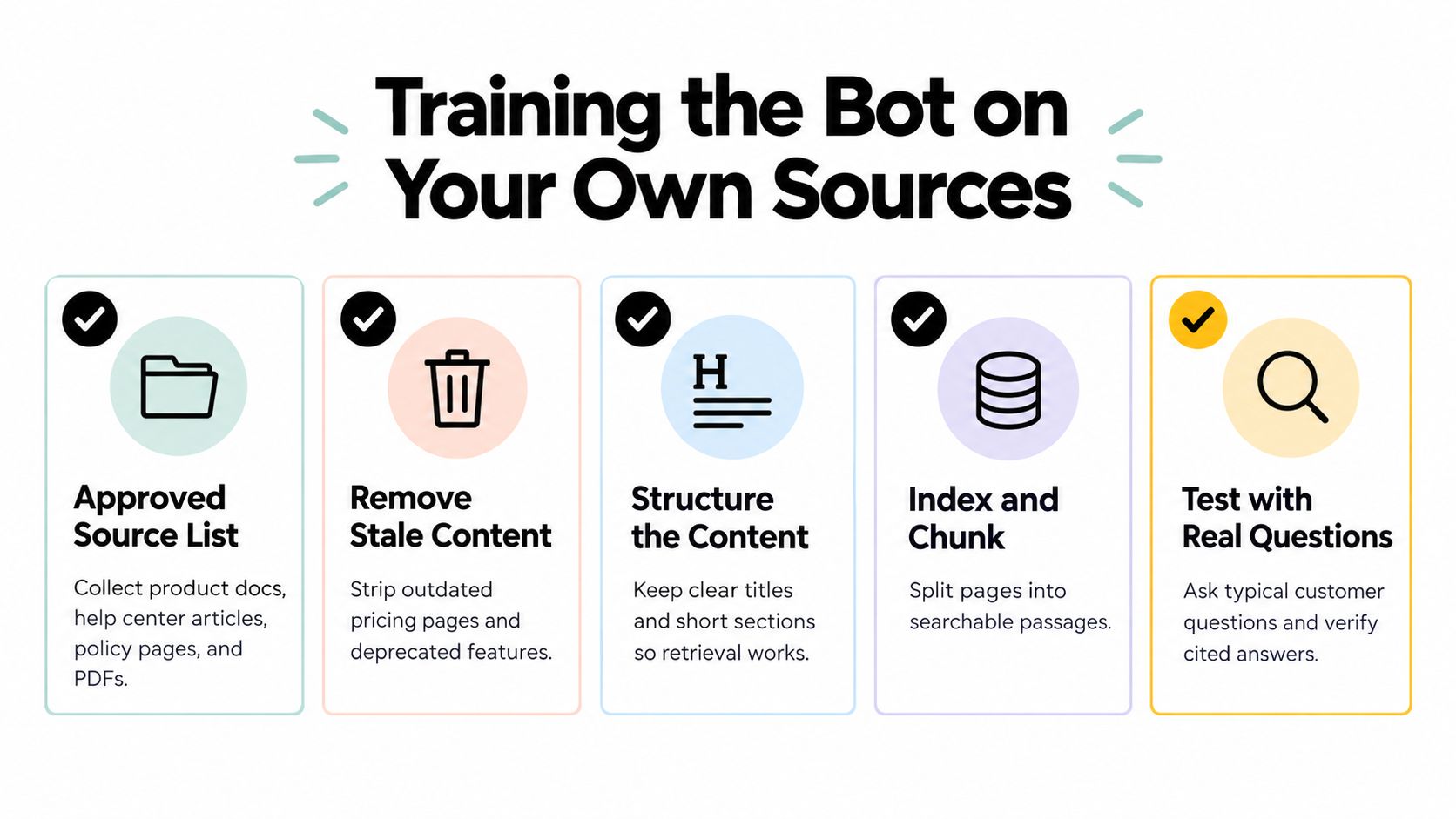
A practical knowledge base training workflow should leave you with a source inventory, test questions, known failure cases, and an owner for every high-impact document.
Embedding the Widget and Configuring Guardrails
Embedding usually takes one script tag, but production behavior depends on everything around it. Load the widget only where it can help, avoid interrupting checkout or authentication flows, and make sure the launcher works on small screens and with keyboard navigation.
A generic script-tag installation might look like this in inline form: <script src="https://widget.example.com/loader.js" data-bot-id="your-bot-id" async></script>. Keep the identifier public only if the provider designed it for client-side use. Secrets, model credentials, and privileged actions belong on your server.
For React or Next.js, use a dedicated ChatWidget component and initialize it after the page is interactive. Lazy-load the bundle when the launcher becomes visible or after the main content has loaded if chat isn't central to the page. That prevents a support tool from competing with the page's primary experience.

Configure behavior in layers
Model settings should match the job. Use a restrained temperature for factual support, cap response length, and require the assistant to acknowledge uncertainty. A system instruction can define the role, supported topics, source hierarchy, language, and escalation behavior.
Content guardrails should block unsupported topics, protect against prompt injection, redact sensitive information, and prevent the assistant from inventing prices, policies, or product commitments. Don't rely on a single prompt instruction. Combine retrieval constraints, output checks, source citations, and explicit fallback paths.
Operational guardrails include rate limits, response-length limits, language restrictions, abuse handling, and timeouts. Set a maximum wait threshold and provide a useful fallback if a provider or integration is unavailable.
A handoff service can detect phrases such as “security incident,” “charged twice,” or “close my account,” then post the transcript and intent metadata to a support inbox or Slack. In a Node service, the logic can be as simple as if (shouldEscalate(message)) await sendToSupport({ transcript, reason });. The important design choice is not the syntax. It is the rule set, the destination, and the confirmation shown to the visitor.
For the installation details of a hosted widget, see this website widget implementation guide. Then test the experience as a visitor:
- Greeting: State what the assistant can help with instead of saying only “How can I help?”
- Typing state: Show progress without pretending a human is typing.
- Fallback: Explain what wasn't found and offer a relevant next action.
- Escalation: Give a clear “Talk to a person” option before frustration builds.
- Transcript context: Send the conversation to the teammate so the visitor doesn't repeat everything.
Privacy, Security, and Compliance Essentials
A website chatbot creates a data path that many embed tutorials ignore. A visitor's message may travel from the browser to a widget script, through an iframe or serverless function, to a model provider, and then into your own transcript database or vector store.
Each hop needs review. Mixed-content HTTP requests can expose conversations in transit. Third-party iframes may introduce domains and cookies that your team didn't expect. Session tokens stored carelessly in browser storage can increase exposure, and personally identifiable information may enter provider logs or internal analytics without the visitor understanding where it goes.
Research examining chatbot privacy risks identified insecure HTTP transfers in 6.29% of chatbots, and found that 68.92% of identified cookies were used for advertising or tracking rather than product function. The findings are documented in this research on chatbot security and privacy, and they make the widget itself part of your privacy review, not an exempt third-party detail.
Apply controls at every boundary
- Transport: Enforce HTTPS for the site, widget loader, API calls, webhooks, and source-management interfaces.
- Browser surface: Self-host the loader when practical, review iframe domains, restrict third-party scripts, and use a strict content security policy.
- Prompt data: Strip unnecessary names, emails, payment details, access tokens, and account identifiers before sending messages to a model provider.
- Storage: Set a short transcript retention period, encrypt stored data, restrict staff access, and separate test data from production conversations.
- Vendors: Review subprocessors, retention settings, deletion procedures, regional processing, and data-processing agreements with model and vector-storage vendors.
- Actions: Require authentication and authorization on every account-changing action. Never treat a chat session alone as proof of identity.
| Control | No-Code Platform | Managed API | Self-Hosted |
|---|---|---|---|
| HTTPS and browser controls | Verify vendor defaults and allowed domains | Configure your application and widget boundary | Fully controlled by your team |
| PII redaction | Use built-in controls where available | Implement redaction before API calls | Implement and audit in your own stack |
| Log retention | Review contractual and dashboard settings | Configure provider and application retention | Set storage and deletion policies directly |
| Access control | Use platform roles and SSO where available | Build roles across app and provider accounts | Own identity, secrets, and permissions |
| Data residency | Depends on vendor regions and subprocessors | Depends on provider and architecture | Determined by your infrastructure |
| Incident response | Follow vendor process and export requirements | Coordinate provider and application response | Operate the entire response process |
A no-code deployment can be acceptable for public, low-sensitivity FAQs when the vendor offers clear controls and contracts. Choose a private VPC or self-hosted design when the assistant handles regulated information, privileged workflows, internal documents, or strict residency requirements. A support compliance guide can help frame the questions for vendor review.
Testing, Launching, and Improving After Go-Live
A chatbot should pass a release checklist before visitors see it. Test the widget on the main browsers and screen sizes, verify that every supported intent retrieves the intended source, confirm that unsupported questions fall back safely, and check that escalation includes the full context a teammate needs.
Run a closed beta with real support examples before opening the assistant to everyone. Then use a staged traffic ramp so the team can watch latency, fallback behavior, escalation volume, source citations, and visitor feedback without turning a bad configuration into a site-wide support problem.
Build a gap log
Record every conversation that contains one of these signals:
- Fallback: The assistant couldn't find a grounded answer.
- Correction: A visitor or teammate had to repair the response.
- Handoff: The bot transferred the conversation to a human.
- Negative feedback: The visitor marked the answer unhelpful or abandoned the exchange.
- Source conflict: Two documents produced different answers.
- Action failure: An integration rejected the requested operation.
Review the log on a regular cadence. Classify each issue as a content gap, data gap, action gap, routing gap, or guardrail gap. A content gap needs a better article. A data gap may require an authenticated lookup. An action gap needs an integration or a human route. This classification prevents the team from trying to solve every failure with prompt wording.
The post-launch bottleneck is usually content readiness and gap management, not the embed code. The chatbot content strategy guidance describes the value of classifying unanswered questions and maintaining a recurring gap loop from live conversations and site-search behavior.
Troubleshoot by symptom
Stale answers usually indicate duplicate sources, missing retirement rules, or a refresh process that doesn't include the canonical document. Remove the old source and test the same question again.
Invented prices require stricter source restrictions. Make pricing answers cite the approved plan document, refuse to calculate undocumented discounts, and route account-specific questions to a person.
Ignored guardrails may come from conflicting instructions, an overly broad retrieval result, or an action exposed without authorization checks. Reproduce the prompt, inspect the retrieved passages, and test the policy outside the happy path.
A missing widget often comes from cached pages, a blocked script, an incorrect loading condition, or a content security policy violation. Check the browser console, deployment version, allowed domains, and script order before changing application logic.
CORS failures point to a mismatch between the browser origin and the API configuration. Keep privileged calls server-side where possible, and allow only the origins you operate.
Use an improvement cadence that matches your support operation. Early reviews should focus on obvious failures and unsafe answers. Later reviews can prioritize new intents, workflow automation, source ownership, and page-level placement. The target isn't maximum automation. It is a dependable system that resolves suitable questions quickly and gets difficult cases to the right teammate with useful context.
For a structured evaluation process, use an AI agent testing framework to turn representative conversations into repeatable checks before each release.
SupportGPT lets teams build AI support agents from their own sources, configure guardrails and natural-language escalation rules, and deploy an assistant through a hosted website widget with analytics and a real-time playground. Visit SupportGPT to evaluate whether its workflow fits your chatbot scope, security requirements, and support team's operating model.