How to Build an AI Chatbot: A Practical Guide (how to build an ai chatbot)
Learn how to build an ai chatbot with a practical, step-by-step guide that covers planning, training, deployment, and optimization for real results.
Before you even think about code or platforms, you need a solid blueprint. The most sophisticated AI on the planet will fall flat if it’s aimed at the wrong problem or built on a shaky foundation. A great chatbot isn't just a piece of tech; it's a strategic tool designed to deliver real business results.
I've seen it happen time and again: a team gets excited about the tech and jumps straight into choosing a platform. That's a classic mistake. The real first step is to zoom out and define what success actually means for your business. This means getting way more specific than just "improving customer support."
Laying The Groundwork For A Successful AI Chatbot
Let's get into the nitty-gritty of planning. This phase is non-negotiable and sets the stage for everything that follows.
Define Your Chatbot's Core Purpose
First things first: your bot needs a clear job description. What is its one primary role? Is it meant to take the pressure off your human agents? Is its job to capture and qualify leads? Or is it there to provide instant, 24/7 answers to those common, repetitive questions?
Setting specific, measurable goals is crucial. You need them not only for the build but also to prove its value down the line.
Here are a few examples of what I mean by concrete goals:
- Reduce ticket volume by automatically resolving the top 10 most frequent support queries.
- Increase lead qualification by 25% by engaging website visitors and scheduling demos for the sales team.
- Improve first-response time by providing instant answers to 80% of incoming questions after business hours.
- Boost user self-service by deflecting 30% of "how-to" questions from the support queue.
Nailing down this core purpose will guide every single decision you make from here on out. It’s a core principle of automation. In fact, getting a handle on What is AI Automation and How Does It Work is essential before building any AI-driven system, especially a chatbot designed to automate conversations.
Map Critical Customer Conversations
Once you know the bot’s main goal, you can figure out which conversations it needs to handle. Don't try to boil the ocean and make it answer everything at once. That's a recipe for failure. Instead, start by identifying the most frequent and highest-impact user interactions.
The best place to start digging is your existing customer support data. Go through your help desk tickets, live chat transcripts, and email chains. Look for the patterns. What questions pop up constantly? Those are your prime candidates for automation.
This simple, three-part process is the foundation for your entire chatbot strategy.
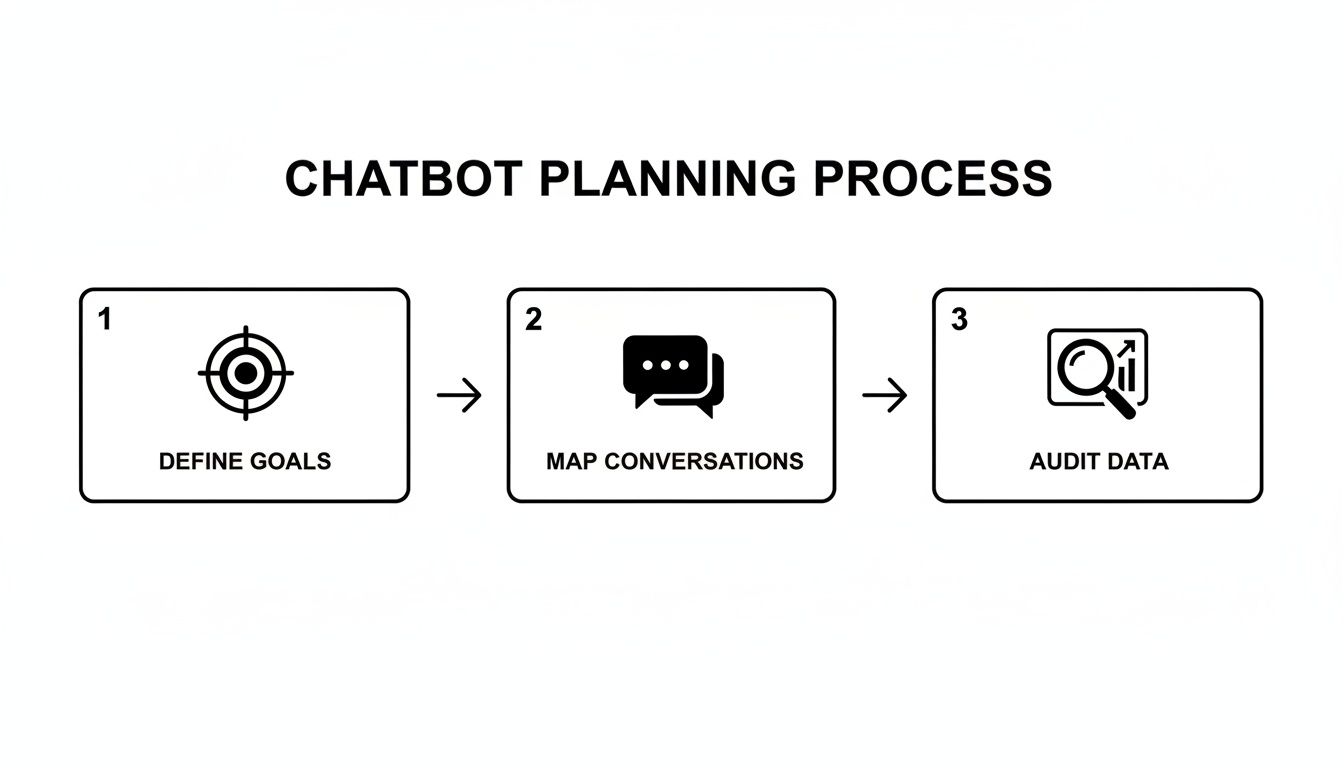
Following this flow—defining goals, mapping conversations, and then auditing your data—is how you ensure the project is built on solid ground.
Audit Your Existing Knowledge Sources
Finally, it’s time to gather the raw materials your chatbot will learn from. An AI chatbot is only as smart as the data you feed it. If your knowledge base is a mess of outdated, incomplete, or confusing articles, your chatbot's answers will be just as bad.
You can have the most powerful AI model in the world, but if your source data is garbage, the chatbot will fail. The quality of your training material directly dictates the quality of the user's experience.
It's time for a thorough audit of all your potential knowledge sources:
- Knowledge Base & FAQs: Are these articles actually accurate and up-to-date?
- Support Tickets & Transcripts: Comb through these to find the best, most concise answers your top human agents have provided. These are gold.
- Product Documentation: Is the technical information clear enough for a non-expert to understand?
This audit will show you what you have to work with, highlighting both your strengths and, more importantly, your weaknesses. It tells you what content you can use right away and pinpoints the gaps you absolutely must fill before building an AI chatbot that your customers will actually trust. This groundwork is the most important investment you'll make in the entire project.
Picking the Right Engine for Your Chatbot
The Large Language Model (LLM) is the engine that powers your chatbot, the core technology that understands what users are asking and figures out how to respond. With big names like OpenAI's GPT-4, Google's Gemini, and Anthropic's Claude constantly in the headlines, it's easy to get lost in the debate over which model is "the best."
But here’s a secret from someone who's been in the trenches: for most support chatbots, the specific model you choose is far less important than how you use it. The real magic happens in the quality of your training data and the platform you use to bring it all together.

This brings you to a crucial fork in the road: do you build the entire chatbot infrastructure yourself, or do you buy into a platform designed for the job?
The Critical "Build vs. Buy" Decision
Going the "build" route means assembling everything from scratch. You get total control, hand-picking every piece of the puzzle, from the vector database to the LLM itself. This path can be rewarding, but it demands serious engineering talent, a hefty budget, and a long-term commitment to maintenance. It's a massive undertaking.
For the vast majority of businesses, especially those without a dedicated AI team, the "buy" approach is smarter and faster. Using a specialized no-code or low-code platform like SupportGPT means you can skip the complex, time-consuming infrastructure build and get straight to creating a great user experience.
Here’s why that’s usually the better move:
- Get Live Faster: You can launch a genuinely helpful chatbot in hours or days, not the months it would take to build one from the ground up.
- Control Your Costs: Building from scratch involves significant upfront and ongoing costs for specialized developers and infrastructure. A platform turns that into a predictable operational expense.
- Let Experts Handle the Tech: The platform manages all the tricky stuff—API connections, security, keeping up with model updates—so you can focus on what the bot actually says.
- Stay Flexible: The best platforms are model-agnostic. This is huge. It means you can swap out the underlying engine—say, from an OpenAI model to a Gemini model—as the technology evolves, without having to rebuild anything.
The AI world moves incredibly fast. While ChatGPT still commands a 68% market share, Google's Gemini has rocketed to 18.2%, marking a staggering 237% growth in just one year. You can dive deeper into these numbers with this analysis of AI chatbot market share. A good platform lets you ride these waves instead of being drowned by them.
Comparing Top LLMs for Customer Support Chatbots
While the platform is key, it's still good to know the strengths of the different engines. This table gives you a quick, side-by-side look at the top contenders for a support-focused chatbot.
| LLM Model | Best For | Key Strengths | Potential Considerations |
|---|---|---|---|
| OpenAI GPT-4o | All-around performance, complex reasoning, and natural conversation. | Excellent at understanding nuance, following instructions, and generating high-quality, human-like text. | Can be more expensive at scale; requires careful prompt engineering. |
| Google Gemini | Multimodal tasks (text, image, video) and deep integration with Google. | Strong reasoning, fast response times, and native integration capabilities within the Google ecosystem. | Still newer in the market, so the tooling and community support are evolving. |
| Anthropic Claude 3 | High-stakes industries needing strong safety and ethical guardrails. | Top-tier performance with a focus on "Constitutional AI" to reduce harmful outputs. Large context window. | Can sometimes be overly cautious in its responses, refusing to answer borderline queries. |
Ultimately, the best model for you will depend on your specific needs, but this gives you a solid starting point for comparison. A model-agnostic platform gives you the freedom to test and choose without being locked in.
How to Evaluate Chatbot Platforms
When you're shopping for a platform, you're not just buying a piece of software. You're choosing a partner that will shape your customer experience. It's crucial to see past the marketing hype and focus on the features that actually matter.
A great platform doesn't just give you access to an LLM. It provides the entire ecosystem of guardrails, analytics, and integrations needed to deploy a chatbot responsibly and effectively.
Keep this checklist handy during your evaluation:
- Is it actually easy to use? Could someone on your support team—not an engineer—confidently train the bot, add new information, and check its performance? A clunky interface is a deal-breaker.
- How well does it play with others? Look for dead-simple embedding for your website and native integrations with your help desk (like Zendesk or Intercom) for when a human needs to step in.
- Can you trust it with your data? Non-negotiables include enterprise-grade security, data encryption, GDPR compliance, and single sign-on (SSO) options.
- Are you in control? You absolutely need tools to keep the bot on-topic, prevent it from making things up, and define its tone of voice. These are your guardrails.
- Can it grow with you? Check the pricing tiers, look for uptime guarantees (SLAs), and make sure the platform can handle a surge in conversations without breaking a sweat.
By focusing on these practical points, you shift the question from a theoretical "which LLM is best?" to a much more useful "which platform gives us the best toolkit for success?" That's how you choose a solution that delivers real, measurable value.
Training Your Bot to Be a True Expert
An AI chatbot is only as smart as the data it’s fed. Once you've picked your platform, the real work begins: turning your raw company knowledge into a structured, intelligent brain for your bot. This isn't just about dumping a bunch of documents into a system. It's a careful process of curation and instruction that elevates a generic model into a genuine expert on your business.
Honestly, this is where many chatbot projects fall flat. If you feed it messy, outdated, or incomplete information, your bot will confidently give messy, outdated, and incomplete answers. The quality of your training material directly dictates the quality of your user's experience.

Whipping Your Knowledge Base into Shape
First things first, you need to gather and clean your source materials. Start by rounding up every piece of documentation you can find—knowledge base articles, FAQs, old support chat logs, and product manuals. Think of yourself as a librarian finally organizing a chaotic, dusty backroom.
The goal here is to create a "single source of truth." That means rolling up your sleeves and taking a few key actions:
- Kill the Clones: Hunt down and remove old, overlapping articles. Having two slightly different versions of the same policy is a surefire way to confuse your AI.
- Fact-Check Everything: Go through your documents with a fine-tooth comb. Are pricing details, feature names, and company policies still accurate?
- Plug the Gaps: Look at your recent support tickets. What are customers constantly asking about that isn't documented anywhere? Write a clear, simple article to answer that question once and for all.
Once your data is clean, structure it for easy digestion. An AI, much like a human, learns better from well-organized content. Use simple headings, short paragraphs, and bullet points. For instance, instead of burying your refund policy in a dense paragraph, break it down with clear headings like "Who is Eligible?", "How to Start a Return," and "Expected Timeline."
Crafting the Core Prompt: Your Bot's Constitution
With a pristine knowledge base ready, it's time for prompt engineering. The core prompt—sometimes called a system prompt or meta-prompt—is the single most important piece of text you will write for this project. It’s the bot's constitution, its permanent set of instructions that governs every single interaction it has.
This prompt is where you define three critical things:
- Personality and Tone: Is your bot friendly and casual? Or is it more formal and professional?
- Scope and Boundaries: What topics is it allowed to discuss? More importantly, what should it never answer?
- Core Directives: How should it behave when it can't find an answer in its knowledge base?
Your core prompt is the DNA of your chatbot. It establishes the rules of engagement and ensures every response is on-brand, accurate, and helpful. A well-written prompt is what separates a truly useful assistant from a frustrating gimmick.
For example, a solid core prompt for a SaaS support bot might include a line like: "You are SupportBot, a helpful and friendly assistant for Acme Inc. Your tone is patient and clear. You must only answer questions using the documents provided. If the answer is not in the documents, politely state you don't have the information and offer to connect the user with a human support agent."
Real-World Prompting Techniques in Action
Beyond that initial setup, you'll need to continuously test and refine how the bot handles specific queries. This is where you apply practical tweaks to guide its behavior and keep it from going off the rails.
For bots running on large language models, effective LLM monitoring is crucial for making sure they stay on track and perform as expected. This ongoing evaluation helps you catch weird deviations before your customers do.
Here are a few common scenarios and how to fix them with a simple prompt tweak:
| Scenario | Ineffective Bot Behavior | A Better Prompt Tweak |
|---|---|---|
| Handling Vague Questions | The bot takes a wild guess at what the user wants, and usually gets it wrong. | Add this instruction: "If a user's question is unclear, ask clarifying questions before attempting to answer." |
| Avoiding Speculation | The bot confidently invents features or policies that don't actually exist. | Add this rule: "Never invent information. If the answer is not explicitly in your sources, say so." |
| Maintaining Persona | The bot's tone drifts, becoming either too robotic or way too casual. | Add a final instruction: "Always end your responses with a helpful and encouraging closing, like 'I hope this helps!'" |
This back-and-forth process of curating data and refining prompts is the heart of building a chatbot people can actually trust. You’re not just feeding it information; you're teaching it how to think about that information, setting clear boundaries, and shaping a personality that truly reflects your brand. This is how you turn a powerful piece of technology into a genuinely valuable member of your team.
Building Trust with Guardrails and Human Handoffs
Let's be blunt: an AI chatbot without a safety net is a brand risk you can't afford. It only takes one wild, inaccurate, or off-brand response to completely shatter a customer's trust. This is why building robust guardrails and a smooth human handoff process isn't just a nice-to-have feature—it's a non-negotiable part of putting any AI in front of your customers.
Your goal here is to create a predictable and reliable experience. You're building a highly specialized expert, not a generalist chatbot that can riff on any topic. This control is what elevates your bot from a frustrating gimmick to a genuinely helpful assistant.

Implementing Practical AI Guardrails
Think of guardrails as the rules of the road for your chatbot. They’re the constraints you hard-code to keep its behavior predictable and aligned with your business goals. These are absolutely essential for preventing common AI pitfalls like "hallucinations," where the model just makes things up.
Here are the guardrails I always implement first:
- Knowledge Confinement: This is the big one. You need to explicitly instruct the AI to only answer questions using the information you've provided. If the answer isn’t in its knowledge base, the bot's only job is to say so, not to guess.
- Topic Restriction: Clearly define the bot's lane. For a support bot, this means sticking to product features, troubleshooting, and billing. Instruct it to politely sidestep questions about the weather, politics, or anything else outside its scope.
- Tone and Persona Consistency: Use your core prompt to lock in the bot's personality. Is it professional? Empathetic? A little quirky? This ensures every single interaction feels on-brand.
- Profanity and Sensitive Content Filters: Most enterprise platforms have these built-in. Double-check that they’re enabled. It’s a simple step that maintains a professional and safe environment for your users.
These measures are table stakes now. By 2030, an estimated 95% of customer interactions are expected to be AI-powered, with the market ballooning to $27.3 billion. With over 80% of organizations already deploying generative AI, these guardrails are what allow you to manage that scale responsibly. You can dig deeper into the explosive growth of chatbot technology to see just how fast this is moving.
Designing a Seamless Human Handoff
No matter how smart your AI gets, it won't be able to solve every problem. And that's okay. Knowing when to pass the conversation to a human agent is just as important as answering a question correctly. A clunky or delayed handoff can quickly turn a minor hiccup into a major point of customer frustration.
The trick is to make the transition feel like a natural, helpful escalation, not a system failure.
A great human handoff isn't an escape hatch; it's an integrated part of the support journey. The customer should feel like they're being seamlessly passed to a specialist, not like they've hit a dead end.
Your escalation strategy needs to be proactive. It should trigger a handoff based on clear signals instead of waiting for the user to get angry and start mashing the "0" key.
Setting Up Smart Escalation Triggers
Smart triggers are your secret weapon for making this work. They automatically detect when a human touch is needed, so your team can intervene at exactly the right moment. This is a crucial piece of learning how to build an AI chatbot that people actually want to use.
Start by implementing triggers based on these real-world conditions:
- Keyword Detection: Automatically flag conversations with words like "cancel," "complaint," "legal," or "frustrated." These almost always need immediate human review.
- Sentiment Analysis: Most modern platforms can gauge user sentiment. If the bot detects a sudden nosedive in sentiment—impatience, confusion, anger—it should proactively offer to connect the user with a person.
- Repeat Questions: If a user asks the same thing two or three times, it’s a massive red flag that the bot's answers are missing the mark. That's the perfect time for a human to step in.
- Complex Query Recognition: Some issues are just better handled by people. Think intricate billing disputes or multi-part technical problems. Set up rules to automatically escalate topics you know require a human's expertise.
- Direct User Request: This one’s the easiest. Always, always give users a clear and simple way to say "talk to a person" at any point. Don't hide it.
When you combine strong guardrails with intelligent escalation paths, you create a system that’s both reliable and empathetic. This is how you build the trust needed for customers to see your chatbot as a genuinely valuable tool, not just another obstacle.
Launching and Optimizing for Peak Performance
Getting your AI chatbot live is a huge milestone, but it's not the finish line. Think of it as the start of a new, ongoing conversation. A truly effective chatbot is a living system that needs constant attention, testing, and refinement based on what it learns from real user interactions. This is where you shift from building to optimizing, creating a powerful feedback loop that makes your bot smarter every single day.
The good news? The actual deployment is often the easiest part. Modern platforms have made this incredibly simple.
You don't need to be a developer to get a chatbot widget live on your website anymore. Most no-code tools just give you a small snippet of code. You just copy and paste it into your site’s header or footer, much like adding a Google Analytics tracking code.
A Practical Approach to Chatbot Testing
Before you let your bot loose on every visitor, you absolutely need a structured testing plan. This is about more than just asking a few questions to see if it works. You have to simulate real-world chaos to see how it holds up under pressure.
Your testing strategy should have a few different layers:
- User Acceptance Testing (UAT): Grab a small, diverse group of internal folks—especially your support team—and have them interact with the bot. Give them real customer scenarios and encourage them to try and "break" it. Their feedback is pure gold because they know your customers' biggest headaches better than anyone.
- Stress Testing: What happens when multiple people try to chat at once? Most platforms handle this heavy lifting for you, but it’s always smart to ask your provider about their capacity limits, especially if you’re expecting a lot of traffic.
- Prompt Refinement in a Playground: This is critical: never edit your live bot’s core instructions on the fly. Use a testing "playground" or sandbox environment to safely experiment with prompt changes. This lets you see exactly how new instructions change its answers before you push anything into production.
Testing isn’t just about finding what’s broken; it’s about discovering what could be better. Every awkward response or missed answer is a valuable lesson that informs your next iteration.
Focusing on Analytics That Actually Matter
Once your chatbot is live, you'll have access to a ton of data. The trick is to ignore the vanity metrics and zero in on the numbers that tell you if your bot is actually solving problems and making customers happier. It's easy to drown in data; the real skill is pulling out actionable insights.
Tracking the right metrics is the foundation of improvement. For businesses looking to scale, our guide on how SupportGPT can help you build an AI chatbot offers deeper insights into setting up effective analytics from day one.
Here are the essential metrics to build your dashboard around:
| Metric | What It Measures | Why It's Important |
|---|---|---|
| Resolution Rate | The percentage of conversations the bot solves without needing a human. | This is your core ROI metric. A rising resolution rate means the bot is successfully deflecting tickets and freeing up your team. |
| User Satisfaction (CSAT) | User feedback, usually a simple thumbs up/down or a star rating. | This tells you how people feel about the bot's help. A high resolution rate with low satisfaction is a major red flag. |
| Escalation Rate | The percentage of chats handed off to a human agent. | This helps you spot knowledge gaps. If lots of escalations are about the same topic, you know exactly where to improve the bot’s training. |
| Most Frequent Queries | A running list of the most common questions users ask. | This is your content roadmap. It shows you what your customers care about most, guiding updates to your knowledge base. |
The growth in this space is undeniable. The AI chatbot market is projected to soar to $27.3 billion by 2030 and could hit $70 billion by 2035, growing at a blistering 24% CAGR. For companies, this means bots trained on your data can slash response times, but having built-in analytics is the only way to truly capitalize on this growth. Dive into more of these compelling AI chatbot statistics to grasp the scale of the opportunity.
Creating Your Continuous Improvement Loop
Finally, you need to turn all these insights into action. The goal is a simple, repeatable process for making your bot better every single week.
Here’s what that feedback loop looks like in practice:
- Review the Data: Once a week, look at your key metrics. Dig into the "unanswered questions" log and find the conversations with low satisfaction scores.
- Identify a Weakness: Find a recurring theme. Is the bot fumbling questions about a new feature? Are its answers on your return policy confusing people?
- Update the Knowledge Base: Go straight to your source documents. Add the missing information or clarify the existing content to make your single source of truth even stronger.
- Push the Update: Sync your changes with the chatbot platform.
By repeating this cycle, you're not just maintaining a chatbot; you're cultivating an ever-smarter digital team member. This proactive, data-driven approach is what separates a chatbot that merely exists from one that delivers exceptional value.
Got Questions About Building an AI Chatbot?
Once you start moving past the initial "what if" stage of planning an AI chatbot, the practical questions start popping up. It's totally normal. Suddenly, you're thinking about real-world stuff like budgets, technical skills, and how to keep the bot from going rogue.
Let's walk through some of the most common questions I hear from teams just starting out. Getting these cleared up early saves a lot of headaches down the road and helps get everyone on the same page.
What’s This Going to Cost Me?
The price tag for an AI chatbot can swing wildly. If you're thinking of a completely custom, built-from-scratch solution, you’re looking at a serious investment—easily tens or even hundreds of thousands of dollars. That route demands a team of pricey AI engineers, plus all the ongoing costs for servers and maintenance.
But honestly, that’s not the reality for most businesses anymore. The rise of powerful no-code platforms has been a game-changer. You can get started with subscription plans for less than a hundred bucks a month, which is a world away from a massive capital expense. Your main costs become the platform subscription and the LLM's API usage, which is often just bundled into your plan.
For the vast majority of companies, a no-code platform is the smartest path. It gives you incredible power without the massive upfront cost and turns a potential budget-breaker into a predictable monthly operational expense.
Do I Need to Be a Coder to Build a Chatbot?
Nope, not anymore. Just a few years ago, you definitely needed a deep understanding of Python, APIs, and machine learning frameworks. Today's best tools are built for the rest of us.
Seriously, if you know how to organize files in a folder and can write clear instructions, you've got this. Modern platforms handle all the heavy lifting on the backend. Your job is to focus on what you're already an expert in: your business knowledge. You get to shape the bot's personality and train it with your expertise. This is huge because it puts the power directly into the hands of the people who know your customers best—your support, product, and success teams.
How Can I Make Sure My Chatbot Gives Correct Answers?
This is probably the most important question of all. A bot that gives wrong answers is worse than no bot at all because it kills user trust in a heartbeat. The good news is, getting this right comes down to a few core principles.
- Garbage In, Garbage Out: The absolute number one factor is the quality of your training data. Your bot should only pull from a "single source of truth"—your own verified help docs, internal knowledge base, and up-to-date FAQs.
- Set Strict Rules: Your prompt engineering is key. You have to explicitly command the bot to only use the documents you've provided. A non-negotiable instruction should be something like, "If you can't find the answer in the provided documents, say 'I don't have that information.'"
- No Random Googling: Enterprise-level platforms let you disable the bot's ability to search the public web. This is a critical guardrail. It prevents the bot from guessing, making things up (what we call hallucinating), or pulling in unreliable info from some random blog post.
When you combine clean, curated data with strict operational rules, you build a chatbot that people can actually rely on.
What's the Difference Between a Rule-Based Bot and an AI Bot?
Ah, the classic question. Understanding this is everything.
A rule-based chatbot is basically a clunky phone tree. It follows a rigid, pre-programmed script. It's all about "if the user says X, you say Y." If someone asks a question a slightly different way or uses a word it doesn't recognize, the whole thing falls apart. It’s incredibly frustrating for users.
An AI chatbot, on the other hand, is powered by a Large Language Model (LLM), and it's a completely different beast. It understands context, nuance, and intent. You can ask it the same question five different ways, and it will get what you mean. This makes for a conversation that feels natural and genuinely helpful, not like you're navigating a broken flowchart.
Ready to build an AI assistant that delights your customers and scales your support? SupportGPT provides a complete, no-code platform with enterprise-grade guardrails, smart human handoffs, and powerful analytics. Start your free trial and launch a bot in minutes at supportgpt.app.