Discover how do you create a bot
Curious how do you create a bot that truly helps? Learn step-by-step tips to design, train, and deploy an AI assistant your users will trust.
Building a genuinely helpful AI bot isn't just a technical exercise. It starts with strategic planning, moves to data preparation, defining a persona, training a model, and then involves rigorous testing before you even think about deployment and monitoring. A platform like SupportGPT can certainly make this easier by letting you define the mission and feed it your existing help docs, but the foundational work is still on you.
Your Blueprint for a Bot That Actually Solves Problems
Let's be honest: a successful bot is born from a clear strategy, not from fancy tech. Before you write a single line of code or even log into a tool, the most important work happens away from the keyboard.
Time and again, I've seen teams rush into development without a solid plan. It's the number one reason bots fail to deliver, ending up as a frustrating gimmick instead of a real solution. The goal here is to build an asset that solves tangible business problems, not just another widget on your website.
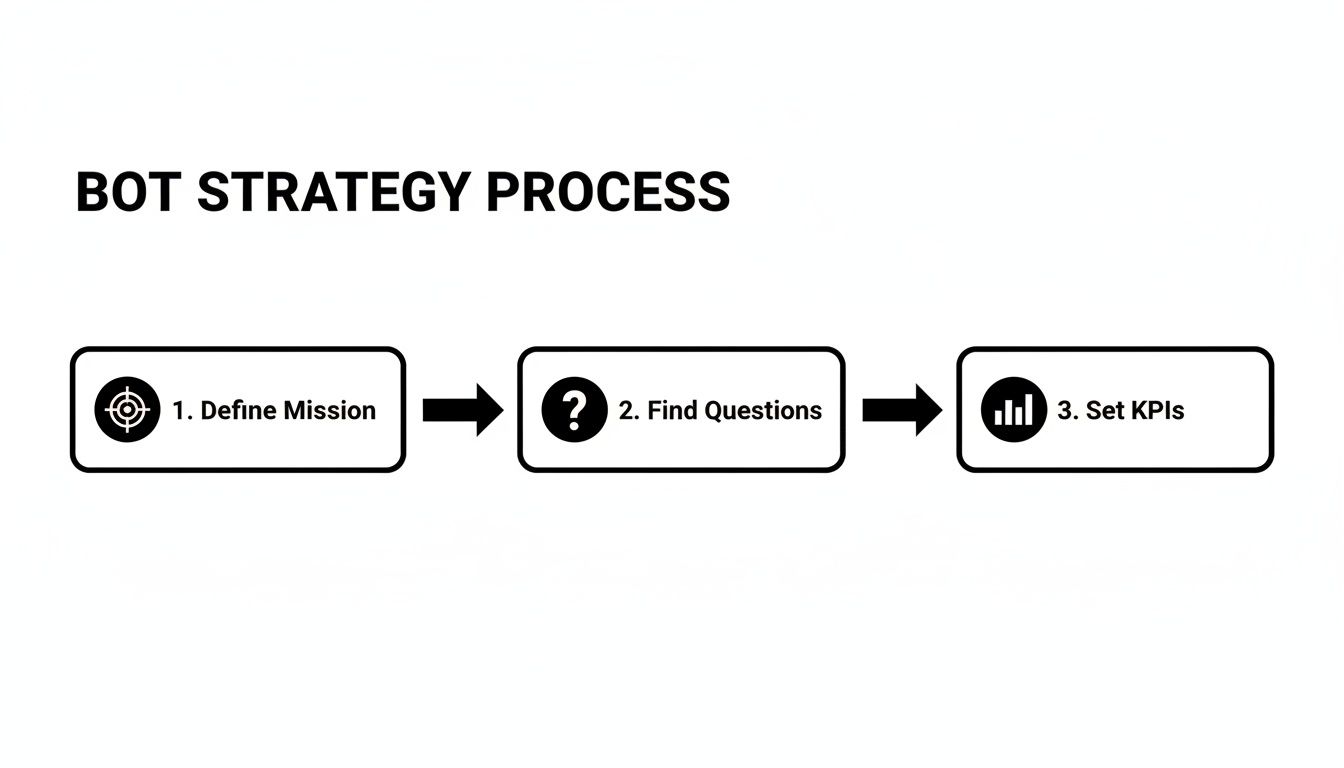
So, where do you start? Define your bot's core mission. What is its single most important job?
- Ticket Deflection: Is the goal to handle the top 5-10 repetitive questions that clog your support inbox daily?
- Lead Qualification: Will it engage website visitors, ask the right questions, and book demos for your sales team?
- User Onboarding: Can it walk new users through your product, proactively answering those first-day setup questions?
Nailing this down gives you focus and prevents the dreaded "scope creep." A bot that tries to do everything ends up accomplishing nothing.
Pinpoint the Repetitive Questions
To figure out where your bot can make the biggest splash, you need to dig into your support data. Your support team is a goldmine here. Go talk to them. Find out what questions they are absolutely sick of answering.
Comb through your ticketing system, chat logs, and old emails. You're hunting for a "greatest hits" list of common problems. These usually revolve around things like:
- Password resets and account lockouts
- Billing inquiries and invoice requests
- "How do I..." questions for basic features
- Shipping status and return policies
This list becomes the curriculum for your bot's initial training. Don't try to make it an expert on every esoteric edge case from day one. Focus on mastering these high-volume, low-complexity issues first. This approach guarantees you're building a tool that provides immediate relief to your team and fast answers for your customers.
Set Sharp, Measurable Goals
Vague goals like "improve customer support" are useless because you can't measure them. To know if your bot is actually working, you have to define specific, quantifiable Key Performance Indicators (KPIs) from the very beginning. This is what turns a side project into a strategic initiative.
A well-defined KPI is the difference between hoping your bot works and knowing it does. It gives you a clear benchmark to measure performance, justify the investment, and guide future improvements. Without it, you're just guessing.
Instead of fuzzy objectives, set concrete targets. For example:
- Achieve a 30% self-service resolution rate for all incoming chats within the first quarter.
- Reduce the average first response time from 10 minutes to under 2 minutes by having the bot handle initial queries.
- Decrease ticket volume related to billing by 50% in six months.
This strategic groundwork ensures every decision you make, from crafting a prompt to choosing a data source, pushes you toward a tangible business outcome.
Gathering and Refining Your Bot's Knowledge Base
An AI bot is only as good as the information it knows. I like to think of its knowledge base as its brain; if you feed it scattered, outdated, or confusing information, you'll get unhelpful answers. This is probably the most common pitfall I see when teams first start building a bot, but getting it right creates a solid foundation for everything that follows.
This initial data preparation phase is less about complex AI and more about thoughtful curation. Your goal here is to transform messy internal wikis, sprawling help docs, and long-winded FAQs into a clean, structured library the bot can actually understand and use.

Auditing Your Existing Content
Before you even think about uploading anything, you need to start with a content audit. Seriously, don't skip this. Pull together every potential knowledge source your company uses—your public help center, internal process documents, developer documentation, and even those handy saved replies from your support inbox.
Once you've got everything in one place, review each piece with a critical eye. You're hunting for common data problems that can completely trip up an AI.
- Outdated Information: Are there mentions of old features, retired pricing plans, or previous company policies? A bot trained on this will confidently give the wrong answers.
- Contradictory Details: Does one article say your return policy is 30 days while another says it's 45? The bot won't know which is correct and will likely "hallucinate" an answer that's a mix of both.
- Excessive Jargon: Is the language filled with internal acronyms or technical terms a brand-new customer wouldn't understand? Now's the time to simplify it.
- Long, Unstructured Text: Take a look at the document. Can a human quickly scan it and find a specific answer? If not, the AI is going to struggle just as much.
The rise of no-code platforms has made this whole process much more accessible. In fact, 59% of consumers are now comfortable using generative AI for company interactions, and 70% of CX leaders are actively revamping their strategies to include it. The conversational AI market, valued at $12.24 billion in 2024, is projected to hit a staggering $61.69 billion by 2032. A platform like SupportGPT fits perfectly into this trend by letting you train a bot on your own custom sources, but remember—the quality of those sources is everything. You can dig into more of these fascinating chatbot statistics on Jotform's AI resource page.
Structuring Data for Effective Ingestion
After cleaning up your content, the next job is structuring it for the AI. While a platform like SupportGPT is excellent at understanding natural language from URLs or PDF uploads, a little bit of smart formatting goes a very long way.
The trick is to think in terms of clear questions and answers. Instead of a long, dense paragraph explaining your entire billing system, break it down into bite-sized chunks.
Original Text (Poorly Structured): "Our billing system runs on the 1st of the month and charges the primary card on file. If the payment fails, we will retry three times over the next week before suspending the account. Users can update their card in the account settings, and invoices are available for download in the billing portal."
Revised Text (Well-Structured): How does billing work? We charge the primary card on file on the 1st of each month.
What happens if a payment fails? We will retry the payment three times over one week. If it still fails, the account will be suspended.
How can I update my credit card? You can update your payment method in your account settings under the "Billing" section.
See the difference? This simple Q&A format makes it incredibly easy for the model to find the precise answer to a user's question without having to guess or interpret a big block of text.
Connecting Your Data Sources
Thankfully, modern bot platforms have made the data ingestion process much easier. You no longer have to manually copy and paste every single piece of information. With a tool like SupportGPT, you can connect your sources directly.
- Website URLs: Just provide links to your help center, FAQs, or documentation pages. The platform will crawl and index the content automatically.
- Document Uploads: Have internal knowledge in files? You can upload PDFs, Word documents, or other text-based files directly.
This approach is not only faster but also way easier to maintain. When you update a help article on your website, you can simply have the bot re-index that URL to learn the new information. This creates a reliable, single source of truth and empowers your bot to give accurate, up-to-date answers, avoiding that frustrating "I can't help with that" response we all hate.
Giving Your Bot a Personality and a Purpose
Once you've fed your knowledge base into the system, it's time for the fun part: bringing your bot to life. This is where you decide exactly how it should talk, act, and think. A well-defined persona is what separates a stiff, robotic script-reader from an engaging assistant that customers actually want to interact with.
This isn’t just about making your bot sound "friendly." The persona is a strategic tool. It builds trust, manages user expectations, and reinforces your brand's voice. A bot for a trendy clothing store might be bubbly and sprinkle in emojis, while a bot for a B2B FinTech platform needs to be buttoned-up, precise, and professional. Get this right, and the bot will feel like a genuine part of your team.
Crafting a Believable Bot Persona
Before you write a single line of instruction for your bot, you need to know who it is. Think of it like creating a character for a movie. What’s its personality? Its tone? Its communication style? Having this defined internally ensures every response is consistent, whether it's handling a simple billing question or navigating a tricky support issue.
To get started, sketch out these core attributes:
- Tone of Voice: Is the bot formal or casual? Witty or empathetic? Strictly professional?
- Vocabulary: Does it use simple, everyday language, or is it okay to use industry jargon (if your audience is technical)?
- Pacing: Does it give short, punchy answers or more detailed, paragraph-style explanations?
- Hard No's: What should the bot never do? Maybe it shouldn't make jokes about account problems, speculate about unreleased features, or give financial advice.
Let’s see how this looks in practice with two completely different brands.
Example 1: "Sparky" for a Fun E-commerce Brand
- Role: The Helpful Shopping Sidekick
- Tone: Friendly, enthusiastic, and upbeat. Uses emojis where appropriate. 😃
- Vocabulary: Simple and positive. Avoids confusing shipping terms.
- Core Directive: "My job is to make shopping easy and fun! I can help you track orders, check on returns, or find the perfect gift."
Example 2: "AssistAI" for a B2B SaaS Platform
- Role: The Technical Specialist
- Tone: Professional, precise, and direct. Respects the user's time. No emojis or slang.
- Vocabulary: Uses correct technical terms (like "API endpoint" or "authentication token") but is ready to explain them.
- Core Directive: "I am here to provide accurate technical support based on official documentation. I can assist with API usage, configuration settings, and troubleshooting steps."
With this foundation in place, writing the prompts that actually guide the AI becomes much easier.
Writing System Prompts That Get Results
The system prompt is your master set of instructions for the AI model. It's a hidden directive that shapes every single response the bot generates. This is where you embed its persona, lay down the rules of engagement, and define its boundaries. It’s the bot’s constitution, and it’s arguably the most critical piece of the puzzle.
A great system prompt is clear, direct, and layered. You start broad with the core persona and then add specific constraints and rules for behavior.
Think of the system prompt as the director's notes for an actor. It establishes the character, the scene's objective, and the things the actor must—or must not—do. A well-written prompt gives the AI the clarity it needs to perform its role convincingly and reliably every time.
Here's a field-tested template I've had a lot of success with. You can adapt it for your own needs. Notice how it starts with identity and then drills down into specific rules.
You are [Bot Name], a [Role] for [Company Name]. Your persona is [Adjective 1, Adjective 2, Adjective 3].
Your primary goal is to [Core Mission]. You must answer questions based *only* on the information provided in the knowledge base. If an answer isn't there, you must say: "I'm sorry, but I don't have the information to answer that. Would you like me to connect you with a human agent?"
**Rules of Engagement:**
Never invent information, URLs, or company policies.Keep your answers concise. Use bullet points for lists to make them easy to scan.Do not engage in conversations unrelated to [Your Company's Business].If a user seems frustrated or uses angry language, immediately offer to escalate to a human agent.
This structure works so well because it covers all the bases. The first line sets the persona. The instruction about sticking to the knowledge base creates a powerful guardrail against "hallucinations" where the AI just makes things up. Finally, the explicit rules give the bot clear directions for tricky situations, ensuring a safe and consistent experience for your customers.
Putting Your Bot Through Its Paces: Testing and QA Before Launch

Throwing an untested bot at your customers is a surefire way to make a terrible first impression. The quality assurance (QA) process isn’t just a final checkbox; it’s where you transform a functional bot into one that's genuinely helpful. This is your chance to find all the awkward phrasing, knowledge gaps, and conversational dead-ends before your users do.
Thankfully, modern tools like SupportGPT make this much easier by giving you a real-time testing playground. Think of it as a safe sandbox where you can chat with your bot just like a customer would, letting you test and tweak on the fly without touching your live website. Your goal here is to be relentless. Try to break it.
Building Your Testing Gauntlet
Before you type a single word, you need a plan. A great testing gauntlet starts with a comprehensive checklist of scenarios that covers the entire spectrum of potential user interactions—from the painfully obvious to the intentionally tricky. This ensures you're systematically probing for weaknesses, not just spot-checking.
Your checklist should be a mix of scenarios designed to really push the bot's limits:
- The Greatest Hits: Start with the top 10-15 most common questions you identified back in the planning phase. Are the answers accurate, concise, and on-brand with your bot's persona?
- Slang and Variations: People don't all speak the same way. Ask the same question differently. For example, "What is your return policy?" vs. "Can I send stuff back?" or "How do returns work?"
- Vague Questions: Throw it a curveball with something ambiguous like, "It's not working" or "I need account help." Observe how the bot tries to clarify and guide the user toward a specific solution.
- Going Off-Topic: Ask about the weather or the score of last night's game. A well-designed bot should politely steer the conversation back to business.
Don't just test for what you expect users to ask; test for what they might ask. Probing for edge cases and intentionally trying to confuse the bot is the fastest way to find and patch holes in its logic and knowledge base.
Role-Playing and Digging into the Logs
Once you’ve run through the scripted scenarios, it’s time to get creative with some role-playing. This is a fantastic way to simulate how real, unpredictable humans behave. Get your team involved and assign them different customer archetypes to act out.
- The Frustrated User: This person uses short, clipped sentences and shows clear impatience. Does the bot pick up on the sentiment and offer to escalate to a human agent?
- The Non-Technical User: This person describes their problem using simple, everyday language, avoiding all jargon. Can the bot understand the intent behind their words?
- The Power User: This person gets straight to the point with highly specific, technical questions. Does the bot provide detailed, accurate answers, or does it recognize its limits and escalate properly?
After every testing session, the real work begins: digging into the conversation logs. This is where you'll find the gold. Look for patterns. Where do conversations consistently go off the rails? Did the bot completely misunderstand a key term? Did it fail to find information you know is in its knowledge base?
Every failure is an opportunity to get better. Use this feedback to tweak your system prompts, add new rules, or clarify the information in your knowledge documents. This loop of testing, analyzing, and refining is what separates a basic Q&A tool from a battle-tested assistant that’s truly ready to help from day one.
Putting Your Bot to Work with a Simple Embed
After all the planning, data prep, and testing, this is the moment of truth. It's time to get your bot in front of your users and see it in action. Thankfully, deploying a modern AI bot isn't the heavy engineering lift it used to be. With a platform like SupportGPT, it’s often as simple as copying and pasting a single snippet of code.
This ease of use is a game-changer. It's a big reason why the AI chatbot market has exploded. Globally, 80% of companies are already using or planning to use AI chatbots for customer service. Some estimates even predict that 95% of all interactions will soon be powered by AI.
Platforms like the one we're using are built for this reality. They come with built-in guardrails, multilingual support, and analytics, helping companies automate an average of 42.4% of customer interactions right out of the box. You can check out more stats on the burgeoning AI chatbot market on Vertu.com.
This deployment method is so straightforward that even non-technical team members can get a bot live on a website or app in minutes.
Embedding and Customizing the Widget
When you're ready to go live, the platform provides a small piece of JavaScript code. That little snippet is all you need.
Simply copy it and paste it into the HTML of your website, usually just before the closing </body> tag. If you're using a common website builder like WordPress, Squarespace, or Webflow, they all have a simple interface for adding custom code like this to your entire site.
But just dropping it in isn't the final step. To make it feel like a natural part of your brand, a few customizations go a long way.
- Color Scheme: Tweak the widget's colors to match your brand's palette. This prevents it from screaming "third-party tool."
- Placement: Stick to the conventions. The bottom-right corner is where users instinctively look for help, so that’s usually the best spot.
- Welcome Message: Craft an initial greeting that reflects your bot's persona and guides the user with a helpful starting question.
A well-placed and branded widget feels like an integrated feature, not an afterthought. This small detail builds user trust from the very first interaction and encourages them to actually use it.
Setting Up Smart Escalation Rules
Your bot is a workhorse, designed to handle the majority of common questions. But just as important, it needs to know when to get out of the way. This is where smart escalation comes in, ensuring a smooth handoff from AI to a human agent before a user gets frustrated.
Instead of wrestling with complex logic, you can set these rules using plain English. The idea is to create triggers based on specific keywords or even the user's sentiment.
Here are a few practical examples:
- If a user mentions "refund," "cancel," or "billing dispute," the bot should immediately offer a connection to a live agent.
- If a user's message contains frustrated language (e.g., "this is broken," "I'm angry"), that’s a clear signal to trigger an escalation.
- If the bot fails to answer a question twice in a row, it should automatically create a ticket and notify the support team.
This intelligent safety net makes sure that complex or sensitive issues are always handled by a person. The bot takes care of the instant, repetitive stuff, freeing up your team to focus on the high-value conversations that truly require a human touch. You can learn more about how to build your own AI support agents on SupportGPT and get started today.
Monitoring Performance and Driving Continuous Improvement
Getting your bot live isn't the finish line; it’s the starting line. The real work—and the real value—begins now, as you start learning from actual user conversations. This is how you create a bot that genuinely gets better over time. By tapping into your built-in analytics, you can measure how the bot is performing against the goals you set way back in the planning stage, turning data into real, tangible improvements.
This feedback loop is what separates a clunky, static bot from one that feels like a dynamic extension of your team. The market reflects this, too. Valued at $7.76 billion in 2024, the chatbot industry is expected to explode to $27.29 billion by 2030. With 57% of CX leaders already seeing AI as a game-changer for chat support, staying ahead means committing to iteration. You can dig into more of this data over at Master of Code’s analysis of the chatbot industry.
Key Metrics to Track
Forget vague feelings about whether the bot is "working." You need hard data. A solid analytics dashboard will bring the most critical metrics to the forefront, giving you an honest look at what’s hitting the mark and what’s falling flat.
I always tell teams to zero in on these three indicators first:
- Resolution Rate: What percentage of conversations does the bot handle completely on its own, without a human ever stepping in? If this number is climbing, you know your bot is becoming more effective.
- Escalation Frequency: On the flip side, how often is the bot throwing its hands up and passing the chat to a human agent? If you see repeated escalations around the same topic, that’s a massive red flag. It points directly to a gap in your knowledge base or a prompt that isn't pulling its weight.
- User Satisfaction (CSAT): The simple thumbs-up/thumbs-down or star rating at the end of a chat is gold. This is direct, unfiltered feedback that tells you exactly how users feel about their experience.
Constantly analyzing performance and updating your bot's knowledge ensures it evolves with your business and your customers. A bot that isn’t learning is a bot that’s slowly becoming obsolete.
From Insights to Action
Data is just noise until you do something with it. The next step is to roll up your sleeves and dig into the actual conversation transcripts. This is where you find the story behind the numbers and uncover your biggest opportunities.
By reading through the chat logs, you can spot patterns you’d otherwise miss. You might see customers using slang or terminology you hadn’t anticipated, or maybe they keep asking about a new feature that isn't in your help docs yet.
Each of these is a clear signal. Add the new terminology. Create a new knowledge base article for that feature. This cycle—monitor, analyze, refine—is the engine that will drive your bot’s success for years to come.
Common Questions About Creating a Bot
When you start thinking about building an AI bot, a few key questions always come up. It's totally normal to wonder about the real timeline, what kind of team you need, and of course, how much it's all going to cost. Getting a handle on these from the start helps manage expectations and sidesteps a lot of potential headaches later.
The good news is, building a bot isn't the monumental task it used to be. Modern platforms have done a lot of the heavy lifting, but let's break down these common questions to give you a clear picture.
How Long Does It Take to Build a Bot?
This is usually the first thing people ask. The honest answer is "it depends," but it's probably much faster than you're imagining. If you have your knowledge base ready to go and you're using a no-code platform, you can actually get a working prototype up for internal testing in a single afternoon.
Now, the full journey from idea to a live bot is shaped by a few things:
- Data Readiness: Is your documentation clean and up-to-date? If you need to spend a week overhauling your help center articles, that's going to add to your timeline.
- Testing Rigor: A quick once-over is fast, but a proper, deep-dive QA process with your whole team will likely take a week. You want to make sure you've thrown enough real-world scenarios at it.
- Integration Complexity: Embedding the bot on your website is a matter of minutes. But if you're looking to hook it into other systems with AI Actions, you'll need to account for some extra setup time.
For most teams, a realistic timeframe to get from a standing start to a live, customer-facing bot is somewhere in the ballpark of one to two weeks.
What Skills Do I Need on My Team?
You can officially stop worrying about hiring a squad of AI engineers and data scientists. The game has changed. The skills you need now aren't what they were a few years ago.
The most crucial skill for building a great support bot today isn't coding—it's having a deep-seated understanding of your customers and their problems. If you know their questions and what a genuinely helpful answer looks like, you're already most of the way there.
What you really need is someone who lives and breathes your customer support. A support lead or a product manager who can write clearly is the perfect person to lead the charge. Technical skills only really come into play for complex, custom integrations, not for the core bot itself.
How Much Does It Cost to Create a Bot?
Costs can swing from completely free to thousands of dollars a month. For the vast majority of businesses, the cost is a straightforward monthly subscription to a platform like SupportGPT. Many of these platforms offer generous free tiers that are perfect for getting your bot built and tested without spending a dime.
As your bot starts handling more and more conversations, you'll likely graduate to a paid plan. This pay-as-you-grow model is fantastic because you can start small and only scale your investment once the bot has proven its value. It makes the whole project incredibly low-risk.
Ready to move from asking questions to actually building? With SupportGPT, you can launch a powerful AI support agent in minutes, not months. Train it on your own data, give it a unique personality, and get it live on your website with a single line of code.