Elevating Ecommerce Customer Service with AI
Transform your ecommerce customer service with AI. Learn proven strategies to design smart conversational flows, automate support, and boost customer loyalty.
Great customer service in ecommerce boils down to one simple thing: giving shoppers fast, accurate, and truly personal support. It's about swapping slow email replies for instant, helpful conversations that build real trust and keep customers coming back—and smart AI is making that possible.
The New Reality of Ecommerce Customer Service
Let's be real—the old-school support playbook just doesn't work anymore. Shoppers today expect answers now, whether they're checking an order status at 2 AM or need a quick product recommendation during a flash sale. This pressure for instant gratification is a huge hurdle for online retailers.
Long waits and canned, unhelpful responses are deal-breakers. They lead directly to abandoned carts and customers who won't be back. This is exactly where AI changes the entire game. Today's ecommerce customer service isn't just about putting out fires; it's about proactively helping people and adding value at every single step of their journey.
Meeting Modern Shopper Expectations
Today's customers live on their phones and are always connected. They aren't going to dig around for a contact page or wait a full day for an email. They want to chat and get an answer right away.
Take India's massive ecommerce market, for example. Customer service preferences there lean heavily toward live chat, with a staggering 47.2% of customers preferring it for quick solutions. This isn't just a local trend; it signals a global move towards immediacy. AI-powered chat is no longer just a nice feature—it's essential for staying in the game.
The biggest challenge for any online store is delivering top-notch support at scale without costs spiralling out of control. AI is the answer. It automates the simple, repetitive questions, freeing up your human team for the complex issues that genuinely need a human touch.
Why AI is the Key to Scaling Support
Adding AI is more than just sticking a chatbot on your website. It's a strategic decision to build a smarter, more efficient, and customer-focused support system. A well-trained AI assistant becomes a seamless part of your team, ready to handle thousands of conversations at once, any time of day or night. Platforms like SupportGPT let you deploy an intelligent agent that understands your product catalogue and provides instant, brand-aligned answers.
Let's look at the core benefits of integrating AI into your customer service workflow.
| Feature | Benefit for Customer | Benefit for Business |
|---|---|---|
| 24/7 Availability | Instant answers anytime, day or night. No more waiting. | Captures sales and solves issues outside of business hours. |
| Instant Resolutions | No queues. Gets fast, accurate answers to common questions. | Automates up to 80% of routine queries, reducing support tickets. |
| Personalised Responses | Receives tailored updates on their specific orders and shipments. | Builds customer trust by providing relevant, context-aware information. |
| Proactive Engagement | Gets help before they even have to ask, like shipping updates. | Reduces "Where is my order?" queries and improves satisfaction. |
| Consistent Quality | Receives the same high-quality, on-brand answer every time. | Ensures brand voice consistency and eliminates human error on simple tasks. |
Ultimately, a strong AI-driven support strategy empowers you to do more with less. You can deliver exceptional experiences that build loyalty without having to constantly hire more support agents. It's a win-win for everyone involved.
Designing Conversational Flows That Actually Help
We’ve all been there: stuck in an endless loop with a chatbot, typing "speak to a human" in frustration. That's exactly what we want to avoid. A genuinely helpful AI assistant isn’t about fancy tech; it's about thoughtful, human-centric design. The goal is to create clear, intuitive pathways that guide a customer to a solution, not a dead end. This work starts long before you touch any AI tools.
First, you need to get inside your customers' heads. What are the top 5 to 10 reasons they contact your support team? It’s usually the predictable stuff: "Where is my order?", "How do I return something?", or "Is this item in stock?". These common questions are your goldmine—they become the foundation for each conversational flow you build.
Think of it like a simple decision tree. Every customer interaction has a starting point (the problem) and a desired destination (the solution). Your job is to map the most efficient route between the two.
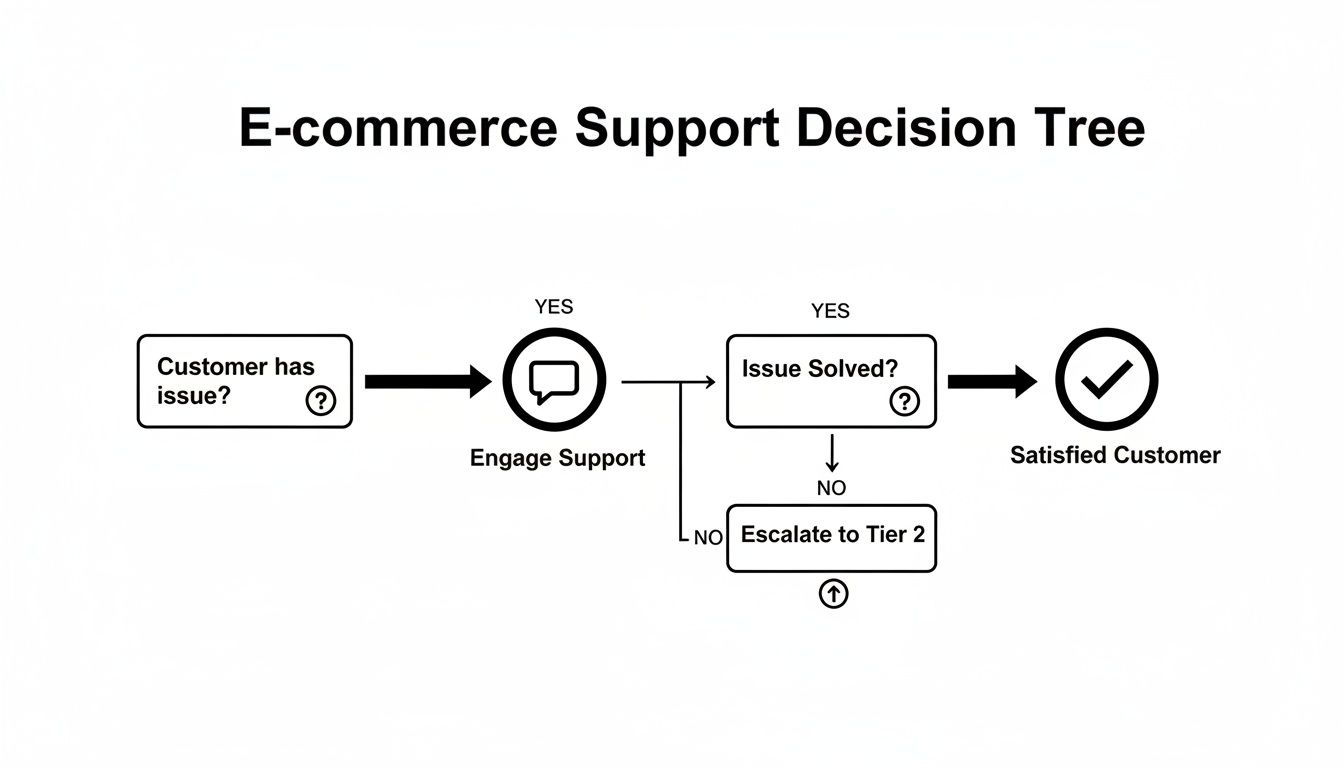
This diagram really drives home the point: every support query is a journey. A well-designed conversational path makes that journey smooth and painless.
Mapping the Customer Journey
Your best starting point is your existing support ticket history. Dive into that data and start categorising. Look for the high-volume, repetitive questions—the ones your team answers over and over again. These are the low-hanging fruit, perfect for automation.
A "Where is my order?" (WISMO) query, for example, is fairly straightforward. The AI just needs to ask for an order number or email, pull the latest data, and share a real-time status update with a tracking link. Simple.
But what about something a bit more involved, like a return request? This is where you need to think about branching logic.
For a return, the AI needs to navigate a few key questions:
- Is the item actually eligible for a return? The AI needs to check the purchase date against your return policy.
- Why is the customer returning it? The reason—like "wrong size," "damaged," or "changed my mind"—could trigger different follow-up actions.
- What does the customer want? Are they after an exchange, a refund, or maybe store credit?
Each answer sends the customer down a specific path, giving them the right information and options without ever needing to wait for a human agent.
Building Intuitive and Natural Conversations
A great conversational AI feels less like a machine and more like a sharp, helpful assistant. This is where Natural Language Processing (NLP) comes into play. The AI has to be smart enough to understand the many different ways people ask the same thing.
Think about it. A customer might ask:
- "Where's my stuff?"
- "Track my parcel"
- "Status on order #12345"
A well-trained AI recognises the intent behind all these phrases is the same: a WISMO query. This kind of flexibility is what makes the experience feel human and prevents the bot from getting stuck on specific phrasing.
A well-designed flow doesn't just react; it anticipates. If a customer asks about your return policy, a smart AI could proactively follow up with, "Would you like to start a return for your recent order?" That simple step moves the conversation forward and shows the bot is genuinely trying to help.
Creating Smart Fallbacks
Let's be realistic: no AI is perfect. There will always be questions it can't handle or moments when a customer gets frustrated. That's why every single conversational flow needs a solid fallback plan. This is your safety net.
Instead of a dead-end "I can't help with that," a smart fallback gives the customer a way forward.
- Prompt for clarity: "I'm not sure I understand. Could you please try asking in a different way?"
- Offer a menu: "I can help with order tracking, returns, or product questions. Which of these can I assist you with?"
- Escalate to a human, seamlessly: "It looks like you need to speak with a member of our team. I can connect you to a live agent right now."
That last point is crucial. The AI's primary job is to resolve issues quickly. Its secondary, equally important job is to know when it's out of its depth and pass the baton to a human without any fuss. This ensures even the trickiest problems are handled well, transforming your AI from a simple tool into the trusted first line of your e-commerce customer service.
Training Your AI with Product and Order Data

A slick conversational flow is the skeleton of your AI support, but real-time data is its lifeblood. Without a direct line into your business operations, your AI is just a glorified FAQ page. To deliver truly exceptional ecommerce customer service, you have to turn it into a genuine expert on your products and your customers' orders.
This means getting your AI to talk directly to the core systems that run your store. When a customer asks, "Where's my parcel?" or "Is the blue t-shirt in medium back in stock?", your AI needs to fire back a precise, up-to-the-minute answer. That’s the moment the customer experience transforms from generic and frustrating to genuinely helpful.
The end goal is to empower your AI to handle those very specific, personalised questions instantly. This doesn’t just keep customers happy; it frees up your human support team to focus their brainpower on the trickier, more nuanced problems that need a human touch.
Integrating with Your Ecommerce Platform
First things first, you absolutely have to connect your AI to your ecommerce platform. This is non-negotiable. Whether you’re running on Shopify, WooCommerce, or Magento, this integration is what allows the AI to tap into the foundational data it needs to answer the most common questions.
A direct connection, usually through an API (Application Programming Interface), lets your AI securely pull vital information. Think of an API as a secure messenger that lets your AI ask your ecommerce platform for specific details and relay them back to the customer.
With this hook-up, it can access:
- Customer order history: To confirm past purchases and order numbers.
- Real-time order status: To provide instant updates on where an order is in the pipeline.
- Product catalogue details: To answer specific questions about an item’s features or dimensions.
This is how your bot can confidently tell a customer their order, #54321, was dispatched this morning and even provide the tracking number.
Syncing with Inventory and Shipping Data
While your ecommerce platform holds a lot of the keys, an AI's expertise deepens when it can access more specialised data. Syncing it with your inventory management and shipping carrier systems is what separates a good AI from a truly great one.
For example, an AI connected to your inventory system can do much more than just say an item is "out of stock." It can give a far more useful response, like, "The blue t-shirt in medium is currently sold out, but we're expecting a restock in about two weeks. Shall I notify you when it's back?"
This kind of proactive, data-driven help is a hallmark of superior ecommerce customer service. It solves the immediate problem while also capturing a future sale, turning a potentially frustrating moment into a positive brand interaction.
This level of detail is a massive competitive advantage. Just look at the Indian ecommerce market, where exceptional service is a primary growth driver. Amazon India's success, capturing a 31% market share, is built on a foundation of lightning-fast delivery and outstanding support. It's clear proof that service excellence directly fuels business growth. You can read more about how online shopping in India is evolving on bain.com.
Structuring Data for AI Consumption
Just plugging in your systems isn't enough. The data has to be organised in a way the AI can actually understand and use. A clean, well-structured knowledge base is the bedrock for training your AI to give accurate and consistent answers.
Start by organising all your information logically. This means your public help centre articles, internal policy documents, and product spec sheets. Use clear headings, simple language, and consistent formatting everywhere.
To get started, you'll need to give your AI access to a range of data sources. Here’s a quick checklist of the essentials.
Essential Data Sources for AI Training
A checklist of the critical data points and systems your AI agent needs access to for providing comprehensive support.
| Data Source | Information Provided | Customer Query Solved |
|---|---|---|
| Product Information Management (PIM) | Detailed specs, materials, dimensions, care instructions. | "Is this jacket waterproof?" or "What are the dimensions of the dining table?" |
| Order Management System (OMS) | Real-time order status, payment info, shipping details. | "Has my order shipped yet?" or "Can I change my delivery address?" |
| Inventory Management System | Live stock levels, restock dates, warehouse locations. | "Is the large size in stock?" or "When will this be available again?" |
| Help Centre/Knowledge Base | Return policies, shipping costs, warranty information. | "What is your return policy for sale items?" or "Do you ship internationally?" |
Giving your AI this level of insight ensures it has the context to answer almost any routine query accurately and instantly.
And finally, never, ever overlook data privacy. As you integrate these systems, make sure you're following strict security protocols. Your AI should only ever access the specific information it needs to resolve a query, and all customer data must be handled securely to maintain trust. This responsible approach is the foundation of modern, personalised support.
Creating a Seamless Handoff to Human Agents

Let’s be honest: even the smartest AI has its limits. Acknowledging this isn't a sign of weakness; it's the mark of a well-designed strategy. The real goal of brilliant ecommerce customer service is to solve a customer's problem efficiently, whether that's with a bot or a person. The magic is making the switch between the two feel completely invisible.
A clunky, awkward handoff can undo all the good work your AI has done. Nothing frustrates a customer more than having to repeat their entire story to a human agent. Mastering this escalation process is what separates a decent automated system from a truly customer-focused one.
This means your AI needs to do more than just answer questions. It has to know precisely when to tag in a human colleague. It’s all about creating a single, unified support experience where technology and human expertise work in perfect harmony.
Identifying the Right Triggers for Escalation
A smooth handoff starts with teaching your AI to spot the cues that a human touch is needed. This goes beyond the AI simply not knowing an answer. It’s about proactively detecting situations that call for human empathy or complex problem-solving.
Your system should be set up to escalate conversations based on clear, pre-defined triggers. This gets customers to a person before they reach boiling point.
Here are some common escalation triggers I’ve seen work wonders:
- Sentiment Analysis: The AI detects growing frustration, anger, or confusion in the customer's language. Phrases like "this is ridiculous" or "I'm getting really annoyed" are instant red flags.
- Keyword Flags: You can set specific words or phrases to immediately trigger a handoff. These usually relate to sensitive topics like "legal," "fraud," "damaged goods," or "billing dispute."
- Repeat Questions: If a customer asks the same thing two or three times in different ways, it’s a huge clue that the AI’s answers are missing the mark.
- Direct Request: This one’s the most straightforward. When a customer types "speak to a human," "live agent," or something similar, the AI needs to comply immediately.
By building these rules into your system, you create a safety net that catches complex issues early on, stopping minor hiccups from turning into major complaints.
The key is to see escalation not as a failure of the AI, but as a success of the entire support system. The AI did its job perfectly by identifying a problem that needed a different kind of expertise. This strategic handoff is a core part of providing excellent service.
Transferring Context So Customers Never Repeat Themselves
Once a trigger is pulled, this next step is absolutely critical. The AI must package the entire conversation history into a neat, concise summary for the human agent. This one move eliminates the single biggest source of customer frustration during a handoff.
Your support platform should automatically pop this summary up for the agent the second they join the chat. This lets them jump right in with confidence and context, opening with something like, "Hi, I can see you’re having an issue with the tracking on order #67890. I’m looking at the carrier details for you now."
This seamless transfer of context shows the customer you value their time. The summary should ideally include:
- Customer Name and Order Number: The basics.
- The Initial Query: What the customer asked for in the first place.
- AI's Attempted Solutions: A quick list of what the bot already tried or suggested.
- A Full Chat Transcript: For the agent to dig into if they need more detail.
This approach transforms the interaction from a cold start into a warm continuation, keeping the momentum going towards a quick solution.
Using Smart Routing to Connect to the Right Expert
Finally, a truly seamless handoff doesn't just pass the conversation to any available agent—it sends it to the right one. Smart routing uses the information gathered by the AI to direct the customer to the team best equipped to handle their specific problem.
For example, if the AI flagged the keyword "billing dispute," the chat should be routed straight to your finance or billing team. If the issue is about a faulty product, it goes directly to technical support. This simple step prevents the customer from being bounced around different departments, which is another common point of irritation.
By combining smart triggers, complete context transfer, and intelligent routing, you build a resilient and highly effective ecommerce customer service machine. This hybrid approach ensures customers get the fastest, most accurate solution possible by leveraging the best of both automated efficiency and human ingenuity.
Using Analytics for Continuous Improvement
Getting your AI agent live is just the beginning. The real magic in automated ecommerce customer service happens when you commit to constantly making it better, guided by data. Think of your AI as a living system; it has the potential to get smarter with every customer chat, but only if you’re actually listening to what the data is telling you.
Simply switching on an AI and hoping for the best is a sure-fire way to get mediocre results. To really sharpen the customer experience, you need to use analytics as your roadmap. The data will show you what’s hitting the mark, what’s confusing your customers, and where the gaps are in your AI's knowledge. This cycle of feedback and fine-tuning is what elevates a basic AI into an essential pillar of your support team.
Pinpointing the Right Key Performance Indicators
It's easy to get buried in a mountain of metrics. The trick is to focus on a handful of Key Performance Indicators (KPIs) that give you genuinely useful insights. Don't chase vanity metrics; stick to the numbers that reflect the true quality and efficiency of your AI support.
From my experience, these are the KPIs that really matter:
- First-Contact Resolution (FCR) Rate: This is your north star. What percentage of questions is the AI handling all on its own, without a human ever getting involved? A rising FCR rate is the clearest sign you’re on the right track.
- Escalation Rate: On the flip side, how often are conversations passed over to your human agents? Even more important is digging into why these escalations are happening in the first place.
- Customer Satisfaction (CSAT) Score: A simple post-chat question like, "Were you happy with your support?" gives you direct, unfiltered feedback. This tells you if the AI is actually solving problems or just creating frustration.
- Average Handle Time (AHT): How long does it take the AI to resolve an issue from the first message to the last? A lower AHT means customers get their answers faster, which is always a win.
Keeping an eye on these numbers gives you a quick health check on your AI's performance. If you see FCR dip or escalations suddenly spike, you know it's time to roll up your sleeves and dive into the conversation logs.
Analysing Conversation Logs to Find Friction Points
Your AI’s chat history is a goldmine. It’s packed with raw, unfiltered customer feedback. This is where you move beyond the high-level numbers and see exactly where people are getting stuck, confused, or frustrated. Making a habit of regularly reviewing these logs is one of the most powerful things you can do.
You're looking for patterns. Are ten different customers asking the same question about your new product line, only for the AI to come up blank? That’s a glaring knowledge gap you can fix in minutes. Perhaps your international shipping policy just changed, but the AI is still giving out old information. Adding that new info to its knowledge base is an easy, immediate win.
Your whole goal here is to find and smooth out the friction. If you spot a dozen conversations where customers got annoyed trying to start a return, you know that specific conversational flow needs a rethink. Every problem you find is a clear opportunity to make things better.
Using A/B Testing to Optimise Responses
So, you’ve found a weak spot. How do you know if your fix is actually an improvement? Through A/B testing. It’s a straightforward concept: you try out different versions of a response or a conversational flow to see which one performs better against your KPIs.
Let's say you notice that questions about shipping costs often end up being escalated to a human agent. You could test two different approaches:
- Version A: A simple, text-based answer that lists out your standard shipping rates.
- Version B: An interactive response that first asks for the customer's postcode and then gives them a precise, personalised shipping quote.
You could run this test for a week, routing 50% of users to Version A and 50% to Version B. By the end, you can compare the CSAT scores and escalation rates for each. The data gives you concrete proof of which approach your customers prefer.
This methodical loop—tracking KPIs, analysing conversations, and testing improvements—is what creates real momentum. It ensures your AI for ecommerce customer service doesn't just stagnate but actively evolves with your customers' needs. This is what building a world-class support experience is all about.
Your Top Questions About AI Customer Service, Answered
Jumping into AI-powered support naturally brings up some big questions. From the price tag to data security, every business owner wants to know what they’re getting into before they commit. Let's tackle the most common concerns I hear from ecommerce leaders, so you can make a clear-headed decision.
This isn't about hype or jargon. It’s about giving you the straight answers you need to move forward with confidence.
Is This Going to Be Expensive?
This is usually the first thing people ask, and I've got good news: not anymore. The cost of getting started with AI has dropped dramatically. Forget the old days when this kind of tech was only for massive corporations with bottomless budgets.
Today’s leading platforms run on a subscription basis, meaning you don’t have to worry about a huge upfront investment. You can often kick things off with a free or low-cost plan and simply scale as your business grows. This puts incredibly powerful AI within reach, even for smaller, growing brands.
Think about the return you get. If an AI agent can handle 80% of your routine questions, it’s not just cutting support costs. It’s also freeing up your human team to focus on complex, high-value conversations that actually drive sales and build loyalty. The efficiency boost and happier customers often pay for the tech many times over.
Will My Customers Be Talking to a Frustrating Robot?
That’s a totally fair question, especially if you’ve ever been stuck in a loop with an old-school, clunky chatbot. But the AI assistants available today are a world away from that. Thanks to huge leaps in large language models (LLMs), they can understand nuance, pick up on context, and talk in a natural, conversational way that actually reflects your brand’s voice.
You’re in the driver’s seat here. You train the AI on your data—your help docs, your product descriptions, even your past customer chats. This is how you ensure it sounds like a genuine extension of your team.
The goal isn’t to trick customers into thinking they're talking to a person. It's about giving them fast, accurate answers in a helpful, human-like way. Authenticity and effectiveness are what matter, not deception.
A well-trained AI agent actually improves the customer experience by delivering instant answers, something even the best human teams struggle to do around the clock.
How Much Technical Know-How Do I Need to Set It Up?
Here’s another area where things have gotten so much better. The best AI support platforms are built for people who aren't developers. Honestly, if you can write a help article or post on social media, you have all the skills you need to build and manage a powerful AI agent.
The setup process usually looks something like this:
- Connect your data sources: Often, this is as simple as pasting a few links to your help centre or product pages.
- Customise the AI's personality: You can give it simple instructions in plain English to define its tone and style—friendly, professional, witty, you name it.
- Embed the widget on your site: This typically means copying and pasting a single line of code. It’s a task that takes just a few minutes.
You don't need a team of data scientists or engineers. The platform does all the heavy lifting behind the scenes, letting you focus on what you do best: designing a brilliant customer experience.
How Secure Is My Customer and Business Data?
Data security is completely non-negotiable, and any AI provider worth their salt will make it their absolute top priority. When you’re looking at different platforms, you need to check for enterprise-grade security features that protect both your company’s information and your customers' privacy.
Here are the key security measures to look for:
- Data Encryption: All data, whether it's being sent or just sitting on a server, must be encrypted using industry-standard protocols.
- Compliance Certifications: Look for badges like GDPR and SOC 2 compliance. These aren't just acronyms; they show a serious commitment to robust security practices.
- Access Controls: You should have full control over who in your team can access the platform and what permissions they have.
Your business data is only used to train your AI to answer questions accurately. It's never shared with other customers or used to train public models. This keeps your trade secrets safe and builds a foundation of trust for your entire ecommerce customer service operation.
Ready to provide instant, 24/7 support without the complexity? SupportGPT makes it easy to build and launch an AI agent trained on your own content. Start for free and see how simple it is to deliver exceptional customer service at scale. Get started with SupportGPT today!