A Guide to Customer Service Automation and AI Workflows
Discover how customer service automation uses AI-driven workflows to cut response times, improve support consistency, and scale your business.
Let’s be honest, your customer support team can’t be everywhere at once. That's where customer service automation comes in. Think of it as a digital teammate working alongside your human experts, handling the repetitive questions 24/7 so your team can focus on the tricky issues that actually need a human touch.
It’s about giving customers instant answers and freeing up your best people for high-value work.
What Is Customer Service Automation Anyway?

Picture your support team as a highly-skilled pit crew at a race. Their job is to get the car back on the track as fast as possible. Now, imagine giving them a set of robotic arms to handle routine tasks like changing tyres or refuelling. This doesn't replace the crew; it frees them up to focus on critical engine diagnostics and race strategy. The entire operation becomes faster and more precise.
That’s exactly what customer service automation does for your support agents. It’s a system of tools and workflows designed to manage the predictable, high-volume tasks that eat up so much time. This isn't about replacing people—it’s about making them more effective.
The Building Blocks of Automation
At its core, automation relies on a few key technologies working together. You don’t need a degree in computer science to get it, but knowing the basics helps you see how it all clicks into place.
- Artificial Intelligence (AI) and Machine Learning (ML): This is the "brain" behind the system. AI helps understand what customers are asking, even if they use slang or make typos. ML allows the system to get smarter over time by learning from every single interaction.
- Workflows and Rule Engines: Think of these as the pre-programmed instructions. For instance, a simple rule might be: "If a customer asks about a 'refund,' automatically create a ticket and send it to the billing department." It’s all about creating clear, efficient pathways for customer queries.
- Self-Service Portals: This goes beyond a simple FAQ page. Modern automation uses AI to proactively suggest the right help articles from your knowledge base, often solving a customer's problem before they even think about creating a support ticket.
In India, the adoption of this technology is happening at a phenomenal rate. The helpdesk automation market hit USD 350 million in 2024 and is forecast to explode to USD 3,010 million by 2033. This growth is fuelled by businesses realising they need to offer round-the-clock, efficient support. In fact, 59% of Indian companies are already using AI tools like chatbots and self-service portals. You can dive deeper into the AI customer service trends shaping India.
Key Takeaway: Customer service automation isn't just a chatbot. It’s a complete ecosystem that weaves together AI, smart workflows, and self-help tools to create a better, faster support experience for everyone involved.
Manual Support vs Automated Support At a Glance
To see the difference clearly, let’s compare the old way of doing things with a modern, automated approach. This table breaks down the core distinctions.
| Feature | Manual Customer Support | Automated Customer Service |
|---|---|---|
| Availability | Limited to business hours | Always on, 24/7/365 |
| Response Time | Minutes to hours, depends on queue | Instant for common queries |
| Cost Per Interaction | Higher, tied to agent salaries | Significantly lower |
| Consistency | Varies between agents | 100% consistent answers |
| Scalability | Difficult and expensive to scale | Scales instantly with demand |
| Agent Focus | Repetitive, simple queries | Complex, high-value problem-solving |
| Data Collection | Manual tracking required | Automatic, rich data for insights |
As you can see, automation doesn't just do the same job faster—it fundamentally changes how support operates, making it more efficient, scalable, and data-driven.
The Real Business Impact of Automating Support

Bringing customer service automation into your business does a lot more than just make replies faster. It completely changes how you operate, how customers feel about you, and even what your support team’s day looks like. The real win isn't just the tech itself, but the solid, measurable results it delivers.
Think of it like this: a small local shop needs a staff member to help every single customer find what they need. A big supermarket, on the other hand, organises its aisles (that’s a form of automation) so shoppers can find most things on their own. This frees up staff for specialised jobs, like at the deli or bakery counter, letting the store serve hundreds of people at once without hiring a massive team.
In the same way, automation lets your business handle a flood of customer questions without constantly hiring more support agents. That leads directly to big savings and makes it much easier to grow.
Driving Down Operational Costs
One of the first things you'll notice is a serious drop in your operational costs. Every simple, repetitive question—like "Where is my order?" or "How do I reset my password?"—that an AI can answer is one less ticket a human agent has to touch. That frees up your team's time and, just as importantly, your budget.
Take e-commerce brands, for example. They often get buried in support tickets during big sales or festivals. Without automation, the only answer is to hire temporary help, which is expensive and a headache to manage. With a good automated system in place, an AI can handle that spike in common queries without breaking a sweat, scaling up and down as needed at no extra cost.
Companies that got in early saw their operational costs fall by as much as 30%. This was mainly because automation took care of the routine questions and could easily handle the rush during peak seasons. But it's not just about saving money. Telecoms and online marketplaces have found that their customers are happier and stick around longer. The data gathered also helps fine-tune products and marketing efforts. You can learn more about how AI is shaping customer service in India.
The Bottom Line: Automation lowers the cost of each customer interaction. This means you can shift money from handling repetitive tickets to areas that actually grow your business, like marketing or product development.
Enhancing the Customer and Agent Experience
While saving money is a huge plus, the impact on people—both your customers and your own team—is just as crucial. In today’s world, customers expect answers right away, no matter what time it is.
- 24/7 Availability: Automation gives you an always-on support system. A customer on the other side of the world can get help at 3 AM your time, without having to wait for your team to come online. This is a massive advantage.
- Instant Gratification: For simple queries, customers get an answer immediately. That speed and convenience does wonders for customer satisfaction (CSAT) scores and builds real brand loyalty.
But this better experience isn't just for customers. Automation also makes life much better for your support agents. By filtering out all the boring, repetitive questions, it frees them up to use their skills on trickier problems that actually require a human touch.
This shift results in some pretty great outcomes for your team:
- Increased Job Satisfaction: Agents feel more valued when they’re solving real problems, not just copy-pasting answers from a script.
- Higher Agent Retention: When work is more engaging, people are less likely to burn out and leave. That saves you a fortune in hiring and training costs.
- Deeper Expertise: With more time on their hands, agents can become true experts on your products, ready to handle the most complex and important customer issues with confidence.
Practical Automation Workflows You Can Use Today
Theory is great, but seeing how automation actually works is where the lightbulb really goes on. Let's move past the concepts and look at some real, practical workflows that businesses are using right now to make their support operations faster and smarter.
Think of these workflows as your go-to plays. Just like a football team has set plays for common situations, your support team can use these automated sequences to handle predictable customer issues with speed and consistency every single time.
Instantly Answering Frequent Questions
This is the bread and butter of automation, and it’s the best place to start. A huge chunk of your support tickets—sometimes as high as 80%—are probably the same few questions asked over and over. Automating these is the single fastest way to free up your human agents for more important work.
An AI agent, fed with your knowledge base, can instantly resolve queries like:
- "What is your refund policy?"
- "How do I reset my password?"
- "Where can I find my invoice?"
For a SaaS company, this could be an AI assistant that walks a new user through setting up their account. Instead of getting bogged down with simple setup questions, the bot can point them to tutorials, explain key features, and get them started on the right foot. That immediate self-service help makes for a much better first impression.
Proactively Engaging Customers with Updates
Good service isn’t just about putting out fires; it’s about preventing them in the first place. Automation is brilliant for keeping customers in the loop without anyone on your team having to lift a finger. This simple act builds a ton of trust and stops customers from getting anxious and creating needless follow-up tickets.
Picture an e-commerce store during a big holiday sale. Instead of a flood of "Where is my order?" tickets, an automated workflow can push out updates via email or WhatsApp at every key step:
- Order Confirmed: A notification goes out the second their payment clears.
- Item Shipped: As soon as the shipping label is printed, the system sends another message with the tracking number.
- Out for Delivery: A final heads-up lets them know the package is arriving today.
This kind of proactive communication keeps customers happy and informed, and it absolutely crushes the volume of "Where Is My Order?" (WISMO) queries—often the number one ticket driver for any online retailer.
Workflow in Action: A customer buys something. This "order paid" event in your e-commerce platform triggers the automation. It then grabs the customer's name and order number, personalises a pre-written confirmation email, and sends it off. All in a split second, with zero human involvement.
Automating Ticket Routing and Triage
Let's be realistic—a bot can't solve everything. When an issue needs a human touch, automation can still play a crucial role by acting as a smart receptionist, making sure the ticket gets to the right person, right away.
Forget having a manager manually assigning tickets from a messy shared inbox. An AI-powered system can read a customer's message, figure out what it's about, and route it automatically.
For example:
- A message with words like "billing issue" or "payment failed" goes straight to the Finance team.
- A query mentioning "API error" or "server connection" is sent to your Technical Support specialists.
- An obviously frustrated message gets flagged as urgent and bumped up to a senior agent or team lead.
This kind of intelligent routing cuts out the dead time. It means the first person who talks to the customer actually has the skills to help them, preventing the dreaded "let me transfer you" runaround that tanks customer satisfaction scores. It just makes the whole process more organised and efficient from the very first moment a customer reaches out.
Your Step-by-Step Implementation Roadmap
Jumping into customer service automation without a clear plan is like trying to build flat-pack furniture without the instructions. You might end up with something, but it probably won’t be what you envisioned. A structured roadmap is what separates a successful automation project from a frustrating one, ensuring your efforts line up with real business goals.
This four-stage process breaks down the journey from a simple idea to a fully functioning, intelligent support system. Following these steps will help you implement automation with confidence, sidestep common pitfalls, and see a real return on your investment from day one.
Stage 1: Define Your Strategy and Goals
Before you even think about looking at software, you need to be crystal clear on what you're trying to achieve. What does a "win" look like for your automation project? Without that clarity, you're just adding tech for the sake of it.
Start by pinpointing the biggest headaches in your current support process.
- Are customers complaining about long wait times? Your main goal might be to slash that first response time.
- Is your team burning out from answering the same questions over and over? Maybe your goal is to deflect 50% of those repetitive queries within three months.
- Are you losing customers overnight because your support team is asleep? The objective here would be to offer 24/7 instant answers for common issues.
Once you have your goals, decide how you'll measure them. These are your Key Performance Indicators (KPIs), and they could be things like ticket deflection rate, average resolution time, or good old Customer Satisfaction (CSAT) scores. A proper strategy transforms automation from a vague concept into a measurable business initiative.
Stage 2: Choose the Right Tools and Technology
With your goals firmly in place, it's time to start looking at platforms. The market is flooded with options, but the right tool for you will come down to your specific needs, your team's technical skills, and your budget.
For mid-market support teams or even solo developers, platforms like SupportGPT make this incredibly accessible—you don’t need a data science PhD to get started. Just embed a widget, train it on your existing documents, and watch the analytics light up with clear paths for when a human needs to step in.
Let’s be real: in a nation of 1.4 billion where instant support in Hindi-English is becoming standard, waiting is no longer an option. This market shift shows that automation isn't a luxury; it’s a survival tool for any business wanting to scale without chaos. You can dive deeper into key AI customer service trends in India to see what’s coming.
When you're comparing tools, focus on these critical areas:
- Ease of Use: Can your non-technical team members actually build and manage the AI agent? A no-code interface is a massive advantage.
- Integration Capabilities: Will it play nicely with your helpdesk, CRM, and other essential software?
- Training and Customisation: How easy is it to teach the AI using your knowledge base, product guides, and unique brand voice?
- Safety Guardrails: Does the tool have built-in protections to prevent it from going off-script, giving out wrong information, or mishandling sensitive data?
Pro Tip: Look for platforms that offer a real-time "playground" or testing environment. This lets you see exactly how the AI will respond to customer questions before it goes live, giving you the confidence to launch.
Stage 3: Train and Deploy Your AI Agent
This is where the magic happens—turning your AI from a blank slate into a knowledgeable digital teammate. The training process is what makes or breaks the accuracy and helpfulness of your automated support. Luckily, modern platforms have made this surprisingly straightforward.
You don't need to write lines of complicated code. Instead, you simply "feed" the AI your existing resources:
- Your entire knowledge base or help centre.
- Product documentation and technical manuals.
- Past support tickets and chat transcripts (anonymised, of course).
- Your company website and marketing materials.
The AI digests all this information to get a deep understanding of your business, products, and policies. From there, you can fine-tune its personality, set its tone of voice, and establish specific rules for how it should behave. The final deployment is often as simple as pasting a small code snippet onto your website.
This flowchart shows a typical automated workflow, from answering the initial query to routing it and updating customer info.
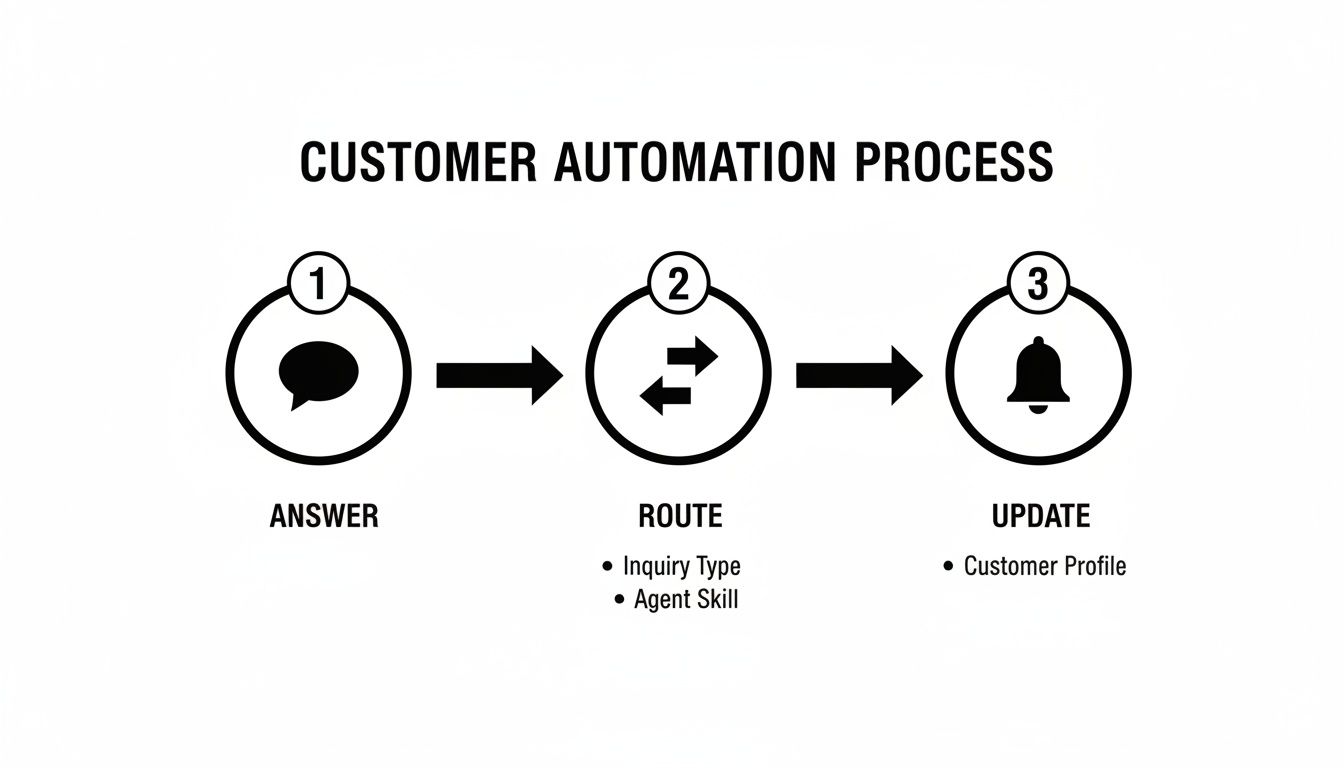
As you can see, the system intelligently manages each question, making sure it’s handled efficiently—either by the AI itself or by the perfect human agent for the job.
Stage 4: Design Escalation Paths and Continuously Improve
Let's be clear: no AI can handle 100% of customer issues, and you shouldn't expect it to. The final, crucial piece of the puzzle is designing a smooth, frictionless handoff from the AI agent to a human expert. A well-thought-out escalation path is the secret to a successful human-AI partnership.
Define clear triggers for when an issue needs to be escalated. This could be based on keywords (like "speak to an agent"), customer sentiment (the AI detecting frustration), or if the AI fails to find an answer after a couple of tries.
But the work doesn’t stop at launch. The analytics and conversation logs from your platform are a goldmine. Use them to see where the AI is excelling and where it's fumbling. This data will help you spot gaps in your knowledge base, refine the AI's responses, and make your entire system smarter over time. Think of implementation not as a one-time project, but as an ongoing cycle of learning and optimisation.
Choosing the Right AI Support Platform

Knowing the theory behind customer service automation is one thing, but actually finding the right tool to bring it to life is a whole different ball game. The best platform isn't one that requires a squad of developers to operate. Instead, it should put your existing support team in the driver's seat, letting them build, tweak, and perfect an AI assistant that genuinely helps customers.
The latest generation of these tools is built to solve real-world business problems with a focus on simplicity and effectiveness. They’re designed to close the gap between powerful AI technology and the day-to-day needs of your business, making this kind of automation feel less like science fiction and more like a practical solution.
Empowering Non-Technical Teams
Historically, one of the biggest roadblocks to adopting AI has been its sheer complexity. This is precisely why a no-code builder has become a must-have feature for most companies. Think of it like a drag-and-drop interface where your customer support manager—not a programmer—can map out conversation flows and teach the AI.
This shift is huge because it puts the power back in the hands of the people who know your customers inside and out. They’re the ones who should be shaping the automated conversations. Tools like SupportGPT champion this approach, letting you build and deploy an AI support agent in a matter of minutes, not months.
Ensuring Quality and Safety
Your AI agent is a direct reflection of your brand, so you need to be absolutely sure its responses are accurate, on-brand, and professional. The right platform will give you the controls to make that happen.
- Support for Multiple LLMs: Don't get locked into a single Large Language Model from one provider like OpenAI or Gemini. The best platforms let you test and switch between different models to find the perfect balance of response quality and cost.
- Enterprise-Grade Guardrails: These are your essential safety nets. Guardrails stop the AI from hallucinating incorrect information, wandering off-topic, or adopting a tone that doesn't match your brand. It’s all about maintaining control and consistency.
A powerful AI is only useful if you can trust it. Enterprise-grade guardrails and compliance features are what separate a helpful tool from a potential liability, giving you the confidence to deploy automation securely.
Automating Tasks, Not Just Conversations
Real automation is about more than just answering questions. Top-tier platforms allow the AI to do things for the customer, which makes the whole experience far more useful and efficient.
This is often done through what are called AI Actions—specific, pre-approved tasks the bot can carry out. So, instead of merely explaining how to book a demo, the AI can schedule it directly within the chat.
Of course, a seamless human-AI partnership is just as important. When a query gets too complicated, smart escalation rules should kick in, passing the conversation to the right person on your team along with the full chat history. This creates a smooth handover, avoids customer frustration, and makes the entire support journey feel cohesive and intelligent.
How to Measure Automation Success and Maintain Governance
Putting customer service automation into action is a big move, but the work doesn’t stop once you go live. To make sure you're getting a real return on your investment, you need a solid way to measure what’s working and clear oversight to keep things running safely. Without that, you're just guessing.
Success isn't just about launching a chatbot. It's about seeing a tangible, positive change in your support operations. Think of it like a new fitness routine—you wouldn't just start working out without tracking things like your stamina, strength, or how you feel. In the same way, you need key performance indicators (KPIs) to monitor your automation's health and prove its worth.
Key Metrics to Track Your Automation ROI
To get a true picture of how your automation is performing, you need to focus on a few critical metrics. These numbers tell the story of your return on investment (ROI) by showing you exactly how automation is boosting efficiency, making customers happier, and impacting your bottom line.
- Ticket Deflection Rate: This is the big one. It’s the percentage of customer questions your AI agent solves without a human ever getting involved. A high deflection rate directly translates to cost savings and frees up your team’s valuable time.
- Average Resolution Time: How fast are problems getting solved? Automation should slash this time for common questions, turning what used to take minutes—or even hours—into instant answers.
- Customer Satisfaction (CSAT) Scores: Are your customers actually happy with the automated help? A quick survey after an interaction is essential for checking in on their experience and making sure efficiency isn't hurting quality.
Monitoring these isn't a set-it-and-forget-it task. You'll want a platform with a great analytics dashboard that lets you watch these numbers in real-time, so you can make smart, data-backed tweaks to your strategy as you go.
Establishing Strong Governance and Guardrails
While metrics show you the value, governance ensures your automation behaves itself. It’s all about setting the rules of the road for your AI to protect your customers, your data, and your brand. For any business that needs to think about enterprise-level compliance, good governance isn't just nice to have—it's essential.
Key Takeaway: An AI without guardrails is a liability. It could go off-script, give out wrong information, or mishandle sensitive user data. Think of governance as your safety net, making sure the AI stays a helpful and trustworthy assistant.
Here are the core areas to lock down from day one:
- Preventing AI Hallucinations: Your AI agent must stick to the script—your verified knowledge base. Set strict rules that stop it from guessing or making things up, which is the fastest way to destroy customer trust.
- Maintaining a Consistent Brand Voice: Define a clear personality for your AI. Whether your brand is buttoned-up and professional or fun and casual, the AI needs to sound like it’s part of your team.
- Ensuring Data Privacy and Compliance: Be upfront and clear about how customer data is being used. Stick with platforms that provide strong encryption and follow data protection regulations. This is fundamental to building and keeping customer trust.
The push towards AI in customer service is growing fast, with some expecting it to reach 80% adoption across various sectors. This trend is completely changing customer expectations; people now want instant, personalised help. For businesses, particularly product-led companies, this means AI can’t just solve problems—it needs to impress users by proactively pulling solutions right from your knowledge base. You can read more about Salesforce insights on the AI revolution in customer service.
By pairing clear metrics with robust governance, you can roll out automation that’s not just powerful, but also safe and reliable.
Your Questions About Customer Service Automation, Answered
Jumping into any new technology brings up good questions, and it’s smart to be a little sceptical. Let's walk through some of the most common queries we hear about automating customer service, so you can move forward with a clear picture.
Will Automation Replace My Human Agents?
This is easily the biggest concern, and the answer is a straight-up no. The point of automation isn't to replace your incredible team, but to supercharge them. Think of it as a tireless assistant that handles all the repetitive, high-volume queries that often lead to agent burnout.
This frees up your human experts to do what they do best: handle complex problems, navigate emotionally charged conversations, and build real relationships with your customers. It's not about benching your best players; it's about giving them better tools so they can win the game.
Is It Difficult to Set Up and Maintain?
It really doesn't have to be. Most modern platforms are built for people who aren't developers. They often come with no-code interfaces, meaning your own support managers can build and tweak automation workflows without ever touching a line of code.
Getting started usually just means connecting your help centre or knowledge base and setting a few ground rules. From there, maintenance is all about checking the analytics to see what the AI is acing and where it could use a bit more guidance. It’s a simple loop of continuous improvement.
The Big Idea: The best automation tools turn your existing team into the AI's trainers. They allow you to pour your team's deep customer knowledge right into the system, making it smarter and more helpful every day.
How Does Automation Handle Different Languages?
Top-tier customer service automation platforms are designed for a global world. They can instantly detect a customer's language and reply in the same one, offering a smooth multilingual support experience without any extra effort.
This is a game-changer for any business looking to grow internationally. You can give every customer fast, accurate help in their native tongue, all without the massive overhead of hiring a dedicated multilingual support team for every region.
What Is the Future of AI in Customer Service?
The future is all about AI becoming a more proactive and deeply integrated partner. In India, AI is on track to handle 50% of all customer service cases, a huge leap from 30% today. This shift is happening because AI is moving beyond just answering questions to autonomously resolving common tickets from start to finish. This frees up agents to focus on revenue-generating activities, like upselling.
It's no surprise that 44% of Indian service leaders are already using AI that can understand voice, text, and images. As you can see in these Salesforce insights on the AI revolution in customer service, the trend is crystal clear: AI is set to become an essential part of every single customer interaction.
Ready to see how a powerful, easy-to-use AI agent can change your support operations? SupportGPT gives you everything you need to build, manage, and deploy 24/7 automated help that your customers will actually appreciate. Get started for free with SupportGPT.