CRM and Helpdesk Software: A Practical Comparison Guide
Compare CRM and helpdesk software side by side. Learn capabilities, overlap, costs, and how to combine them with AI agents for smarter support.
A customer reports a billing problem that began several renewals ago. The support agent opens the ticket, then switches to the CRM to find the account owner, then searches a spreadsheet because the CRM doesn't show what sales promised on the last call. The customer waits while the agent reconstructs a history that should have been visible immediately.
That gap explains most bad software decisions in this category. CRM and helpdesk software solve different problems, but growing teams increasingly need both systems to exchange context reliably. The right choice isn't the platform with the longest feature list. It's the setup that gives each employee the information and controls required for the work in front of them.
The Moment Support Breaks Down
The first reply eventually arrives, but it contains a generic apology and a request for information the customer already supplied. The agent didn't lack effort. They lacked a dependable connection between the live ticket and the customer record.
This failure appears in several forms. A sales representative sees an open opportunity but not the unresolved implementation issue threatening it. A support agent sees a ticket but not the customer's subscription tier or renewal status. A customer success manager notices declining sentiment only after the account has already escalated.
Practical rule: If an employee must open another system to understand why a customer is contacting the company, the workflow is already carrying avoidable risk.
CRM and helpdesk software sit on opposite sides of this problem. A CRM organizes the relationship, account history, ownership, and revenue journey. A helpdesk organizes the active request, its priority, queue position, response target, escalation path, and resolution. Confusing those roles creates a poor system in either direction.
A fast buying comparison
| Need | CRM | Helpdesk |
|---|---|---|
| Primary record | Contact, account, lead, or opportunity | Ticket, conversation, or case |
| Best for | Sales, account management, renewals, and relationship history | Support intake, routing, escalation, and resolution |
| Lifecycle control | Pipeline stages and account ownership | Ticket status, SLA timers, queues, and reopen events |
| Customer context | Deep commercial and relationship history | Operational context around the current issue |
| Main users | Sales, marketing, customer success, and revenue leaders | Support agents, team leads, and service managers |
| Reporting strength | Pipeline, conversion, account value, and lifecycle | Response, resolution, backlog, escalation, and satisfaction |
| Biggest weakness | Weak queue and SLA control | Shallow deal and revenue visibility |
The decision becomes straightforward once you identify which failure costs more. If sales and success teams can't understand the customer relationship, prioritize CRM depth. If support can't route and resolve work consistently, prioritize helpdesk control. If both failures occur, connect the systems instead of forcing one product to impersonate the other.
The broader market reflects this convergence. A Gartner-related estimate places worldwide CRM software revenue at approximately $128 billion in 2024, with 13.4% year-over-year growth, while an IDC-derived estimate places the 2023 market at $90.7 billion, compared with $77.3 billion in 2022. The different totals reflect vendor coverage and category definitions, but both point to the same conclusion: CRM now covers far more than basic contact storage. Market analysis of CRM software scope and estimates
What CRM Software Is Built For
A CRM is built around the customer and the commercial relationship. Its central question is, “Who is this account, what has happened with it, and what should happen next?”
That makes the CRM the natural home for contacts, account hierarchies, leads, opportunities, quotes, activities, renewals, ownership rules, and pipeline stages. Sales teams use it to track movement from first conversation to closed business. Marketing teams use it to segment audiences. Customer success teams use it to understand adoption, expansion, and renewal context.
The CRM operating model
A typical CRM workflow looks like this:
- Capture the person or company. The system stores identity, role, account, and relevant attributes.
- Record commercial activity. Calls, emails, meetings, proposals, and tasks attach to the relationship.
- Move the opportunity through stages. Each stage represents a commercial decision, not a support status.
- Assign ownership. Rules determine which salesperson, account manager, or team is responsible.
- Report on revenue activity. Leaders inspect pipeline health, forecast movement, and account coverage.
Platforms such as Salesforce Sales Cloud, HubSpot Sales Hub, and Pipedrive illustrate this pattern. They provide rich activity timelines and deal views because their core object is the revenue relationship.
CRM capability also matters outside conventional sales. A school, training provider, or education marketplace may need a specialized tutoring CRM software workflow that connects learners, tutors, sessions, and ongoing relationships. The principle is the same: the platform is organizing people and account context, not managing a queue of operational incidents.
Where CRM stops being the right tool
A CRM can store a support request, but storage isn't the same as support operations. Most CRMs aren't designed to manage a busy inbound queue with channel normalization, collision avoidance, service-level timers, escalation paths, internal support notes, and resolution reporting.
That distinction matters during growth. A support manager needs to know which tickets are unassigned, which are close to breach, which have reopened, and which require a specialist. A sales manager needs to know which opportunities are advancing and which accounts need attention. One record may connect the two activities, but the workflows remain different.
For teams considering Salesforce as a support foundation, the practical question is whether its ticketing design matches the required queue discipline. This guide to Salesforce ticketing systems is useful for examining that boundary before treating CRM customization as a substitute for a dedicated helpdesk.
What Helpdesk Software Is Built For
A helpdesk starts with the ticket, not the account. Its job is to turn incoming requests into controlled work.
Messages may arrive through email, chat, web forms, social channels, or voice. The helpdesk converts those interactions into records, applies priority and category rules, assigns ownership, starts the relevant SLA clock, and preserves the full history through resolution. The best systems also provide a knowledge base, macros, internal collaboration, escalation logic, and customer satisfaction reporting.
The helpdesk operating model
The ticket lifecycle is operational:
- Intake: Capture the request and identify the customer.
- Classification: Determine intent, priority, product, language, or severity.
- Routing: Send the work to the correct queue, team, or specialist.
- Response: Track the first reply and ongoing communication.
- Resolution: Record the fix, article, action, or decision.
- Review: Measure reopen events, escalation quality, satisfaction, and backlog.
This structure makes helpdesk software the better choice for support-heavy SaaS companies, ecommerce stores, marketplaces, and service teams. It gives managers a live view of work in motion rather than a historical view of customer activity.
A CRM may contain a field called “response target,” but that field doesn't automatically run the queue. A helpdesk can enforce the workflow with timers, notifications, escalation rules, and assignment logic. That difference is the operational equivalent of a calendar note versus an alarm that rings when a deadline is approaching.
What a helpdesk doesn't replace
A helpdesk isn't a complete revenue system. It may show customer details, purchase history, or account attributes, but it usually won't provide the depth required for forecasting, opportunity management, account hierarchies, or complex renewal planning.
Support leaders should also evaluate the people who will operate the system. Agents need clear writing, product judgment, and channel-specific communication skills. Resources covering tools and English for support roles can help managers define those requirements during hiring and onboarding.
A useful overview of the category is this explanation of what a help desk does. The central idea is simple: the helpdesk controls the work required to resolve a request, while the CRM preserves the broader relationship around that request.
CRM and Helpdesk Side by Side
The difference is easiest to see when both systems are graded against the same buying criteria. A CRM wins whenever the question concerns relationship depth, account ownership, or revenue movement. A helpdesk wins whenever the question concerns ticket control, service deadlines, or agent productivity.
CRM vs Helpdesk Capability Scorecard
| Criterion | CRM | Helpdesk |
|---|---|---|
| Primary record | Contact, account, lead, or opportunity | Ticket, case, or conversation |
| Customer lifecycle | Prospecting through renewal and expansion | Intake through resolution and possible reopen |
| Channel coverage | Usually activity capture and sales communication | Omnichannel intake and conversation continuity |
| SLA handling | Often a policy field, task, or custom workflow | Runtime timers, breach alerts, escalations, and queues |
| Automation | Lead assignment, deal updates, nurture, and renewal tasks | Routing, categorization, macros, escalation, and self-service |
| Analytics output | Pipeline, forecast, conversion, account activity | First response, resolution, FCR, backlog, cost, and satisfaction |
| Ownership model | Account or opportunity owner | Ticket owner, queue, team, or escalation group |
| Best user | Revenue or relationship manager | Agent, support lead, or service operations manager |
The gap is small when the team handles occasional requests and one person manages both sales and support. It becomes significant when requests arrive through several channels, customers have different priorities, or contractual service commitments matter.
Gartner reports that 32% of current CRM users identify contact management as the most essential CRM capability, followed by contact databases, lead management, sales-pipeline management, and lead capture. That finding supports a practical distinction: CRM users value the customer record first, while support teams need the ticket lifecycle to function as an operating system. CRM buyer capability insights
The real comparison is not one tool versus another
A CRM and helpdesk can both store contacts, notes, tasks, and communication history. That overlap doesn't make them interchangeable. The important question is whether the systems exchange the right events in both directions.
A support agent should see the account tier, subscription, purchase or usage history, and relevant sales context inside the ticket. A CRM user should see open incidents, escalations, SLA breaches, and customer sentiment without asking an agent to copy the details manually.
That requirement makes integration quality more important than surface-level feature parity. Buyers comparing support platforms should also examine the operational differences between products such as Intercom and Zendesk, including how each handles ticket state, routing, and customer context. This Intercom versus Zendesk comparison provides a useful starting point.
Where CRM and Helpdesk Overlap
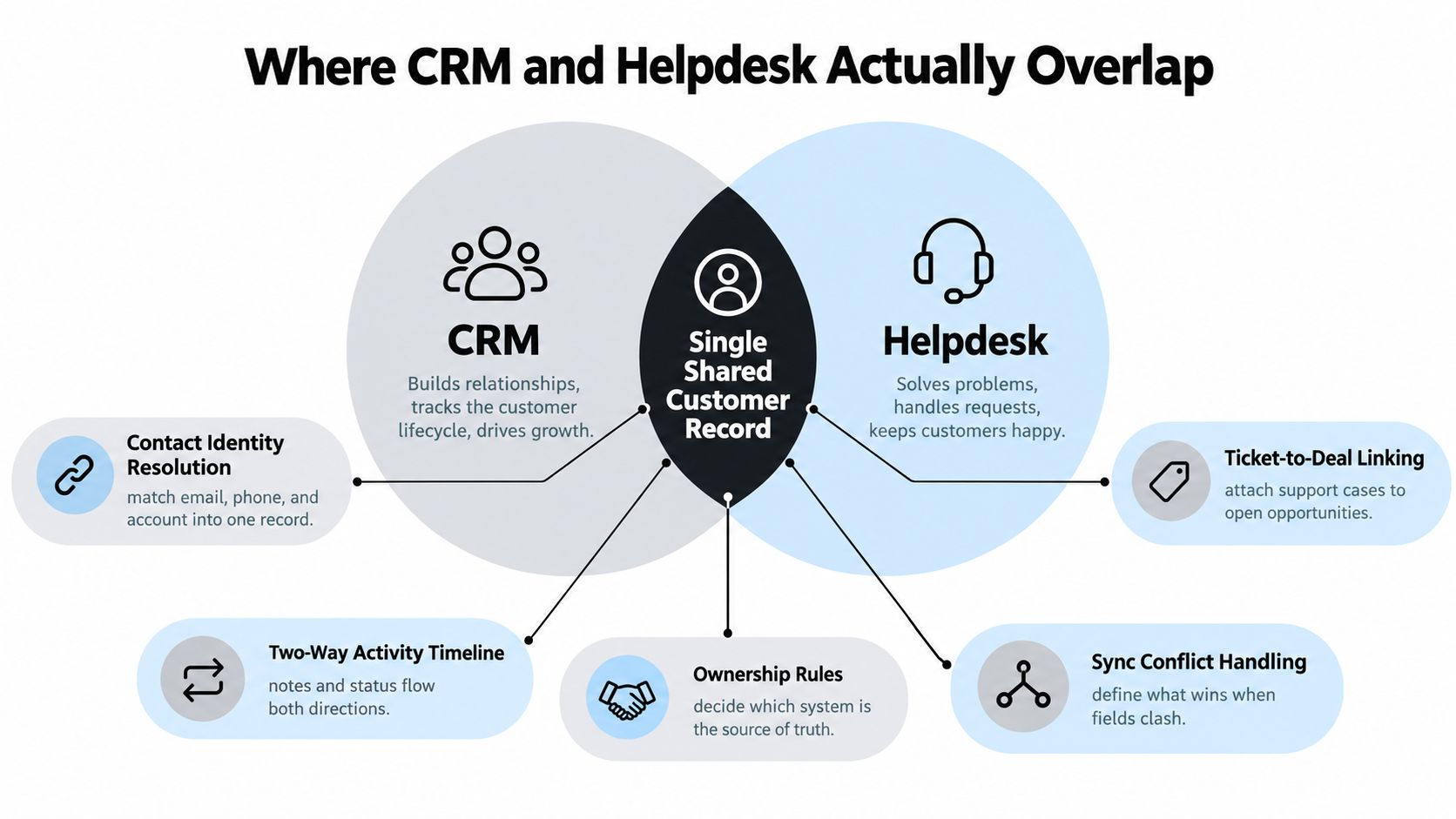
The overlap starts with a shared customer identity. Both systems need to recognize who contacted the company, which account they belong to, what they purchased, and what happened before the current interaction.
A dependable connection does more than copy email addresses. It resolves duplicate identities, links tickets to accounts and opportunities, and combines relevant activity into a timeline people can use. It also assigns ownership when both systems store the same field. If an account tier changes in the CRM while a ticket remains open, the integration must define which value controls and when the helpdesk receives the update.
Where shared features create false confidence
Many CRMs now offer basic ticketing, while many helpdesks include lightweight account or pipeline views. Those additions can suit a small team, but they rarely support a larger operation without workarounds.
Consider a renewal-risk case. A customer submits several tickets about a missing feature, but the helpdesk does not receive the latest renewal date from the CRM. The agent handles the issue as routine. The account manager sees the renewal opportunity but not the unresolved tickets. Both teams work separately, duplicate outreach, and miss the chance to coordinate a recovery plan.
Two specialized systems can be the better choice when their synchronization preserves the context each team needs. An all-in-one platform can reduce administration, but it may force support or sales into workflows that do not fit their work. Choose based on shared context depth and ticket-lifecycle control, not on the length of a feature list.
Pilot the handoff, not the brochure
Test the connection with real records and failure cases. For a worked example, review this guide to Salesforce and Zendesk integration before designing conflict rules.
- Identity matching: Can it associate contacts across email, phone, account, and subscription identifiers?
- Event freshness: Do ownership changes, ticket updates, and account attributes arrive when users need them?
- Conflict rules: Can administrators see and resolve mismatched values?
- Failure recovery: Does the integration retry, log, and reconcile failed events?
- Operational continuity: Can agents keep working during an integration outage?
A helpdesk pilot should track first-response time, average resolution time, first-contact resolution, escalation rate, backlog, agent utilization, cost per ticket, customer satisfaction, and SLA compliance. The SLA formula is tickets resolved within SLA divided by total tickets received, multiplied by 100, as documented in helpdesk metrics guidance.
A synchronized record is useful only when it is accurate, timely, and actionable. Test whether the information changes a support decision, rather than merely appearing in both systems.
Metrics and Integration Risks Most Buyers Miss
A software demo shows a successful path. Production exposes the exceptions.
Legacy CRM, ERP, billing, messaging, and identity systems often determine whether a new helpdesk succeeds. An integration may look complete while dropping webhooks, hitting API limits during a ticket spike, or creating duplicate contacts when customers use different email addresses. Agents then lose trust in the data and return to spreadsheets, private notes, and manual messages.
A market analysis reports that about 34% of enterprises experienced operational delays while integrating modern helpdesk platforms with older systems, while roughly 25% faced limitations connecting AI analytics to legacy support applications. Those figures make integration resilience a buying criterion, not an implementation detail. Analysis of helpdesk integration constraints
What to measure before signing
| Risk | What It Looks Like | Metric to Track |
|---|---|---|
| Identity mismatch | One customer appears as several contacts | Match accuracy and duplicate rate |
| Stale account context | Agent sees an old tier, plan, or owner | Context freshness and sync lag |
| Dropped events | CRM and helpdesk show different ticket states | Failed-event rate and reconciliation time |
| Routing failure | Tickets reach the wrong team or queue | Routing precision and reassignment rate |
| SLA ambiguity | Managers can't explain why a breach occurred | SLA attainment by priority and channel |
| Duplicate work | Two agents respond to the same request | Duplicate-ticket rate and collision events |
| Weak reporting | Automation activity can't be linked to outcomes | Event-level export coverage |
Don't use one average to judge support performance. Segment results by channel, priority, language, customer tier, and issue category. An overall resolution time can look acceptable while high-value accounts or severe incidents wait too long.
A clear decision framework
Choose a separate CRM when pipeline visibility, account ownership, and renewal context are the primary risks. Choose a dedicated helpdesk alongside it when queue governance, routing, SLA compliance, and resolution quality drive the operation. Choose a combined platform only when its support controls are strong enough for the actual workload and its commercial records are deep enough for sales and success.
The most expensive choice is often the platform that looks complete but forces teams to compensate for unreliable synchronization. Score every option on integration resilience, reconciliation tools, auditability, migration effort, fallback procedures, and exportability. Feature breadth comes after those controls.
For a broader method of testing system performance under realistic conditions, use this guide to performance benchmarking as part of the pilot design.
Choosing Separately, Together, or With AI Support Agents
There are three sensible deployment paths. The right one depends on where the operational bottleneck sits, not on whether a vendor calls its product an all-in-one platform.
Keep the CRM and support process separate
This works for a sales-led team where support is occasional and commercial context matters more than queue complexity. A salesperson may handle a customer question directly, record the interaction in the CRM, and move on without needing a dedicated ticket lifecycle.
This setup is attractive because it minimizes administration. The trade-off is obvious: as requests become more frequent, the CRM becomes a poor place to manage routing, response targets, escalations, and backlog. Keep this path only while the team can maintain prompt, consistent service without hiding work in inboxes.
Add a dedicated helpdesk beside the CRM
This is the strongest default for growing SaaS and ecommerce teams. The CRM remains authoritative for account, subscription, opportunity, and renewal data. The helpdesk owns tickets, channels, queues, SLA policies, agent workflows, and resolution reporting.
The integration should expose only the context agents need and return only the events revenue teams can act on. Don't mirror every field just because the API allows it. Excessive synchronization creates conflicts, slows troubleshooting, and makes ownership unclear.
Add an AI support agent to the stack
An AI support agent can sit above either architecture. It can answer repeat questions from approved sources, draft replies inside the helpdesk, classify requests, collect missing details, and escalate complex conversations to people. With the right actions and permissions, it can also create tickets or update customer records rather than leaving agents to re-enter information.
That changes the economics of the decision. A team doesn't have to replace a capable CRM or helpdesk merely because repetitive questions consume agent time. It can preserve the systems of record and automate the context handoff around them.
| Company Stage | Ticket Volume | Recommended Setup | Why It Wins |
|---|---|---|---|
| Early sales-led team | Light and irregular | CRM with simple request tracking | Keeps relationship and ownership context in one place |
| Growing SaaS or ecommerce team | Consistent and varied | CRM plus dedicated helpdesk | Separates revenue records from ticket operations |
| Support-led operation | High or multi-channel | Mature helpdesk integrated with CRM | Protects routing, SLA control, and resolution quality |
| Lean team with repetitive questions | Any manageable level | Existing stack plus AI support agent | Reduces repetitive handling without replacing core systems |
| Complex enterprise operation | Multiple teams and legacy systems | Controlled integration with strong auditability | Limits synchronization risk and clarifies system ownership |
Before buying, answer two questions. Which customer decision requires context from both systems? And which workflow must never fail during an integration outage? Those answers will tell you whether to simplify, specialize, or add an automation layer.
A 30 Day Pilot Plan Before You Sign
A short pilot should use real conversations and real records. A polished demo can't reveal identity mismatches, missing events, weak escalation logic, or reporting gaps.
Week one
Record the current baseline: ticket volume, average handle time, first-response time, and how often agents search another system for customer context. Separate the figures by channel and issue type so a single average doesn't hide the actual bottleneck.
Week two
Import representative tickets and contacts into the leading helpdesk or combined platform. Map shared fields, assign ownership rules, test ticket-to-account linking, and measure whether changes in the CRM appear correctly in the ticket view.
Week three
Enable AI assistance on one high-volume channel. Track containment, escalation accuracy, agent corrections, customer satisfaction, and reopened conversations. Review every incorrect answer rather than judging automation by volume alone.
Week four
Validate dashboards, exports, data residency, permissions, support coverage, contract terms, and exit procedures. Calculate the value of resolved or deflected work against the complete subscription and implementation cost.
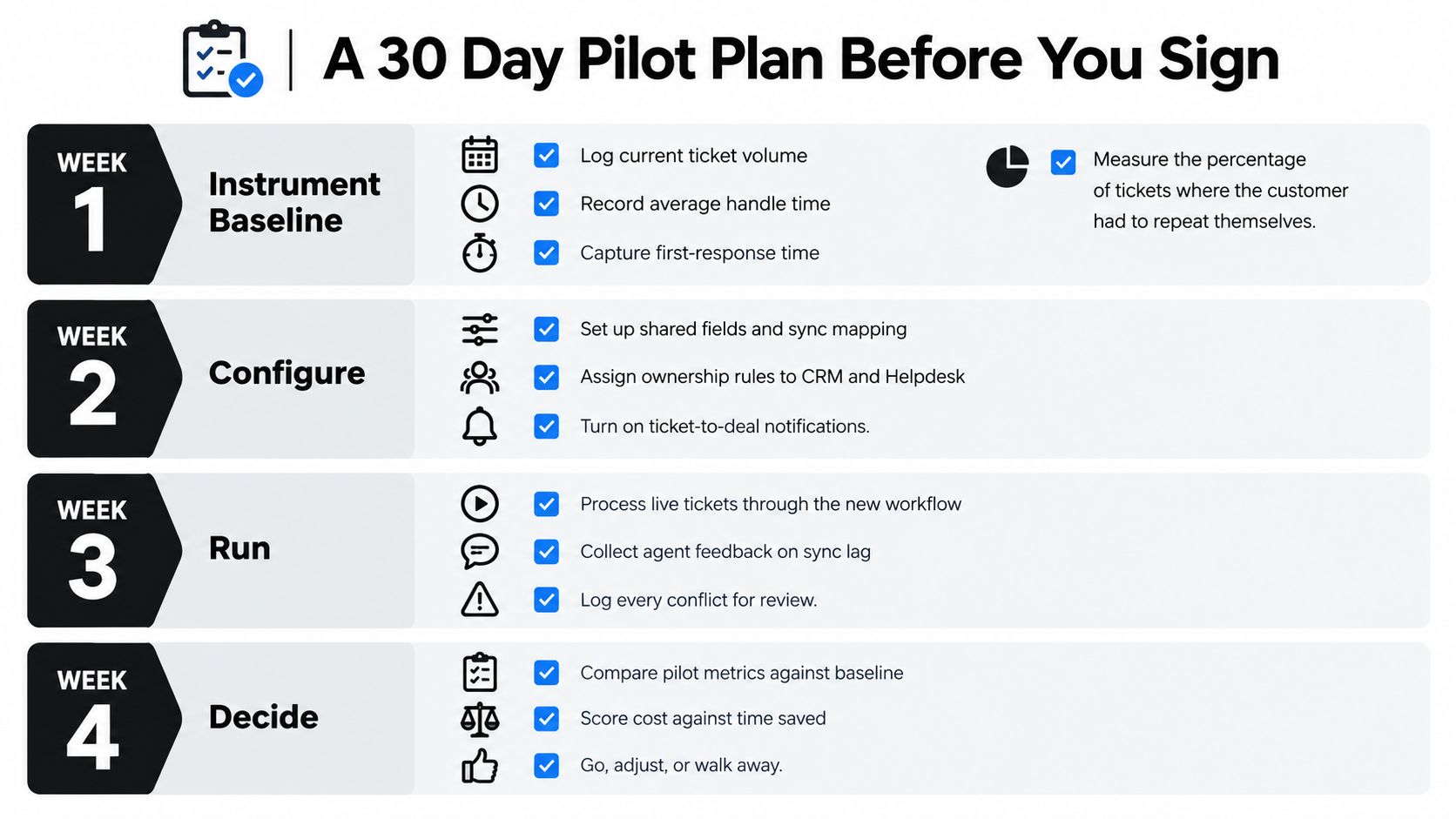
Use the pilot to make a decision, not to justify a purchase already made. Go forward when the shared context is accurate, routing is dependable, agents trust the workflow, and reporting connects activity to customer outcomes. Adjust the design when the system works but ownership or reconciliation remains unclear. Walk away when the platform requires manual copying to stay reliable.
The strongest stack gives sales a complete relationship record and support a controlled ticket lifecycle. It doesn't force either team to work inside the other's tool.
If your CRM and helpdesk are losing context between customer records, tickets, and handoffs, SupportGPT can add AI support agents, human escalation, ticket creation, and CRM record updates around your existing stack. Start with one support workflow, measure the handoff and resolution quality, and use the results to decide how much automation your operation can trust.