A Developer's Guide to the Chat Bot API
Unlock the power of conversational AI. This guide explores how a chat bot API works, key features, and how to choose the right provider for your application.
At its heart, a chatbot API is the bridge that connects your application to a powerful AI model. Think of it as giving your software a direct line to a pre-built brain, saving you the monumental task of creating one from scratch.
Essentially, the API acts as a translator. It takes a user's question from your app, sends it over to a complex AI for processing, and then brings back a smart, conversational reply.
How a Chatbot API Actually Works
To really get your head around this, let's use an analogy. Picture the API as a highly efficient waiter at a futuristic restaurant. In this scenario, your application is the customer, the user's question is the order, and the AI model is the world-class kitchen.
Your app (the customer) places an order, like "How do I reset my password?". It hands this order to the API (the waiter). The waiter's job isn't to cook the meal but to understand the order, make sure the kitchen has everything it needs, and deliver it correctly. This is what we call making an API request.
The kitchen (the AI model) gets to work. It takes the order, pulls the right ingredients from its vast pantry of information, and cooks up the perfect answer. This is where all the complex AI magic happens behind the scenes.
Finally, the waiter (the API) brings the finished dish back to your table. Your application receives this answer and presents it to the user. This is the API response. The incredible part? This whole round trip usually takes just a fraction of a second.
The Anatomy of an API Call
This "waiter" process relies on three core components that work in harmony. Getting to grips with them is key to understanding how any chatbot API functions, whether it's a simple FAQ bot or a sophisticated AI agent.
-
Endpoint: This is like the specific kitchen door the waiter uses. It’s a unique URL that your application sends its request to. For example, a common endpoint might look something like
/v1/chat/completions, which tells the service, "Hey, I've got a message that needs a response." -
Request: This is the detailed order slip. It includes the user's actual message, your authentication details (like an API key to prove you're a paying customer), and any special instructions—maybe you want the AI to adopt a friendly tone or keep its answer brief.
-
Response: This is what the kitchen sends back on the tray. It’s usually formatted in a clean, predictable structure like JSON, which is easy for your application to read. The response contains the chatbot's message plus other useful bits of information, like a conversation ID for keeping track of the chat history.
A chatbot API basically hides away enormous complexity. You don't need to be an expert in neural networks or know the first thing about training a language model. You just need to know how to place the order and read the response.
Why This Model Is So Powerful
This simple request-response cycle is the backbone of so much modern software. By plugging into a chatbot API, developers can weave incredibly advanced conversational AI into their products with just a handful of code.
The benefits are huge. You don't have to worry about managing expensive, power-hungry servers or hiring a team of machine learning PhDs. Instead, you're tapping into a specialised service that handles all the heavy lifting for you.
This lets you focus your energy where it matters most: building a fantastic experience for your users. It’s this simple yet effective model that allows thousands of businesses to offer 24/7 automated support and create truly engaging customer interactions.
How a Chat Bot API Actually Works
To really get what a chat bot API does, we need to pop the bonnet and see what happens when a user sends a message. It's a lightning-fast journey from your app to the AI's "brain" and back again, all managed by the API. This isn't just theory; it’s the nuts and bolts that make those smooth, real-time conversations happen.
The whole thing kicks off the second a user types something like, "What are your weekend opening hours?" and hits send. Your app's frontend grabs this text, but it doesn't just fire it off to the AI.
Instead, your backend server steps in like a mission controller. It takes the user's message and wraps it up into a neat API request. This package contains more than just the text; it includes crucial bits and pieces like your authentication key (to prove it's you), a unique session ID to keep track of the conversation, and maybe some user details for a more personal touch.
The diagram below gives you a bird's-eye view of this data flow—from your application, through the API, to the AI model, and back.
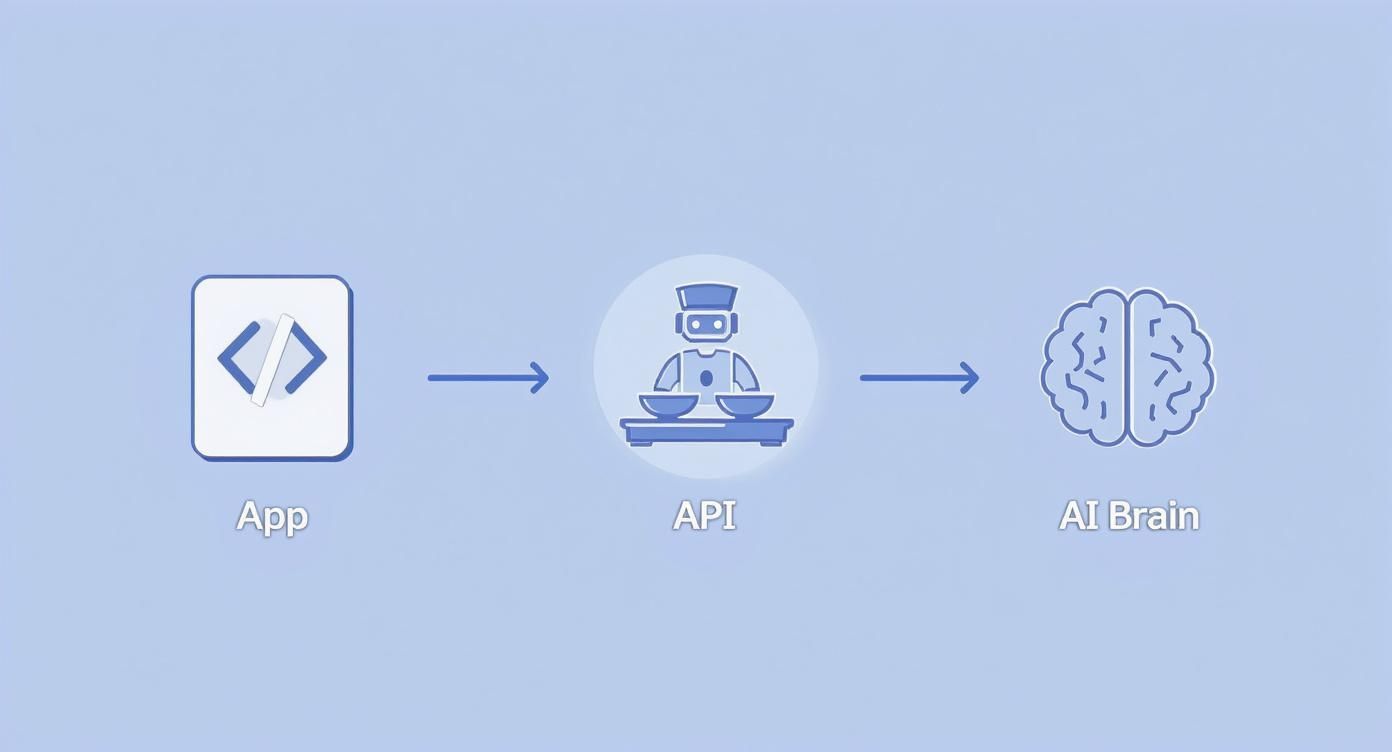
As you can see, the chat bot API is the essential go-between, translating a simple human question into instructions the AI can understand, and then turning the AI's complex output back into a friendly response.
Peeking Inside the "AI Black Box"
Once your server shoots off that request, it hits the chatbot service's API endpoint. This is where the AI model rolls up its sleeves and, in a matter of milliseconds, gets to work on some seriously complex language processing.
It all boils down to a few key steps:
- Natural Language Processing (NLP): First, the model dissects the sentence to figure out its grammar and what the words actually mean. It tidies up the text, fixing typos and getting it ready for proper analysis.
- Intent Recognition: Next, the AI figures out what the user is trying to achieve. For "What are your weekend opening hours?", the intent is clearly something like
get_opening_hours. Nailing this is the only way to give a genuinely helpful answer. - Entity Extraction: The model then pinpoints specific, important details, which we call entities. In our example, the key entity is
weekend. This helps the AI zero in on the exact information needed. If the user had asked about a product, that product’s name would be the entity.
These stages are what allow the AI to go way beyond simple keyword matching. It can actually grasp the context and purpose behind what someone is asking.
Crafting and Sending the Perfect Reply
With the user's intent and key details understood, the AI can now figure out the answer. It might check a knowledge base, scan your company's FAQs, or query a database to find the weekend opening hours.
The reply is then built and put into a structured format, usually JSON (JavaScript Object Notation). This is key because it’s not just a block of text; it’s a predictable, machine-readable package that your application can easily understand and use.
A chat bot API's response is so much more than just an answer. It's a structured packet of data with the message, the state of the conversation, and even suggestions for what to do next. This gives developers all the tools they need to create a truly dynamic experience.
Finally, this JSON response is sent back to your server. Your application opens it up, pulls out the message—"Our weekend hours are 9 AM to 5 PM on Saturday and Sunday."—and displays it to the user in the chat window.
The entire round trip, from the user's question to the AI's answer, happens so fast it feels instant. This is what creates that illusion of a natural, back-and-forth conversation, and it’s all thanks to the clean, efficient architecture of the API.
What to Look For: Key Features and Common API Endpoints
A truly effective chatbot API does a lot more than just shuttle messages back and forth. The best ones are loaded with features that let you build conversations that feel dynamic, intelligent, and aware of what's happened before. These are the tools that take a bot from a simple script to a genuinely useful digital assistant.
It's like the difference between a basic walkie-talkie and a modern smartphone. Sure, both can send a message, but one has a whole ecosystem built around it—memory, identity, analytics—that makes it vastly more powerful.
Core Features of a Modern Chatbot API
To create an experience that doesn't frustrate users, your API needs to do more than just understand words. It needs a solid foundation to manage the conversation's flow, remember who it's talking to, and give you feedback on how it's performing.
Here are the non-negotiables you should be looking for:
- Session Management: This is the API's memory. It lets the chatbot recall what was said earlier in the conversation, so users don't have to keep repeating themselves. Without it, every single message is a brand new, isolated chat, which is a recipe for a clunky and unnatural interaction.
- User Authentication: For any kind of personalised help, the API has to know who the user is—and do it securely. This is what allows a bot to pull up account details, check on an order, or make recommendations based on past activity.
- -Multi-language Support: If you have a global audience, your API has to be able to chat in more than just one language. This is absolutely critical for any business that wants to scale its support and connect with customers internationally.
- Analytics Hooks: How can you tell if your chatbot is actually helping? Analytics hooks are your window into its performance. They give you the data you need to see what people are asking, how often the bot succeeds, and where conversations are falling apart. This feedback is priceless for making improvements.
These features are the bedrock of any sophisticated chatbot API. They’re what enable you to build applications that are not just functional, but genuinely helpful and a pleasure to use.
A Look at Common API Endpoints
Endpoints are simply the specific URLs you send requests to, with each one designed to do a different job. While every API has its own quirks, most are built around a handful of standard endpoints that manage the core conversational logic. Getting your head around these is the first step to actually building something.
Let's break down the most common ones you'll run into.
- /start_session: This endpoint is what kicks off a new conversation. When a user first opens your chat window, you’ll call this to get a unique
session_id. You then include that ID in every follow-up request to keep the entire dialogue connected. - /send_message: This is the real workhorse. You send the user's message, the
session_id, and any other useful info (like a user ID) to this endpoint. The API takes it from there, processes the input, and sends back the chatbot's reply. - /get_history: Sometimes, you need to pull up the transcript of a past conversation. Maybe a user wants to see it, or a human agent needs the context before jumping in. This endpoint lets you fetch all the messages tied to a specific
session_id.
Think of endpoints like different departments in an office.
/send_messageis the mailroom, handling all the back-and-forth communication./start_sessionis the reception desk, greeting new arrivals and getting them signed in. Each one has a clear, specialised role.
This kind of logical structure is what makes a complex AI system predictable and manageable for developers to work with.
The rapid adoption of these API-driven tools is sparking some serious market growth, particularly in emerging tech hubs. For example, the India chatbot market was valued at around USD 243.3 million and is projected to skyrocket to USD 1,465.2 million by 2033. A huge driver for this is how easily a chatbot API can plug into the platforms people already use, like WhatsApp and Facebook Messenger. You can read more about the findings on the Indian chatbot market on imarcgroup.com.
This chart from IMARC Group really puts that explosive growth into perspective.
This sharp upward curve highlights just how much value businesses are finding in using AI-powered bots to better engage with their customers and make their own operations more efficient.
Practical Integration Patterns and Code Examples
https://www.youtube.com/embed/q5HiD5PNuck
Knowing the theory behind a chatbot API is one thing, but the real fun begins when you start writing code. Let's shift from concepts to concrete examples and see how to actually bring a conversational AI into your projects. This is where the magic happens.
At its heart, talking to an API is just a conversation between two computers. Your application sends a structured request, and the API sends one back. It’s a simple pattern that unlocks incredibly powerful AI. The language they almost always speak is JSON, a lightweight format that’s easy for both humans and machines to understand.
Let's walk through a basic example to see what this looks like in the real world.
A Simple API Call in Python
Imagine your user types, "Tell me a fun fact about space." To get an answer from the chatbot, your application needs to send this message to the API. If you're using Python, a go-to for backend development, you'd typically use the requests library to send an HTTP POST request to an endpoint, something like /send_message.
The body of your request, neatly packaged in JSON, would contain the key details:
{ "session_id": "user123-abc-987", "message": "Tell me a fun fact about space", "api_key": "YOUR_SECRET_API_KEY" }
The API server gets this, works its magic, and sends back a response, also in JSON. Your code just needs to catch this response, pull out the bot's answer, and show it to the user.
A successful response would look something like this:
{ "status": "success", "session_id": "user123-abc-987", "response_text": "Did you know that a day on Venus is longer than a year on Venus? It rotates incredibly slowly!" }
This simple request-and-response loop is the fundamental building block for every single chatbot integration.
Exploring Common Integration Patterns
While the basic API call is straightforward, where you make that call from is a critical architectural decision. The way you’d hook up a chatbot API for a website widget is worlds apart from how you'd power a bot inside a messaging app like Slack.
Let's look at the two most common approaches.
1. The Frontend Website Widget
This is the pattern you've probably seen a thousand times. A little chat bubble sits in the corner of a website, ready to help.
- How It Works: A snippet of JavaScript is embedded directly on your website. This script does all the heavy lifting right in the user's browser—it creates the chat interface, listens for user input, and sends API calls directly to the chatbot provider.
- Strategic Advantage: It's incredibly fast to get up and running. You can often have a chatbot live on your site in minutes just by copying and pasting a piece of code. It's a fantastic choice for teams who need a solution now without involving backend developers.
- Potential Challenge: Security can be tricky. Since the API key lives in frontend code, it’s more exposed. Providers get around this by issuing special, restricted "public" keys that can only perform specific, safe actions.
2. The Backend Server Integration
This is the standard approach for mobile apps, custom software, or integrating with platforms like WhatsApp.
- How It Works: The user's message travels from their device to your own server first. Your server then makes the secure call to the chatbot provider, gets the response, and passes it back to the user. Your server acts as a trusted middleman.
- Strategic Advantage: This is a far more secure and powerful setup. Your primary API key is kept secret and safe on your server. It also gives you total control to add your own business logic—you can log conversations, check a user's order status in your own database, or connect to other internal tools before the chatbot even sees the message.
- Potential Challenge: It simply requires more work. You have to build and maintain the backend logic to manage the flow of messages, which adds a layer of complexity.
The choice between frontend and backend integration isn't about which is "better"—it's about what's right for your project. A simple marketing website will do great with a quick-to-deploy widget. An enterprise application handling sensitive customer data absolutely needs a secure backend integration.
Ultimately, a good chatbot API should be flexible enough to support both patterns. This gives you the freedom to pick the architecture that fits your security needs, your team's skills, and your long-term goals for the project.
How to Choose the Right Chat Bot API Provider
Picking a chat bot API provider is a huge deal. It’s a decision that will directly shape your customer experience and how efficiently your team operates. The market is crowded, and it's easy to get distracted by flashy features. The key is to look past the marketing and focus on the core technology and how well it fits with your business. Think of it less like buying software and more like finding a strategic partner for your automated support.
The first thing to look at is the most important: how well the AI actually understands people. A provider’s Natural Language Understanding (NLU) is the engine that determines if your bot feels smart and helpful or just frustratingly robotic. A solid NLU can pick up on context, figure out what a user means even if they make a typo, and handle complicated questions without getting stuck in a loop.
Evaluating Core Technical Capabilities
Before you even think about signing a contract, you need to get your hands dirty and put the technology under a microscope. The quality of the AI model itself is obviously a big deal, but you also have to consider the tools your team will use to build with it and the infrastructure that keeps everything online.
One of the most overlooked, yet critical, factors is the quality of the developer documentation. Clear, thorough, and well-organised docs can save your team countless hours and headaches. Look for providers that offer detailed guides, practical code samples, and a straightforward API reference. Without good documentation, even the most powerful API is nearly impossible to implement well.
Just as important are the guarantees around uptime and scalability. A chatbot that’s offline during your busiest hours is worse than having no chatbot at all. You'll want to see a Service Level Agreement (SLA) that promises high availability—aim for 99.9% or better. Also, ask how their infrastructure handles sudden spikes in traffic. You need a partner that can grow with you.
Assessing Business and Customisation Factors
Beyond the nuts and bolts of the technology, the right provider has to align with your business goals, budget, and specific needs. This means digging into their pricing models, how much you can customise the AI, and where they fit in the market. A solution that’s perfect for a small startup probably won’t cut it for a large enterprise, and the other way around.
Here are a few business-oriented things to keep an eye on:
- Transparent Pricing: Stay away from providers with confusing or hidden fees. A clear, predictable pricing model—whether it's pay-as-you-go, tiered subscriptions, or based on monthly active users—is vital for budgeting and avoiding nasty surprises.
- AI Customisation: Can you train the model on your own data? The ability to fine-tune the AI with your company's knowledge base, product details, and past support tickets is what makes a bot truly useful and on-brand.
- Security and Compliance: Make sure the provider follows data protection rules that are relevant to your industry and where you operate. This includes things like strong data encryption, access controls, and having the right compliance certifications.
The conversational AI market is booming, particularly in India's fast-growing tech scene. The Indian Conversational AI market was valued at around INR 38.10 billion and is expected to hit INR 152.31 billion by 2030. This growth is largely driven by industries like banking that depend on chatbots for efficient customer service. You can read more about the growth of India's Conversational AI market at Business Wire.
This projection from Business Wire highlights the rapid expansion of the market, which really drives home the importance of picking a provider that can keep up.

The steep growth curve shown here is a clear signal that more and more businesses are relying on API-driven chatbots to improve how they support customers and run their operations.
To help you organise your evaluation, think about comparing providers across a few key areas. Here’s a simple framework you can use:
Comparing Chat Bot API Provider Features
A comparison of key features to consider when evaluating different chatbot API providers for your business needs.
| Feature | What to Look For | Why It Matters |
|---|---|---|
| NLU Quality | Accuracy in intent recognition, entity extraction, and handling of complex or ambiguous user queries. | The core of the bot's intelligence. High-quality NLU leads to fewer errors and a better user experience. |
| Developer Tools & Docs | Clear API references, SDKs for popular languages, code samples, and comprehensive step-by-step guides. | Poor documentation slows down your development team and makes it harder to build and maintain the chatbot. |
| Customisation | The ability to train the AI on your own data, define custom intents, and fine-tune responses. | A generic bot won't know your business. Customisation ensures the bot provides accurate, brand-specific help. |
| Scalability & Uptime | A clear SLA guaranteeing high availability (99.9%+) and an infrastructure built to handle growth. | Downtime means frustrated customers and lost business. You need a reliable service that can handle peak demand. |
| Pricing Model | A simple, transparent structure (e.g., per-conversation, per-user) without hidden costs. | Predictable costs are essential for budgeting. Complicated pricing makes it hard to calculate your ROI. |
| Security | Compliance with regulations like GDPR or HIPAA, data encryption (at rest and in transit), and access controls. | Protecting customer data is non-negotiable. A breach could lead to huge fines and damage your reputation. |
By systematically comparing providers on these points, you can move past the marketing hype and make a decision based on what truly matters for your business.
Choosing the right chat bot API is an exercise in balancing power with practicality. The best choice is rarely the one with the most features, but the one whose features best solve your specific problems, fit your budget, and empower your team to succeed.
For teams searching for a solution that marries ease of use with serious, enterprise-level control, platforms like SupportGPT are a great option. They give you the guardrails, customisation, and analytics you need to build a trustworthy AI agent, but without demanding a deep technical background from your team. This makes them a fantastic fit for a lot of modern businesses.
Securing Your Chatbot API Implementation
When you plug a chatbot API into your application, you’re not just adding a new feature—you're also taking on new security responsibilities. An unsecured API isn't a minor technical hiccup; it's an open door for data breaches, service outages, and a complete breakdown of user trust. Building a reliable and safe conversational experience means putting security at the top of your list, right from the very beginning.
This isn't about being alarmist; it’s about being smart and proactive. A few straightforward measures can shield your integration, your data, and your customers from the most common threats. Think of it like putting locks on the doors of a new house—it's a fundamental step you simply wouldn't skip.

This chart gives you a clear picture of the projected boom in India’s chatbot market, a huge player in the rapidly growing Asia-Pacific region. This sharp upward curve highlights just how much businesses are coming to rely on these API-driven tools, making solid security practices more crucial than ever.
Essential Security Best Practices
Securing your chatbot API isn’t about finding one magic bullet. It’s about layering your defences. While no single tactic is perfect, when you combine them, you create a tough security posture that keeps bad actors out and protects the integrity of your system. Here are the absolute must-haves.
- Guard Your API Keys: Your API key is literally the key to the kingdom. Treat it with the same care you would a password. That means never, ever leaving it exposed in your frontend code or checking it into a public code repository. The only safe place for it is stored as an environment variable on your server.
- Rotate Your Keys Regularly: Don't let your API keys get stale. The practice of regularly changing them, known as key rotation, drastically limits the potential damage if a key is ever compromised. A leaked key that’s only valid for 30 days is a headache; one that’s valid forever is a disaster.
- Encrypt Everything with HTTPS: All communication between your app and the chatbot API must be encrypted. Using HTTPS ensures that all data flying back and forth—from user messages to API keys—is scrambled and unreadable to anyone trying to eavesdrop.
An API key left in client-side JavaScript is a ticking time bomb. Anyone with a web browser's developer tools can find it and gain direct access to your account, leading to runaway bills or outright service abuse. Always, always keep your keys on the server.
Protecting Against Attacks and Abuse
Beyond just protecting your credentials, you need to defend the API itself from being manipulated or overwhelmed. A malicious user could try to exploit an open API to disrupt your service or inject harmful data. This is where you bring in the heavy hitters: rate limiting and input validation.
These measures don't just stop hackers in their tracks. They also protect you from yourself—like when a bug in your code accidentally sends thousands of requests a second, which could crash your service or rack up an astronomical bill.
Rate Limiting and Input Validation
Rate limiting is your frontline defence against denial-of-service (DoS) attacks. It works by capping the number of requests a single user or IP address can make within a certain period. This simple step prevents a malicious bot from hammering your API with traffic and locking out your actual users.
At the same time, you have to practice strict input validation. The golden rule is to never trust data coming from a user. Before passing any message along to the chatbot API, clean it up on your server. Sanitise it to remove any malicious code, like SQL injection or cross-site scripting (XSS) payloads. This ensures your chatbot doesn’t accidentally become an accomplice in an attack on your own systems.
Got Questions? We've Got Answers
Stepping into the world of chatbot APIs can bring up a few common questions. Let's clear up some of the basics so you can move forward with confidence.
Chatbot Platform vs. Chat Bot API: What's the Real Difference?
It’s easy to get these two mixed up. A chatbot platform is usually a complete, low-code toolkit for building a chatbot from scratch. An API, on the other hand, is for developers who want to plug powerful conversational AI directly into their own applications.
Think of it this way: a platform is like a full car-building factory. An API is the high-performance engine you can drop into a car you’re already building, giving you total control over the final design and feel.
So, What's the Price Tag on These APIs?
Cost is a big one, and it really varies. Most providers have a few different ways they structure their pricing. You'll often find a free tier for getting your feet wet, pay-as-you-go plans that charge you per API call, or monthly subscriptions that give you a set number of interactions. For bigger operations, there are usually enterprise plans with custom pricing and more hands-on support.
Do I Need a PhD in AI to Use One?
Absolutely not. That’s the beauty of using a good chatbot API. The provider handles all the heavy lifting—the complex AI models, the machine learning infrastructure, all of it. Your job, as a developer, is to send standard API requests and process the responses. You get to focus on building a fantastic user experience without needing to become an AI researcher overnight.
Ready to build a smarter, more reliable AI assistant for your business? With SupportGPT, you can deploy a powerful support agent trained on your own data in minutes. Start your free trial today and see how easy it is to deliver instant, accurate answers.