10 Best Practices for Quality Assurance
Discover 10 best practices for quality assurance across testing, metrics, automation, safety, and governance, with practical AI support examples.
Reliable AI support and SaaS experiences aren't secured by testing only before release. Quality assurance works when teams connect measurable standards, representative test cases, automated regression checks, human review, safety validation, customer signals, monitoring, and governance into one operating system.
That approach reflects mature quality practice. Official UK guidance recommends repeatable checks such as cross-checking figures against tables, verifying formulas, comparing breakdowns with totals, checking results against previous years, and proofreading links, footnotes, charts, and trend explanations. It also recommends allowing sufficient time and resources for quality assurance, using dual running for new processes, and keeping methods transparent. UK Civil Service quality guidance treats validation as a structured workflow, not a final inspection.
The same principle applies to an AI support agent. A SupportGPT agent can answer routine questions quickly, but its quality depends on the knowledge it uses, the boundaries it follows, the conversations humans review, and the signals the team monitors after deployment. The ten practices below turn those dependencies into repeatable work. SupportGPT examples make the workflow concrete, but teams should adapt thresholds to their own customers, risks, products, and support capacity rather than copy unsupported targets.
1. Implement Continuous Testing and Monitoring
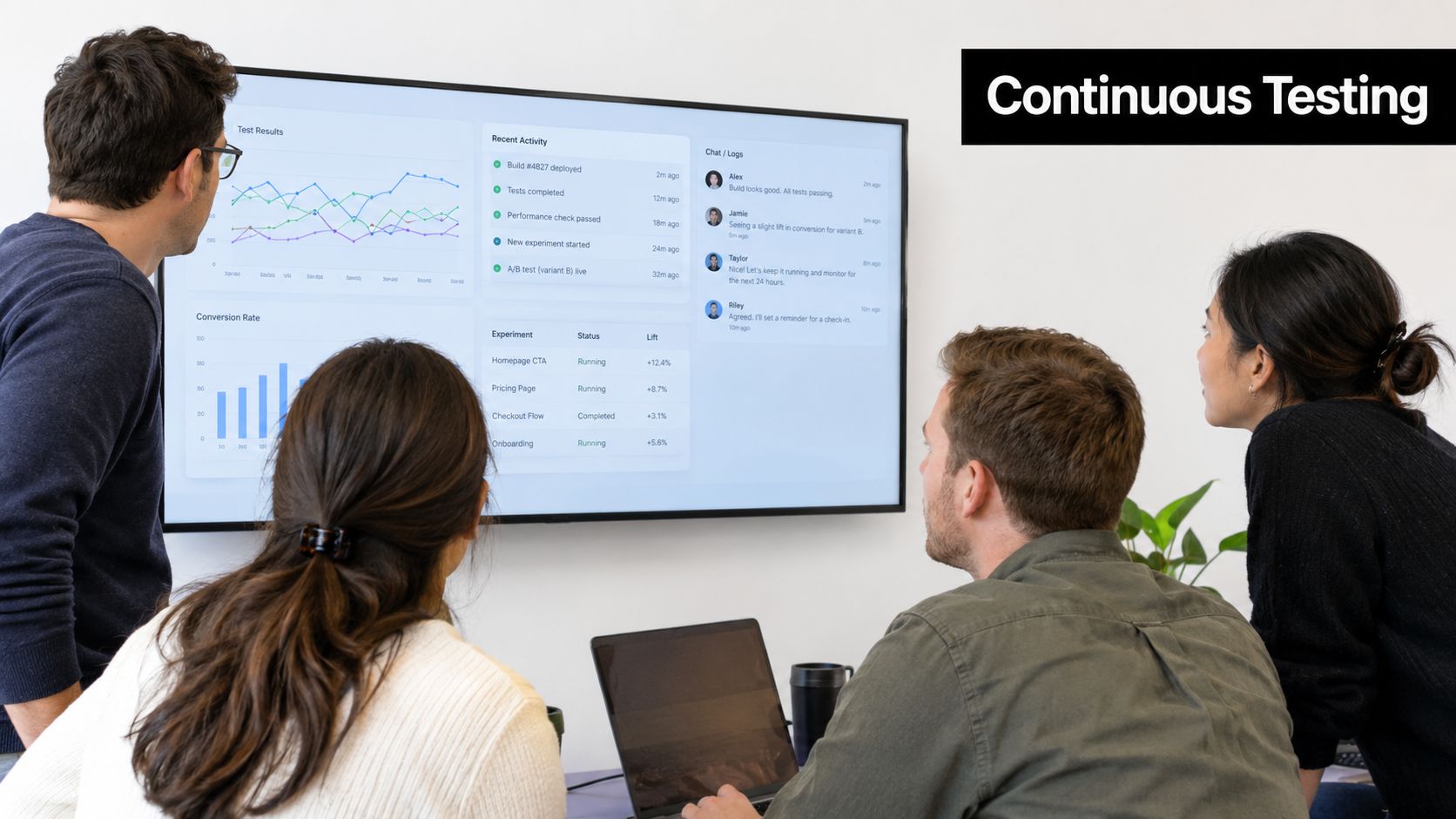
A release is only one moment in an AI agent's life. Product changes, new documentation, model updates, seasonal demand, integrations, and customer behavior can all change response quality after the original test suite passes. Continuous testing and monitoring keep those changes visible.
Start with a canonical set of conversations that represents the work your agent typically handles. Include routine questions, ambiguous requests, known failure modes, policy-sensitive topics, multilingual interactions, and escalation scenarios. Run the set whenever someone changes a prompt, knowledge source, model, routing rule, or integration. SupportGPT's AI agent testing guidance provides a relevant framework for testing intent handling, answer relevance, policy fidelity, escalation judgment, and tone.
Monitoring should combine technical and conversational signals. Track response latency, service availability, failed tool calls, answer quality, escalation patterns, and customer feedback. Don't reduce quality to one score. A fast answer that cites outdated information or avoids a necessary escalation can still create a poor customer outcome.
Build a review rhythm
Use the real-time playground to test prompt and knowledge changes before they reach customers. Once deployed, configure alerts for meaningful changes in error patterns, latency, escalation behavior, or satisfaction. Review failed and surprising interactions at a fixed cadence, then convert recurring problems into new test cases.
An e-commerce team might compare answers before and during a major demand period, while a SaaS team might inspect daily escalation themes after a product release. The exact thresholds belong to the business. What matters is that the team defines them before an incident forces a rushed decision.
2. Define Clear Quality Standards and Metrics
Teams can't improve quality they haven't defined. Before deployment, write down what a good interaction means for each important conversation type. A pre-sales question may prioritize speed and helpfulness. A billing or security question may require careful verification and human escalation, even if that takes longer.
Use a small initial metric set. Useful categories include response time, factual accuracy, successful resolution, escalation appropriateness, policy compliance, tone, and customer satisfaction. Don't create a dashboard full of measures that nobody reviews. Three to five metrics tied to decisions are more useful than dozens of disconnected indicators.
SupportGPT's customer satisfaction metrics guide can help teams connect interaction quality with customer feedback. The practical step is to define each metric precisely. “Accuracy” might mean that an answer matches an approved knowledge source. “Successful resolution” might mean that the customer completes the intended task without avoidable repetition or escalation.
Separate standards by risk
A single pass threshold for every conversation creates bad incentives. Low-risk product discovery can tolerate a different workflow from a payment dispute, account-access issue, or safety concern. Define which requests the agent can answer directly, which require source verification, and which must go to a person.
Document the standards where support, product, engineering, and compliance can find them. Review them when actual interactions reveal gaps, and revisit them on a planned schedule. A metric is useful only when someone owns the response to a change.
Practical rule: Define the decision attached to each metric before collecting it. If nobody knows what action a falling score should trigger, the score is probably not ready for production use.
3. Establish a Human-in-the-Loop Review Process
Automation handles repeatable work, but human reviewers catch ambiguity, misleading confidence, subtle tone problems, and policy failures that a score may miss. Human review should be structured rather than occasional browsing through random transcripts.
Create a review queue from escalated, low-rated, novel, and high-risk conversations. Add a sample of routine interactions so the team can detect silent drift, but focus scarce expert attention where the agent has the most room to cause harm or frustrate customers. SupportGPT's human and AI collaboration approach is relevant to this division of responsibility.
Reviewers need a short form that produces consistent data. Ask whether the agent understood the intent, used the right source, answered the question, followed policy, used an appropriate tone, and escalated correctly. Include a free-text field for the reason behind the score. That explanation often becomes the raw material for a new test case, prompt adjustment, knowledge update, or guardrail.
Make review a feedback loop
Rotate reviewers across support, product, and quality roles. Different perspectives expose different defects, and rotation reduces the risk that one person's preferences become an undocumented standard. Calibrate reviewers with shared examples, especially when tone or helpfulness is subjective.
A weekly review can work for a small team if it consistently covers the most informative conversations. A larger organization may need a formal queue, audit trail, reviewer calibration, and ownership for closing findings. The process should produce changes, not just scores. When a recurring issue appears, assign an owner, record the decision, update the relevant configuration, and add a regression case.

4. Optimize Prompts and Knowledge Sources Iteratively
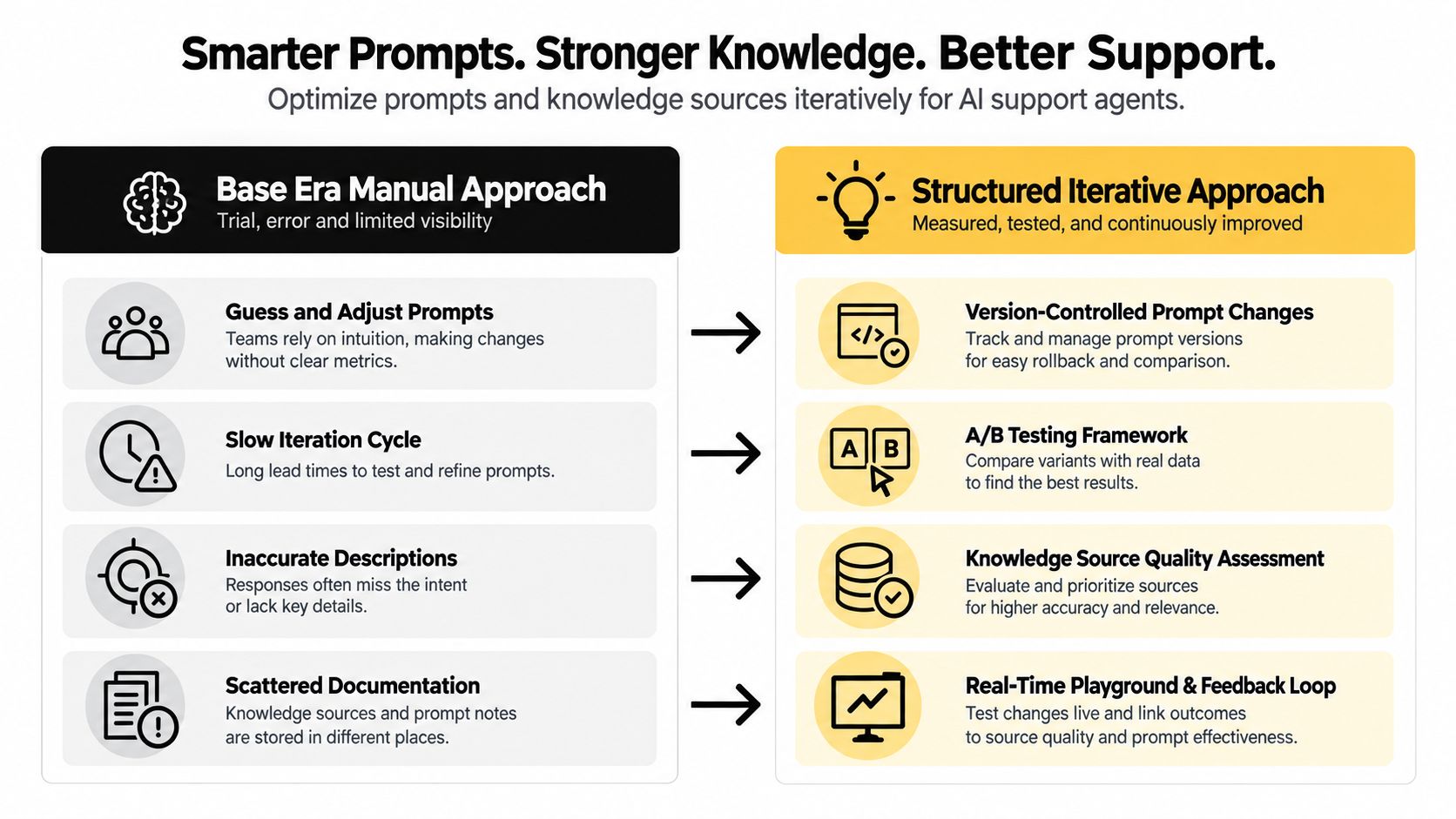
Prompt optimization fails when teams treat a prompt as a magic instruction that can be rewritten until responses “feel better.” A reliable process changes one meaningful variable at a time, tests it against representative conversations, and records why the change was made.
Start with a baseline prompt and a versioned test set. If the agent gives incomplete refund answers, first determine whether the problem comes from instruction priority, missing policy content, retrieval quality, or an unclear escalation rule. Changing all four at once may improve one example while making another failure impossible to diagnose.
SupportGPT's AI prompt optimization resource fits this iterative model. Use its real-time playground to compare candidate responses before deployment, then monitor the live outcome after a controlled release. Record the version, change rationale, affected conversation types, reviewer observations, and decision to keep, revise, or revert.
Treat knowledge as a product asset
Frontline support staff often identify outdated articles before anyone else. Give them a direct way to report missing or conflicting information. Every source should have an owner, a clear scope, and a review process. A prompt cannot compensate for contradictory pricing, incomplete setup instructions, or an obsolete cancellation policy.
Test changes across the models your product may use. An instruction that works well for one model can produce different levels of verbosity, caution, or source adherence elsewhere. Compare behavior across representative cases rather than approving a change from one impressive response.
The best prompt is not the cleverest one. It's the version that produces predictable behavior across ordinary requests, edge cases, and escalation boundaries while remaining understandable to the people responsible for maintaining it.
5. Implement Multi-LLM Testing and Comparison
Model selection is a quality decision, not just an engineering preference. Different models can vary in reasoning, factuality, tone, multilingual behavior, latency, cost, and resilience under load. A model that performs well on technical documentation may be a poor choice for sensitive billing conversations.
Build a fixed evaluation set from the most important conversation types. Use identical user inputs, relevant context, instructions, and tools for each model. Score both measurable outcomes and human judgments. A comparison should answer practical questions: Did the model use the approved source? Did it ask for clarification when needed? Did it make an unsupported promise? Did it escalate at the right point?
SupportGPT's AI model comparison guidance supports this type of structured evaluation. Keep model comparison separate from prompt experimentation where possible. Otherwise, a prompt change and a model change can mask each other's effects.
Choose by workflow, not by leaderboard
One model may handle technical troubleshooting better, while another may produce a more suitable tone for customer-facing replies. A routing strategy can assign models by conversation type, but that adds operational complexity. Each route needs its own monitoring, fallback behavior, cost review, and regression coverage.
Retest when model versions change and when traffic conditions differ from your test environment. A response that looks acceptable at low volume may become slow or unstable under production demand. Keep the final decision tied to customer outcomes and operational effort, not a generic claim that one provider is best.
6. Validate Guardrails and Safety Mechanisms Regularly
Guardrails are part of the product's behavior. They aren't a policy document that can be written once and forgotten. Teams should test whether the agent refuses unsafe requests, avoids unsupported claims, stays within scope, protects sensitive information, and escalates when the situation requires judgment.
Build the test library from real failures and plausible abuse cases. Include requests that attempt to override instructions, extract hidden information, force unauthorized refunds, solicit regulated advice, or make the agent contradict an approved policy. Test direct attacks and indirect ones, such as a customer embedding misleading instructions inside a pasted document.
Financial, healthcare, and marketplace workflows illustrate why context matters. A financial support agent should not turn general account information into personalized investment advice. A healthcare assistant needs appropriate boundaries around medical questions. An e-commerce agent shouldn't promise a refund or delivery outcome it isn't authorized to provide.
Test the safety system as a whole
Check guardrails across every configured model, language, channel, and integration. A rule that works in a text chat may behave differently when a tool returns unexpected data. Review refusal quality as well as refusal rate. A vague refusal frustrates legitimate customers, while an overly broad rule can push ordinary requests to human teams unnecessarily.
Compliance and legal stakeholders should define the essential boundaries, but support and engineering teams should test how those boundaries behave in practice. Log failures, explain the business rationale for each rule, and update the adversarial library as new attack patterns appear.
7. Track and Analyze Escalation Patterns
Escalations are not merely failures of automation. They are evidence about customer intent, knowledge gaps, policy boundaries, staffing needs, and product friction. Analyze them as a feedback stream rather than treating each handoff as an isolated support event.
Start with a taxonomy that reflects your business. Categories might include missing knowledge, unclear intent, technical complexity, account security, payment risk, policy restriction, tool failure, or customer preference for a person. Keep the categories distinct enough to support decisions, but not so detailed that reviewers stop using them consistently.
For each escalation, capture the trigger, conversation context, time to handoff, receiving team, final outcome, and whether the escalation was necessary. This helps distinguish a correct safety boundary from an avoidable failure. A high escalation rate in one topic could indicate that the agent needs better documentation, a clearer workflow, or a stricter handoff rule.
Turn patterns into product work
Review new deployments more frequently at first, then settle into a cadence that matches the volume and risk of the workflow. Look for repeated questions that should become knowledge-base content, product defects that create support demand, and rules that delay customers before handing them to a person.
Share findings with product and engineering. If customers repeatedly ask for the same missing capability, the right fix may not be another prompt. It may be a product improvement, a better API, clearer onboarding, or a new human workflow.
Escalation quality has two dimensions. The agent must hand off when it should, and it must avoid making the customer wait before handing off.
8. Establish Cross-Functional Quality Ownership
Quality deteriorates when one team owns the dashboard but lacks authority over the inputs. Support sees customer frustration, product understands intended behavior, engineering controls integrations and deployment, and compliance defines critical boundaries. A dependable QA operating system gives each group a clear role.
Create a shared quality forum with a fixed agenda. Review changes in key metrics, notable failures, unresolved escalations, upcoming model or product changes, guardrail decisions, and open corrective actions. Keep the meeting short and decision-oriented. A dashboard that everyone can access is more useful than a report that only one team receives.
Clarify decisions before disagreement
Write down who can approve a prompt change, who can pause an agent, who owns a knowledge source, who signs off on a safety rule, and who communicates a customer-impacting incident. Define an emergency path for severe failures. Without decision rights, teams can spend more time debating ownership than fixing the issue.
A rotating quality champion can keep daily attention on defects without making quality the permanent responsibility of one person. Add quality outcomes to team planning and performance conversations, but avoid rewarding teams solely for reducing escalations or increasing automation. Those incentives can encourage the wrong behavior, such as suppressing handoffs or accepting unsafe answers.
Shared ownership also improves learning. A support observation can become a product requirement, an engineering test, or a compliance clarification instead of remaining trapped in a ticket queue.
9. Implement Customer Feedback Loops and Satisfaction Tracking
Internal reviewers can judge whether an answer follows policy, but customers reveal whether it helped. Collect feedback immediately after relevant interactions, keep the request short, and connect it to the conversation context. A simple rating plus an optional comment often produces more usable insight than a long survey.
Ask about the interaction itself. “Was this answer helpful?” tells the team more than a broad question about brand satisfaction. Pair the rating with conversation type, escalation status, topic, model, prompt version, and outcome. That context lets the team identify patterns instead of reacting to isolated complaints.
Customer feedback should never be interpreted without sampling bias in mind. The people who respond may be especially pleased or frustrated, and customers with unresolved issues may be more likely to leave comments. Combine direct feedback with human review, escalation analysis, support outcomes, and technical monitoring.
Close the loop visibly
Review negative feedback quickly when it signals a safety, accuracy, or policy problem. Cluster comments by issue, assign an owner, and decide whether the response requires a knowledge update, prompt change, guardrail, product fix, or human follow-up. Positive feedback can also identify workflows that are ready for broader automation, provided other quality signals agree.
Tell support and product teams what changed because of customer feedback. This builds trust in the process and encourages better reporting. Track whether a change improves the relevant conversation type without harming other workflows. A local improvement isn't a quality win if it creates new failures elsewhere.
10. Maintain Documentation, Training, and Quality Audits
A quality system becomes fragile when only one person knows which prompt is live, why a guardrail exists, or which source controls a customer-facing answer. Centralized documentation preserves that context through team changes, model updates, incidents, and product growth.
Document the quality standard, metric definitions, prompt versions, knowledge owners, guardrail rules, escalation logic, test cases, review decisions, and deployment history. Include the reason for a decision, not just the final setting. Future reviewers need to know whether a rule was introduced because of a regulatory requirement, a customer complaint, a model failure, or a product limitation.
Use a searchable workspace such as Confluence, Notion, or an internal documentation system. Link each record to the live configuration where possible. A change deployment should include a documentation update, just as it includes a test result.
Audit for drift
Run recurring audits that check whether sources remain accurate, links work, prompts match the recorded version, guardrails still reflect policy, escalation routes reach the right team, and unresolved findings have owners. Train new staff with practical examples, then refresh existing teams through hands-on exercises rather than passive reading.
A simple audit is more valuable when people use it consistently. Record findings without turning the process into blame. The purpose is to expose weak controls early, improve the system, and make quality repeatable as the team scales. A training management system in the UK can provide useful context for organizing training records and recurring learning workflows.
Top 10 QA Best Practices Comparison
| Practice | 🔄 Implementation Complexity | ⚡ Resource Requirements | ⭐ Expected Outcomes | 📊 Ideal Use Cases | 💡 Key Advantages |
|---|---|---|---|---|---|
| Implement Continuous Testing and Monitoring | Medium–High, requires test infra and CI/CD | Moderate–High, engineering, monitoring tools, test data | ⭐⭐⭐⭐ Improved reliability, fewer regressions, faster detection | High-volume support, enterprises, production-critical agents | Automated validation, scalable quality, early issue detection |
| Define Clear Quality Standards and Metrics | Low–Medium, policy and alignment work | Low–Medium, stakeholder time, analytics baseline | ⭐⭐⭐⭐ Aligned expectations, measurable evaluation | All deployments, SLA-driven teams, regulated sectors | Objective benchmarks, accountability, prioritization |
| Establish a Human-in-the-Loop Review Process | Medium, process design and reviewer workflows | High, dedicated reviewers, training, review tools | ⭐⭐⭐⭐⭐ Catch hallucinations, qualitative feedback, compliance | High-risk queries, regulated industries, complex escalations | Qualitative oversight, trust building, continuous improvement |
| Optimize Prompts and Knowledge Sources Iteratively | Low–Medium, process discipline and versioning | Low–Moderate, A/B testing tools, non-technical effort | ⭐⭐⭐⭐ Measurable quality gains, faster iteration | Rapidly evolving products, non-technical teams | Rapid experimentation, lowers engineering dependence |
| Implement Multi-LLM Testing and Comparison | Medium–High, multi-provider orchestration | Moderate–High, API costs, benchmarking framework | ⭐⭐⭐⭐ Better model fit, cost/performance optimization | Teams needing best model per task, multilingual or varied needs | Avoids vendor lock-in, redundancy, cost insights |
| Validate Guardrails and Safety Mechanisms Regularly | High, adversarial test design and coverage | Moderate–High, security/compliance expertise | ⭐⭐⭐⭐⭐ Mitigates risk, ensures compliance and tone | Regulated industries, security-sensitive applications | Prevents misuse, protects brand and compliance |
| Track and Analyze Escalation Patterns | Medium, analytics and taxonomy setup | Moderate, labeling, analytics tools initially | ⭐⭐⭐⭐ Surfaces capability gaps, improves routing | Support optimization, capacity planning, KB prioritization | Identifies root causes, informs KB and escalation rules |
| Establish Cross-Functional Quality Ownership | Medium, governance and decision-rights | Low–Moderate, meetings, shared dashboards | ⭐⭐⭐⭐ Faster resolution, broader perspective on quality | Organizations scaling support across teams | Reduces silos, shared accountability, better alignment |
| Implement Customer Feedback Loops and Satisfaction Tracking | Low–Medium, survey integration and analysis | Low–Moderate, feedback tooling and analysis | ⭐⭐⭐⭐ Direct CX insights, early warning of regressions | Customer-focused teams, improving agent UX | Real customer signal, validates changes, closes feedback loop |
| Maintain Documentation, Training, and Quality Audits | Medium, ongoing upkeep and audit cadence | Moderate, documentation tools, training time | ⭐⭐⭐⭐ Consistent standards, onboarding, auditability | Scaling teams, compliance-heavy organizations | Knowledge retention, audit trails, detects quality drift |
Turn QA Practices Into a Working Operating Rhythm
The ten practices work best as one loop, not as ten disconnected projects. Start by defining a small set of quality standards for one high-volume AI support or SaaS workflow. Specify what counts as an accurate answer, when the agent must escalate, which topics need human approval, and which customer outcomes matter. Keep the initial scope narrow enough that the team can inspect results rather than hiding behind a large dashboard.
Next, build a representative test set. Include routine requests, ambiguous language, outdated-source risks, tool failures, safety-sensitive cases, and conversations that should reach a human. Run those tests before deployment and after changes to prompts, knowledge, models, integrations, or escalation rules. The UK Civil Service guidance on repeatable statistical quality assurance offers a useful general principle, compare outputs against expected totals, prior results, source material, and presentation requirements rather than trusting one inspection.
Then validate guardrails and establish human review. Human reviewers should examine escalated, low-rated, novel, and high-risk interactions, while automated checks handle repeatable regression paths. Convert recurring findings into tests, knowledge updates, prompt revisions, or product work. Keep the reason for each change in the documentation so the team can distinguish a measured improvement from a subjective preference.
After launch, monitor technical behavior and customer outcomes together. Review escalation reasons, failed tool calls, response quality, latency, customer comments, and satisfaction trends. Production data often exposes issues that pre-release suites miss, especially when customers phrase requests in unexpected ways or interact with changing product flows. For higher-risk workflows, consider gradual releases, clear rollback authority, and post-release checks rather than treating launch approval as the end of QA.
Finally, assign ownership and establish a review cycle. Product should own intended behavior, support should contribute customer evidence, engineering should maintain tests and integrations, and compliance should define required boundaries where relevant. Use SupportGPT's playground for controlled experiments, analytics for performance signals, conversation tracking for review, and smart escalation where human intervention is necessary. The platform can support multilingual agents, multiple model providers, training from your own sources, and ongoing interaction analysis, but the operating rhythm still belongs to your team.
Don't attempt to automate everything at once. Choose one workflow, establish a trustworthy baseline, prove that your review and monitoring process produces useful decisions, and expand from there. The strongest best practices for quality assurance are the ones people can repeat after the original project team has moved on.
SupportGPT provides AI support agents with configurable knowledge, guardrails, smart escalation, conversation tracking, analytics, and a real-time playground for testing changes. Use those capabilities to connect pre-release checks with human review and post-release learning, then visit SupportGPT to explore a practical quality workflow for your support or SaaS product.