Automated Message Response: A Complete Guide for 2026
Master automated message response with this 2026 guide. Learn types, best practices, implementation, and how SupportGPT delivers reliable AI support.
Automated message response can cut first-response latency from 8.5 minutes to 12 seconds, according to a telecommunications field study. The challenge is keeping that speed while preserving accurate resolution and a useful path to a human agent.
A fast reply changes the first few seconds of a support interaction. It doesn't automatically solve the customer's problem. If the response is vague, poorly grounded, or followed by a slow handoff, the customer may experience more effort rather than less.
For product teams, the useful question isn't “How much support can we replace?” It's “Which requests can we resolve safely, and how well can we transfer the rest?” That shift puts containment quality, escalation quality, and resolution outcomes beside response time.
Why Automated Message Response Speed Is Only Part of the Story
A telecommunications field study reported average response time falling from 8.5 minutes with human agents to 12 seconds with an AI implementation. The improvement came from removing queue delays for predictable requests, allowing the system to acknowledge and classify messages concurrently. The field study offers useful directional evidence, although teams still need to validate performance against their own traffic and infrastructure.
Consider a customer asking why a payment failed. An automated message arrives immediately and says the issue is being reviewed. The customer then asks whether the payment was charged, receives a generic article, repeats the question, and eventually waits for an agent who has no transcript summary. The first response was fast, but the interaction still failed.

The first reply isn't the resolution
A support system should separate three events:
- Acknowledgment: The system confirms that it received the message.
- Containment: The system answers the request or completes the supported task without human intervention.
- Resolution: The customer reaches an acceptable outcome, whether through automation or an assisted transfer.
These events often get compressed into one response-time metric. That hides failure. A customer might receive an instant acknowledgment but wait much longer for account access, a refund decision, or a technical exception.
Teams tracking average resolution time should therefore connect response latency with the full interaction path. Measure how quickly the system responds, whether it answers correctly, how often the customer reopens the conversation, and how long a human takes to take over when automation stops.
Practical rule: Treat speed as an entry condition for good support, not proof that good support happened.
The strongest automated message response systems target routine, well-understood intents first. They make uncertainty visible, avoid pretending to have completed an action, and transfer the conversation with enough context for the human agent to continue without interrogation.
From Early Pattern Matching to Modern AI Support Agents
Automated conversation didn't begin with today's generative systems. Its roots reach back to ELIZA, created by computer scientist Joseph Weizenbaum at MIT in 1966. Britannica describes ELIZA as an early program designed to simulate conversation with a human user through predefined rules and pattern recognition. Britannica's chatbot history explains that the system compared typed input with rules, identified keywords, and transformed parts of the message into scripted replies.
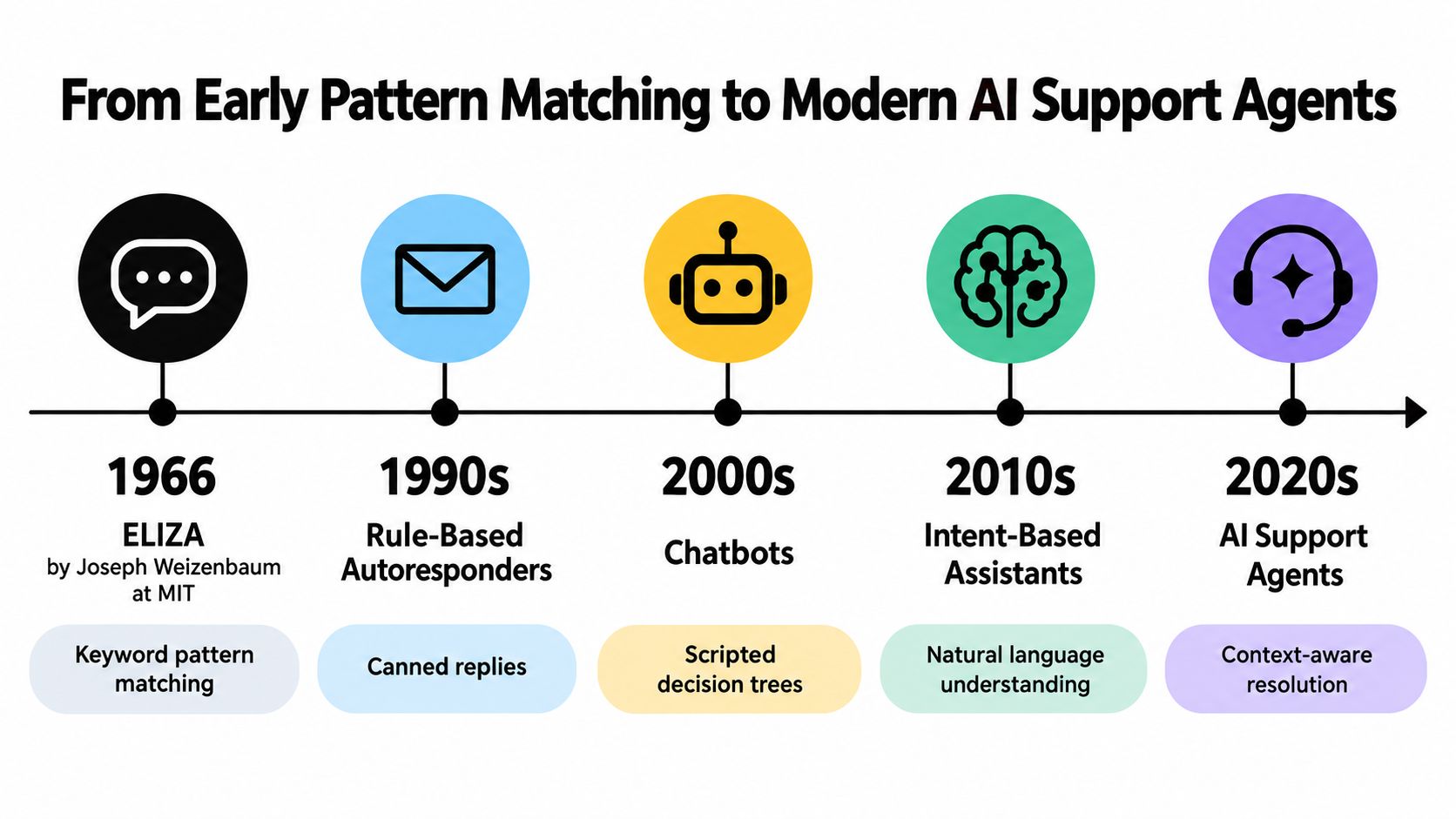
ELIZA could appear conversational without understanding language. A user might mention feeling anxious, and the system could respond with a prompt that encouraged further explanation. That behavior demonstrated an enduring lesson: useful-seeming conversation doesn't require genuine comprehension, but it does depend on carefully designed rules.
The knowledge boundary still matters
If a message falls outside ELIZA's rules, the reply can become incoherent. Modern systems have more flexible language handling, but the underlying risk remains. A model can produce fluent text without having reliable evidence for the answer.
A rule-based system might map “I can't log in” to a password-reset article. An intent-aware system can distinguish a forgotten password from a locked account, a missing verification email, or an outage. A retrieval-grounded agent can then use approved documentation, while a system with account tools may check status or create a support ticket.
That difference is central to natural language processing and chatbots. Modern AI support agents can interpret varied wording, ask clarifying questions, retrieve relevant information, and preserve conversation context. They still need boundaries, because flexible generation doesn't guarantee accurate policy interpretation or permission to take an action.
A durable evaluation question is simple: Where does the response come from? If the answer relies on a known policy, the system should retrieve that policy. If the request requires account access or judgment, the system should escalate rather than improvise.
Auto-Replies, Autoresponders, and Bot-Driven Conversations Compared
A fast first response can mean very different things depending on the system behind it. The comparison between auto-replies, autoresponders, and bot-driven conversations matters because each one handles a different level of customer intent, and each one fails in a different way when the request gets more complex.
An auto-reply is the simplest layer. It sends a fixed acknowledgment or a narrow answer, such as “We received your request and will respond during business hours.” That works when the customer mainly needs confirmation, a standard instruction, or a status message. It is a receipt, not a conversation.
An autoresponder adds process. It can ask for missing information, classify a ticket, confirm an appointment, or send a sequence after a known trigger. A good way to picture it is as a form with timing and logic attached. It follows conditions and predefined branches, which makes it useful for repeatable workflows but less reliable when a customer asks something outside those branches.
A bot-driven conversation handles language more dynamically. It interprets the customer's wording in real time, asks clarifying questions, retrieves relevant content, and routes the request when confidence is low. That broader coverage is useful, but it also raises the risk of giving a fluent answer that does not resolve the core issue. Speed alone is not the win. The true test is whether the system contains the request safely or hands it to a human with enough context to avoid making the customer start over.
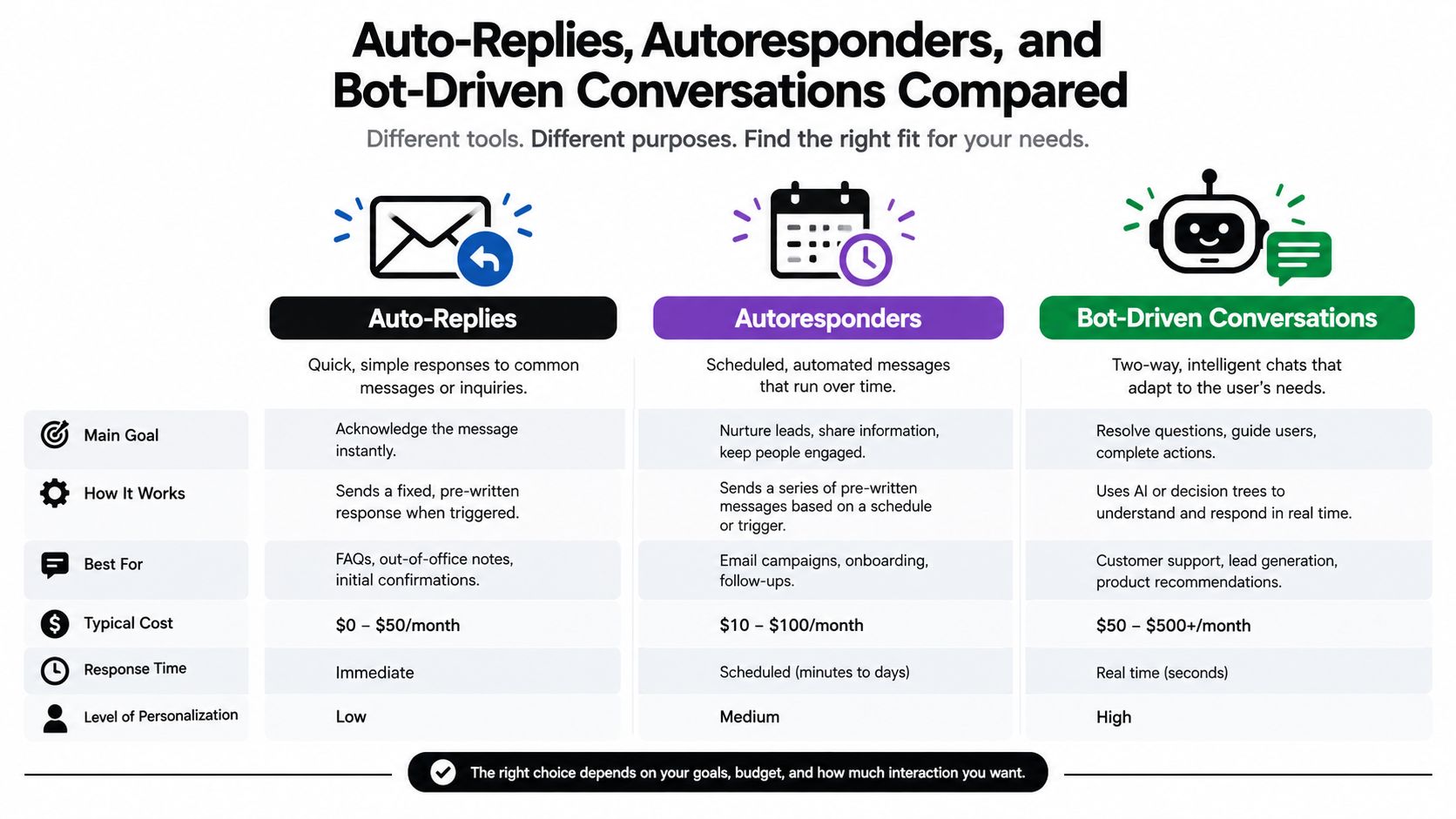
| Approach | Best fit | Main limitation |
|---|---|---|
| Auto-reply | Receipt confirmation and narrow, predictable answers | Doesn't adapt well to follow-up questions |
| Autoresponder | Multi-step workflows and ticket triage | Depends on accurate branches and conditions |
| Bot-driven conversation | Variable language and contextual support | Requires grounding, confidence rules, and escalation |
Match coverage to intent complexity
Analysts at Macha summarized support benchmark data showing that higher automation coverage was associated with large response-time reductions. Increasing automation from near-zero to about 20% corresponded with average response time dropping from roughly 736 minutes to 400 minutes. Approximately 30% automation corresponded with about 80 minutes, while 40% corresponded with about 12 minutes. The benchmark summary presents these figures as directional evidence, not a universal guarantee.
That pattern fits how support queues behave. Early automation removes repetitive, high-volume work. What remains is harder: ambiguous wording, account-specific questions, exceptions, and policy-sensitive decisions.
Use an auto-reply when acknowledgment is enough. Use an autoresponder when the path is known. Use a conversational agent when the system can interpret intent and retrieve reliable information. Route to a person when the request needs judgment, authorization, or emotional sensitivity.
The practical objective is safe containment and a human transfer that preserves momentum.
Designing Safe Automated Flows with Templates and Escalation Rules
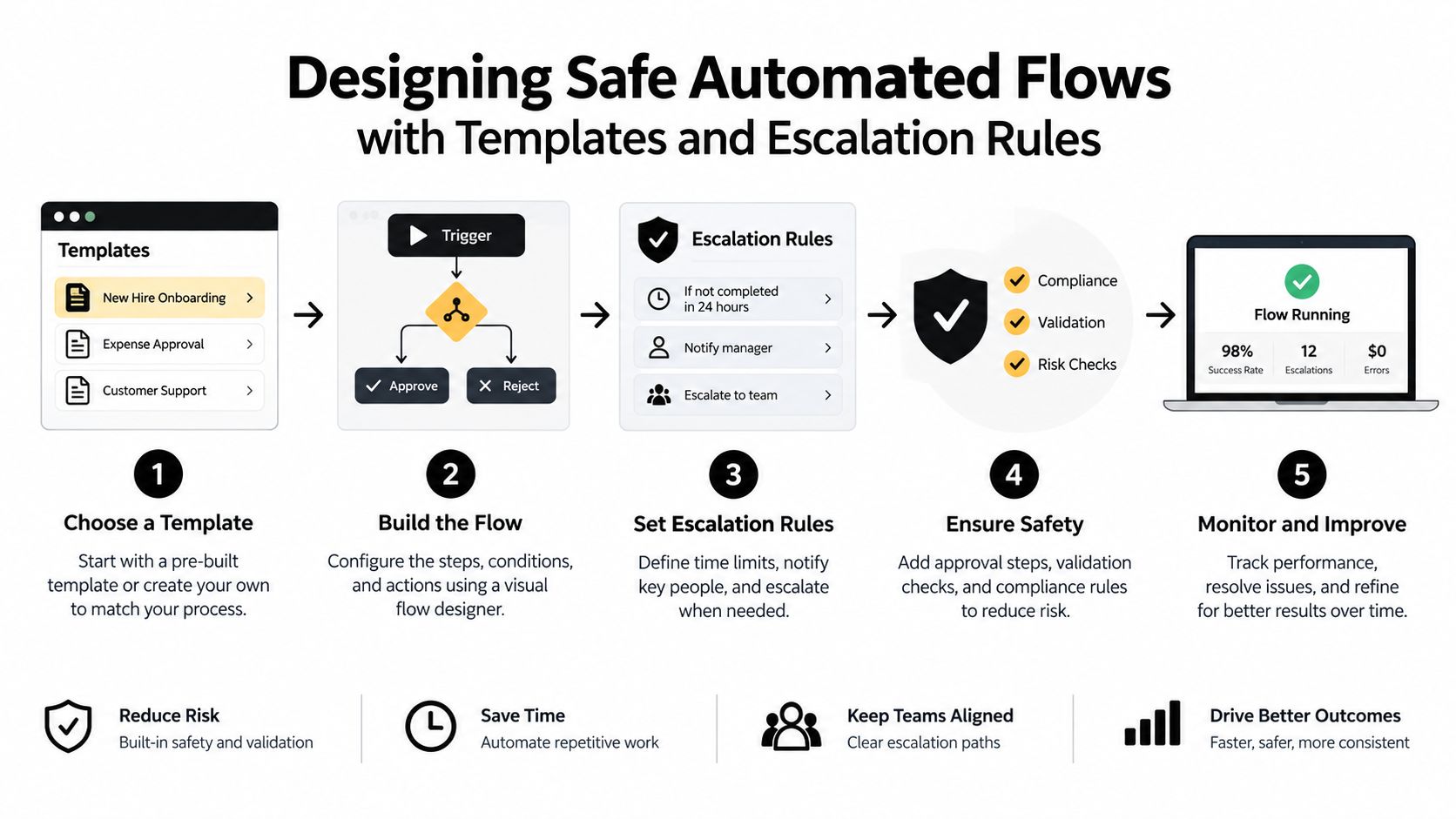
A reliable automated flow begins with a narrow promise. Tell the customer what the system can do, use a direct template, and avoid claiming that an action occurred unless the system completed it.
A useful template usually contains four parts:
- Recognition: Identify the request in plain language.
- Answer or next action: Provide the approved information or perform the supported task.
- Boundary: State what the system can't decide or access.
- Route: Explain what happens next and when a human should take over.
For example, a password-reset flow can provide the documented steps. A refund request should acknowledge the request, collect the required context, and route it under the organization's refund policy. The system shouldn't invent an approval or imply that money has been returned.
Define the stop conditions before the launch
Escalation rules should be explicit rather than buried in a general instruction. Stop automation when a request involves:
- Emotional distress: Acknowledge the situation and route it to a trained person.
- Technical uncertainty: Escalate when approved documentation doesn't resolve the issue.
- High-value accounts: Use the account policy instead of treating every customer identically.
- Regulated topics: Transfer requests that require controlled review or authorization.
- Repeated failure: Escalate after the system fails to answer or the customer repeats the same intent.
Confidence thresholds help the system decide when not to answer. Retrieval should be required for policy-sensitive responses, and the response should expose uncertainty rather than hide it behind polished wording.
Transfer the conversation, not just the ticket
A human agent needs the original transcript, inferred intent, attempted remedies, authentication state, and relevant account data. Without those details, the customer has to repeat the problem, which turns automation into an extra step.
Escalation timing also starts with the original customer message. If an automated response arrives immediately but the human transfer waits, the customer's real service-level experience includes the entire interval.
Use customer support scripts as controlled building blocks, then test them against ambiguous wording, missing context, and follow-up questions. Templates should be versioned, reviewed after policy changes, and evaluated with real conversation patterns rather than ideal prompts.
Measuring What Actually Matters Beyond Response Time
Response time is easy to display and easy to misunderstand. A dashboard can show excellent latency while customers receive incorrect answers, abandon after handoff, or reopen the same issue.
Track the system as a chain of outcomes:
- Containment rate: How often does automation resolve the request without human help?
- Escalation rate: Which intents require transfer, and are the rules triggering at the right point?
- False-answer rate: How often does the system provide an incorrect or unsupported answer?
- Reopened conversations: Do customers return because the original response failed?
- Post-handoff abandonment: Do customers leave after being transferred because the next step is unclear or slow?
High containment isn't automatically positive. If containment rises while false answers and reopened conversations rise too, the system may be suppressing human involvement rather than solving customer needs.
Separate perceived speed from completed work
Production monitoring should record p50, p95, and p99 response latency separately from end-to-end resolution time. A streaming interface can appear fast while retrieval, authentication, or a backend tool call remains slow.
Segment latency by model, language, channel, retrieval status, and tool-call path. This helps teams identify whether a delay comes from generation, a knowledge lookup, an external action, or the human queue.
Practical operating targets include sub-10-second automated acknowledgments, explicit uncertainty handling, and escalation timers for account access, refunds, exceptions, or emotional judgment. These targets are engineering starting points, not universal guarantees.
A fast first message is useful only when the next step is equally clear.
Review conversations where customers repeated themselves, challenged an answer, or requested a human. Those examples reveal hidden friction more effectively than a single average response-time number.
When Automation Fails Because Human Handoff Is Poorly Designed
The strongest warning against automation-only thinking comes from the handoff experience. Recent Verizon research across 5,000 consumers and 500 executives in seven countries reported satisfaction of 88% for mostly or fully human interactions, compared with 60% for primarily AI interactions. The same research reported that 47% of consumers saw difficulty reaching a live person as a major frustration. The reported consumer research shows why a human route must be part of the product design, not an emergency button hidden behind repeated prompts.
Separate 2025 research covering 4,800 consumers across 15 countries found that only 15% felt a human agent received full context from the prior AI interaction. 54% said AI agents rarely or never had useful previous context. These findings expose the central handoff failure: the customer reaches a person, but the person starts with less information than the customer already provided.
A poor flow looks like this:
- The customer explains the issue.
- The bot answers incorrectly.
- The customer asks again.
- The bot repeats the answer.
- The customer requests a person.
- The agent asks the customer to restate everything.
The system may report a successful automated response, but the customer paid for that speed with additional effort.
Design assisted transfer as an outcome
A good transfer includes the conversation transcript, a concise intent summary, attempted answers, relevant identifiers, authentication state, and the reason automation stopped. The agent should know whether the customer needs a refund, has already tried a troubleshooting step, or is reporting a repeated failure.
Set a maximum number of turns for unresolved intents. Give customers a visible human option when the interaction becomes circular. For sensitive requests, prioritize clarity and care over containment.
Handoff standard: If the agent can't continue from the transferred context, the automation hasn't completed its job.
This is why success should be measured through resolution quality and assisted-transfer quality, not only through the percentage of conversations that avoid humans. Automation can remove effort from routine questions, but poor routing can add effort to every difficult case.
Implementing Automated Message Response with SupportGPT
A practical implementation starts with the knowledge boundary. Gather approved documents, website links, and internal knowledge-base material, then map common intents to the information or action each one requires. Separate answers that need retrieval from actions that require authentication, authorization, or a human decision.
SupportGPT provides an AI support agent that can answer questions from configured knowledge sources and deploy through a website chat widget or iframe. It includes guardrails for staying on topic and reducing unsupported responses, smart escalation based on natural-language rules, conversation tracking, analytics, and a real-time playground for iteration.
Build the operating loop
Use a small, reviewable launch process:
- Prepare sources: Remove outdated policies and identify documents that conflict.
- Define intent rules: Mark which requests can be contained and which must escalate.
- Configure handoff context: Pass the transcript, intent, attempted remedies, and relevant state to the human team.
- Test failure paths: Try ambiguous questions, unsupported requests, repeated questions, and emotionally sensitive language.
- Inspect outcomes: Compare containment with false answers, reopened conversations, escalation latency, and abandonment.
The platform also supports multilingual assistance, lead capture, AI Actions for workflows such as ticket creation or appointment booking, and training from owned sources and links. Encryption and compliance options matter when the assistant handles customer or account information, while plan choices can be matched to operational requirements such as SSO, higher limits, SLAs, and priority support.
For teams deciding how to make bots, the important design choice is not whether the assistant sounds natural. It's whether the assistant knows when to answer, when to ask, when to act, and when to transfer.
Start with predictable intents, audit the complete conversation path, and expand coverage only when resolution quality remains stable. A support agent that responds quickly but loses context is only automating the visible part of the problem.
SupportGPT lets teams build AI support agents from their own knowledge sources, deploy them on websites and products, and route complex conversations to human teammates with configurable escalation rules. Visit SupportGPT to test a practical automated message response workflow that measures containment, handoff quality, and resolution instead of speed alone.