7 Types of Customers Your AI Support Must Serve in 2026
Explore 7 types of customers, from SaaS trial users to enterprise SSO teams, with support tactics and SupportGPT examples for each persona.
A two-person support team gets the same refund question forty times in one week. Meanwhile, a high-value account waits unanswered because its issue doesn't fit the queue's usual pattern. Nothing appears broken in the dashboard. Response times look acceptable, but the wrong conversations are consuming attention.
Support breaks when teams treat every customer as if they have the same intent, urgency, and tolerance for automation. The right setup depends on who is asking, what they need, and what happens if the answer is wrong. The seven types of customers below are grouped by staffing reality and support maturity, not demographics. Use them as an operating guide for choosing knowledge sources, escalation rules, and one metric worth watching. That discipline helps internet businesses keep compounding through better retention, faster learning, and fewer preventable support failures, as described in this practical growth perspective.
1. SaaS Startup and Product-Led Growth Company
A product-led SaaS company can attract users faster than its support team can speak to them. Free trials, freemium plans, self-serve upgrades, and product onboarding create a steady stream of questions before a sales representative ever enters the conversation.
The best AI assistant for this environment isn't a generic chatbot. It should work from the help center, product documentation, changelogs, FAQs, and release notes. A project management company might use it to explain workspace setup during a trial. A developer tools startup might connect API documentation so the assistant can explain an integration while sending suspected bugs to engineering with the conversation attached.
Place the assistant where intent is highest, especially on pricing, signup, and onboarding pages. Keep answers short for setup questions, but link to the relevant documentation when a user needs a detailed procedure. A recurring source-refresh task matters because an answer based on last month's interface can create more tickets than it resolves.
Practical rule: If the question could affect payment, conversion, data integrity, or product reliability, don't let the assistant improvise.
The operating model
Train the agent on approved sources and define separate routes for routine guidance, commercial exceptions, and technical defects. A pricing exception or refund request should go to a person. A suspected bug should create a ticket with the user's steps, account context, and prior assistant response.
Your single metric should be unanswered-question rate. Review it weekly alongside the conversations that triggered it. Repeated gaps usually point to one of three fixes: a missing article, an unclear interface, or a product defect. The support team shouldn't just add another paragraph to the knowledge base when the product itself is causing confusion.
For teams building an LLM-connected workflow, this guide to LLM integration for support systems provides a useful implementation path. A small team can also learn from the operational decisions involved when an Australian SaaS incorporated in Ireland, particularly the need to make product, billing, and operational information easy to locate.
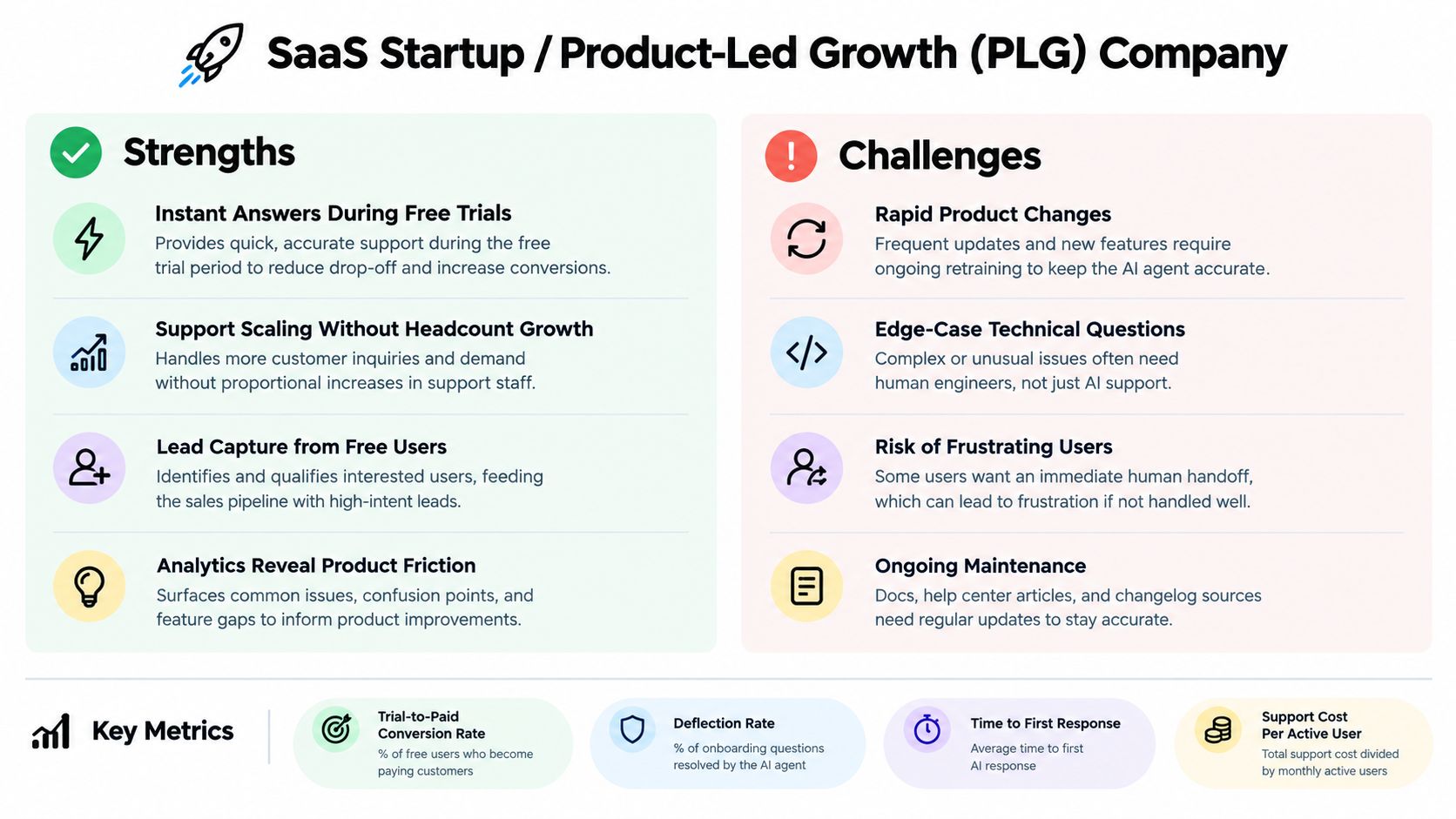
The staffing trade-off is clear. Automation gives the team more coverage, but weak escalation creates false confidence. Measure the questions the assistant fails to answer, not just the conversations it contains.
2. E-commerce Store Owner
A customer checks a size chart, sees a delivery estimate, and reaches checkout. One unanswered compatibility question or unverified promise can stop the purchase. Retail support is repetitive until an order, payment, warehouse, or carrier exception requires judgment.
Connect the assistant to the product catalog, shipping rules, inventory signals, size guides, and return policy. A fashion store can answer whether a particular cut runs small and explain return conditions without sending shoppers across several pages. An electronics store should route a question such as whether a USB-C dock supports a specific laptop model to product guidance, while a report that the dock stopped charging after setup belongs in post-purchase troubleshooting. If an order-status integration is available, retrieve the order instead of repeating a general delivery policy.
The guardrail is direct: never promise what the system can't verify. That covers delivery dates, stock levels, refunds, discount eligibility, and replacement timing. Refresh the sources before each promotion, then test the questions customers are likely to ask about eligibility, delivery, and returns.
Speed without careless promises
A proactive widget can help on a size-chart, comparison, or checkout page. Place it where hesitation is likely, and answer the immediate question rather than interrupting every visitor with a sales message. Customers may need only one fact, such as whether a product works with an existing device or whether opening the package affects return eligibility.
Track unanswered-question rate as the single metric. Review it weekly alongside the conversations that triggered it. Repeated gaps usually indicate a missing article, an unclear interface, or a product defect. Adding another knowledge-base paragraph will not solve confusion caused by the product itself.
Klarna has publicly described its AI assistant handling roughly two-thirds of customer service chats during its first month, according to Klarna's announcement. Treat that as an example, not a target for every store. The practical lesson is narrower: high-volume retail questions can be automated when the underlying data is current and the handoff is clear. This guide to conversational AI for e-commerce covers implementation considerations.

Retail staffing changes during launches and seasonal peaks. Keep automated answers fast, but define an escalation rule for lost parcels, disputed deliveries, payment failures, and stock discrepancies. The metric matters only when those exceptions reach a person with enough context to resolve them.
3. Online Marketplace Operator
A marketplace supports at least two customer roles, and they shouldn't receive the same guidance. Buyers ask about listings, orders, payments, and refunds. Sellers ask about verification, fees, onboarding, listing quality, and payouts. A rental platform may add hosts and guests. A freelance platform may add clients and contractors.
Start by identifying the speaker's role. Then use role-specific knowledge sources and prompts. A new seller might need a guided identity-verification flow, while a buyer needs help understanding an order. Neither should receive a vague answer written for the other side of the transaction.
The biggest risk is allowing the assistant to become an unofficial judge. It can explain escrow rules, milestone payments, cancellation policies, or the steps in a dispute process. It shouldn't issue a binding decision, accuse a user of fraud, or make promises about an investigation.
Escalation is part of trust
Send disputes, fraud signals, account-security concerns, identity-verification failures, and payment conflicts directly to trained human reviewers. Preserve the conversation context so the customer doesn't have to repeat the facts. Separate policy explanation from case resolution, because consistency matters but so does judgment.
A marketplace assistant should explain the rules clearly, then know when it has no authority to decide the outcome.
Your single metric should be human-review turnaround for escalated cases. Fast self-service doesn't compensate for a dispute sitting without ownership. Review escalation reasons regularly. If users repeatedly misunderstand one rule, rewrite the policy page rather than adding another scripted response.
Multilingual assistance can widen access, but translated policy answers need review. A small wording difference around fees, deadlines, or eligibility can change the perceived meaning. This is why marketplace support requires controlled sources, role detection, and moderation workflows, not just a larger language model. The operational details in this marketplace support guide are especially relevant when buyers and sellers share one interface.
4. SMB Customer Support Team
Small businesses often have capable staff but no spare support department. A few people handle email, chat, phone calls, bookings, billing, and urgent requests while also doing the work customers pay for.
The right deployment starts narrow. Build the assistant around the 20 questions customers ask most often, then test it against real wording, misspellings, incomplete details, and frustrated messages. A home-repair company might automate service-area questions, appointment preparation, and booking requests. A boutique software vendor might cover setup and billing FAQs while sending cancellations and complaints to a staff member.
Don't force a small team to manage a complicated system. They need plain-language instructions, a real-time playground, readable conversation logs, and escalation rules that staff can change without waiting for a developer.
A manageable weekly routine
Set aside a short weekly review. Look for wrong answers, missing sources, questions that should have been escalated, and conversations where the customer asked the same thing twice. Fix one high-impact gap at a time.
Useful rules include:
- Complaint signals: Hand off when the customer mentions a complaint, cancellation, repeated failure, or a serious service problem.
- Urgent requests: Route time-sensitive service issues to the team member who can respond by phone or another direct channel.
- Booking boundaries: Let the assistant collect details, but don't confirm an appointment unless the scheduling system verifies availability.
- Human access: Keep an email or phone option visible so automation doesn't feel like a locked door.
The single metric to watch is repeat-contact rate. If customers return with the same question, the assistant may be answering quickly without resolving the need. That points to unclear wording, missing account access, or a handoff that loses context.

For a small team deciding where to begin, this overview of an AI assistant for small business focuses on the practical setup rather than a large transformation project. The trade-off is coverage versus maintenance. A focused assistant that stays accurate is more useful than a broad one nobody reviews.
5. Mid-Market Customer Success Team
A mid-market customer usually arrives with more context and more stakeholders. Administrators, end users, procurement teams, executives, and account managers may all ask about the same product from different perspectives. The support system must answer routine questions without weakening the relationship owned by customer success.
Use the assistant for tier-one product guidance, onboarding checklists, configuration help, and standard feature questions. Route contracts, pricing, renewals, expansion opportunities, and account-specific commercial issues to the account manager. An HR software company might automate administrator onboarding while sending contract questions to the assigned commercial owner. An analytics provider might detect repeated questions about one feature and prompt a success manager to offer targeted enablement.
This model depends on ownership. Assign a named person to each knowledge area, define how updates are approved, and connect escalations to the existing helpdesk tiers. The handoff should include the transcript, customer identity, account context, and the reason for escalation.
Protect the relationship layer
Customer success teams shouldn't use automation to hide account risk. A customer asking the same setup question repeatedly may need training, a product review, or a direct conversation. The assistant can surface that pattern, but a person must decide what it means.
Your single metric should be successful self-service resolution by account. Overall averages can hide a struggling strategic account. Review the metric alongside account health and product adoption, then identify customers whose conversations indicate friction.
Ownership matters more than volume. If nobody owns a knowledge area, the assistant will eventually answer from outdated or conflicting material.
Use conversation analytics to build a recurring adoption view for success managers. Topics can reveal where customers are stuck, which features need better documentation, and where onboarding content fails. The related framework for client success metrics can help teams connect support activity to broader account management without treating ticket counts as the whole customer relationship.
6. Indie Maker or Independent Developer
An indie maker doesn't need an elaborate contact center. They need fewer interruptions while keeping the product approachable. A solo developer may be answering install questions, compatibility questions, licensing requests, and refund emails personally, often between product releases.
Keep the knowledge base small. Start with the three to five questions that repeatedly interrupt development. A browser-extension maker can explain installation and supported environments on the landing page. A creator selling digital templates can answer download and licensing questions while directing refund requests to email.
The assistant should sound useful, not corporate. A clear human option matters even when the maker handles every handoff personally. Tell customers where the escalation goes and what information they should include. That reduces back-and-forth without pretending the assistant can solve a case it can't access.
Spend attention where it compounds
Start with a lightweight deployment and review conversations once a week. Add one source when a real gap appears. Avoid importing every draft note, old announcement, or private workaround into the knowledge base. A short, current source set is easier to maintain and less likely to produce conflicting answers.
The single metric to watch is founder-interruption rate. Count how often a routine customer question still reaches the maker. A lower number is useful only if refunds, bugs, and sensitive issues still reach the right channel.

The trade-off is control versus convenience. A solo operator can approve every answer, but that doesn't scale. Clear instructions, a focused widget, and an honest escalation path create a professional experience without adding a second full-time job.
7. Enterprise Team Requiring Compliance and SSO
Enterprise support teams don't start with the question, “Can the assistant answer more?” They start with, “Which answers is it allowed to give, to whom, from which source, and under what audit trail?”
A financial services firm might permit general product guidance while routing account-specific requests and advice to licensed staff. A large software company might use SSO and role-based access so regional teams can manage local content while central IT controls security settings. In both cases, the assistant needs strict topic boundaries, approved sources, professional tone, and documented ownership.
Security, legal, compliance, and support should define the deployment together. Review data handling, retention, encryption, access controls, audit requirements, and service expectations before the pilot. Write prohibited-topic rules explicitly. Don't rely on a general instruction such as “be careful with sensitive questions.”
Pilot risk before scaling reach
Start with one department, region, or low-risk workflow. Test account-specific requests, attempts to obtain restricted information, ambiguous questions, multilingual interactions, and requests for legal, medical, or financial advice. Record what the assistant refused, what it escalated, and whether the receiving team had enough context to act.
The single metric should be guardrail exception rate. Every unsafe, unsupported, or incorrectly routed answer deserves review. A low escalation rate isn't automatically good if the assistant is confidently handling questions outside its authority.
Enterprise buyers may accept slower automation when it preserves accountability. That is a real trade-off. Faster answers are valuable, but an untraceable answer can create operational, regulatory, or reputational exposure. Build the audit process before expanding the assistant's scope.
7 Customer Types Comparison
| Customer Type | 🔄 Implementation complexity | ⚡ Resource requirements | ⭐ Expected outcomes | 📊 Ideal use cases | 💡 Key tips |
|---|---|---|---|---|---|
| SaaS Startup / Product-Led Growth (PLG) Company | Moderate, connect docs, changelogs, and in-app context; requires frequent updates after releases. | Low-to-moderate staffing; engineering involvement for escalations and retraining. | Higher trial-to-paid conversion, scalable onboarding, reduced churn when maintained. | In-app how-to guidance, onboarding widgets, API/docs Q&A, bug routing. | Train on docs/changelogs, set escalation rules, refresh sources after each release. |
| E-commerce Store Owner | Moderate, requires catalog and order-management integrations for accurate responses. | Small team plus integrations for order checks, inventory, and shipping systems. | Reduced cart abandonment, faster peak-period responses, lower cost per ticket. | Order status, shipping & returns, sizing help, promo & checkout assistance. | Sync catalogs/policies before promotions; use actions for order checks; enforce guardrails on stock/dates. |
| Online Marketplace Operator | High, two-sided workflows, dispute routing, multilingual support, and strict policy controls. | Moderate-to-high: trust & safety, moderation teams, legal review, translation resources. | Consistent policy answers, fewer simple disputes, faster seller onboarding. | Buyer/seller FAQs, onboarding & verification, payout questions, dispute triage. | Maintain separate buyer/seller sources, auto-escalate disputes, verify translations and policy wording. |
| SMB Customer Support Team | Low, no-code setup and simple configuration preferred; minimal engineering. | Small teams with limited engineering; relies on guided setup and dashboards. | Fewer repetitive tickets, reduced backlog, agents freed for complex cases. | Routine FAQs, appointment booking, basic billing and service queries. | Start with top 20 FAQs, schedule short weekly log reviews, add clear human-handoff rules. |
| Mid-Market Customer Success Team | Moderate, integration with CRM/helpdesk and governance required. | Mid-sized teams; needs CRM integration, analytics, and named KB owners. | Frees CSMs for expansion work, consistent onboarding, insights into account friction. | Onboarding checklists, tier-one support, renewal/renewal-readiness triage. | Assign KB owners, route contract/pricing to humans, map escalations to existing tiers. |
| Indie Maker / Independent Developer | Low, lightweight embeds and minimal configuration; few integrations. | Very limited time and budget; favors generous free tier and minimal maintenance. | Saves founder support hours, captures leads, provides professional support presence. | Landing page/docs Q&A, install/compatibility help, licensing and download support. | Start on free tier, keep KB to top 3–5 questions, include a simple "talk to human" option. |
| Enterprise Team Requiring Compliance and SSO | Very high, SSO, RBAC, audit logs, vendor security reviews, and legal approvals required. | High: security, legal, IT involvement, procurement cycles, and SLA management. | Audit-ready, compliant responses, reduced legal/risk exposure, enterprise SLA adherence. | Controlled internal support, regulated product FAQs, compliance-sensitive public assistance. | Involve security/legal early, define explicit guardrails and prohibited topics, pilot per department. |
Match the Persona First, Then Choose the Support Stack
These seven types of customers differ less by age or personality than by volume, risk, staffing, and the cost of a wrong answer. A product-led SaaS company needs scalable product education and bug routing. An e-commerce store needs current order and policy data. A marketplace needs role detection and human moderation. An SMB needs a narrow system that a busy team can maintain. A mid-market customer success team needs account-aware handoffs. An indie maker needs fewer interruptions. An enterprise team needs compliance controls before it needs broad automation.
The same customer can also move between operating states. A routine tracking question may suit self-service. A billing dispute, account-security concern, accessibility barrier, language need, or repeated failed attempt may require a person. Research from Euromonitor's consumer segmentation shows why motivations vary across Brand Champions, Wellness Enthusiasts, Connected Shoppers, Changemakers, Experience Seekers, Trendsetters, and Value Hackers. That framework is useful for understanding behavior, but support routing should also consider the current intent and stakes.
Service quality affects more than ticket volume. The XM Institute's global consumer research connected stronger experience ratings with trust, recommendations, and willingness to purchase more in its cited studies, which is why containment alone isn't a sufficient goal. For speed-sensitive customers, Verint's customer-experience research also supports measuring fast answers alongside resolution quality and access to human help.
Take one practical step this week. Map your top three support questions to the customer type they serve. Set one explicit escalation rule for each question, then choose one metric to review every week. You can borrow the discipline used in customer discovery interviews by asking what the customer was trying to accomplish, what blocked them, and whether your current route solved the problem.
The best support stack isn't the one with the most automation. It's the one that gives each customer a suitable first answer, a safe next step, and a human path when the situation requires judgment.
SupportGPT lets you build and deploy AI support agents trained on your own sources, with multilingual assistance, analytics, AI Actions, guardrails, and natural-language escalation rules. Match the setup to your customer type, then visit SupportGPT to create a focused assistant for your website or product.